Email List Validation in 2026: How It Works and Real Costs
Bounce rates now decide whether your cold email reaches the inbox at all. Here's how email list validation actually works, what each result status means, and what the major tools really cost per verified contact.
TL;DR
- Email list validation is the process of checking, before you send, whether an address exists, accepts mail, and won't damage your sender reputation. It is not the same thing as finding emails.
- Since Google and Yahoo tightened bulk-sender rules, a hard bounce rate above roughly 2% is enough to start throttling your delivery. Validation is the cheapest insurance against that.
- Most vendors quote "98%+ accuracy," but that number is almost always measured on deliverable/undeliverable verdicts only — with catch-all and unknown results excluded. Ask how big the unknown bucket is.
- Realistic pricing runs $0.0006–$0.01 per email depending on volume and vendor. Bundled plans (finder + verifier) usually beat pay-as-you-go verification once you pass ~20k checks a month.
- Validation cannot fix a bad list. If your source data is scraped junk, you'll pay to confirm that it's junk.
What is email list validation?#
Email list validation is a set of automated checks that answer one question: if I send to this address right now, what happens?
Think of it like a courier checking an address before loading the truck. The courier confirms the street exists, the building number is real, and someone still lives there. Nothing is delivered yet — but you've stopped paying to drive parcels to demolished houses.
Technically, a validation service runs a stack of checks against each address: syntax parsing, domain and MX record lookups, disposable-domain matching, role-account detection, and — where the receiving server allows it — an SMTP handshake that asks the mail server whether the mailbox exists without actually delivering a message.
The important distinction: finding an email and validating one are separate jobs. An email finder produces a candidate address from a name and domain. An email verifier tells you whether that candidate is safe to send to. Good tools do both, but they are different pipelines with different failure modes.
Why does email list validation matter more in 2026?#
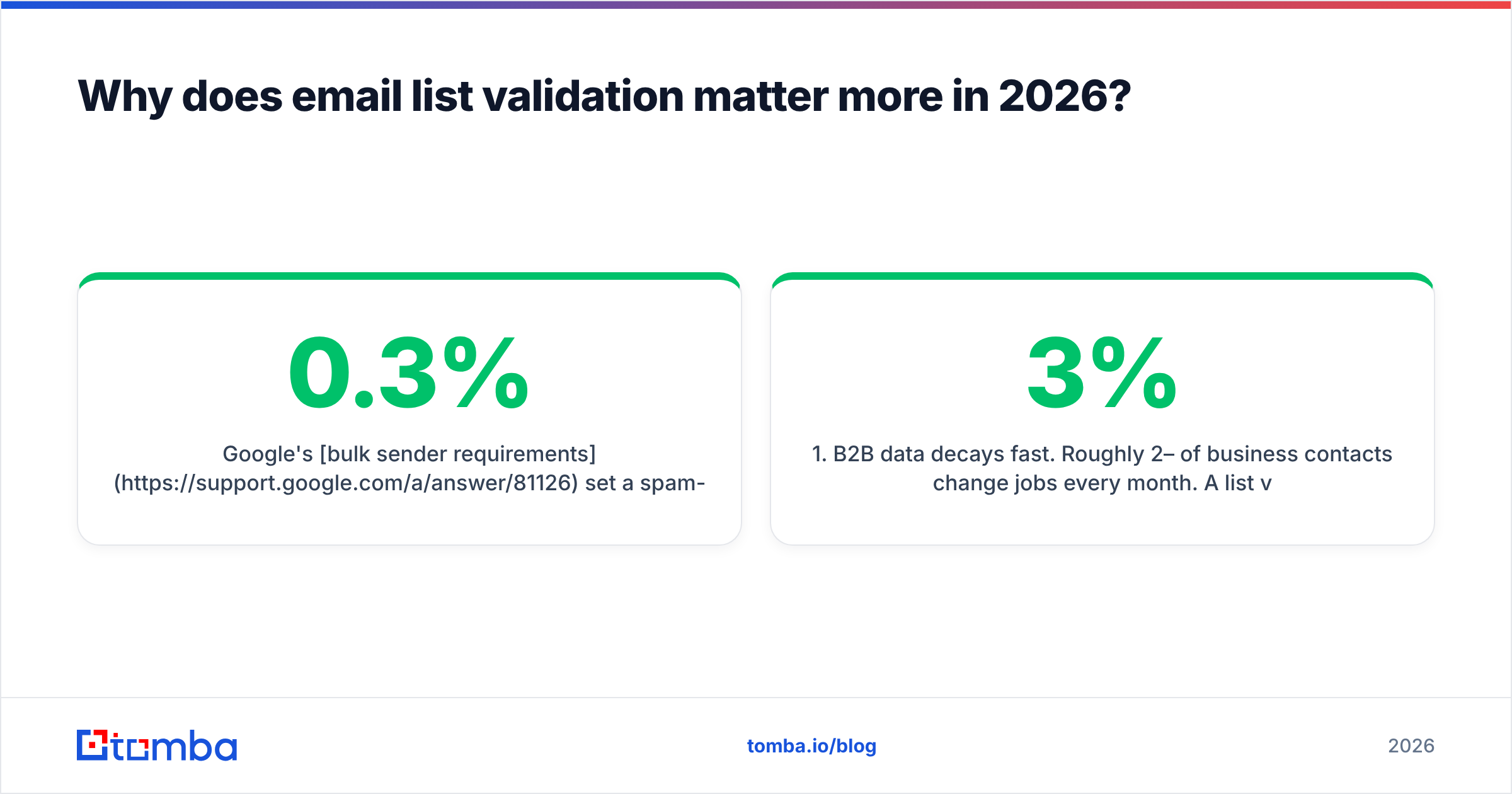
Because mailbox providers stopped treating bounce rate as a soft signal.
Google's bulk sender requirements set a spam-complaint ceiling of 0.3% and require authenticated, low-friction sending. Yahoo published near-identical rules. Neither publishes a hard bounce threshold, but deliverability teams consistently report throttling starting somewhere between 2% and 5% hard bounces on a given sending domain.
Here's the compounding problem. A bounce message isn't just a wasted send. It's a signal to the receiving provider that you don't know who you're mailing — which is exactly the behavior signature of a spammer working from a purchased list. Once your sender reputation slips, your valid recipients start landing in spam too. You lose the good addresses because of the bad ones.
Three practical consequences:
- B2B data decays fast. Roughly 2–3% of business contacts change jobs every month. A list validated in January is materially different by June.
- New domains have no buffer. A warmed domain with two years of positive engagement can absorb a bad batch. A three-week-old domain cannot.
- Shared infrastructure spreads damage. If you send through a pooled IP, your bounces affect other senders — and providers increasingly rate-limit at the domain level anyway.
What actually happens during a validation check?#
Most vendors run the same five layers. The differences are in how aggressively they probe and how honestly they report uncertainty.
- Syntax and formatting — RFC-compliant parsing. Catches typos like
john@gmail..comand malformed local parts. Cheap, instant, catches maybe 1–2% of a messy list. - Domain and MX records — Does the domain resolve, and does it have mail exchanger records? A domain with no MX record cannot receive email, period. This kills dead companies and parked domains.
- Disposable and temporary domains — Matches against a maintained list of throwaway providers (mailinator, guerrillamail, and thousands of rotating clones). Common in freemium signup lists, rare in B2B prospecting.
- Role and catch-all detection — Flags
info@,sales@,support@(role accounts, technically valid but usually low-response) and identifies domains configured to accept mail at any address (catch-alls, which defeat mailbox-level probing). - SMTP mailbox probe — Opens a connection to the receiving server and asks whether the specific mailbox exists, then disconnects before sending. This is where real accuracy comes from — and where large providers like Microsoft 365 deliberately return ambiguous answers to frustrate list scrapers.
That last point drives most of the confusion in this category. Microsoft-hosted domains — a huge slice of enterprise B2B — often respond identically to real and fake mailboxes. Vendors that handle this well use pattern intelligence, historical send data, and known-format databases rather than pretending the SMTP answer was definitive.
What do validation result statuses actually mean?#
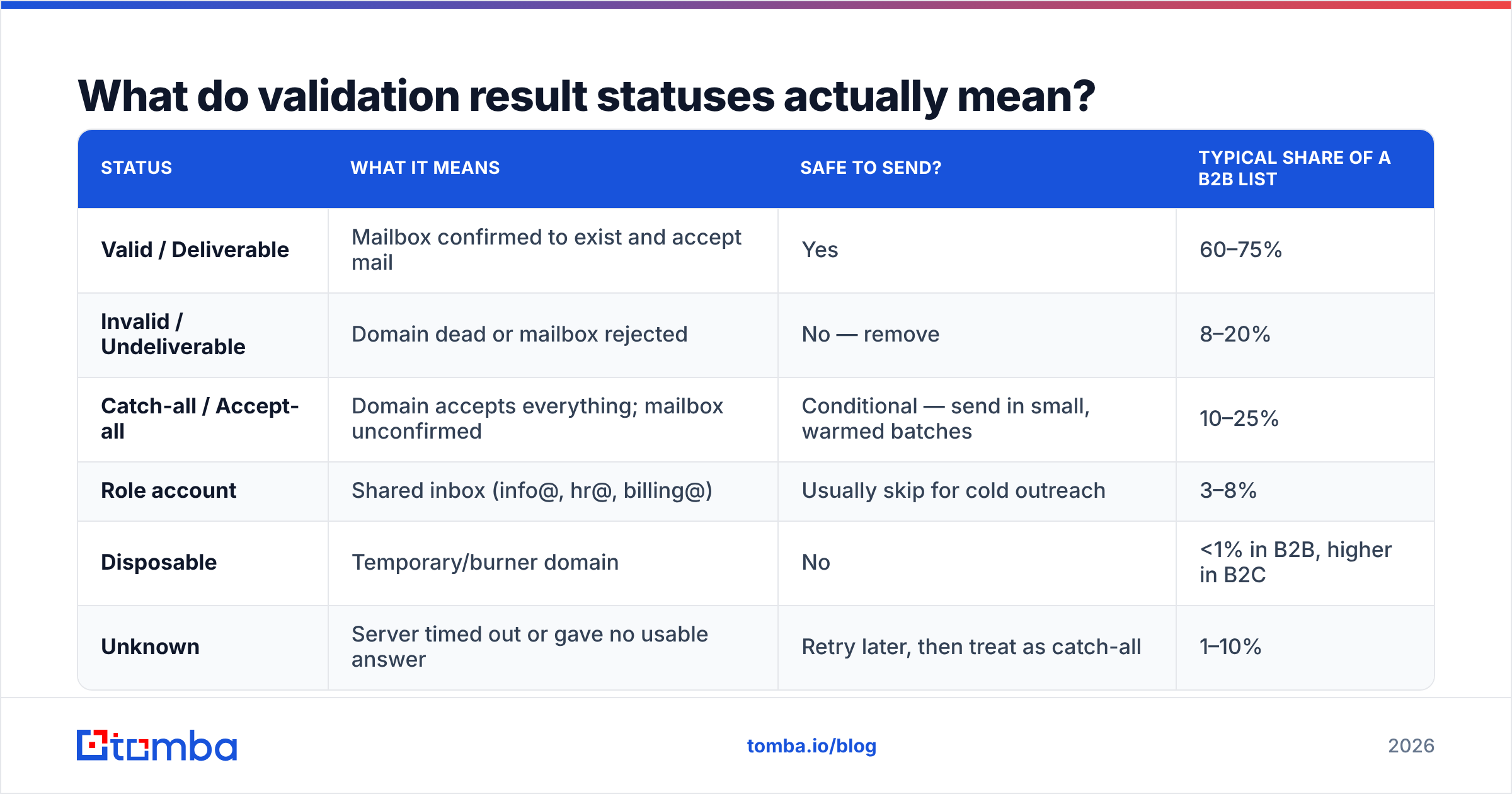
Every vendor uses slightly different labels, but the underlying buckets are consistent. This is the table you should have open when you're deciding what to actually send to.
| Status | What it means | Safe to send? | Typical share of a B2B list |
|---|---|---|---|
| Valid / Deliverable | Mailbox confirmed to exist and accept mail | Yes | 60–75% |
| Invalid / Undeliverable | Domain dead or mailbox rejected | No — remove | 8–20% |
| Catch-all / Accept-all | Domain accepts everything; mailbox unconfirmed | Conditional — send in small, warmed batches | 10–25% |
| Role account | Shared inbox (info@, hr@, billing@) | Usually skip for cold outreach | 3–8% |
| Disposable | Temporary/burner domain | No | <1% in B2B, higher in B2C |
| Unknown | Server timed out or gave no usable answer | Retry later, then treat as catch-all | 1–10% |
The number to interrogate is that unknown row. A vendor advertising "99% accuracy" while returning 12% unknowns is doing less work than one advertising 97% with 2% unknowns. Accuracy percentages are almost always calculated across resolved verdicts only. Always ask for the resolution rate alongside the accuracy rate.
How do the main email validation tools compare?#
Prices below are published list rates at the time of writing and move regularly — treat them as directional and confirm on the vendor's own pricing page before you commit budget.
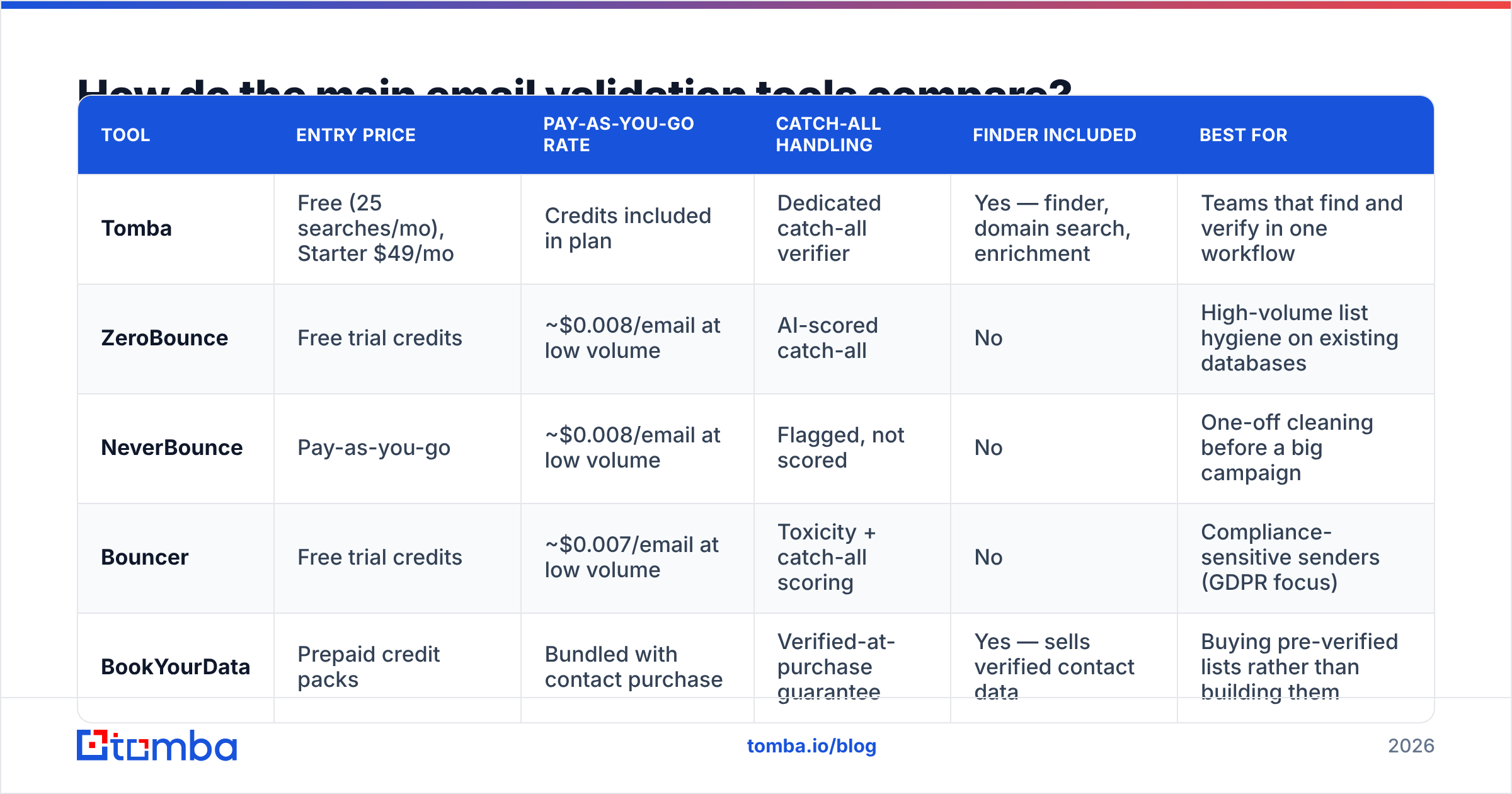
| Tool | Entry price | Pay-as-you-go rate | Catch-all handling | Finder included | Best for |
|---|---|---|---|---|---|
| Tomba | Free (25 searches/mo), Starter $49/mo | Credits included in plan | Dedicated catch-all verifier | Yes — finder, domain search, enrichment | Teams that find and verify in one workflow |
| ZeroBounce | Free trial credits | ~$0.008/email at low volume | AI-scored catch-all | No | High-volume list hygiene on existing databases |
| NeverBounce | Pay-as-you-go | ~$0.008/email at low volume | Flagged, not scored | No | One-off cleaning before a big campaign |
| Bouncer | Free trial credits | ~$0.007/email at low volume | Toxicity + catch-all scoring | No | Compliance-sensitive senders (GDPR focus) |
| BookYourData | Prepaid credit packs | Bundled with contact purchase | Verified-at-purchase guarantee | Yes — sells verified contact data | Buying pre-verified lists rather than building them |
Two structural observations, independent of any one brand:
Standalone verifiers get cheaper per unit at volume, bundled platforms get cheaper per workflow. If you already have 500k contacts sitting in a CRM and just need hygiene, a pure verifier priced per credit is efficient. If you're building lists from scratch every week, paying separately for finding and verifying means two vendors, two APIs, and two reconciliation problems.
Catch-all handling is the real differentiator. Anyone can reject a domain with no MX record. Deciding whether sarah.chen@enterprise.com is real on an accept-all Microsoft domain is the hard problem, and it's where per-vendor results diverge most. If a large share of your target accounts are enterprise, weight this heavily.
You can sanity-check any vendor's claims yourself: take 200 addresses you know the truth about (your own CRM, with send history), run them through a trial, and compare. It costs an hour and tells you more than every accuracy page on the internet combined. G2's email verification category is a reasonable place to shortlist candidates, but reviews won't substitute for that test.
What does email list validation actually cost?#
Per-email pricing is misleading on its own. Work backwards from the campaign instead.
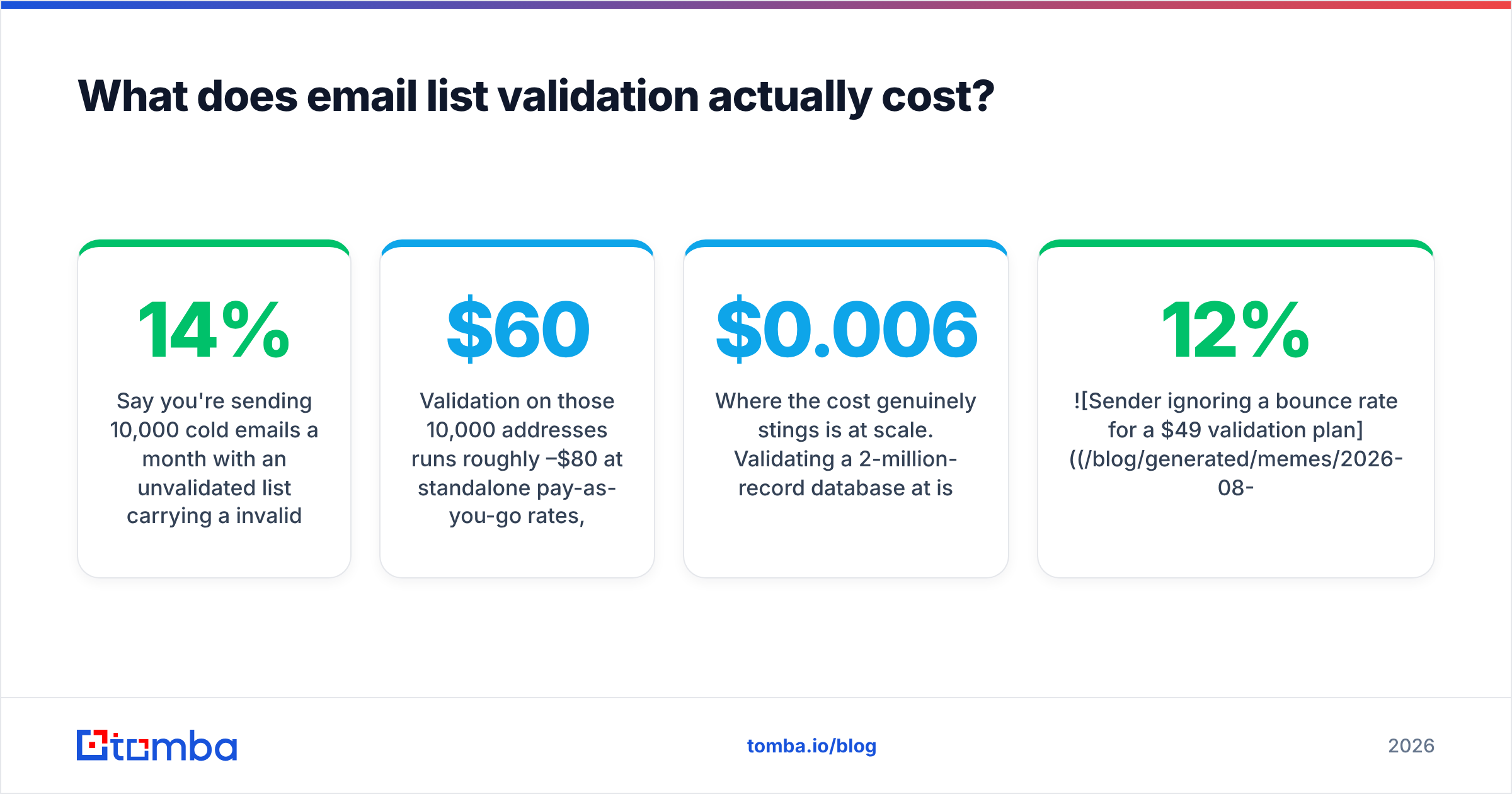
Say you're sending 10,000 cold emails a month with an unvalidated list carrying a 14% invalid rate:
- 1,400 hard bounces per month
- Enough to push a young domain past throttling thresholds within two sends
- Best case: your remaining 8,600 emails see reduced inbox placement
- Worst case: your domain gets filtered and you burn 4–6 weeks re-warming
Validation on those 10,000 addresses runs roughly $60–$80 at standalone pay-as-you-go rates, or is simply included in a bundled plan. Compare that against the cost of a burned sending domain plus the pipeline that campaign was supposed to generate, and the math isn't close.
Where the cost genuinely stings is at scale. Validating a 2-million-record database at $0.006 is $12,000. At that point you should be segmenting: validate what you're actually mailing this quarter, not the entire archive. Use bulk verification on active segments and re-validate on a schedule rather than all at once.
How often should you re-validate a list?#
Base it on data age and source, not a calendar habit.
- Before every cold campaign — non-negotiable if the list is older than 90 days.
- Every 90 days for actively mailed B2B segments. Job-change churn alone justifies it.
- Every 30 days for lists in high-turnover industries (tech, agencies, startups) or lists built from scraped sources.
- At import for anything from a new vendor, a partner, or a trade show badge scan — regardless of what the source claims.
- Never re-validate addresses that already bounced hard. Suppress them permanently; re-testing dead mailboxes just spends credits.
One workflow that saves money: validate at capture, not at send. If you're pulling contacts through an API or a domain search, verify in the same call. You pay once, and every downstream system inherits a clean record instead of each team re-cleaning the same list.
What can email list validation not fix?#
This is where most buyers over-index on the tool and under-index on the strategy.
Validation confirms an address is reachable. It says nothing about whether the person wants to hear from you, whether they're the right buyer, or whether your message is any good. A perfectly validated list sent bad copy still gets 0.4% reply rates — it just gets them without bouncing.
Specifically, validation will not:
- Rescue a purchased list of unknown provenance. If 40% is invalid, you'll validate it down to a smaller list of people who never asked to hear from you. Consider that a diagnostic result, not a cleaning success.
- Protect you from spam complaints. Complaints come from irrelevant messages to valid recipients. That's a targeting and copy problem.
- Substitute for authentication. SPF, DKIM, and DMARC are prerequisites, not alternatives. Validation without authentication still lands you in spam.
- Guarantee inbox placement on catch-all domains. You're making a probabilistic bet. Send those in small volumes to a warmed domain and watch engagement before scaling.
- Detect a mailbox that's real but abandoned. Someone's
@company.comaddress can exist for years after they leave. Validation says "deliverable." Reality says "nobody reads it."
The honest framing: validation is a floor, not a ceiling. It stops you from actively harming your sending infrastructure. Everything above that floor — targeting, timing, message relevance, response rate — is still your job.
What's the practical workflow?#
For a team building outbound lists weekly, this sequence keeps costs down and quality up:
- Source with intent. Build from ICP criteria — industry, headcount, tech stack, hiring signals — not from whatever export is easiest to get.
- Find and verify in one pass. Pull addresses and validate them in the same API call so nothing enters your CRM unverified.
- Segment by status. Valid goes to the main sequence. Catch-all goes to a separate, smaller-volume sequence on a warmed domain. Invalid goes straight to permanent suppression.
- Suppress permanently. Bounced addresses should never re-enter your list, even from a different source. Maintain a global suppression file.
- Monitor after send. If your actual bounce rate exceeds your vendor's predicted invalid rate by more than 2 points, your vendor is over-reporting deliverable. That's your real accuracy audit.
- Re-validate on a schedule tied to segment activity, not to the whole database.
If you want a zero-commitment starting point, run a handful of addresses through a free email checker and compare the verdicts against what you already know is true.
Where to start#
If your bottleneck is hygiene on a list you already have, a standalone verifier priced per credit is the efficient buy. If your bottleneck is that you're rebuilding lists every week — finding contacts, checking them, pushing to a CRM, doing it again — the two-vendor split costs you more in workflow overhead than it saves in per-credit pricing.
That's the case for a combined tool. Tomba's Email Finder returns addresses with a confidence score and verification status in the same response, so nothing enters your sequence unchecked. The free tier gives you 25 searches a month to test it against contacts you already know the answers on, and paid plans start at $49/mo with catch-all verification, bulk processing, and API access included — full Tomba pricing is public. Run your own 200-address benchmark before you commit to anyone, including us.
Related guides#
Ready to find emails that actually work?
Join 150,000+ professionals who stopped guessing and started sending. Free credits on signup — no credit card required.
Get the Tomba newsletter
Practical outbound tactics and product updates — once every two weeks.
About the author