Email List Verification in 2026: Costs, Tools, and Bounce Rates
Bounce rates above 3% get your domain throttled. Here's how email list verification actually works, what the major tools cost, which statuses matter, and when cleaning a list is money you shouldn't spend.

TL;DR
- Email list verification is the process of checking whether an address exists and can receive mail before you send to it. It is not the same thing as finding an email, and it is not the same thing as warming up a domain.
- Mailbox providers throttle or block senders whose hard-bounce rate creeps past roughly 2–3%. Verification is the cheapest lever you have to stay under that line.
- Most verifiers agree on the easy cases. They diverge hard on catch-all domains, role accounts, and greylisted servers — which is where the accuracy claims in vendor marketing quietly come from.
- Bulk verification runs $0.0005–$0.008 per email depending on volume and vendor. Verifying a 50,000-record list costs less than one wasted week of a rep's time.
- Verification is a waste of money on lists under ~90 days old that came from a real-time API, and on double-opt-in inbound lists that already bounce under 0.5%.
What is email list verification?#
Email list verification is a validation pass over a list of addresses that answers one question per row: if I send mail here, will it be delivered?
Think of it like a hotel calling ahead before a shuttle run. The shuttle driver has a list of twelve guests. Rather than drive to twelve addresses and find four of them empty, the front desk phones each one and confirms someone is home. Same trip, same fuel, four fewer dead stops — and no angry hotel manager asking why the shuttle is burning gas on ghosts.
Technically, a verifier runs a chain of checks against each address: syntax, domain, DNS, mail server reachability, and finally a mailbox-level probe. The output is a status — valid, invalid, catch-all, unknown, role, disposable — plus a confidence score. Your job is deciding which statuses you actually mail.
The distinction people get wrong: finding an address (guessing first.last@company.com from a name and domain) and verifying it are separate operations. A good email finder verifies as it discovers, but a list you bought, scraped, imported from a 2023 CRM export, or inherited from a departing rep has had no such treatment.
Why do email lists decay so fast?#
Because people change jobs. B2B email data rots at roughly 22–30% per year, and it accelerates during hiring freezes and layoffs, when whole departments get deprovisioned in a week.
Here's what actually breaks a list, ranked by how often it happens:
- Job changes. The single biggest source. The address is deleted or forwarded to a manager who has no idea who you are. Roughly two-thirds of B2B list decay.
- Domain and brand migrations. An acquisition moves everyone from
oldco.comtonewco.com. Your entire segment for that account goes dead overnight. - Typos and form junk.
gmial.com,test@test.com, deliberate garbage from people who want the lead magnet but not the follow-up. - Spam traps and recycled addresses. An abandoned mailbox that a provider reactivates as a trap. Hitting one is materially worse than a bounce — it signals to filters that you're mailing a list you didn't earn.
- Role accounts.
info@,sales@,support@. Often technically valid, almost always terrible for cold outreach, and disproportionately likely to mark you as spam.
The compounding problem: bounces don't just waste sends. They feed back into sender reputation, which determines whether your good addresses land in the inbox next month. One dirty campaign taxes every clean campaign that follows it.

How does an email verifier actually check an address?#
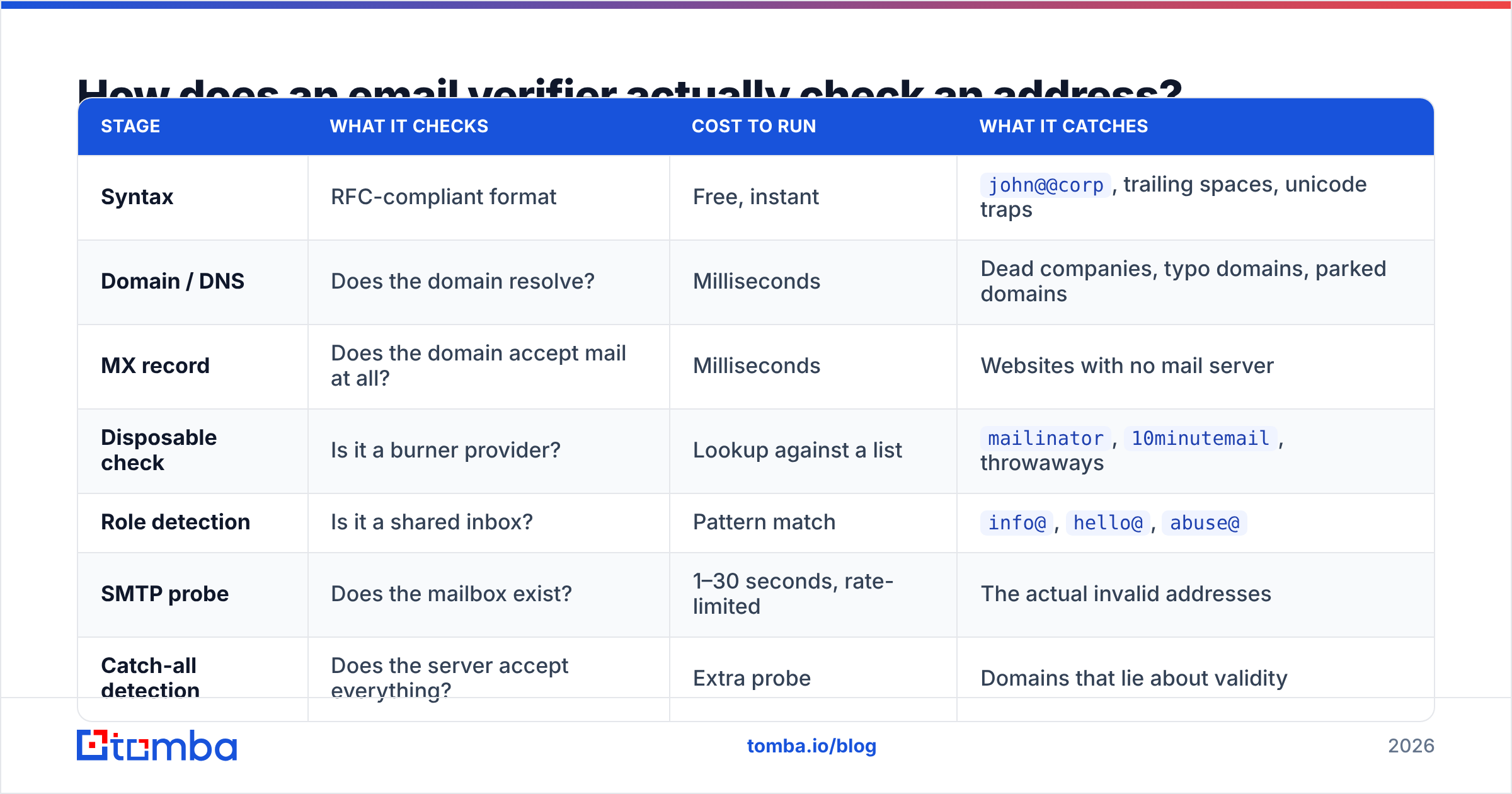
It runs a cascade, cheapest check first, most expensive last. Each stage can reject the address and stop the chain.
| Stage | What it checks | Cost to run | What it catches |
|---|---|---|---|
| Syntax | RFC-compliant format | Free, instant | john@@corp, trailing spaces, unicode traps |
| Domain / DNS | Does the domain resolve? | Milliseconds | Dead companies, typo domains, parked domains |
| MX record | Does the domain accept mail at all? | Milliseconds | Websites with no mail server |
| Disposable check | Is it a burner provider? | Lookup against a list | mailinator, 10minutemail, throwaways |
| Role detection | Is it a shared inbox? | Pattern match | info@, hello@, abuse@ |
| SMTP probe | Does the mailbox exist? | 1–30 seconds, rate-limited | The actual invalid addresses |
| Catch-all detection | Does the server accept everything? | Extra probe | Domains that lie about validity |
The SMTP probe is where verifiers earn their money and where they differ. The verifier opens a conversation with the recipient's mail server, announces a sender, and asks about the recipient — then disconnects before sending anything. A cooperative server replies with a clear accept or reject. An uncooperative one greylists, rate-limits, or accepts everything regardless.
Microsoft 365 and Google Workspace have both gotten more hostile to this probe over the last few years. That's why "unknown" rates have risen industry-wide, and why any vendor claiming 99%+ certainty on every record is describing a scoring model, not a mailbox check. Read the Bounce message mechanics if you want the protocol-level version.
What do verification statuses actually mean for your sending?#
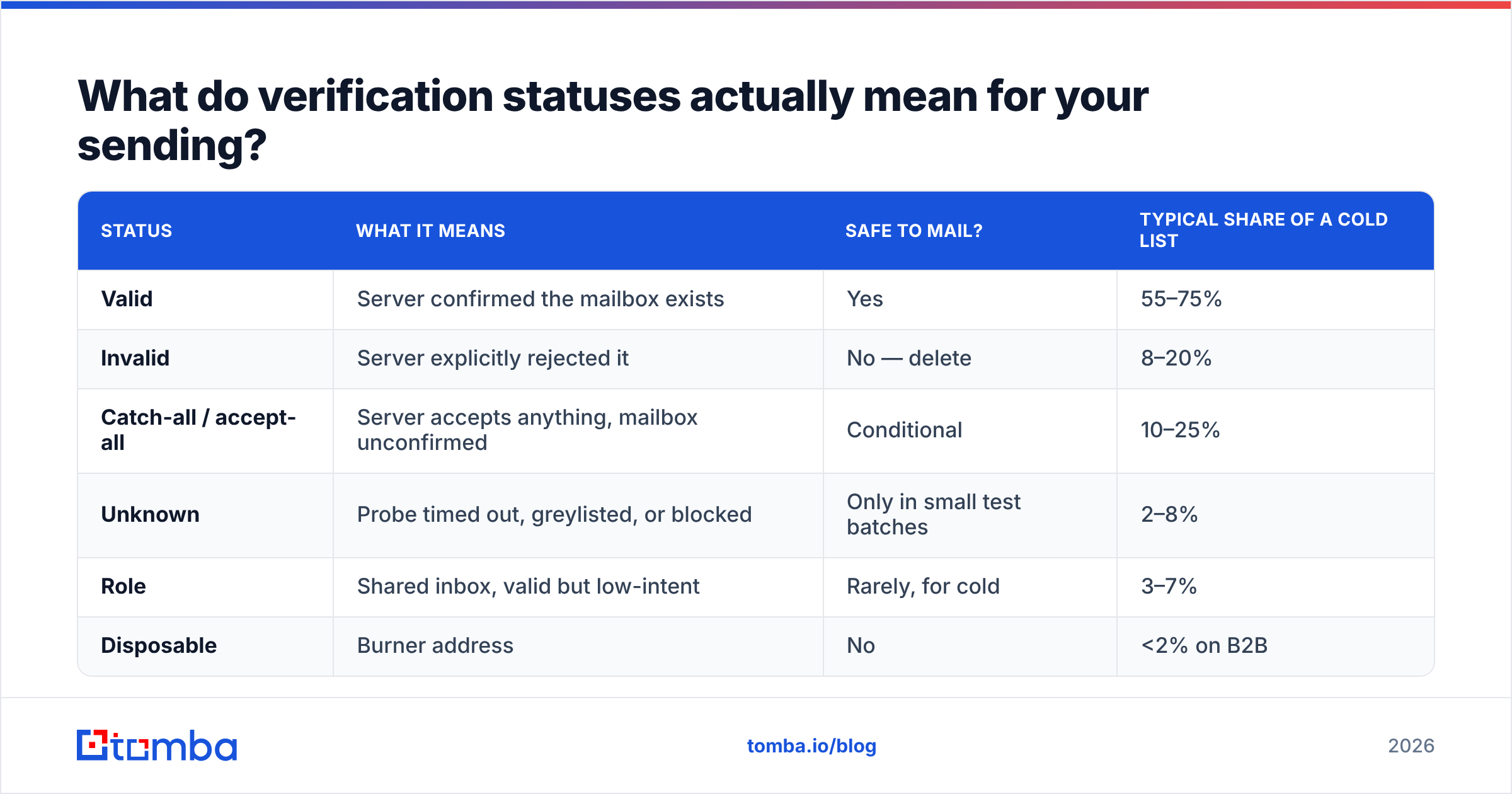
This is the part most teams skip, then wonder why a "verified" list still bounced at 4%. The statuses are not a pass/fail binary — they're a risk ladder.
| Status | What it means | Safe to mail? | Typical share of a cold list |
|---|---|---|---|
| Valid | Server confirmed the mailbox exists | Yes | 55–75% |
| Invalid | Server explicitly rejected it | No — delete | 8–20% |
| Catch-all / accept-all | Server accepts anything, mailbox unconfirmed | Conditional | 10–25% |
| Unknown | Probe timed out, greylisted, or blocked | Only in small test batches | 2–8% |
| Role | Shared inbox, valid but low-intent | Rarely, for cold | 3–7% |
| Disposable | Burner address | No | <2% on B2B |
The two decisions that matter:
- Delete invalids permanently, don't just suppress them for one campaign. Re-uploading a cleaned list from a stale CSV is the most common way teams re-bounce the same addresses twice.
- Segment catch-alls into their own campaign with its own sending domain. That way, if they bounce, the damage is contained.
If you want to sanity-check a single address before committing to a bulk run, a free email checker will show you what the status ladder looks like on records you already know the answer for. That's the fastest way to calibrate trust in any vendor.
Which email list verification tools compare best in 2026?#
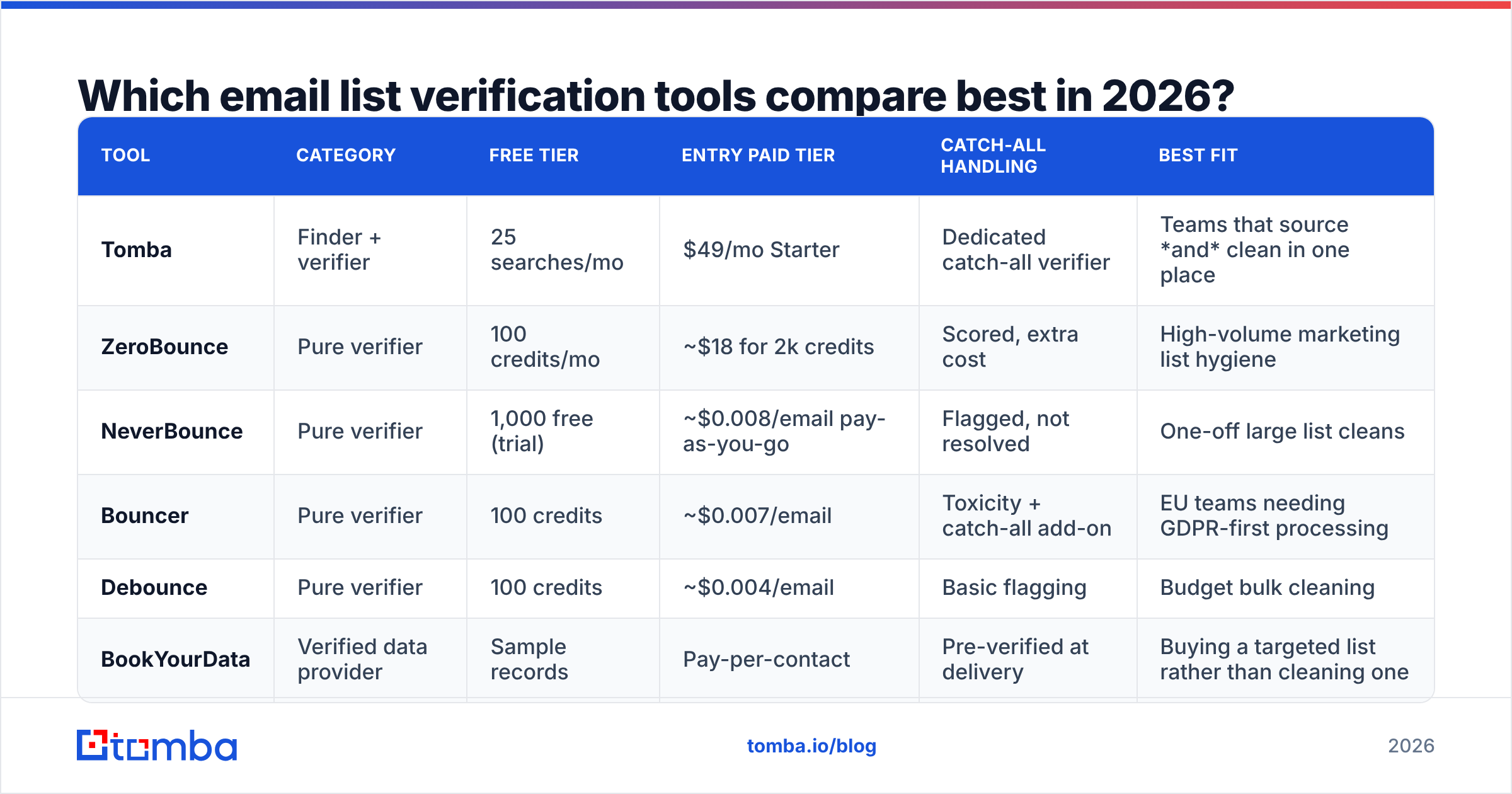
There are three categories of vendor here, and mixing them up leads to bad purchases: pure verifiers (they only clean lists), finder-plus-verifier platforms (they source and clean), and verified-data providers (they sell lists that arrive pre-cleaned).
Prices below are entry-level list pricing at the time of writing and move often — check the vendor's page before budgeting.
| Tool | Category | Free tier | Entry paid tier | Catch-all handling | Best fit |
|---|---|---|---|---|---|
| Tomba | Finder + verifier | 25 searches/mo | $49/mo Starter | Dedicated catch-all verifier | Teams that source and clean in one place |
| ZeroBounce | Pure verifier | 100 credits/mo | ~$18 for 2k credits | Scored, extra cost | High-volume marketing list hygiene |
| NeverBounce | Pure verifier | 1,000 free (trial) | ~$0.008/email pay-as-you-go | Flagged, not resolved | One-off large list cleans |
| Bouncer | Pure verifier | 100 credits | ~$0.007/email | Toxicity + catch-all add-on | EU teams needing GDPR-first processing |
| Debounce | Pure verifier | 100 credits | ~$0.004/email | Basic flagging | Budget bulk cleaning |
| BookYourData | Verified data provider | Sample records | Pay-per-contact | Pre-verified at delivery | Buying a targeted list rather than cleaning one |
A few honest notes on that table.
Pure verifiers are cheaper per email and that is the whole point. If you already have a 200,000-record database and just need it scrubbed once a quarter, a dedicated verifier is the correct purchase. Don't pay platform pricing for a commodity operation.
Finder-plus-verifier platforms win on workflow, not unit price. Tomba pricing starts at $49/mo for Starter, $99/mo for Growth, and $249/mo for Pro, with a free tier at 25 searches per month. The reason to buy that rather than a per-email verifier is that discovery and verification happen in the same call — you never build a dirty list in the first place. Cleaning is a repair job; sourcing verified is prevention.
Verified data providers solve a different problem. BookYourData and similar vendors sell you contacts that arrive already validated with an accuracy guarantee attached. If your constraint is "I don't have a list at all," a verifier is useless to you and a data provider is the right first purchase. If your constraint is "my list is three years old," it's the reverse.
Cross-check any vendor's claims against third-party reviews — the G2 email verification category is the least-bad public source, since the reviews at least come from named accounts.
Is catch-all verification worth paying extra for?#
Usually yes, if catch-alls are more than 15% of your list — which is normal in enterprise B2B, where security teams deliberately configure accept-all to frustrate exactly the kind of probe verifiers run.
A catch-all domain says "yes" to every address you ask about. ceo@bigcorp.com, asdfgh@bigcorp.com, same answer. So a basic verifier can't tell you anything, and it will either mark the whole domain catch-all and pass the decision back to you, or — worse — mark it valid and let you believe you have a clean list.
There are two ways vendors resolve this. The first is pattern intelligence: if the verifier already knows this domain uses first.last@, and your record is first.last@, confidence goes up substantially even without a mailbox confirmation. The second is corroboration from other data sources — the address appearing in public sources, signatures, or previous confirmed sends.
A catch-all verifier that does both will typically resolve 50–70% of accept-all records into a usable confidence tier. That matters more than it sounds: on a list where a quarter of records are catch-all, resolving two-thirds of them recovers roughly 17% of your total addressable list that you'd otherwise either discard or gamble on.
The economics are simple. If catch-alls are under 10% of your list, skip the add-on and route them to a separate low-volume campaign. Above 20%, pay for the resolution — the recovered contacts cost less than sourcing replacements.
What does a clean verification workflow look like?#
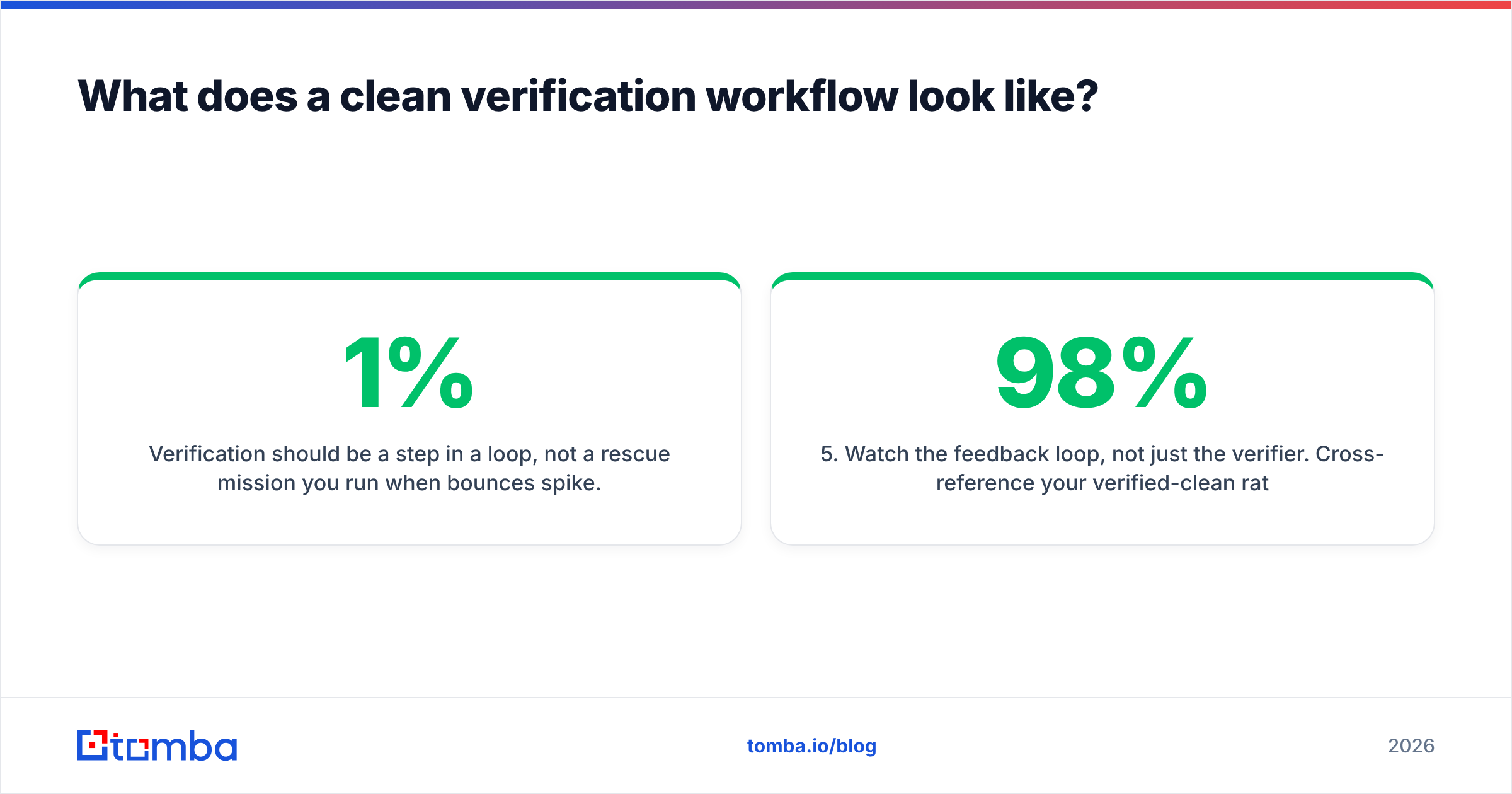
Verification should be a step in a loop, not a rescue mission you run when bounces spike. The teams with sub-1% bounce rates all do roughly the same five things.
- Verify at capture, not at send. Validate form submissions and enriched records in real time via API. An address caught at entry costs one credit; the same address caught after it's polluted three campaigns costs you reputation.
- Re-verify anything older than 90 days. Set a
last_verified_atfield on every contact record. Anything past the window gets re-checked before it enters a sequence. This single field prevents most repeat bounces. - Run bulk passes before every major campaign. Upload the segment, not the whole database. Bulk verification on a 20,000-record segment takes minutes and costs less than the coffee budget for the meeting where you argue about it.
- Suppress permanently, in the source of truth. Invalids go into a suppression list in your CRM, not a spreadsheet on someone's desktop. Otherwise the next import resurrects them.
- Watch the feedback loop, not just the verifier. Cross-reference your verified-clean rate against actual bounce data from Google Postmaster Tools. If a vendor says 98% valid and you bounce at 4%, the vendor's scoring model is optimistic and you need a stricter threshold.
Teams running this at scale should wire it into the ingestion pipeline directly rather than doing manual CSV rounds — the email verification API approach means every record entering the CRM is checked once at the boundary, which is where validation belongs.
When is email list verification a waste of money?#
Three cases, and being honest about them saves you real budget.
Your list came from a real-time verified source within the last 60–90 days. If addresses were confirmed at discovery, re-verifying next week buys you almost nothing. Decay is a function of time; verification is a function of decay.
You run double opt-in inbound and already bounce under 0.5%. Those subscribers confirmed the address by clicking a link in it. That's stronger proof than any SMTP probe. Verify the list annually for job changes, not monthly.
You're about to mail a list you have no permission to mail. Verification makes the addresses real. It doesn't make the send legal, wanted, or effective. A perfectly verified list of people who've never heard of you and never opted in will still generate complaints, and complaints hurt sender reputation faster than bounces do. Fix the targeting problem first.
The blunt version: verification protects email deliverability, it doesn't create relevance. It's the seatbelt, not the destination.
What should you do next?#
Start by measuring, not buying. Pull your last three campaigns, calculate the actual hard-bounce rate, and check what percentage of your database has no last_verified_at value. If bounces are under 1% and your records are fresh, you have a targeting problem, not a data problem — spend the money on research instead.
If bounces are above 2%, or you're sitting on a database nobody has touched since the last CRM migration, run a bulk pass this week and set up verification at capture so you never rebuild the same mess.
The cheapest version of this problem is the one you never create. Tomba's Email Finder verifies as it discovers, so contacts enter your CRM already checked, with catch-all resolution, disposable filtering, and role detection applied at source. The free tier gives you 25 searches a month to test it against records where you already know the answer — start there, compare the statuses against your own bounce data, and only pay once the numbers hold up.
Related guides#
Ready to find emails that actually work?
Join 150,000+ professionals who stopped guessing and started sending. Free credits on signup — no credit card required.
Get the Tomba newsletter
Practical outbound tactics and product updates — once every two weeks.
About the author