Email Lookup in 2026: How It Works and What Actually Verifies
Email lookup tools promise a verified inbox from a name and a domain. Here's how the pattern-plus-verification pipeline actually works, what accuracy claims really mean, and how the major tools compare on price and bounce rate.
TL;DR
- An email lookup returns a probable business email from a name plus a domain, then scores how likely it is to be real. The finding step is cheap guesswork; the verification step is what you actually pay for.
- "98% accuracy" almost always means accuracy on the addresses we chose to return — not coverage. A tool that returns 30% of your list at 98% accuracy is worse than one returning 70% at 94%.
- Free lookup tools work for one-off checks. They break on catch-all domains, which now cover roughly a third of B2B mail servers, because SMTP no longer tells the truth.
- Budget tiers cluster tightly: Tomba $49/mo, Hunter $49/mo, Snov.io $39/mo, BookYourData sells credits outright. The real differentiator is credit-refund policy on unverified results.
- Run every lookup output through a separate verifier before it touches a sequence. Bounce rate above 3% is where Google and Microsoft start throttling you.
What is an email lookup, exactly?#
An email lookup is the process of turning identity fragments — a person's name, a company domain, sometimes a LinkedIn URL — into a deliverable work email address.
Think of it like finding an apartment number when you only know the street and the resident's name. You know the building's numbering convention (floor + unit), so you generate candidates, then you knock on doors until someone answers. Email lookup does the same thing: it infers the company's address format, generates candidates, then "knocks" via SMTP or database cross-reference.
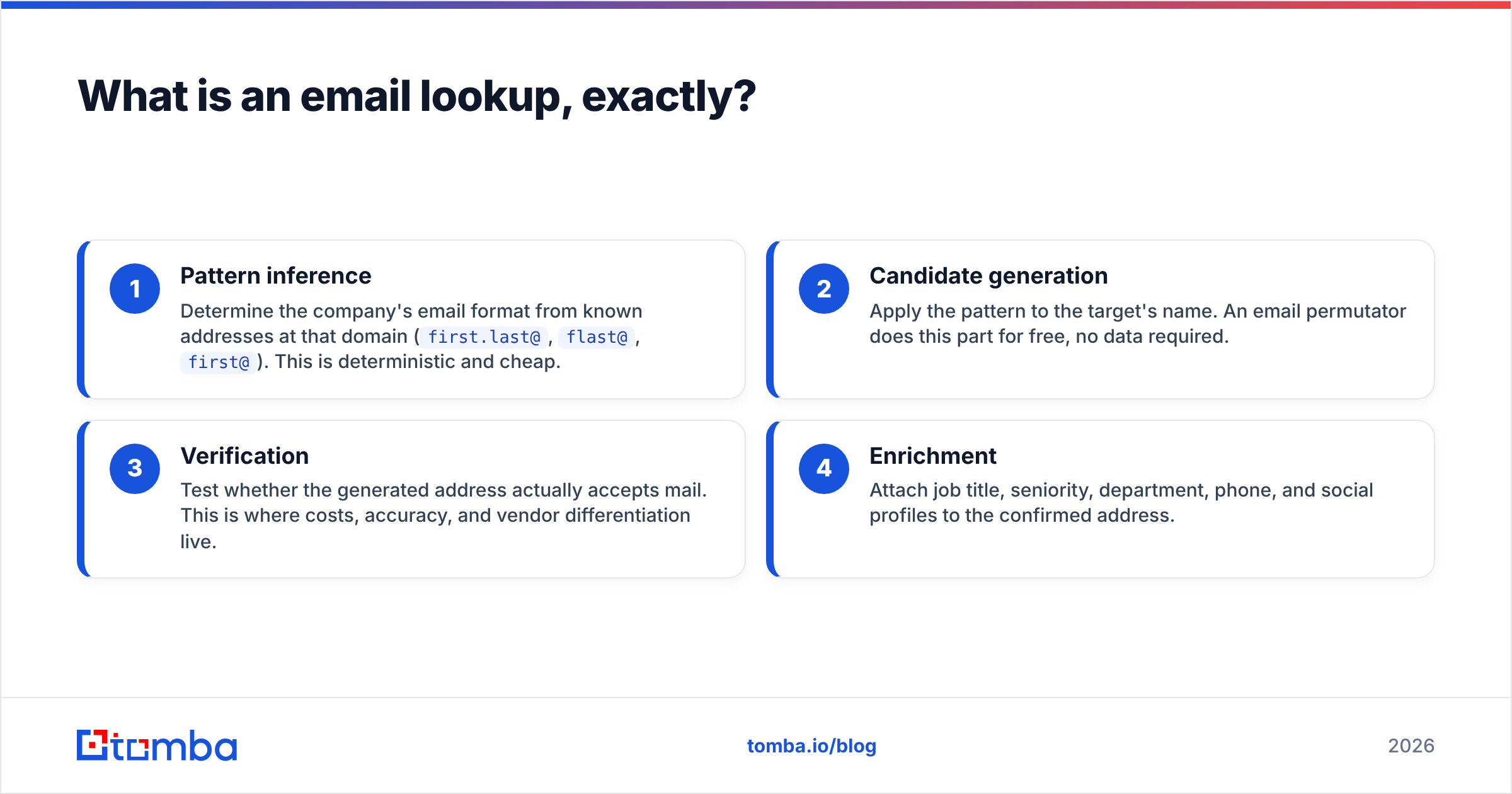
Technically, three distinct operations hide behind the phrase:
- Pattern inference — Determine the company's email format from known addresses at that domain (
first.last@,flast@,first@). This is deterministic and cheap. - Candidate generation — Apply the pattern to the target's name. An email permutator does this part for free, no data required.
- Verification — Test whether the generated address actually accepts mail. This is where costs, accuracy, and vendor differentiation live.
- Enrichment — Attach job title, seniority, department, phone, and social profiles to the confirmed address.
Most tools sell you all four as one API call and quote a single accuracy number. That bundling is precisely what makes vendor comparisons so slippery.

How does an email lookup actually find the address?#
Three mechanisms, usually blended.
Crawled public data. The provider indexes company sites, press releases, GitHub commits, conference programs, academic papers, and public filings, extracting any @company.com string it finds. This is how domain search builds its inventory — you enter stripe.com and get back every address the crawler has ever seen there, with source URLs attached.
Pattern extrapolation. Once the crawler has 3+ confirmed addresses at a domain, the format is obvious. sarah.chen@acme.com and david.okafor@acme.com means first.last@acme.com. Every future employee at Acme gets generated from that rule without any new crawling. Cheap, fast, and the source of most false positives — patterns break for duplicate names (j.smith vs john.smith), acquired subsidiaries, and legacy staff on a retired format.
SMTP handshake verification. The verifier opens a connection to the recipient's mail server, issues RCPT TO: for the candidate address, and reads the response code. A 250 means the mailbox exists. A 550 means it doesn't. No email is sent — the connection closes before DATA.
The catch: SMTP verification is degrading as a signal. Microsoft 365 tenants, Proofpoint, and Mimecast increasingly return 250 for everything to defeat directory-harvest attacks. That's the catch-all problem, and it's the single biggest thing separating good lookup tools from mediocre ones in 2026.

What does "95% accuracy" actually mean?#
It means whatever the vendor wants it to mean, because nobody publishes a shared benchmark.
Here are the three definitions in circulation, all marketed as "accuracy":
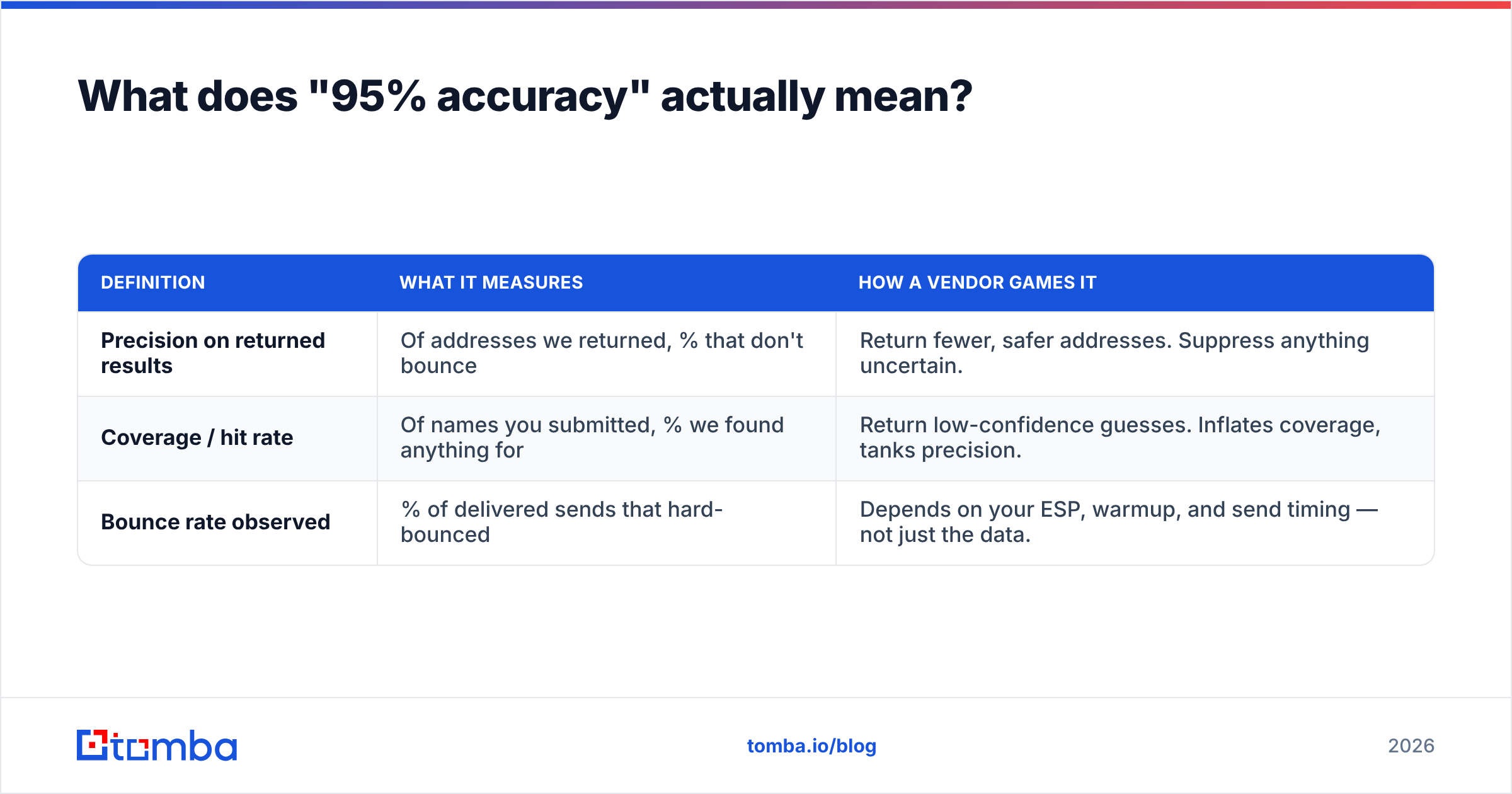
| Definition | What it measures | How a vendor games it |
|---|---|---|
| Precision on returned results | Of addresses we returned, % that don't bounce | Return fewer, safer addresses. Suppress anything uncertain. |
| Coverage / hit rate | Of names you submitted, % we found anything for | Return low-confidence guesses. Inflates coverage, tanks precision. |
| Bounce rate observed | % of delivered sends that hard-bounced | Depends on your ESP, warmup, and send timing — not just the data. |
A tool advertising 98% precision while returning results for only 32% of your input list is doing less work than one returning 71% at 94% precision. On a 1,000-name list: the first gives you 313 usable contacts, the second gives you 667. The "less accurate" tool wins by more than 2x.
What to actually measure when you trial a tool:
- Hit rate — Submit an identical 200-row list to every candidate. Count non-empty results.
- Verified share — Of those hits, how many come back marked "valid" rather than "accept-all" or "risky"?
- Real bounce rate — Send to 100 of them from a warmed domain. Count hard bounces after 48 hours.
- Credit honesty — Does the vendor charge you for a "not found" result or a risky guess? Some do.
- Catch-all handling — What percentage of your list lands in the catch-all bucket, and does the tool attempt resolution or just shrug?
Run that four-way test and the marketing numbers stop mattering. G2's data enrichment category has real user-reported bounce complaints buried in the reviews, which is more useful than any vendor landing page.
Which email lookup tools are worth comparing in 2026?#
The market splits into three groups: finder-first tools (find + light verify), verifier-first tools (clean lists you already have), and database sellers (buy a static list outright).
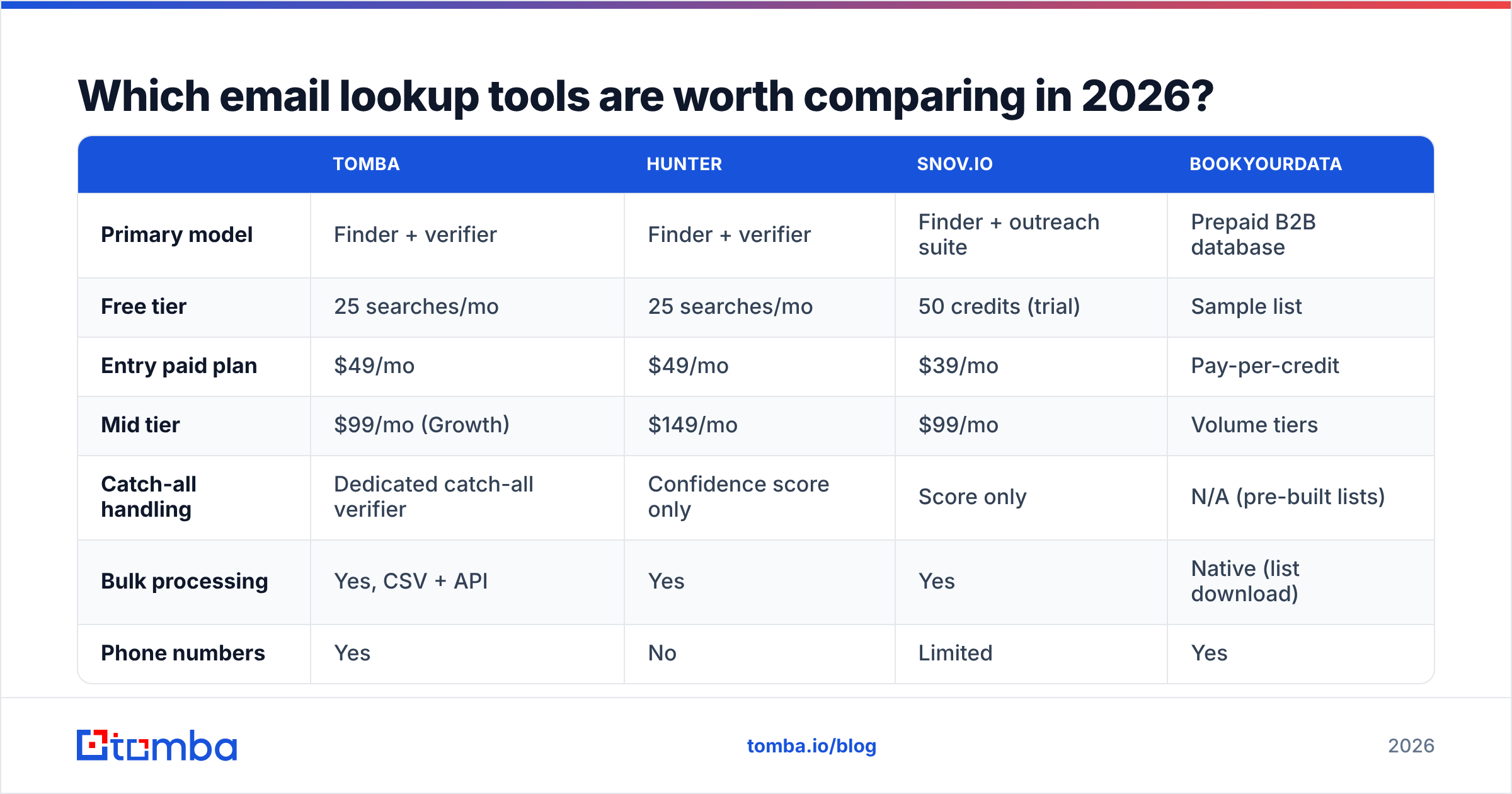
| Tomba | Hunter | Snov.io | BookYourData | |
|---|---|---|---|---|
| Primary model | Finder + verifier | Finder + verifier | Finder + outreach suite | Prepaid B2B database |
| Free tier | 25 searches/mo | 25 searches/mo | 50 credits (trial) | Sample list |
| Entry paid plan | $49/mo | $49/mo | $39/mo | Pay-per-credit |
| Mid tier | $99/mo (Growth) | $149/mo | $99/mo | Volume tiers |
| Catch-all handling | Dedicated catch-all verifier | Confidence score only | Score only | N/A (pre-built lists) |
| Bulk processing | Yes, CSV + API | Yes | Yes | Native (list download) |
| Phone numbers | Yes | No | Limited | Yes |
| API + CLI + MCP | Yes | API only | API only | API |
| Best for | Mixed find + verify workflows at API scale | Simple domain-level lookups | Teams wanting sending built in | Buying a defined segment fast |

How to read that table. BookYourData solves a genuinely different problem — you filter by industry, geography, and title, then buy that segment outright with a bounce guarantee. If your ICP is well-defined and static, that's often faster and cheaper than running lookups one name at a time. It's a poor fit if your input is a list of specific named people you already sourced, because you're paying for a segment you'll mostly discard.
Finder-first tools invert that. You bring the names, they return addresses. Better for account-based work where you've already picked the 40 people who matter at 12 target accounts.
Snov.io bundles sending, which is convenient until you want a different sequencer. Hunter is the cleanest single-purpose tool and has the strongest brand recognition; see Hunter's own documentation for how their confidence score is computed. Tomba's differentiator is the surface area — Tomba API, CLI, MCP server, Sheets, Excel, and Airtable all hit the same data, which matters if lookups are a step inside an automated pipeline rather than something a rep does by hand.
How do you handle catch-all domains?#
You stop trusting SMTP and start triangulating. This is the section most guides skip.
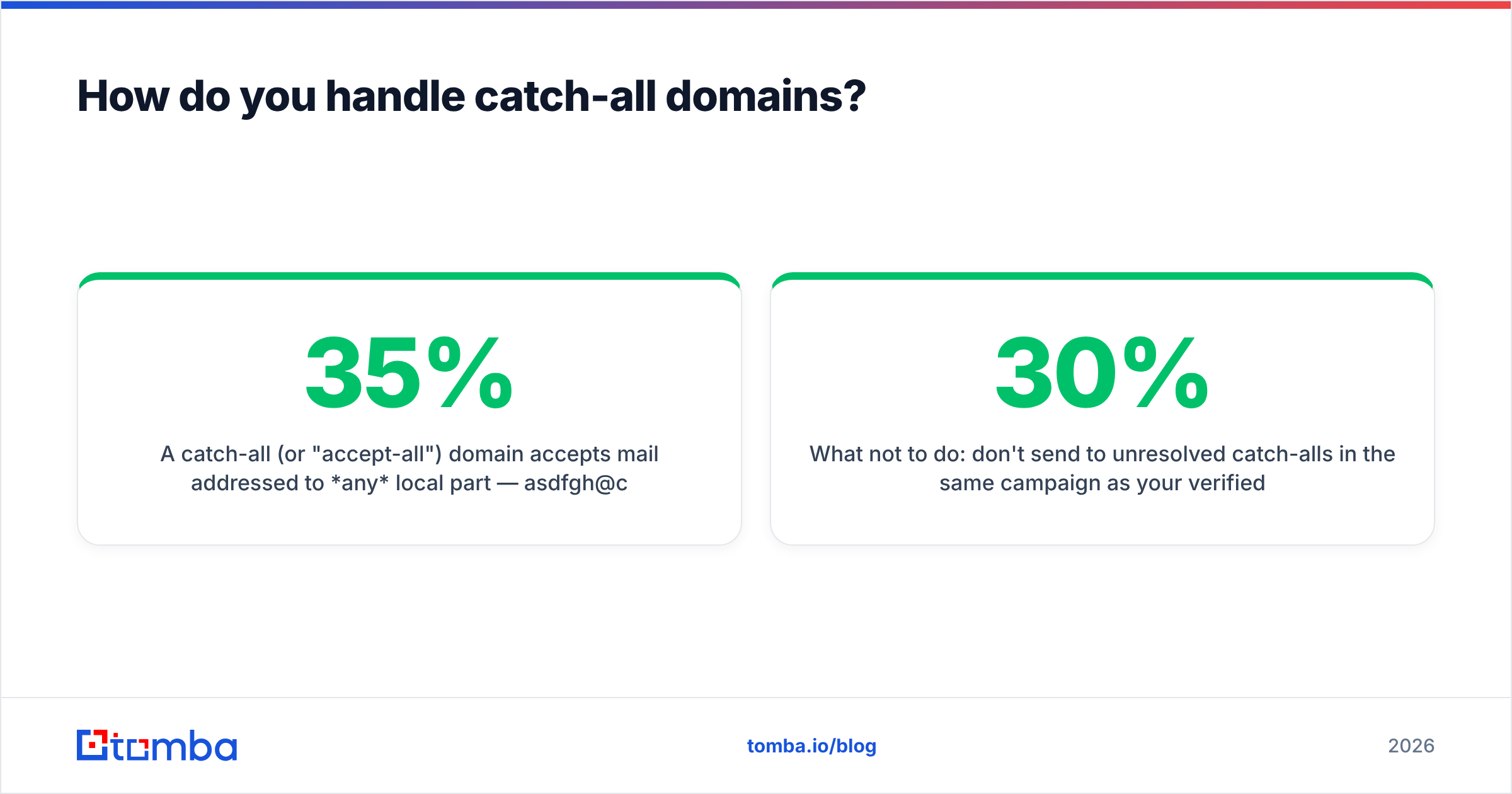
A catch-all (or "accept-all") domain accepts mail addressed to any local part — asdfgh@company.com returns the same 250 OK as the CEO's real address. Roughly 25–35% of B2B domains behave this way, concentrated in enterprise Microsoft 365 and security-gateway setups.
Three viable approaches, in order of reliability:
- Corroborate against crawled evidence. If the address was actually observed in the wild — a GitHub commit, a conference speaker page, an email signature in a public PDF — it exists regardless of what SMTP says. This is the only genuinely strong signal on a catch-all domain.
- Pattern confidence at the domain level. If 40 confirmed addresses at that domain all follow
first.last@, a generatedfirst.last@for a new name is well-supported. Not proof, but a defensible bet. - Dedicated catch-all resolution. Some providers run additional heuristics — MX behavior fingerprinting, greylisting response timing, historical engagement data. Tomba exposes this as a separate catch-all verifier rather than silently rolling it into a confidence score, which at least lets you decide your own risk threshold.
What not to do: don't send to unresolved catch-alls in the same campaign as your verified contacts. Segment them. If catch-all addresses are 30% of your list and half of them are invalid, you've just added a 15% bounce rate to an otherwise clean send — enough to get throttled by Gmail's bulk sender rules and torch your sender reputation.

Is a free email lookup good enough?#
For fewer than 25 lookups a month, yes. Past that, the economics flip fast.
Every serious vendor offers a free tier because lookups are cheap to serve and the conversion rate on people who hit the ceiling is high. Tomba's free tier is 25 searches/month; Hunter's is the same; most verifiers give 50–100 free checks.
Free tiers are genuinely fine when:
- You're checking a handful of addresses before a manual outreach push
- You're validating one address you already suspect is correct — a free email checker handles that with no signup
- You're testing pattern inference on a single company before committing
They fall apart when:
- Volume. 500 lookups/month across five free accounts is a compliance headache and an operational one.
- Catch-all resolution. Free tiers almost never include it; you get "accept-all" and no further help.
- API access. Rate limits on free keys make automation impractical.
- Credit refunds. Paid plans typically refund credits for not-found results. Free tiers just burn them.
The practical threshold: if you're doing more than ~50 lookups a month or any lookup is feeding an automated sequence, pay. The cost of one bounced-out sending domain exceeds a year of Tomba pricing at the Starter tier.
How should you build an email lookup workflow that doesn't bounce?#
Sequence matters more than tool choice. Here's the order that holds up:
Step 1 — Source at the domain level first. Before looking up individuals, run a domain search on each target account. You'll often find the exact person already indexed, plus you'll learn the email pattern for free. Cheaper than name-by-name lookups.
Step 2 — Look up named targets. For people the domain crawl missed, run individual lookups. Feed name + domain, not name + company name — company-name resolution adds an error-prone step.
Step 3 — Verify independently. Run every result through a standalone email verifier, even results your finder already marked valid. Data ages: roughly 25–30% of B2B contact data decays annually per HubSpot's research on database decay. An address confirmed eight months ago is a coin flip today.
Step 4 — Segment by confidence. Three buckets: verified-valid (send freely), catch-all/risky (send in small isolated batches from a secondary domain), invalid (discard, don't "try anyway").
Step 5 — Enrich only what survives. Adding job titles and phone numbers to addresses that will bounce is wasted spend. Enrich leads after verification, not before.
Step 6 — Re-verify before every major send. Lists older than 90 days should be re-run. This is the step everyone skips and the reason "the data was bad" gets blamed for what was actually a stale list.
Is email lookup legal?#
Mostly yes for B2B, with real conditions. This is not legal advice.
Under GDPR, a work email tied to a named individual is personal data, and processing it requires a lawful basis. Legitimate interest is the usual one for B2B prospecting, and it requires that you document a balancing test, honor opt-outs immediately, and disclose where you obtained the data when asked. The ICO's guidance on legitimate interests is the clearest public reference.
Under CAN-SPAM in the US, the bar is lower: accurate headers, a real physical address, a working unsubscribe, and honoring it within 10 business days. Address acquisition method isn't itself restricted, though harvesting is called out as an aggravating factor for penalties.
Practical rules that keep you clean in both regimes:
- Prefer providers that disclose data sources rather than treating provenance as a trade secret
- Never look up personal Gmail/Yahoo addresses for cold B2B outreach — it's outside legitimate interest in the EU and reads as spam everywhere
- Maintain a global suppression list that survives tool changes
- Delete on request, including from your finder tool's cache where the vendor supports it
Closing: pick the tool that matches your input shape#
The choice comes down to what you're starting with. Starting with a defined segment — job titles, industries, regions — a prepaid database is usually the fastest path. Starting with a specific list of named people at named companies, you need a finder, and the thing to optimize is hit rate against your actual list, not the accuracy number on the pricing page.
Run the four-way test. Same 200 names, four tools, measure hit rate, verified share, real bounce rate, and credit-refund policy. It takes an afternoon and it will contradict at least one vendor's marketing.
If your workflow is find-then-verify at any scale — inside a script, a Sheet, a CRM sync, or an agent pipeline — start with the Tomba Email Finder. The free tier gives you 25 searches to run your own benchmark before spending anything, and the Starter plan at $49/mo covers most single-rep workflows with catch-all verification and bulk processing included rather than sold separately.
Related guides#
Ready to find emails that actually work?
Join 150,000+ professionals who stopped guessing and started sending. Free credits on signup — no credit card required.
Get the Tomba newsletter
Practical outbound tactics and product updates — once every two weeks.
About the author