Email Lookup API: The 2026 Guide to Picking the Right One
An email lookup API is easy to buy and easy to overpay for. Here's how the endpoints actually work, what accuracy claims really mean, and where per-lookup billing quietly doubles your cost.

TL;DR
- An email lookup API turns a name + domain (or a domain alone) into a deliverable business email address programmatically, so you never touch a CSV.
- The three endpoints that matter are finder, verifier, and domain search. Everything else — enrichment, phone, catch-all handling — is upsell or edge-case coverage.
- Accuracy claims are marketing until you test them on your ICP. Run 200 known-good contacts through any vendor before you sign an annual deal.
- Pricing traps: credits burned on failed lookups, per-seat minimums, and overage rates that are 3–5x the in-plan rate.
- Tomba's email finder starts free at 25 searches/month and $49/mo on Starter, with a REST API and no charge for a no-result lookup.
What is an email lookup API?#
An email lookup API is a REST endpoint you call with partial identity data — usually a first name, last name, and company domain — that returns a business email address plus a confidence score. Think of it as a switchboard operator for the internet: you give it "Sarah Chen at stripe.com" and it hands back sarah.chen@stripe.com with a note on how sure it is.
Under the hood there is no magic directory. Vendors build these systems from four ingredients:
- Pattern inference — Every company standardises on a format (
first.last@,flast@,first@). Once a provider observes enough confirmed addresses at a domain, it can extrapolate the pattern to new employees with high confidence. - Crawled public sources — Press pages, GitHub commits, conference speaker lists, WHOIS records, job boards, and published author bylines. This is where the seed data comes from.
- SMTP validation — A handshake with the recipient mail server that stops short of sending a message. It follows the mechanics defined in RFC 5321, and it's the reason a "verified" result means something different than a "guessed" one.
- Contributed and licensed data — Extension users, partner feeds, opt-in datasets. Quality varies wildly and this is the layer most vendors are vaguest about.
If a provider can't tell you which of those four produced a given result, treat the confidence score as decorative.

How does an email lookup API differ from a verifier or a database?#
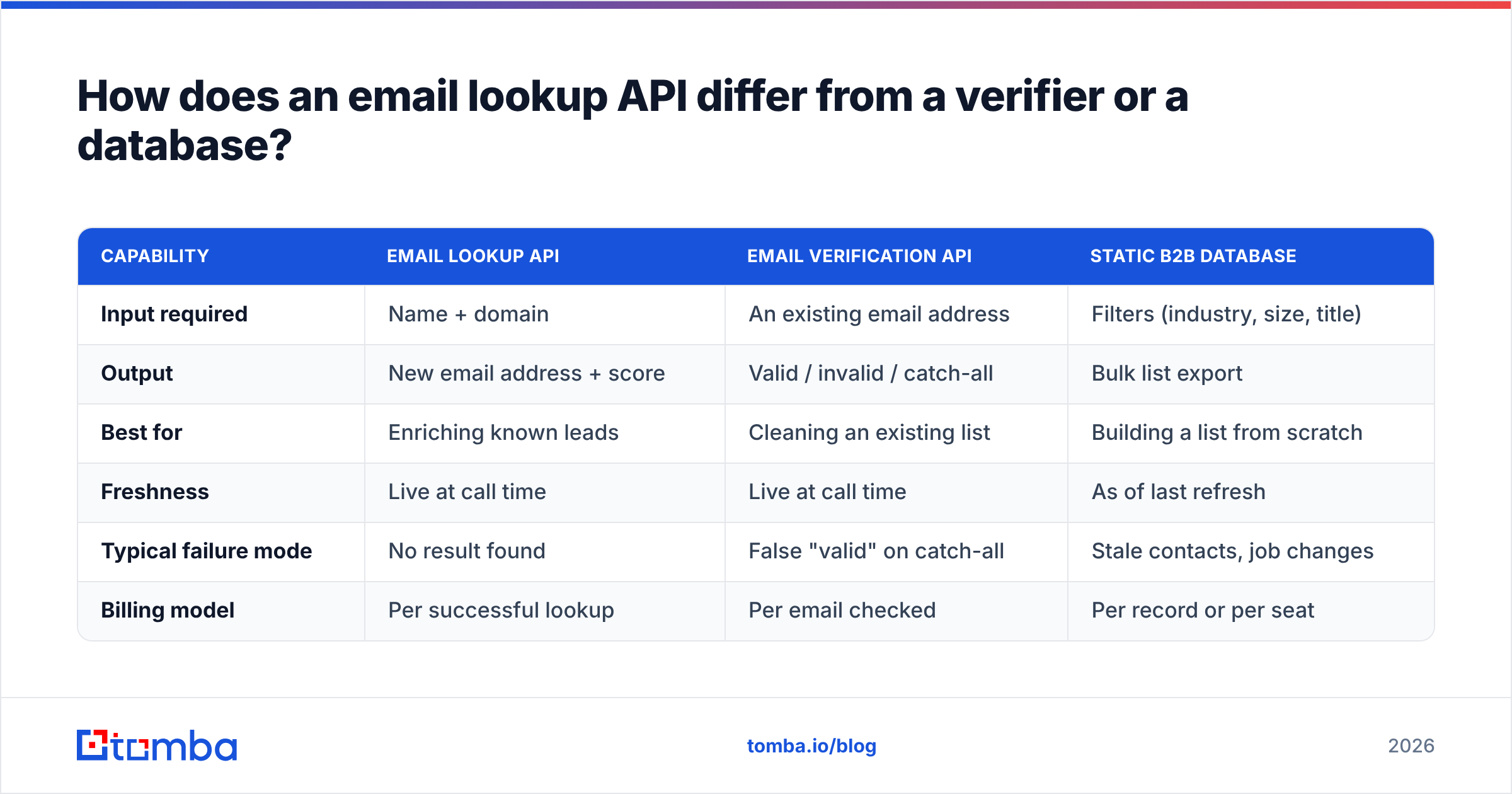
People buy the wrong product constantly here, so let's separate the three categories.
| Capability | Email lookup API | Email verification API | Static B2B database |
|---|---|---|---|
| Input required | Name + domain | An existing email address | Filters (industry, size, title) |
| Output | New email address + score | Valid / invalid / catch-all | Bulk list export |
| Best for | Enriching known leads | Cleaning an existing list | Building a list from scratch |
| Freshness | Live at call time | Live at call time | As of last refresh |
| Typical failure mode | No result found | False "valid" on catch-all | Stale contacts, job changes |
| Billing model | Per successful lookup | Per email checked | Per record or per seat |
The practical rule: use a lookup API when you already know who you want to reach, a verifier when you already have addresses and don't trust them, and a database when you don't yet know who to target. Most real stacks use all three, in that order, and the good vendors expose all three under one key. Tomba, for instance, ships the email verifier and domain search on the same API credential as the finder, which means one integration instead of three.
Which endpoints does a serious email lookup API need?#
Ignore feature-count marketing. Here are the endpoints that carry actual weight in production, roughly in order of how often you'll call them:
- Email finder —
GET /email-finder?domain=&first_name=&last_name=. The workhorse. Should return a status, score, sources, and the inferred pattern. - Domain search — Returns every known address at a domain, with role and department metadata. This is how you find the buying committee when you only have a company name.
- Email verifier — Syntax, MX, disposable, role-account, and SMTP checks in one call. Non-negotiable if you're feeding a cold sequence.
- Catch-all handling — Roughly a third of mid-market domains accept everything at the gateway. A catch-all verifier that scores probability instead of shrugging "unknown" is worth real money.
- Bulk / batch — Async job submission with a webhook callback. Without it you'll hand-roll a queue and rate limiter yourself.
- Enrichment — Job title, LinkedIn URL, company size. Useful, but it's a different product; don't pay lookup prices for it.
Anything beyond that list — reverse lookup, author finder, phone append — is genuinely useful for specific workflows, but it shouldn't drive your vendor choice.
How accurate are email lookup APIs in 2026?#
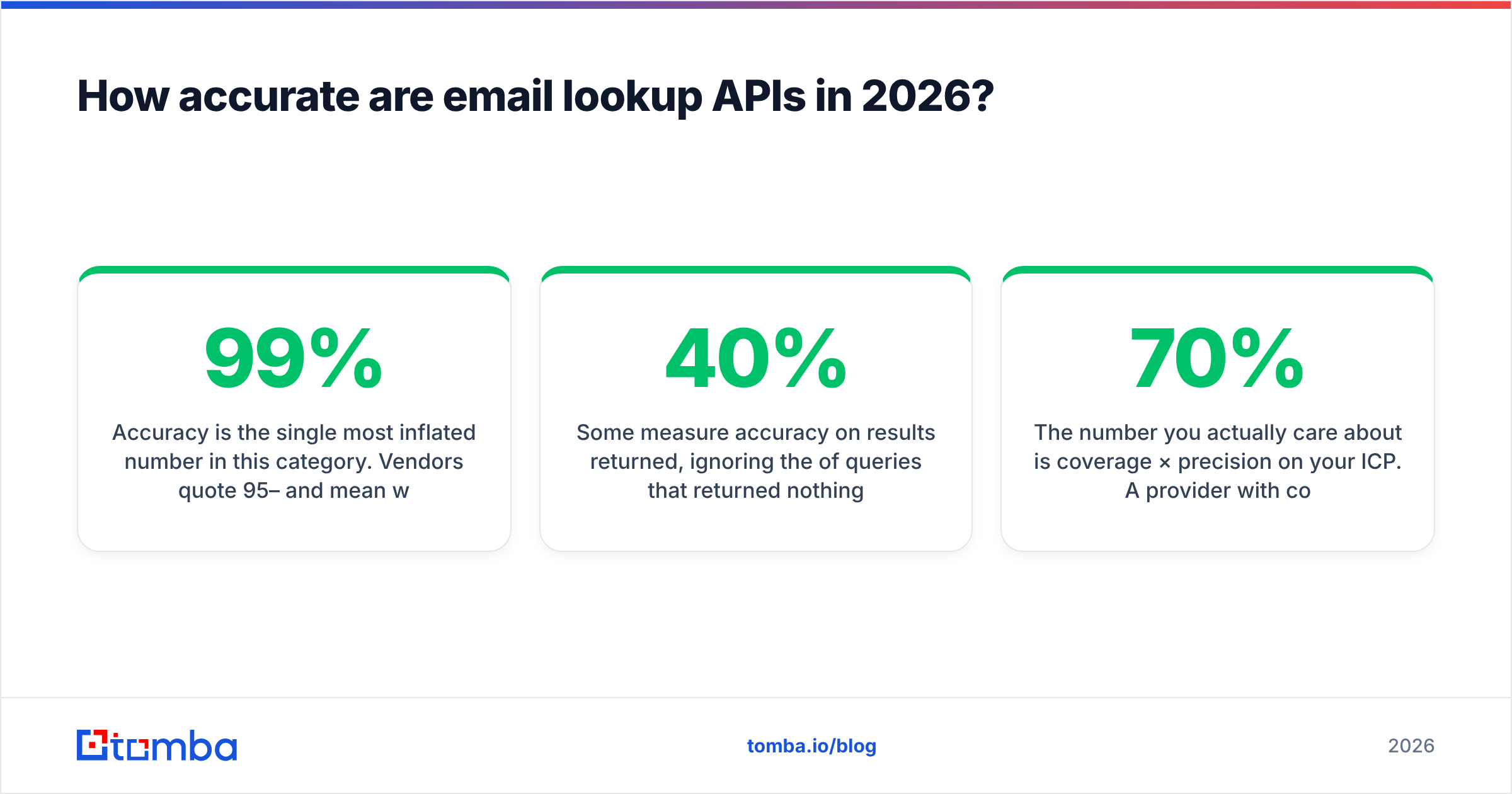
Accuracy is the single most inflated number in this category. Vendors quote 95–99% and mean wildly different things:
- Some measure accuracy on results returned, ignoring the 40% of queries that returned nothing.
- Some measure bounce rate on a sample they chose, which is usually tech companies with clean, predictable patterns.
- Some measure SMTP acceptance, which counts catch-all domains as wins even though they'll accept a fabricated address just as happily.

The number you actually care about is coverage × precision on your ICP. A provider with 70% coverage and 97% precision beats one with 90% coverage and 82% precision, because the second one is quietly buying you a deliverability problem that outlives the campaign.
Run this test before you commit, and run it on every vendor at once:
- Pull 200 contacts you already have confirmed, working emails for — ideally from replies, not from a list.
- Strip the email column. Keep name and domain.
- Push all 200 through each API.
- Score three buckets: exact match, no result, and wrong result.
- Weight wrong results heavily. A no-result costs you nothing; a wrong result costs you sender reputation.
Most teams discover their shortlist collapses to two vendors after this exercise. It takes an afternoon and saves an annual contract.
How do the main email lookup APIs compare on price?#
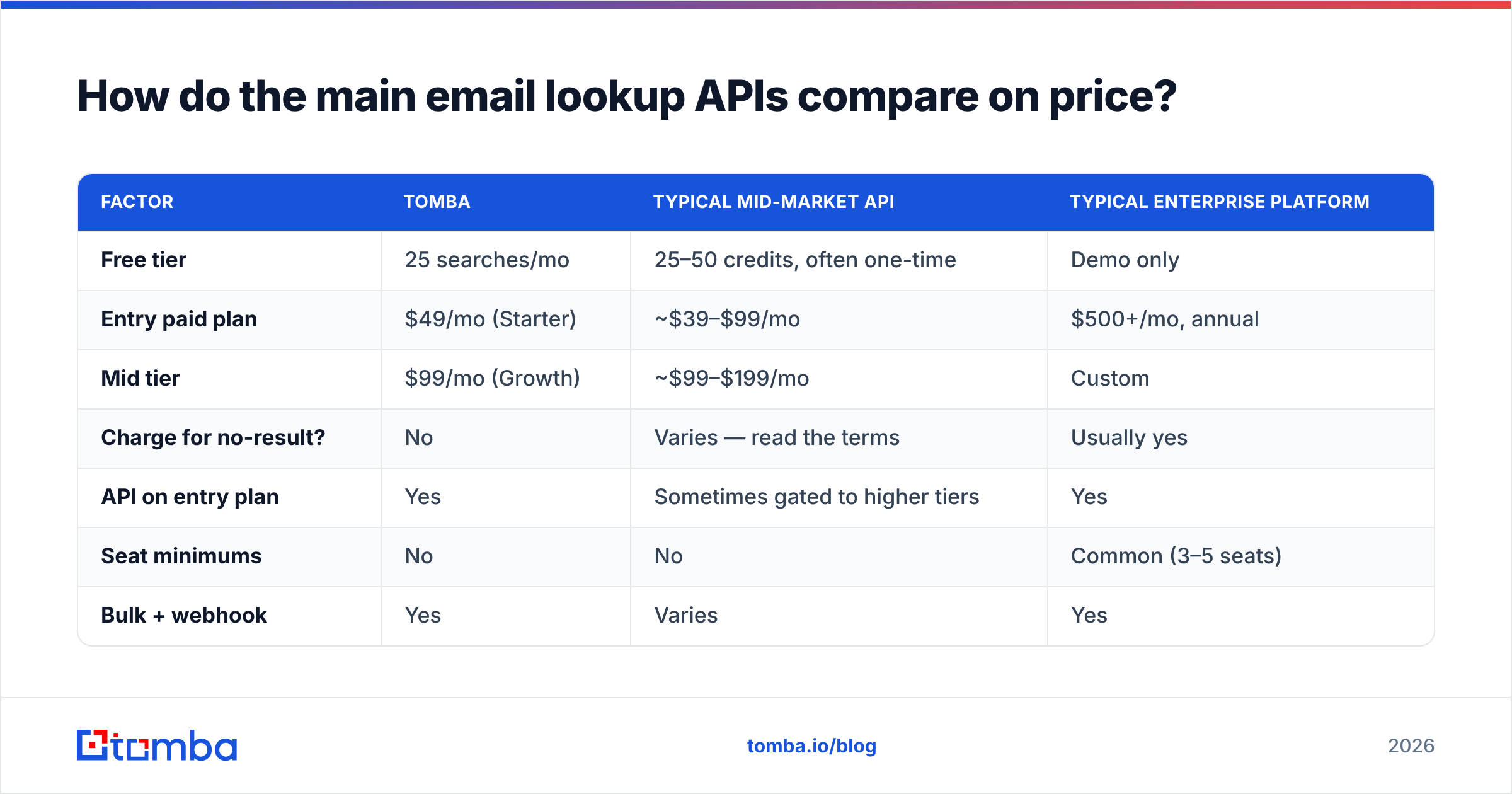
Pricing pages in this category are deliberately hard to compare because everyone uses a different unit. Some charge per search, some per result, some per verified result, and a few charge for both the find and the verify on the same contact.

| Factor | Tomba | Typical mid-market API | Typical enterprise platform |
|---|---|---|---|
| Free tier | 25 searches/mo | 25–50 credits, often one-time | Demo only |
| Entry paid plan | $49/mo (Starter) | ~$39–$99/mo | $500+/mo, annual |
| Mid tier | $99/mo (Growth) | ~$99–$199/mo | Custom |
| Charge for no-result? | No | Varies — read the terms | Usually yes |
| API on entry plan | Yes | Sometimes gated to higher tiers | Yes |
| Seat minimums | No | No | Common (3–5 seats) |
| Bulk + webhook | Yes | Varies | Yes |
| Overage rate | Plan upgrade | Often 3–5x in-plan rate | Negotiated |
Two line items on that table cause most billing surprises. The first is charging for failed lookups — if a vendor debits a credit whether or not it finds anything, and your ICP is a long tail of small companies with 55% coverage, your effective cost per usable email is nearly double the sticker price. The second is overage pricing. Burning through a monthly allotment during a campaign push and paying $0.20 per lookup instead of $0.04 is the classic way a $99 month becomes a $600 month.

Compare the full Tomba pricing tiers against whoever else is on your shortlist, and specifically ask each vendor in writing: do you charge for lookups that return no result, and what is the overage rate? Get it in email, not on a call.
For teams that would rather buy a verified list outright than call an API per contact, providers like BookYourData sell pay-as-you-go verified records — a legitimately different purchasing model that suits one-off campaigns better than a subscription does. Match the billing model to your usage shape, not to the marketing.
What do rate limits and latency actually cost you?#
The docs page says "15 requests per second" and nobody reads further. Then the enrichment job that was supposed to take twenty minutes runs for six hours.
Things to check before you build:
- Sustained vs burst limits. Many APIs allow a short burst well above the documented steady-state rate, then throttle hard. Design for the sustained number.
- p95 latency, not average. Live SMTP verification is inherently slow — a real handshake against a slow mail server can take 3–8 seconds. If your endpoint returns in 200ms every time, it isn't verifying live; it's serving cache.
- Async for anything over 100 records. Submit a batch, get a job ID, receive a webhook. Synchronous loops over 5,000 contacts will time out somewhere in your stack and you'll rebuild it as a queue anyway.
- Retry semantics. Does a 429 or a 500 consume a credit? Does a retried request with the same payload get deduplicated? Both answers should be in the docs; if they're not, that's information too.
- Idempotency keys. Without them, a network blip during a bulk run can double-bill you.
The Tomba API documents its limits per plan, and the bulk endpoints are built around job submission plus callback rather than long-lived synchronous connections — which is the pattern you want for anything running inside a Lambda or a serverless worker with a hard timeout.
How should you architect the integration?#
The mistake almost everyone makes is calling the lookup API at the wrong moment in the pipeline. Here's the sequence that minimises spend:
- Dedupe first. Run your input list through a dedupe pass on
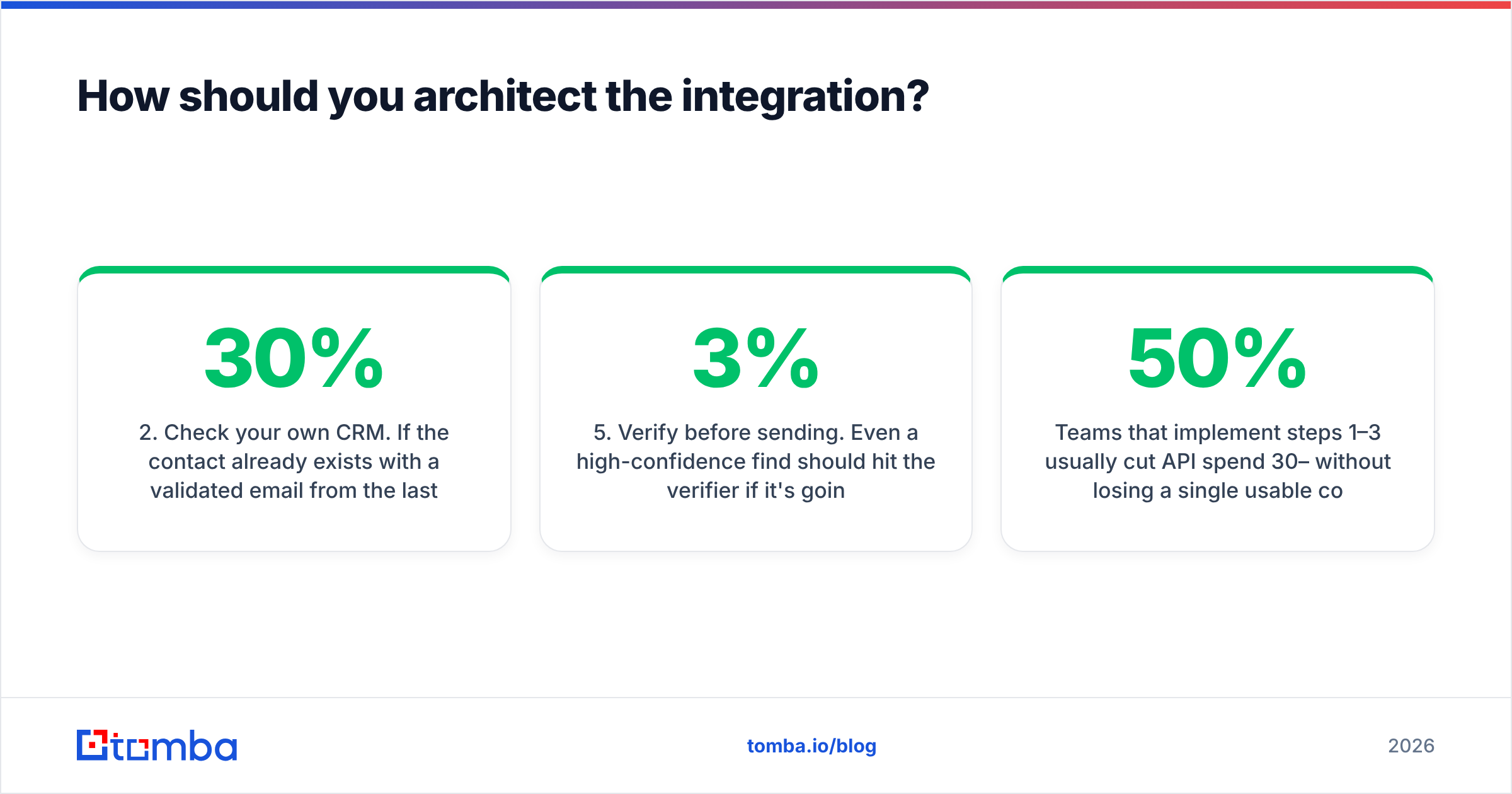
lowercase(first + last + domain). Teams routinely pay to look up the same person three times because the source rows differed in casing or a middle initial. - Check your own CRM. If the contact already exists with a validated email from the last 90 days, don't call anyone. This alone typically cuts 15–30% of calls.
- Try pattern inference cheaply. If you already know a domain's format from previous lookups, generate and verify the address rather than paying for a full find. An email permutator plus a verify call is often cheaper than a find call.
- Then call the finder. Only for the contacts that survived steps 1–3.
- Verify before sending. Even a high-confidence find should hit the verifier if it's going into an outbound sequence. Bounces above 3% start damaging inbox placement, and Google's bulk sender requirements make that threshold real, not theoretical.
- Write back the pattern, not just the email. Store the inferred format per domain. Next quarter, every new contact at that company is a free permutation plus a cheap verify.
Teams that implement steps 1–3 usually cut API spend 30–50% without losing a single usable contact. It's unglamorous plumbing and it pays for itself in the first month.
What compliance rules apply to email lookup APIs?#
Short version: finding a business email is generally lawful; what you do with it is regulated.
- GDPR (EU/UK) — Business contact data is personal data. Most B2B outreach relies on legitimate interest, which requires a documented balancing test, a clear opt-out in every message, and the ability to honour deletion requests. Your vendor should tell you the source of each record so you can respond to a subject access request.
- CAN-SPAM (US) — No opt-in requirement, but you must include a physical address, honest headers, and a working unsubscribe honoured within 10 business days.
- CASL (Canada) — Materially stricter. Consent is generally required; the B2B exemptions are narrow.
- Vendor terms — Some sources prohibit programmatic extraction. If a provider's coverage seems impossibly good on a network that forbids scraping, ask where the data came from. Reviewing a vendor's data sources documentation is a two-minute check that saves a lot of downstream awkwardness.
Cross-check any shortlist against independent reviews on G2 too — support responsiveness and billing disputes show up there long before they show up in a sales call.
Which email lookup API should you pick?#
Decide on three axes, in this order:
- Coverage on your ICP. Measured, not claimed. Run the 200-contact test.
- Cost per usable email. Sticker price divided by your measured hit rate, plus expected overage.
- Integration surface. Does it fit where you actually work — API, Google Sheets, CRM, or a no-code automation layer?
If you're a developer wiring enrichment into a product, prioritise clean docs, async bulk, and predictable rate limits. If you're a founder or SDR doing manual prospecting, the extension and Sheets add-on matter far more than the REST schema. If you're RevOps running a 50k-contact quarterly refresh, negotiate the bulk rate and ignore the self-serve page entirely.
Start with a free tier and a real test set. Tomba's Email Finder gives you 25 searches a month at no cost — enough to run a coverage benchmark against your own known-good contacts before you spend anything — and paid plans start at $49/mo with the finder, verifier, domain search, and bulk endpoints on the same key. Run the test, compare the hit rates, and let your own data pick the vendor.
Related guides#
Ready to find emails that actually work?
Join 150,000+ professionals who stopped guessing and started sending. Free credits on signup — no credit card required.
Get the Tomba newsletter
Practical outbound tactics and product updates — once every two weeks.
About the author