Email Lookup Chrome Extension: The 2026 Buyer's Guide
Browser extensions promise one-click email lookup on LinkedIn and company sites. Here's how the 2026 field actually performs on accuracy, credits, and privacy — and when to skip the extension entirely.
TL;DR
- An email lookup chrome extension finds a prospect's work email while you're already on their LinkedIn profile, company site, or CRM record — no tab-switching, no CSV round-trip.
- Accuracy varies more than pricing does. The gap between a good extension and a mediocre one is roughly 20-30 percentage points of deliverable addresses, and that gap only shows up after you send.
- Credits are the real cost driver. Some tools charge per reveal, some per result, some per verified result. Read that line before you read the monthly price.
- Extensions are built for depth (one prospect at a time). If you need 500 contacts by Friday, use a domain search or bulk API instead — the extension is the wrong shape for that job.
- Best combo in 2026: one solid extension for live research plus a verification step before anything hits your sequencer.
What is an email lookup chrome extension?#
An email lookup chrome extension is a browser add-on that surfaces a person's professional email address on the page you're already looking at. You open a LinkedIn profile, click the extension icon (or a button it injects into the page), and it returns a best-guess email plus a confidence signal.
Think of it like a translator standing next to you at a conference. You could go back to your hotel, look up every phrase in a dictionary, and come back tomorrow — or you can get the answer in the moment, while the conversation is still live. That immediacy is the entire value proposition. It's not that extensions find emails a database can't; it's that they find them at the exact moment you've decided the person is worth contacting.
Under the hood, almost every extension does some combination of four things:
- Pattern inference — It knows
acme.comusesfirst.last@, so it constructsjane.doe@acme.comfrom the name on screen. Cheap, fast, and only as good as the pattern database. - Index lookup — It queries a crawled index of emails scraped from public web sources, press pages, git commits, conference listings, and public filings. This is where real coverage comes from.
- SMTP / MX validation — It pings the receiving mail server to check whether the mailbox accepts mail, without sending anything. This is what separates a guess from a verified address.
- Contributed data — Some tools ask users to share their own address books in exchange for credits. Coverage jumps; privacy exposure jumps with it.
The tools that only do step 1 are guessing with extra steps. The ones that do 1-3 are doing actual work. Knowing which category a tool sits in tells you more than any pricing page will.
Wait — corrected format below.
How accurate is an email lookup chrome extension really?#
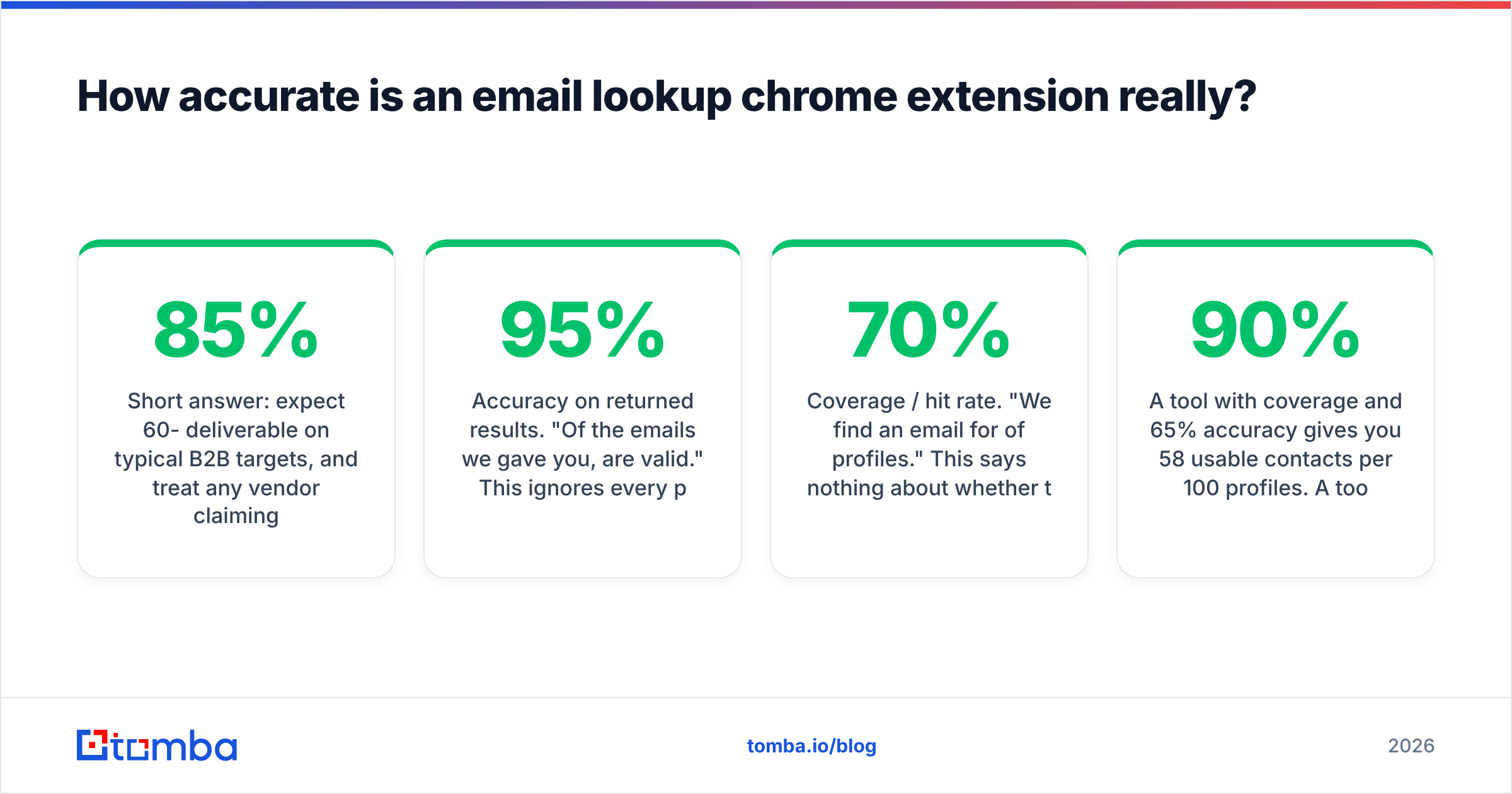
Short answer: expect 60-85% deliverable on typical B2B targets, and treat any vendor claiming 99% with suspicion unless they define the denominator.
The number that matters is not "accuracy" — it's deliverable rate on the addresses you actually got back. Vendors report this three different ways, and the differences are enormous:
- Accuracy on returned results. "Of the emails we gave you, 95% are valid." This ignores every profile where the tool returned nothing.
- Coverage / hit rate. "We find an email for 70% of profiles." This says nothing about whether those emails work.
- Effective yield. Coverage × accuracy. This is the only number that predicts your campaign outcome, and almost nobody publishes it.
A tool with 90% coverage and 65% accuracy gives you 58 usable contacts per 100 profiles. A tool with 65% coverage and 95% accuracy gives you 62. The second tool "finds fewer emails" and lands more meetings, because your bounce rate stays under the threshold that wrecks email deliverability.

Accuracy also degrades in predictable places. Know them before you blame the tool:
- Catch-all domains. The server accepts everything, so SMTP validation can't tell you anything. Roughly 15-20% of B2B domains are catch-all. Good tools flag these separately instead of marking them "valid" — run them through a catch-all verifier before you decide.
- Recent job changes. Someone who moved companies six weeks ago may still show the old employer on their profile. Every pattern-based guess will be wrong.
- Non-English name handling. Transliteration, compound surnames, and diacritics break naive pattern generators constantly.
- Small companies with custom patterns. A 12-person agency using
jd@instead ofjane.doe@will defeat any tool that hasn't crawled that domain.
Which email lookup chrome extension should you use in 2026?#
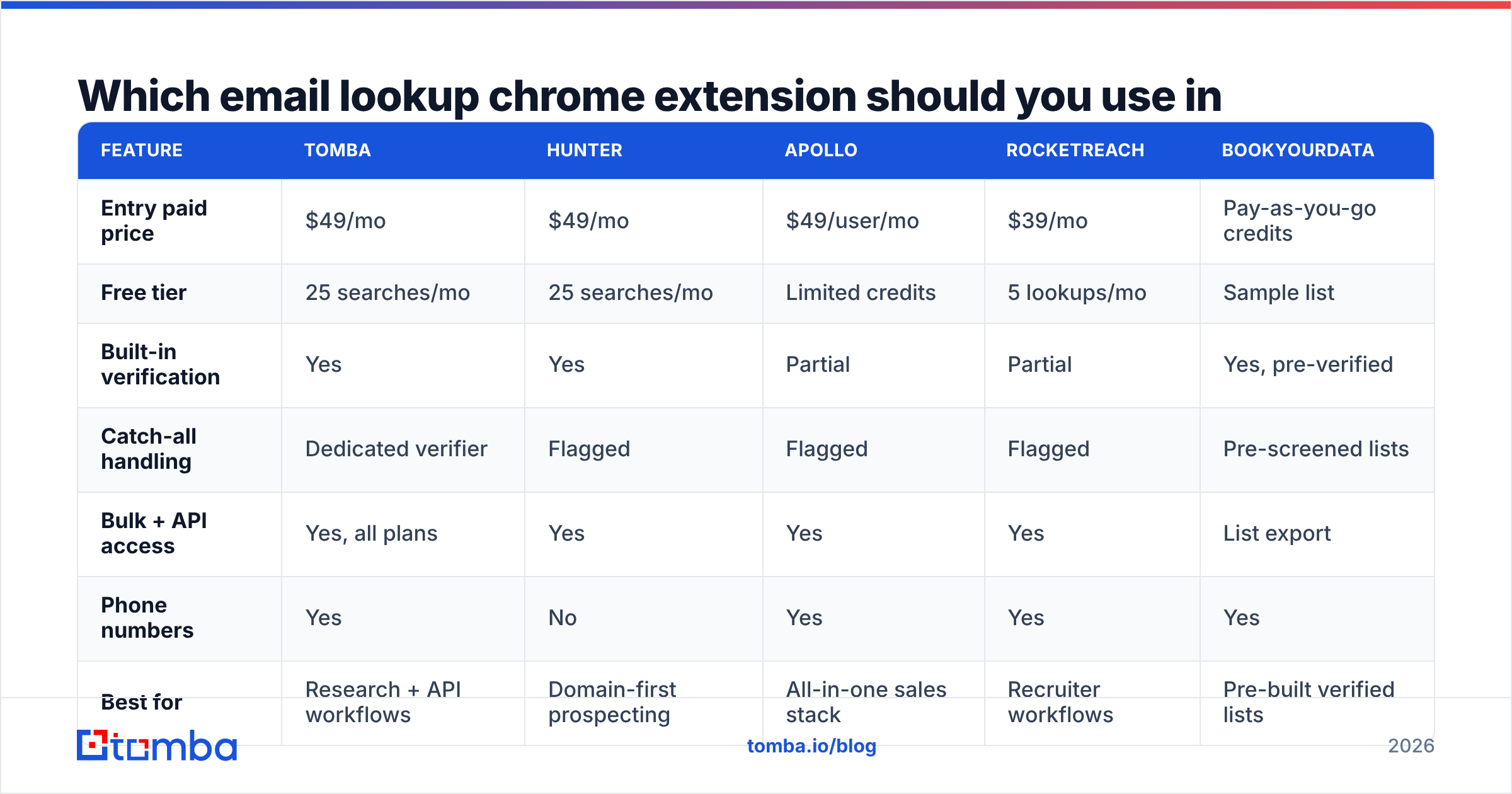
Here's the honest field comparison. Prices are the entry paid tier as of early 2026 — check each vendor before you commit, since packaging changes quarterly.
| Feature | Tomba | Hunter | Apollo | RocketReach | BookYourData |
|---|---|---|---|---|---|
| Entry paid price | $49/mo | $49/mo | $49/user/mo | $39/mo | Pay-as-you-go credits |
| Free tier | 25 searches/mo | 25 searches/mo | Limited credits | 5 lookups/mo | Sample list |
| Built-in verification | Yes | Yes | Partial | Partial | Yes, pre-verified |
| Catch-all handling | Dedicated verifier | Flagged | Flagged | Flagged | Pre-screened lists |
| Bulk + API access | Yes, all plans | Yes | Yes | Yes | List export |
| Phone numbers | Yes | No | Yes | Yes | Yes |
| Best for | Research + API workflows | Domain-first prospecting | All-in-one sales stack | Recruiter workflows | Pre-built verified lists |

A few notes so this table isn't read too flatly:
Tomba leans toward researchers and builders. The extension is fine on its own, but the reason to pick it is that the same credits work across domain search, bulk email finder, and the Tomba API. If your workflow ever graduates from manual clicking to automation, you don't re-buy your stack. Pricing runs Free (25 searches), Starter $49/mo, Growth $99/mo, Pro $249/mo, Enterprise custom — see Tomba pricing for current credit allocations.
Hunter is the category's default answer and has the strongest brand recognition. Its domain-first model is excellent when you're working account-by-account rather than person-by-person.
Apollo bundles the extension into a full sales platform — sequences, dialer, CRM sync. If you want one vendor for everything, that's the trade. If you only want emails, you're paying for a lot of surface area you won't touch.
RocketReach has deep coverage on individuals, which is why recruiters gravitate to it. Its per-lookup pricing gets expensive at volume.
BookYourData takes a different route entirely: pre-verified list purchase with a bounce guarantee rather than live lookup. If your motion is "give me 2,000 verified CFOs in fintech" rather than "who is this specific person," a curated list is genuinely a better fit than any extension, and the economics are cleaner.
Is a chrome extension better than a bulk email finder?#
Depends entirely on volume and where the decision happens.
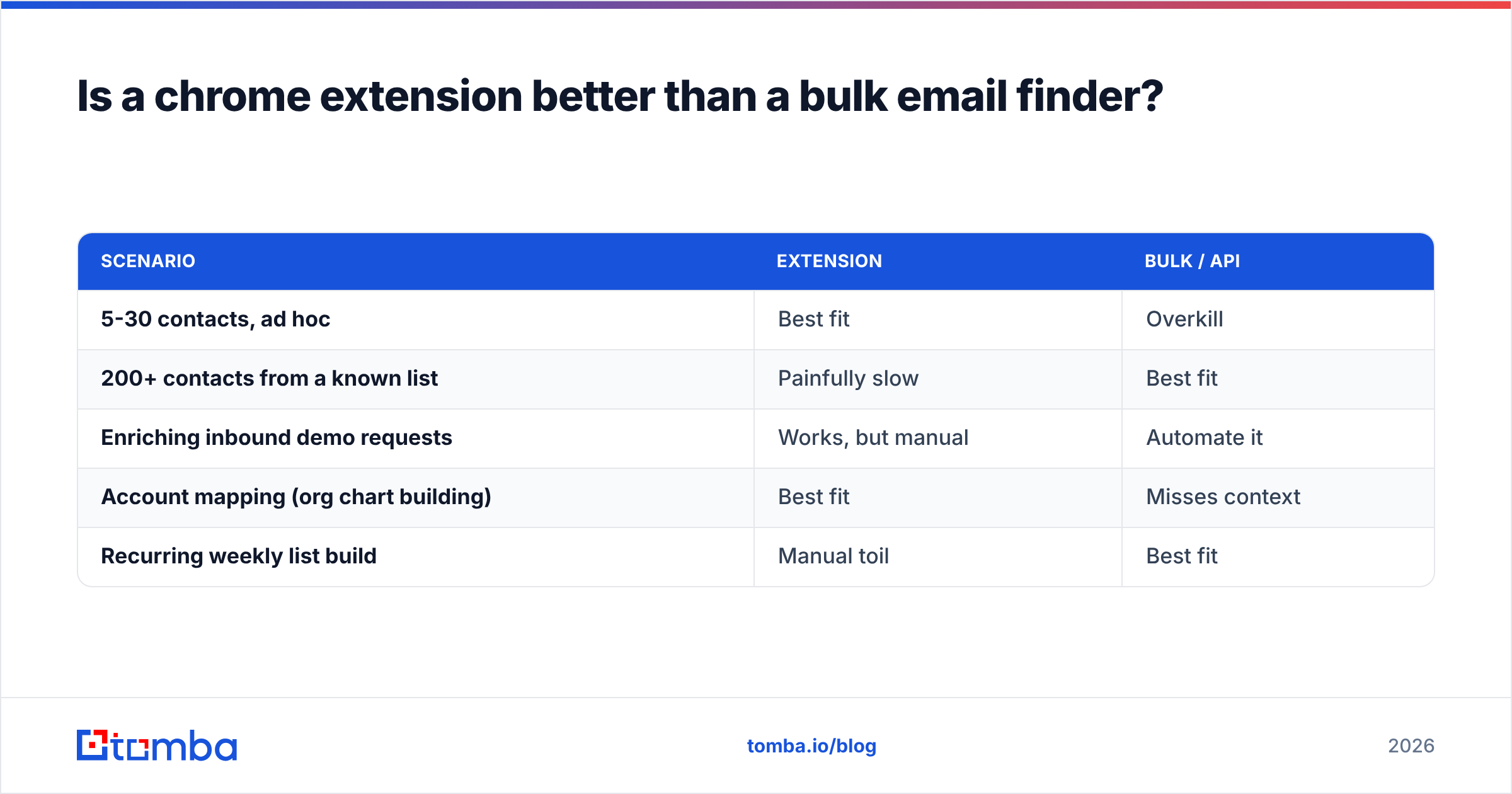
Use the extension when the decision to contact someone happens while you're looking at them — inbound research, event attendee lists, referral follow-ups, account mapping where you're evaluating each person's fit. The lookup is a byproduct of research you were doing anyway.
Use a bulk finder or API when you already know who you want. If you have 400 rows in a spreadsheet, clicking through 400 LinkedIn profiles is roughly 6-8 hours of work an API call does in 90 seconds. Pipe the list through bulk verification or wire it into your CRM with a HubSpot integration.
| Scenario | Extension | Bulk / API |
|---|---|---|
| 5-30 contacts, ad hoc | Best fit | Overkill |
| 200+ contacts from a known list | Painfully slow | Best fit |
| Enriching inbound demo requests | Works, but manual | Automate it |
| Account mapping (org chart building) | Best fit | Misses context |
| Recurring weekly list build | Manual toil | Best fit |
The mistake I see most often is teams buying an extension seat for every rep and then using it for bulk work, burning both credits and hours. Extensions are a scalpel. Lists need a saw.

What should you check before installing one?#
Chrome extensions run with real permissions on pages containing real customer data. Five checks before you click Install:
- Permission scope. "Read and change all your data on all websites" is the broadest permission Chrome grants. Some extensions genuinely need it to inject buttons across sites; many request it out of laziness. Check whether the tool can be scoped to specific domains.
- Where your contributed data goes. If the extension offers free credits for syncing your address book, understand that you're contributing your colleagues' and customers' contact details to a shared database. That's a GDPR conversation with your legal team, not a growth hack.
- Whether the vendor publishes data sourcing. Reputable providers document where records come from. Tomba publishes its data sources; check whether your shortlist does the same. Vagueness here usually means scraping methods someone doesn't want scrutinized.
- Credit refund policy on bad results. Do you get charged for a result the tool itself marks "risky"? Does a bounce refund the credit? The answer changes the effective price materially.
- Update cadence and reviews. Check the last-updated date on the Chrome Web Store listing and skim recent G2 reviews — an extension not updated in 18 months is a liability, not a tool.
One more, specific to 2026: Chrome's Manifest V3 migration is fully enforced now. Any extension still shipping MV2 patterns has been delisted or is running on borrowed time. If a vendor's Web Store listing shows a long gap in updates, that's the likely reason.
How do you get the most out of an email lookup extension?#
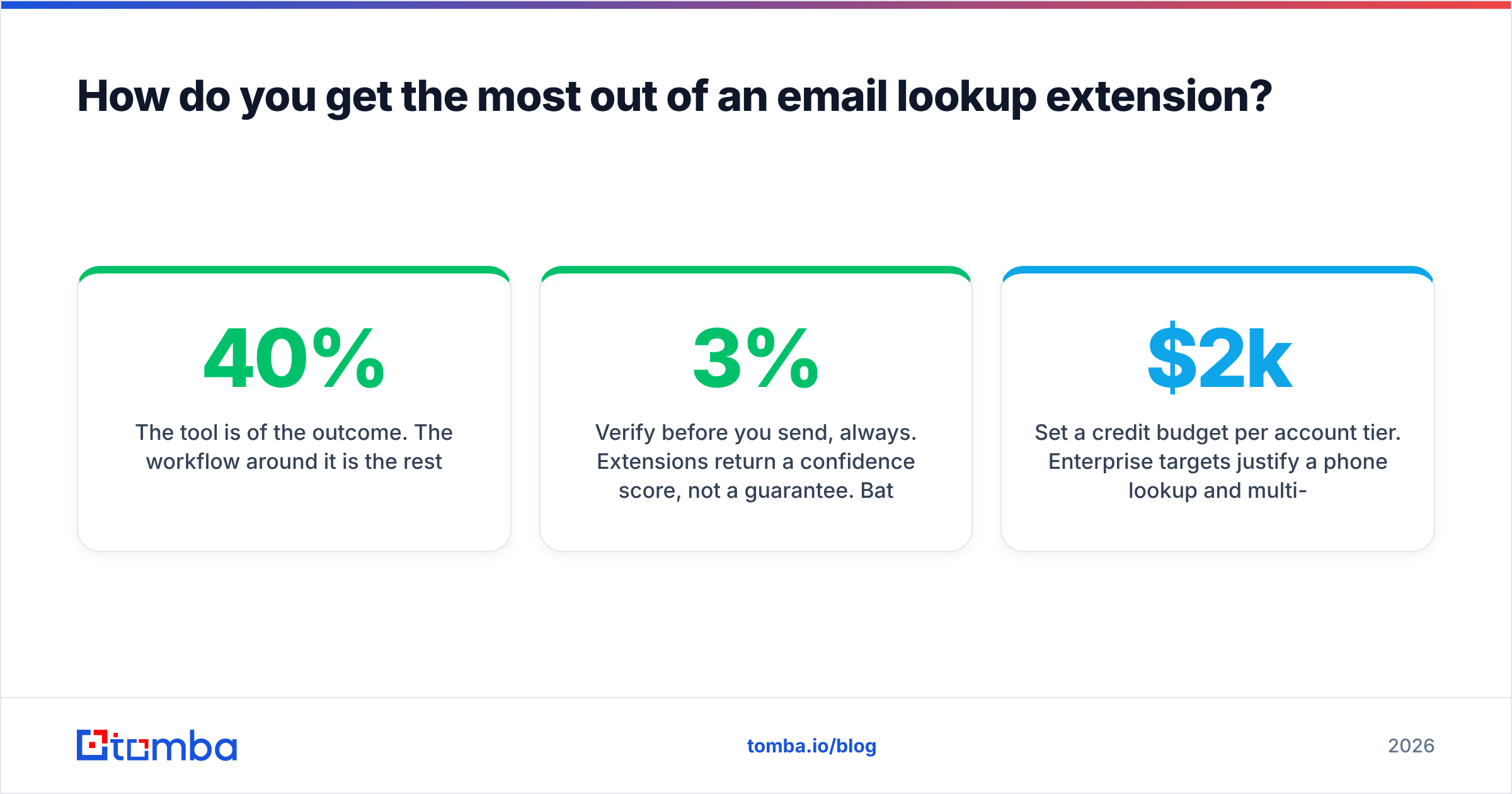
The tool is 40% of the outcome. The workflow around it is the rest.
Verify before you send, always. Extensions return a confidence score, not a guarantee. Batch your finds and push them through an email verifier before they enter a sequence. A 3% bounce rate is survivable; 8% starts damaging your sender reputation, and reputation damage takes weeks to undo.
Find the pattern once, then apply it. If you're targeting eight people at the same company, don't spend eight lookups. Use one lookup to learn the domain's format, then generate the rest with an email permutator and verify the batch. Same result, one-eighth the credits.
Log the source, not just the address. Record where each email came from and when. Six months later, when a contact bounces, you'll know whether the data was stale or wrong from the start — and which tool to trust less.
Set a credit budget per account tier. Enterprise targets justify a phone lookup and multi-contact mapping. SMB targets usually don't. Without a budget, reps spend the same effort on a $2k account as a $200k one.
Layer channels, don't stack tools. If the email is unverifiable, that's a signal to try LinkedIn outreach or a phone touch rather than buying a third email tool. Google's own bulk sender guidelines make it clear: low complaint rates and clean lists matter more than list size.
What are the realistic limitations?#
Three that no vendor will lead with.
Coverage collapses outside tech and North America. Most crawled indexes are heavily weighted toward US/EU software companies. Manufacturing in Southeast Asia, mid-market firms in Latin America, and public sector organizations anywhere will return far worse hit rates. Test on your actual ICP before committing to an annual plan — a 14-day trial on 50 real target accounts tells you more than any review site.
LinkedIn actively works against these tools. Profile scraping violates LinkedIn's terms, and enforcement varies. Extensions that read the page you're viewing sit in a grayer area than ones that crawl programmatically, but aggressive usage still triggers rate limits and, occasionally, account restrictions. Don't run 300 lookups an hour from a personal profile you care about.
A found email is not permission to email. GDPR's legitimate interest basis for B2B outreach is real but narrow — it requires relevance to the recipient's professional role and a working opt-out. CAN-SPAM in the US is looser but still mandates accurate headers and an unsubscribe path. Having the address is the easy part; having a defensible reason to use it is the part that keeps you out of trouble.
Which one should you actually pick?#
Match the tool to your motion, not to the review-site leaderboard:
- You research prospects one at a time and value accuracy over volume → any well-verified extension works; prioritize catch-all handling and refund policy.
- You'll eventually automate this → pick a vendor whose extension, bulk tool, and API share one credit pool. Rebuying a stack in month nine is the expensive mistake.
- You want an all-in-one sales platform → Apollo, and accept that email accuracy is one feature among thirty.
- You need a large verified list right now, not live lookups → buy a curated pre-verified list; it's cheaper per usable contact than 2,000 manual reveals.
- You're a recruiter chasing individuals across employers → RocketReach's person-centric index earns its price.
Whichever way you go, budget for verification as a separate line item. It's the cheapest insurance in outbound: a few dollars per thousand addresses to protect a sending domain that takes months to rebuild.
Ready to test this on your own list? Start with the Tomba Email Finder — the free tier gives you 25 searches a month with no card, enough to run a real accuracy test against your actual target accounts rather than a vendor's demo data. Find the emails in your browser, verify them in bulk, and push them to your CRM through the same credits. If the hit rate on your ICP doesn't hold up, you've lost nothing but an afternoon — which is exactly how a tool evaluation should work.
Related guides#
Ready to find emails that actually work?
Join 150,000+ professionals who stopped guessing and started sending. Free credits on signup — no credit card required.
Get the Tomba newsletter
Practical outbound tactics and product updates — once every two weeks.
About the author