Email Lookup Service in 2026: How to Pick One That Works
Most email lookup services quote 95%+ accuracy and deliver far less on real lists. Here's how the technology works, what the numbers mean, and how to run a 30-minute test that exposes a weak provider before you pay for a year.
TL;DR
- An email lookup service turns a name plus a company (or a domain, or a LinkedIn URL) into a verified professional email address. It is pattern inference plus verification, not a magic directory.
- Headline accuracy claims of "98%" are measured on the vendor's easiest data. On a mixed list of SMB and enterprise targets, expect 55–80% coverage and 90–96% validity on what comes back.
- The two numbers that matter are hit rate (how many rows return anything) and bounce rate (how many of those actually deliver). Vendors love quoting the second and hiding the first.
- Credit accounting is where budgets die. Ask whether failed lookups, re-verifications, and enrichment fields each burn a credit.
- Run the same 100-row test list through three providers before committing. It takes 30 minutes and settles the argument permanently.
What is an email lookup service?#
An email lookup service is a tool that takes an identity fragment you already have — a full name and employer, a company domain, a LinkedIn profile, or even an existing email address — and returns a working business email address for that person, along with a confidence score.
The everyday analogy: it works like a locksmith who has seen ten thousand doors on your street. They don't have your neighbor's key on file. They know that every house on this block uses the same lock model, so they can cut a key that almost certainly fits, then test it in the lock before handing it to you. The "cutting" is pattern inference. The "testing" is verification. A service that skips the second step is selling you guesses.
Technically, a lookup provider sits on three layers:
- A crawled corpus. Public web pages, press releases, GitHub commits, academic papers, company staff directories, and conference speaker lists that expose real addresses in the wild.
- A pattern engine. Once the crawler has seen
sarah.chen@acme.comandmike.torres@acme.com, it infers{first}.{last}@acme.comfor the whole domain and can generate a candidate for anyone at Acme. - A verification layer. MX record checks, SMTP handshake probes, catch-all detection, role-account and disposable-domain filtering, and a scoring model that decides whether the candidate is safe to send to.
Everything else a vendor advertises — Chrome extensions, CRM sync, bulk CSV upload, an API — is packaging around those three layers. When two services differ wildly in quality, it's almost always layer 1 (corpus breadth) or layer 3 (verification rigor), rarely layer 2.
How does an email lookup service actually find an address?#
Here's the sequence a good provider runs for a single query. Understanding it tells you exactly where each vendor cuts corners.
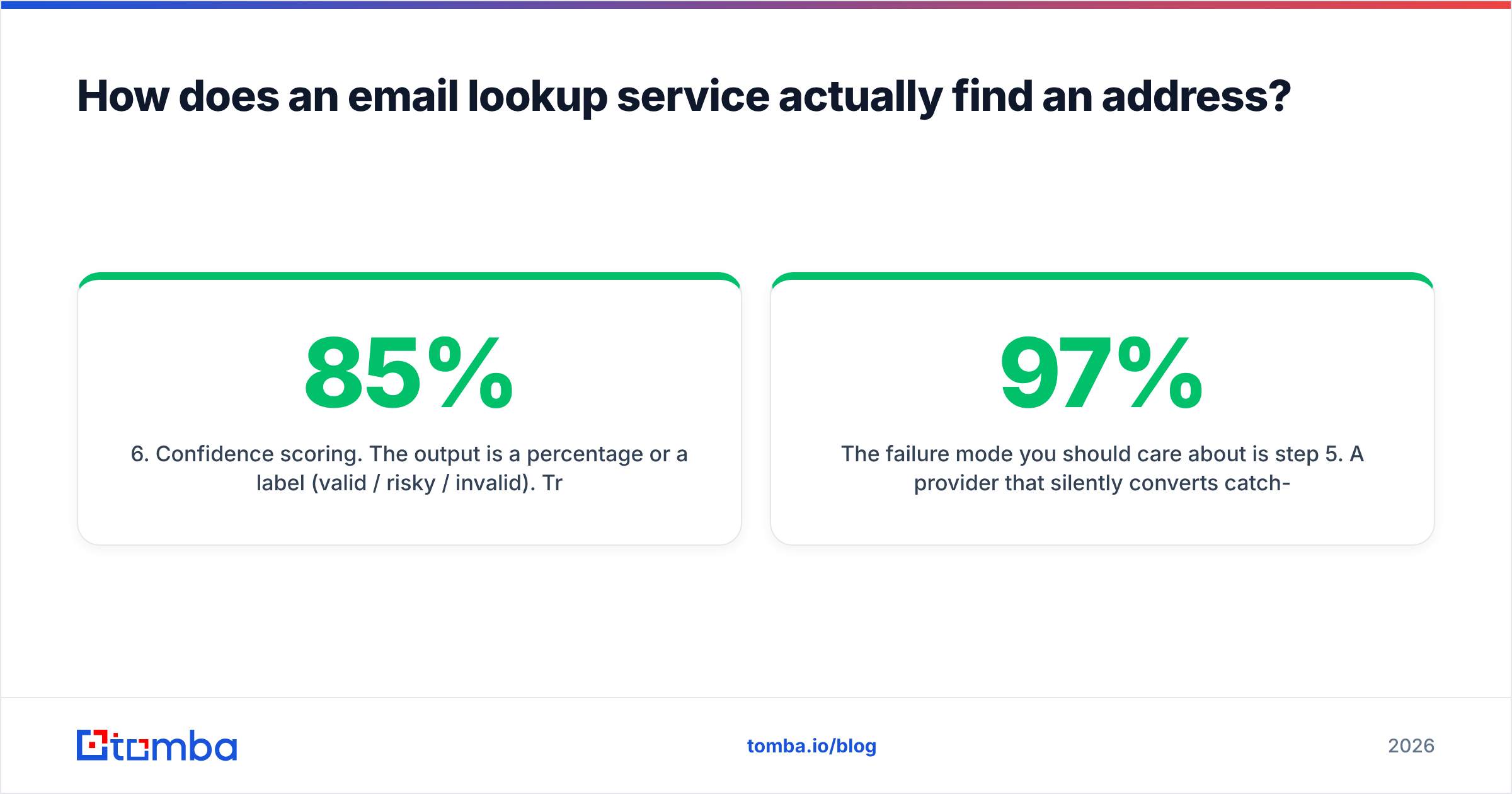
- Direct corpus match. The service checks whether it has already seen this exact person's address in a crawled source. This is the highest-confidence path and the one that separates a large index from a small one. No inference risk, no SMTP guessing.
- Domain pattern resolution. If there's no direct hit, the engine pulls the known email format for that domain —
{f}{last},{first}.{last},{first}— from previously observed addresses at the same company. You can check any company's format yourself with a company email pattern tool. - Candidate generation and ranking. The name is normalized (accents stripped, hyphenated surnames split, nicknames expanded — Bob to Robert and back) and candidates are ranked by how well each matches the dominant domain pattern.
- MX and SMTP validation. The top candidate is tested: does the domain accept mail at all, and does the specific mailbox exist? A well-built email verifier throttles these probes so it doesn't get the checking IP blocked, which is why cheap tools sometimes return false negatives at scale.
- Catch-all and risk classification. If the domain accepts every address, SMTP can't confirm anything. Honest providers label the result "catch-all" or "accept-all" instead of pretending it's verified — and the good ones run additional signals to separate real catch-all mailboxes from noise.
- Confidence scoring. The output is a percentage or a label (valid / risky / invalid). Treat anything under about 85% as needing a second source before it goes into a live sequence.
The failure mode you should care about is step 5. A provider that silently converts catch-all results into "verified" will show you a beautiful 97% accuracy dashboard and a 9% bounce rate on your actual send. Those two numbers cannot both be true, and the bounce rate is the one your mail provider believes.

What accuracy should you expect in 2026?#
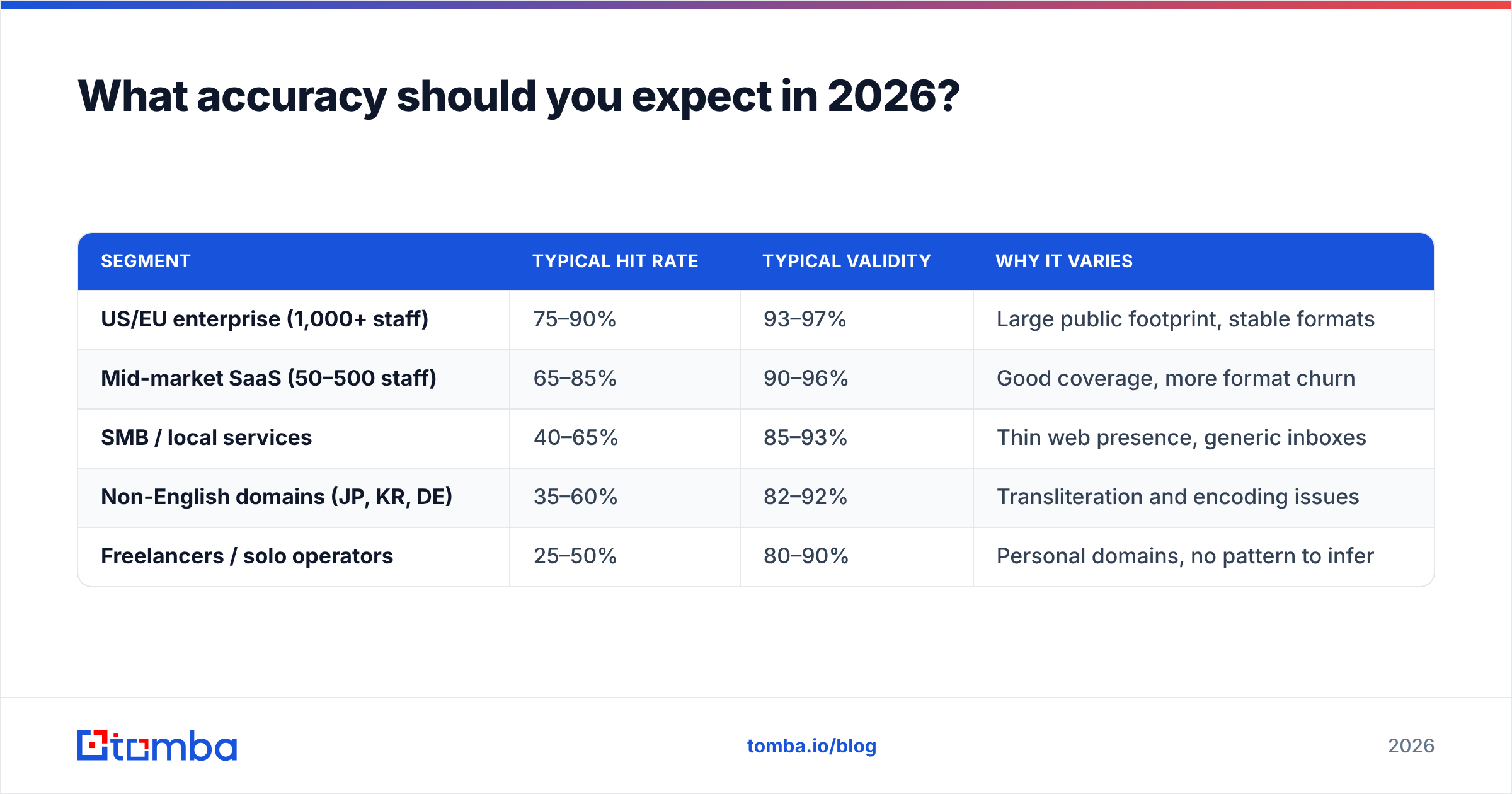
Two different numbers hide behind the word "accuracy," and vendors switch between them freely.
Hit rate (also called coverage or match rate) is the share of input rows that return any address. Validity rate is the share of returned addresses that actually deliver. A service can post 99% validity by returning results for only 30% of your list — technically true, commercially useless.
Realistic 2026 benchmarks on a mixed B2B list:
| Segment | Typical hit rate | Typical validity | Why it varies |
|---|---|---|---|
| US/EU enterprise (1,000+ staff) | 75–90% | 93–97% | Large public footprint, stable formats |
| Mid-market SaaS (50–500 staff) | 65–85% | 90–96% | Good coverage, more format churn |
| SMB / local services | 40–65% | 85–93% | Thin web presence, generic inboxes |
| Non-English domains (JP, KR, DE) | 35–60% | 82–92% | Transliteration and encoding issues |
| Freelancers / solo operators | 25–50% | 80–90% | Personal domains, no pattern to infer |

If a vendor quotes a single number across all of that, they've tested on the enterprise row and are hoping you sell to Fortune 500 companies. Ask them directly: what is your hit rate on companies under 200 employees? The answer, or the dodge, tells you a lot. It's also worth reading how a provider sources and refreshes its index — Tomba publishes its data sources openly, and any vendor that won't discuss provenance in 2026 is a compliance risk you don't need.
How do the main email lookup services compare?#
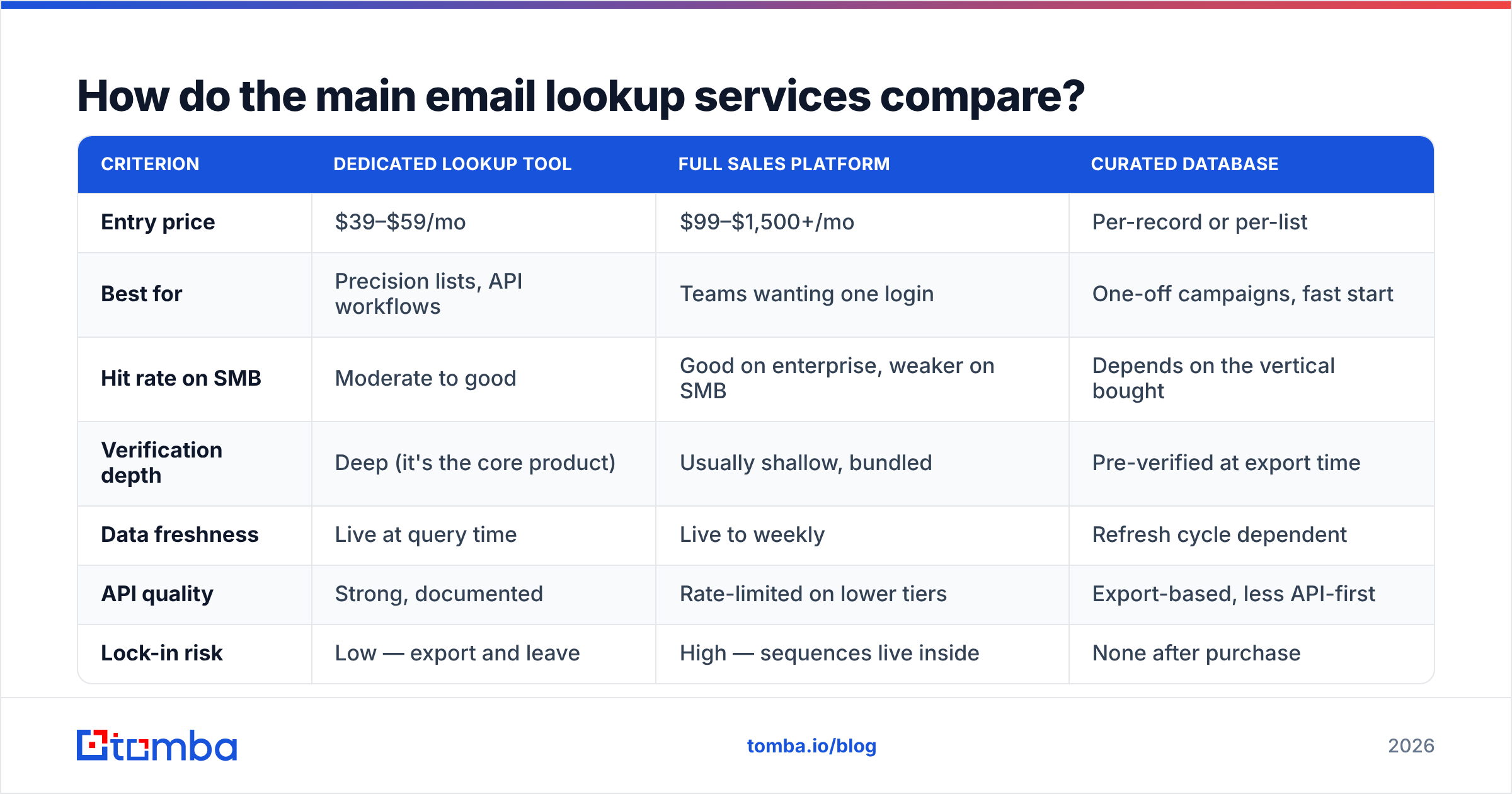
The category splits into three shapes, and picking the wrong shape costs more than picking the wrong vendor within a shape.
Dedicated lookup and verification tools do one job well: name plus domain in, verified address out. Lowest cost per credit, cleanest APIs, no CRM lock-in. Tomba, Hunter, Findymail, and Snov sit here.
Full sales platforms bundle lookup into sequencing, dialers, and a prospect database. Apollo and ZoomInfo are the anchors. You pay platform pricing whether or not you use the platform.
Curated database vendors sell pre-built, human-checked lists rather than on-demand lookups. BookYourData is a strong option here — you buy a filtered slice of a maintained database with a bounce guarantee attached, which suits teams who want a clean list handed over rather than an API to wire up.
| Criterion | Dedicated lookup tool | Full sales platform | Curated database |
|---|---|---|---|
| Entry price | $39–$59/mo | $99–$1,500+/mo | Per-record or per-list |
| Best for | Precision lists, API workflows | Teams wanting one login | One-off campaigns, fast start |
| Hit rate on SMB | Moderate to good | Good on enterprise, weaker on SMB | Depends on the vertical bought |
| Verification depth | Deep (it's the core product) | Usually shallow, bundled | Pre-verified at export time |
| Data freshness | Live at query time | Live to weekly | Refresh cycle dependent |
| API quality | Strong, documented | Rate-limited on lower tiers | Export-based, less API-first |
| Lock-in risk | Low — export and leave | High — sequences live inside | None after purchase |

For pricing sanity checks across the category, G2's lead intelligence grid is a reasonable place to see how these tools cluster by segment and review volume, though treat aggregate review scores as a tiebreaker rather than evidence about data quality.
What does an email lookup service cost in 2026?#
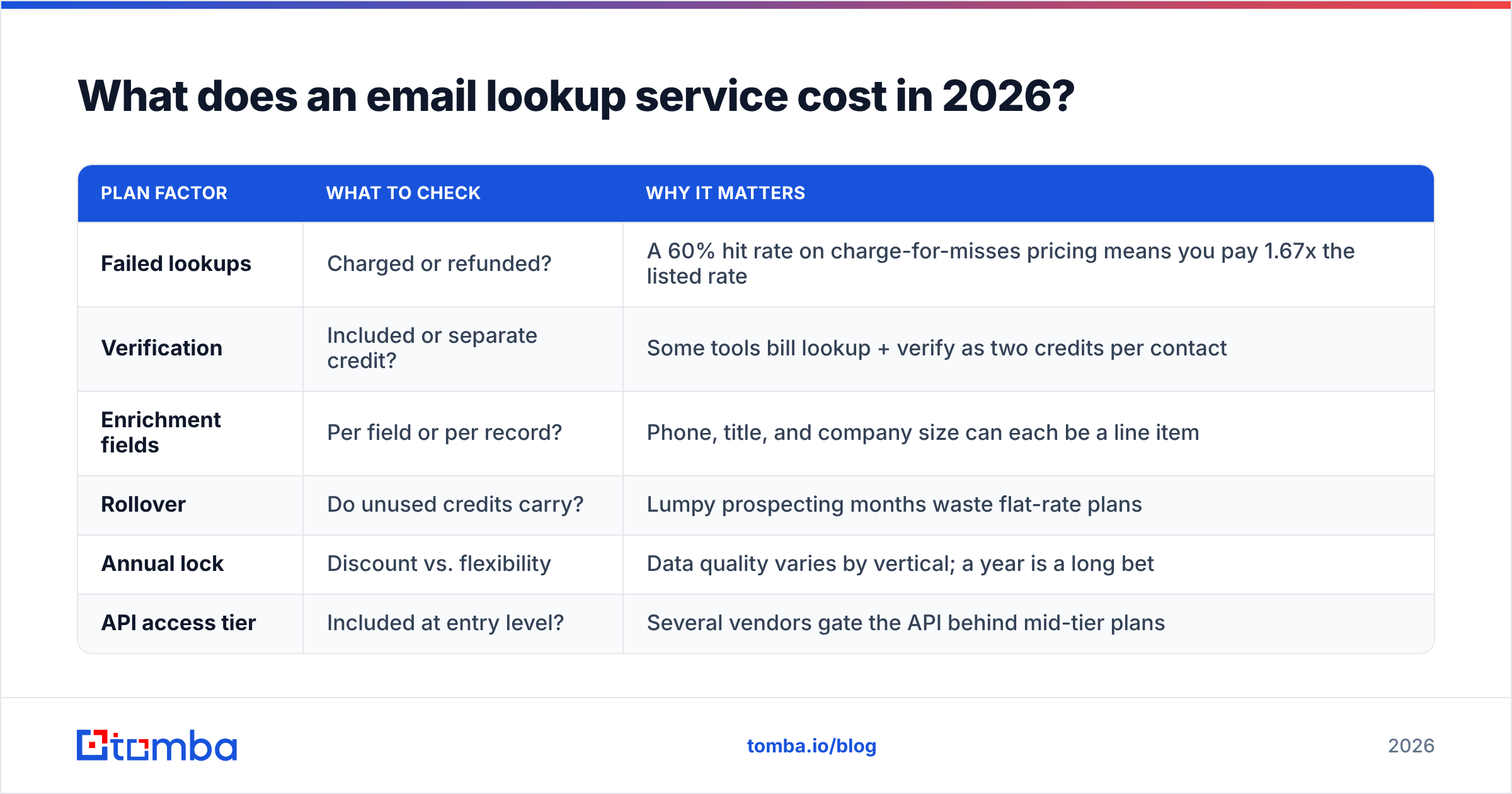
Sticker price is the least interesting number. Cost per usable address is the real one — and it depends entirely on credit accounting.
| Plan factor | What to check | Why it matters |
|---|---|---|
| Failed lookups | Charged or refunded? | A 60% hit rate on charge-for-misses pricing means you pay 1.67x the listed rate |
| Verification | Included or separate credit? | Some tools bill lookup + verify as two credits per contact |
| Enrichment fields | Per field or per record? | Phone, title, and company size can each be a line item |
| Rollover | Do unused credits carry? | Lumpy prospecting months waste flat-rate plans |
| Annual lock | Discount vs. flexibility | Data quality varies by vertical; a year is a long bet |
| API access tier | Included at entry level? | Several vendors gate the API behind mid-tier plans |
Tomba's structure is deliberately simple: a free tier at 25 searches per month, Starter at $49/mo, Growth at $99/mo, Pro at $249/mo, and custom Enterprise pricing — with the API available rather than locked behind an upgrade wall. Full details are on the Tomba pricing page. Whichever vendor you evaluate, do the arithmetic on effective cost: divide the monthly fee by the number of addresses you'd actually send to, not the number of credits you're granted.
A quick sanity example. Two tools, both $99/mo, both quoting 5,000 credits:
- Tool A: 70% hit rate, misses refunded, verification included → 5,000 usable addresses → $0.020 each
- Tool B: 70% hit rate, misses charged, verification is a second credit → 1,750 usable addresses → $0.057 each
Same sticker price, 2.85x the real cost.

Is a free email lookup service good enough?#
For some jobs, yes. Free tiers are genuinely useful when your volume is low and your targets are well-known companies.
Free works when you need fewer than ~30 addresses a month, you're targeting mid-size or larger companies with predictable formats, and a manual second check before sending is acceptable. A free email checker will confirm syntax, MX records, and obvious disposable domains at zero cost.
Free breaks down the moment you need volume, an API, catch-all handling, or reproducible results. Most free tiers cap at 25–50 lookups, throttle SMTP verification hard (which inflates "unknown" results), and exclude bulk upload entirely. If you're building a list of 2,000 contacts, stitching together five free accounts costs more in your time than a $49 plan costs in cash.
The honest rule: use free tiers to evaluate a provider, not to run a campaign on.
How do you handle catch-all domains?#
Catch-all domains are the single biggest source of disagreement between vendors, and roughly 20–30% of B2B domains are configured this way.
A catch-all server accepts mail addressed to anything at the domain — ceo@, asdfgh@, all of it — and sorts out the mess internally. SMTP verification therefore returns "accepted" for every candidate, which tells you nothing about whether the mailbox exists.
Three strategies, in ascending order of quality:
- Reject them. Safest for deliverability, but you may be discarding a third of your total addressable market.
- Send anyway and monitor. Works if your domain reputation has headroom and you cap catch-all sends at a small share of daily volume.
- Use a dedicated catch-all resolver. Tools like a catch-all verifier apply signals beyond SMTP — corpus matches, pattern confidence, historical engagement — to grade catch-all candidates instead of blanket-labeling them "risky."
If your ICP skews toward larger enterprises, catch-all handling is not an edge case. It's the majority of your list, and it deserves to be a primary evaluation criterion rather than a footnote.
What else should a lookup service do?#
Modern providers extend past the single-address query, and these adjacent features often determine whether the tool fits your workflow:
- Domain search — pull every discoverable address at a company in one call, useful for multi-threading an account rather than betting on one contact.
- Reverse lookup — start from an address you already have and work backwards to a name, title, and company. A reverse email lookup is how you clean an inherited list where all you inherited was the email column.
- Bulk processing — CSV in, enriched CSV out, with clear per-row status codes. Non-negotiable above a few hundred contacts.
- Enrichment — job title, seniority, company size, tech stack. Useful for segmentation, but check whether it's billed separately.
- Native integrations — a HubSpot integration or Sheets add-on removes the CSV round-trip that quietly eats an hour a week.
You don't need all of these. You do need to know which ones your process actually depends on before you compare price tags, because a cheaper tool that forces manual CSV shuffling is not cheaper.
How do you test a provider in 30 minutes?#
Vendor benchmarks are marketing. Your list is evidence. Run this:
- Build a 100-row control list. Split it deliberately: 40 rows from your real ICP, 30 from companies under 100 employees, 20 non-US, and 10 people whose addresses you already know for certain (colleagues, customers, your own team). That last group is your ground truth.
- Run the identical file through three providers. Free tiers usually cover 25 rows each; buy one month of the cheapest paid tier if you need the full 100.
- Record four numbers per vendor: hit rate, catch-all share, agreement with your 10 known addresses, and cost per returned row.
- Send a small validation batch. Take 50 verified addresses per vendor, send a low-stakes message from a warmed domain, and count hard bounces after 48 hours. Anything over 3% means the verification layer is decorative.
- Test the failure path. Feed each tool ten deliberately bad rows — misspelled companies, defunct domains, made-up names. A good service returns nothing. A bad one invents plausible addresses, which is far more expensive than an empty cell.
Step 5 catches more bad vendors than the other four combined. Guessing without verification is the behavior that damages your sender reputation, and it's invisible until your bounce rate spikes weeks later. If you want the underlying mechanics, the Wikipedia entry on email addresses covers the RFC rules that determine what's syntactically valid in the first place — a surprising number of tools get the edge cases wrong.
What are the most common mistakes?#
Optimizing for hit rate alone. A 95% hit rate with 12% bounces is worse than a 65% hit rate with 1% bounces, because the first one damages the domain you'll need for the next twelve months of outbound.
Skipping re-verification on old data. B2B contact data decays roughly 25–30% per year through job changes alone. An address verified in January is a different risk profile in September. Re-verify anything older than 90 days before a send.
Buying the platform to get the data. If lookup is the only thing you need, a full sales platform charges you 5–10x for sequencing features your team already has elsewhere.
Ignoring compliance. Under GDPR and similar frameworks, legitimate-interest B2B outreach is defensible; scraped personal addresses are not. Ask where the data comes from and whether the vendor honors suppression requests, and get the answer in writing.
Treating the tool as the strategy. The best lookup service in the world doesn't fix a bad ICP, a weak offer, or a cold domain with no warmup history. It removes one specific bottleneck — finding the address — and nothing else.
Which email lookup service should you choose?#
Match the shape to the job. If you're running precision outbound to a defined list and want to control cost per usable address, a dedicated lookup tool wins on economics and API quality. If you want a pre-cleaned list handed to you with a bounce guarantee and no integration work, a curated database vendor like BookYourData is the faster path. If your team genuinely lives inside one platform, the bundle may be worth the premium — just price it honestly against the alternative.
Ready to test the first option? Start with the Tomba Email Finder on the free tier: 25 searches a month, no card, with verification and catch-all handling included rather than sold separately. Run your 100-row control list, check the four numbers, and compare it against whatever you're using now. If the hit rate and bounce rate hold up on your data, the $49/mo Starter plan covers most solo and small-team prospecting — and if they don't, you've lost half an hour and learned something a vendor benchmark would never have told you.
Related guides#
Ready to find emails that actually work?
Join 150,000+ professionals who stopped guessing and started sending. Free credits on signup — no credit card required.
Get the Tomba newsletter
Practical outbound tactics and product updates — once every two weeks.
About the author