Email Management Tool for Sales: 2026 Buyer's Guide
Most sales teams buy an inbox tool when they actually need a data tool. Here is how the five categories of email management software differ, what each one costs, and how to pick without wasting a quarter.
TL;DR
- "Email management tool for sales" describes five different product categories that get confused constantly: inbox organizers, sequencers, deliverability/warmup platforms, shared-inbox helpdesks, and data/verification layers.
- Buying the wrong category is the most common failure. A sequencer will not fix a 22% bounce rate, and an inbox organizer will not fix a rep who sends 12 emails a day.
- Budget roughly $30–$80 per seat per month for sending, $40–$100 per month for data, and $30–$50 per mailbox for warmup. Stacks that hit $200+/seat are usually paying twice for the same feature.
- The highest-ROI layer is almost always the cheapest one: clean, verified contact data feeding whatever sequencer you already own.
- Start by auditing what breaks first — bounces, follow-up leakage, or reply triage — and buy only for that.
What is an email management tool for sales?#
An email management tool for sales is any software that handles the volume, sequencing, hygiene, or triage of outbound and inbound sales email at a scale a human inbox can't. That's a deliberately wide definition, because the market is wide — and vendors in five very different categories all describe themselves with the same phrase.
Think of it like kitchen equipment. A knife, a stove, a fridge, and a dishwasher are all "kitchen tools," but if your problem is spoiled ingredients, buying a sharper knife accomplishes nothing. Most sales teams shopping for email management have a spoiled-ingredients problem — bad contact data — and go shopping for knives.
Here's how the categories actually break down:
- Inbox organizers — Superhuman, Shortwave, Missive. Speed, snoozing, keyboard shortcuts, AI triage. They make one rep's personal inbox faster. They do nothing for pipeline volume.
- Sequencers / sending platforms — Instantly, Smartlead, Saleshandy, Reply.io, Outreach, Salesloft. Multi-step campaigns, mailbox rotation, reply detection, A/B testing. This is what most people mean by "sales email tool."
- Deliverability and warmup platforms — Warmup Inbox, Mailreach, plus warmup bundled into most sequencers. They manage sender reputation, SPF/DKIM/DMARC, and inbox placement.
- Shared inbox / conversation platforms — Front, Help Scout, Missive again. Built for inbound: routing, assignment, SLAs, collision detection when two reps reply to the same thread.
- Data and verification layers — Tomba, BookYourData, Apollo, ZeroBounce, Clearbit. These supply and clean the addresses everything else sends to.
Only categories 2 and 4 are "email management" in the literal sense. Categories 3 and 5 determine whether category 2 works at all.

Which category do you actually need?#
Diagnose before you shop. Three symptoms map cleanly to three purchases:
Symptom: bounce rate above 3%. You have a data problem, not a sending problem. No sequencer fixes this. You need verification at the source and ongoing list hygiene. Every 100 bounced sends on a fresh domain costs you weeks of sender reputation recovery.
Symptom: reps send 8 emails a day and forget follow-ups. You have a sequencing problem. Buy a sequencer. Most pipeline in outbound sits in touches 3 through 6, and humans do not execute those manually with any consistency.
Symptom: inbound replies sit unanswered for 14 hours, or two reps reply to the same lead. You have a triage problem. Buy a shared inbox. A sequencer will make this worse by adding volume to a queue nobody is working.
Symptom: emails send fine, land nowhere, and open rates sit under 15%. Deliverability. Check SPF, DKIM, DMARC, domain age, and content flags before you blame the copy. Run an SPF checker and a spam checker before you spend $500 on a warmup subscription.
If two symptoms are true, fix the data one first. Clean data improves the other metrics passively; the reverse is never true.
How do the main categories compare on price and fit?#
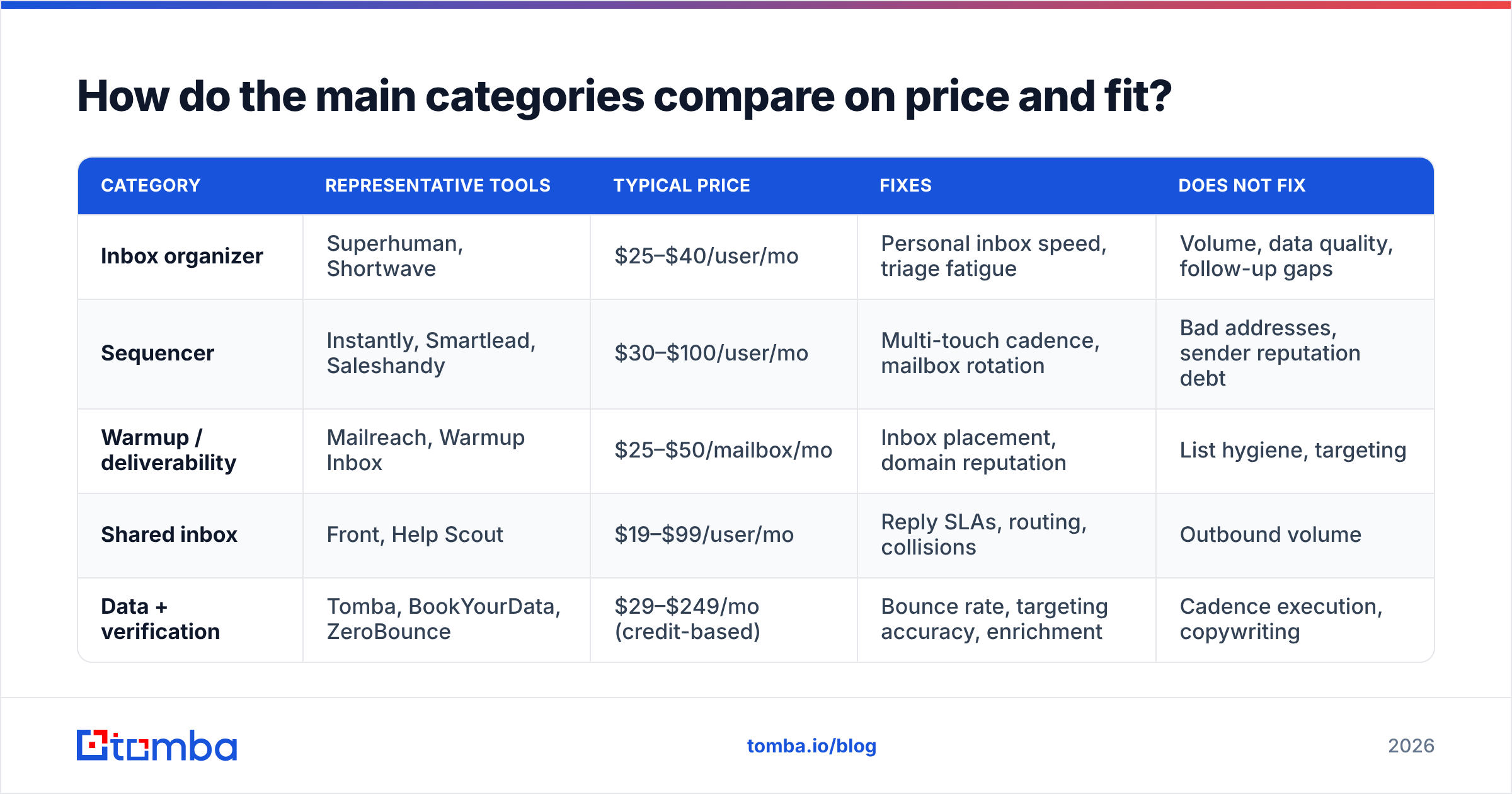
| Category | Representative tools | Typical price | Fixes | Does NOT fix |
|---|---|---|---|---|
| Inbox organizer | Superhuman, Shortwave | $25–$40/user/mo | Personal inbox speed, triage fatigue | Volume, data quality, follow-up gaps |
| Sequencer | Instantly, Smartlead, Saleshandy | $30–$100/user/mo | Multi-touch cadence, mailbox rotation | Bad addresses, sender reputation debt |
| Warmup / deliverability | Mailreach, Warmup Inbox | $25–$50/mailbox/mo | Inbox placement, domain reputation | List hygiene, targeting |
| Shared inbox | Front, Help Scout | $19–$99/user/mo | Reply SLAs, routing, collisions | Outbound volume |
| Data + verification | Tomba, BookYourData, ZeroBounce | $29–$249/mo (credit-based) | Bounce rate, targeting accuracy, enrichment | Cadence execution, copywriting |
Read the "Does NOT fix" column twice. It's the column that determines whether your second purchase was necessary or redundant.
What does a sane sales email stack cost in 2026?#
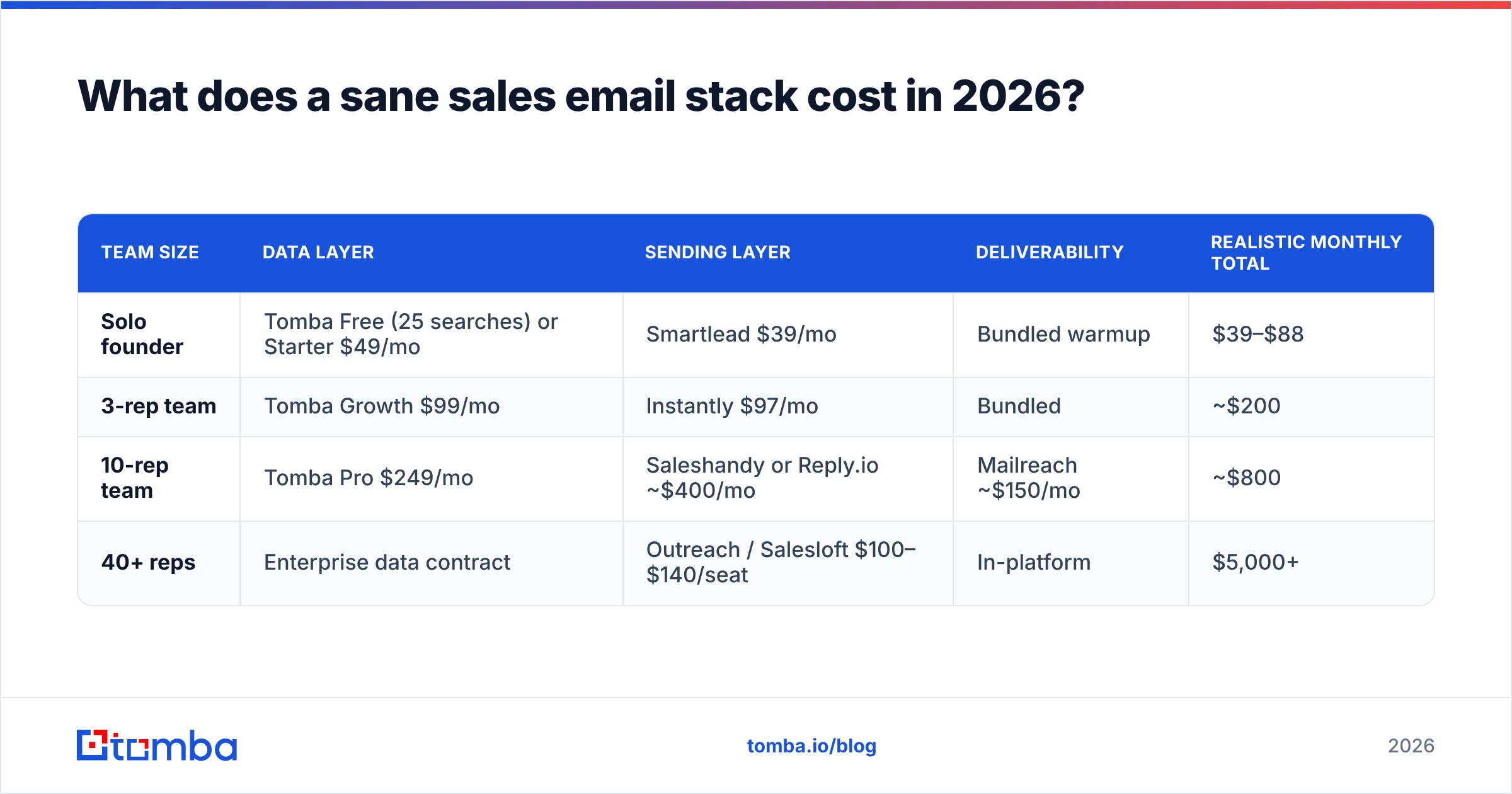
Most teams overbuy by layering platforms whose feature sets overlap 60%. A three-rep team does not need Outreach. A 40-rep team probably does need something more than a $37/mo sequencer.
| Team size | Data layer | Sending layer | Deliverability | Realistic monthly total |
|---|---|---|---|---|
| Solo founder | Tomba Free (25 searches) or Starter $49/mo | Smartlead $39/mo | Bundled warmup | $39–$88 |
| 3-rep team | Tomba Growth $99/mo | Instantly $97/mo | Bundled | ~$200 |
| 10-rep team | Tomba Pro $249/mo | Saleshandy or Reply.io ~$400/mo | Mailreach ~$150/mo | ~$800 |
| 40+ reps | Enterprise data contract | Outreach / Salesloft $100–$140/seat | In-platform | $5,000+ |
Two notes on that table. First, sequencer pricing is per-seat and scales linearly; data pricing is credit-based and scales with list volume, not headcount — a 3-rep team building 10,000-contact lists needs a bigger data plan than a 10-rep team working 500 named accounts. Second, the enterprise row exists mostly to buy forecasting, call recording, and admin controls. If you're evaluating it purely for email, you're overpaying by an order of magnitude.
BookYourData is worth a separate mention here because it solves a different shape of the data problem: pre-built, pay-as-you-go list purchasing with a bounce guarantee, rather than lookup-by-name. If your motion is "give me 5,000 CFOs in US manufacturing" rather than "find this specific person's address," that's the model that fits. Teams often run both — a purchased list for volume plays, a lookup tool for named-account precision.
Why does data quality decide everything downstream?#
Because the entire stack multiplies against it.
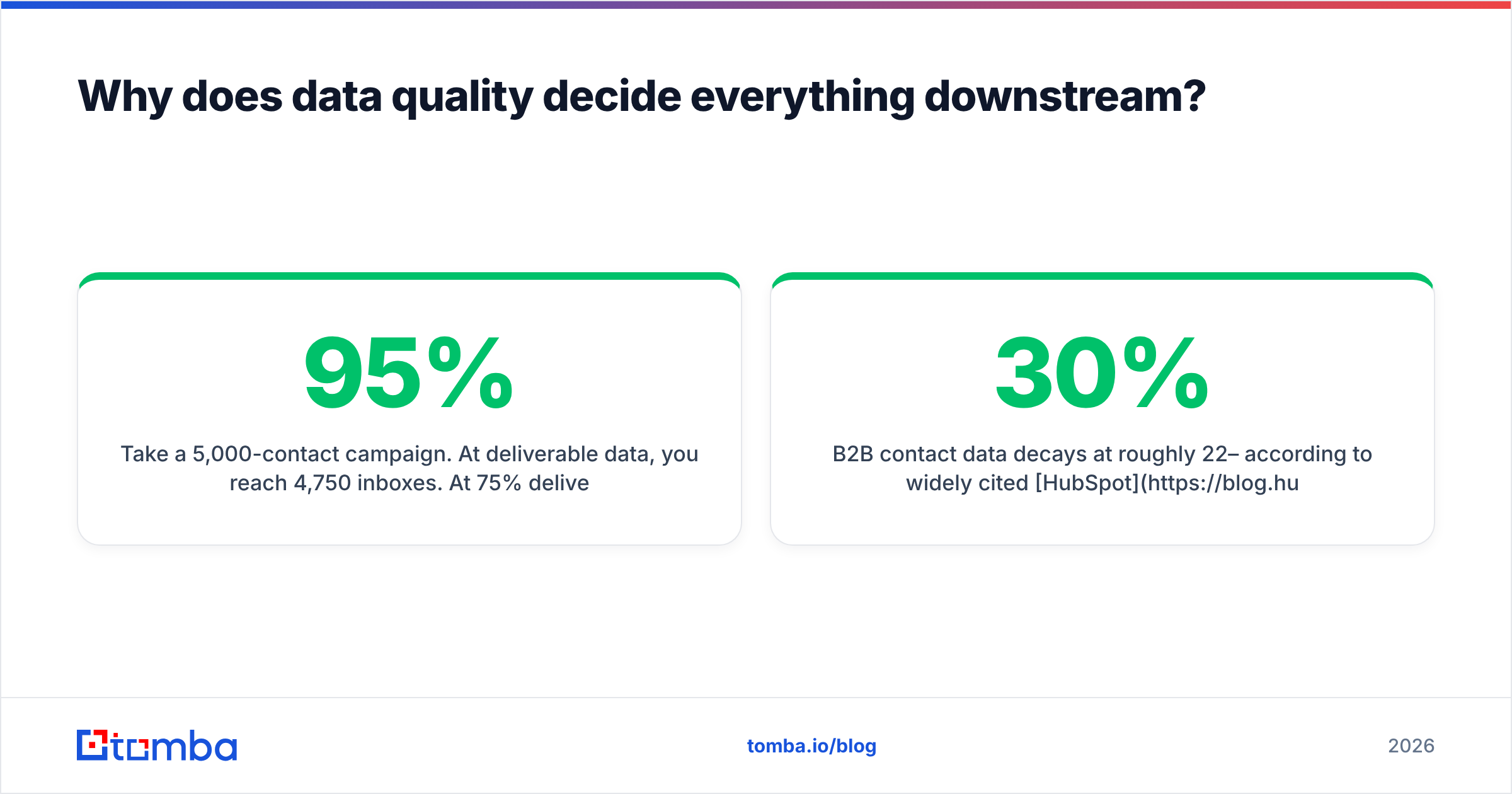
Take a 5,000-contact campaign. At 95% deliverable data, you reach 4,750 inboxes. At 75% deliverable data — normal for a scraped or 18-month-old list — you reach 3,750, and the 1,250 bounces push your domain reputation down far enough that some of the 3,750 land in spam anyway. The effective reach gap is closer to 2:1 than the raw numbers suggest.
B2B contact data decays at roughly 22–30% per year according to widely cited HubSpot research, and job-change velocity in tech has made that worse. A list you bought in January is measurably worse in July.
This is why verification is not a one-time step. The workflow that holds up:
- Find the address at send time, not months ahead — use an email finder or domain search as close to the campaign date as possible.
- Verify every address before import with an email verifier; reject anything below your confidence threshold.
- Handle catch-alls separately — a catch-all verifier distinguishes "the domain accepts everything" from "this mailbox exists," which standard verification cannot.
- Enrich for personalization tokens — title, company size, tech stack — via data enrichment so your merge fields don't render blank.
- Re-verify anything older than 90 days before it enters a new sequence.

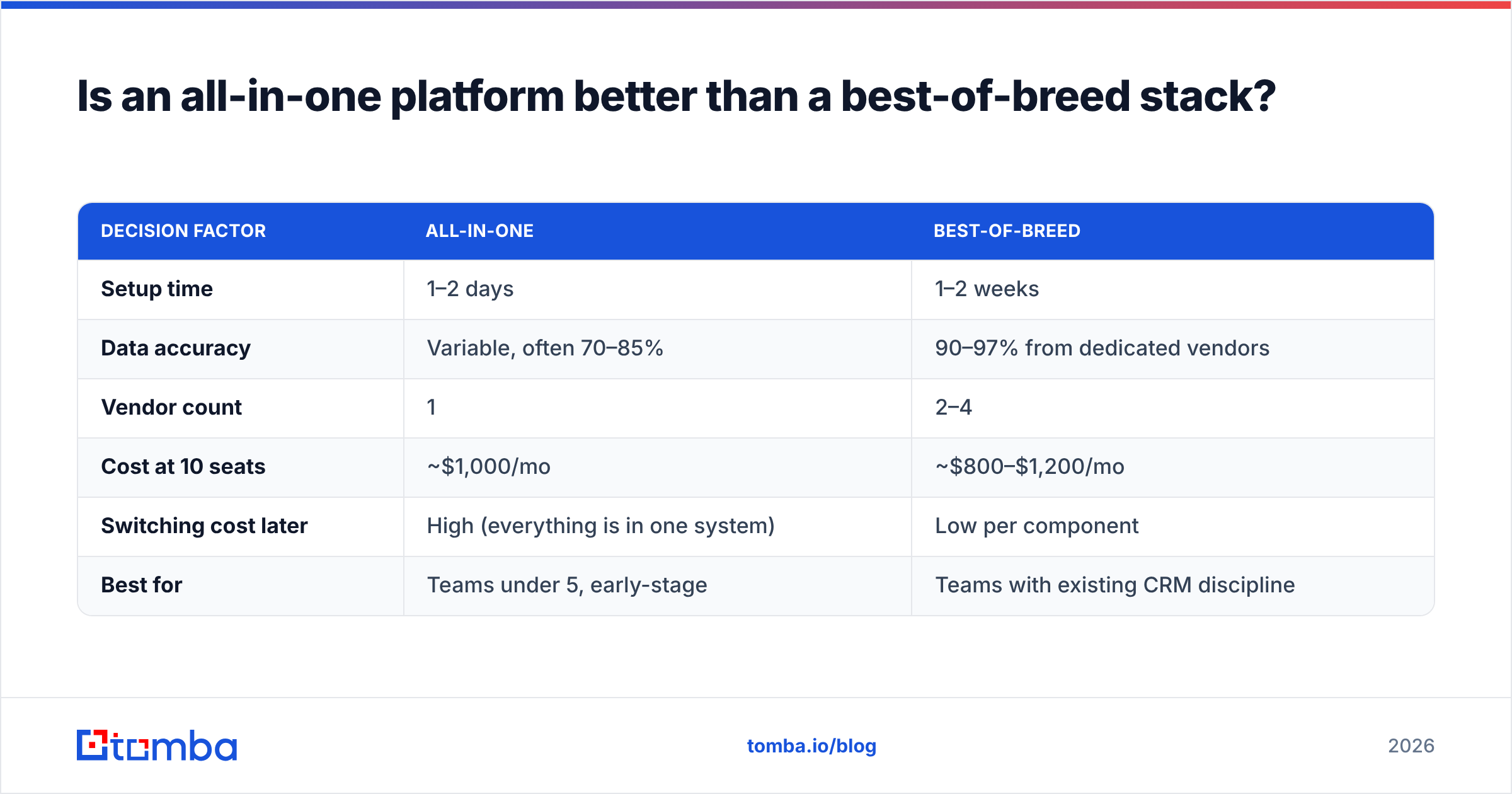
Is an all-in-one platform better than a best-of-breed stack?#
Depends on your bounce tolerance and your team's appetite for admin work.
All-in-one platforms — Apollo being the archetype — bundle data, sequencing, dialing, and basic CRM into a single seat price. That's genuinely convenient at $49–$99/user/mo, and for a team under five people, the reduced vendor overhead is worth real money.
The trade-off is that bundled data is usually the weakest component. Platforms that give away contact records to sell seats have no incentive to make those records excellent, and independent accuracy testing on G2 consistently shows dedicated data vendors outperforming bundled databases on verified-email rate. You end up paying for a sequencer and inheriting a list you don't trust.
Best-of-breed costs more in line items and less in wasted sends. The practical compromise most mid-market teams land on: keep whichever sequencer your reps already like, and swap the data layer underneath it. Sequencers are sticky because reps build muscle memory in them; data providers are trivially swappable because they're just an API and a CSV.
| Decision factor | All-in-one | Best-of-breed |
|---|---|---|
| Setup time | 1–2 days | 1–2 weeks |
| Data accuracy | Variable, often 70–85% | 90–97% from dedicated vendors |
| Vendor count | 1 | 2–4 |
| Cost at 10 seats | ~$1,000/mo | ~$800–$1,200/mo |
| Switching cost later | High (everything is in one system) | Low per component |
| Best for | Teams under 5, early-stage | Teams with existing CRM discipline |
How should you run an evaluation without burning a quarter?#
Two weeks, three vendors, one control list. That's the whole method.
Week 1 — build the control. Pull 300 contacts you can independently verify: accounts where you already have a confirmed email for at least 50 of them. Feed the same 300 names and domains to each candidate tool. Measure raw find rate, verified find rate, and how many known-good addresses each one got right versus merely returned.
Week 2 — send. Route the results through your existing sequencer with identical copy. Track bounce rate, response rate, and spam complaints per source. Do not change subject lines between cohorts; you're testing data, not copy.
Things that will skew the test if you're careless:
- Mixed domains. Sending from a new domain and an aged one across cohorts invalidates the deliverability read entirely.
- Catch-all domains. Segment these out and score them separately — otherwise one enterprise-heavy cohort looks artificially good or bad.
- Credit-model confusion. Some vendors charge for failed lookups, some don't. Normalize cost-per-verified-contact, not cost-per-search. Check Tomba pricing and each competitor's terms on what counts as a billable credit.
- Sample size under 200. Below that, a handful of bad rows swings the percentage enough to mislead you.
Run the numbers per 1,000 verified contacts. That single metric makes tools with wildly different pricing models directly comparable, and it's the number your CFO will ask for anyway.
What should you do in the first 30 days?#
If you're starting from a mess, sequence it like this:
- Days 1–3: audit. Export your current list, run it through verification, and get an honest bounce-risk number. Most teams find 15–30% of their "active" list is dead.
- Days 4–7: fix authentication. SPF, DKIM, DMARC on every sending domain. This is free and it's the single largest lever on email deliverability.
- Days 8–14: pick one tool. Whichever category matched your worst symptom. One tool, not three.
- Days 15–30: instrument. Bounce rate, reply rate, and meetings booked, tracked per source and per sequence. Without this, your next purchase is another guess.
The teams that get this right treat email management as a supply chain: data in, sequence through, replies out. The tools matter less than knowing which link is broken.
Most of the time it's the first one. If your bounce rate is the number keeping you up, start with the Tomba Email Finder — the free tier gives you 25 searches a month to test find rate against your own control list, and Starter at $49/mo covers most solo and small-team volume. Verify before you send, and every other tool in your stack starts performing like the demo promised.
Related guides#
Ready to find emails that actually work?
Join 150,000+ professionals who stopped guessing and started sending. Free credits on signup — no credit card required.
Get the Tomba newsletter
Practical outbound tactics and product updates — once every two weeks.
About the author