Email Marketing Bounce Rate: Benchmarks and Fixes for 2026
Bounce rate is the fastest way to lose inbox access — and most senders only look at it after the damage. Here are the 2026 benchmarks, the math ESPs actually use, and the pre-send fixes that work.
TL;DR
- Bounce rate = (bounced emails ÷ emails delivered to the sending server) × 100. Most ESPs suspend or throttle accounts somewhere between 2% and 5%.
- Hard bounces are the ones that hurt. A 4% hard-bounce campaign can cost you weeks of sender reputation; a 4% soft-bounce campaign is usually a Tuesday.
- The 2026 median across B2B senders sits near 0.7%. If you're above 2%, your list hygiene is the problem — not your subject line.
- Verification before send removes 80–95% of avoidable bounces. It is cheaper than reputation repair by roughly an order of magnitude.
- Catch-all domains are where most "verified" lists still leak. Treat them as a separate risk bucket, not as valid addresses.
What is an email marketing bounce rate?#
Your email marketing bounce rate is the percentage of sent messages that a receiving mail server refused to accept. The formula every major platform uses:
Bounce rate = (total bounces ÷ total emails sent) × 100Think of it like a delivery driver leaving packages at addresses that don't exist. One bad address is a shrug. Forty in a row and the depot starts asking whether your address list — and by extension, you — should be trusted at all. That's exactly how Gmail and Microsoft treat a sender with a rising bounce rate: not as someone with a data problem, but as someone who probably bought a list.
The number matters more than open rate for one reason. Opens are inferred and increasingly obscured by privacy proxies. Bounces are a hard signal, logged by the receiving server, and mailbox providers weigh them directly when deciding whether your next campaign lands in the inbox, the spam folder, or nowhere.
Hard bounce vs soft bounce: what's the difference?#
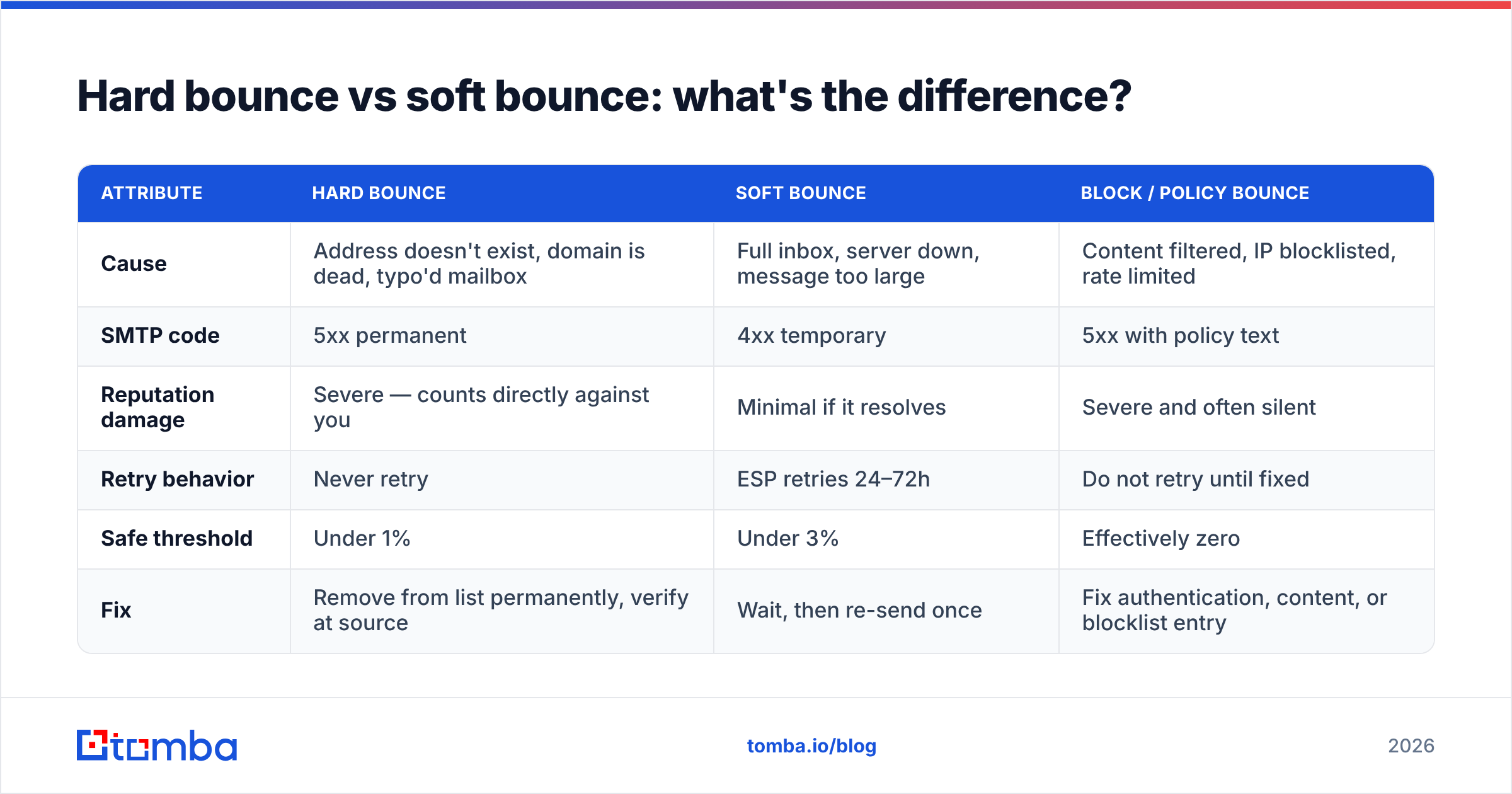
Not all bounces cost the same. Mixing them into one dashboard number is the single most common reporting mistake in email marketing.
| Attribute | Hard bounce | Soft bounce | Block / policy bounce |
|---|---|---|---|
| Cause | Address doesn't exist, domain is dead, typo'd mailbox | Full inbox, server down, message too large | Content filtered, IP blocklisted, rate limited |
| SMTP code | 5xx permanent | 4xx temporary | 5xx with policy text |
| Reputation damage | Severe — counts directly against you | Minimal if it resolves | Severe and often silent |
| Retry behavior | Never retry | ESP retries 24–72h | Do not retry until fixed |
| Safe threshold | Under 1% | Under 3% | Effectively zero |
| Fix | Remove from list permanently, verify at source | Wait, then re-send once | Fix authentication, content, or blocklist entry |
The practical rule: hard bounces are a data problem, block bounces are an infrastructure problem, and soft bounces are usually noise. If your platform reports a single blended "bounce rate," export the raw logs and split them by SMTP response class before you diagnose anything.
What is a good email marketing bounce rate in 2026?#
Under 2% total, with hard bounces under 0.5%. That's the working target. Anything above 5% and most ESPs will pause your account automatically.
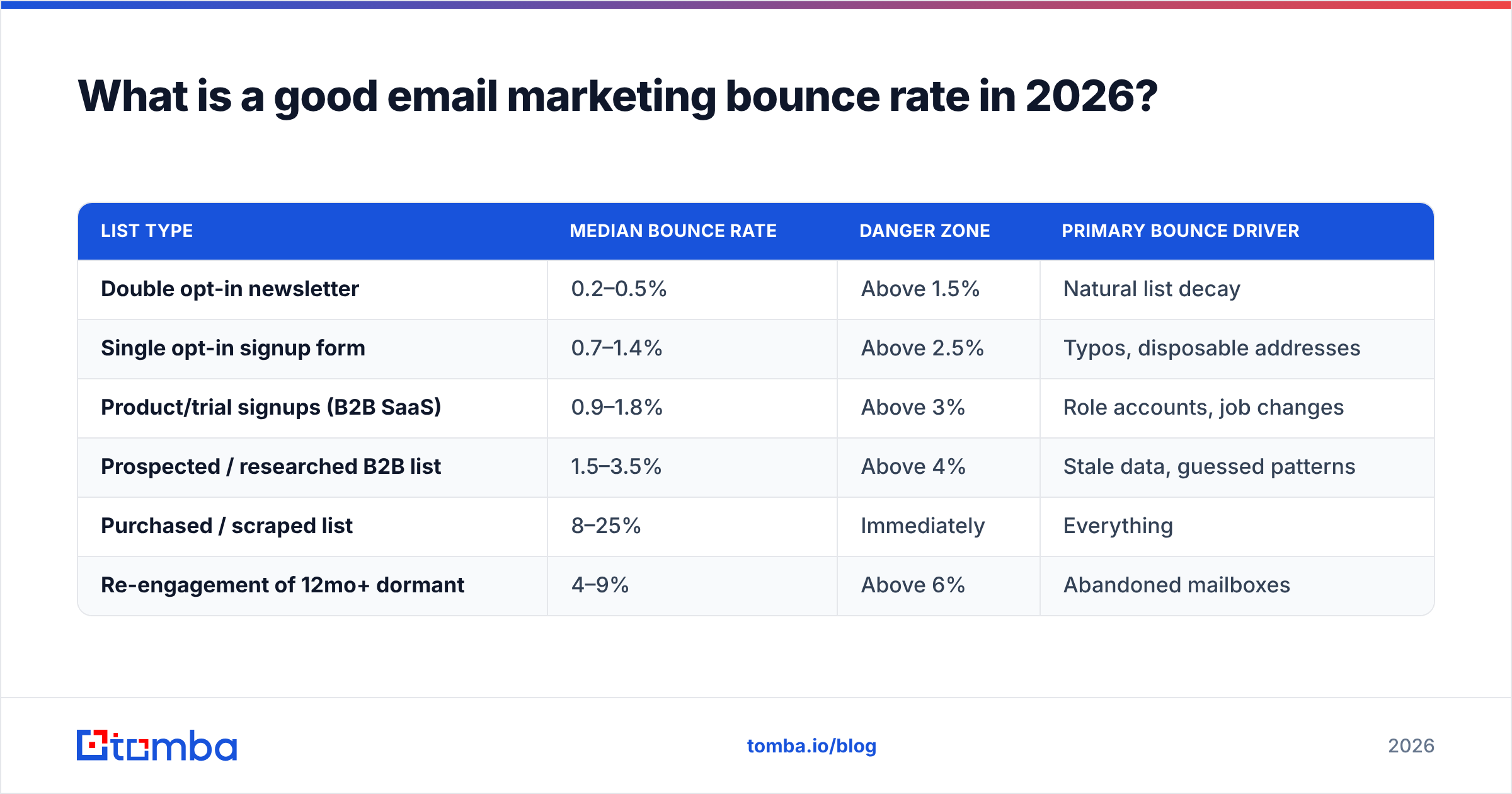
Benchmarks vary meaningfully by list source and industry, though. Aggregate data from Mailchimp's ongoing benchmark reporting and vendor-published deliverability studies puts typical ranges here:
| List type | Median bounce rate | Danger zone | Primary bounce driver |
|---|---|---|---|
| Double opt-in newsletter | 0.2–0.5% | Above 1.5% | Natural list decay |
| Single opt-in signup form | 0.7–1.4% | Above 2.5% | Typos, disposable addresses |
| Product/trial signups (B2B SaaS) | 0.9–1.8% | Above 3% | Role accounts, job changes |
| Prospected / researched B2B list | 1.5–3.5% | Above 4% | Stale data, guessed patterns |
| Purchased / scraped list | 8–25% | Immediately | Everything |
| Re-engagement of 12mo+ dormant | 4–9% | Above 6% | Abandoned mailboxes |
Two numbers in that table deserve attention. First, the "natural decay" floor: even a perfect list bleeds roughly 22–30% of addresses per year as people change jobs. You cannot hit 0%. Second, the gap between a researched B2B list and a purchased one is not a matter of degree — it's the difference between a manageable maintenance task and a reputation event.
Gmail's own sender guidelines don't publish a bounce threshold explicitly, but they do tie inbox placement to spam-rate and authentication signals that bounce spikes correlate with tightly. In practice, a campaign that bounces 6% will also see its spam-complaint rate rise, because the surviving addresses on a stale list skew toward abandoned and spam-trap mailboxes.
Why is your bounce rate climbing?#
If the number moved and you didn't change anything, one of these six is almost always responsible.
- Your list aged past its half-life. B2B contact data decays at roughly 2.1% per month. A list you verified 14 months ago is now about 25% wrong. This is the number one cause and it requires no mistake on your part.
- You imported without verifying. Trade show scans, webinar registrations, and CSV handoffs from sales all arrive dirty. Typo domains (
gmial.com,outlok.com) alone account for 1–3% of most raw imports. - You're guessing email patterns. Permutation tools that generate
first.last@company.comwithout validating produce plausible-looking addresses that don't exist. They pass a syntax check and fail at the SMTP handshake. - You sent to catch-all domains as if they were verified. A catch-all server accepts everything at the gateway and silently discards invalid mail later — or bounces it in a delayed batch that lands on your reputation days after the campaign.
- Your authentication broke. A lapsed SPF record, a DKIM key rotation nobody documented, or a DMARC policy tightened to
p=rejectwill generate policy bounces that look like list problems but aren't. - You resumed a dormant list. Sending to 40,000 addresses you haven't touched since 2024 is functionally identical, from the receiving server's perspective, to sending to a purchased list.

How do you calculate bounce rate correctly?#
Here's the trap: your ESP's bounce rate and your actual deliverability picture are not the same number, and the discrepancy is systematic.
Most platforms calculate bounces against attempted sends. But addresses that get suppressed before send — because they hard-bounced previously — are silently removed from the denominator. The result is a dashboard that improves while your list quality gets worse.
Do this instead:
- Track raw bounce rate. Bounces ÷ total addresses you intended to reach, including suppressed ones. This is the honest list-health number.
- Track hard-bounce rate separately. Hard bounces ÷ attempted sends. This is the reputation number ESPs actually watch.
- Track a rolling 90-day trend. A single campaign at 2.4% means little. Three consecutive campaigns climbing 1.1% → 1.8% → 2.4% means your acquisition source broke.
- Segment by acquisition channel. If your webinar list bounces at 4% and your newsletter at 0.3%, you don't have a bounce problem — you have a webinar form problem.
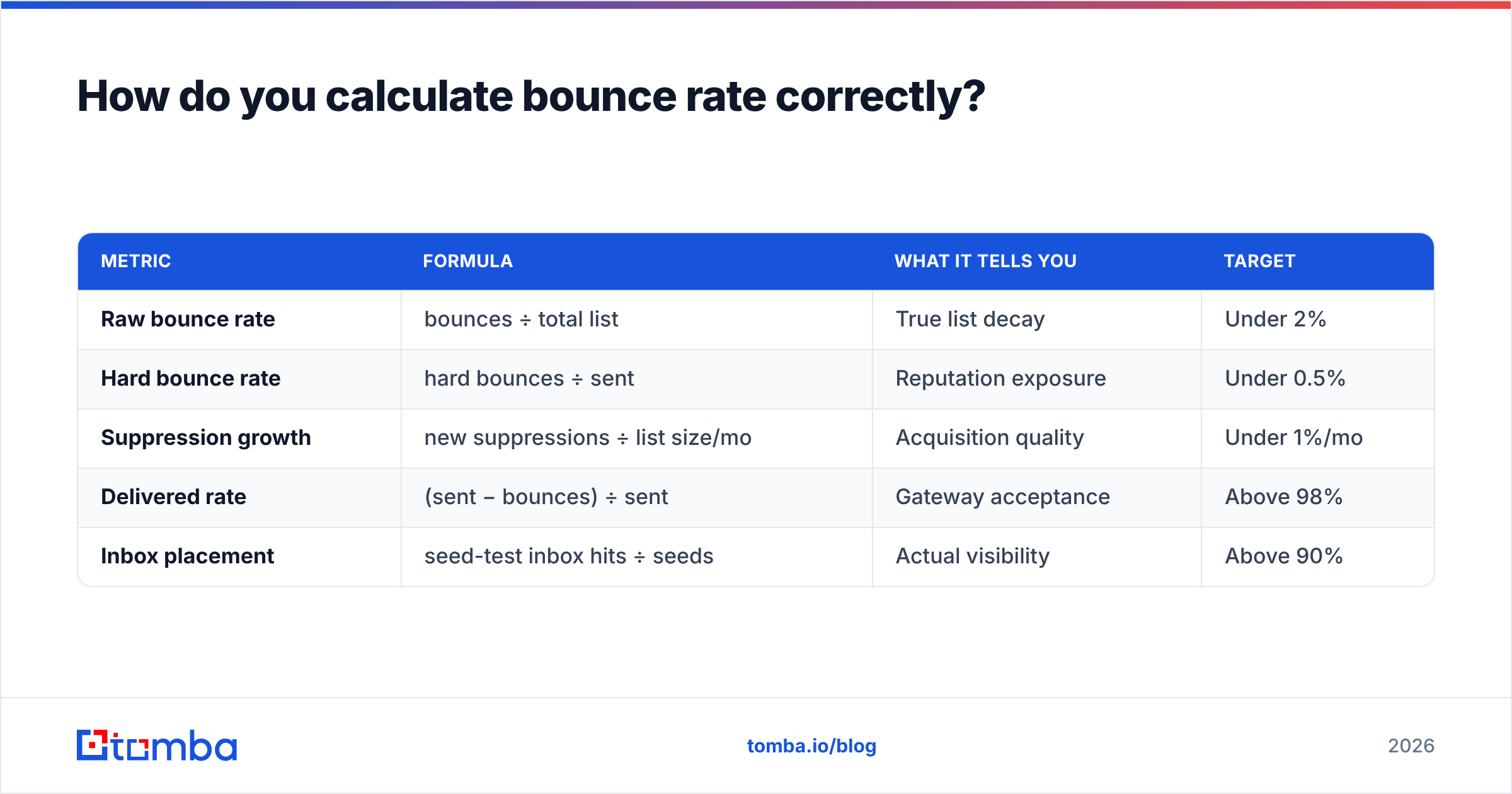
| Metric | Formula | What it tells you | Target |
|---|---|---|---|
| Raw bounce rate | bounces ÷ total list | True list decay | Under 2% |
| Hard bounce rate | hard bounces ÷ sent | Reputation exposure | Under 0.5% |
| Suppression growth | new suppressions ÷ list size/mo | Acquisition quality | Under 1%/mo |
| Delivered rate | (sent − bounces) ÷ sent | Gateway acceptance | Above 98% |
| Inbox placement | seed-test inbox hits ÷ seeds | Actual visibility | Above 90% |
Delivered rate above 98% with inbox placement below 70% is the classic pattern for a sender who fixed bounces but is still landing in spam. Those are separate problems with separate fixes — bounce work is necessary, not sufficient.
How do you lower your bounce rate before you hit send?#
Prevention beats cleanup by a wide margin, because a bounce that never happens costs nothing and a bounce that happens costs reputation you can't buy back.
1. Verify at the point of capture. Put real-time validation on every signup form, not just a regex check. Syntax validation catches john@@company but not john@copmany.com. An API call at submit time catches both. Tomba's email verification API and equivalent endpoints from other vendors return a verdict in under a second, which is fast enough to run inline on a form.
2. Verify in bulk before every campaign. Not once a year. Before every send to any segment you haven't mailed in 60 days. A bulk verify pass on a 50,000-record list takes minutes and typically flags 4–9% for removal on an aged list.
3. Handle catch-alls as their own tier. Roughly 15–20% of B2B domains are catch-all configured, which means standard SMTP verification returns "accept" for every address including nonsense. A dedicated catch-all verifier uses pattern confidence and secondary signals to score these instead of blindly passing them. Send to high-confidence catch-alls only, and send to them in a separate campaign so a bad batch doesn't drag down your main sending domain.
4. Kill role accounts and disposables. info@, support@, sales@, and admin@ addresses bounce less but complain more and convert worse. Disposable domains (mailinator, 10minutemail, and the thousands of rotating equivalents) should be blocked at capture.
5. Warm and segment, don't blast. If you must mail a large aged list, send to the most recently engaged 10% first. If that segment bounces above 3%, stop — the rest of the list is worse, and you've just saved yourself a suspension. This staged approach matters more than any single tool.
6. Re-verify job-change risk quarterly. B2B roles turn over fast. Running data enrichment against your CRM on a quarterly cadence catches people who moved companies before your campaign discovers it the hard way.
Which tools actually reduce bounces?#
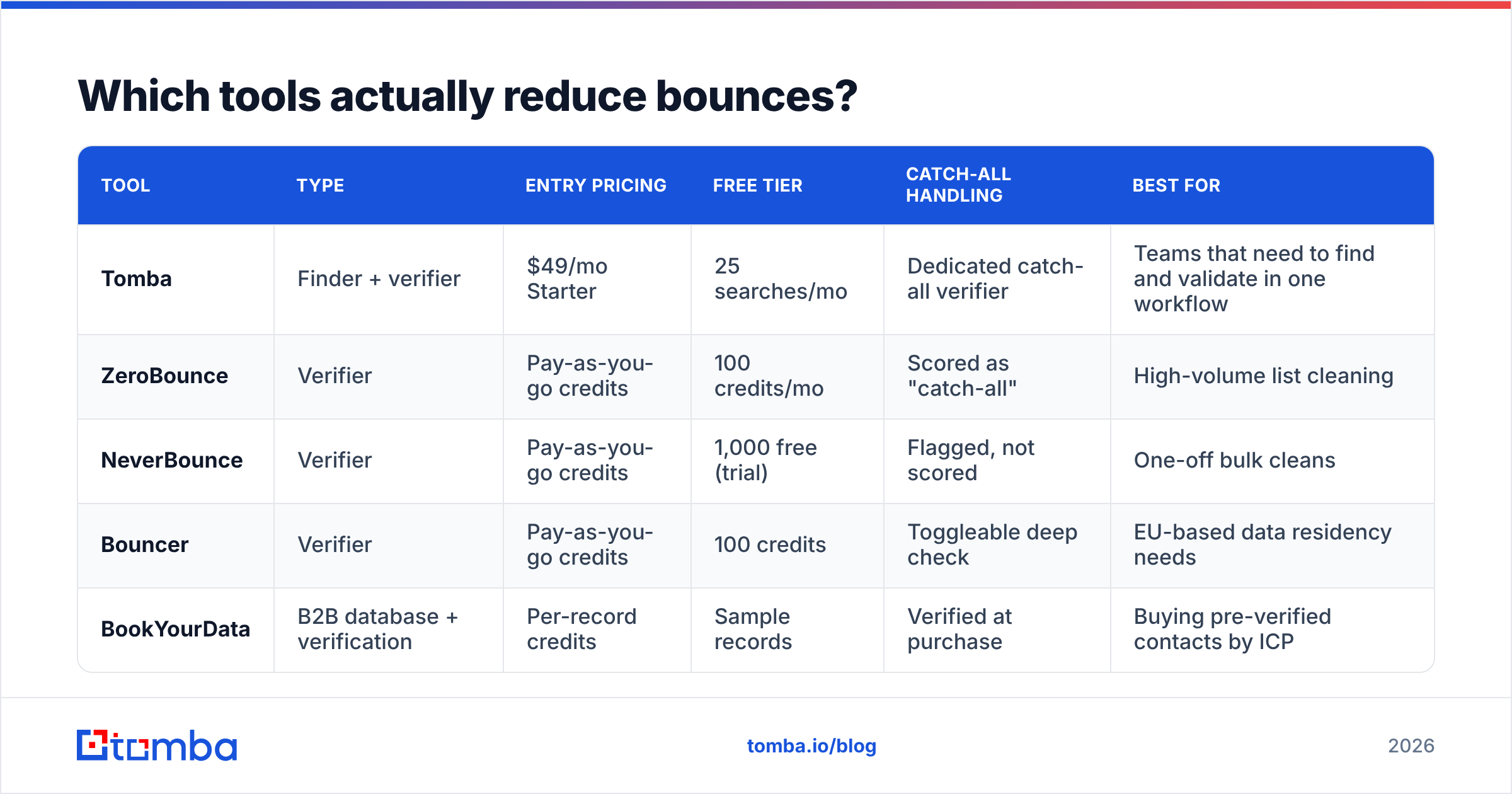
The verification market splits into two groups: tools that only validate addresses you already have, and tools that both find and validate. Which one you need depends on whether your problem is list decay or list acquisition.
| Tool | Type | Entry pricing | Free tier | Catch-all handling | Best for |
|---|---|---|---|---|---|
| Tomba | Finder + verifier | $49/mo Starter | 25 searches/mo | Dedicated catch-all verifier | Teams that need to find and validate in one workflow |
| ZeroBounce | Verifier | Pay-as-you-go credits | 100 credits/mo | Scored as "catch-all" | High-volume list cleaning |
| NeverBounce | Verifier | Pay-as-you-go credits | 1,000 free (trial) | Flagged, not scored | One-off bulk cleans |
| Bouncer | Verifier | Pay-as-you-go credits | 100 credits | Toggleable deep check | EU-based data residency needs |
| BookYourData | B2B database + verification | Per-record credits | Sample records | Verified at purchase | Buying pre-verified contacts by ICP |
Pricing shifts frequently; check each vendor's page before committing. Tomba's plans run Free (25 searches/mo), Starter $49/mo, Growth $99/mo, Pro $249/mo, and custom Enterprise, with the email verifier included rather than sold separately — which matters if you're currently paying two vendors for finding and validating.
The honest read: pure verification vendors like ZeroBounce and NeverBounce are excellent at exactly one job and priced accordingly. If your entire problem is "I have 200,000 addresses of unknown quality," a pay-as-you-go verifier is the cheapest correct answer. If you're building lists continuously — prospecting, enriching, re-verifying — a combined finder-plus-verifier removes an integration and a second invoice. And if the constraint is that you don't have a list at all, sourcing from a curated B2B provider such as BookYourData starts you from verified records rather than from a scrape you then have to repair.

What should you do after a campaign bounces badly?#
Assume you just sent to 30,000 addresses and got a 7% bounce rate. Damage control, in order:
- Stop all sending from that domain immediately. Not "pause the campaign" — stop everything, including transactional if you can route it elsewhere. Every additional message compounds the signal.
- Suppress every bounced address permanently. Hard bounces never come back. Re-sending to them after a "maybe it was temporary" hunch is how a bad week becomes a bad quarter.
- Check blocklists. Run your sending IP and domain through a blacklist checker. Spamhaus and Barracuda listings have documented delisting processes; most resolve within 24–72 hours once the underlying behavior stops.
- Audit authentication. Confirm SPF, DKIM, and DMARC all pass. Broken auth turns a recoverable bounce event into a persistent filtering problem.
- Verify the remaining list before resuming. Every address, not a sample.
- Re-warm slowly. Resume at 10–20% of prior volume to your most engaged segment, and increase roughly 30% every two days if bounce and complaint rates hold. Full recovery of sender reputation typically takes two to four weeks.
The uncomfortable part: steps 1 through 6 take about a month of degraded performance. Verifying the list first would have taken twenty minutes.
Does a low bounce rate guarantee inbox placement?#
No — and this is where a lot of teams stop too early. Bounce rate measures whether the receiving server accepted your mail. Inbox placement measures whether it put that mail somewhere a human will see it. You can hit 99.8% delivered and still have 40% of your mail sitting in Promotions or Spam.
Bounce rate is a gate, not a goal. Clear it, then move on to the metrics that actually predict revenue: reply rate, spam-complaint rate (keep it under 0.10% — Gmail's stated threshold is 0.30% and that's already a crisis), and seed-list inbox placement. Broader email deliverability work — authentication, content, sending cadence, engagement segmentation — starts where bounce work ends.
One useful sequencing rule: don't optimize copy while your bounce rate is above 3%. The data you'd be optimizing against is noise, because a meaningful share of your audience never received the message you're A/B testing.
Where should you start this week?#
Pull your last five campaigns. Split bounces into hard and soft. If hard bounces exceed 0.5% on any of them, your next action is list verification, not a redesign.
Then close the loop at the source. Most bounce problems are acquisition problems wearing a deliverability costume: someone guessed an email pattern, someone imported a conference scan, someone reactivated a 2023 segment. Fixing the intake is what keeps the number down permanently.
If you're building B2B lists and want the addresses to be right before they ever reach your ESP, start with the Tomba Email Finder — it returns verified, source-attributed addresses with a confidence score, so the verification step happens at discovery instead of after a failed campaign. The free tier covers 25 searches a month if you want to test it against a segment you already know the answer for. That's the right way to evaluate any data vendor: run it against contacts you've confirmed by hand, and compare.
Related guides#
Ready to find emails that actually work?
Join 150,000+ professionals who stopped guessing and started sending. Free credits on signup — no credit card required.
Get the Tomba newsletter
Practical outbound tactics and product updates — once every two weeks.
About the author