Email Marketing for Lead Nurturing: The 2026 Playbook
Most nurture sequences are just newsletters with a countdown timer. Here is how email marketing for lead nurturing actually works in 2026 — triggers, stage-by-stage sequences, tooling, and the data hygiene that keeps it out of spam.
TL;DR
- Lead nurturing is not a newsletter on a timer. It is a set of behaviour-triggered sequences that move a known contact from "curious" to "sales-ready" without a rep touching them.
- The three failures that kill most programs: sending on a calendar instead of a trigger, one generic track for every persona, and a contact list nobody verified before the first send.
- A working program needs four moving parts — clean contact data, a trigger layer, stage-specific content, and a handoff rule that tells sales exactly when to call.
- Measure reply rate, sales-accepted leads, and pipeline influenced. Open rate has been unreliable since Apple Mail Privacy Protection, and it got worse, not better.
- Enrichment and verification are upstream of everything. A 20% bounce rate on nurture sends damages the same sending domain your reps use for one-to-one email.
What is email marketing for lead nurturing?#
Email marketing for lead nurturing is the practice of sending sequenced, behaviour-triggered email to contacts who have already identified themselves — a demo no-show, an ebook download, a trial signup that stalled on day three — with the goal of moving them to a buying conversation.
The everyday analogy: cold email is knocking on doors in a neighbourhood. Nurturing is what a good shopkeeper does after someone browses and leaves without buying — remembers what they looked at, follows up with something relevant, and stays useful until they are ready. Technically, it is a state machine: contact enters at a known stage, behaviour events advance or hold them, and each state has its own content and exit condition.
Three things separate it from the rest of your email program:
- The contact is known. They gave you an address, or you enriched a record they authorized. This is permissioned, first-party territory — not prospecting.
- The trigger is behavioural, not calendrical. "Visited the pricing page twice in 48 hours" beats "day 4 of the drip."
- The goal is a stage change, not a click. Success is the lead becoming sales-accepted, not the email getting opened.
Most teams get this wrong because their marketing automation platform makes time-based drips the path of least resistance. Building the trigger layer takes an afternoon of thinking; queuing seven emails takes ten minutes.
Is lead nurturing different from cold email and newsletters?#
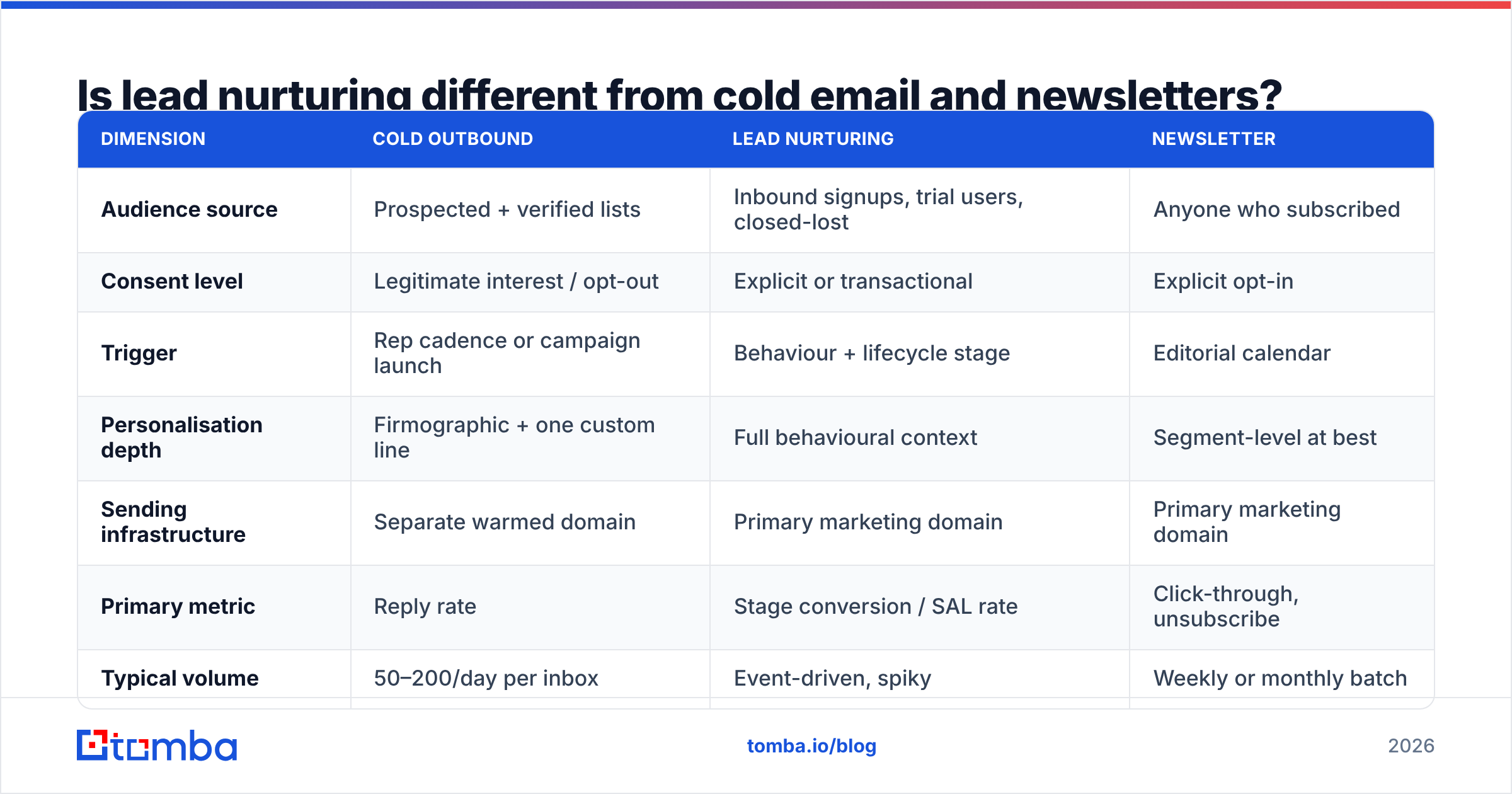
Yes, and conflating them is the fastest way to burn a sending domain. Here is the honest breakdown.
| Dimension | Cold outbound | Lead nurturing | Newsletter |
|---|---|---|---|
| Audience source | Prospected + verified lists | Inbound signups, trial users, closed-lost | Anyone who subscribed |
| Consent level | Legitimate interest / opt-out | Explicit or transactional | Explicit opt-in |
| Trigger | Rep cadence or campaign launch | Behaviour + lifecycle stage | Editorial calendar |
| Personalisation depth | Firmographic + one custom line | Full behavioural context | Segment-level at best |
| Sending infrastructure | Separate warmed domain | Primary marketing domain | Primary marketing domain |
| Primary metric | Reply rate | Stage conversion / SAL rate | Click-through, unsubscribe |
| Typical volume | 50–200/day per inbox | Event-driven, spiky | Weekly or monthly batch |
| Failure mode | Spam complaints | Fatigue, irrelevance | Silent list decay |
The row that matters most is sending infrastructure. If you run cold outbound and nurture from the same domain, one bad prospecting list poisons deliverability for the leads who actually raised their hand. Keep them separated, and check your email deliverability fundamentals — SPF, DKIM, DMARC — on both.
Why do most nurture sequences fail?#
Because they are newsletters wearing a costume. Five specific causes, in rough order of how often they show up in audits:
- No entry criteria beyond "filled out a form." A whitepaper downloader and a pricing-page visitor who requested a callback are at wildly different stages. Putting them in the same track means half your list gets content that insults their intelligence and the other half gets content they are not ready for.
- Time-based sends with no behavioural override. Someone books a demo on day 2 and still receives days 3 through 7 of the "learn about the problem" track. This is the single most common configuration error.
- No exit condition. Sequences that never end train contacts to ignore you, then to unsubscribe, then to hit the spam button. Every track needs a natural terminus.
- Unverified or stale contact data. Inbound forms collect typos, role addresses, and disposable domains. Six months later, 15–25% of a B2B list has changed jobs. Sending to that decay is how you get throttled by Google and Microsoft.
- No handoff rule. Marketing nurtures, the lead gets hot, and nobody tells sales. The lead goes cold in a queue. Define the threshold in writing — for example, two high-intent actions inside seven days routes to a rep within one business day.
Fixing 1, 2, and 5 is process work. Fixing 4 is tooling work, and it is the one most teams postpone because it is invisible until the bounce report lands.
What does a nurture sequence look like by funnel stage?#
Structure the program as three tracks, not one long chain. Each track has its own entry trigger, cadence, and exit.
- Top of funnel — education (entry: content download, blog subscribe). 4–5 emails over 3 weeks. No product pitch until email 3. Goal: get one meaningful click on a mid-funnel asset. Exit: any mid-funnel action, or sequence completion into a low-frequency list.
- Middle of funnel — evaluation (entry: pricing page view, comparison page view, webinar attendance). 4 emails over 10 days. Lead with proof: a customer story with a number in it, a comparison that admits where you lose, an ROI framing. Exit: demo booked or 14 days of silence.
- Bottom of funnel — decision (entry: demo attended, trial started, quote requested). 3–4 emails over 7 days, ideally sent from the rep's address rather than a marketing domain. Content is objection handling: security docs, migration effort, procurement paperwork. Exit: closed-won, closed-lost, or handoff to a re-engagement track.
- Re-engagement (entry: closed-lost, or 90 days inactive). 3 emails over 6 weeks. Trigger on a change in their world — funding round, new hire in the buying role, a product update that closes the gap they cited. Exit: reply, or suppression.
- Post-signup onboarding (entry: account created, activation incomplete). Behaviour-driven only. If they completed the step, do not send the email about the step. This one is a product problem disguised as an email problem.
Two rules across all five: cap total sends per contact per week across every track (three is a sane ceiling), and make every email answerable. A nurture email that ends with "let me know if that resonates" outperforms one ending in a button, because a reply is the strongest deliverability signal there is.
What tools do you need to run this?#
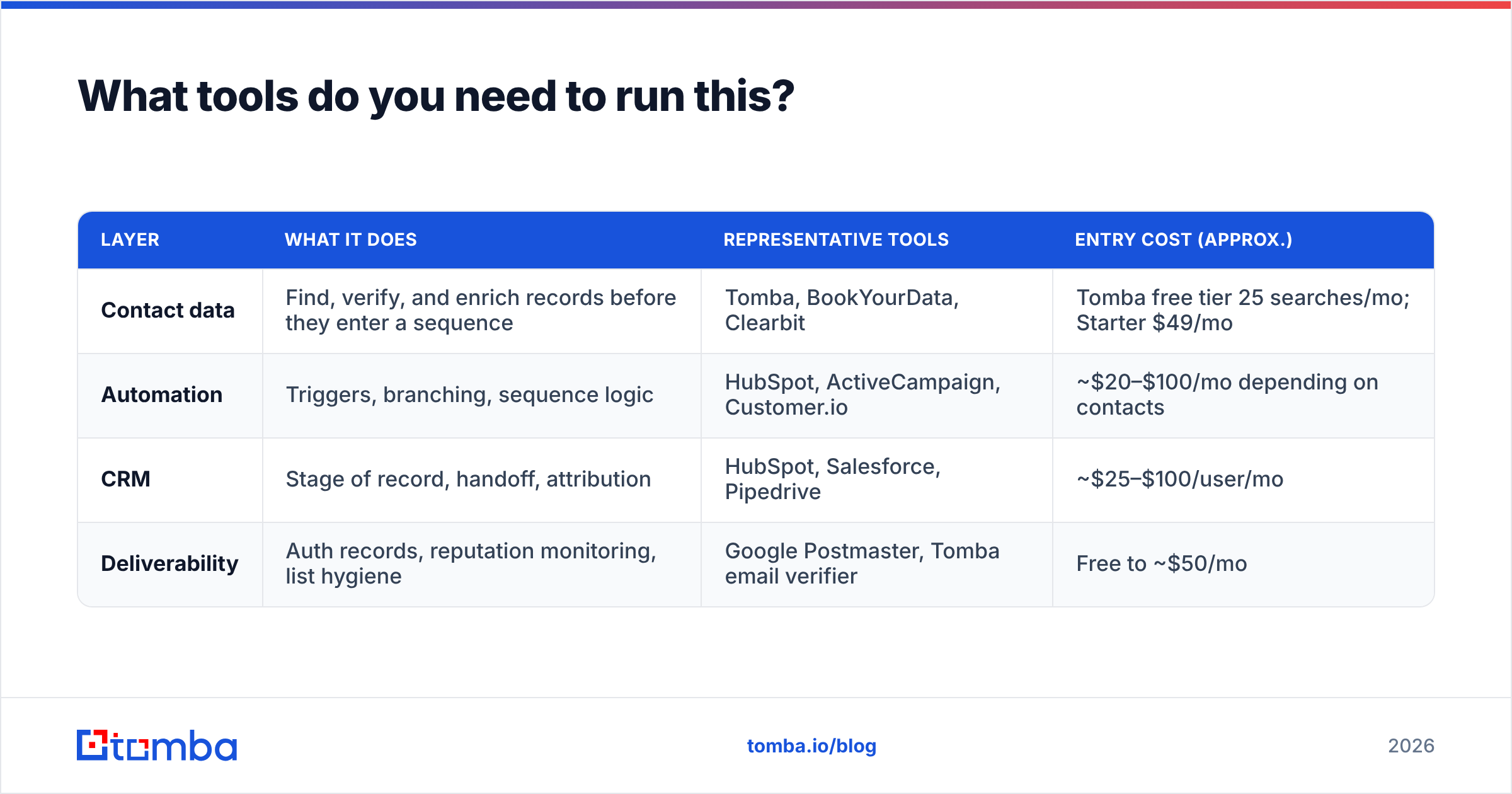
Four layers, and you can start with two of them. What matters is that the data layer is solid before the sending layer gets clever.
| Layer | What it does | Representative tools | Entry cost (approx.) |
|---|---|---|---|
| Contact data | Find, verify, and enrich records before they enter a sequence | Tomba, BookYourData, Clearbit | Tomba free tier 25 searches/mo; Starter $49/mo |
| Automation | Triggers, branching, sequence logic | HubSpot, ActiveCampaign, Customer.io | ~$20–$100/mo depending on contacts |
| CRM | Stage of record, handoff, attribution | HubSpot, Salesforce, Pipedrive | ~$25–$100/user/mo |
| Deliverability | Auth records, reputation monitoring, list hygiene | Google Postmaster, Tomba email verifier | Free to ~$50/mo |
A note on data vendors: BookYourData is a solid pick if you want a pay-as-you-go verified list you own outright, and Tomba is the better fit when you need live lookups and API-driven enrichment inside a workflow. They solve adjacent problems, not the same one.
For the automation layer, compare on trigger flexibility rather than template count. Ask one question during evaluation: can I branch on a custom event from my product, not just on form fills and email clicks? If the answer is no, you will be back in the market within a year. G2's marketing automation category is a reasonable place to shortlist, and the marketing automation overview on Wikipedia is a decent primer on where the category came from and why so many platforms overlap.
How does contact data quality change nurture results?#
More than the copy does, and it is not close.
Three mechanisms:
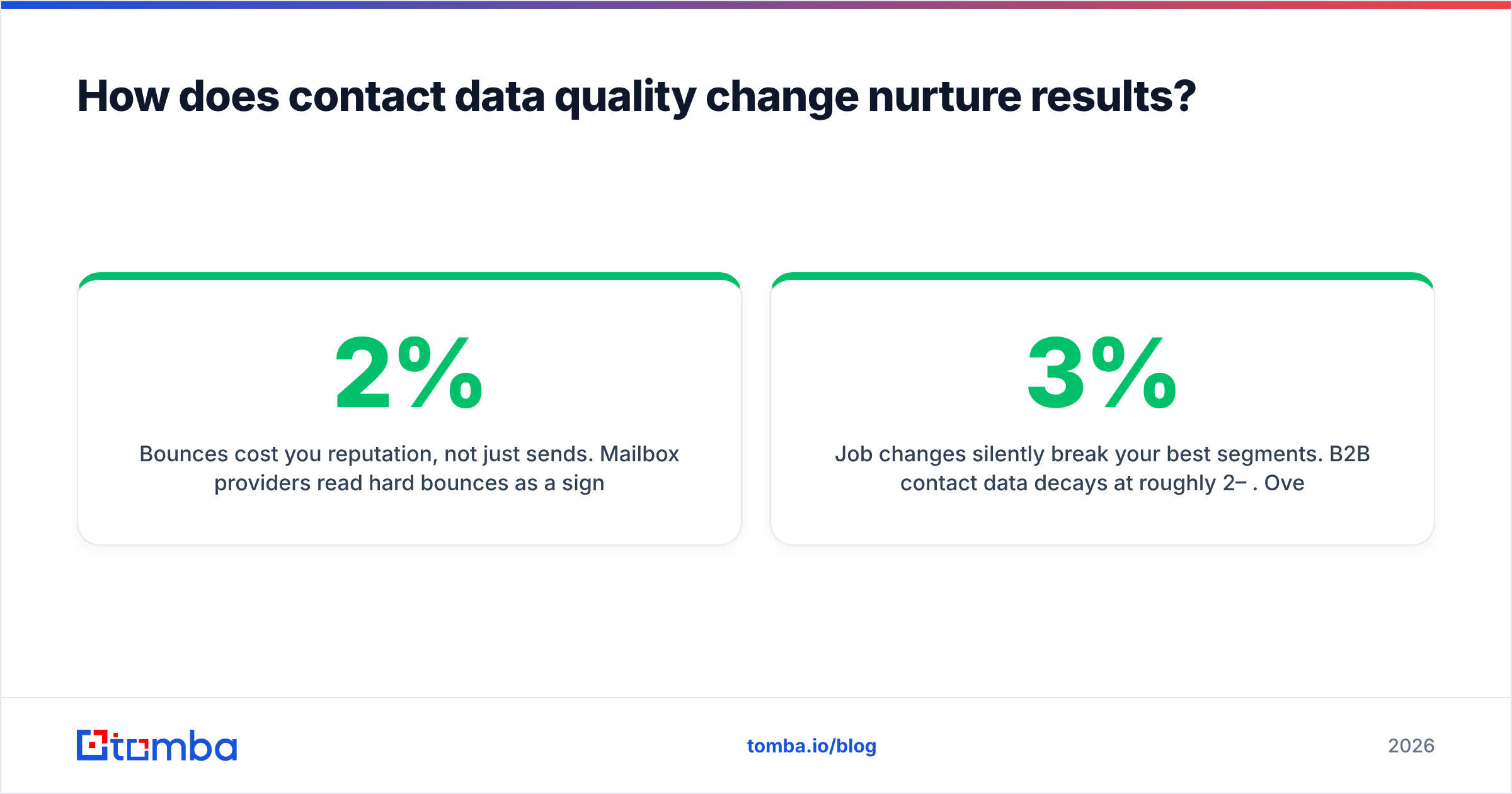
Bounces cost you reputation, not just sends. Mailbox providers read hard bounces as a signal that you do not know your recipients. Push past roughly 2% and throttling starts. Push past 5% and your legitimate mail starts landing in Promotions or worse. Run every inbound address through an email verifier at capture time, and re-verify the whole list quarterly.
Job changes silently break your best segments. B2B contact data decays at roughly 2–3% per month. Over a year, a third of your nurture list is aimed at people who no longer hold the role you targeted. Periodic data enrichment catches the moves and lets you re-enter the contact at the right company — often a warmer lead than the one you lost.
Missing firmographics collapse your branching. You cannot personalise by company size, industry, or tech stack if the form only captured an email address. Enrich on capture instead of asking for eight form fields; conversion on a two-field form plus enrichment beats an eight-field form plus none, almost every time.
If your program is already running and the numbers look wrong, verify before you rewrite. A rewrite on a dirty list produces a confusing result you cannot attribute.
What should you measure, and what should you ignore?#
Open rate is not a metric anymore. Apple Mail Privacy Protection pre-fetches images for a large share of consumer and mixed-use inboxes, and corporate security scanners do the same on the B2B side. Treat opens as directional at best.
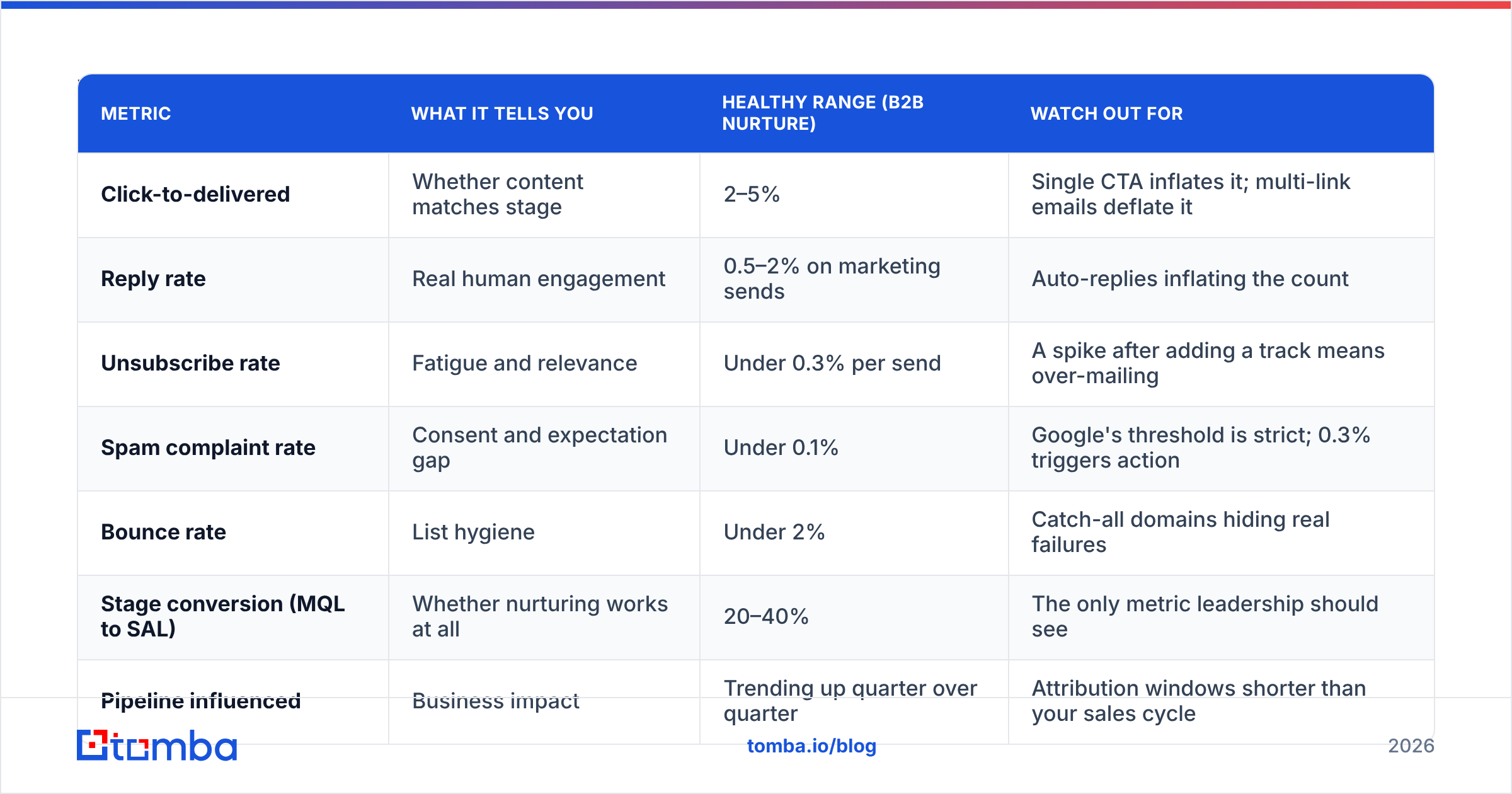
| Metric | What it tells you | Healthy range (B2B nurture) | Watch out for |
|---|---|---|---|
| Click-to-delivered | Whether content matches stage | 2–5% | Single CTA inflates it; multi-link emails deflate it |
| Reply rate | Real human engagement | 0.5–2% on marketing sends | Auto-replies inflating the count |
| Unsubscribe rate | Fatigue and relevance | Under 0.3% per send | A spike after adding a track means over-mailing |
| Spam complaint rate | Consent and expectation gap | Under 0.1% | Google's threshold is strict; 0.3% triggers action |
| Bounce rate | List hygiene | Under 2% | Catch-all domains hiding real failures |
| Stage conversion (MQL to SAL) | Whether nurturing works at all | 20–40% | The only metric leadership should see |
| Pipeline influenced | Business impact | Trending up quarter over quarter | Attribution windows shorter than your sales cycle |
Report the last two upward, use the first five to diagnose. HubSpot publishes updated email marketing benchmarks each year if you want an external reference point, though treat any cross-industry average as a loose sanity check rather than a target.
One diagnostic worth running monthly: pull every contact that converted to an opportunity and check which nurture emails they received before the conversion. Usually two or three emails carry the whole program. Cut the rest, or rewrite them to look like the winners.
How do you build the first version in a week?#
Keep it small enough to actually ship.
- Day 1 — Export your existing inbound contacts, verify them, and suppress everything that fails. You will likely lose 8–20% of the list. That is a win, not a loss.
- Day 2 — Define three entry triggers and three exit conditions. Write them down where sales can see them.
- Day 3–4 — Write one track only: the middle-of-funnel evaluation sequence, four emails. This is where the money is and where most teams have nothing.
- Day 5 — Wire the handoff. A Slack alert to the owning rep when a contact hits the exit trigger is enough for version one.
- Week 2 onward — Add the top-of-funnel track, then re-engagement. Do not build all five at once; you will not have the volume to tell which one is broken.
If you need a starting point for the writing itself, working from proven cold email templates and stripping out the prospecting framing is faster than staring at a blank editor.
Where does Tomba fit in a nurture program?#
At the data layer, before anything gets sent. Use the Tomba Email Finder to fill in missing contacts when an enriched company record has no named buyer, verify every inbound address at capture so bounces never reach your sending reputation, and re-enrich quarterly to catch job changes before your best segments quietly rot.
The free tier gives you 25 searches a month to test the workflow. Starter is $49/mo when you are ready to run it against a real list, with Growth at $99/mo and Pro at $249/mo as volume grows — full Tomba pricing is public, and the API works fine inside whatever automation platform you already use. Clean the data first; the copy will work harder for it.
Related guides#
Ready to find emails that actually work?
Join 150,000+ professionals who stopped guessing and started sending. Free credits on signup — no credit card required.
Get the Tomba newsletter
Practical outbound tactics and product updates — once every two weeks.
About the author