Email Marketing Personalization: What Actually Works in 2026
Merge tags stopped working years ago. Here's what real email marketing personalization looks like in 2026 — the data layers, the tiers, the tools, and the ROI math behind each one.
TL;DR
- First-name merge tags are no longer personalization. Every inbox has seen them, and reply-rate lift from
{{first_name}}alone rounds to zero in most 2026 benchmark sets. - Real email marketing personalization runs on four data layers: identity, firmographic, behavioral, and intent. Most teams only own the first two.
- The highest-ROI move for small teams is not AI-written copy — it's clean, verified contact data plus one genuinely researched sentence per prospect.
- Personalization has a cost curve. Tier 1 (segment-level) costs cents per contact, Tier 3 (1:1 research) costs $2-$8. Match the tier to deal size, not to ego.
- Deliverability is a prerequisite, not a bonus. A perfectly personalized email in spam converts at 0%.
What is email marketing personalization in 2026?#
Email marketing personalization is the practice of changing what an email says based on what you actually know about the person receiving it. That's it. The definition hasn't changed. What changed is the bar.
Think of it like a tailor. In 2015, "personalization" meant asking your name before handing you a suit off the rack. In 2026, buyers have been handed thousands of those suits. They can spot the rack from across the room. The tailor who wins now is the one who noticed you always roll your sleeves and cut the jacket accordingly.
Concretely, that means personalization has split into two very different activities that people keep confusing:
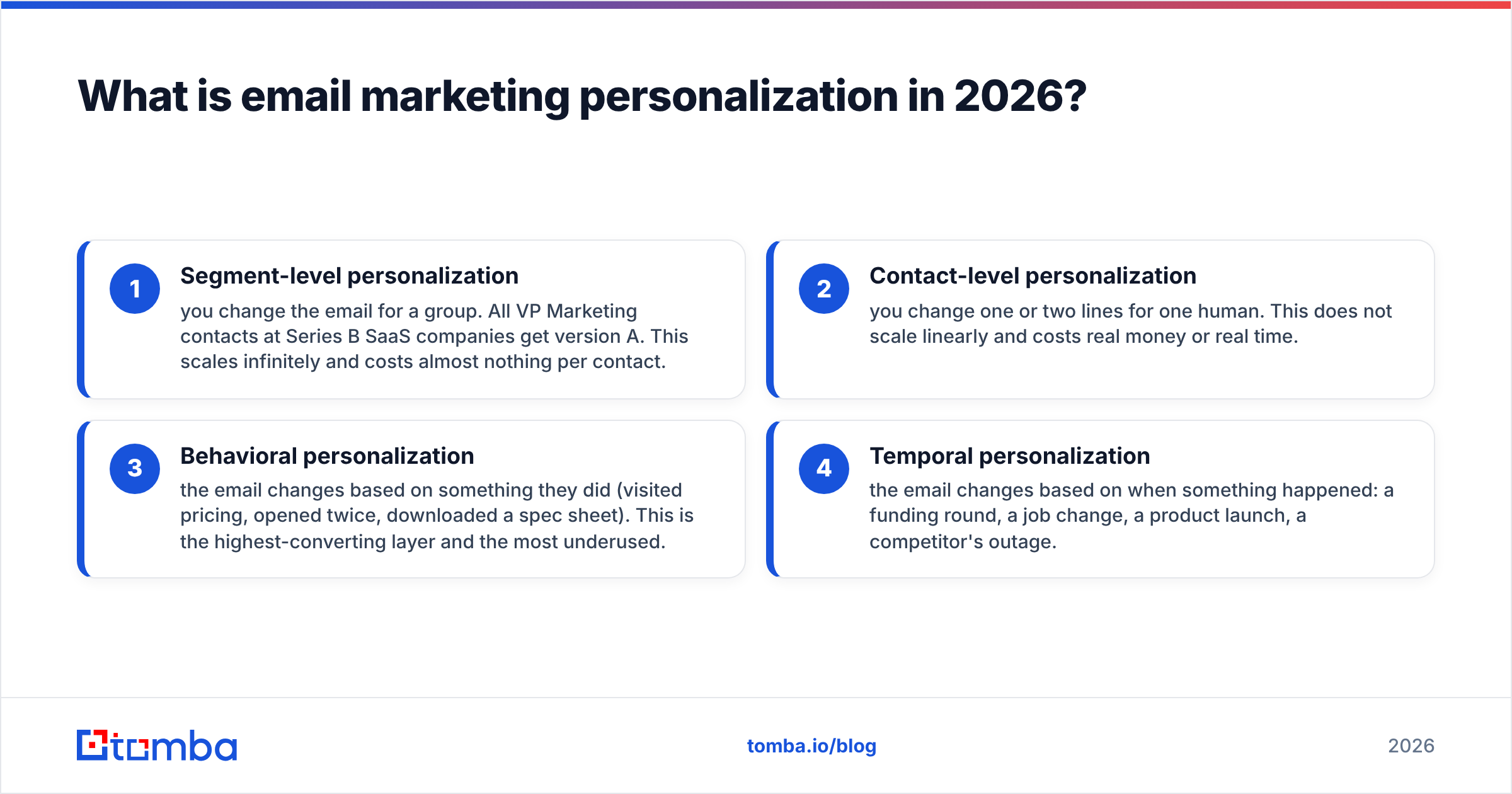
- Segment-level personalization — you change the email for a group. All VP Marketing contacts at Series B SaaS companies get version A. This scales infinitely and costs almost nothing per contact.
- Contact-level personalization — you change one or two lines for one human. This does not scale linearly and costs real money or real time.
- Behavioral personalization — the email changes based on something they did (visited pricing, opened twice, downloaded a spec sheet). This is the highest-converting layer and the most underused.
- Temporal personalization — the email changes based on when something happened: a funding round, a job change, a product launch, a competitor's outage.
Most teams do #1, call it personalization, and wonder why reply rates sit at 1%.
Why do most personalization tactics stop working?#
Because personalization tokens are a signal, and signals decay the moment they become cheap to fake.
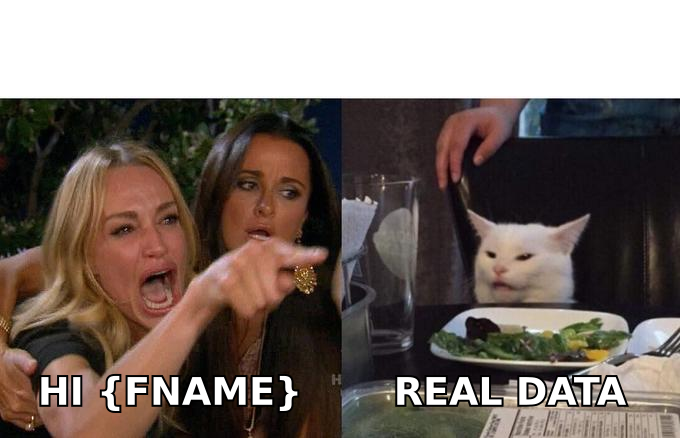
When only 5% of senders used a first name, seeing your name meant someone probably looked you up. Now every sequencing tool injects it by default, including the ones sending 40,000 emails a day from rotated domains. The token no longer carries information. Worse, a broken token (Hi {FIRSTNAME}, or Hi there, after a name-looking greeting) is now an active negative signal — it tells the reader "this was a batch."
The same decay curve is running through the next generation of tactics:
- "I saw your LinkedIn post about X" — worked brilliantly in 2022. Now AI writes it, badly, at volume. Buyers have learned the pattern.
- "Congrats on the funding round" — every seller with a Crunchbase trigger sends this within 48 hours. The prospect gets 60 of them.
- AI-generated "personalized" first lines — the tell is that they summarize the prospect's website back at them. Nobody needs their own About page read aloud.
The tactics that survive are the ones that are expensive to fake: a specific observation about their product, a genuine question about a decision they made, a referral, or a piece of data they don't already have.
Which data layers actually drive personalization?#
You cannot personalize past the quality of your data. This is the part most content skips, and it's the part that determines whether any of the copy advice works.
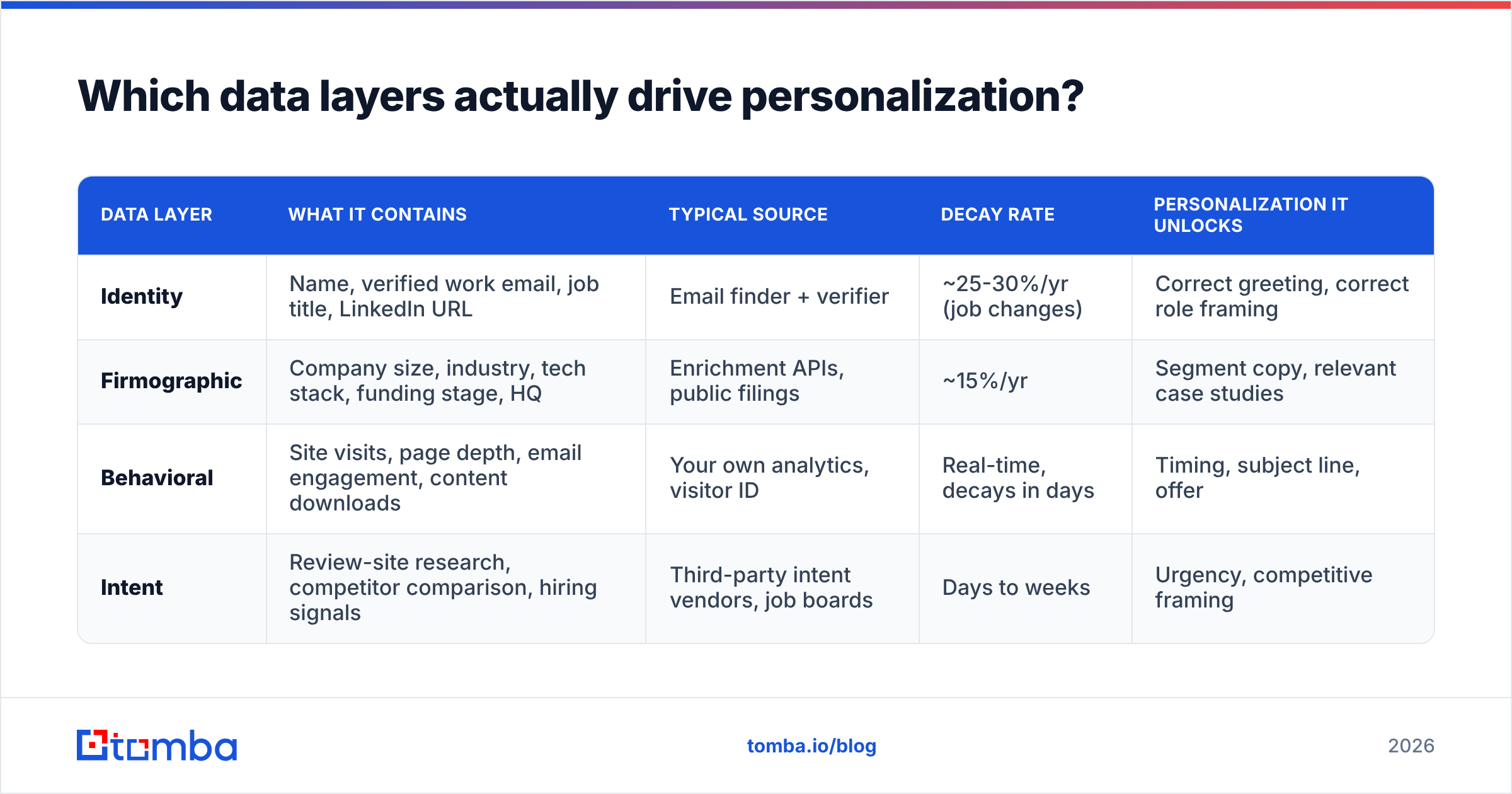
There are four layers, and they stack:
| Data layer | What it contains | Typical source | Decay rate | Personalization it unlocks |
|---|---|---|---|---|
| Identity | Name, verified work email, job title, LinkedIn URL | Email finder + verifier | ~25-30%/yr (job changes) | Correct greeting, correct role framing |
| Firmographic | Company size, industry, tech stack, funding stage, HQ | Enrichment APIs, public filings | ~15%/yr | Segment copy, relevant case studies |
| Behavioral | Site visits, page depth, email engagement, content downloads | Your own analytics, visitor ID | Real-time, decays in days | Timing, subject line, offer |
| Intent | Review-site research, competitor comparison, hiring signals | Third-party intent vendors, job boards | Days to weeks | Urgency, competitive framing |
The uncomfortable truth: layer one is where most personalization programs die. If 22% of your list bounces, your ESP throttles you, your domain reputation drops, and the beautifully personalized layer-three email never reaches the inbox.
Run identity data through an email verifier before it ever touches a sequence, and re-verify anything older than 90 days. B2B contact data decays faster than most people budget for — Gartner and other analyst groups have put annual B2B record decay in the 25-30% range for years, and remote-work-era job mobility hasn't slowed it.
For layer two, data enrichment fills in the firmographic fields you'll actually branch copy on. Don't enrich 40 fields you'll never use — pick the four that change what you'd say.
How much personalization is worth the cost?#
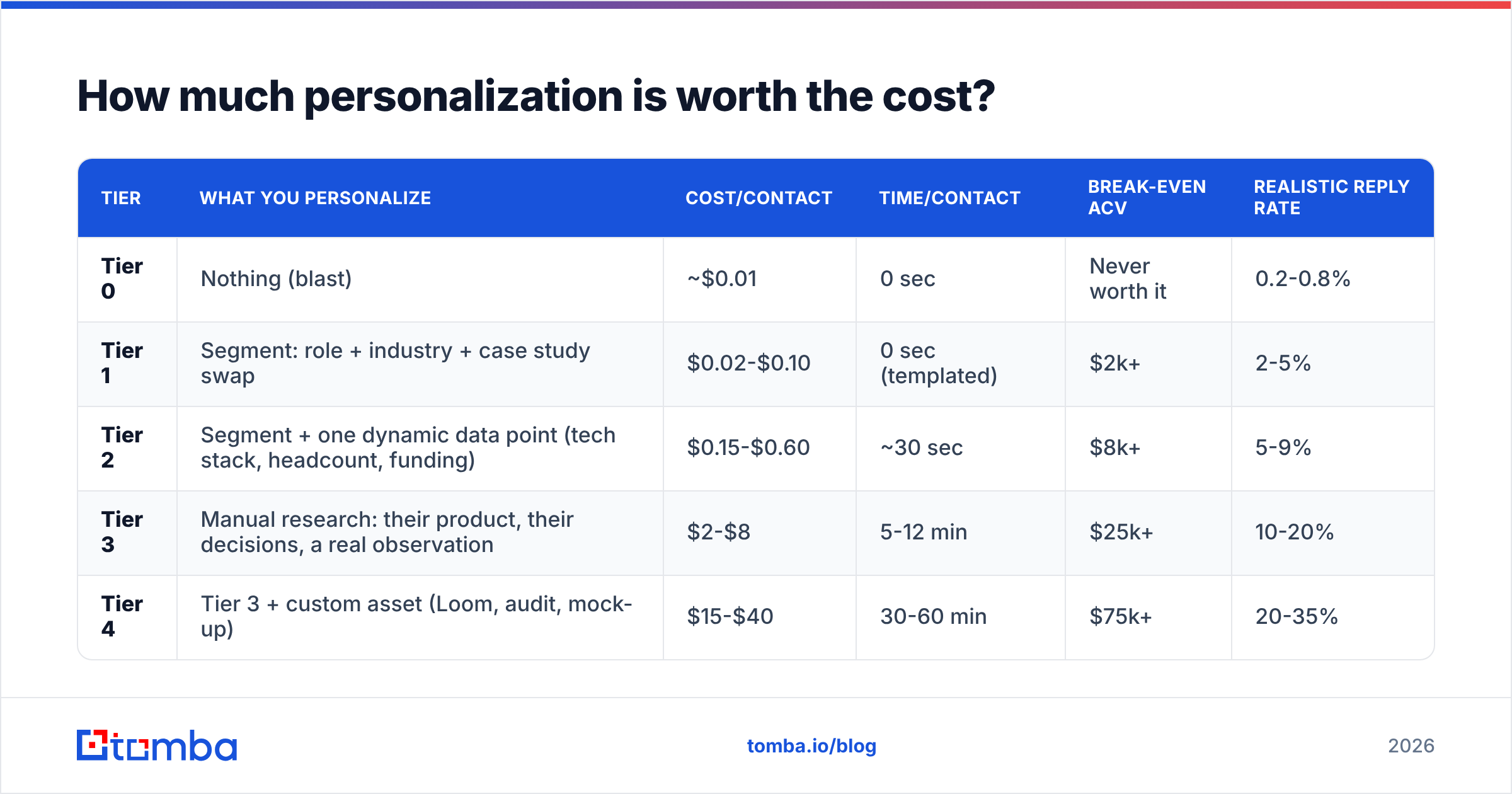
Here's the framework that keeps teams honest. Personalization tiers have a cost per contact and a break-even deal size. Match them.
| Tier | What you personalize | Cost/contact | Time/contact | Break-even ACV | Realistic reply rate |
|---|---|---|---|---|---|
| Tier 0 | Nothing (blast) | ~$0.01 | 0 sec | Never worth it | 0.2-0.8% |
| Tier 1 | Segment: role + industry + case study swap | $0.02-$0.10 | 0 sec (templated) | $2k+ | 2-5% |
| Tier 2 | Segment + one dynamic data point (tech stack, headcount, funding) | $0.15-$0.60 | ~30 sec | $8k+ | 5-9% |
| Tier 3 | Manual research: their product, their decisions, a real observation | $2-$8 | 5-12 min | $25k+ | 10-20% |
| Tier 4 | Tier 3 + custom asset (Loom, audit, mock-up) | $15-$40 | 30-60 min | $75k+ | 20-35% |
Two things fall out of this table immediately.
First, Tier 3 at scale is usually a mistake. If your average contract value is $6,000 and you spend eight minutes researching each prospect, your fully-loaded cost per meeting is often higher than the margin on the deal. Run Tier 2 and send more.
Second, Tier 1 is criminally underused. Swapping the case study, the pain statement, and the CTA by segment costs you nothing per send after the initial build, and it routinely doubles reply rate versus a generic blast. Most teams skip straight from Tier 0 to attempting Tier 3, burn out, and revert to Tier 0.
What does good personalization actually look like?#
Let's get concrete. Same prospect, four versions.
Tier 0 (blast):
Hi there, I wanted to reach out about our platform that helps companies scale their revenue operations. Do you have 15 minutes this week?
Tier 1 (segment):
Hi Marcus, most Series B fintech ops leads I talk to are stuck stitching Salesforce to three data vendors that disagree with each other. We cut that to one pipe for Ramp's ops team. Worth 15 minutes?
Tier 2 (segment + data point):
Hi Marcus, saw Northwind is running Salesforce alongside Outreach and Clay — that trio usually means someone on your team is manually reconciling contact records every week. That's the exact problem we solved for a 240-person fintech last quarter. Want the 4-minute version?
Tier 3 (researched):
Hi Marcus, your careers page has two RevOps reqs open and both list "data hygiene" in the first three bullets. Guessing that's not a coincidence. Before you hire for it — one of our customers killed a similar req after automating the reconciliation piece. Happy to show you what they did, no pitch.
Notice what changes. Tier 3 doesn't flatter the prospect or compliment their LinkedIn post. It references a decision they made that costs them money, and it offers something. That's the difference between personalization and decoration.
If you're building these systematically, start from a tested skeleton rather than a blank page — a library of cold email templates gives you the structural bones, and you spend your energy on the variable that matters instead of re-inventing the CTA every time.
Does personalization survive the deliverability filter?#
This is the section everyone skips and everyone regrets skipping.
Personalization and deliverability are coupled in ways that aren't obvious:
Personalization helps deliverability when it drives engagement. Gmail and Outlook both weight positive engagement signals — opens with dwell time, replies, moves out of spam — heavily. A Tier 2 email that gets 7% replies trains the filters that your domain sends wanted mail. A Tier 0 blast at 0.3% does the opposite.
Personalization hurts deliverability in three specific ways people don't anticipate:
- Broken merge tags.
Hi ,andHi {{first_name}},are pattern-matched by spam filters as automation artifacts. A single field-mapping error across 5,000 sends does measurable reputation damage. - Personalized links. Unique tracking URLs per recipient, especially on shared link-shortener domains, are a classic spam signature. If you must track, use a subdomain you own.
- High-variance HTML. Dynamic image blocks and conditional HTML sections often produce malformed markup at scale. Malformed markup scores badly.
Before you scale any personalized sequence, get the fundamentals verified: check your SPF record, run the copy through a spam checker, and confirm your domain isn't already on a blocklist. Google's own sender guidelines spell out the authentication requirements — they became hard requirements for bulk senders, not suggestions, and they haven't loosened.
What tools do you need for each personalization tier?#
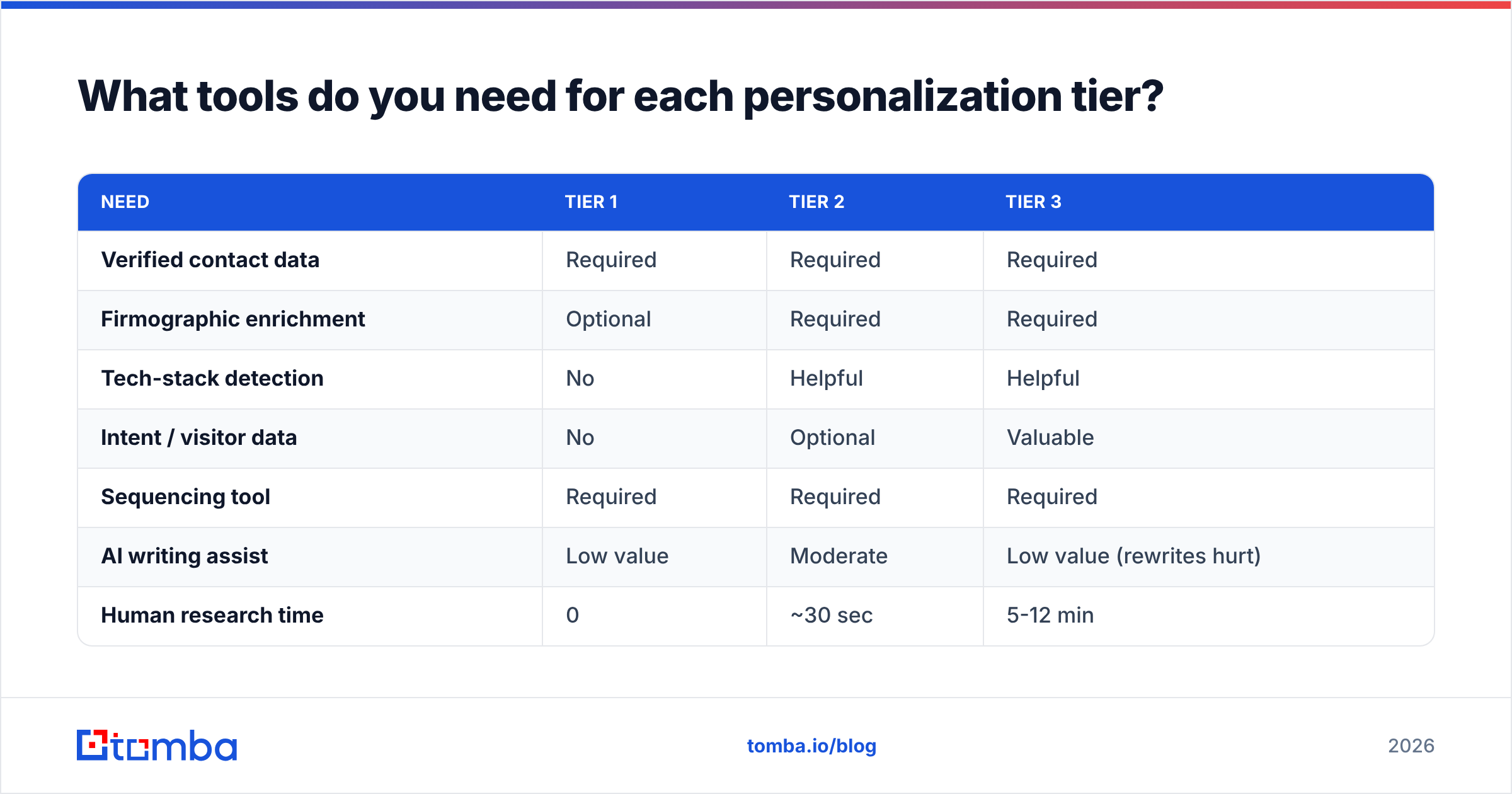
You need fewer tools than vendors want you to believe. Here's the honest stack by tier.
| Need | Tier 1 | Tier 2 | Tier 3 |
|---|---|---|---|
| Verified contact data | Required | Required | Required |
| Firmographic enrichment | Optional | Required | Required |
| Tech-stack detection | No | Helpful | Helpful |
| Intent / visitor data | No | Optional | Valuable |
| Sequencing tool | Required | Required | Required |
| AI writing assist | Low value | Moderate | Low value (rewrites hurt) |
| Human research time | 0 | ~30 sec | 5-12 min |
A few notes on the tooling market as it stands in 2026:
- All-in-one platforms (Apollo, Amplemarket, Outreach) bundle data + sequencing. Convenient, but you inherit their data quality across every campaign, and their contact-level accuracy varies a lot by geography and company size. If you go this route, spot-check a sample before committing your domain reputation to it.
- Dedicated data providers (BookYourData, Tomba, and similar) sell accuracy rather than workflow. You pair them with whatever sequencer you already like. BookYourData in particular is worth a look if you want pay-as-you-go list building with a bounce guarantee rather than a seat-based contract.
- Verification-only tools are a commodity now. Price per verification has compressed hard. Don't overpay.
On the data side, Tomba's approach is API-first: find email addresses by domain and name, verify them, and enrich the record in one pipeline. Pricing runs Free (25 searches/mo), Starter at $49/mo, Growth at $99/mo, and Pro at $249/mo, with Enterprise custom — see full Tomba pricing for credit allocations. The relevant point for personalization work isn't the price, it's that verified-at-source data means you're not paying twice: once to find, once to clean.
If you want independent signal on any of these, G2's email marketing category is more useful than vendor comparison pages, because you can filter reviews by company size and see where the accuracy claims hold up.
How do you measure whether personalization worked?#
Reply rate is the headline metric, but it's a trap on its own. Three metrics together tell the real story:
- Positive reply rate, not total reply rate. "Unsubscribe" and "wrong person" are replies. Track them separately or your personalization looks great while your list burns.
- Meeting-to-reply ratio. High replies with low meetings usually means your personalization created curiosity but your offer didn't match. That's a copy problem, not a data problem.
- Cost per booked meeting, fully loaded. Include the research time at a real hourly rate. This is the number that tells you which tier to run.
Run the test properly: same list, same send window, same sender, one variable changed. Split at a minimum of 400 contacts per arm if you want to detect a reply-rate difference of a few points with any confidence. Most "personalization doubled our replies" claims come from 80-contact tests where the difference is noise.
Track your response rate by segment, not just in aggregate. It's common to find that Tier 3 dramatically outperforms for enterprise contacts and does nothing for SMB — which tells you exactly where to spend research hours.
What should you do first?#
If you're starting from a generic blast, the sequence of fixes in order of ROI:
- Verify the list. Nothing else matters if 20% bounces. This is a one-day fix.
- Fix authentication. SPF, DKIM, DMARC. Another one-day fix.
- Build three Tier 1 segments. Role × company stage is usually enough. Different pain statement, different proof point, different CTA per segment.
- Add one Tier 2 data point to your best-performing segment. Tech stack or headcount is usually the easiest to get and the easiest to write around.
- Reserve Tier 3 for your top 50 accounts only. Not your top 500. Fifty.
- Measure by segment for six weeks before changing anything else.
Steps 1 and 2 typically produce a bigger lift than steps 3-5 combined, which is deeply unglamorous and consistently true.
Where to start#
Personalization is downstream of data. You cannot write a Tier 2 email about a prospect's tech stack if you don't have a verified address to send it to, and you cannot run a clean split test on a list that's 20% dead.
Start with the Tomba Email Finder — find and verify professional email addresses by domain, name, or company, then feed clean identity data into whatever sequencer and enrichment layer you already run. The free tier gives you 25 searches a month to check accuracy against your own known-good contacts before you commit a dollar. Test it against a list you can independently verify. That's the only benchmark that matters.
Related guides#
Ready to find emails that actually work?
Join 150,000+ professionals who stopped guessing and started sending. Free credits on signup — no credit card required.
Get the Tomba newsletter
Practical outbound tactics and product updates — once every two weeks.
About the author