Email Name Checker: How to Match Names to Emails in 2026
An email name checker tells you whether an address actually belongs to the person you think it does. Here is how name-to-email matching works, where it breaks, and which tools get it right.
TL;DR
- An email name checker answers a narrower question than an email verifier: not "does this mailbox exist?" but "does this mailbox belong to this named person at this company?"
- Syntax-only checkers (permutators, regex validators) confirm an address is well-formed. They tell you nothing about ownership — and permutation guessing produces a wrong address roughly half the time on non-obvious patterns.
- The reliable stack is three layers: pattern detection (what format does this company use?), identity match (does a real person with this name hold it?), and deliverability check (will it bounce?).
- Common names, role accounts, catch-all domains, and non-Latin transliterations are where every name checker degrades. Know the failure modes before you trust a match score.
- For most B2B teams, a combined finder-plus-verifier that returns a confidence score and a source beats a standalone name-matching gadget.
What is an email name checker?#
An email name checker takes a person's name plus a company or domain and tells you whether a given email address plausibly — or verifiably — belongs to that person.
Think of it like checking a name against an apartment buzzer panel. A syntax validator confirms the buzzer button exists and is wired. A name checker confirms the Sarah Chen you're looking for actually lives in 4B. Those are different questions, and most tools marketed as "email checkers" only answer the first.
Three distinct jobs hide under the same label:
- Format validation — is
s.chen@acme.coma syntactically legal address per RFC 5322? Free, instant, near-useless on its own. - Name-to-address matching — does the local part (
s.chen) map to the name "Sarah Chen" under the domain's known pattern? This is inference, not proof. - Ownership verification — is there evidence (a signature, a public profile, a source page, an SMTP response) that Sarah Chen holds that mailbox today? This is the only layer that survives contact with reality.
Confusing layer 2 for layer 3 is the single most expensive mistake in cold outreach. You get an address that looks right, passes a syntax check, and lands in the inbox of a completely different person — or bounces and drags down your email deliverability.
How does name-to-email matching actually work?#
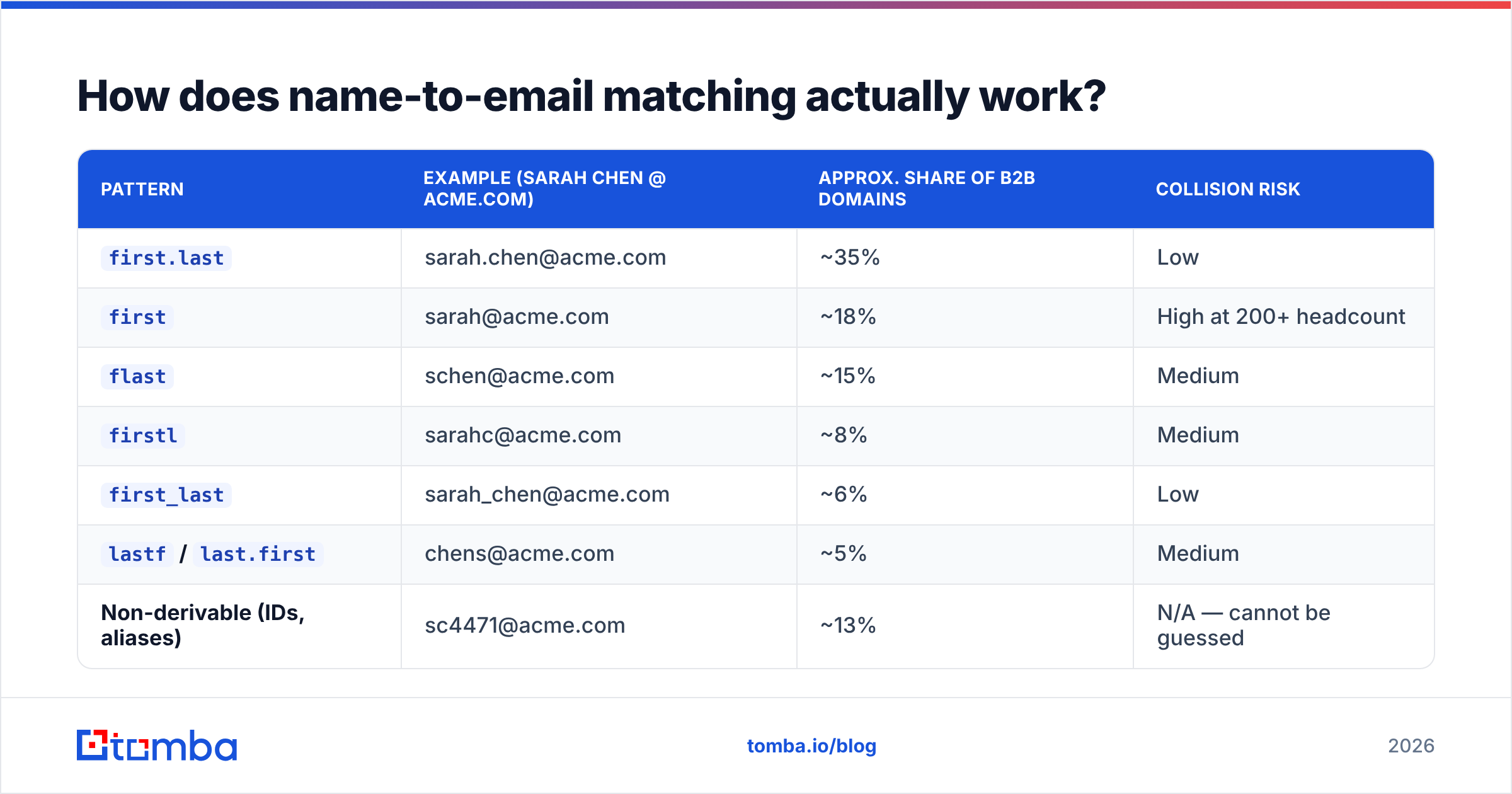
Every company picks an email pattern and mostly sticks to it. There are about a dozen common ones, and roughly 70% of B2B domains use one of the top four.
| Pattern | Example (Sarah Chen @ acme.com) | Approx. share of B2B domains | Collision risk |
|---|---|---|---|
first.last |
sarah.chen@acme.com | ~35% | Low |
first |
sarah@acme.com | ~18% | High at 200+ headcount |
flast |
schen@acme.com | ~15% | Medium |
firstl |
sarahc@acme.com | ~8% | Medium |
first_last |
sarah_chen@acme.com | ~6% | Low |
lastf / last.first |
chens@acme.com | ~5% | Medium |
| Non-derivable (IDs, aliases) | sc4471@acme.com | ~13% | N/A — cannot be guessed |
A name checker works in stages:
- Normalize the name. Strip accents, handle hyphenated surnames, split compound given names, decide whether "Dr." or "Jr." is part of the string. This is where transliteration bugs start — "Müller" becomes
muller,mueller, ormllerdepending on the tool. - Detect the domain pattern. Sample known-good addresses at that domain and infer the dominant format. A company email pattern checker does exactly this step in isolation.
- Generate candidates. Apply the detected pattern first, then fall back to the ranked list above. A pure email permutator skips step 2 entirely and emits all 20-odd variants — that's why permutator output needs heavy filtering.
- Match against known data. Cross-reference candidates with an indexed contact record — a public profile, a byline, a scraped signature, a WHOIS record. Without this, you are guessing.
- Verify deliverability. MX lookup, SMTP handshake, catch-all detection, disposable-domain check.
Skip step 4 and you have a permutator with good manners. That's the difference between a 50% hit rate and a 95% one.
Why do syntax-only checkers give false confidence?#
Because a syntactically valid address and a real one are almost unrelated categories.
nonexistent.person@microsoft.com passes every regex ever written. It has a legal local part, a legal domain, valid MX records, and — because large enterprises frequently run catch-all configurations — it may even accept mail at the SMTP layer. It still goes nowhere useful.
The gap shows up as three specific costs:
- Bounce rate. Guessed addresses that fail hard push your bounce rate above the 2% threshold where Google and Microsoft start throttling. Google's own Email Sender Guidelines put spam complaint and authentication requirements front and center for bulk senders — bounces compound the damage.
- Wrong-person delivery. At companies using
firstorflast, two employees named Sarah Chen and Steven Chen collide onschen@. Your pitch reaches the wrong Chen. No bounce, no signal, no reply, and a tiny reputational ding. - Silent list rot. Someone leaves; the mailbox goes to an alias or gets deleted. A checker that validated the address eight months ago still shows green.
That last one is why point-in-time verification matters more than a stored score. Contact data decays roughly 22–30% per year, and job-change churn is the biggest driver.
What does a good email name checker return?#
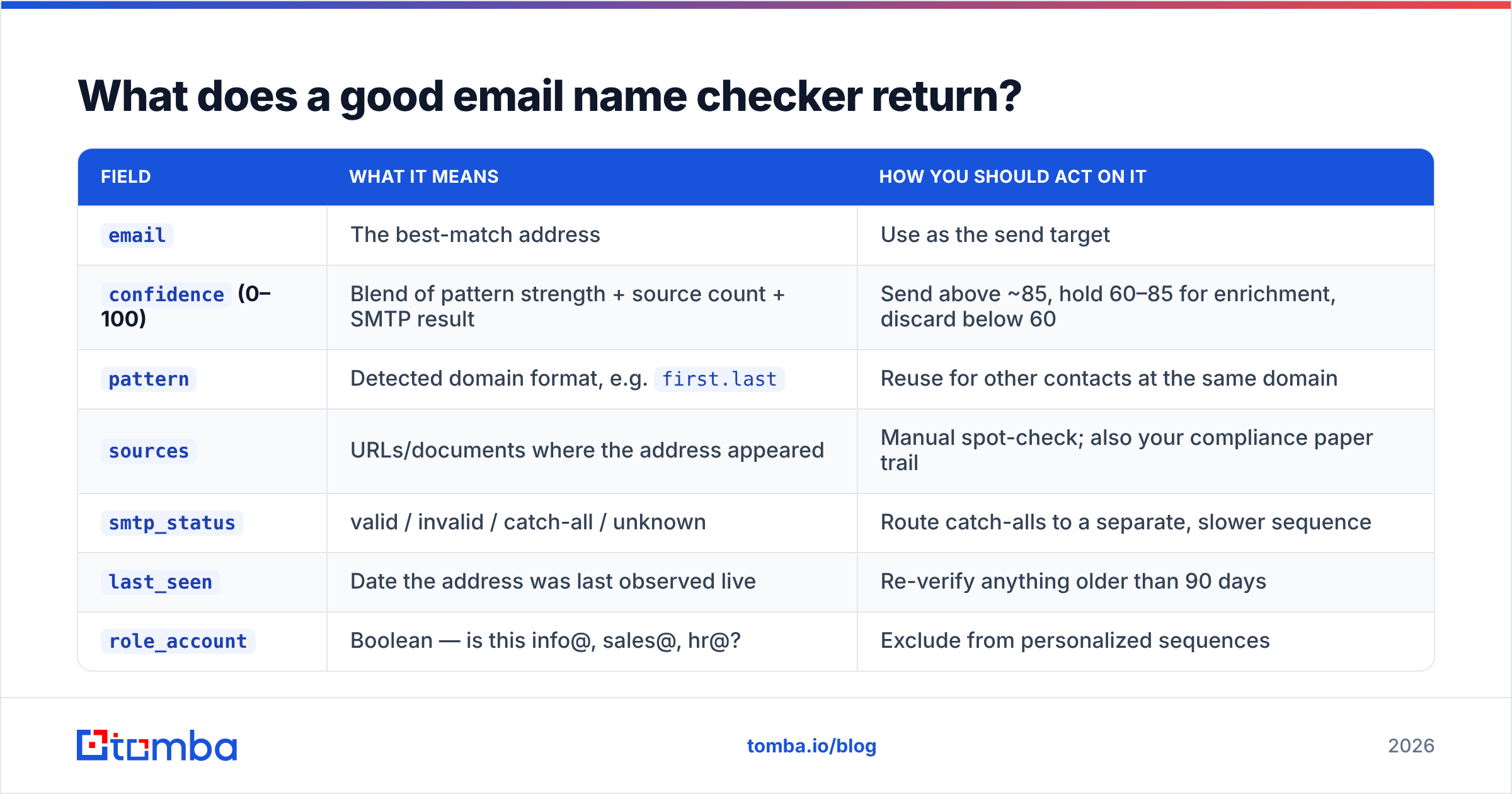
A useful result is not a boolean. It's a structured object you can route on.
| Field | What it means | How you should act on it |
|---|---|---|
email |
The best-match address | Use as the send target |
confidence (0–100) |
Blend of pattern strength + source count + SMTP result | Send above ~85, hold 60–85 for enrichment, discard below 60 |
pattern |
Detected domain format, e.g. first.last |
Reuse for other contacts at the same domain |
sources |
URLs/documents where the address appeared | Manual spot-check; also your compliance paper trail |
smtp_status |
valid / invalid / catch-all / unknown | Route catch-alls to a separate, slower sequence |
last_seen |
Date the address was last observed live | Re-verify anything older than 90 days |
role_account |
Boolean — is this info@, sales@, hr@? | Exclude from personalized sequences |
The sources field is the honesty check. A tool that returns a 97% confidence score with no source is asking you to trust an unaudited model. A tool that shows you the two conference pages and one GitHub commit where the address appeared is showing its work. Tomba publishes its data sources for exactly this reason.

Which tools do name-to-email matching best in 2026?#
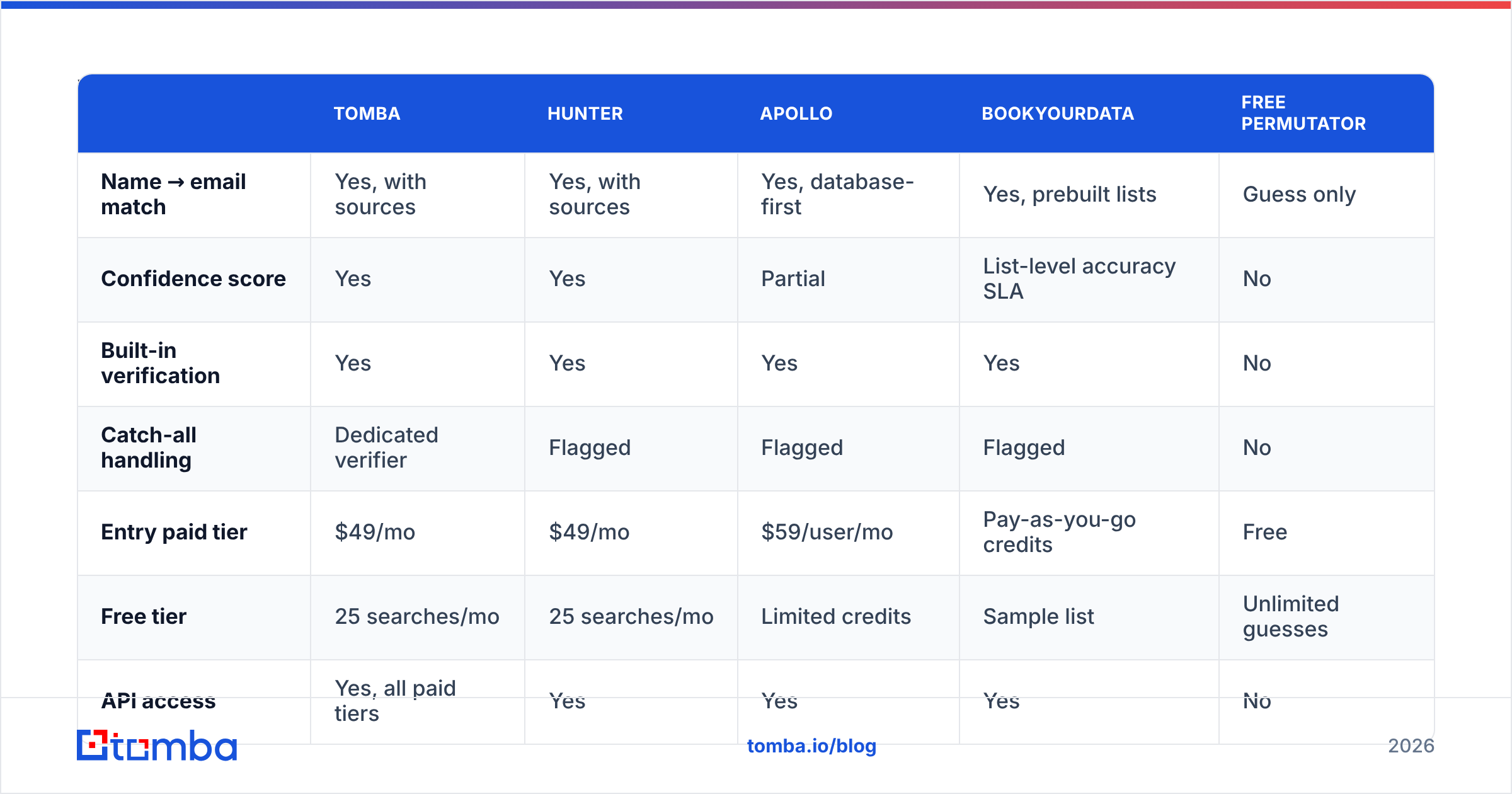
The category splits into three groups: free permutators (guess only), verifiers (deliverability only), and finder-verifiers (both). Only the third group answers the ownership question.

| Tomba | Hunter | Apollo | BookYourData | Free permutator | |
|---|---|---|---|---|---|
| Name → email match | Yes, with sources | Yes, with sources | Yes, database-first | Yes, prebuilt lists | Guess only |
| Confidence score | Yes | Yes | Partial | List-level accuracy SLA | No |
| Built-in verification | Yes | Yes | Yes | Yes | No |
| Catch-all handling | Dedicated verifier | Flagged | Flagged | Flagged | No |
| Entry paid tier | $49/mo | $49/mo | $59/user/mo | Pay-as-you-go credits | Free |
| Free tier | 25 searches/mo | 25 searches/mo | Limited credits | Sample list | Unlimited guesses |
| API access | Yes, all paid tiers | Yes | Yes | Yes | No |
| Bulk upload | Yes | Yes | Yes | Yes (native) | Manual |
| Best for | Dev-led + SMB outbound | Agency prospecting | Full sales engagement | Buying verified lists outright | One-off manual lookups |
A few honest notes on that table.
Apollo bundles matching into a full sequencing platform. If you want the CRM, dialer, and sequencer in one seat, the per-seat cost is defensible. If you only need addresses, you're paying for a suite. See the breakdown at Apollo alternatives.
BookYourData approaches the problem from the other end — instead of resolving names one at a time, you buy a pre-verified list filtered by title, geography, and industry, with an accuracy guarantee attached. That's a genuinely different workflow, and for teams that want volume without an API integration it's often the faster path. It's less useful when you already have a fixed list of named prospects and need those specific addresses.
Hunter is the closest direct comparison to Tomba on features and price. Differences come down to index coverage by region and how each handles catch-all domains.
Free permutators have exactly one legitimate use: you know the domain pattern already, you have one contact to find, and you're going to verify manually. Anything past that and the false-positive rate eats your sender reputation.
How do you handle catch-all domains and role accounts?#
These are the two cases where a confident name match still fails you.
Catch-all domains accept mail to any local part. asdfghjkl@theirdomain.com returns a 250 OK. Standard SMTP verification is blind here — everything looks valid, so nothing is. Roughly 15–20% of B2B domains run catch-all, concentrated in enterprise and in agencies using Google Workspace defaults.
Three workable approaches:
- Segment and throttle. Route catch-all addresses into a separate sequence with lower daily volume, so a bad batch can't torch your main sending domain.
- Use a dedicated catch-all verifier. These go beyond a single SMTP handshake — pattern consistency across the domain, historical engagement signals, alias-detection heuristics.
- Corroborate the person, not the mailbox. If the name appears in a byline, conference roster, or public profile at that domain, and the pattern matches, your risk drops sharply even without an SMTP confirmation.
Role accounts (info@, support@, careers@, no-reply@) are structurally different. They're real, deliverable, and almost always the wrong target for a personalized email. Worse, some are seeded spam traps. Any name checker worth using flags them automatically — if yours doesn't, filter on a role-account blocklist before you import.
What about non-Latin names and international patterns?#
This is the least-discussed accuracy gap in the whole category, and it's large.
- Transliteration ambiguity. "Иван Петров" can render as
ivan.petrov,ivan.petroff, ori.petrov. Arabic, Korean, and Greek names each have multiple competing romanization standards. Most checkers pick one and miss the rest. - Name-order inversion. In China, Japan, Korea, and Hungary, the family name comes first in native ordering but is often flipped in the corporate directory. A checker that doesn't try both orders halves its hit rate on those regions.
- Diacritic stripping. Some systems keep
é, some map toe, some drop the character.josé.garcía@versusjose.garcia@versusjosegarcia@are three different mailboxes. - Compound surnames. Spanish and Portuguese contacts frequently carry two family names.
garcia.lopez,garcia, andlopezare all plausible.
Practical rule: for non-Anglophone domains, weight source-based evidence far more heavily than pattern inference, and expect confidence scores to run lower. That's the tool being honest, not the tool being broken. If you're prospecting heavily outside North America and Western Europe, test any vendor on a 100-contact sample from your actual target region before you commit to an annual plan.
When should you use a name checker versus a full email finder?#
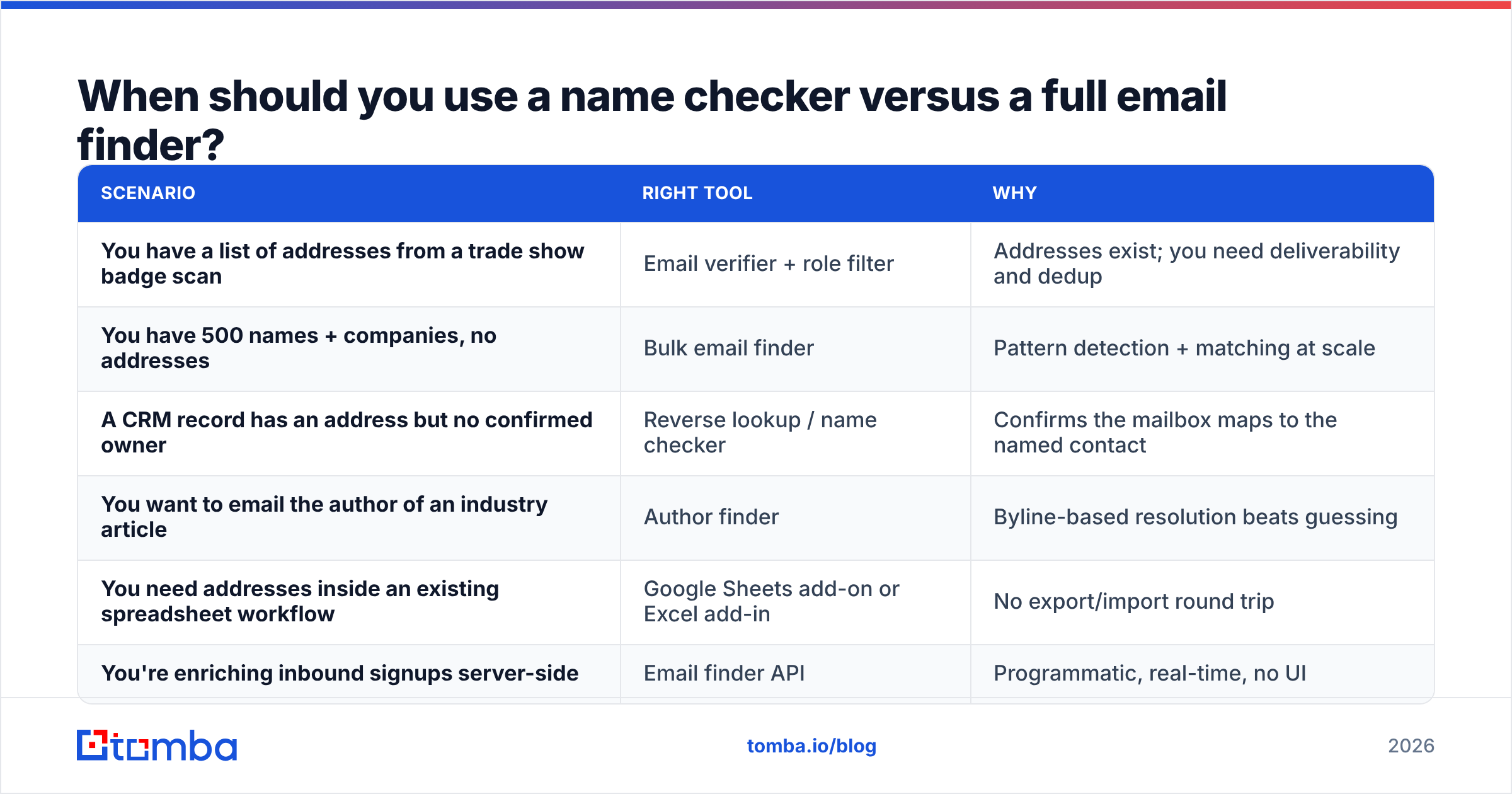
Short version: use a name checker when you already have the address and need to confirm ownership. Use a finder when you have the person and need the address.
| Scenario | Right tool | Why |
|---|---|---|
| You have a list of addresses from a trade show badge scan | Email verifier + role filter | Addresses exist; you need deliverability and dedup |
| You have 500 names + companies, no addresses | Bulk email finder | Pattern detection + matching at scale |
| A CRM record has an address but no confirmed owner | Reverse lookup / name checker | Confirms the mailbox maps to the named contact |
| You want to email the author of an industry article | Author finder | Byline-based resolution beats guessing |
| You need addresses inside an existing spreadsheet workflow | Google Sheets add-on or Excel add-in | No export/import round trip |
| You're enriching inbound signups server-side | Email finder API | Programmatic, real-time, no UI |
Most teams need both directions, which is why standalone name checkers rarely survive as separate line items. They get absorbed into whatever finder-verifier the team already pays for.
What does this cost in practice?#
Assume a 2,000-contact quarter with a 60% initial match rate.
- Free permutator route: $0 in tooling. You generate ~40,000 candidate addresses, verify them somewhere (a verifier at ~$0.004/check is roughly $160), and still land at 50–60% accuracy with meaningful bounce risk. The hidden cost is a damaged sending domain, which takes weeks to repair.
- Finder-verifier route: roughly $49–$99/month depending on volume. Tomba's Starter plan at $49/mo covers most solo and small-team workloads; Growth at $99/mo and Pro at $249/mo scale from there. Full Tomba pricing breaks the credit allocations down by tier.
- Full sales platform route: $59–$150 per user per month. Worth it when you need sequencing, dialing, and reporting in one place; overkill when you need addresses.
Run the arithmetic on your own reply rate. If a valid address is worth $8 in expected pipeline and a bad one costs you a fraction of a point of deliverability, the $49/mo tier pays for itself before you finish onboarding. Independent user reviews on G2 are a decent sanity check on whether a vendor's claimed accuracy survives contact with real lists.
What should you check before trusting any match?#
A quick pre-send checklist that catches most of the damage:
- Is there a source? No source, no send — or at minimum, no send from your primary domain.
- Is the confidence score above your threshold? Set it at 85 and hold the line. Lowering it to hit a volume target is how bounce rates climb.
- Is it a role account? Filter
info@,sales@,hr@,admin@,no-reply@and their variants out of personalized sequences. - Is the domain catch-all? If yes, segment it. Don't blend catch-alls into your main send.
- How old is the record? Anything past 90 days gets re-verified before it enters a sequence.
- Does the pattern match the domain's dominant format? A
first.lastmatch at aflastcompany is a red flag, not a lucky find.
Run those six checks and your bounce rate stays where the mailbox providers want it. Skip them and no amount of copywriting saves the campaign.
Getting started#
If you're resolving names to addresses at any volume, start with the layer that actually answers the ownership question. The Tomba Email Finder takes a name plus a domain and returns the matched address with a confidence score, the detected company pattern, and the sources where that address was observed — then verifies deliverability before it hands the result back. The free tier gives you 25 searches a month to test it against contacts you already know the answer for, which is the only benchmark that matters. Pair it with the email verifier for lists you've collected elsewhere, and you've covered both directions of the problem without stacking two subscriptions.
Related guides#
Ready to find emails that actually work?
Join 150,000+ professionals who stopped guessing and started sending. Free credits on signup — no credit card required.
Get the Tomba newsletter
Practical outbound tactics and product updates — once every two weeks.
About the author