Email Name Generator: Build Addresses That Actually Land
An email name generator spits out 20 plausible addresses in a second. Most of them bounce. Here's how the patterns work, which ones hit, and when to skip guessing entirely.
TL;DR
- An email name generator (also called an email permutator) takes a first name, last name, and domain and outputs every plausible address combination —
john.smith@,jsmith@,john@, and 15 more. - Roughly 60–70% of B2B domains use one of five patterns, so pattern-based generation gets you close. It does not get you correct.
- Generating is free. Verifying is the part that protects your sender reputation — never send to a raw generated list.
- If you already know the company's email format, a generator plus a verifier is enough. If you don't, a real email finder that queries a source index beats guessing on both accuracy and time.
- Use a generator for your own business addresses too:
firstname@for founders,firstname.lastname@for teams over 20, role addresses for shared inboxes.
What is an email name generator?#
An email name generator is a tool that builds candidate email addresses from three inputs: a first name, a last name, and a domain. Feed it Sarah, Chen, and acme.com and it returns a list:
sarah.chen@acme.com
sarahchen@acme.com
schen@acme.com
sarah.c@acme.com
sarah@acme.com
s.chen@acme.com
chen.sarah@acme.com
csarah@acme.com
That's it. There's no database lookup, no intelligence, no confirmation that any of these exist. The tool applies string templates and returns permutations. The term gets used for two different jobs, which is why search results feel confusing:
- Prospecting use — you know who you want to reach and where they work, and you need their address. This is the dominant use case and what most people mean.
- Naming use — you're setting up email for a new company or domain and want a consistent, professional convention before you provision 40 mailboxes.
Both are covered below, because the same pattern logic drives both. If you pick a weird convention for your own company, every prospecting tool aimed at you will miss — and vice versa.
How does an email name generator actually work?#
Under the hood it's four steps, and understanding them tells you exactly where accuracy leaks out.
- Normalization — the tool strips accents, hyphens, and middle names.
José Martínez-Ruizbecomesjoseandmartinezormartinezruiz, depending on the tool. This is the single biggest source of misses on non-English names. - Template expansion — each pattern (
{first}.{last},{f}{last},{first}) is filled and joined to the domain. A thorough tool produces 20–35 variants; a lazy one produces 8. - Syntax validation — anything violating the address spec gets dropped. The rules come from RFC 5322, summarized well on Wikipedia's email address page. Length limits, illegal characters, consecutive dots.
- Optional MX + SMTP check — better tools then ask the receiving mail server whether each address exists. This is the step that turns a guess list into a usable list, and it's the step free generators skip.
Steps 1–3 are commodity. Step 4 is where tools separate. A free email permutator hands you the raw list; a verifier tells you which one is real.
Which email name patterns are most common?#
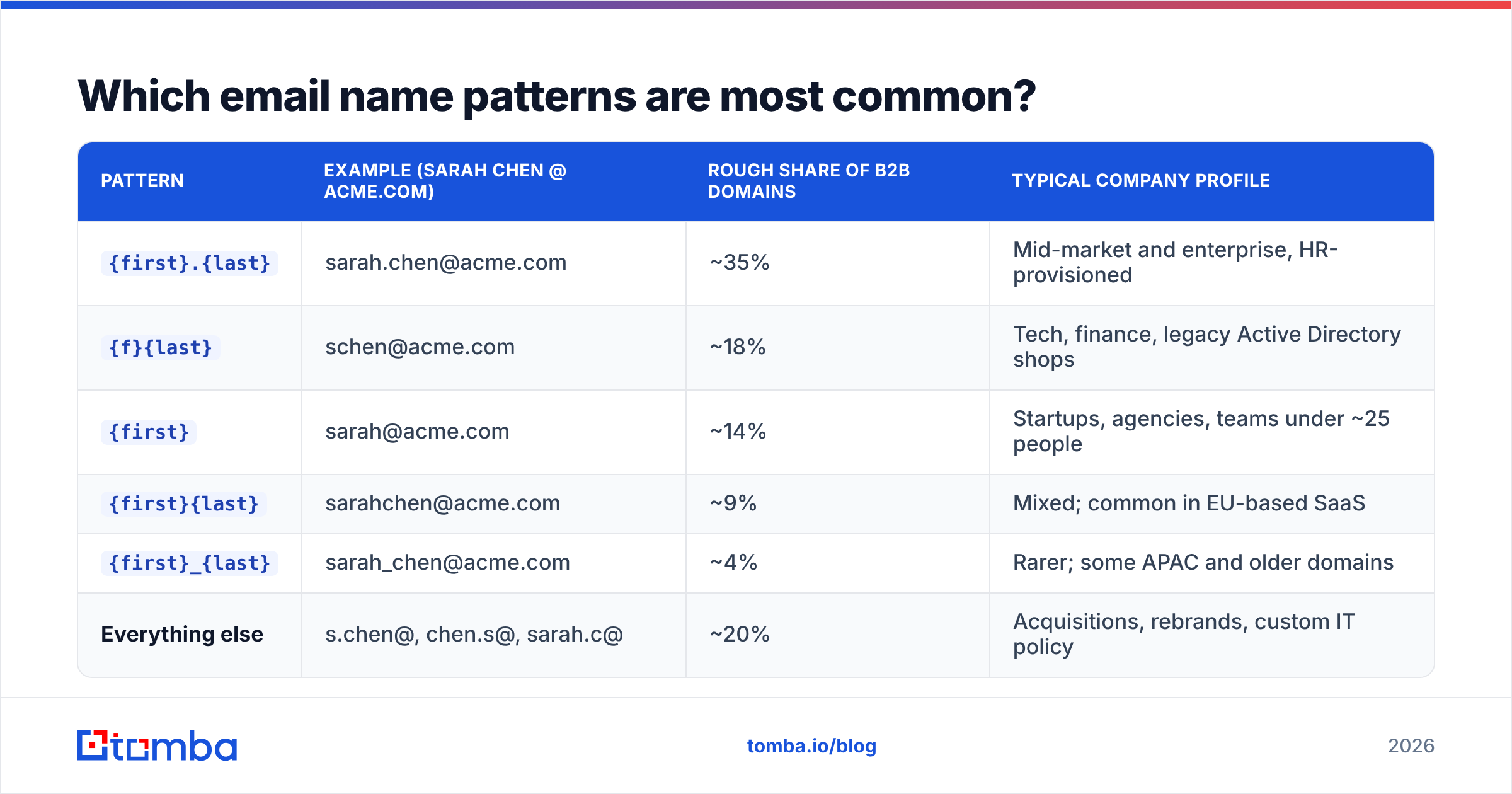
Across B2B domains, the distribution is heavily concentrated. Five patterns cover the large majority of companies, which is why guessing works at all.
| Pattern | Example (Sarah Chen @ acme.com) | Rough share of B2B domains | Typical company profile |
|---|---|---|---|
{first}.{last} |
sarah.chen@acme.com | ~35% | Mid-market and enterprise, HR-provisioned |
{f}{last} |
schen@acme.com | ~18% | Tech, finance, legacy Active Directory shops |
{first} |
sarah@acme.com | ~14% | Startups, agencies, teams under ~25 people |
{first}{last} |
sarahchen@acme.com | ~9% | Mixed; common in EU-based SaaS |
{first}_{last} |
sarah_chen@acme.com | ~4% | Rarer; some APAC and older domains |
| Everything else | s.chen@, chen.s@, sarah.c@ | ~20% | Acquisitions, rebrands, custom IT policy |
Two things follow from that table. First, if you only test the top pattern you're wrong about two-thirds of the time. Second, if you test all 20 permutations by sending email, you'll hit 19 invalid addresses per contact — which is how you destroy a sending domain in a week.
The smarter move is to establish the company's pattern once, then apply it to everyone else at that company. One confirmed address unlocks the whole org chart. A company email pattern checker does this in a single lookup instead of trial and error.

How accurate are generated email addresses?#
Honestly: on their own, not very. A permutator's job is recall, not precision. It guarantees the correct address is somewhere in the list — it tells you nothing about which one.

Three factors decide whether generated addresses hold up:
- Catch-all domains. Around 15–20% of business domains accept mail to any local part. Every one of your 20 guesses will look "valid" on an SMTP check, and 19 will land in a black hole or an abuse trap. A dedicated catch-all verifier is the only reliable way to score these.
- Name collisions. Two Sarah Chens at a 900-person company means one is
sarah.chen@and the other issarah.chen2@orschen2@. No generator knows which is which. - Aliases and forwarders. Many people have three working addresses. All deliver; only one gets read. Google Workspace documents this behavior in its email alias support docs.
The practical bar: treat a generated list as a hypothesis set, verify it, and only send to addresses returned as deliverable. If your bounce rate on a campaign exceeds 3%, mailbox providers start throttling you regardless of how good your copy is.
Email name generator vs email finder: which should you use?#
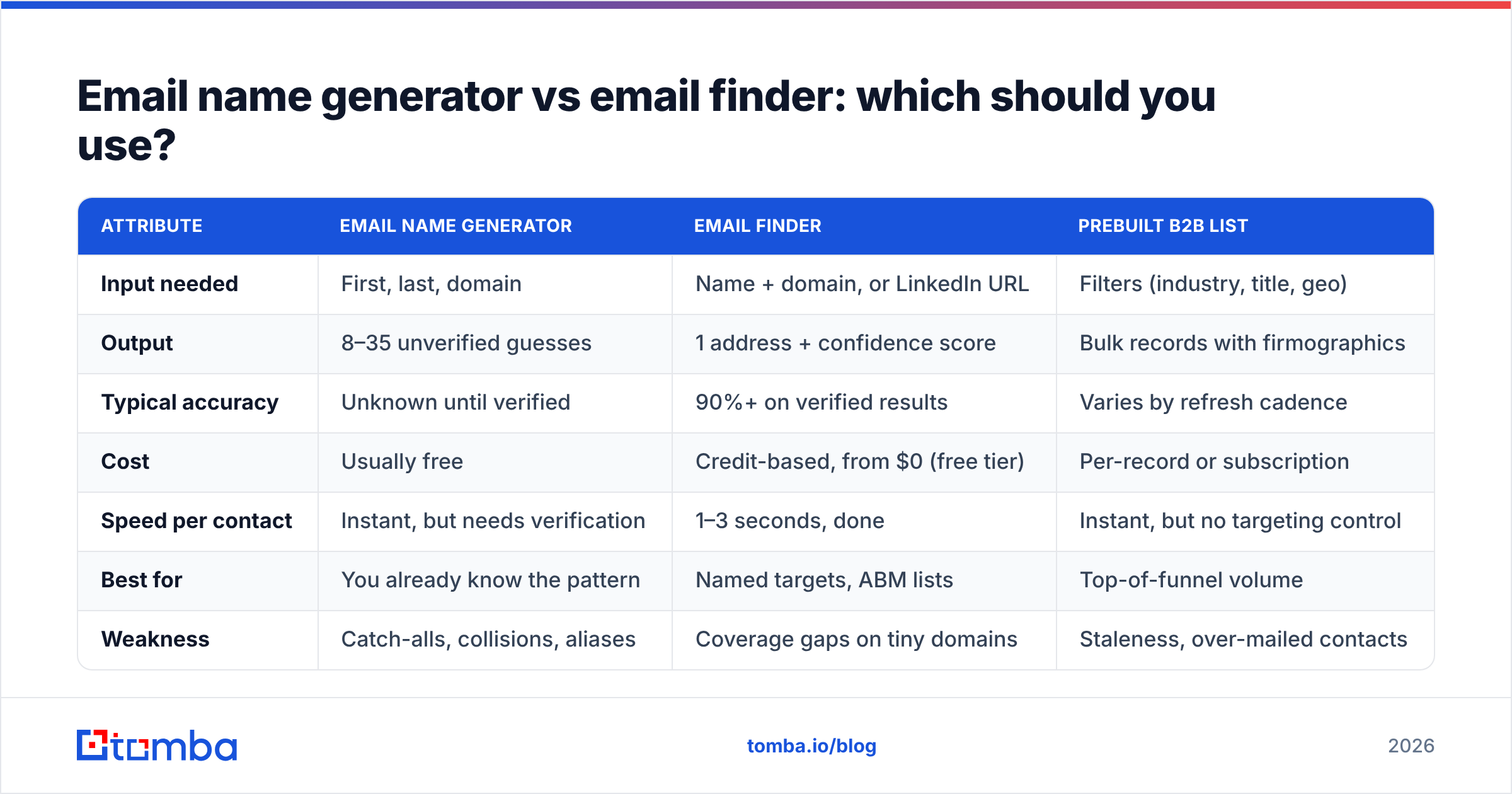
They solve overlapping problems with different mechanics. A generator computes candidates from name plus domain. A finder queries an index of addresses observed on the public web, in company data, and via verified sources, then confirms with an SMTP check.

| Attribute | Email name generator | Email finder | Prebuilt B2B list |
|---|---|---|---|
| Input needed | First, last, domain | Name + domain, or LinkedIn URL | Filters (industry, title, geo) |
| Output | 8–35 unverified guesses | 1 address + confidence score | Bulk records with firmographics |
| Typical accuracy | Unknown until verified | 90%+ on verified results | Varies by refresh cadence |
| Cost | Usually free | Credit-based, from $0 (free tier) | Per-record or subscription |
| Speed per contact | Instant, but needs verification | 1–3 seconds, done | Instant, but no targeting control |
| Best for | You already know the pattern | Named targets, ABM lists | Top-of-funnel volume |
| Weakness | Catch-alls, collisions, aliases | Coverage gaps on tiny domains | Staleness, over-mailed contacts |
| Example tools | Free permutators, spreadsheet formulas | Tomba Email Finder, Hunter | BookYourData, curated vendors |
For named-account outbound, the finder wins on time-per-contact by a wide margin. For a list where you already confirmed the pattern at three companies, the generator plus a bulk verify pass is cheaper and just as good. And for pure volume plays where you don't have names yet, a curated database like BookYourData or a filtered B2B database query gets you the names in the first place. These aren't competing religions; they're three stages of the same pipeline.
Reviews on G2's lead intelligence category reflect the same split — the complaints about "generator" tools are almost always about bounce rates, and the complaints about databases are almost always about staleness.
What makes a good email name for your own business?#
Flip the perspective. If you're provisioning addresses, the pattern you choose determines how findable your team is, how much internal confusion you create, and how much spam you attract.
- Under 15 people: use
{first}@. It's short, memorable, and reads as human in a reply-to field. The moment you hire a second Alex, you migrate — plan for it rather than pretending it won't happen. - Over 15 people: use
{first}.{last}@. It's the most common B2B convention for a reason: it scales to thousands, collides rarely, and every CRM and calendar tool parses it cleanly. - Avoid
{f}{last}@unless you're forced into it.schen@is compact but unreadable, gets misspelled on phone calls, and makes name-based routing rules brittle. - Never use numbers or years.
sarah2@andchen2026@read as either spam or a personal Gmail. They also break the mental model your recipients use to reply later. - Reserve role addresses separately.
support@,billing@,careers@should be groups, not people. Role addresses attract high spam volume, so keep them off the same reputation path as your outbound sending domain. - Use a subdomain for cold outreach. Send prospecting from
mail.yourdomain.comor a dedicated sending domain. If reputation tanks, your corporate mail keeps flowing.
One more: check the pattern renders sensibly for your whole team before you commit. Names with apostrophes, hyphens, or three parts break naive templates, and you'd rather find that in a spreadsheet than in a bounced invoice.
How do you verify generated addresses without burning your domain?#
Never verify by sending. That's the entire rule. Sending to a guessed list is how you collect hard bounces, hit spam traps, and get your domain flagged by mailbox providers who don't offer an appeals process.
The safe sequence:
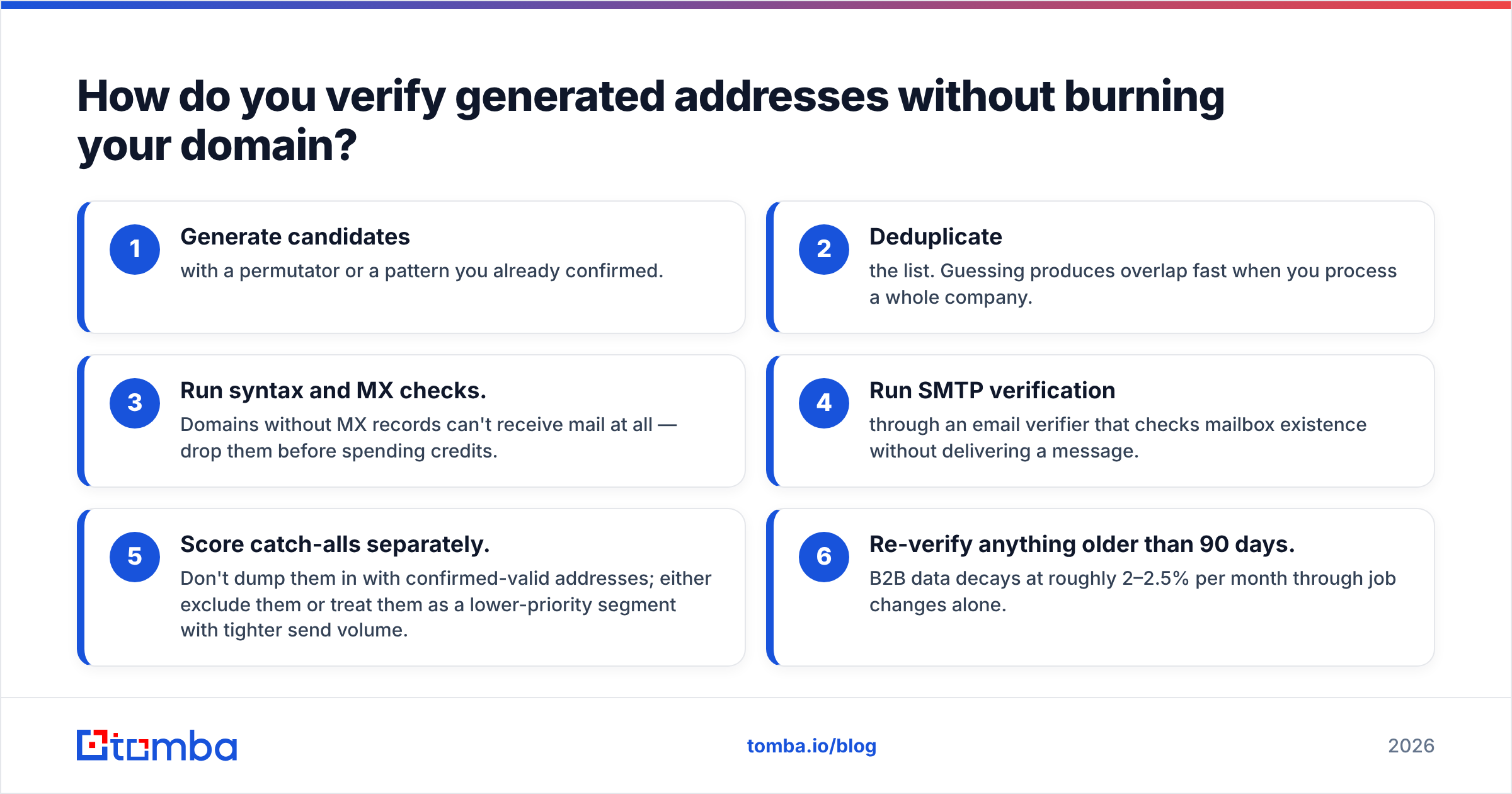
- Generate candidates with a permutator or a pattern you already confirmed.
- Deduplicate the list. Guessing produces overlap fast when you process a whole company.
- Run syntax and MX checks. Domains without MX records can't receive mail at all — drop them before spending credits.
- Run SMTP verification through an email verifier that checks mailbox existence without delivering a message.
- Score catch-alls separately. Don't dump them in with confirmed-valid addresses; either exclude them or treat them as a lower-priority segment with tighter send volume.
- Re-verify anything older than 90 days. B2B data decays at roughly 2–2.5% per month through job changes alone.
For a whole list, a bulk verify run is the practical path — upload a CSV, get statuses back, filter to deliverable. If you're working in a spreadsheet already, the Google Sheets add-on does the same thing inline so you never export.
What does an email name generator cost?#
The generation step is almost always free. You pay for verification and for finding, which is the right place to spend money because that's where the accuracy lives.
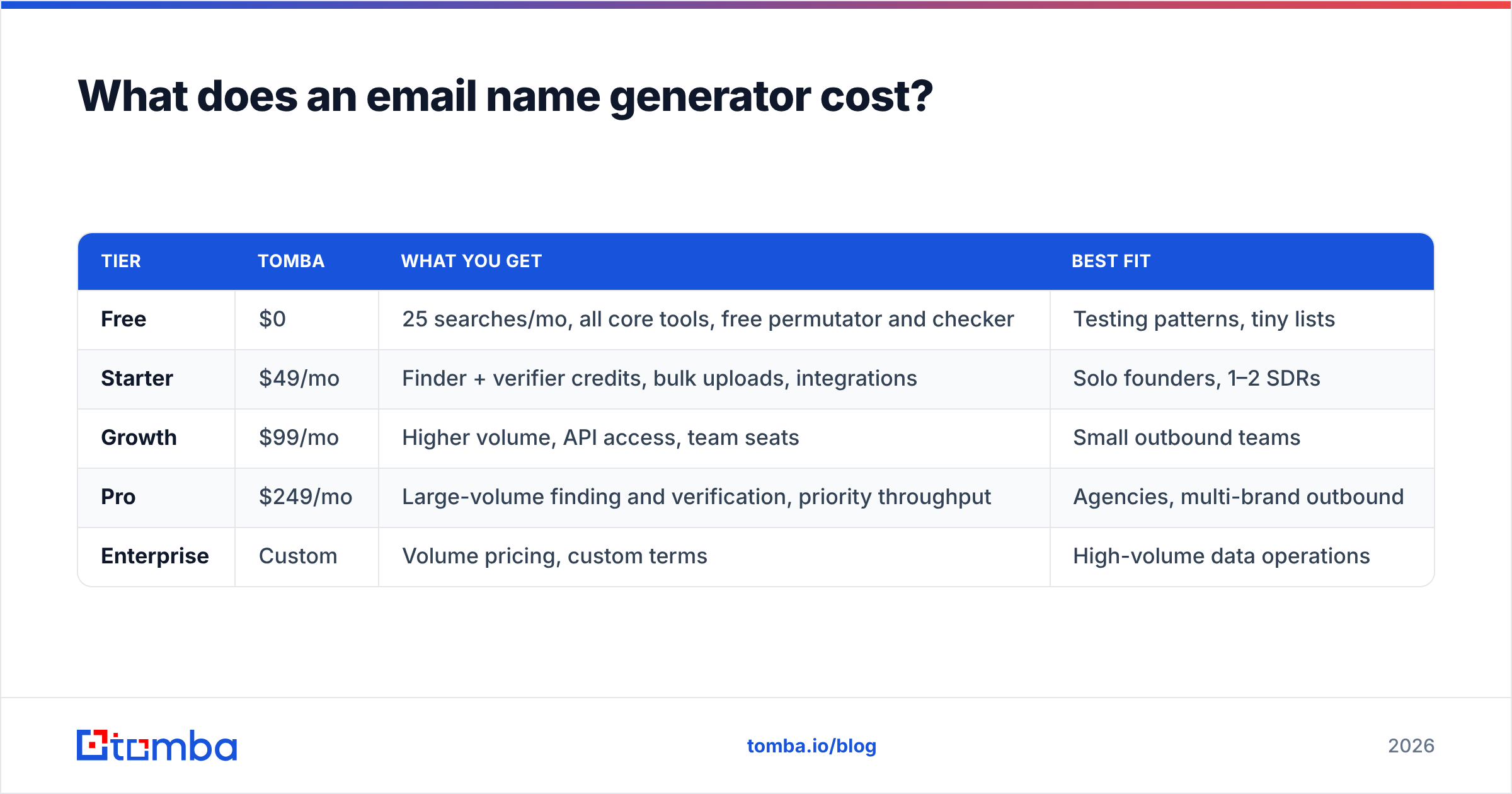
| Tier | Tomba | What you get | Best fit |
|---|---|---|---|
| Free | $0 | 25 searches/mo, all core tools, free permutator and checker | Testing patterns, tiny lists |
| Starter | $49/mo | Finder + verifier credits, bulk uploads, integrations | Solo founders, 1–2 SDRs |
| Growth | $99/mo | Higher volume, API access, team seats | Small outbound teams |
| Pro | $249/mo | Large-volume finding and verification, priority throughput | Agencies, multi-brand outbound |
| Enterprise | Custom | Volume pricing, custom terms | High-volume data operations |
Free permutators, the email generator, and the free email checker sit outside credit limits, so you can pattern-test without touching a plan. Full Tomba pricing breaks down credit allocation per tier if you're modeling cost per verified contact.
The math that matters: cost per verified, deliverable address. A free generator producing 20 guesses at a 12% hit rate is not free — it costs you 17 bounces and a damaged domain.
What are the most common mistakes with email name generators?#
- Sending to all permutations. The fastest way to get blacklisted. One contact, one address.
- Trusting a "valid" result on a catch-all domain. Valid means "the server accepted the syntax," not "a human reads this inbox."
- Ignoring subdomains. Some companies route mail through
mail.company.comor a country domain. Your generator built addresses for the wrong host. - Using personal-provider patterns for business targets. Nobody's work address is
sarahchen1987@. Don't let generic generators pad your list. - Skipping the pattern-confirmation step. Confirm once per company, apply everywhere. It cuts your verification spend by an order of magnitude.
- Treating the list as permanent. People change jobs. A verified address from March is a coin flip in September.
Should you use a generator or just find the email?#
Use a generator when you already know the company's convention and you're filling in known names — it's free, instant, and accurate enough once verified. Use a finder when you don't know the pattern, when the domain is a catch-all, or when time per contact matters more than credit cost. Most teams end up doing both: find one address to establish the pattern, generate the rest, bulk-verify the whole set.
If you want the shortest path from a name and a company to an address that actually delivers, start with the Tomba Email Finder. It skips the permutation guesswork, returns a single address with a confidence score and source attribution, and runs SMTP verification before it hands anything back. The free tier gives you 25 searches a month — enough to check whether guessing was ever worth it for your list. Pair it with domain search when you want every reachable contact at a company rather than one name at a time.
Related guides#
Ready to find emails that actually work?
Join 150,000+ professionals who stopped guessing and started sending. Free credits on signup — no credit card required.
Get the Tomba newsletter
Practical outbound tactics and product updates — once every two weeks.
About the author