Email Not Found: Why Email Finders Fail and How to Fix It
Your email finder returned nothing. That doesn't mean the address doesn't exist — it usually means the tool ran out of evidence. Here's what "email not found" actually means and the recovery playbook that gets you the contact anyway.
TL;DR
- "Email not found" almost never means the person has no email address. It means the tool you used had no verifiable evidence for that specific person at that specific domain.
- Six causes account for nearly every failure: wrong or aliased domain, name mismatch, thin source coverage, catch-all domains, privacy scrubbing, and genuinely new hires.
- A structured recovery sequence — fix the domain, fix the name, try a second data source, then pattern-and-verify — recovers roughly 30-50% of first-pass failures in most B2B lists.
- Never guess-and-send. A pattern guess that fails silently on a catch-all domain damages your sender reputation far more than a skipped lead.
- Budget for failure: assume 15-30% of any real B2B list will not resolve on the first pass, and build your workflow around that number instead of pretending it's zero.
You searched for someone's work email. The tool spun for two seconds and returned nothing. Now what?
Most people do one of two things, and both are wrong. They either give up on the lead entirely, or they guess firstname.lastname@company.com and hit send. The first throws away pipeline. The second quietly poisons your domain reputation. There's a third path, and it's mechanical — a sequence of checks that turns a meaningful slice of your dead lookups back into deliverable contacts.
What does "email not found" actually mean?#
It means the tool found no address it was willing to stand behind. That's a statement about the tool's evidence, not about reality.
Think of an email finder like a librarian. You ask for a book. The librarian checks the catalog, the shelves, and the returns cart. If none of those show the book, they tell you it isn't available — not that the book was never printed. Somebody might have it at home. It might be in a branch across town. The catalog is a map of what the library can see, not a map of everything that exists.
Email finders work the same way. They assemble addresses from public web pages, corporate sites, press releases, git commits, conference listings, published documents, WHOIS records, and partner data feeds. When a provider returns a result, it's because at least one of those sources produced an address for that person-domain pair, and usually because a verification step confirmed the mailbox accepts mail.
So a null result decomposes into two very different scenarios:
- No candidate address was ever generated. The person doesn't appear in any indexed source under that domain. This is a coverage problem.
- A candidate was generated but failed verification. The tool built
j.smith@acme.com, tested it, got a rejection, and suppressed it rather than shipping you a bounce. This is a confidence decision — and a good one.
The second case is the tool doing its job. Providers that never return null have simply moved the failure downstream, from your search result to your bounce rate. That trade is always worse.
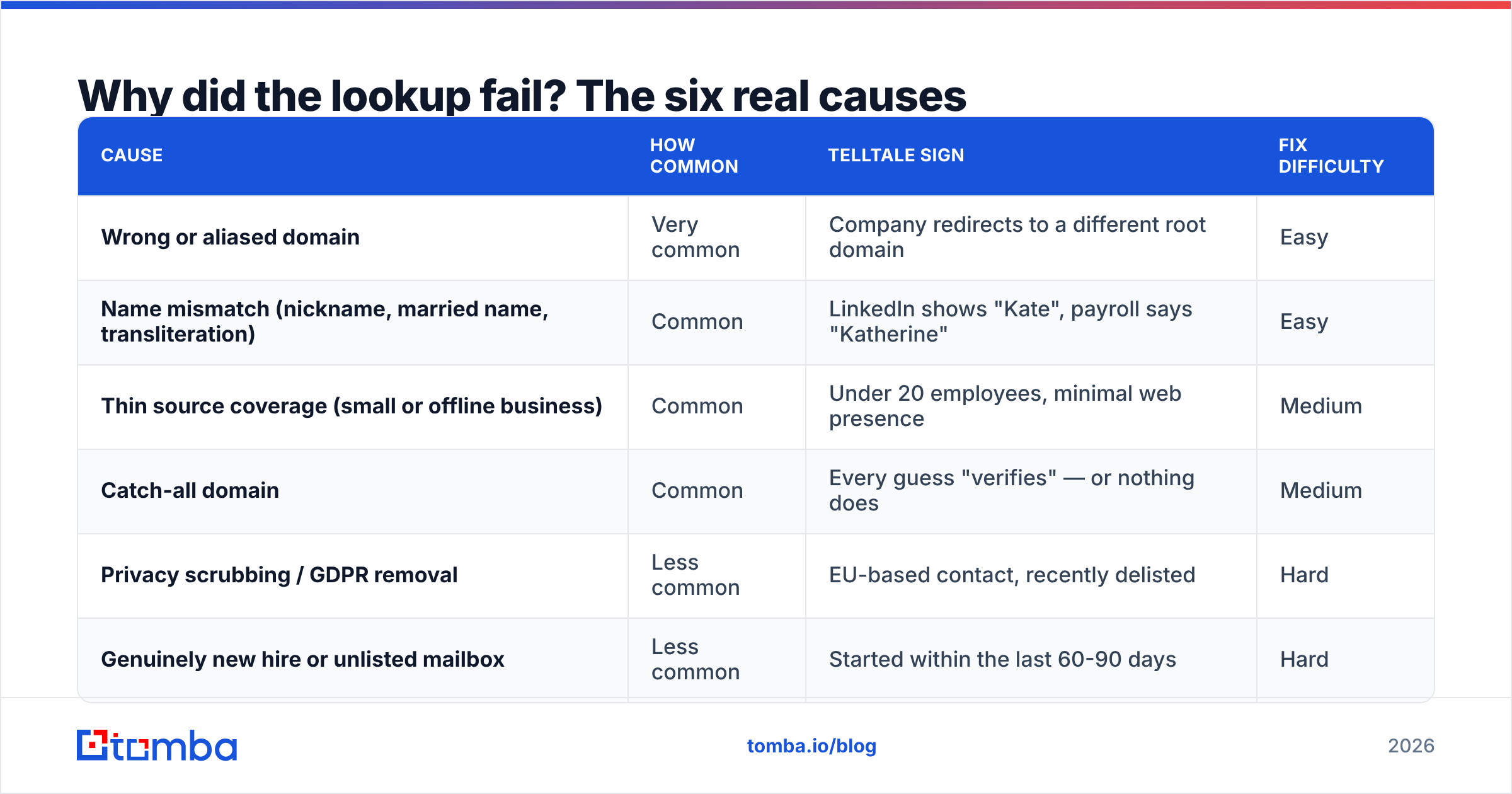
Why did the lookup fail? The six real causes#
| Cause | How common | Telltale sign | Fix difficulty |
|---|---|---|---|
| Wrong or aliased domain | Very common | Company redirects to a different root domain | Easy |
| Name mismatch (nickname, married name, transliteration) | Common | LinkedIn shows "Kate", payroll says "Katherine" | Easy |
| Thin source coverage (small or offline business) | Common | Under 20 employees, minimal web presence | Medium |
| Catch-all domain | Common | Every guess "verifies" — or nothing does | Medium |
| Privacy scrubbing / GDPR removal | Less common | EU-based contact, recently delisted | Hard |
| Genuinely new hire or unlisted mailbox | Less common | Started within the last 60-90 days | Hard |
Wrong domain is the single biggest silent killer. You search acme.com because that's what's on the LinkedIn company page, but the company actually sends mail from acme-group.com, or getacme.com, or the parent holding company's domain after an acquisition. The person's mailbox exists; you asked about the wrong building.
Name mismatch is the second. Corporate email conventions usually follow HR records, not display names. "Bob Kowalczyk" on Twitter may be robert.kowalczyk@ in Exchange. Non-Latin names get transliterated inconsistently — the same person can be mueller, muller, or müeller depending on who set up the account.
Catch-all domains deserve their own paragraph. A catch-all mail server accepts every address at the domain, including asdkjhaskdj@company.com. Standard SMTP verification is useless there, because everything comes back valid. Careful providers flag these rather than pretend, which is why you sometimes get "not found" or "accept-all" instead of a green checkmark. Running the address through a dedicated catch-all verifier applies different signals — historical engagement, pattern consistency across the domain, source corroboration — to give you a usable confidence score instead of a shrug.

Is it ever safe to guess the address?#
Guessing is fine. Sending to a guess is not.
The distinction matters because pattern generation is a legitimate discovery technique. Roughly 70% of B2B domains use one of five formats:
first.last@domain.com— the most common corporate standard, dominant in mid-market and enterprisefirst@domain.com— typical of startups and companies under about 50 peopleflast@domain.com— common in finance, legal, and older enterprisesfirstl@domain.com— less common but persistent in techfirst_last@domain.com— rare, but shows up in specific verticals and some Asia-Pacific companies
If you know one confirmed address at the domain, you know the format, and you can construct a candidate for anyone else there. That's not a guess — it's an inference from evidence. Use an email permutator to generate the variants, then push every candidate through verification before a single one touches your sequence.
What you must never do is skip step two. An unverified guess has maybe a 40-60% chance of being right. Send a thousand of those and you book 400-600 hard bounces, which is enough to drag your domain into the spam folder for the legitimate half. Google and Microsoft both treat bounce rate as a primary reputation signal; Google's bulk sender guidelines are explicit that keeping spam and invalid rates low is a condition of inbox placement, not a nice-to-have.
How do you recover a failed lookup? The seven-step playbook#
Work these in order. Each step is cheap, and the early ones resolve most failures.
Step 1 — Confirm the sending domain, not the marketing domain. Load the company's site and check where the contact form, careers page, and press contacts point. Look at the MX records. A company at acme.io that runs Google Workspace on acmecorp.com will fail every lookup on the first domain and succeed on the second. A domain search against the correct root returns the full set of known addresses plus the dominant pattern, which then unlocks everyone else at that company.
Step 2 — Normalize the name. Try the legal form (Katherine, not Kate), drop middle initials, strip accents and hyphens, and try both orderings for names where the surname convention is ambiguous. Check whether a recent marriage or name change is reflected on LinkedIn but not in HR-derived data — or vice versa.
Step 3 — Search by role instead of person. If you're targeting a function rather than a specific human, run a domain search and pick whoever holds that title now. Companies churn; the VP you found in a saved list six months ago may have left, which is a common cause of confident-looking lookups that suddenly return nothing.
Step 4 — Change the source, not just the query. Different providers index different corners of the web. One weights corporate site crawls, another weights LinkedIn-derived data, another leans on partner co-ops. If your primary tool returns null, a second source with a different collection method has a real chance — this is why waterfall enrichment exists as a category. Reputable comparison data on G2's lead intelligence category makes the coverage differences between providers reasonably visible.
Step 5 — Use adjacent identifiers. If the person has published articles, an author finder pulls contact details from bylines. If they're active on LinkedIn, a LinkedIn finder resolves profile-to-email. If you already have a personal address and need the work one, a reverse email lookup can bridge the two records.
Step 6 — Generate and verify. Only now, with a confirmed domain and a known pattern, build candidates and run them through an email verifier. Accept only valid. Treat accept-all as a separate bucket requiring a catch-all-specific check, and discard invalid and unknown outright.
Step 7 — Switch channels or shelve it. If steps 1-6 fail, the contact isn't worth more of your time via email today. Try a phone finder for a direct dial, send a LinkedIn message, or park the record in a re-check queue and run it again in 90 days. New hires become discoverable as they start appearing in company content.
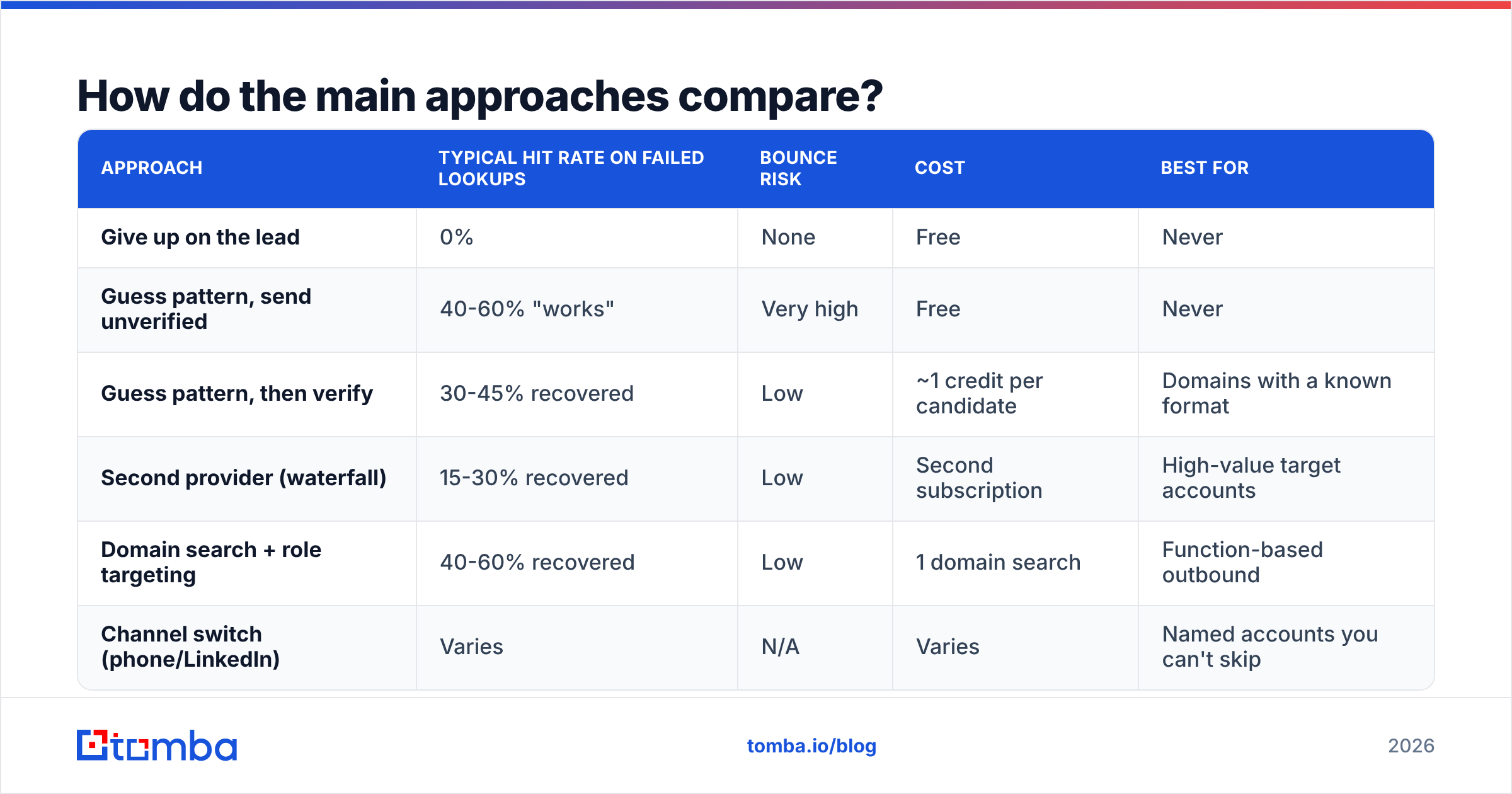
How do the main approaches compare?#
| Approach | Typical hit rate on failed lookups | Bounce risk | Cost | Best for |
|---|---|---|---|---|
| Give up on the lead | 0% | None | Free | Never |
| Guess pattern, send unverified | 40-60% "works" | Very high | Free | Never |
| Guess pattern, then verify | 30-45% recovered | Low | ~1 credit per candidate | Domains with a known format |
| Second provider (waterfall) | 15-30% recovered | Low | Second subscription | High-value target accounts |
| Domain search + role targeting | 40-60% recovered | Low | 1 domain search | Function-based outbound |
| Channel switch (phone/LinkedIn) | Varies | N/A | Varies | Named accounts you can't skip |
The economics here are usually misjudged. People assume recovery is expensive because it involves more tool calls. It doesn't. A domain search plus a handful of verifications costs a few credits. On Tomba pricing, the Free tier gives you 25 searches a month to test the workflow, Starter runs $49/mo, and Growth is $99/mo — the marginal cost of recovering a lead is small change against the cost of a lead you already spent research time sourcing.
What hit rate should you actually expect?#
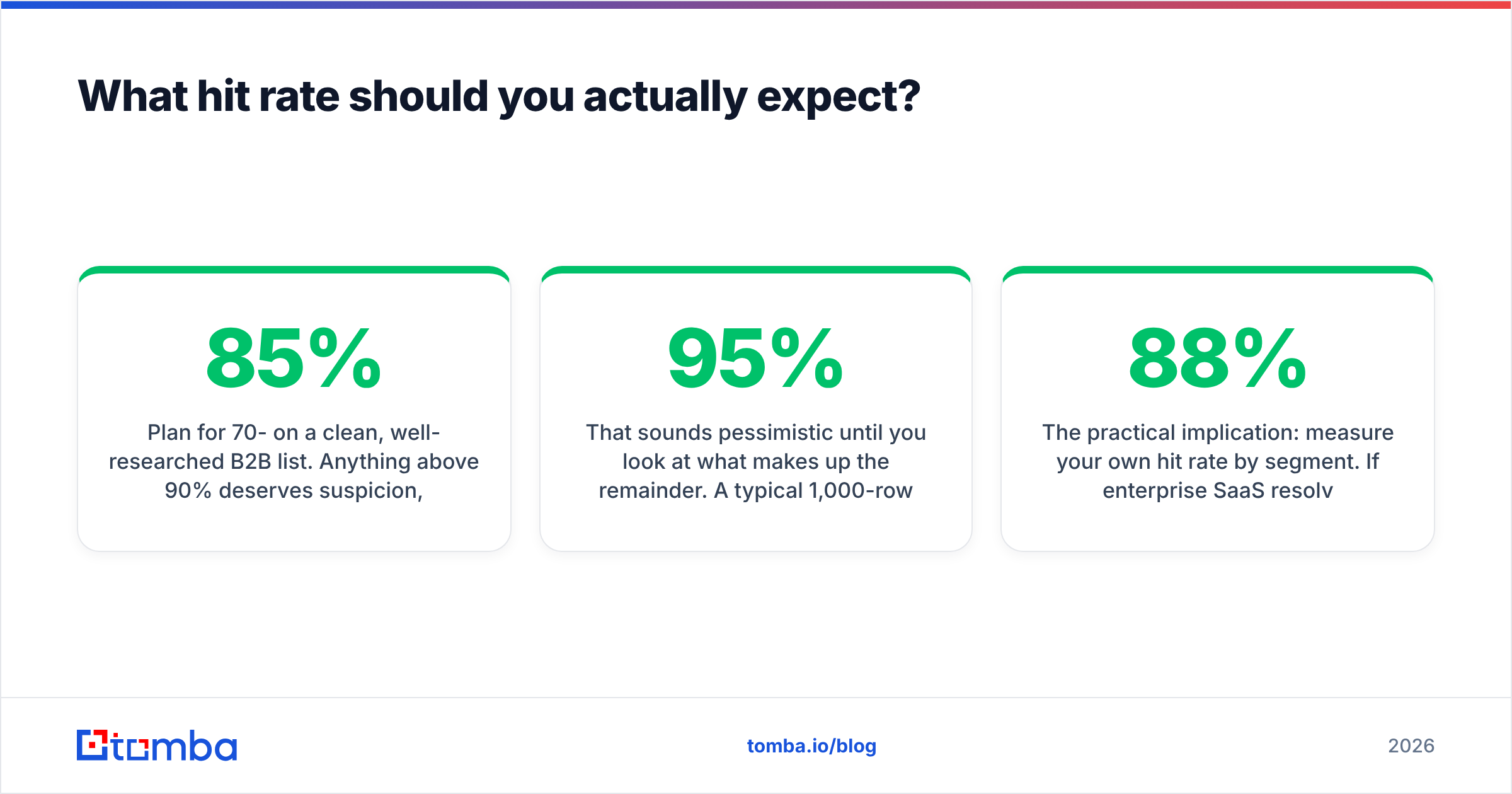
Plan for 70-85% on a clean, well-researched B2B list. Anything above 90% deserves suspicion, not celebration.
That sounds pessimistic until you look at what makes up the remainder. A typical 1,000-row list contains stale records where the person has changed jobs, companies that were acquired and re-domained, small businesses with almost no web footprint, EU contacts who exercised deletion rights, and a handful of people who genuinely do not have a discoverable work address. No provider resolves all of those, and any vendor claiming 95%+ coverage across arbitrary lists is either measuring on a curated sample or shipping unverified guesses as results.
Providers vary in how they handle the gap. Some, like BookYourData, work from a pre-built verified database, which trades breadth of long-tail coverage for high confidence on the records they do hold — a reasonable design if your ICP sits inside their coverage. Others, including Tomba, run live discovery against a domain, which reaches more long-tail companies but returns more honest nulls. Neither model is universally better; they fail differently, which is exactly why waterfalling across two sources beats maximizing one.

The practical implication: measure your own hit rate by segment. If enterprise SaaS resolves at 88% and local services companies resolve at 51%, that's not a tool problem — that's a targeting insight. Either accept a slower prospecting motion for the low-coverage segment or reach it through a channel where it's actually visible.
How do you prevent "not found" before it happens?#
Fix the input, and the output improves more than any tool switch will.
- Enrich the company record first. Resolve the true root domain before you resolve people. A website-to-company lookup or a company email pattern check up front prevents the most common failure mode entirely.
- Batch by domain, not by person. Running one domain search per company and then matching names locally is faster, cheaper, and higher-yield than a thousand individual person lookups.
- Refresh on a schedule. B2B contact data decays somewhere around 2-3% per month as people change roles. A list built in January and used in September will underperform badly, and much of that shows up as "not found."
- Deduplicate before you search. Running the same contact three times under three name spellings burns credits and produces three inconsistent answers. Clean the list with a remove duplicates pass first.
- Log your nulls. Keep failed lookups in a separate table with the reason code. After a few hundred rows you'll see the pattern — usually one or two segments generating most of the misses — and you can fix the sourcing instead of grinding the recovery loop forever.
Does a "not found" result ever protect you?#
Yes, and this is worth internalizing before you switch tools out of frustration.
A null is a provider declining to sell you a bounce. The alternative — returning a plausible-looking address with no verification behind it — feels better in the moment and costs you later. HubSpot's research on email deliverability consistently ties list hygiene to inbox placement, and bounce rate is the fastest-acting lever in that relationship. Under about 2% is healthy; above 5% and mailbox providers start throttling.
So when you compare providers, don't rank them purely on raw hit rate. Rank them on verified hit rate, and ask what the tool does when it's unsure. A finder that returns 60% of a list as confirmed-valid and honestly nulls the other 40% is more valuable than one that returns 90% where a third are fabrications, because you'll spend the difference — and more — repairing your domain.
Check your own sending health with a sender reputation checker before you scale up any recovered list. If reputation is already soft from a previous unverified send, fix that first; more volume won't help.
Where should you start?#
Start with the domain, because that fixes the most failures for the least effort. Then normalize the name. Then pattern-and-verify. Then, and only then, consider whether you need a second data source.
If you want that whole sequence in one place, the Tomba Email Finder runs domain resolution, pattern detection, and SMTP verification as a single call, and returns a confidence score with the sources behind each result — so a null tells you why it's a null, not just that it happened. The free tier includes 25 searches a month, which is enough to run your worst-performing 25 records through the playbook above and see how many come back. If it works on those, Starter at $49/mo covers most solo and small-team prospecting, and the Tomba API handles it at list scale when you're ready to automate the recovery loop instead of running it by hand.
Related guides#
Ready to find emails that actually work?
Join 150,000+ professionals who stopped guessing and started sending. Free credits on signup — no credit card required.
Get the Tomba newsletter
Practical outbound tactics and product updates — once every two weeks.
About the author