Email Nurture Sequence Template: 7 Emails That Convert
A copy-and-paste 7-email nurture sequence template with subject lines, timing, branch logic, and the benchmarks that tell you whether it is working or quietly burning your list.
TL;DR
- A nurture sequence is not a drip campaign with the send button held down. It is 5–9 emails, each tied to a specific objection or stage, spread over 3–6 weeks.
- The template below gives you seven emails with subject lines, body copy, and the trigger that should fire each one. Copy it, then rewrite 40% of it in your own language.
- Timing beats copy. Most teams send too fast in week one and then vanish. The gap between email 4 and email 5 is where deals go cold.
- Nurture only works on a list that actually receives mail. Bounce rates above 3% will drag deliverability down faster than any subject line can lift replies.
- Measure reply rate and pipeline created per 100 contacts nurtured — not open rate, which Apple Mail Privacy Protection has made close to useless.
What is an email nurture sequence template?#
An email nurture sequence template is a reusable, pre-written set of emails sent on a schedule to a lead who has shown interest but is not ready to buy. Think of it like a physical therapist's rehab plan: the exercises are known in advance, the order matters, and skipping ahead makes things worse. The template is the plan; the lead's behavior decides how fast they move through it.
The parts you actually have to define:
- The entry trigger — what puts someone into the sequence. A demo request, an ebook download, a pricing-page visit, a closed-lost deal from six months ago. Each deserves its own variant.
- The email count and cadence — how many sends and how many days between them. Seven emails over 21–35 days is the range most B2B teams land on.
- The job of each email — one email, one job. Deliver a resource, kill an objection, prove a result, ask for the meeting. Never two jobs in one send.
- The exit conditions — reply received, meeting booked, unsubscribe, or "no engagement after email 7." A sequence without a defined exit turns into spam.
- The branch logic — what happens when someone clicks but does not reply, versus when they ghost entirely. Two different problems, two different follow-ups.
- The measurement window — when you judge the sequence. Usually 45 days after the last send, since nurture lags.
Most teams write the copy first and the logic never. That is backwards. The logic is the product; the copy is the packaging.
How is nurturing different from cold outreach?#
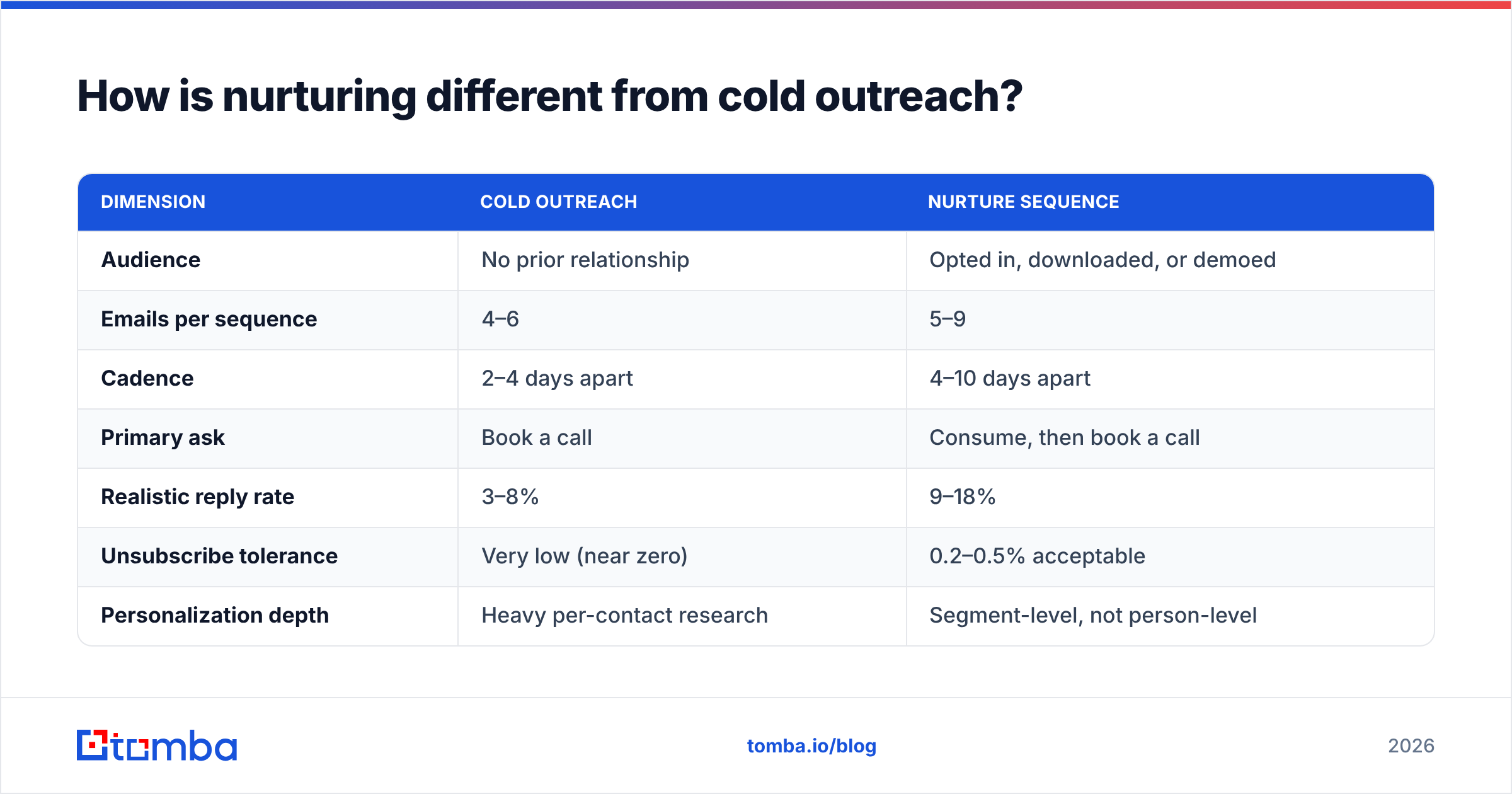
Cold outreach earns attention from strangers. Nurture keeps attention you already paid for. The mechanics diverge more than people expect.
| Dimension | Cold outreach | Nurture sequence |
|---|---|---|
| Audience | No prior relationship | Opted in, downloaded, or demoed |
| Emails per sequence | 4–6 | 5–9 |
| Cadence | 2–4 days apart | 4–10 days apart |
| Primary ask | Book a call | Consume, then book a call |
| Realistic reply rate | 3–8% | 9–18% |
| Unsubscribe tolerance | Very low (near zero) | 0.2–0.5% acceptable |
| Personalization depth | Heavy per-contact research | Segment-level, not person-level |
| Sending infrastructure | Separate warmed domain | Primary domain is usually fine |
| Data requirement | Verified email + firmographics | Verified email + behavioral signal |
The row that trips people up is sending infrastructure. Because nurture contacts opted in, teams assume they can blast from the main domain at any volume. They can — until a stale list from 2023 starts bouncing and the main domain's sender reputation takes the hit. Re-verify anything older than 90 days before it enters a sequence.
What does the 7-email nurture sequence template look like?#
Below is the working template. Entry trigger: lead downloaded a resource or requested a demo and did not book. Day 0 is the day of the trigger.
Email 1 — Deliver and set expectations (Day 0)#
Subject: the {resource} you asked for
Hi {first_name},
Here's the {resource}: {link}
Page 4 is the part most people screenshot — it's the breakdown of {specific_thing}.
I'll send two or three more things over the next few weeks that are relevant to {company}'s situation. If that's not useful, hit reply with "stop" and I'll take you off.
{sender}
Why it works: it delivers instantly, points to one specific page (proving you read your own asset), and gives an opt-out that is not a legal footer. That last line cuts spam complaints hard.
Email 2 — The problem, framed in their words (Day 3)#
Subject: the {job_title} version of this problem
{first_name},
Quick context on why we built that guide.
Most {job_title}s we talk to have the same sequence of events: {symptom_1}, then {symptom_2}, then someone asks for a report that takes four days to build.
If that's not your situation, ignore me. If it is, this teardown of how {similar_company} handled it is 90 seconds of reading: {link}
{sender}
One job: prove you understand the problem. No ask.
Email 3 — Proof with a number (Day 8)#
Subject: {similar_company} cut {metric} by {number}%
{first_name},
Short one.
{similar_company} — same size, same {industry} — was spending {time_amount} a week on {task}. After switching the process, that dropped to {smaller_amount}.
The actual mechanism was boring: {one_sentence_explanation}.
Worth 15 minutes to see if the same math applies to {company}?
{sender}
First soft ask. Notice it is a question about relevance, not a calendar link dump.
Email 4 — Objection killer (Day 14)#
Subject: "we already have {competitor_or_status_quo}"
{first_name},
The most common thing I hear at this point is "we already have {competitor_or_status_quo}."
Fair. Here's the honest comparison, including the two things {competitor_or_status_quo} does better than us: {link}
If you're happy there, genuinely no problem — I'd rather you know than wonder.
{sender}
Admitting a competitor's strengths is the highest-leverage move in the whole sequence. It converts skeptics because it signals you are not running a script. (You are, but it does not read that way.)
Email 5 — The value gap (Day 22)#
Subject: rough numbers for {company}
{first_name},
I ran a rough estimate for {company} based on {public_signal — headcount, job posts, tech stack}.
If your team is at {estimate}, the gap looks like roughly {dollar_or_hours_figure} a quarter. That's a back-of-envelope number and I'd expect it to be wrong by 20% either way.
Want me to sanity-check it with your actual numbers? Ten minutes.
{sender}
The admitted margin of error makes the estimate credible. A precise-sounding fake number does the opposite.
Email 6 — Social proof at scale (Day 30)#
Subject: three {industry} teams, same week
{first_name},
Three {industry} teams started last month. All three came in for the same reason: {shared_reason}.
One of them, {named_company}, wrote up what changed: {link}
Still open to a short call if the timing's better now.
{sender}
Email 7 — The clean break (Day 40)#
Subject: closing your file
{first_name},
I'm going to stop emailing after this one — you've got enough from me.
If {problem} moves up your list in Q{next_quarter}, reply "later" and I'll ping you then. If not, no hard feelings.
Everything I sent is collected here: {link}
{sender}
The breakup email consistently pulls the second-highest reply rate in the sequence, behind email 1. Do not skip it, and do not make it passive-aggressive. "Closing your file" outperforms "should I stay or should I go" by a wide margin because it is a statement, not a guilt trip.
What timing and branch logic should you use?#
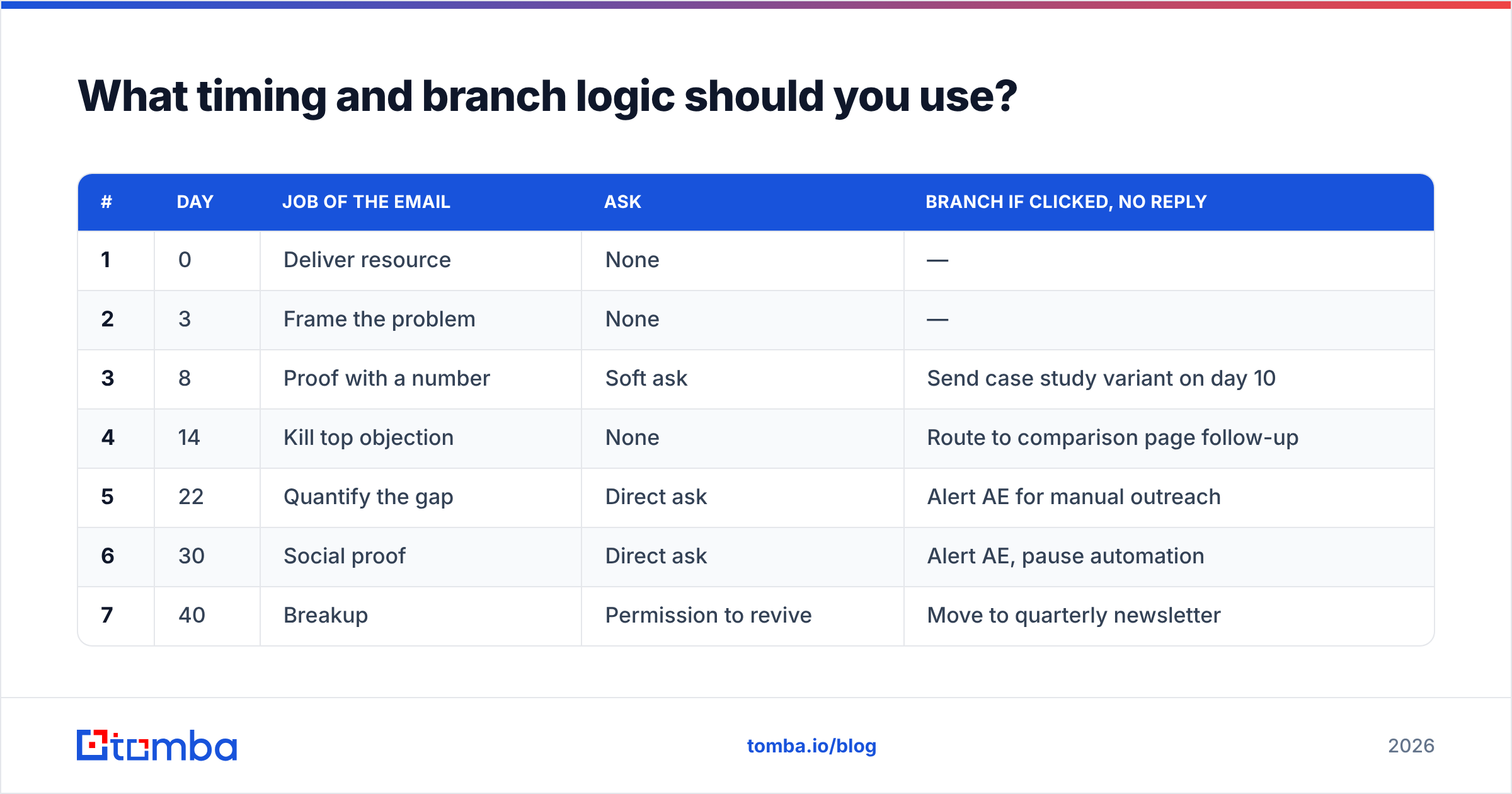
Copy the schedule below rather than inventing one. The widening gaps mimic how a human salesperson actually follows up.
| # | Day | Job of the email | Ask | Branch if clicked, no reply |
|---|---|---|---|---|
| 1 | 0 | Deliver resource | None | — |
| 2 | 3 | Frame the problem | None | — |
| 3 | 8 | Proof with a number | Soft ask | Send case study variant on day 10 |
| 4 | 14 | Kill top objection | None | Route to comparison page follow-up |
| 5 | 22 | Quantify the gap | Direct ask | Alert AE for manual outreach |
| 6 | 30 | Social proof | Direct ask | Alert AE, pause automation |
| 7 | 40 | Breakup | Permission to revive | Move to quarterly newsletter |
Three rules that matter more than the grid itself:
- Any reply pauses everything. If a human replies and email 5 still fires, you have destroyed the illusion and the trust.
- Two clicks with no reply is a hand-raise. Pull that contact out and have a rep send a plain-text one-liner. Automation cannot close the gap it just created.
- Never send two emails in the same 72-hour window unless the second is triggered by a pricing-page visit.
Why do most nurture sequences fail?#
Not because of the copy. Here is the actual failure ranking from teams that audit their own numbers.
1. The list is decayed. B2B contact data goes stale at roughly 22–30% per year through job changes alone. A sequence built in January is mailing a meaningfully different audience by December. Run every list through an email verifier before it enters a sequence, and again before any re-engagement campaign. Bounces above 3% are not a data problem — they are a deliverability problem that will suppress every campaign you run afterward.
2. Every email asks for the meeting. Seven asks in seven emails reads as desperation. The template above asks three times, and the first ask arrives on day 8.
3. There is no exit for engaged leads. Someone replies "interesting, send more" and the automation keeps marching. Build the pause.
4. Segmentation is a single list. One sequence for demo requests and ebook downloaders is one sequence too few. The demo requester has an active project; the downloader may be a student. Same email, wildly different result.
5. Nobody owns the numbers. Marketing measures opens, sales measures meetings, and no one measures pipeline created per 100 contacts nurtured. That last number is the only one that decides whether the sequence survives the next budget review. Research on lead nurturing from teams like HubSpot's marketing blog and the broader marketing automation category on G2 is worth reading, but your own cohort data beats every published benchmark.
What should you measure?#
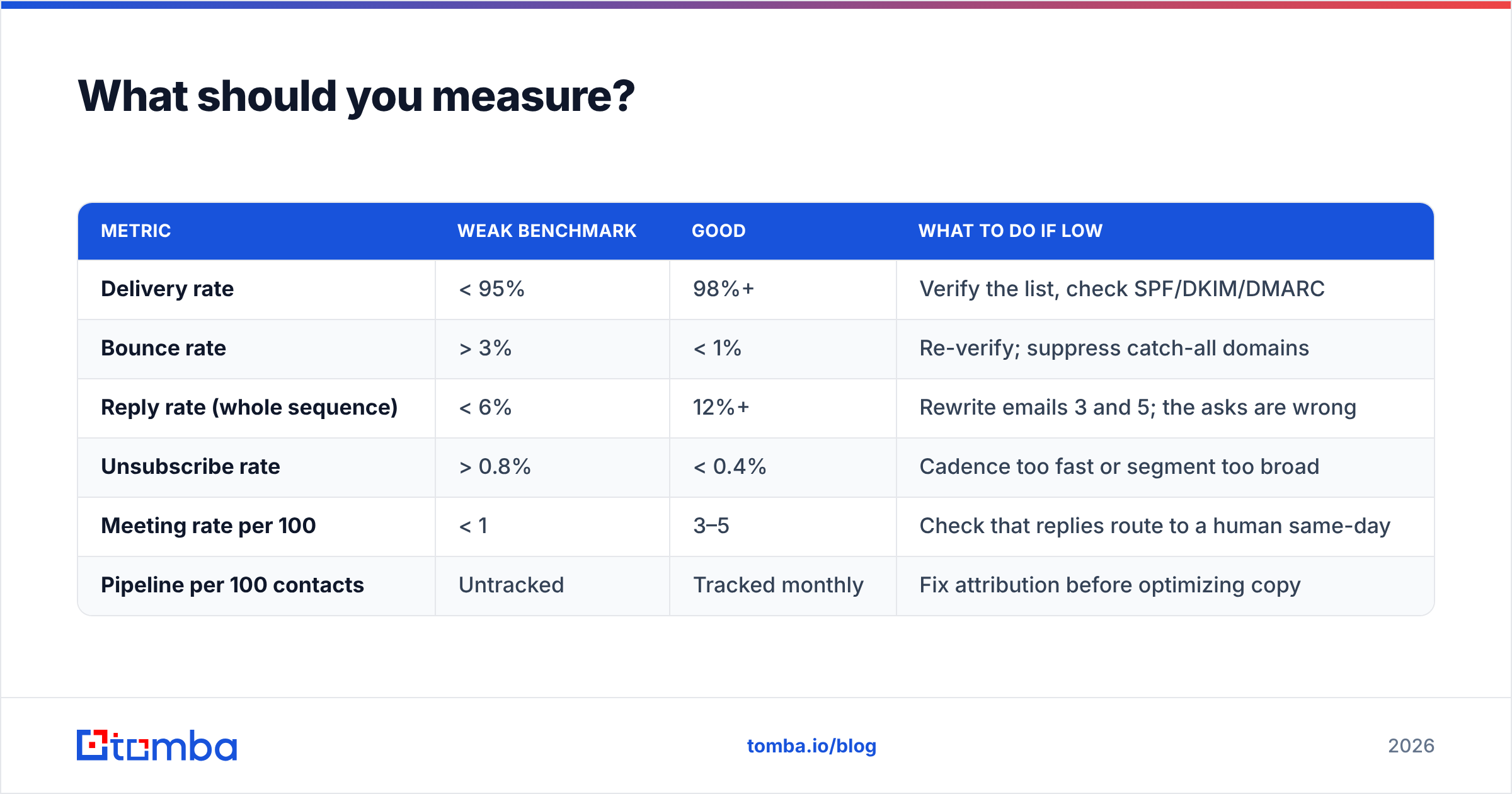
Open rate is contaminated. Apple Mail Privacy Protection pre-fetches images, which inflates opens for a large slice of your audience. Use it as a directional signal only.
| Metric | Weak benchmark | Good | What to do if low |
|---|---|---|---|
| Delivery rate | < 95% | 98%+ | Verify the list, check SPF/DKIM/DMARC |
| Bounce rate | > 3% | < 1% | Re-verify; suppress catch-all domains |
| Reply rate (whole sequence) | < 6% | 12%+ | Rewrite emails 3 and 5; the asks are wrong |
| Unsubscribe rate | > 0.8% | < 0.4% | Cadence too fast or segment too broad |
| Meeting rate per 100 | < 1 | 3–5 | Check that replies route to a human same-day |
| Pipeline per 100 contacts | Untracked | Tracked monthly | Fix attribution before optimizing copy |
Track by cohort — everyone who entered in a given month — not by calendar month of sends. Nurture lags, and calendar-month reporting will make a working sequence look broken.
Which tools do you actually need?#
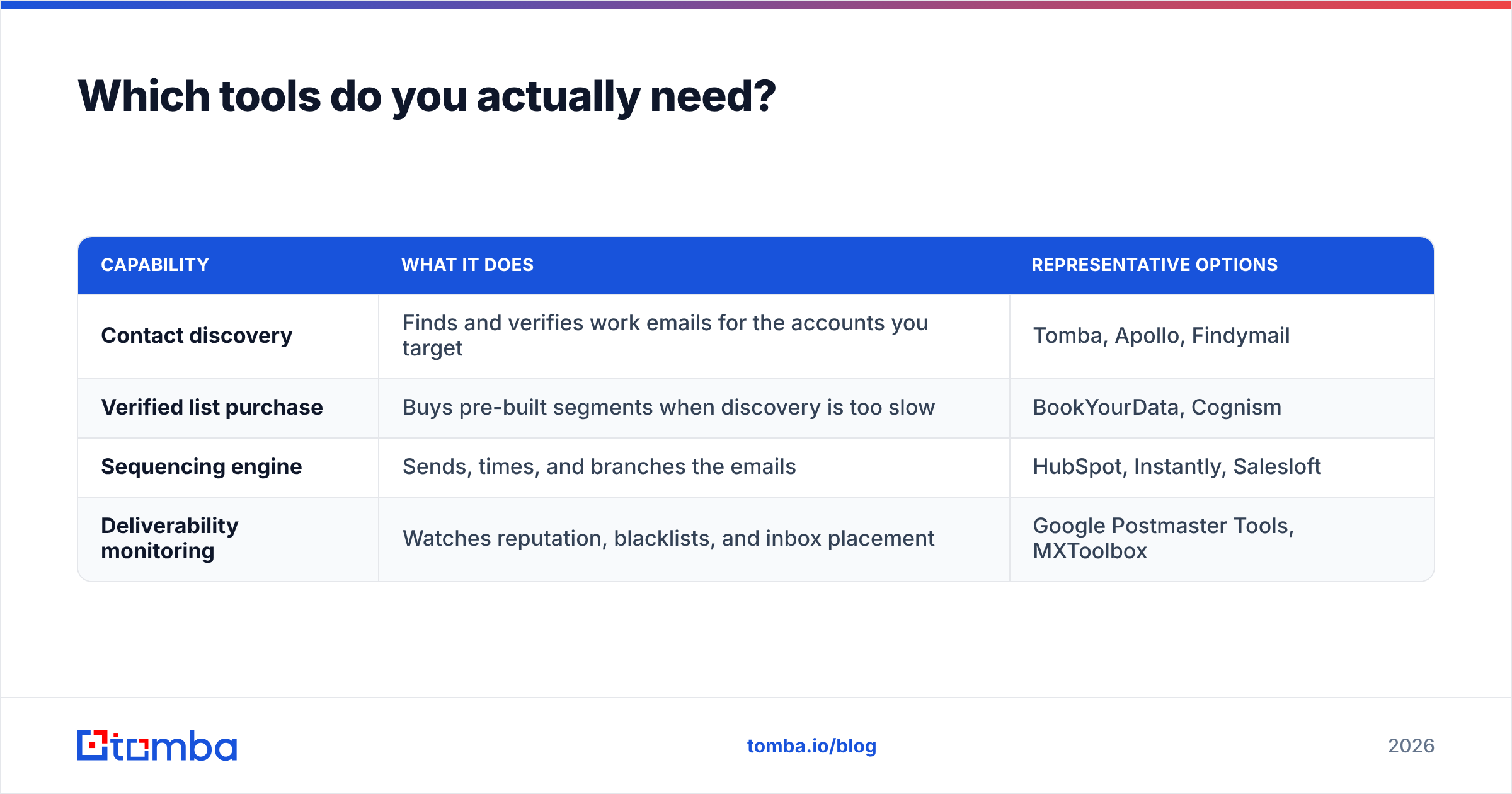
You need four capabilities, and they do not have to come from one vendor.
| Capability | What it does | Representative options |
|---|---|---|
| Contact discovery | Finds and verifies work emails for the accounts you target | Tomba, Apollo, Findymail |
| Verified list purchase | Buys pre-built segments when discovery is too slow | BookYourData, Cognism |
| Sequencing engine | Sends, times, and branches the emails | HubSpot, Instantly, Salesloft |
| Deliverability monitoring | Watches reputation, blacklists, and inbox placement | Google Postmaster Tools, MXToolbox |
For discovery and hygiene, Tomba pricing starts with a free tier of 25 searches per month, then $49/mo Starter, $99/mo Growth, and $249/mo Pro. The relevant pieces for nurture work are the email verifier for pre-send hygiene, domain search for filling in the rest of a buying committee once one contact opts in, and the bulk email finder for refreshing a decayed list in one pass. BookYourData is a solid fit when you would rather buy a verified segment outright than build one — different job, both valid.
The sequencing layer matters less than teams assume. Any tool that supports reply detection, click branching, and per-contact pausing will run this template. What it cannot do is fix the addresses you feed it. If you want the background on how contact records go stale in the first place, the lead generation entry on Wikipedia is a reasonable neutral primer.
How do you adapt this template to your segment?#
Keep the skeleton — deliver, frame, prove, object, quantify, socially prove, break up — and change three things:
- The objection in email 4. For security software it is compliance. For agencies it is "we'd rather do it in-house." For infrastructure it is migration cost. Get this from your last ten lost deals, not from a brainstorm.
- The unit in email 5. Hours for services buyers, dollars for finance buyers, error rate for engineering buyers.
- The gap between emails 4 and 5. Long sales cycles want 10–14 days here. Transactional products want 5.
Rewrite roughly 40% of the words in your own voice. Templates that ship verbatim across an industry stop working the moment two vendors use the same one — and you will not be told when that happens.
Start with the list, not the copy. The best nurture sequence in the world converts nothing if a third of it bounces. Run your contacts through the Tomba Email Finder to fill in missing addresses and verify what you already have, then load a clean list into whichever sequencing tool you already pay for. Free tier is 25 searches a month if you just want to test the hygiene of your current list before committing.
Related guides#
Ready to find emails that actually work?
Join 150,000+ professionals who stopped guessing and started sending. Free credits on signup — no credit card required.
Get the Tomba newsletter
Practical outbound tactics and product updates — once every two weeks.
About the author