Email Open Rates by Time of Day: The 2026 Send-Time Guide
Send-time advice is mostly recycled folklore. Here's what email open rates by time of day actually look like in 2026, why Apple MPP broke the old benchmarks, and how to run a send-time test that survives scrutiny.
TL;DR
- Across most B2B benchmark sets, the strongest open-rate windows are 9:00–11:00 and 13:00–15:00 in the recipient's local time — but the spread between the best and worst hour is usually 5–12 percentage points, not 3x.
- Apple's Mail Privacy Protection (MPP) pre-fetches images, which means a meaningful share of your "opens" are timestamped when Apple's proxy fetched the pixel, not when a human read the email. Open-rate-by-hour charts built on raw pixel data are partly fiction.
- Day of week matters roughly as much as hour of day. Tuesday and Wednesday still edge out Monday and Friday in most B2B datasets; weekends collapse for B2B and hold up better for B2C.
- Send time is a second-order lever. List quality, deliverability, and subject line move open rate far more — a bad list sent at the perfect hour still underperforms a clean list sent at a mediocre one.
- Run your own test: hold everything constant except send hour, use reply rate or click rate as the primary metric, and require at least 1,000 delivered emails per variant before you believe anything.
What do "email open rates by time of day" actually measure?#
An open is recorded when a 1x1 tracking pixel loads. That's it. There is no browser event that says "a human read this email."
Think of it like a doorbell camera that also triggers when the wind blows. Most of the footage is real visitors, some of it isn't, and if you build a security schedule off the raw timestamps you'll end up guarding against wind.
So an "open rate by time of day" chart is really a chart of when tracking pixels fired, bucketed by hour. Three things distort that:
- Image blocking. Recipients with images off never register an open, even if they read and reply. Outlook desktop defaults and many corporate gateways strip or defer images.
- Proxy pre-fetching. Apple MPP (and to a lesser extent Gmail's image proxy) fetches images on the recipient's behalf. MPP fires in bulk, often shortly after delivery, regardless of whether the message was opened.
- Timezone attribution. If your ESP reports opens in your account timezone rather than the recipient's, a 9:00 spike in your dashboard may be three different local hours stitched together.
That doesn't make the metric useless. It makes it a relative metric. Comparing 10:00 vs 16:00 within the same list, same week, same sender is fine. Comparing your 42% to a benchmark report's 21% is close to meaningless.
What does the data say about the best hours to send?#
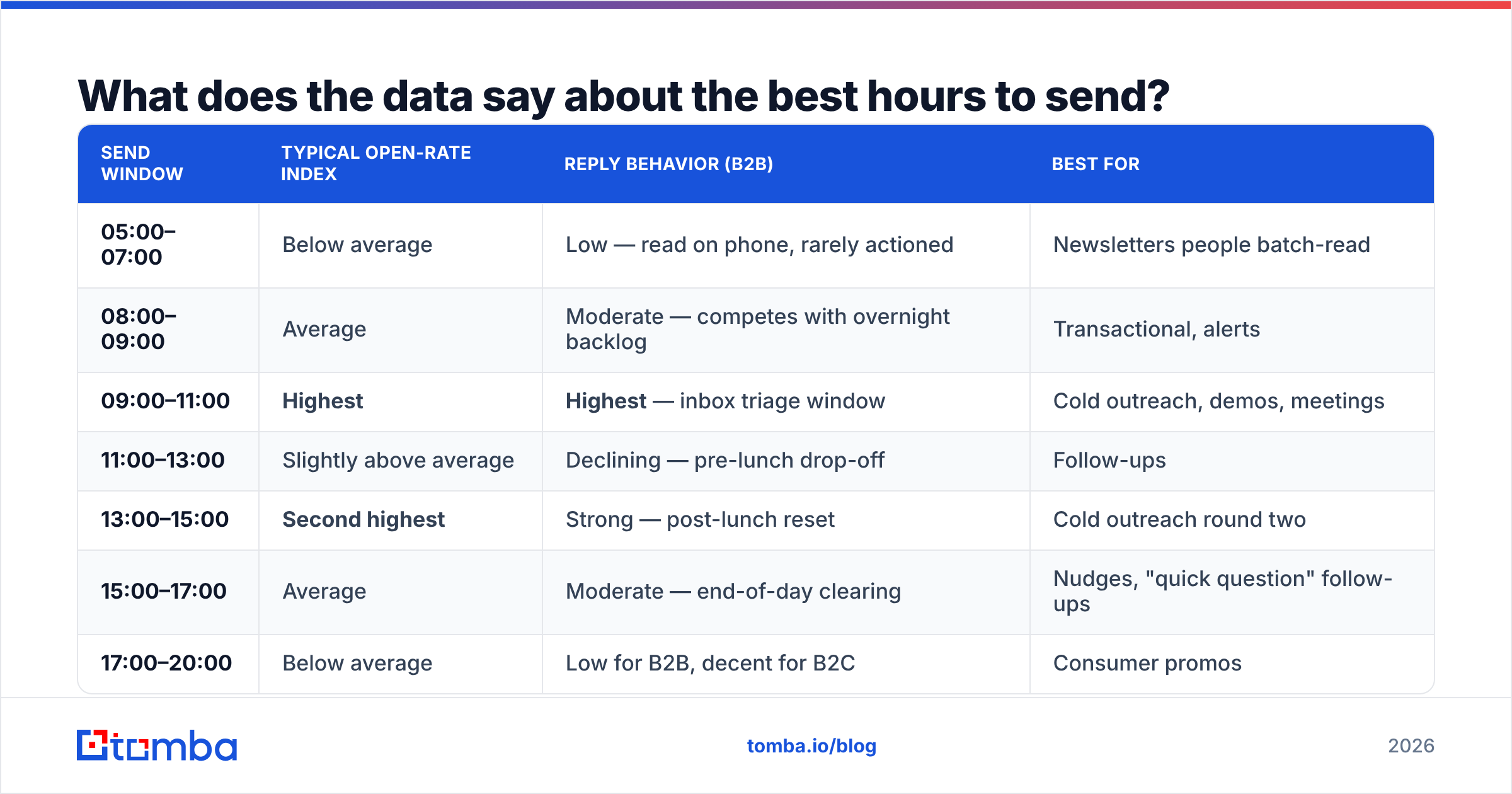
Aggregated benchmark reports from Mailchimp, HubSpot, and most large ESPs converge on a similar shape for B2B audiences. Here's the pattern that repeats, expressed in recipient local time:
| Send window | Typical open-rate index | Reply behavior (B2B) | Best for |
|---|---|---|---|
| 05:00–07:00 | Below average | Low — read on phone, rarely actioned | Newsletters people batch-read |
| 08:00–09:00 | Average | Moderate — competes with overnight backlog | Transactional, alerts |
| 09:00–11:00 | Highest | Highest — inbox triage window | Cold outreach, demos, meetings |
| 11:00–13:00 | Slightly above average | Declining — pre-lunch drop-off | Follow-ups |
| 13:00–15:00 | Second highest | Strong — post-lunch reset | Cold outreach round two |
| 15:00–17:00 | Average | Moderate — end-of-day clearing | Nudges, "quick question" follow-ups |
| 17:00–20:00 | Below average | Low for B2B, decent for B2C | Consumer promos |
| 20:00–05:00 | Lowest | Near zero for B2B | Nothing worth scheduling |
Two honest caveats. First, the 09:00–11:00 advantage is real but modest — in most first-party tests it's worth a few percentage points of open rate, not a doubling. Second, everyone read the same blog posts you did, so 09:00 and 10:00 are the most crowded hours in the inbox. In a saturated vertical (sales tech, agencies, recruiting), the off-peak 13:30 slot sometimes wins precisely because nobody is fighting for it.
The practical read: treat 09:00–11:00 and 13:00–15:00 as your default test range, and treat the exact minute as noise unless you have the volume to detect a 1-point difference.
Which day of the week beats the rest?#
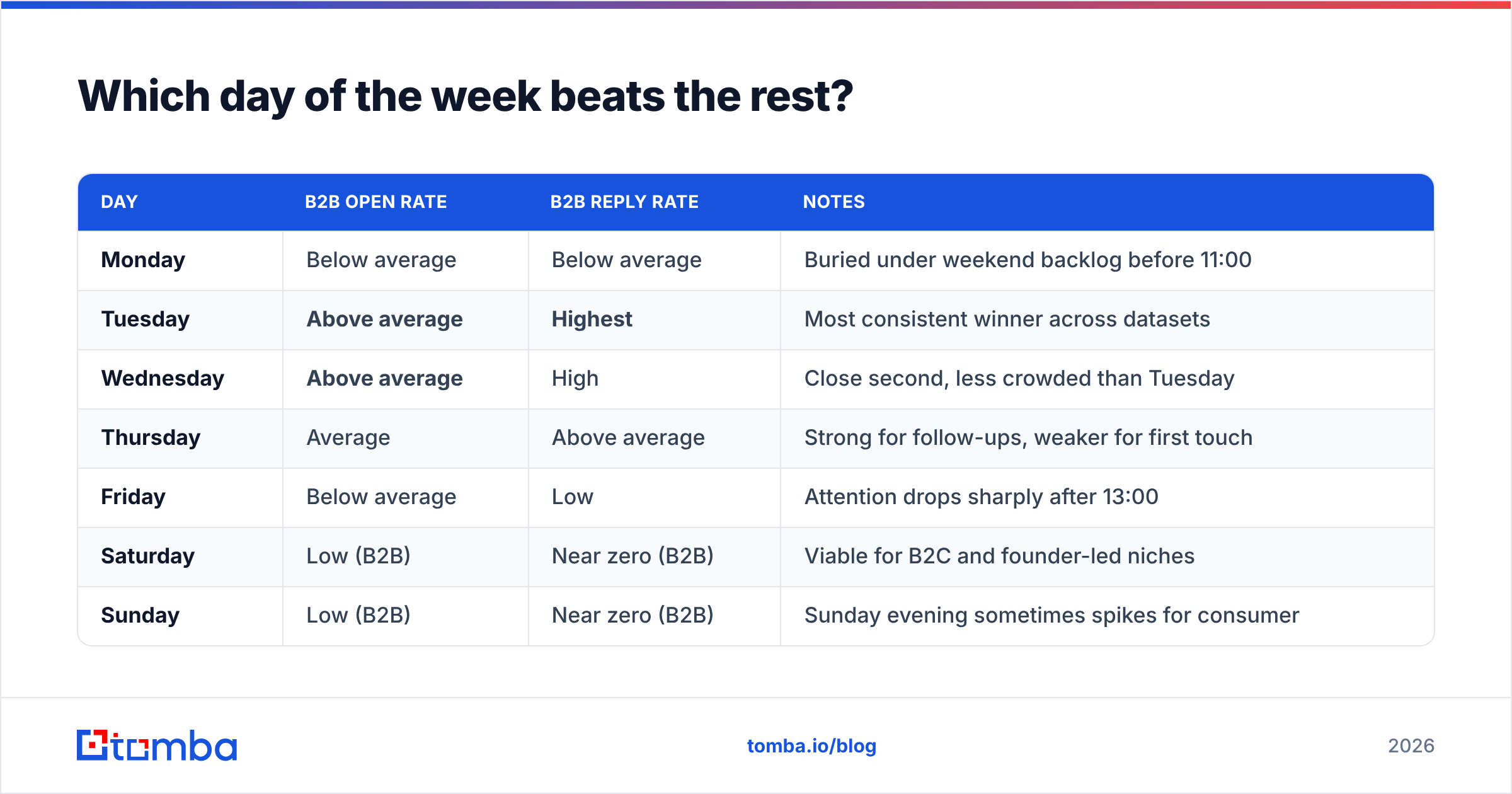
Day of week is at least as strong a signal as hour, and it's cheaper to test because you don't need timezone precision to see it.
| Day | B2B open rate | B2B reply rate | Notes |
|---|---|---|---|
| Monday | Below average | Below average | Buried under weekend backlog before 11:00 |
| Tuesday | Above average | Highest | Most consistent winner across datasets |
| Wednesday | Above average | High | Close second, less crowded than Tuesday |
| Thursday | Average | Above average | Strong for follow-ups, weaker for first touch |
| Friday | Below average | Low | Attention drops sharply after 13:00 |
| Saturday | Low (B2B) | Near zero (B2B) | Viable for B2C and founder-led niches |
| Sunday | Low (B2B) | Near zero (B2B) | Sunday evening sometimes spikes for consumer |
If you only have budget for one experiment, run day-of-week first. The effect size is bigger and the sample requirement is smaller.
One exception worth knowing: founder-to-founder and very small business outreach often behaves like B2C. People who own the company check email on Sunday night. If your ICP is a 5-person agency owner, don't blindly inherit enterprise-calibrated schedules.
How does timezone handling break your send-time data?#
This is where most send-time programs quietly fail. You optimize to 10:00, your ESP sends at 10:00 your time, and half your list receives it at 04:00 or 19:00.
Here's what to fix, in order of impact:
- Store a timezone on every contact record. Derive it from country, state/region, or company HQ. Missing timezone should be a data-quality flag, not a silent default to your own.
- Send in recipient local time, not account time. Most modern sending platforms support this. If yours doesn't, split your list into timezone segments and schedule separately.
- Normalize your reporting the same way. If you send in local time but report in UTC, your hour-of-day chart is a blur. Both sides of the loop have to use the same clock.
- Handle DST explicitly. A "10:00 local" schedule set in January drifts if your platform stores a fixed UTC offset instead of an IANA timezone name like
America/New_York. - Segment before you average. A global list averaged together produces a flat, useless curve. Split by region first, then look at the hour-of-day shape inside each region.
- Cap per-domain concurrency. Sending 4,000 emails to one corporate domain in a 10-minute local-time window looks like a burst to their gateway regardless of how well-intentioned your timing is.
Contact-level timezone data is a data enrichment problem before it's a scheduling problem. If your CRM has a company name and a website but no location, enrich first — otherwise every send-time decision downstream is built on a guess.
Is send time more important than list quality?#
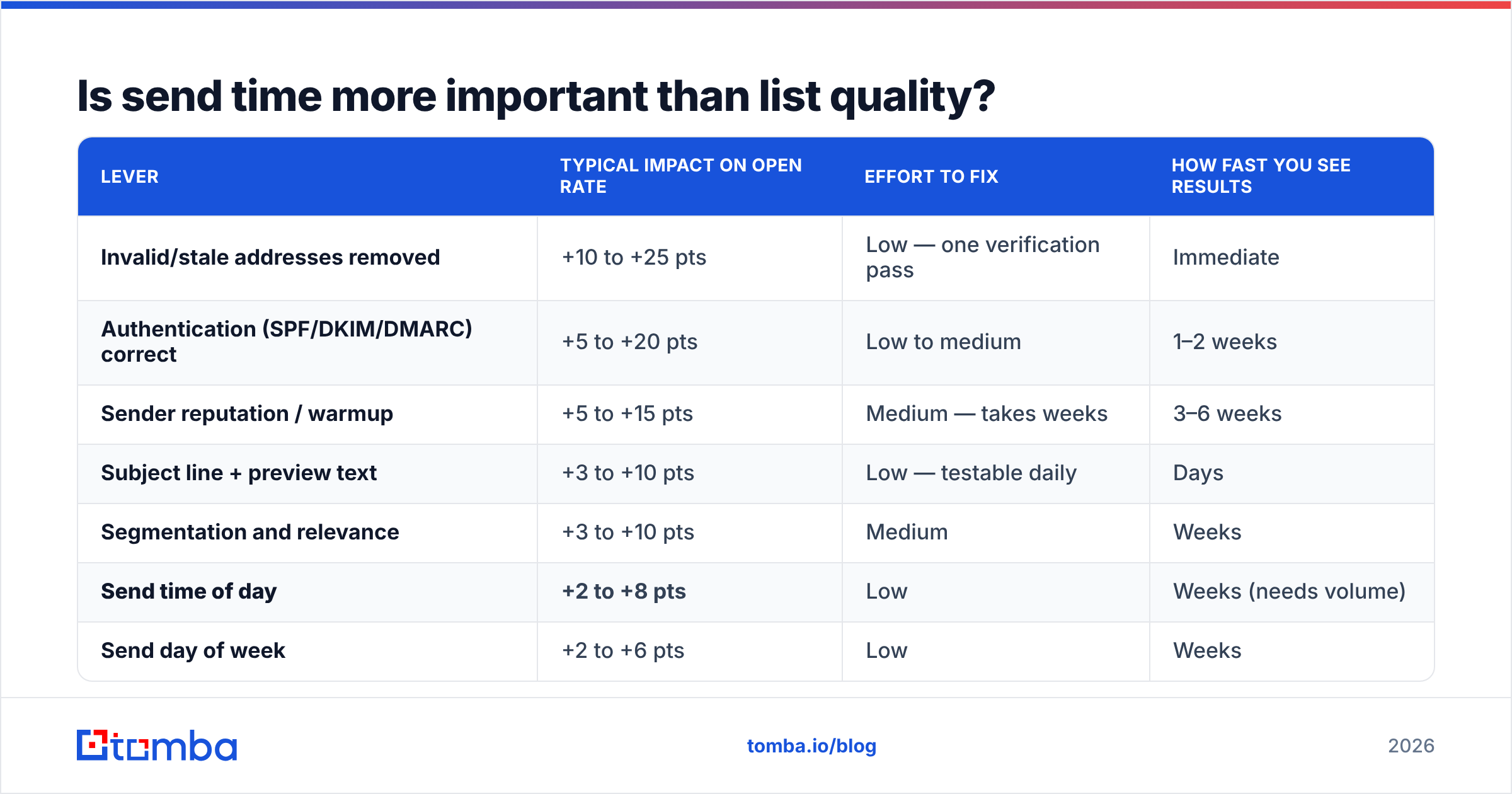
No, and it isn't close. Here's the honest ranking of what moves open rate, based on effect sizes you can observe in your own account within a quarter:
| Lever | Typical impact on open rate | Effort to fix | How fast you see results |
|---|---|---|---|
| Invalid/stale addresses removed | +10 to +25 pts | Low — one verification pass | Immediate |
| Authentication (SPF/DKIM/DMARC) correct | +5 to +20 pts | Low to medium | 1–2 weeks |
| Sender reputation / warmup | +5 to +15 pts | Medium — takes weeks | 3–6 weeks |
| Subject line + preview text | +3 to +10 pts | Low — testable daily | Days |
| Segmentation and relevance | +3 to +10 pts | Medium | Weeks |
| Send time of day | +2 to +8 pts | Low | Weeks (needs volume) |
| Send day of week | +2 to +6 pts | Low | Weeks |
The pattern: timing is a real lever, but it's the one you pull after the bigger ones. A 30% bounce rate destroys deliverability and no send hour rescues it. Run your list through an email verifier before you spend a month A/B testing 10:00 against 14:00 — you'll find more upside in the first pass than in the whole experiment.
The same applies to email deliverability fundamentals. If your DMARC policy is missing or your domain is on a blocklist, your hour-of-day chart is measuring your spam-folder placement, not your audience's habits.
What did Apple MPP do to open-rate benchmarks?#
Apple Mail Privacy Protection, rolled out in 2021 and now the default for a large share of Apple Mail users, pre-loads remote images through a proxy. The consequence for send-time analysis is specific and severe:
- Opens get timestamped near delivery, not near reading. If MPP fetches your pixel 4 minutes after you send, your "best hour" chart is really a "when I sent" chart.
- Open rates inflate. Accounts commonly saw open rates jump 5–15 points after MPP with no change in actual engagement.
- The inflation isn't evenly distributed. Lists skewed toward Apple devices (consumer, design, media, startup founders) inflate more than Outlook-heavy enterprise lists.
Practical response, in three steps:
- Segment MPP opens out where you can. Most serious ESPs now flag proxy-opened messages. If yours does, build your hour-of-day chart on non-MPP opens only. It's a smaller sample but an honest one.
- Demote open rate to a diagnostic. Use it to spot deliverability cliffs, not to pick a send time.
- Optimize on clicks and replies. A click requires a human. A reply requires a human who cared. Both are immune to pixel pre-fetching.
Google's own Postmaster Tools is worth wiring up alongside this — domain reputation and spam-rate trends explain more sudden open-rate drops than any scheduling change ever will.
How do you run a send-time test that produces a real answer?#
Most send-time "tests" are anecdotes with a spreadsheet attached. Here's the protocol that holds up:
- Pick one variable. Hour of day or day of week. Not both. Not "hour of day plus a new subject line."
- Randomize, don't split by segment. Assigning your enterprise list to 10:00 and your SMB list to 14:00 tests audience, not timing.
- Set a minimum sample. At least 1,000 delivered emails per variant to detect a ~3-point difference with any confidence. Below 500, you're reading noise.
- Run across at least three weeks. A single week gets wrecked by one conference, one holiday, one news cycle.
- Choose a primary metric before you look. Reply rate for outbound, click rate for marketing. Declaring the winner after seeing the data is how everyone talks themselves into a false result.
- Re-test annually. Work patterns shift. The 2019 "Tuesday 10am" consensus was built in a mostly-office world; hybrid schedules moved the curve, and they'll move again.
For cold outbound specifically, watch response rate rather than opens. A 46% open rate with a 0.4% reply rate means your timing found eyeballs and your message found nothing.
Which tools actually help with send timing?#
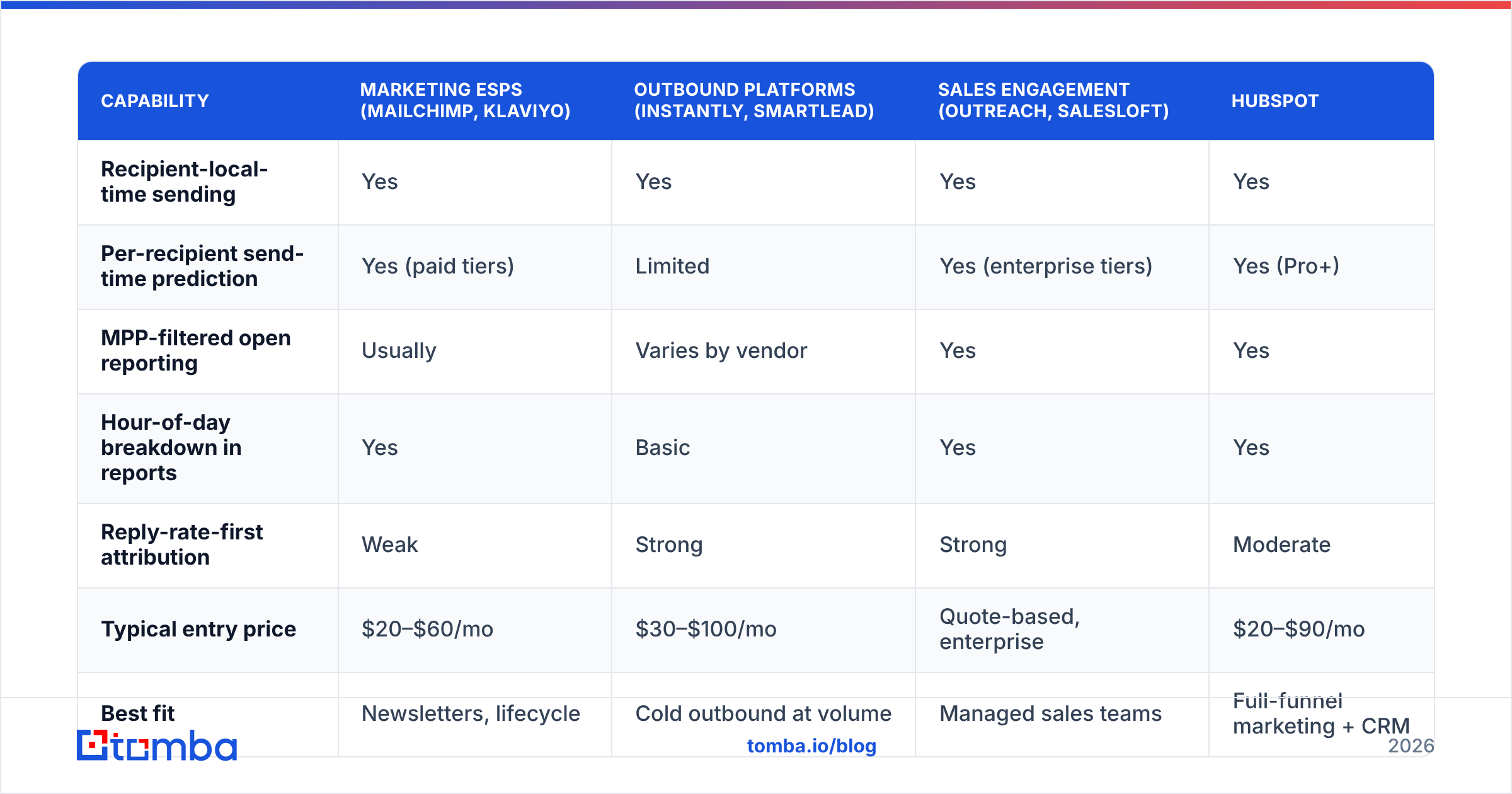
Send-time optimization exists on a spectrum from "manual schedule" to "per-recipient ML prediction." Here's how the common options compare on the things that matter for timing work:
| Capability | Marketing ESPs (Mailchimp, Klaviyo) | Outbound platforms (Instantly, Smartlead) | Sales engagement (Outreach, Salesloft) | HubSpot |
|---|---|---|---|---|
| Recipient-local-time sending | Yes | Yes | Yes | Yes |
| Per-recipient send-time prediction | Yes (paid tiers) | Limited | Yes (enterprise tiers) | Yes (Pro+) |
| MPP-filtered open reporting | Usually | Varies by vendor | Yes | Yes |
| Hour-of-day breakdown in reports | Yes | Basic | Yes | Yes |
| Reply-rate-first attribution | Weak | Strong | Strong | Moderate |
| Typical entry price | $20–$60/mo | $30–$100/mo | Quote-based, enterprise | $20–$90/mo |
| Best fit | Newsletters, lifecycle | Cold outbound at volume | Managed sales teams | Full-funnel marketing + CRM |
Two notes on interpreting this table. First, "per-recipient send-time prediction" is only as good as the engagement history behind it — on a brand-new cold list, the model has nothing to learn from and falls back to a global default. Second, features that filter MPP opens vary a lot in quality; ask the vendor how they detect proxy opens before you trust the chart.
Data providers sit upstream of all of this. Whether you're pulling contacts from a B2B database, a provider like BookYourData, or your own scraping pipeline, the timezone and seniority fields on those records determine whether local-time sending is even possible. You can compare providers on independent review sites like G2 rather than taking vendor claims at face value.
What's the practical playbook?#
If you want a default schedule to start from and then test against, use this:
- B2B cold outreach: Tuesday or Wednesday, 09:30–10:30 recipient local time, follow-ups at 13:30–14:30 on alternate days.
- B2B newsletter: Thursday morning, 08:00–09:00 local — earlier than outreach, because readers batch newsletters into their morning skim.
- Product/lifecycle emails: Trigger-based, not schedule-based. Time-since-event beats time-of-day for anything behavioral.
- B2C promotions: Weekday evenings 18:00–21:00 and Sunday afternoons, with the caveat that category matters enormously.
Then test one variable at a time against it. Expect to move a few points, not to transform your program. If you need a step change in open rate, the answer is almost always upstream: better targeting, cleaner data, stronger subject lines, healthier sending domains.
Start with the data, not the calendar. Send-time optimization only pays off when the addresses behind it are real, current, and attached to the right people. Tomba's email finder returns verified professional addresses with company context you can use to derive timezone and seniority — so "send at 10:00 local" becomes an instruction your system can actually execute. The free tier includes 25 searches per month, and paid plans start at $49/mo on the Starter tier; full Tomba pricing is public. Clean the list first, then argue about the hour.
Related guides#
Ready to find emails that actually work?
Join 150,000+ professionals who stopped guessing and started sending. Free credits on signup — no credit card required.
Get the Tomba newsletter
Practical outbound tactics and product updates — once every two weeks.
About the author