Email Permutator in 2026: How to Guess Emails That Land
An email permutator turns a first name, last name, and domain into every plausible address. That list is worthless until you verify it. Here is the 2026 workflow that keeps bounce rates under 2%.

TL;DR
- An email permutator takes a first name, last name, and company domain and generates every plausible address format —
john@,john.doe@,jdoe@,doe.j@, and 30 more. - Permutation alone has roughly a 5-15% hit rate per guess. It becomes useful only when paired with SMTP-level verification that filters the list down to one deliverable address.
- Never send to an unverified permutation list. Spraying 36 guesses at one company is the fastest way to torch your sender reputation and get your domain flagged.
- For most B2B use cases, a database-backed email finder beats permutation on both accuracy and time-per-contact. Permutators still win for tiny domains, obscure companies, and one-off manual lookups.
- The practical 2026 workflow: detect the company's dominant pattern first, permute only if no pattern is known, verify every candidate, and treat catch-all domains as a separate problem.
What is an email permutator?#
An email permutator is a small combinatorial tool. You feed it three inputs — first name, last name, and domain — and it outputs every syntactically valid combination of those parts against that domain.
Think of it like a locksmith with a ring of 40 blank keys. The locksmith doesn't know which one opens the door, so they cut every reasonable shape and try them in order. The permutator cuts the keys. Something else has to try the lock.
Given Sarah Chen at northwind.com, a permutator produces:
sarah@northwind.com
chen@northwind.com
sarah.chen@northwind.com
sarahchen@northwind.com
schen@northwind.com
s.chen@northwind.com
sarahc@northwind.com
sarah_chen@northwind.com
chen.sarah@northwind.com
csarah@northwind.com
...
A thorough permutator generates 30-40 variants. Some add middle initials, hyphenated last names, and subdomain variants (@mail.northwind.com, @corp.northwind.com). You can generate the full list in seconds with a free email permutator, a spreadsheet formula, or ten lines of Python.
The generation step is trivial. The hard part — the part that decides whether this tactic is worth your time — is figuring out which of the 40 is real.
Which email formats should a permutator actually generate?#
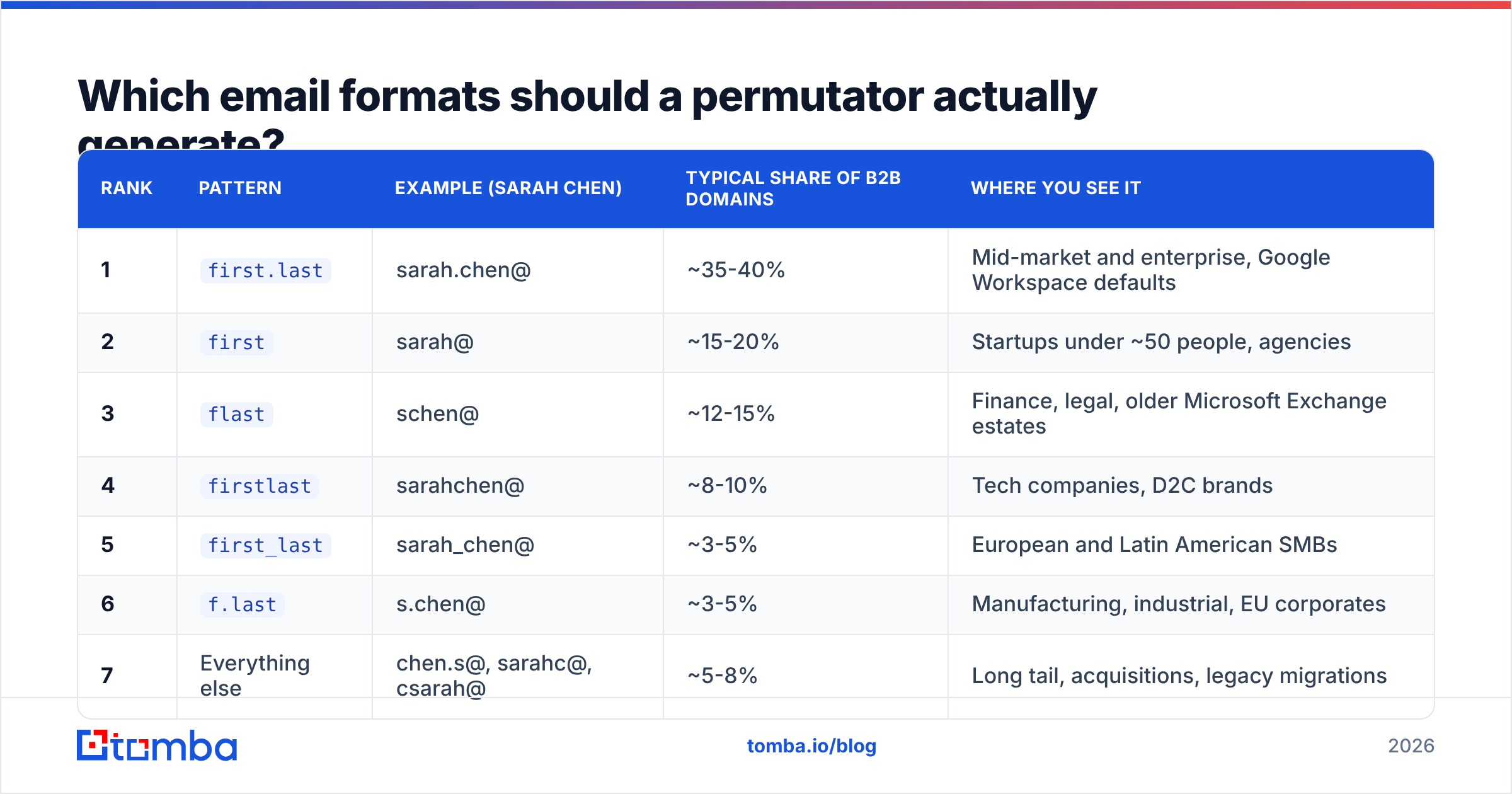
Not all 40 permutations deserve equal weight. Across public B2B datasets, a small handful of formats cover the overwhelming majority of corporate mailboxes. Generating the long tail is cheap, but you should test in order of likelihood so verification credits go to the probable candidates first.
| Rank | Pattern | Example (Sarah Chen) | Typical share of B2B domains | Where you see it |
|---|---|---|---|---|
| 1 | first.last |
sarah.chen@ | ~35-40% | Mid-market and enterprise, Google Workspace defaults |
| 2 | first |
sarah@ | ~15-20% | Startups under ~50 people, agencies |
| 3 | flast |
schen@ | ~12-15% | Finance, legal, older Microsoft Exchange estates |
| 4 | firstlast |
sarahchen@ | ~8-10% | Tech companies, D2C brands |
| 5 | first_last |
sarah_chen@ | ~3-5% | European and Latin American SMBs |
| 6 | f.last |
s.chen@ | ~3-5% | Manufacturing, industrial, EU corporates |
| 7 | Everything else | chen.s@, sarahc@, csarah@ | ~5-8% | Long tail, acquisitions, legacy migrations |
Two consequences follow from that distribution.
First, if you test in rank order, you find roughly 70% of addresses within the first three guesses. Testing all 40 is almost always wasted effort.
Second, format is a company property, not a person property. If you already know that one person at northwind.com uses first.last, you don't need to permute anyone else at that company — you need to apply the known pattern. That single insight collapses most permutation work into a lookup. A company email pattern check answers it before you generate a single variant.

Why do most permutator lists fail?#
Because a permutator has no idea whether an address exists. It's a syntax generator, not a truth oracle. Four failure modes recur.
1. Naming collisions. Every company with two people named Sarah has already resolved the conflict — usually sarah.chen@ and sarah.c@, or schen@ and schen2@. Permutators guess the clean form and miss the disambiguated one.
2. Non-Latin and compound names. José Martínez-López explodes into accented and unaccented variants, hyphenated and unhyphenated, single and double surname. The correct address depends on the company's transliteration policy, which no permutator knows.
3. Nicknames. The directory says Robert, the mailbox says bob@. Permutators built on legal first names miss the entire nickname branch unless you seed them manually.
4. Catch-all domains. Roughly 15-20% of B2B domains accept mail at any address. On a catch-all, SMTP verification returns "valid" for all 40 permutations — including asdfgh@northwind.com. Every guess looks correct and none of them are. This is the single biggest trap in permutator workflows, and it needs a dedicated catch-all verifier rather than a standard syntax + SMTP check.
Accuracy is where permutation and database-driven lookup part ways. A permutator's per-guess hit rate is a function of format distribution — call it 35-40% for the top guess. A finder that has already observed the address in public sources, or has confirmed the company's pattern from multiple verified mailboxes, starts from evidence instead of probability.

How do you verify a permutated list without burning your domain?#
Rule one: never send to unverified permutations. Not a test email, not a "quick hello," not a tracking pixel. If you fire 36 messages at northwind.com and 35 bounce, you have handed the receiving mail server a textbook directory-harvest signature. Google and Microsoft both treat that pattern as abuse, and the damage lands on your sending domain, not on the tool.
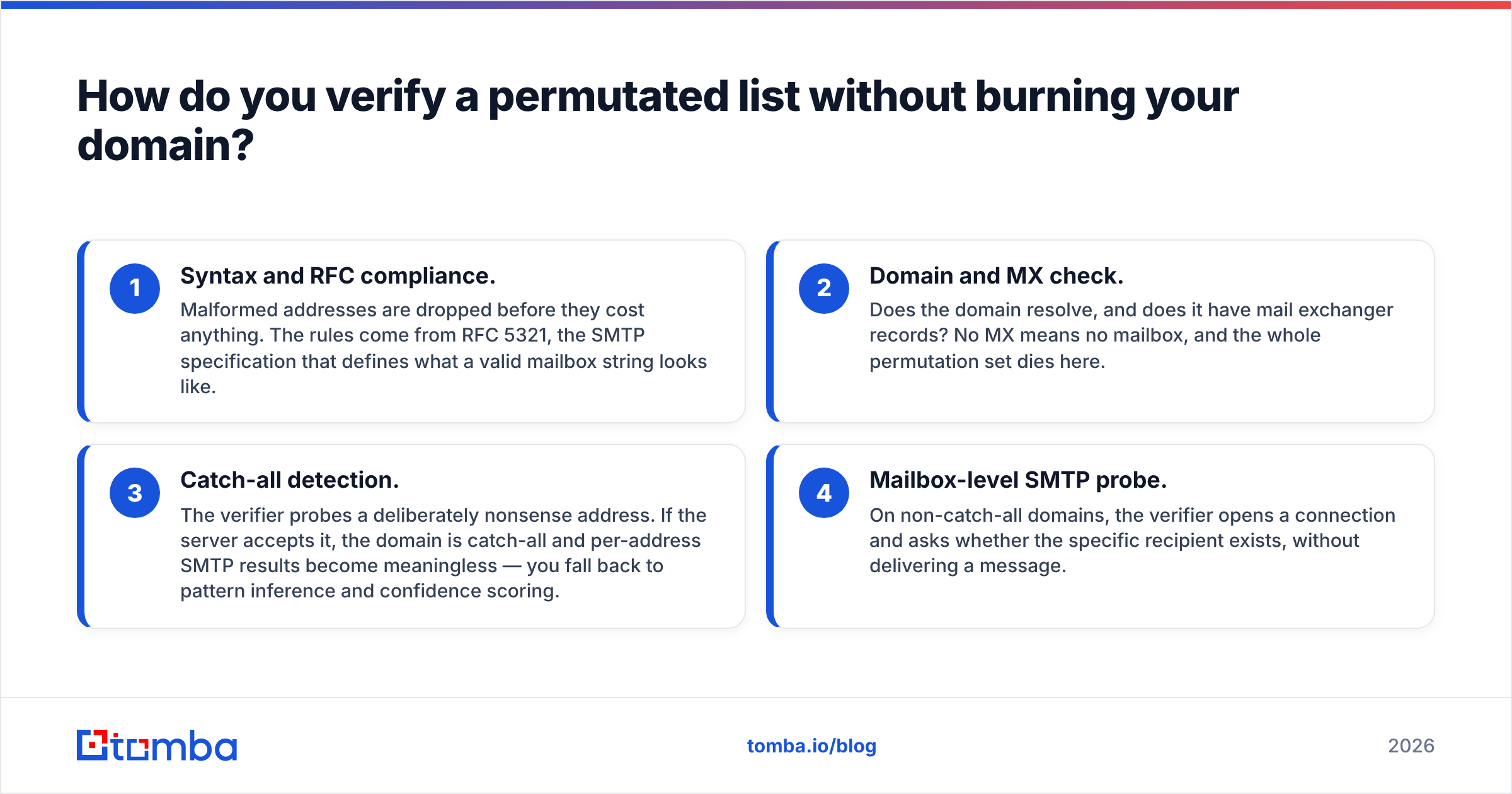
Verification happens out-of-band, before any message is composed. A proper verification pass runs four checks in sequence:
- Syntax and RFC compliance. Malformed addresses are dropped before they cost anything. The rules come from RFC 5321, the SMTP specification that defines what a valid mailbox string looks like.
- Domain and MX check. Does the domain resolve, and does it have mail exchanger records? No MX means no mailbox, and the whole permutation set dies here.
- Catch-all detection. The verifier probes a deliberately nonsense address. If the server accepts it, the domain is catch-all and per-address SMTP results become meaningless — you fall back to pattern inference and confidence scoring.
- Mailbox-level SMTP probe. On non-catch-all domains, the verifier opens a connection and asks whether the specific recipient exists, without delivering a message.
Only addresses that clear all four are safe to send to. Running your permutation list through an email verifier turns 36 guesses into either one deliverable address or a clean "not found," and it does so without a single message hitting the recipient's inbox.
One more practical note: rate-limit your probes. Hammering a single domain with 40 sequential SMTP checks in ten seconds looks identical to harvesting. Reputable verification services distribute probes across IP pools and pace them; a homegrown script usually does not.
Is an email permutator better than an email finder?#
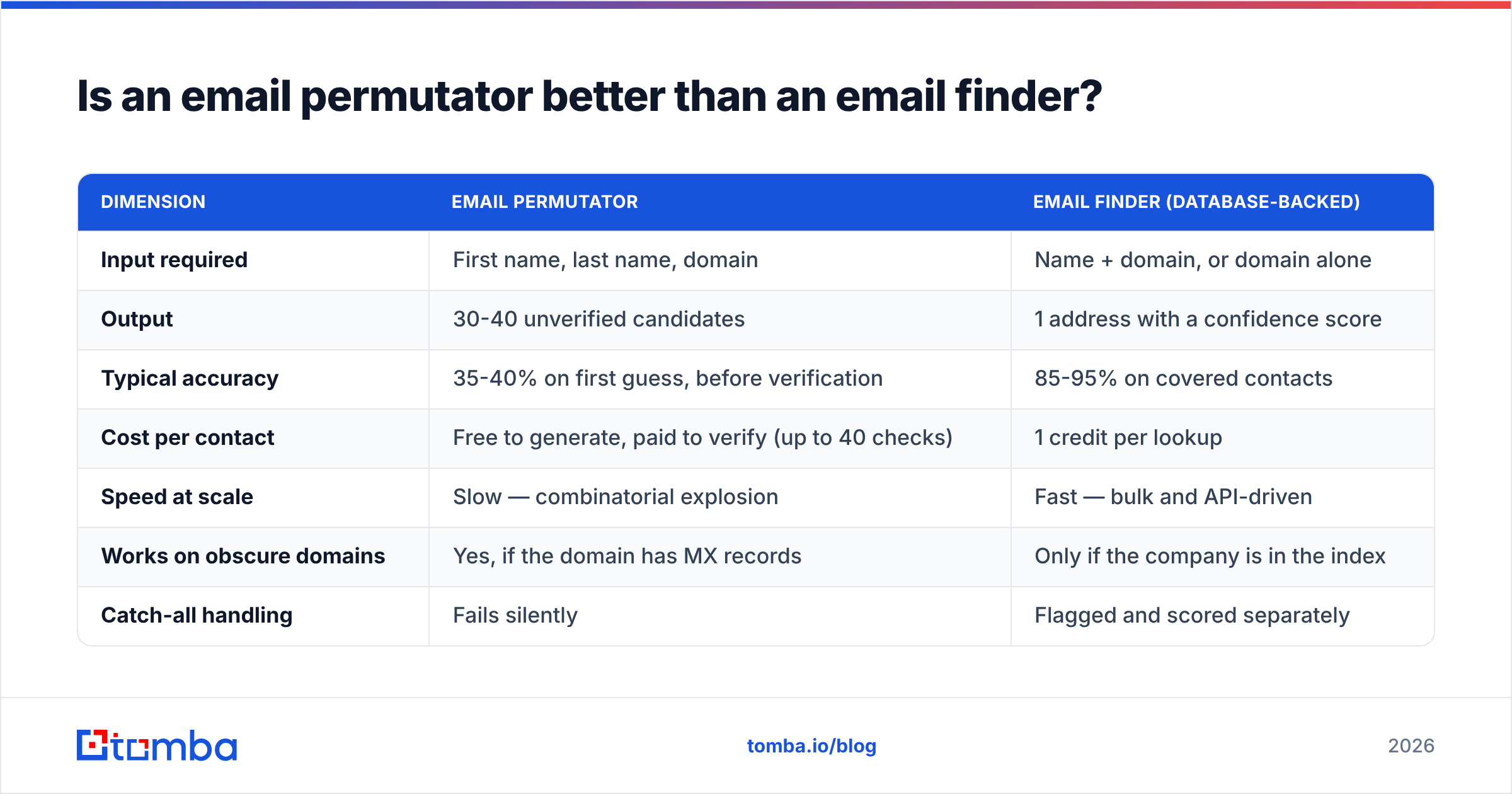
Different tools for different situations. A permutator is a generator with zero data behind it. An email finder queries an index built from crawled public sources, verified submissions, and observed company patterns, then returns a scored answer.
| Dimension | Email permutator | Email finder (database-backed) |
|---|---|---|
| Input required | First name, last name, domain | Name + domain, or domain alone |
| Output | 30-40 unverified candidates | 1 address with a confidence score |
| Typical accuracy | 35-40% on first guess, before verification | 85-95% on covered contacts |
| Cost per contact | Free to generate, paid to verify (up to 40 checks) | 1 credit per lookup |
| Speed at scale | Slow — combinatorial explosion | Fast — bulk and API-driven |
| Works on obscure domains | Yes, if the domain has MX records | Only if the company is in the index |
| Catch-all handling | Fails silently | Flagged and scored separately |
| Best for | One-off lookups, tiny or unindexed companies | Repeatable prospecting, list building, enrichment |
The cost math is what usually settles it. Verifying 36 permutations to find one address costs 36 verification credits. A single finder lookup costs one credit and returns a scored answer. At ten prospects, that's 360 credits versus 10.
Here is how the current tooling compares on the dimensions that matter when you are building lists rather than chasing a single contact:

| Tool | Entry price | Free tier | Permutation fallback | Catch-all handling | Bulk + API |
|---|---|---|---|---|---|
| Tomba | $49/mo (Starter) | 25 searches/mo | Yes, pattern-first | Dedicated catch-all verifier | Yes, both |
| Hunter | $49/mo | 25-50 searches/mo | Pattern-based | Confidence score only | Yes, both |
| BookYourData | Credit packs | Sample credits | Database-first | Verified-on-delivery model | Yes, both |
| Manual permutator + verifier | Free tool + per-check cost | Varies | The whole method | Manual, error-prone | Spreadsheet only |
BookYourData is worth calling out separately because it solves a different half of the problem: it sells pre-verified contact records rather than resolving a name you already have. If your bottleneck is "I need 5,000 marketing directors in DACH," that's a database purchase, not a permutation exercise. If your bottleneck is "I have this one person's name and I need their address today," permutation or a finder lookup is the right shape of tool. Check current Tomba pricing against your monthly contact volume before committing to either model — the break-even usually sits around 200-300 lookups a month.
What does a working permutator workflow look like step by step?#
If you're going to permute, do it in this order. Each step exists to avoid spending verification credits on guesses you didn't need to make.
- Check for a known pattern first. Query the domain for any already-confirmed address. If
mike.brown@northwind.comis public on the company's contact page, the pattern isfirst.lastand you're done guessing. This single step eliminates permutation for roughly two-thirds of established companies. - Confirm the domain is real and mail-enabled. Run an MX lookup. No MX records, no mailboxes — stop here rather than generating 40 dead addresses.
- Test for catch-all before anything else. Probe a random string like
zx9q4r@northwind.com. If it comes back valid, switch strategies entirely: use pattern confidence, LinkedIn cross-referencing, or a database lookup, because SMTP verification will lie to you on this domain. - Generate ranked permutations, not all permutations. Produce the top six formats from the distribution table above. That covers roughly 90% of real-world addresses at 15% of the verification cost of a full 40-variant sweep.
- Verify in batches, paced. Run the ranked list through verification, stopping at the first confirmed hit. Do not fire all six simultaneously at a single domain.
- Log the result back to the company record. Once you confirm
sarah.chen@, storefirst.lastagainstnorthwind.com. The next twelve people you need at that company cost you zero permutation work.
Step six is the one most teams skip, and it's the one with compounding returns. Pattern knowledge is an asset. Treat your CRM as the place it accumulates.

When is a permutator still the right tool in 2026?#
Three situations, and they're narrower than they were five years ago.
Unindexed domains. A 6-person engineering consultancy in Ljubljana with no LinkedIn presence and no press coverage will not appear in any commercial database. There is no index to query. Permutation plus verification is genuinely the only path.
Verification of a suspected address. Someone gave you s.chen@northwind.com verbally and you're not sure about the dot. Permuting the three nearby variants and verifying each is faster than a full lookup.
Auditing your own list quality. If you inherited a contact list and want to know whether it was built by guessing, permute a sample of the names and see how many list entries match the top-guess format exactly. A suspiciously high match rate on first.last across dozens of unrelated domains is a sign someone shipped an unverified permutation dump.
Outside those cases, permutation is a slower, less accurate path to the same answer. The tooling category on G2's lead intelligence listings has consolidated around database-plus-verification for exactly this reason: the guessing step got automated away, and what's left is coverage and accuracy.
It's also worth being honest about the deliverability stakes. Bounce rates above 3% put you in the territory where mailbox providers start throttling. Above 5%, you're in reputation-damage territory that takes weeks to recover from. An unverified permutation list, sent cold, routinely bounces at 40-60%. That isn't a marginal difference in efficiency — it's the difference between a working outbound channel and a dead domain. The mechanics of how email deliverability responds to bounce signals are well documented, and none of it is forgiving.
What should you use instead for volume prospecting?#
Pattern-first, database-backed, verification-gated. In practice that means: look the contact up, and let permutation run as an automatic fallback inside the tool rather than as a manual step you perform in a spreadsheet.
That's the design behind the Tomba Email Finder — it checks the index first, falls back to the company's confirmed pattern second, and runs verification on whatever it returns before handing you a result with a confidence score. The free tier gives you 25 searches a month to test the hit rate against your own target accounts, and Starter runs $49/mo when you need volume. If you'd rather keep the permutator in your workflow, run its output through verification first and never send to a candidate that hasn't cleared an MX, catch-all, and mailbox check. Either path works. Sending to raw permutations does not.
Related guides#
Ready to find emails that actually work?
Join 150,000+ professionals who stopped guessing and started sending. Free credits on signup — no credit card required.
Get the Tomba newsletter
Practical outbound tactics and product updates — once every two weeks.
About the author