Email Permutator Chrome Extension: 2026 Buyer's Guide
Permutator extensions generate 30+ guesses per prospect, but only one is real. Here's how browser-based permutators actually work, where they break, and when a verified email finder beats guessing entirely.
TL;DR
- An email permutator chrome extension generates every plausible combination of a prospect's name and company domain —
john@,j.doe@,johnd@— directly in your browser while you sit on a LinkedIn or company page. - Permutation alone finds nothing. It produces guesses. Without an SMTP or catch-all verification layer, you're mailing a list where 90%+ of addresses do not exist.
- The realistic workflow is permutate → verify → send, and the verification step is where the cost and the accuracy actually live.
- Extensions are best for one-off lookups on pages you're already browsing. For anything above ~50 prospects a month, a database-backed email finder is faster and cheaper per valid contact.
- Free permutator tools handle the string generation fine. Pay for verification, not for concatenation.
What is an email permutator chrome extension?#
An email permutator is a string generator with a business-card veneer. You give it a first name, last name, and domain; it returns every conventional pattern companies use — typically 20 to 40 variants. A Chrome extension version does this inside your browser, usually pulling the name and company off the page you're viewing so you don't have to type anything.
Think of it like trying keys on a locked door. The permutator hands you a keyring with 36 keys cut to standard shapes. It doesn't tell you which one opens the door — it just guarantees the right key is probably somewhere on the ring.
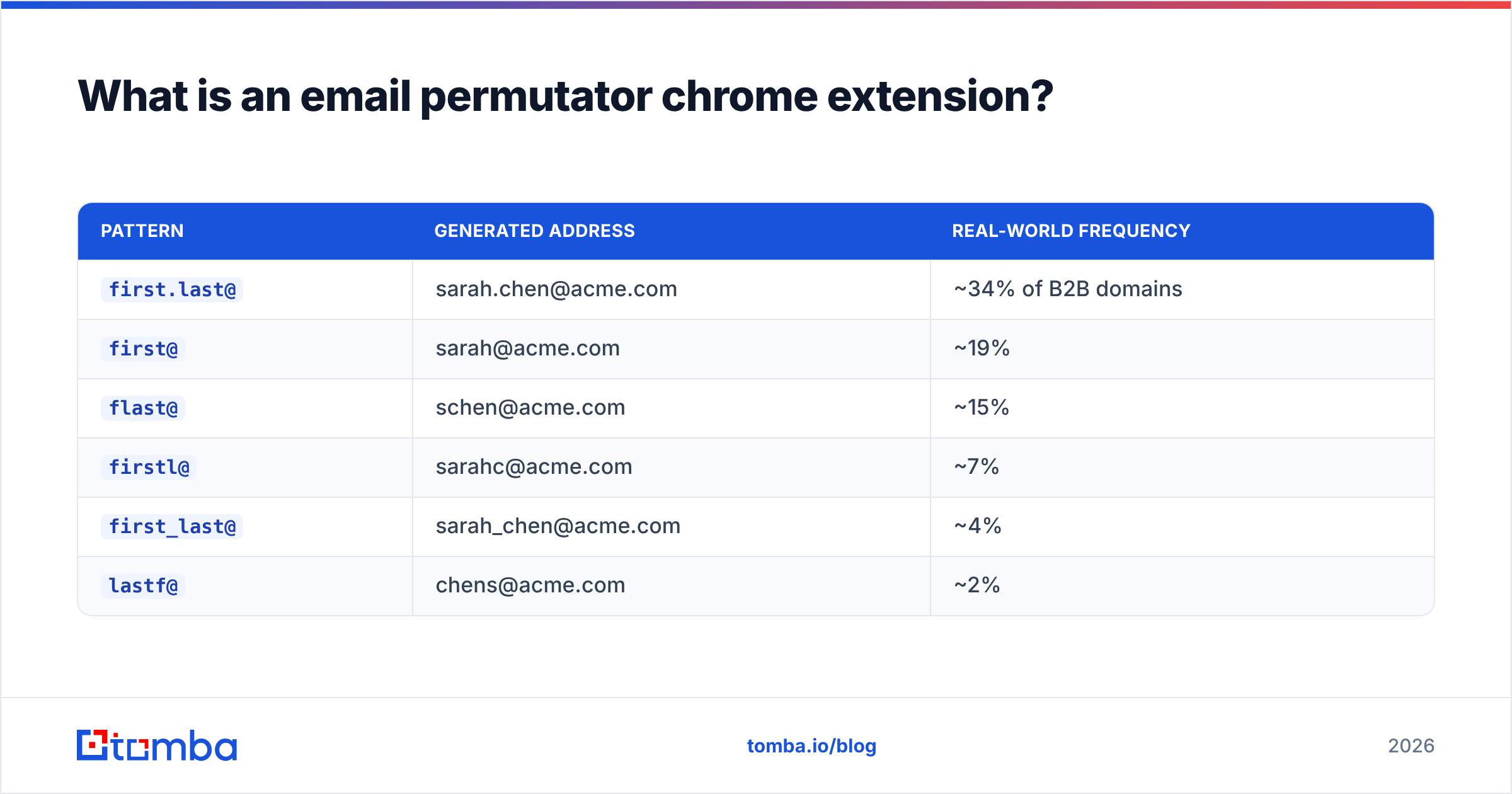
Here's what a typical output looks like for "Sarah Chen" at acme.com:
| Pattern | Generated address | Real-world frequency |
|---|---|---|
first.last@ |
sarah.chen@acme.com | ~34% of B2B domains |
first@ |
sarah@acme.com | ~19% |
flast@ |
schen@acme.com | ~15% |
firstl@ |
sarahc@acme.com | ~7% |
first_last@ |
sarah_chen@acme.com | ~4% |
lastf@ |
chens@acme.com | ~2% |
Those frequency numbers matter more than the extension's feature list. If first.last@ covers a third of domains and first@ another fifth, two guesses get you a coin-flip. The remaining 30 patterns fight over the tail.
How does a permutator extension differ from an email finder?#
They solve different halves of the same problem, and conflating them is the single most expensive mistake in cold outreach.
- A permutator generates. It has no data. It applies string templates to a name and a domain. Cost to build: an afternoon. Cost to run: zero.
- An email finder searches. It queries an index of crawled and validated addresses, pattern data per domain, and historical send outcomes. It returns addresses it has evidence for, with a confidence score.
- A verifier confirms. It performs MX lookup, SMTP handshake, catch-all detection, and disposable/role filtering against a specific address to decide whether it accepts mail.
- A pattern detector shortcuts both. Given a domain, it tells you the format that company actually uses — so you generate one address instead of 36.
The practical difference: a permutator gives you 36 addresses with a ~3% chance each of being right. A finder gives you one address with an 85–95% chance. If you mail all 36 permutations, you will generate roughly 35 hard bounces per prospect and torch your sending domain within a week.

Which email permutator chrome extensions are worth installing in 2026?#
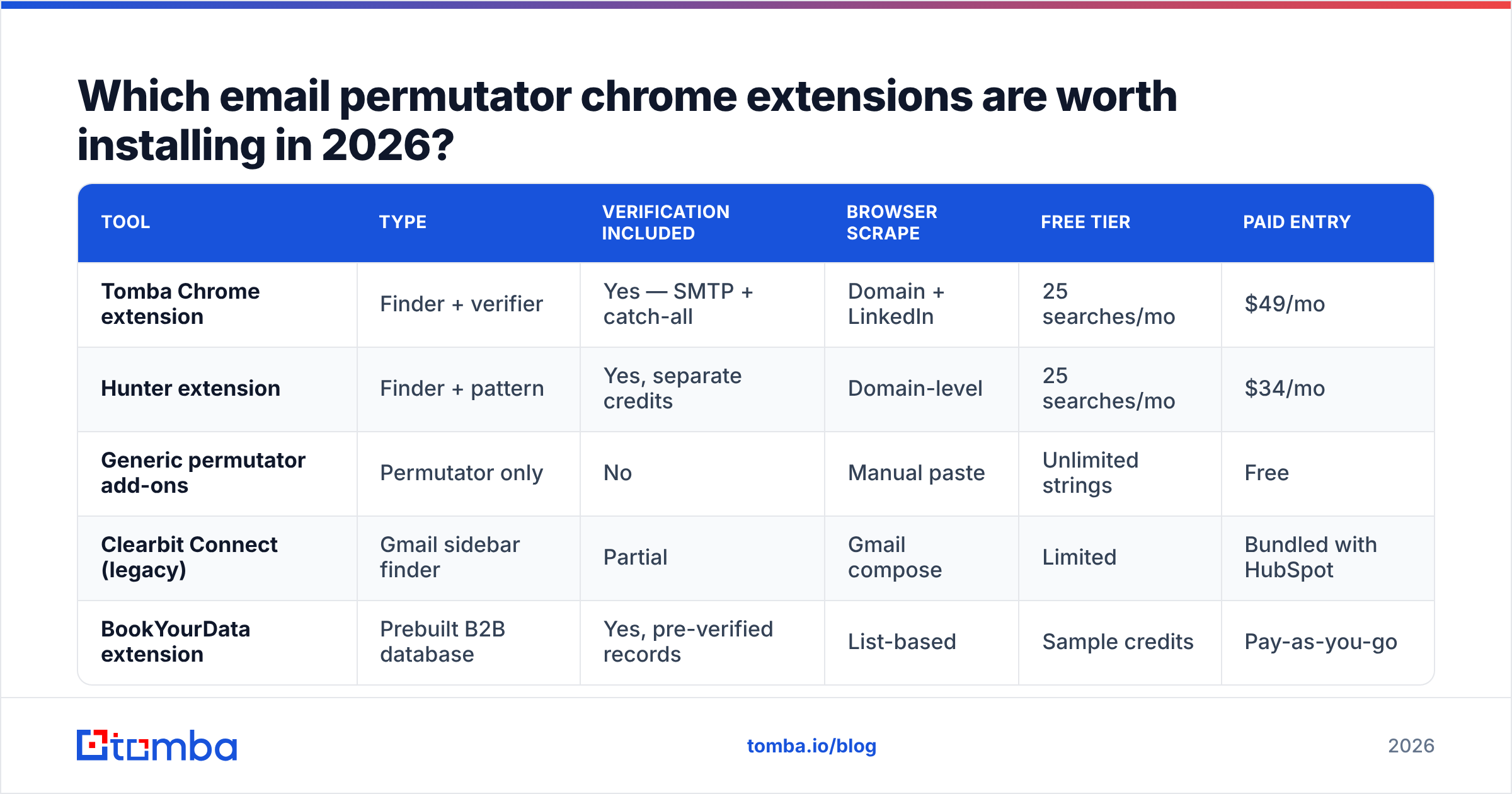
Most browser permutators are thin wrappers over the same logic. What separates them is whether they bolt on verification, how they handle the page scrape, and whether they cap you.
| Tool | Type | Verification included | Browser scrape | Free tier | Paid entry |
|---|---|---|---|---|---|
| Tomba Chrome extension | Finder + verifier | Yes — SMTP + catch-all | Domain + LinkedIn | 25 searches/mo | $49/mo |
| Hunter extension | Finder + pattern | Yes, separate credits | Domain-level | 25 searches/mo | $34/mo |
| Generic permutator add-ons | Permutator only | No | Manual paste | Unlimited strings | Free |
| Clearbit Connect (legacy) | Gmail sidebar finder | Partial | Gmail compose | Limited | Bundled with HubSpot |
| BookYourData extension | Prebuilt B2B database | Yes, pre-verified records | List-based | Sample credits | Pay-as-you-go |
A note on that last row: BookYourData isn't a permutator at all — it's a pre-verified database you buy from rather than guess against. That's a legitimately different model, and for teams who want a clean list in one purchase instead of a per-lookup workflow, it's the more direct route. Worth knowing which problem you're solving before you pick a category.
The honest summary: pure permutator extensions are commodity. Install one for free if you like, but understand you've installed a calculator, not a data provider.
Why do permutated emails bounce so often?#
Four failure modes account for nearly all of it, and only one is fixable by better guessing.
Catch-all domains accept everything. Roughly 15–20% of B2B domains are configured to accept mail at any address. asdfgh@acme.com returns "valid" on a naive SMTP check. Your permutator sees 36 green checkmarks and you learn nothing. This is why a dedicated catch-all verifier exists as a separate product — it uses behavioral signals rather than the handshake to score deliverability on those domains.
Non-standard formats break templates. Companies using employee IDs (e40221@), initials-plus-number (sc2@), or localized orderings (chen.sarah@ at APAC subsidiaries) fall outside every standard template. No permutator catches these because there's nothing to permutate from.
Nicknames defeat exact matching. LinkedIn says "Robert Ellison." Payroll says "Bob." The permutator generates 36 addresses around "Robert" and the real one is bob.ellison@. Name normalization is a data problem, not a string problem.
Sub-domains and legacy mail routing. Larger enterprises often route through @corp.acme.com or @us.acme.com while the marketing site sits on acme.com. Your permutations target a domain that doesn't handle employee mail.
Google's own bulk sender guidance puts the spam-complaint threshold at 0.3% and expects senders to maintain valid recipient lists. Mailing raw permutations blows past both. According to G2's email verification category data, bounce rates above 3% are where inbox providers start throttling — permutation-without-verification routinely produces 40%+.
What does the permutate-then-verify workflow actually cost?#
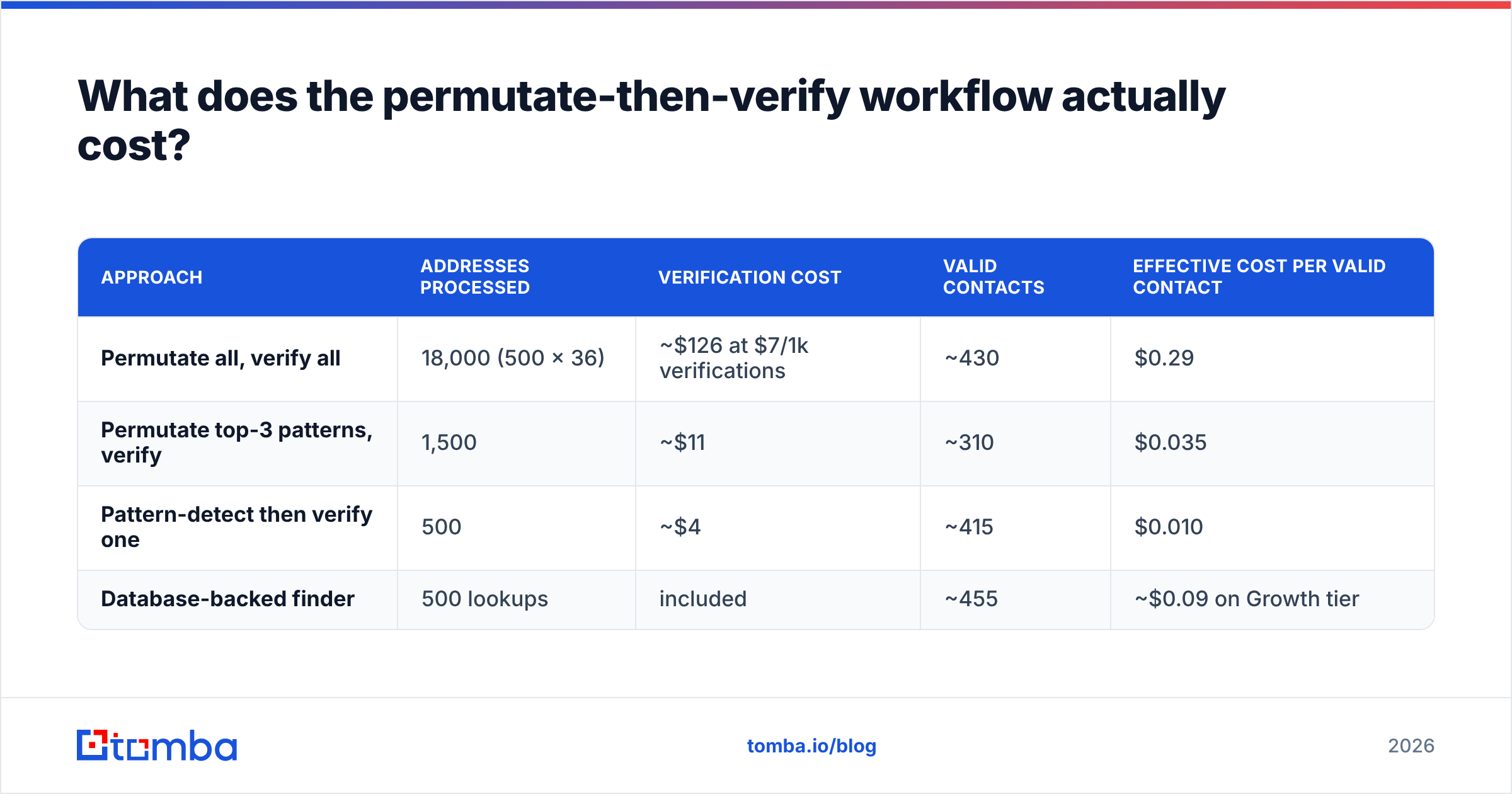
Run the math on 500 prospects, because this is where the "free extension" argument collapses.
| Approach | Addresses processed | Verification cost | Valid contacts | Effective cost per valid contact |
|---|---|---|---|---|
| Permutate all, verify all | 18,000 (500 × 36) | ~$126 at $7/1k verifications | ~430 | $0.29 |
| Permutate top-3 patterns, verify | 1,500 | ~$11 | ~310 | $0.035 |
| Pattern-detect then verify one | 500 | ~$4 | ~415 | $0.010 |
| Database-backed finder | 500 lookups | included | ~455 | ~$0.09 on Growth tier |
The naive permutate-everything path costs roughly 30× more per usable contact than pattern detection, and it burns hours of processing. The middle path — permutate only the three highest-frequency patterns, verify those — is a reasonable free-tier strategy if your volume is genuinely small.
If you want to test the generation step without installing anything, the browser-based email permutator produces the same variant list, and the company email pattern checker tells you which format a specific domain uses before you generate anything at all. Running the pattern check first is the single highest-leverage change to this workflow.

When should you use an extension versus an API or bulk tool?#
Match the tool to the shape of the work, not to the price tag.
- Use a Chrome extension when you're already on the prospect's LinkedIn or company page, you need one address now, and volume is under roughly 50/month. The context-switch savings are real. A browser extension that reads the page and returns a verified address in one click beats any copy-paste loop.
- Use a spreadsheet add-on when your list already lives in a sheet. The Google Sheets or Excel path lets you fill a column of 200 names without leaving the file.
- Use bulk upload when you have a CSV of 500+ names and domains and no urgency. Bulk email finder jobs run async and cost less per lookup than interactive queries.
- Use the API when enrichment is part of a product or an automated sequence. The Tomba API handles find-and-verify in a single call, which removes the two-step latency entirely.
- Skip all of the above when you can buy a pre-verified list for the segment. If your ICP is "US-based HR directors at 200–1000 employee companies," a database purchase is faster than 500 individual lookups.
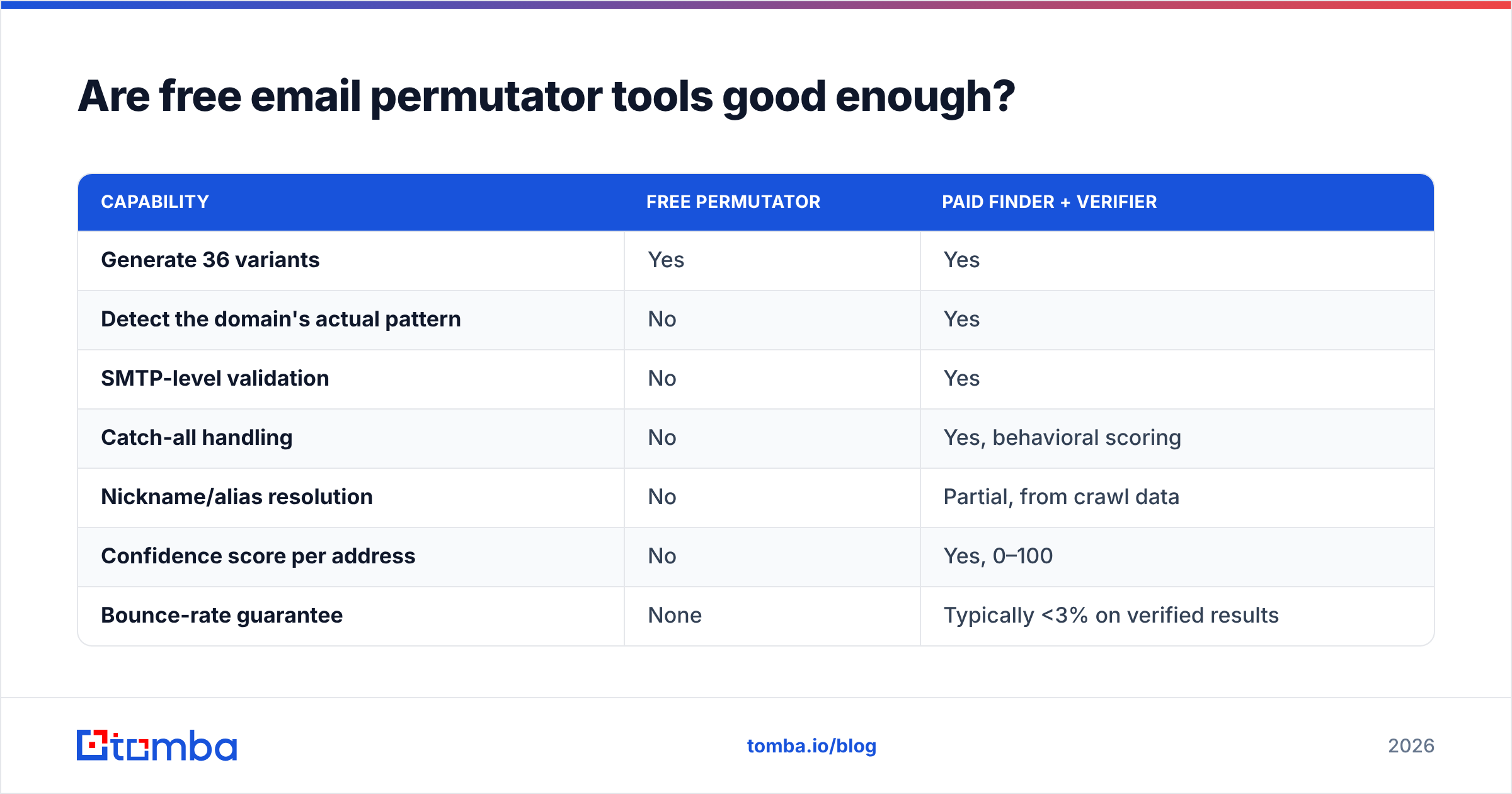
Are free email permutator tools good enough?#
For generation, yes. For anything downstream, no — and the gap is not subtle.
Free web permutators (including Rob Ousbey's original Distilled spreadsheet template that started the whole category, documented on Moz) produce identical output to paid ones. Concatenating strings is not a competitive moat. What free tools cannot do:
| Capability | Free permutator | Paid finder + verifier |
|---|---|---|
| Generate 36 variants | Yes | Yes |
| Detect the domain's actual pattern | No | Yes |
| SMTP-level validation | No | Yes |
| Catch-all handling | No | Yes, behavioral scoring |
| Nickname/alias resolution | No | Partial, from crawl data |
| Confidence score per address | No | Yes, 0–100 |
| Bounce-rate guarantee | None | Typically <3% on verified results |
The decision rule is simple: if you send fewer than 20 cold emails a month, permutate manually and verify each address with a free email checker before sending. Above that, the manual loop costs more in your time than a paid tier costs in dollars.
How do you protect deliverability when working from guessed addresses?#
Assume every permutated address is guilty until verified, and structure your sending around that assumption.
- Verify before every send, not once per quarter. Contact data decays at roughly 22–30% annually as people change jobs. An address you verified in January is a coin flip by December.
- Segment by confidence. Send to 90+ confidence addresses on your primary domain. Route 60–89 confidence addresses to a secondary domain so bounces don't touch your main sender reputation.
- Drop catch-all results from cold sequences entirely, or route them to LinkedIn touches instead. A catch-all "valid" is not evidence a human reads that mailbox.
- Cap daily volume per mailbox at 30–50 during the first six weeks. Volume spikes from a new domain look identical to spam behavior regardless of list quality.
- Watch your bounce rate weekly, not monthly. Once you're above 3%, the damage is already accruing. Suppress and re-verify before your next batch.
- Never mail multiple permutations of the same person. If three variants "pass" verification on a catch-all domain, pick one. Mailing all three doubles your complaint exposure for zero added reach.
The email verifier step is not optional overhead — it's the only thing standing between a permutated list and a burned domain. Teams that skip it consistently rebuild their sending infrastructure within two quarters.
What's the verdict on email permutator chrome extensions?#
Install one if it includes verification. Skip it if it only generates strings.
The permutation logic is a solved, free, commoditized problem. Every extension produces the same 36 variants because there are only 36 sensible ways to arrange a first name, last name, and domain. Nobody wins on generation.
What varies enormously is the layer underneath: whether the tool knows that acme.com uses flast@, whether it can tell a catch-all from a real mailbox, whether it resolves "Bob" to "Robert," and whether it hands you a confidence score you can actually make sending decisions on. That's data infrastructure, and it costs money to maintain.
So the practical stack for 2026:
- Detect the domain's pattern first — one lookup replaces 36 guesses.
- Generate only if pattern detection fails, and only the top three patterns.
- Verify everything, without exception, immediately before sending.
- Reserve the browser extension for in-context, one-at-a-time lookups where the time savings are real.
Stop guessing and start verifying. The Tomba Email Finder skips the permutation step entirely for most domains — it returns the address the company actually uses, with a confidence score and SMTP verification already applied. Start on the free tier at 25 searches a month, or move to Starter at $49/mo when your outbound volume justifies it. Full Tomba pricing breaks down credits per plan, and the Chrome extension puts the same lookup one click away on any company page you're already viewing.
Related guides#
Ready to find emails that actually work?
Join 150,000+ professionals who stopped guessing and started sending. Free credits on signup — no credit card required.
Get the Tomba newsletter
Practical outbound tactics and product updates — once every two weeks.
About the author