Email Preview Text A/B Test: How to Run One That Wins
Most preview text tests are decided by noise, not copy. Here's how to size, run, and read an email preview text A/B test that actually holds up — including what to do now that opens are inflated.
TL;DR
- Preview text (the preheader) is the second line in the inbox. It gets roughly the same eyeball time as the subject line and is tested about a tenth as often.
- Most email preview text A/B tests are underpowered. Below ~2,000 recipients per variant you cannot reliably detect anything smaller than a 3-point open-rate swing.
- Apple Mail Privacy Protection and similar image-proxy prefetching inflate open rates. Judge preview text tests on click-to-open, reply rate, or a machine-open-filtered open rate — never raw opens alone.
- Test angles, not synonyms. "Curiosity gap vs. specific benefit" is a test. "Quick question" vs. "Quick question?" is a coin flip.
- Bad data breaks tests faster than bad copy: a list with 12% invalid addresses hard-bounces asymmetrically and poisons both arms.
What is email preview text, and why does it matter?#
Preview text — also called the preheader — is the snippet of body copy the inbox pulls in after the subject line. In Gmail on desktop it shows as grey text on the same row. In Apple Mail on iPhone it gets one or two full lines under the sender and subject. In Outlook it sits below the subject in the reading pane list.
Think of the inbox row as a movie poster. The sender name is the studio logo, the subject line is the title, and the preview text is the tagline under it. Nobody buys a ticket on the tagline alone, but a bad one kills a good title. Most senders leave that tagline blank, which means the client fills it with whatever comes first in the HTML — "View this email in your browser," an unsubscribe fragment, or a chunk of alt text.
That default failure is why preview text testing has such a high ceiling. You are often not testing copy A against copy B. You are testing copy against garbage.
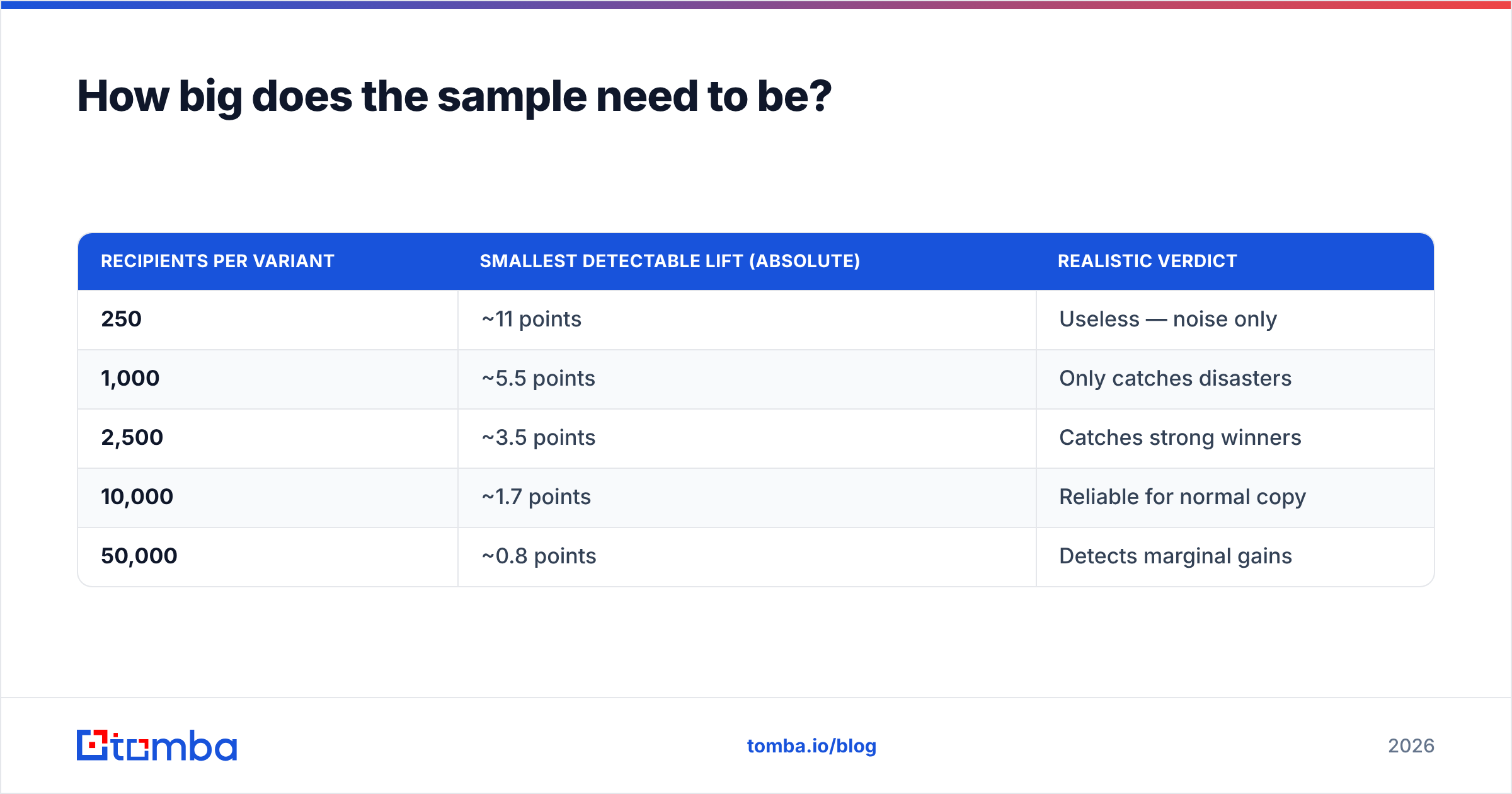
A structured way to think about the four maturity levels:
- No preheader at all — the client scrapes your header markup. This is the baseline most cold outbound and half of newsletters still sit at.
- Echo of the subject line — technically filled, adds zero information. Wastes 60–100 characters of prime inbox real estate.
- Standalone hook — a second, independent line that extends the subject rather than repeating it. This is where most measurable lift lives.
- Personalised or data-driven line — company name, role, recent trigger event, or a number specific to the recipient. Highest ceiling, highest data requirement, and the only tier that needs a clean enrichment layer behind it.
Is an email preview text A/B test different from a subject line test?#
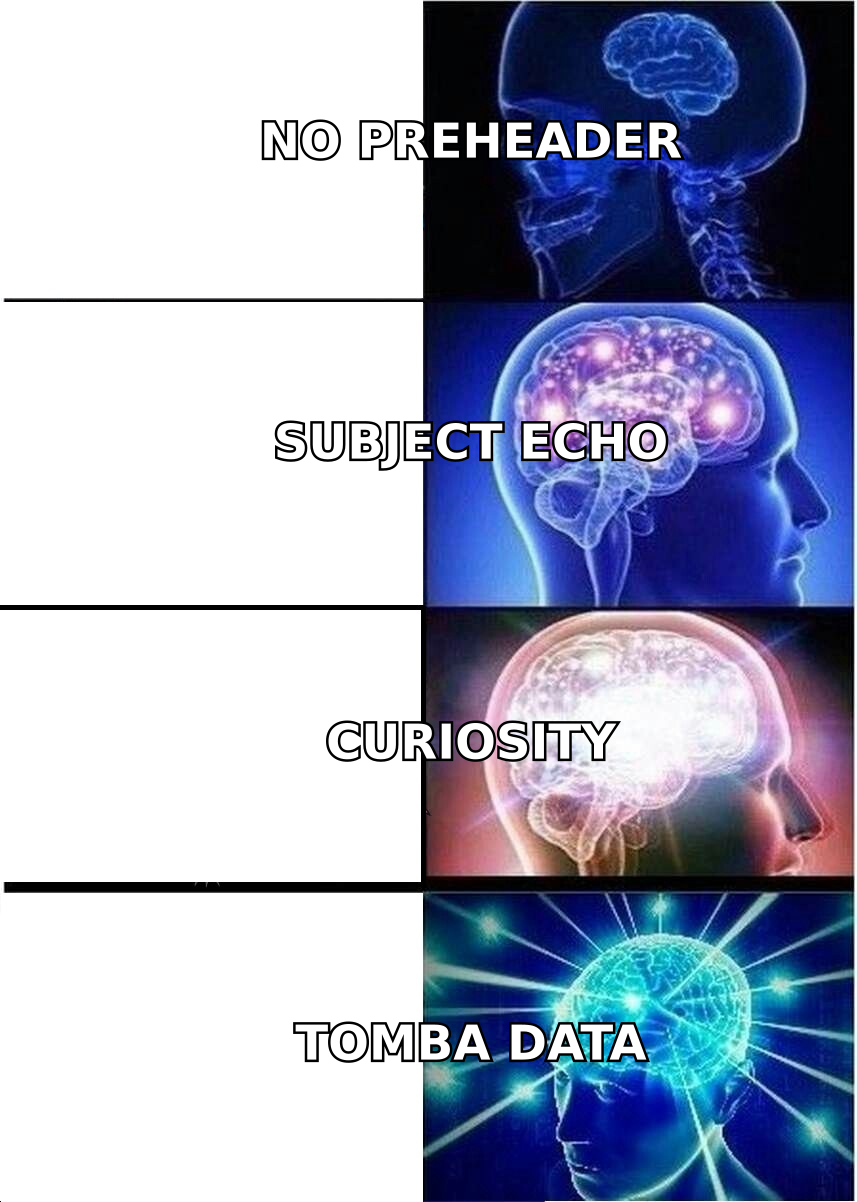
Structurally, no — you are still running a two-arm randomised split, the same shape described in the standard A/B testing framework. Practically, three things differ and they matter.
Effect sizes are smaller. Subject line tests routinely produce 5–15% relative swings in open rate. Preview text tests typically land at 2–8% relative. Smaller effect means you need a bigger sample to see it, not a smaller one — which is exactly backwards from how most teams run these.
Rendering is inconsistent. Character truncation varies by client, device, and whether the reading pane is on. A 90-character line that reads beautifully in Apple Mail can be cut at "Here's the one thing your CFO nev…" in Outlook. Rendering references from vendors like Litmus are worth checking before you write, not after you lose.
Attribution is muddier. A subject line change shows up in opens. A preview text change shows up in opens conditional on the subject already being decent — the two interact. If your subject is weak, the best preheader in the world tests flat, and you will wrongly conclude preview text doesn't matter.
| Dimension | Subject line test | Preview text test |
|---|---|---|
| Typical relative lift | 5–15% | 2–8% |
| Sample needed per arm (to detect 10% rel. lift at 25% baseline) | ~3,000 | ~9,000 |
| Primary metric | Open rate | Click-to-open, reply rate |
| Rendering variance | Low (30–60 chars) | High (35–140 chars) |
| Interaction risk | Standalone | Depends on subject quality |
| How often teams test it | Every send | Rarely |
How big does the sample need to be?#
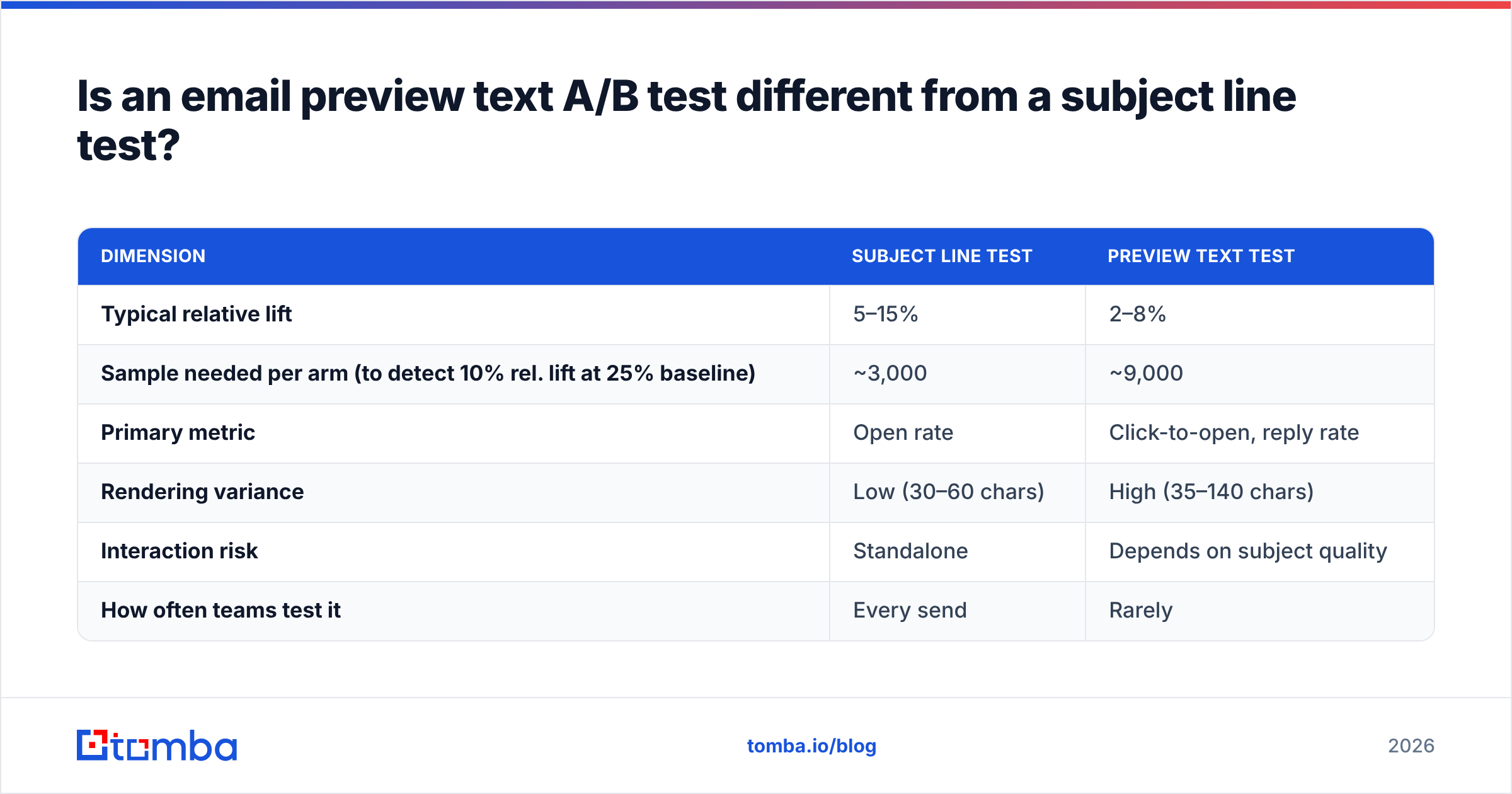
Big enough that you are measuring copy and not weather. Here is the practical version, using a 25% baseline open rate, 95% confidence, and 80% power.
| Recipients per variant | Smallest detectable lift (absolute) | Realistic verdict |
|---|---|---|
| 250 | ~11 points | Useless — noise only |
| 1,000 | ~5.5 points | Only catches disasters |
| 2,500 | ~3.5 points | Catches strong winners |
| 10,000 | ~1.7 points | Reliable for normal copy |
| 50,000 | ~0.8 points | Detects marginal gains |
If you send to 800 people a week, you do not have a preview text A/B test — you have an anecdote. That is not a reason to skip testing. It is a reason to change the unit of analysis: pool the same variant pattern across eight weeks of sends and evaluate the pattern, not the individual line. Curiosity-gap-vs-specific-benefit across 6,400 cumulative recipients is a real test. Line 1 vs. line 2 on a single Tuesday blast is not.
Two guardrails that cost nothing:
- Randomise at the recipient level, not the segment level. Splitting "enterprise gets A, SMB gets B" measures segment, not copy.
- Hold the send window constant. Sending arm A at 9am and arm B at 2pm makes the test unreadable, and it is the single most common way teams accidentally invalidate a week of work.
What should you actually test?#
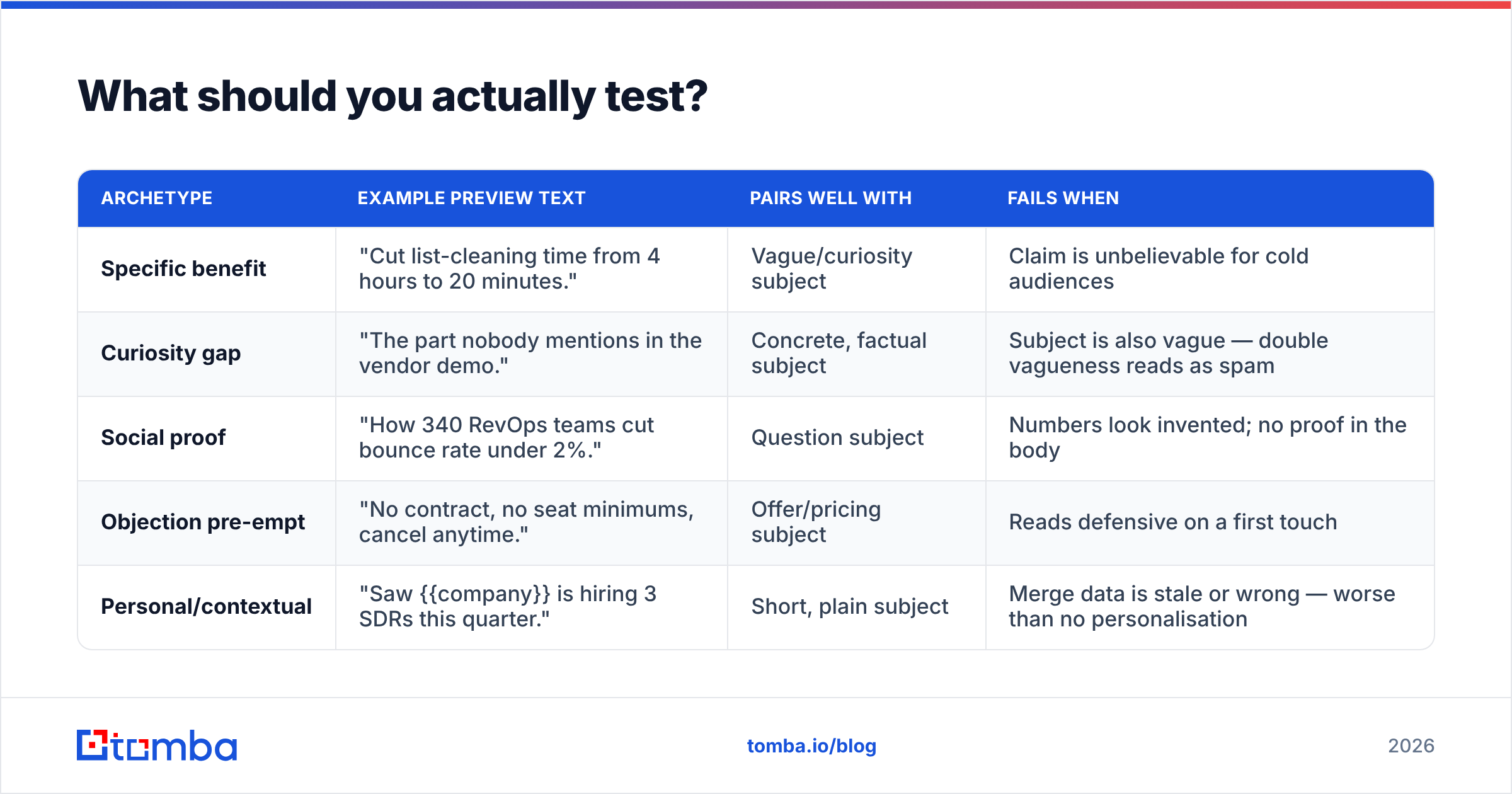
Test angles that could plausibly move a human. Below are five preheader archetypes that produce separable results, with the subject-line pairing that works and the failure mode to watch.
| Archetype | Example preview text | Pairs well with | Fails when |
|---|---|---|---|
| Specific benefit | "Cut list-cleaning time from 4 hours to 20 minutes." | Vague/curiosity subject | Claim is unbelievable for cold audiences |
| Curiosity gap | "The part nobody mentions in the vendor demo." | Concrete, factual subject | Subject is also vague — double vagueness reads as spam |
| Social proof | "How 340 RevOps teams cut bounce rate under 2%." | Question subject | Numbers look invented; no proof in the body |
| Objection pre-empt | "No contract, no seat minimums, cancel anytime." | Offer/pricing subject | Reads defensive on a first touch |
| Personal/contextual | "Saw {{company}} is hiring 3 SDRs this quarter." | Short, plain subject | Merge data is stale or wrong — worse than no personalisation |
Notice what is not on that list: emoji tests, punctuation tests, and title-case-vs-sentence-case. These occasionally produce a statistically significant result on a huge list, but they do not generalise. You learn nothing you can apply to the next campaign, and learning that transfers is the actual product of a testing programme.
If you want a fast way to generate paired subject-and-preheader candidates before you commit send volume, run them through a subject line tester and a spam checker first. Killing the variants that will land in Promotions is cheaper than testing them.
How do you run the test, step by step?#
- Fix the subject line. One variable at a time. If the subject changes, the test is a two-variable experiment with one measurement and you cannot attribute the result.
- Write two preheaders from different archetypes. Not two phrasings of the same idea. If you cannot explain in one sentence why a reasonable person might prefer each, the test is not worth the send.
- Cap each at 90 characters, front-load the first 35. Outlook and older Android clients truncate hard. Anything after character 100 is decoration for a minority of your list.
- Clean the list before the split, not after. Invalid addresses do not distribute evenly across arms once your ESP starts throttling on bounces. Run the list through an email verifier so both arms start from the same deliverability footing.
- Split 50/50 at the recipient level and send simultaneously. No holdback, no staggered send, no "we'll top up the winner later" mid-flight.
- Wait a full 72 hours before reading results. B2B opens have a long tail into day two and three, and early leads flip more often than people expect.
Which metric should decide the winner?#
Not raw open rate. This is the part that changed and most testing playbooks have not caught up.
Apple's Mail Privacy Protection prefetches tracking pixels for a large share of Apple Mail users, which registers an open whether or not a human looked at anything. Similar proxying happens elsewhere. The result: a meaningful slice of your "opens" are machines, that slice is roughly constant across arms, and it dilutes any real difference toward zero. A genuine 8% relative lift can show up as 4% after dilution — small enough to lose significance and get discarded.
Three workable responses, in order of preference:
- Click-to-open rate (CTOR). Machine opens rarely click. CTOR is noisier but far less contaminated.
- Reply rate. For outbound, this is the only metric that pays rent. It's also the metric your pipeline model actually consumes — see the definition of response rate if you need a shared baseline across teams.
- Filtered open rate. Segment out known Apple Mail privacy-proxy opens if your ESP exposes the flag, then compare the remainder.
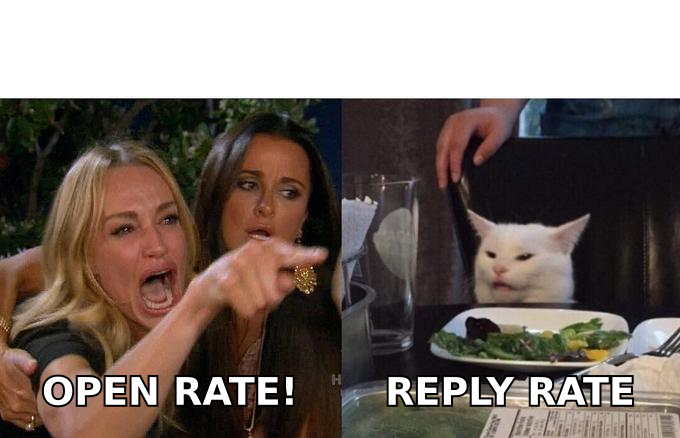
The argument you will have internally is real: marketing wants opens because opens are the metric preview text is "supposed" to move, and sales wants replies because replies are the metric that becomes revenue. Both sides are half right. Preview text moves opens mechanically and replies only if the promise it makes is kept by the body copy. A preheader that wins on opens and loses on replies is not a winner — it is a well-optimised lie, and it costs you sender reputation over the following weeks as engagement decays.
Record both. Promote on the downstream one.
What does a well-run test look like in practice?#
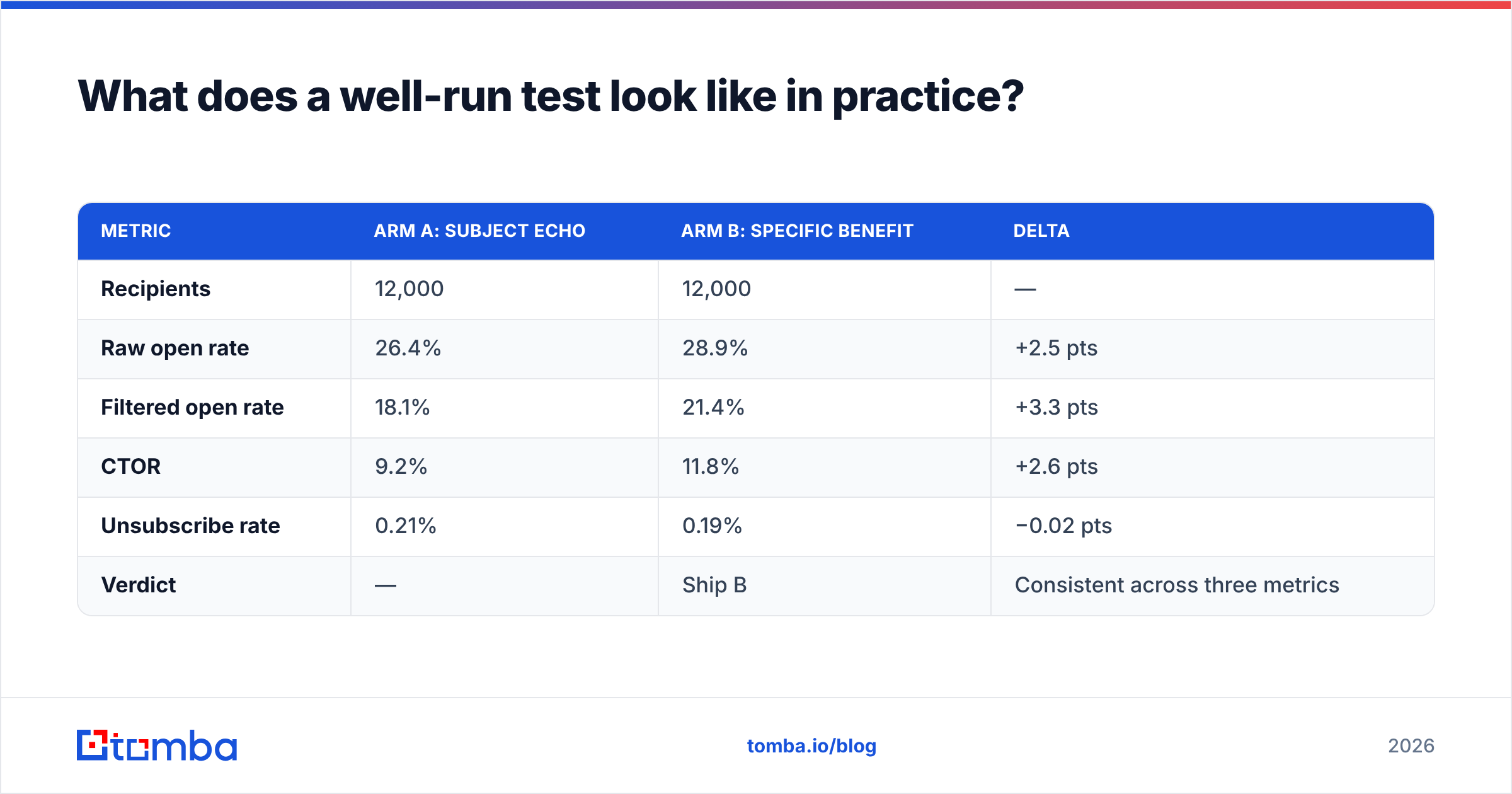
A plausible shape for a 24,000-recipient B2B newsletter, subject held constant:
| Metric | Arm A: subject echo | Arm B: specific benefit | Delta |
|---|---|---|---|
| Recipients | 12,000 | 12,000 | — |
| Raw open rate | 26.4% | 28.9% | +2.5 pts |
| Filtered open rate | 18.1% | 21.4% | +3.3 pts |
| CTOR | 9.2% | 11.8% | +2.6 pts |
| Unsubscribe rate | 0.21% | 0.19% | −0.02 pts |
| Verdict | — | Ship B | Consistent across three metrics |
The thing that makes this readable is not the size of the gap. It is that the gap points the same direction on raw opens, filtered opens, and CTOR, while unsubscribes stay flat. When those three disagree — opens up, CTOR down — you have found a curiosity gap the body copy does not close. That is a copywriting bug, not a testing win, and shipping it degrades results over the next four sends.
One more discipline worth adopting: keep a running log of every preview text test with archetype, sample size, and outcome. After a dozen tests you will have a house style backed by your own audience data rather than by whatever a general-purpose marketing blog such as HubSpot's recommends for everyone. General benchmarks are a starting hypothesis. Your log is the evidence.
What breaks preview text tests most often?#
- Dirty lists. Bounces throttle sends unevenly and skew delivered volume between arms. Verify first.
- Merge-field failures. "Hi {{first_name}}," rendering literally in one arm turns a copy test into a QA incident. Always send both arms to a seed inbox set first.
- Too-short reads. Calling a winner at 6 hours is how teams ship losers.
- Segment-level splits. Randomise per recipient or the test measures audience, not copy.
- Simultaneous subject changes. One variable. Always.
- Stale personalisation data. A preheader naming the wrong company is worse than a generic one. If you personalise, refresh contact and company fields with proper data enrichment before the send rather than trusting a CRM field last touched in 2023.
Where should you start if you have never tested preview text?#
Run one test: blank/default preheader versus a deliberate standalone hook. That is the largest effect you will ever measure, it requires no sophistication, and it settles the internal debate about whether preview text is worth the effort. Once that test lands, move to archetype-versus-archetype and start building the log.
Then fix the input side. Testing copy on a list where 10–15% of addresses are invalid, role-based, or catch-all guesses means you are optimising a message that never arrives. Clean, current, verified contact data is what makes small effect sizes visible in the first place — it removes the noise floor that swallows a 3-point lift.
If your list is the weak link, start there: the Tomba Email Finder sources verified professional addresses by domain, name, or company, with a free tier at 25 searches per month and paid plans starting at $49/mo. Build a list you can trust, then let your preview text test measure what it was supposed to measure — the copy.
Related guides#
Ready to find emails that actually work?
Join 150,000+ professionals who stopped guessing and started sending. Free credits on signup — no credit card required.
Get the Tomba newsletter
Practical outbound tactics and product updates — once every two weeks.
About the author