Email Productivity Tool Guide 2026: Pick the Right Stack
Most email productivity tools solve one of five different problems, and buying the wrong category costs you months. Here is how the categories break down, what each actually fixes, and how to build a stack that survives contact with a real inbox.
TL;DR
- "Email productivity tool" is not one category — it's five: inbox management, scheduling and sequencing, template and snippet systems, data/contact sourcing, and deliverability monitoring. Buying from the wrong bucket is the #1 reason teams feel no lift.
- The biggest time sink in most sales inboxes isn't writing emails. It's the manual work upstream: finding addresses, verifying them, and re-typing the same context into a CRM.
- Tools that save the most hours per dollar are usually the boring ones — snippet expanders, send-time schedulers, and bulk verification — not the AI writer everyone demos.
- A realistic stack costs $80–$250/month per rep. Anything over $400/rep means you're paying for overlapping features across three vendors.
- Measure the tool by hours reclaimed per week and reply rate, not by "emails sent." Volume metrics reward the wrong behavior.
What is an email productivity tool, actually?#
An email productivity tool is any software that removes manual steps between "I need to reach this person" and "they replied." That's a deliberately wide definition, because the market is deliberately vague.
Think of your inbox like a restaurant kitchen. Some tools are the prep station (mise en place — getting contacts, data, and templates ready before service). Some are the line (actually cooking and sending). Some are the expeditor (making sure the right plate reaches the right table on time). Vendors all call themselves "productivity," but a prep-station tool won't fix a broken line.
Technically, the category splits into five functional groups:
- Inbox management — snoozing, triage, split inboxes, unsubscribe sweeps. Tools like Superhuman, SaneBox, and Shortwave live here. They reduce cognitive load on incoming mail.
- Scheduling and sequencing — send-later, follow-up automation, multi-step cadences. Instantly, Saleshandy, and Reply.io sit here. They reduce the "did I follow up?" tax.
- Templates and snippets — text expanders, variable-driven blocks, AI-assisted drafting. This is the cheapest, highest-ROI layer and the one most teams skip.
- Contact data and enrichment — finding and verifying the address in the first place. This is where Tomba, Apollo, and BookYourData operate.
- Deliverability and monitoring — SPF/DKIM/DMARC checks, blacklist monitoring, warmup, placement testing.
Most "productivity" pain is actually a category-4 problem masquerading as a category-2 problem. You don't need a better sequencer if 22% of your list bounces.
Wait — that renders wrong. Here it is properly:

Which category does your team actually need?#
Run this diagnostic before you look at a single pricing page. Pick the statement that stings most:
- "I spend the first 90 minutes of every day just clearing mail." → Inbox management. Start with SaneBox or a split-inbox tool. Cost: $10–$30/user/month.
- "I forget to follow up and deals go quiet." → Sequencing. A cadence tool pays for itself in one recovered deal. Cost: $30–$99/user/month.
- "I retype the same three paragraphs forty times a week." → Snippets. A text expander costs under $5/month and saves 2–4 hours weekly.
- "My bounce rate is above 5% and I don't know who's real." → Contact data and verification. This is the highest-leverage fix and the one most teams delay.
- "My emails send but nobody sees them." → Deliverability. Check your SPF record and DMARC alignment before buying anything else.
The order matters. Fixing sequencing before fixing data means you automate the sending of undeliverable mail — faster failure, not productivity.
How do the main email productivity tool categories compare?#
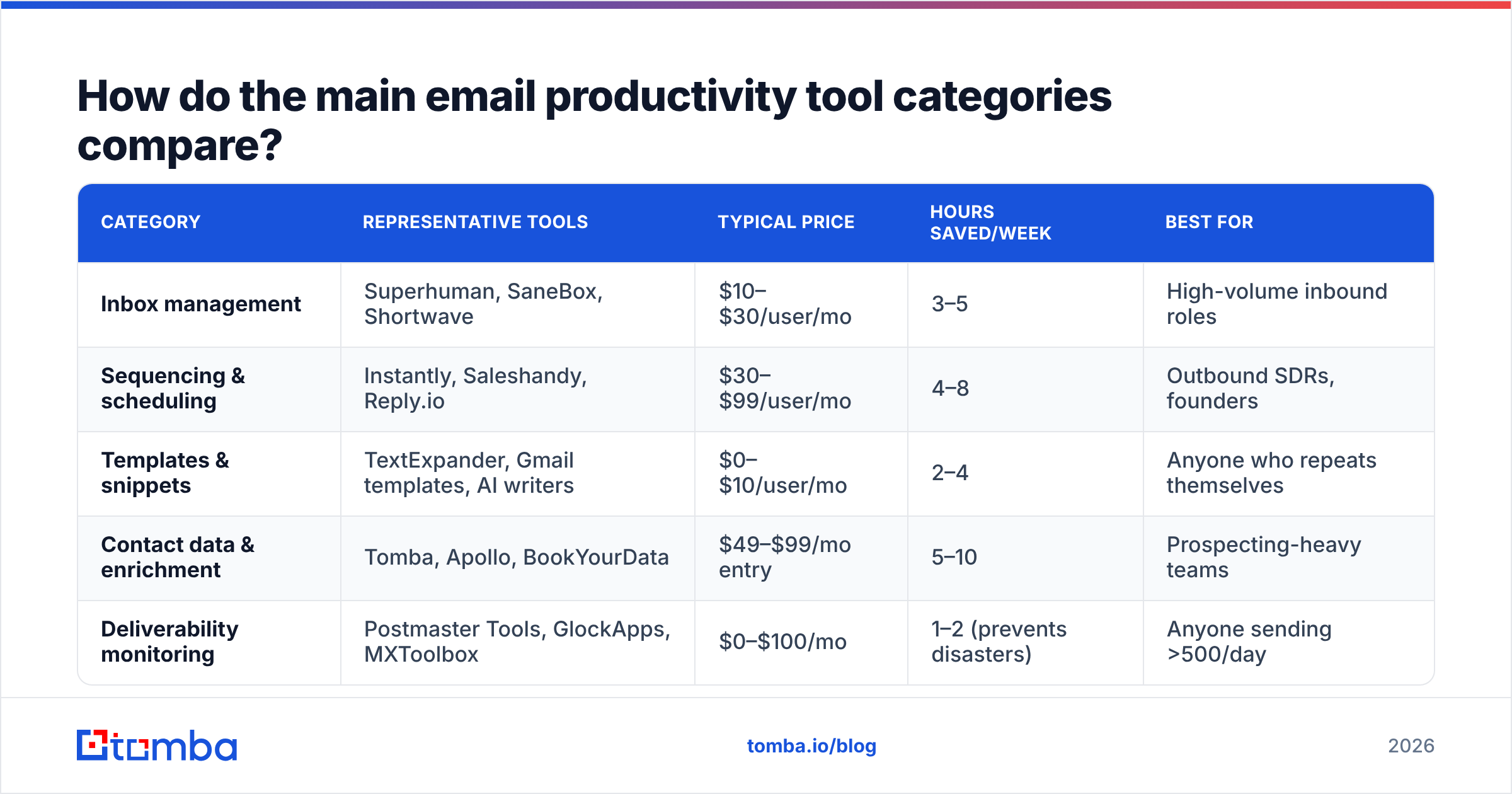
| Category | Representative tools | Typical price | Hours saved/week | Best for |
|---|---|---|---|---|
| Inbox management | Superhuman, SaneBox, Shortwave | $10–$30/user/mo | 3–5 | High-volume inbound roles |
| Sequencing & scheduling | Instantly, Saleshandy, Reply.io | $30–$99/user/mo | 4–8 | Outbound SDRs, founders |
| Templates & snippets | TextExpander, Gmail templates, AI writers | $0–$10/user/mo | 2–4 | Anyone who repeats themselves |
| Contact data & enrichment | Tomba, Apollo, BookYourData | $49–$99/mo entry | 5–10 | Prospecting-heavy teams |
| Deliverability monitoring | Postmaster Tools, GlockApps, MXToolbox | $0–$100/mo | 1–2 (prevents disasters) | Anyone sending >500/day |
The "hours saved" column is the part vendors won't publish. It's based on the mundane arithmetic: if a rep manually hunts 40 email addresses a week at roughly 4 minutes each — LinkedIn, company site, guess-and-check — that's 2.7 hours gone. Automate the lookup and you've bought back most of a workday per month, per rep.
[Screenshot placeholder: side-by-side of a manual LinkedIn-to-email workflow vs. a single bulk lookup, showing elapsed time]
Why is contact data the highest-leverage layer?#
Because everything downstream inherits its errors. A bad address doesn't just fail — it damages sender reputation, which then degrades delivery for the good addresses on the same list.
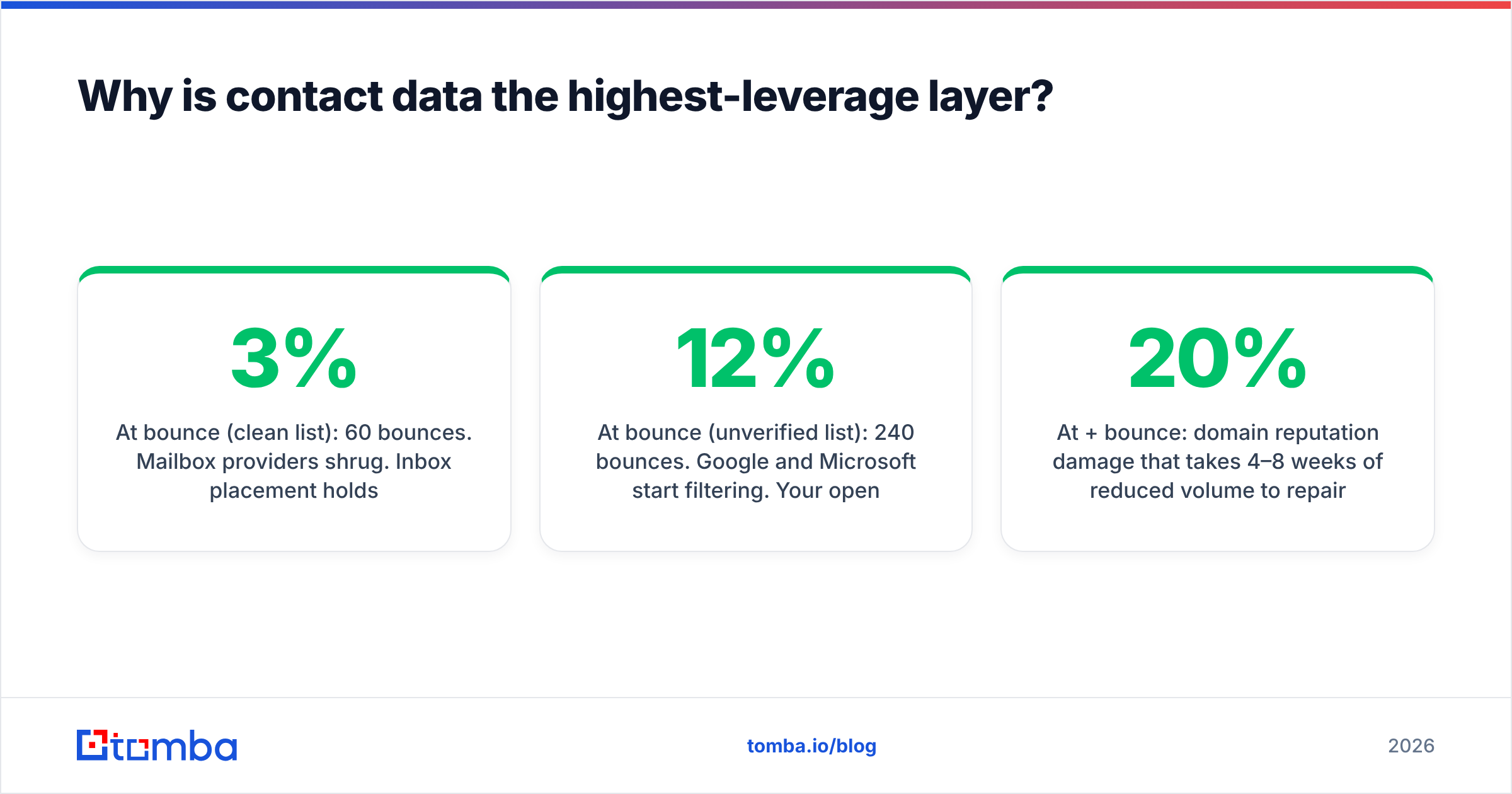
Here's the compounding math. Say you send 2,000 emails a month:
- At 3% bounce (clean list): 60 bounces. Mailbox providers shrug. Inbox placement holds.
- At 12% bounce (unverified list): 240 bounces. Google and Microsoft start filtering. Your open rate drops 15–30% across the entire list, including the valid contacts.
- At 20%+ bounce: domain reputation damage that takes 4–8 weeks of reduced volume to repair.
That's why a bulk email verifier run costs less than the deliverability recovery it prevents. It's the smoke detector, not the fire extinguisher.
The other reason: contact sourcing is the least automatable step without a tool, and the most automatable step with one. Writing a good email still needs a human. Finding the address does not. That asymmetry is why the data layer returns more hours per dollar than the AI-writing layer everyone is excited about.
If your workflow is LinkedIn-first, a LinkedIn finder collapses profile → verified address into one step. If you work account-first, domain search pulls every published address at a company in one call, along with the detected email pattern — which then lets you predict addresses for people the crawler hasn't indexed yet.
What does a realistic stack cost in 2026?#
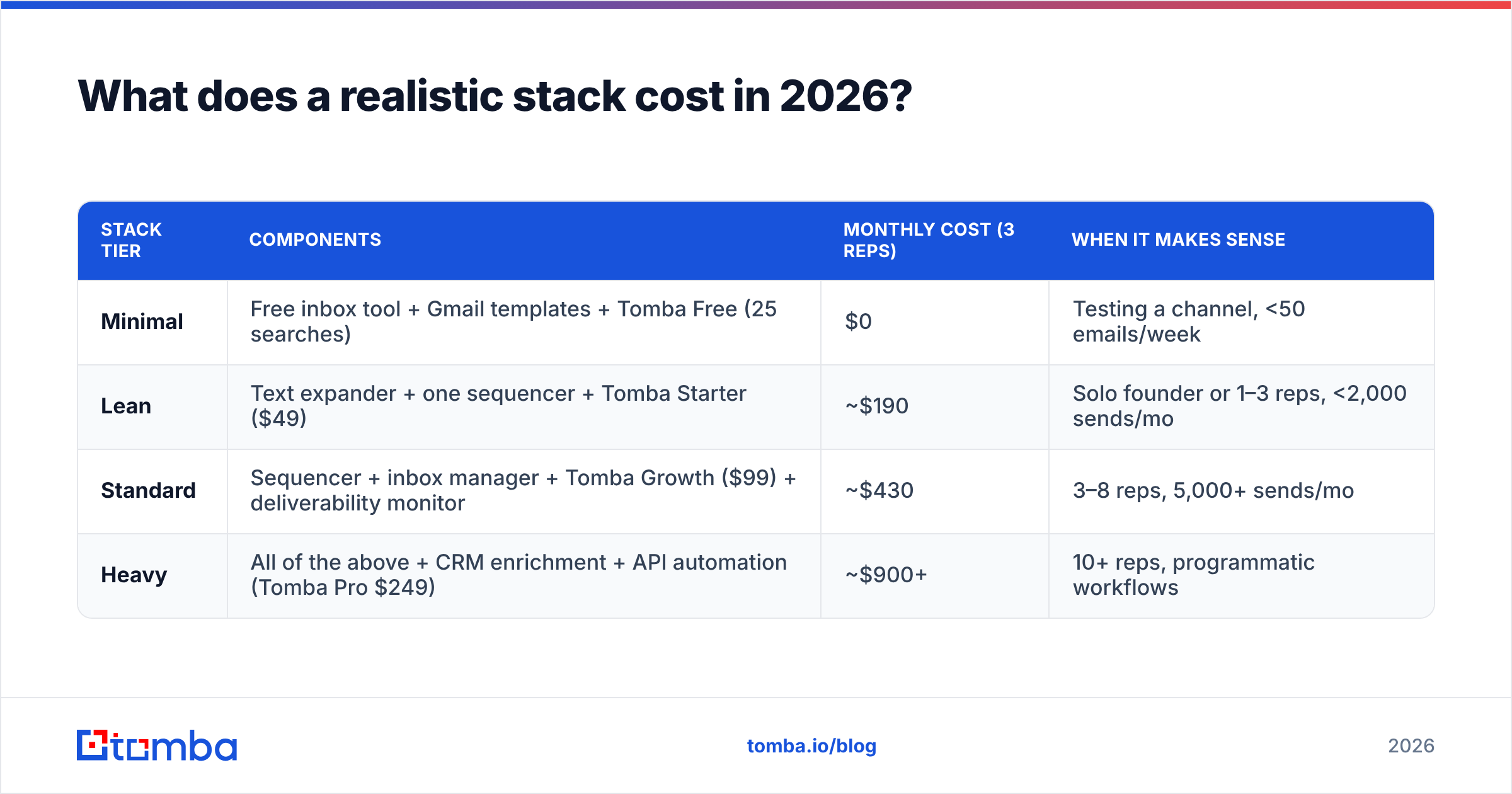
Three tiers, priced honestly. Note that per-seat costs stack fast, so the data layer is usually shared across the team rather than per-rep.
| Stack tier | Components | Monthly cost (3 reps) | When it makes sense |
|---|---|---|---|
| Minimal | Free inbox tool + Gmail templates + Tomba Free (25 searches) | $0 | Testing a channel, <50 emails/week |
| Lean | Text expander + one sequencer + Tomba Starter ($49) | ~$190 | Solo founder or 1–3 reps, <2,000 sends/mo |
| Standard | Sequencer + inbox manager + Tomba Growth ($99) + deliverability monitor | ~$430 | 3–8 reps, 5,000+ sends/mo |
| Heavy | All of the above + CRM enrichment + API automation (Tomba Pro $249) | ~$900+ | 10+ reps, programmatic workflows |
Two notes on this table. First, the jump from Lean to Standard is mostly seat-based sequencer cost, not data cost — data scales with volume, not headcount, which is why it's the cheaper line item as you grow. Second, if your total lands above $400 per rep, audit for overlap. Sequencers increasingly bundle mediocre contact data, and data platforms increasingly bundle mediocre sequencing. Paying twice for both halves is the most common budget leak.
Full Tomba pricing runs Free (25 searches/mo), Starter $49/mo, Growth $99/mo, Pro $249/mo, and Enterprise custom — the credits pool across finder, verifier, and enrichment rather than being siloed per product, which matters when your mix shifts month to month.
How do you evaluate an email productivity tool without wasting a trial?#
Trials fail because people evaluate features instead of workflows. Run this instead — it takes about 40 minutes and kills bad fits fast.
- Bring your own list of 50 real prospects. Not the vendor's demo data. Vendor demos are tuned to the accounts they index best.
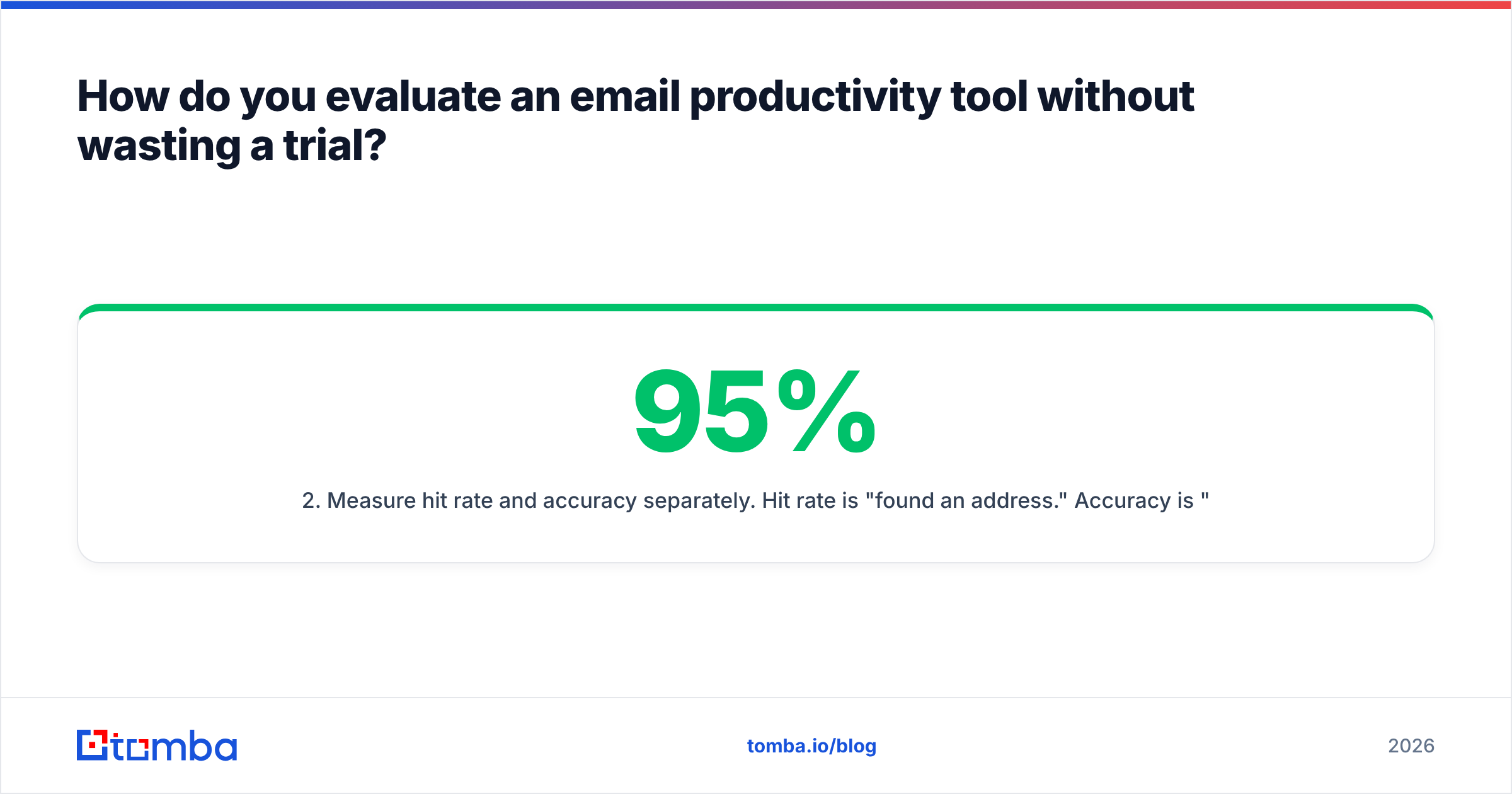
- Measure hit rate and accuracy separately. Hit rate is "found an address." Accuracy is "the address was real." A tool with 95% hit rate and 70% accuracy is worse than 70%/98% — the first one hands you bounces with confidence.
- Test the awkward accounts. Small companies, non-English domains, catch-all servers, recently-rebranded businesses. Everyone nails Salesforce and Stripe. Nobody's marketing page shows you a 12-person agency in Lyon.
- Time the full loop, not the single lookup. Search → verify → export → into CRM. A fast lookup buried behind a slow export is not fast.
- Check the exit. Can you export your data cleanly? Is there an API? A tool you can't leave is a tool that will raise prices.
- Read the credit policy. Do failed searches consume credits? Do credits roll over? This is where the real cost lives.
Point 3 deserves emphasis. G2 reviews across this category show the consistent complaint isn't "the tool didn't work" — it's "the tool didn't work on my segment." Coverage is regional and vertical-specific. Test yours.

Where do AI features actually help — and where are they theater?#
Genuinely useful:
- Draft-from-context. Pulling a prospect's recent announcement into a first line saves real research time. This works because the AI is summarizing, not inventing.
- Reply classification. Auto-sorting "interested / not now / wrong person / unsubscribe" is boring, accurate, and saves triage time.
- Pattern inference for email formats. Predicting
first.last@vsflast@from known addresses at a domain is a solved statistical problem, and it works.
Mostly theater:
- Fully autonomous cold email writing. The output is grammatically fine and strategically empty. Reply rates on generic AI copy have fallen as recipients learned the tells. Use AI for the first draft, then cut it in half yourself.
- "AI lead scoring" with no explanation. If the tool can't tell you why a lead scored 87, you can't act on it or debug it.
- AI subject line generation at scale. Testing five variants beats generating fifty. HubSpot's research on email benchmarks keeps landing in the same place: specificity and relevance beat cleverness.
The pattern: AI helps where the task is classification or summarization. It underperforms where the task is judgment.
What should you automate first?#
Automate in this order, because each step makes the next one cheaper:
- Verification before send. Non-negotiable. Run every list through a bulk verify pass. Costs cents, prevents weeks of reputation repair.
- Address finding. Replace manual lookup with an email finder — either in the browser, in a spreadsheet, or via the API for programmatic workflows.
- Follow-up scheduling. Three to four touches over two weeks, automated. Most replies land on touch two and three, and manual follow-up is exactly what people drop when they're busy.
- Snippet expansion. Twenty saved blocks covering your ten most common replies. Cheapest win in the list.
- CRM sync. Kill manual data entry last, because it's the most brittle to set up and the easiest to get wrong. Native integrations beat custom Zaps when they exist.
Notice what's not on the list: automating the actual writing of your first-touch email. That's the part where human judgment still outperforms, and it's the part where automation is most visible to the recipient.
Frequently asked questions#
Is a free email productivity tool enough for a solo founder? Often yes, for the first 90 days. Gmail's native templates plus a free tier email finder handles low volume. The break point is roughly 200 outbound emails a month — past that, manual lookup and manual follow-up start costing more in hours than the tools cost in dollars.
Do I need separate tools for finding and verifying emails? No, and separating them usually costs more. Platforms that do both in one credit pool avoid the export-import-export shuffle. Check that verification is a real SMTP-level check, not just syntax validation — those are wildly different products with similar marketing.
How many email productivity tools is too many? If a single prospect touches more than three tools between "identified" and "emailed," you have too many. Every handoff is a place for data to get stale or lost.
What about catch-all domains? They're the hardest case in the category, and most tools return "unknown" and charge you anyway. A dedicated catch-all verifier gives you a confidence score instead of a shrug, which at least lets you decide whether to risk the send.
The honest summary#
The email productivity tool that saves you the most time is almost never the one with the best demo. It's the one that removes the step you currently do manually forty times a week — and for most B2B teams, that step is finding and verifying contact data, not writing or sending.
Fix the data layer first. Then sequencing. Then inbox management. Then, if there's budget left, the shiny AI layer. Reversing that order is how teams end up paying $400 a rep to send unverified mail faster.
Start with the free tier and test it against your own list — 25 searches a month is enough to know within an afternoon whether the coverage holds for your segment. If it does, Tomba's Email Finder plugs into the browser, Google Sheets, and a straightforward API, so the lookup step disappears from your day regardless of where the rest of your stack lives. If it doesn't cover your niche, you've lost an afternoon instead of a quarter — which is exactly how tool evaluation should work.
Related guides#
Ready to find emails that actually work?
Join 150,000+ professionals who stopped guessing and started sending. Free credits on signup — no credit card required.
Get the Tomba newsletter
Practical outbound tactics and product updates — once every two weeks.
About the author