Email Profiling: How One Address Becomes a Full Lead Profile
Email profiling turns a bare address into a routable, scored lead record — role, seniority, company, tech stack, deliverability risk. Here's how the pipeline works, what it costs, and where it quietly breaks.
TL;DR
- Email profiling is the process of taking a known email address and resolving it into a structured record: person, role, seniority, employer, technographics, and deliverability risk.
- It is not the same thing as email finding (address → discovery) or email verification (address → valid/invalid). Profiling sits after finding and alongside verification.
- The three inputs that matter most are the local part (
first.last), the domain, and any public identity graph signal tied to that address. Everything else is inference. - Most teams waste 30-60% of enrichment credits by profiling addresses they never should have kept. Verify first, profile second.
- Budget realistically: usable B2B profiling starts around $49/mo at low volume and climbs fast once you cross ~10k records/month.
What is email profiling?#
Email profiling is the practice of expanding a single email address into a usable contact record — who owns it, what they do, where they work, how risky it is to send to, and whether they match your ICP.
Think of it like a license plate. The plate alone tells you almost nothing. Run it through the right registry and you get make, model, year, registered owner, and whether the vehicle is flagged. An email address works the same way: s.patel@northwind-logistics.com is inert on its own, but resolved against company data, identity graphs, and SMTP checks it becomes "Sanjay Patel, VP Operations, 340-person 3PL in Rotterdam, uses NetSuite, mailbox active, low bounce risk."
That last part matters more than the demographics. A profile that tells you a contact exists but not whether the mailbox accepts mail is a profile that will burn your sender reputation.
Three things people conflate constantly:
- Email finding — you have a name and a company, you want the address. Discovery direction.
- Email verification — you have an address, you want a binary (or graded) answer on deliverability.
- Email profiling — you have an address, you want context. Everything you'd need to write a relevant first line and route the lead correctly.
You need all three, in that order, and most stacks only do one well.
How does email profiling actually work?#
The pipeline is more mechanical than vendors let on. Here is what happens between "address in" and "record out":
- Syntax and pattern parsing. The local part is decomposed.
s.patelimpliesfirstinitial.lastname;sanjay.patelimpliesfirst.last;info,sales,helloflag the address as a role account, not a person. Role accounts should be tagged and routed differently — they have different reply behavior and different legal footing. - Domain resolution. The domain is mapped to a legal entity: company name, HQ country, employee band, industry code, funding stage. This is where most of the firmographic value comes from, and it's the cheapest step because domain-level data is dense and stable.
- MX and infrastructure fingerprinting. MX records reveal the mail provider (Google Workspace, Microsoft 365, Zoho, a self-hosted relay), which in turn predicts verification behavior — Microsoft-hosted domains reject SMTP probing far more aggressively than Google-hosted ones.
- Identity graph matching. The address is matched against public professional profiles, published bylines, conference speaker lists, GitHub commits, press mentions. This produces name, title, seniority, tenure, and sometimes a LinkedIn URL.
- Deliverability grading. SMTP handshake, catch-all detection, disposable-domain check, spam-trap heuristics. The output should be graded (
valid/catch-all/risky/invalid), not binary — a catch-all domain isn't invalid, it's unknowable by probe alone. - Confidence scoring and merge. Conflicting signals get reconciled. A good provider exposes the confidence number and the source; a bad one hands you a single flattened row and asks you to trust it.

Step 6 is the one to interrogate during a trial. Ask any vendor: what is your confidence threshold, and what happens to records below it? If the answer is "we return them anyway," you're buying noise at data prices.
What data can you actually get from one email address?#
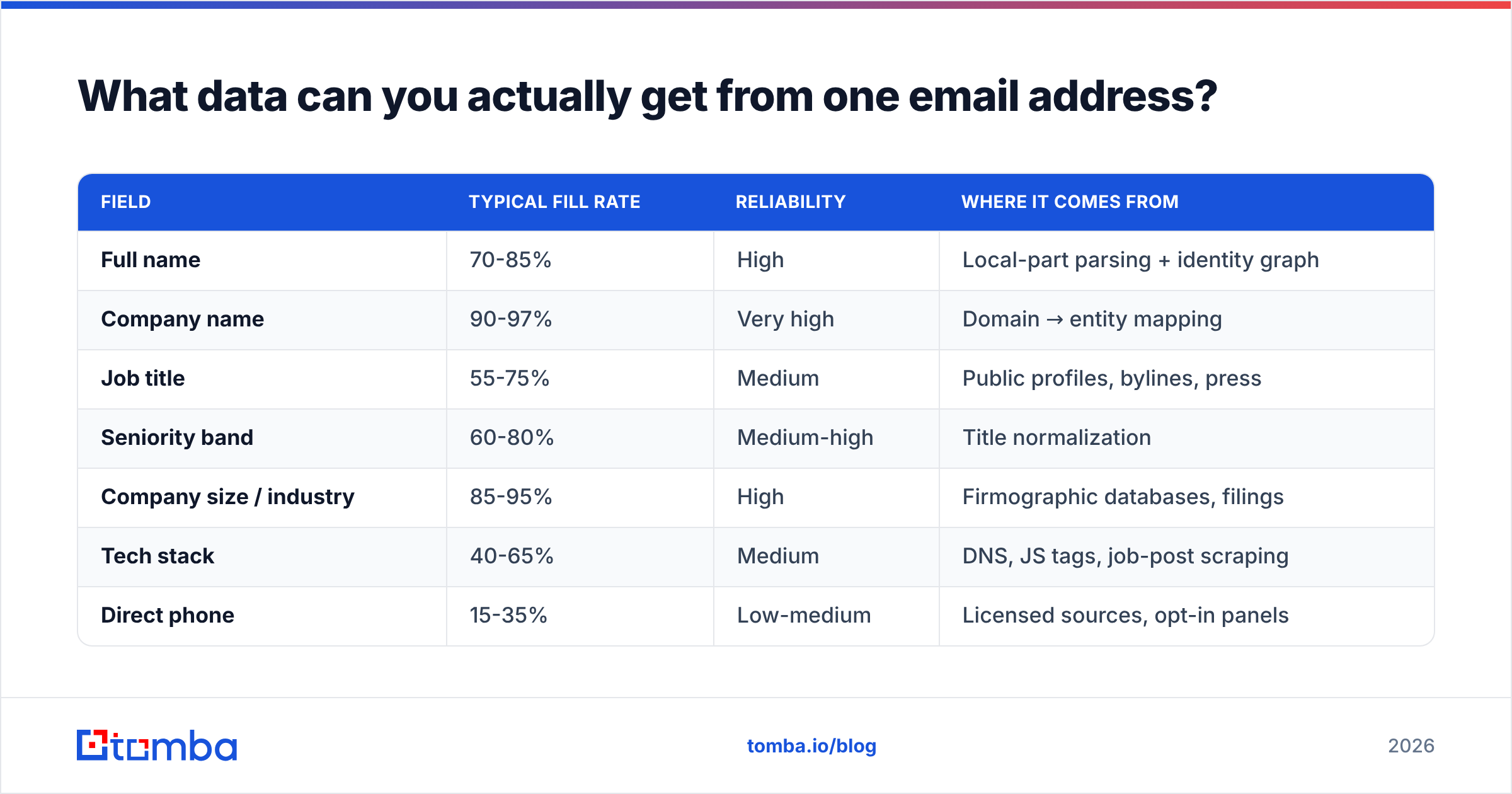
Not everything vendors imply. Here's an honest breakdown of what's reliably resolvable versus what's inference dressed up as fact.
| Field | Typical fill rate | Reliability | Where it comes from |
|---|---|---|---|
| Full name | 70-85% | High | Local-part parsing + identity graph |
| Company name | 90-97% | Very high | Domain → entity mapping |
| Job title | 55-75% | Medium | Public profiles, bylines, press |
| Seniority band | 60-80% | Medium-high | Title normalization |
| Company size / industry | 85-95% | High | Firmographic databases, filings |
| Tech stack | 40-65% | Medium | DNS, JS tags, job-post scraping |
| Direct phone | 15-35% | Low-medium | Licensed sources, opt-in panels |
| Deliverability grade | 95-99% | High | SMTP + MX + trap lists |
| Personal social profiles | 20-40% | Low | Identity graph, often stale |
Two numbers to internalize. First, job title fill rate collapses below 50% for companies under 20 employees — there's simply no public trail. Second, direct-phone fill rates advertised as "70%+" almost always mean any phone, including the company switchboard. If phone matters to your motion, test it on 200 known records before you sign, and pair it with a phone validator so you're not counting dead lines as coverage.
Is email profiling different from enrichment and verification?#
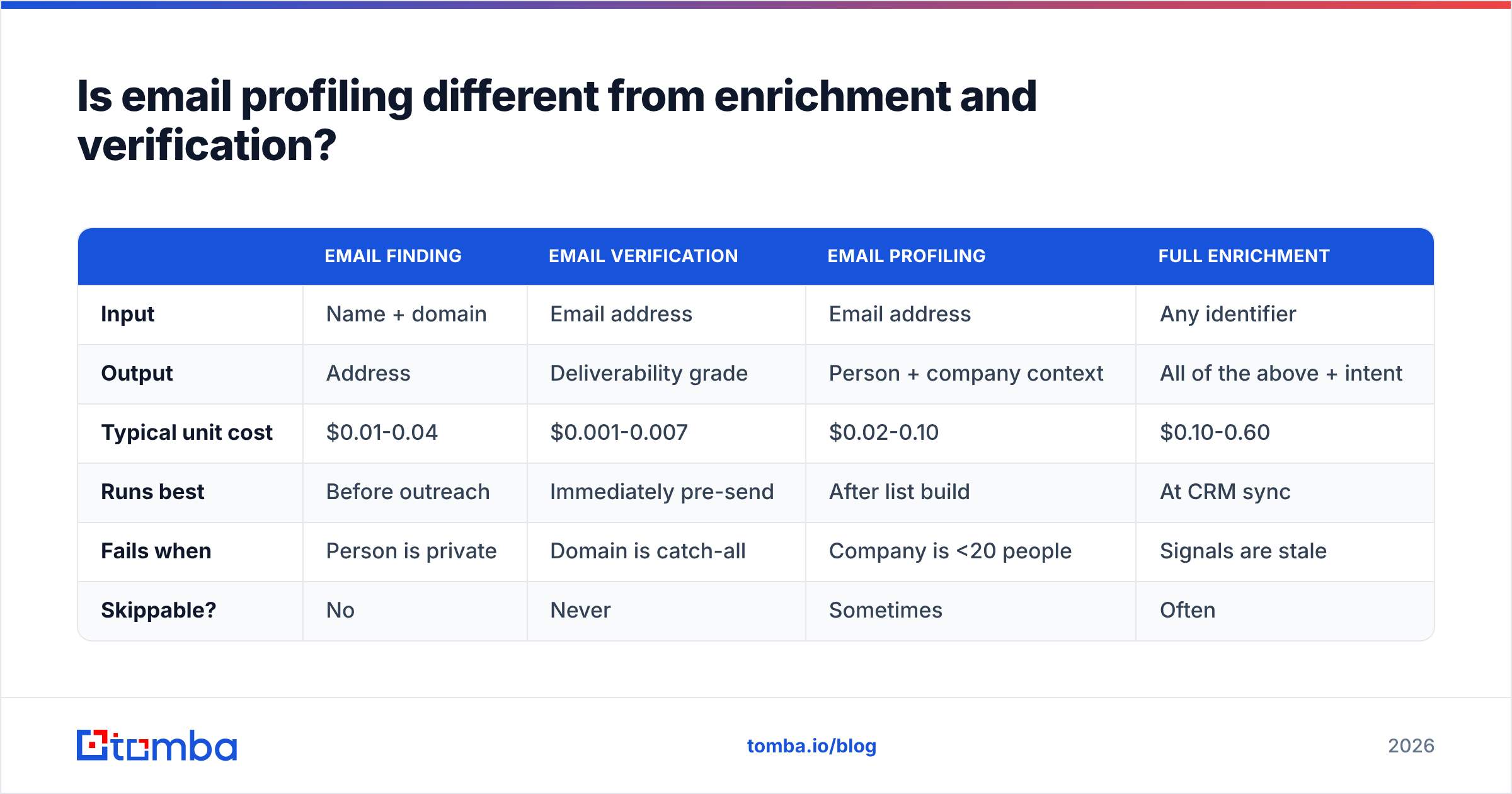
Yes, and the distinction has budget consequences. Teams that treat them as one line item overpay for the expensive step and underbuy the cheap one.
| Email finding | Email verification | Email profiling | Full enrichment | |
|---|---|---|---|---|
| Input | Name + domain | Email address | Email address | Any identifier |
| Output | Address | Deliverability grade | Person + company context | All of the above + intent |
| Typical unit cost | $0.01-0.04 | $0.001-0.007 | $0.02-0.10 | $0.10-0.60 |
| Runs best | Before outreach | Immediately pre-send | After list build | At CRM sync |
| Fails when | Person is private | Domain is catch-all | Company is <20 people | Signals are stale |
| Skippable? | No | Never | Sometimes | Often |
Verification is the cheapest step and the one people skip. That's backwards. Verification costs roughly a tenth of profiling per record, and it removes the records you'd otherwise pay full profiling price to enrich. Run an email verifier as a gate, not as a cleanup pass, and your profiling spend drops by whatever share of your list was junk — typically 25-40% on scraped or aged lists.
Full data enrichment is the superset: profiling plus intent signals, funding events, hiring velocity, and CRM-shaped fields. Worth it for ABM programs targeting a few hundred accounts. Rarely worth it for broad outbound where you'll contact 20,000 people and hear back from 400.
Which tools are worth comparing for email profiling in 2026?#
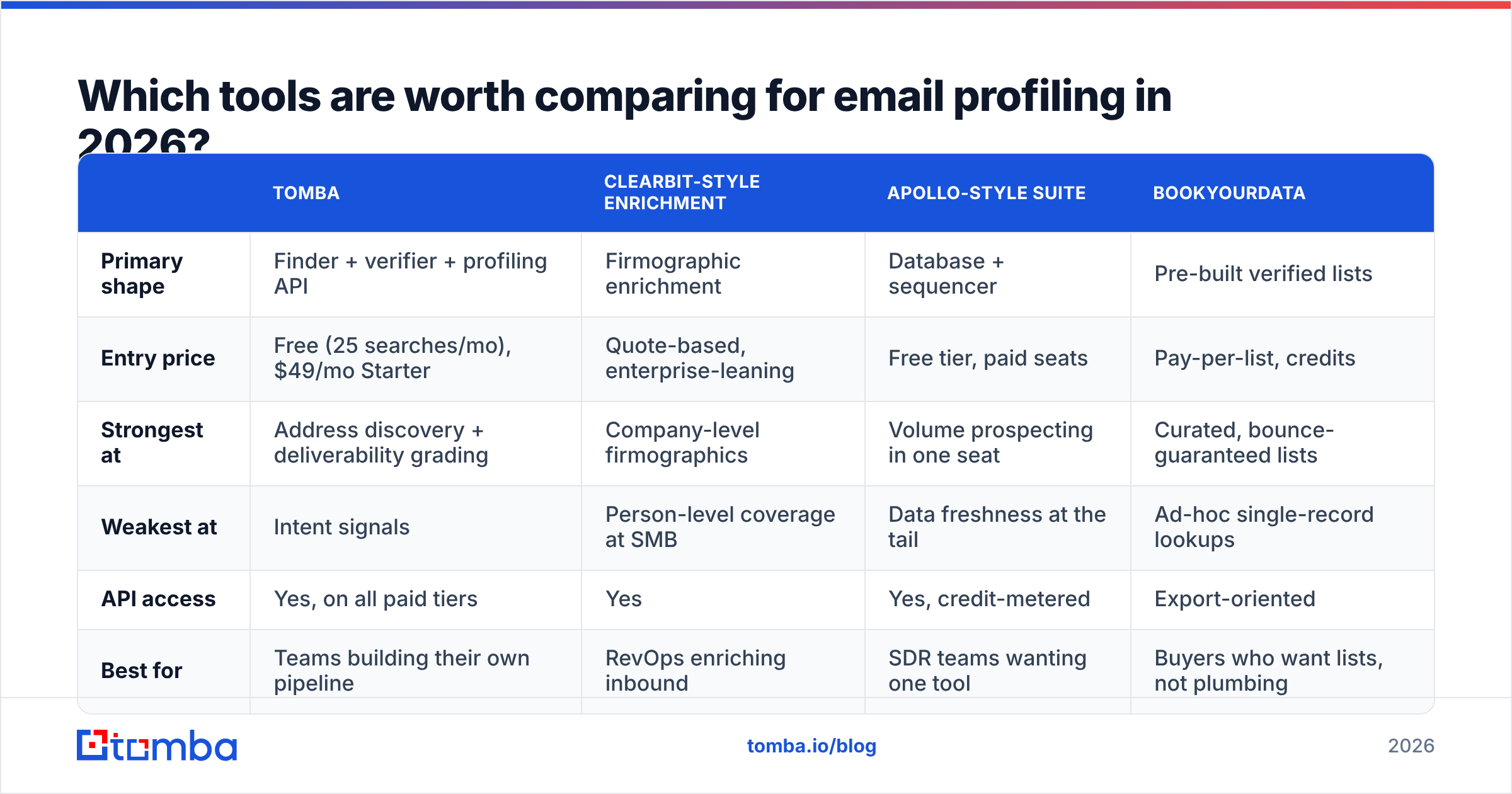
The market splits into three shapes: profiling-first data platforms, all-in-one sales engagement suites with profiling bolted on, and verified-list vendors who sell the profile pre-attached. Each is correct for a different buyer.
| Tomba | Clearbit-style enrichment | Apollo-style suite | BookYourData | |
|---|---|---|---|---|
| Primary shape | Finder + verifier + profiling API | Firmographic enrichment | Database + sequencer | Pre-built verified lists |
| Entry price | Free (25 searches/mo), $49/mo Starter | Quote-based, enterprise-leaning | Free tier, paid seats | Pay-per-list, credits |
| Strongest at | Address discovery + deliverability grading | Company-level firmographics | Volume prospecting in one seat | Curated, bounce-guaranteed lists |
| Weakest at | Intent signals | Person-level coverage at SMB | Data freshness at the tail | Ad-hoc single-record lookups |
| API access | Yes, on all paid tiers | Yes | Yes, credit-metered | Export-oriented |
| Best for | Teams building their own pipeline | RevOps enriching inbound | SDR teams wanting one tool | Buyers who want lists, not plumbing |
A few honest notes. BookYourData is genuinely strong when you want a clean, delivery-guaranteed list handed to you rather than a pipeline you operate — different job, and a legitimate one; plenty of teams run it alongside an API provider. Apollo-style suites win on convenience and lose on tail freshness, which shows up as bounce spikes on niche verticals. Enrichment-first platforms like Clearbit are excellent at company data and thinner at resolving individual people below the director level.
Read the G2 category pages with skepticism — coverage claims there are self-reported and rarely segmented by company size, which is exactly where the variance lives.

Is email profiling legal under GDPR and CAN-SPAM?#
Short answer: profiling B2B contact data is lawful in most jurisdictions if you have a legitimate interest, you're transparent, and you honor deletion requests. It is not a free pass.
Under GDPR, a work email tied to a named individual is personal data. Article 6(1)(f) legitimate interest is the usual basis for B2B prospecting, but it requires a documented balancing test and a working opt-out. Profiling that infers sensitive attributes — health, political views, union membership — is a different category entirely and you should not be doing it from an email address.
In the US, the FTC's CAN-SPAM guidance governs the message, not the data collection. You need accurate headers, a physical address, and a functioning unsubscribe honored within 10 business days.
Practical compliance checklist for a profiling stack:
- Log provenance per field. If you can't say where a title came from, you can't defend it.
- Honor suppression globally. An opt-out must propagate to your enrichment layer, not just your sender.
- Set a staleness TTL. Profiles older than 6-9 months should be re-resolved or flagged, not silently reused.
- Keep a deletion path. A subject access or erasure request should be executable in minutes, not by hand across four tools.
- Don't profile consumer inboxes for B2B outreach. A Gmail address with no company signal is a compliance liability and a deliverability one.
Check what your provider publishes about its data sources before you sign. Vendors that won't describe sourcing usually have a reason.
How do you build a profiling workflow that doesn't waste credits?#
The order of operations is the whole game. Here's a sequence that consistently reduces cost per usable contact:
- Dedupe first, always. Normalize casing, strip plus-addressing and Gmail dots, collapse alias domains. Ten minutes of scripting saves a double-digit percentage of credits on any list built from more than one source.
- Kill role accounts early unless your motion specifically targets them.
info@,careers@, andnoreply@will consume the same profiling credit and return almost nothing. - Verify before you enrich. Gate on the verification grade. Only
validand reviewedcatch-allrecords proceed. Use a catch-all verifier rather than blanket-discarding catch-all domains — a lot of legitimate enterprise mail lives behind them. - Profile in tiers. Domain-level enrichment for everything (cheap, high fill). Person-level profiling only for records that clear your ICP filter. This alone typically halves spend.
- Score, then route. Combine seniority, company size, and tech-stack match into a single number. Anything below threshold goes to nurture, not to an SDR.
- Re-resolve on a schedule. B2B contact data decays roughly 2-2.5% per month through job changes alone. A quarterly re-profile of your active pipeline costs less than one bounced campaign.
Automate it through an API rather than CSV round-trips. A email finder API call inside your enrichment job keeps the verification gate and the profiling step in the same transaction, so you never pay for a profile on an address you were about to discard. If you're not ready for that, Google Sheets add-ons handle the same logic at smaller volume.
What should email profiling cost you?#
Model it per usable contact, not per credit. Vendors quote credits because credits hide waste.
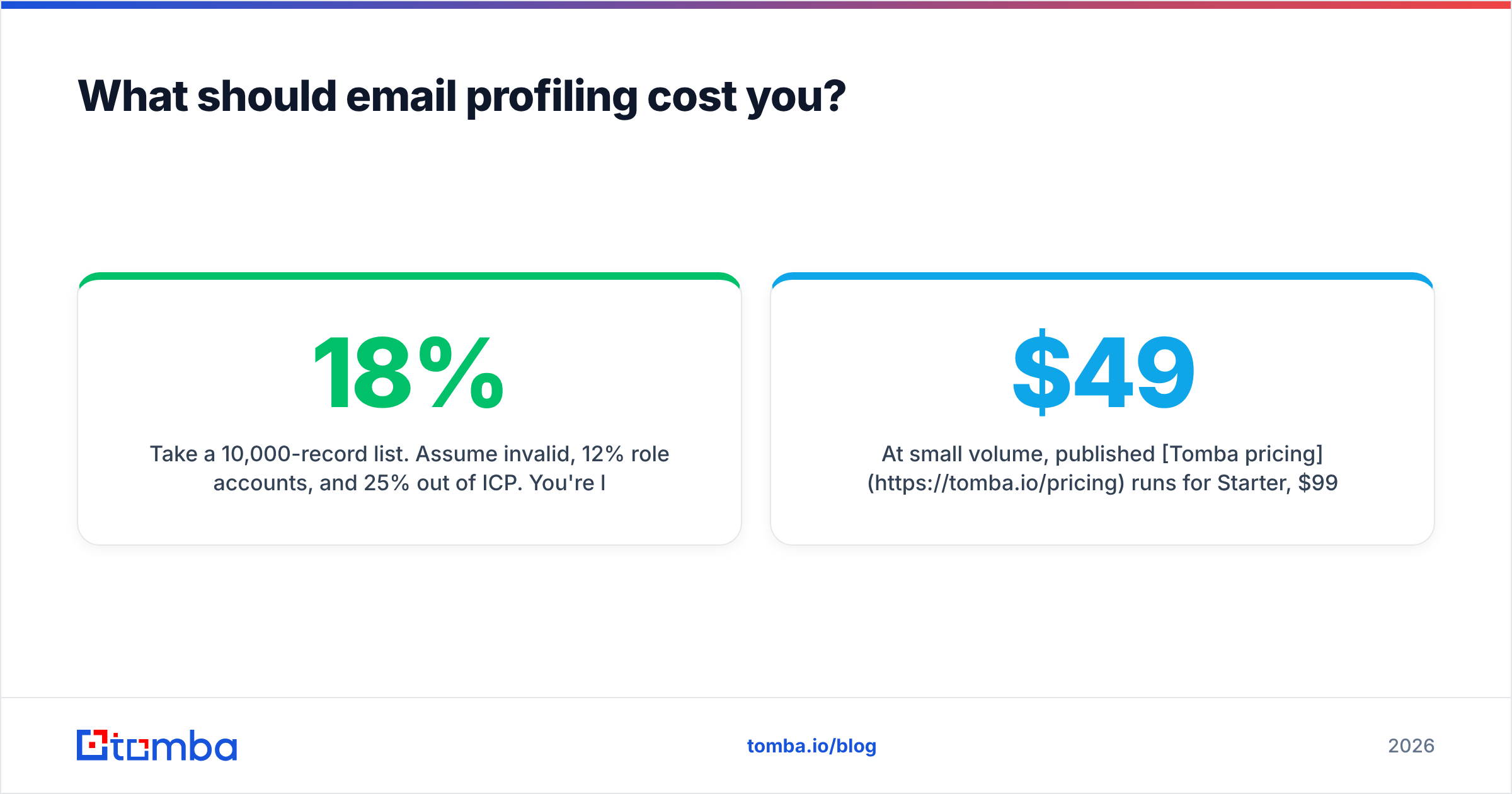
Take a 10,000-record list. Assume 18% invalid, 12% role accounts, and 25% out of ICP. You're left with roughly 5,000 records worth profiling. If you profile all 10,000 at $0.05, you spent $500 to get 5,000 usable profiles — $0.10 each. Gate first with verification at $0.004, and you spend $40 on verification plus $250 on profiling: $290 for the same 5,000 usable profiles, or $0.058 each. Same outcome, 42% cheaper.
At small volume, published Tomba pricing runs $49/mo for Starter, $99/mo for Growth, and $249/mo for Pro, with a free tier at 25 searches per month for testing the resolution quality before committing. Whatever provider you pick, run a 200-record blind test against contacts you already know the answers for. Vendor-reported accuracy is a marketing number; your own bounce and match rate on known records is the only benchmark that transfers.
What breaks email profiling most often?#
Four failure modes account for most of the disappointment:
- Small-company blind spots. Under 20 employees, public identity signal is sparse. Fill rates drop hard and confidence scores should drop with them. If they don't, the provider is guessing.
- Post-acquisition domain churn. Company gets acquired, domains redirect, profiles point at an entity that no longer exists. This is why TTLs matter.
- Catch-all ambiguity. Roughly 15-20% of business domains accept everything at the SMTP layer. Treating them as valid inflates your bounce rate; discarding them wholesale throws away enterprise accounts.
- Stale titles. Someone was promoted 14 months ago and your first line congratulates them on a role they left. This is the single most common cause of "your data is wrong" replies.
None of these are solvable by buying a more expensive provider. They're solvable by grading confidence, setting TTLs, and writing copy that degrades gracefully when a field is missing.
Where should you start?#
Start with the two steps that pay for themselves immediately: get the address right, then verify it before you spend anything on context. Tomba's Email Finder handles discovery by domain, name, or company, returns a confidence score and source with every result, and hands off cleanly to verification and profiling through the same API — so the gate-then-enrich sequence above runs as one job instead of four exports. The free tier gives you 25 searches a month, which is enough to run the 200-record blind test on a sample and see what your real match rate looks like before you pay anyone, including us.
Related guides#
Ready to find emails that actually work?
Join 150,000+ professionals who stopped guessing and started sending. Free credits on signup — no credit card required.
Get the Tomba newsletter
Practical outbound tactics and product updates — once every two weeks.
About the author