Email Prospecting in 2026: The Complete Working Playbook
Email prospecting still works in 2026 — but only if your list, verification, and sequencing survive Google and Microsoft's bulk-sender rules. Here's the full workflow, with numbers.
TL;DR
- Email prospecting is still the highest-leverage outbound channel in 2026, but the margin for sloppy execution is gone: Google and Microsoft's bulk-sender rules cap spam complaints at 0.3% and require authenticated, one-click-unsubscribe mail.
- The single biggest driver of results is not copy — it's list quality. A 12% bounce rate will sink a perfectly written sequence; a verified list under 2% bounce gives average copy a fighting chance.
- Realistic 2026 benchmarks for a well-targeted B2B sequence: 40-55% open (unreliable post-MPP), 3-8% reply, 1-3% positive reply, 0.5-1.5% meeting booked.
- The workflow that works: define an ICP narrow enough to personalize → build the list from firmographic triggers → find and verify emails → warm the domain → send 3-4 touches over 12-18 days → route replies to a human within an hour.
- Tooling matters less than sequencing, but a bad email finder costs you twice — once in wasted credits, once in domain reputation.
What is email prospecting, exactly?#
Email prospecting is the practice of identifying people who fit your ideal customer profile, finding their verified business email addresses, and sending them a short, relevant, permission-conscious message to open a sales conversation.
It is not email marketing. Marketing emails go to people who opted in and get measured on aggregate engagement. Prospecting emails go to people who have never heard of you and get measured on one thing: did a qualified human reply.
That distinction changes everything downstream. Marketing tolerates a 0.2% reply rate because volume is cheap and the list is warm. Prospecting cannot — every email you send to a stale, guessed, or role-based address is a withdrawal from your sender reputation account, and in 2026 that account is monitored far more aggressively than it was three years ago.
The four components that determine whether prospecting works:
- Targeting precision — Can you name the specific trigger that makes this company a buyer this quarter? "SaaS companies, 50-200 employees" is not a trigger. "Posted a RevOps job req in the last 30 days" is.
- Data accuracy — Verified, deliverable addresses tied to real, currently-employed humans. Contact data decays roughly 25-30% per year as people change jobs.
- Deliverability infrastructure — SPF, DKIM, DMARC, a warmed sending domain separate from your primary, and complaint rates under 0.3%.
- Message relevance — A first line that proves you looked at their business, a single specific claim, and one low-friction ask.
Miss any one of the four and the other three stop mattering. That is the part most teams learn expensively.
Does email prospecting still work in 2026?#
Yes — but the distribution of outcomes has widened dramatically.
The top decile of outbound teams are booking meetings at roughly the same rate they did in 2021. The bottom half have seen reply rates collapse, and most of that collapse traces to three structural changes rather than "email being dead."
Change one: bulk sender enforcement. Since Google and Microsoft tightened requirements for bulk senders, unauthenticated mail and high-complaint mail gets filtered rather than delivered. The Google bulk sender guidelines are explicit: keep spam complaint rates below 0.3%, authenticate with SPF and DKIM, publish a DMARC record, and support one-click unsubscribe. This is not advisory. It is a filter.
Change two: Apple Mail Privacy Protection destroyed open rates as a metric. Any "58% open rate" you see reported in 2026 is contaminated by pre-fetched pixel loads. Optimize for reply rate and meetings booked. Treat opens as directional at best.
Change three: AI-generated volume. Generic personalization at scale trained buyers to pattern-match and delete. The "I noticed you're the VP of Sales at [Company]" opener is now a negative signal — it reads as automated, because it is.
What still works is the opposite of scale-first: fewer, better-researched emails to a tighter list, sent from properly configured infrastructure, with a reply-handling process that responds like a human within the hour.
How does email prospecting compare to other outbound channels?#
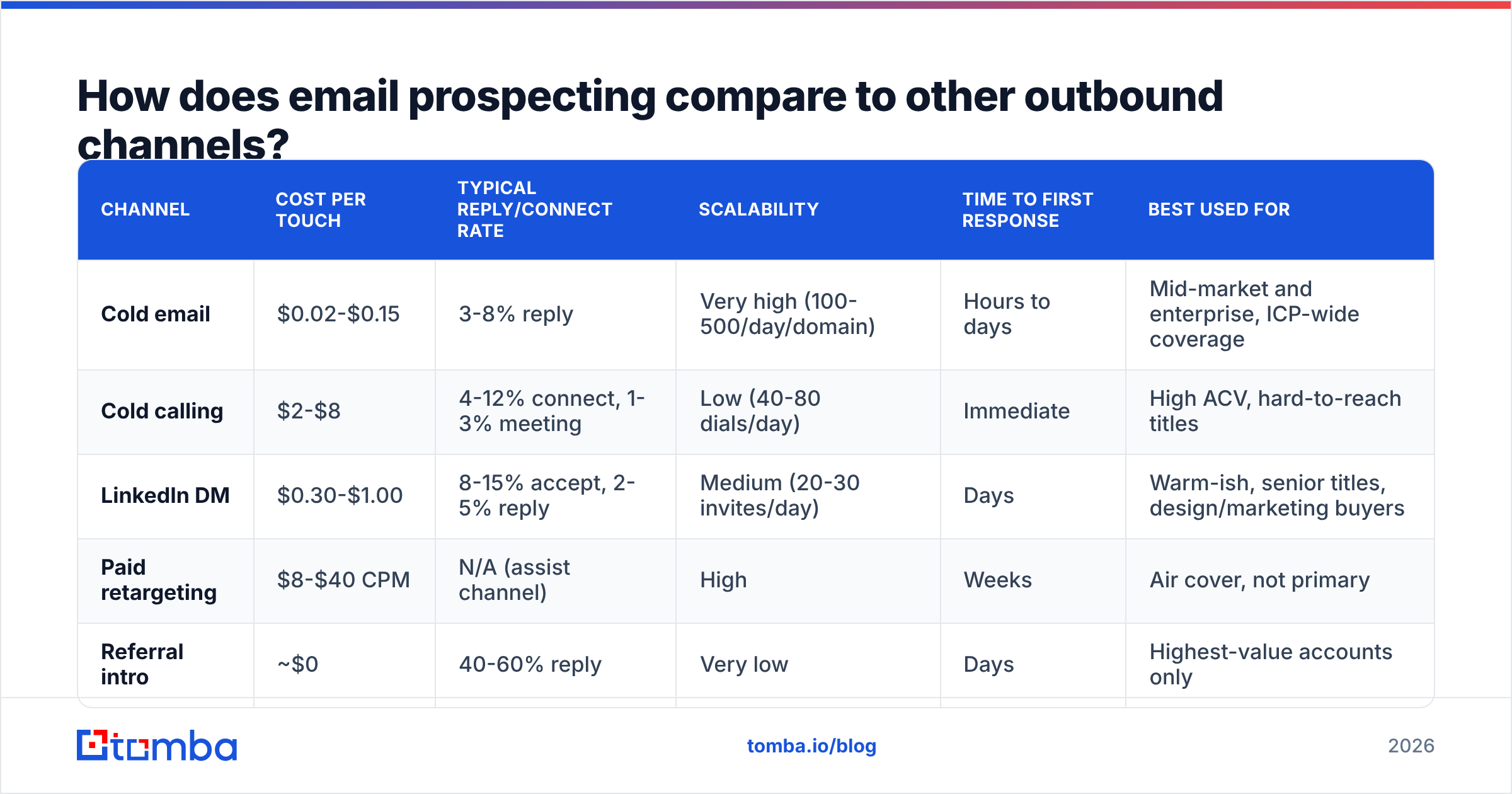
Email is not the only option, and the honest answer is that the best-performing teams run two or three channels in parallel. Here is how the main channels stack up on the metrics that matter:
| Channel | Cost per touch | Typical reply/connect rate | Scalability | Time to first response | Best used for |
|---|---|---|---|---|---|
| Cold email | $0.02-$0.15 | 3-8% reply | Very high (100-500/day/domain) | Hours to days | Mid-market and enterprise, ICP-wide coverage |
| Cold calling | $2-$8 | 4-12% connect, 1-3% meeting | Low (40-80 dials/day) | Immediate | High ACV, hard-to-reach titles |
| LinkedIn DM | $0.30-$1.00 | 8-15% accept, 2-5% reply | Medium (20-30 invites/day) | Days | Warm-ish, senior titles, design/marketing buyers |
| Paid retargeting | $8-$40 CPM | N/A (assist channel) | High | Weeks | Air cover, not primary |
| Referral intro | ~$0 | 40-60% reply | Very low | Days | Highest-value accounts only |
Email wins on cost-per-qualified-conversation and coverage. It loses on immediacy and on the very top of the market, where a warm intro beats twelve perfect sequences. The sensible allocation for most B2B teams: email as the volume layer, calls layered onto accounts that engaged, LinkedIn as the recognition builder before and after the email lands.
What does the email prospecting workflow actually look like?#
Six steps, in order. Skipping any of them shows up as a metric problem two weeks later.
1. Define the ICP with a trigger, not just firmographics. Write down the segment and the observable event that suggests timing. Hiring signals, funding rounds, tech-stack changes, leadership hires, and product launches are all public and all beat static firmographics.
2. Build the account list before the contact list. 150-300 accounts per sequence is the workable range. Beyond that, personalization degrades and you are running email marketing with extra steps.
3. Find the contacts. For each account, identify 2-3 people: the economic buyer, the likely champion, and one adjacent stakeholder. Use a domain search to pull every discoverable address at the company, then filter by title. If you are working from LinkedIn lists, a LinkedIn finder resolves profiles to work emails without manual guessing.
4. Verify everything before it touches your sender. This is non-negotiable. Run the full list through an email verifier and drop anything that comes back invalid, risky, or role-based (info@, sales@, admin@). Catch-all domains need their own handling — see the next section.
5. Warm the sending infrastructure. Buy a secondary domain (yourcompany-hq.com, getyourcompany.com), authenticate it fully, and warm it for 3-4 weeks before real volume. Never prospect from your primary corporate domain.
6. Sequence, send, and route replies. Three to four touches across 12-18 days. First email is the pitch; follow-ups add a new angle, not a "just bumping this."
How do you build a prospecting list that doesn't bounce?#
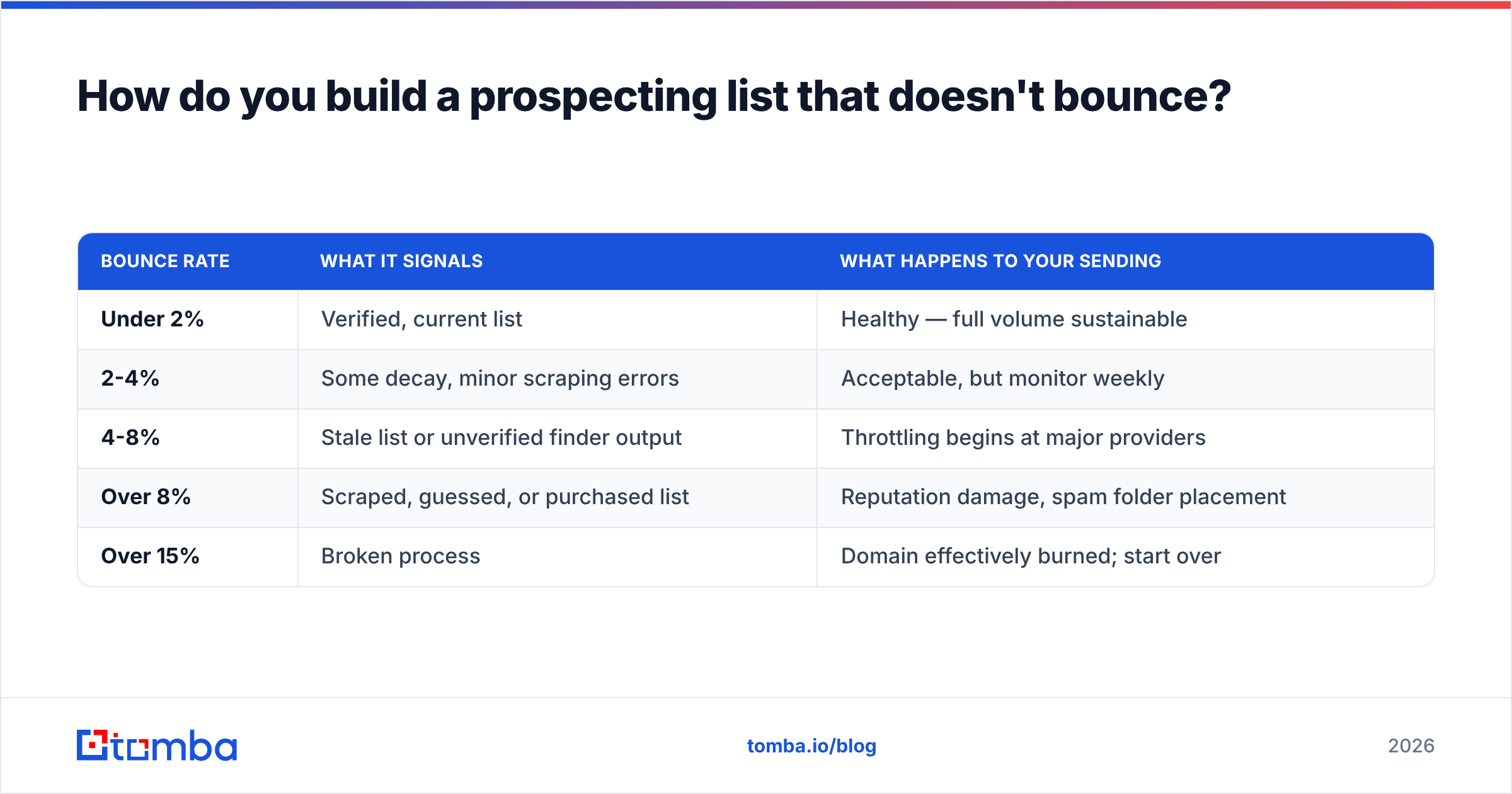
Bounce rate is the number that quietly decides whether your campaign works. Here is the practical thresholds table most deliverability teams operate against:
| Bounce rate | What it signals | What happens to your sending |
|---|---|---|
| Under 2% | Verified, current list | Healthy — full volume sustainable |
| 2-4% | Some decay, minor scraping errors | Acceptable, but monitor weekly |
| 4-8% | Stale list or unverified finder output | Throttling begins at major providers |
| Over 8% | Scraped, guessed, or purchased list | Reputation damage, spam folder placement |
| Over 15% | Broken process | Domain effectively burned; start over |
The three ways lists go bad:
- Job change decay. B2B contact data degrades roughly 2-2.5% per month. A list you built in January is measurably worse in June. Re-verify anything older than 90 days.
- Pattern-guessing without validation. Generating
first.last@domain.comand sending blind produces 20-40% bounce on companies that use a different convention. If you must generate, run the output through an email permutator and then verify — never send unverified permutations. - Catch-all domains. These accept everything at the SMTP layer, so standard verification returns "unknown." They are not automatically bad — many enterprises use them — but you need a catch-all verifier to separate the ones that actually route mail to a human from the ones that silently discard.

Accuracy claims from finder vendors are worth checking against your own data. Run 200 contacts from your actual ICP through any tool's free tier, send to them, and measure real bounce. Vendor-published accuracy figures are computed on their own test sets and rarely survive contact with a niche vertical.
Which tools do you actually need for email prospecting?#
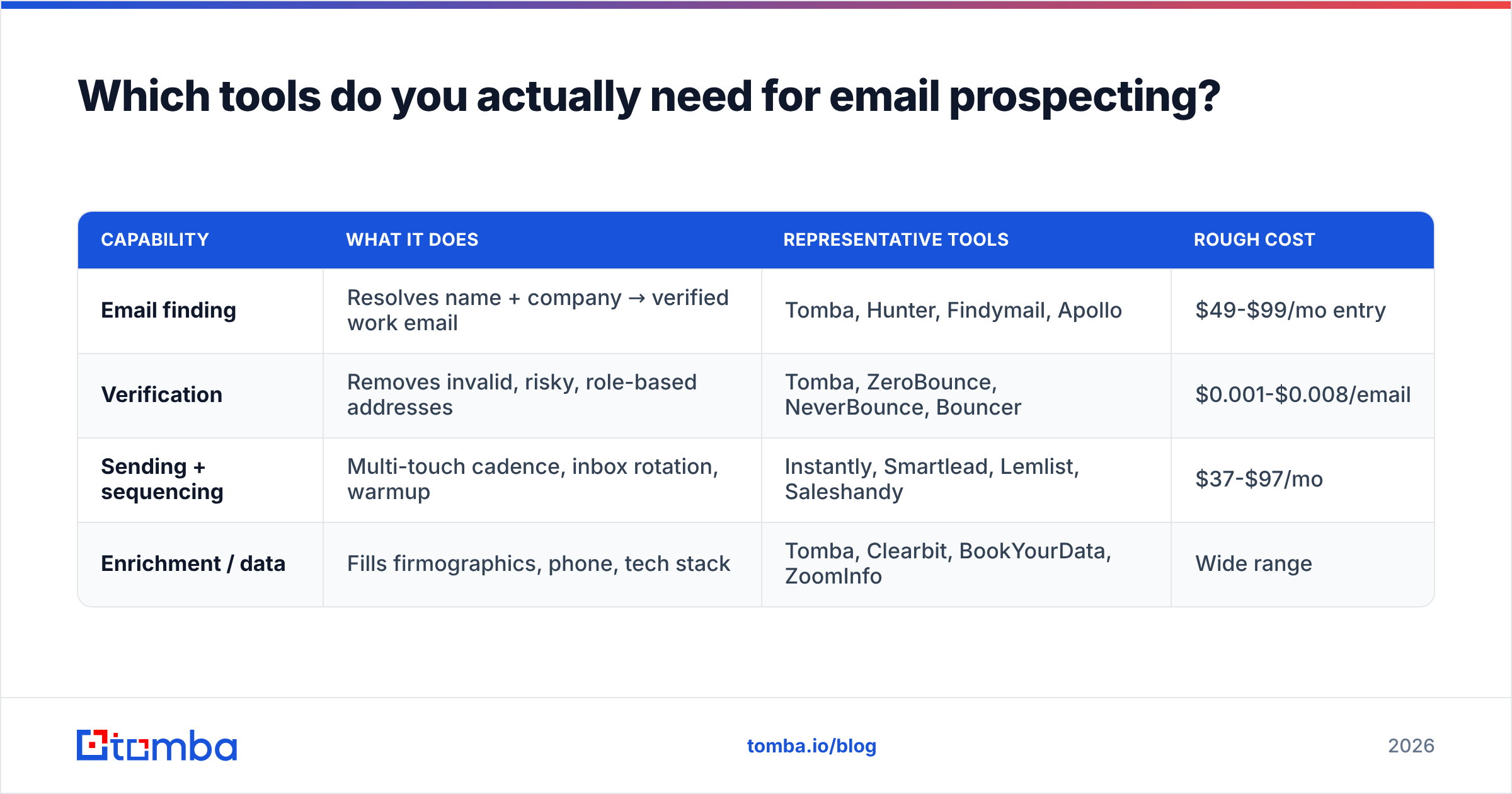
You need four capabilities. You do not need four separate vendors, but you do need all four covered.
| Capability | What it does | Representative tools | Rough cost |
|---|---|---|---|
| Email finding | Resolves name + company → verified work email | Tomba, Hunter, Findymail, Apollo | $49-$99/mo entry |
| Verification | Removes invalid, risky, role-based addresses | Tomba, ZeroBounce, NeverBounce, Bouncer | $0.001-$0.008/email |
| Sending + sequencing | Multi-touch cadence, inbox rotation, warmup | Instantly, Smartlead, Lemlist, Saleshandy | $37-$97/mo |
| Enrichment / data | Fills firmographics, phone, tech stack | Tomba, Clearbit, BookYourData, ZoomInfo | Wide range |
A note on consolidation: buying finding and verification from the same vendor is usually cheaper and avoids the "found by tool A, rejected by tool B, credits burned twice" problem. Tomba's Tomba pricing starts with a free tier at 25 searches per month, Starter at $49/mo, Growth at $99/mo, and Pro at $249/mo — with verification, domain search, and data enrichment included rather than metered separately.
For teams that need volume without a UI, most finders expose an API. If you are building lists programmatically inside a warehouse or an n8n/Make workflow, an email finder API will cost you far less per contact than clicking through an app.

For sending, resist the urge to prospect from your CRM's native email tool. Sequencing platforms handle inbox rotation, per-domain throttling, and reply detection in ways that HubSpot and Salesforce sequences do not. That said, HubSpot's own outbound research is useful for benchmarking what "good" looks like across industries.

What should an email prospecting sequence look like?#
Four touches, 12-18 days, each with a distinct job. Here is the structure that consistently outperforms the 7-touch grind:
Email 1 (Day 1) — The specific observation. 60-90 words. Open with the trigger you found, not their title. One sentence on the problem it usually creates. One sentence on how you help, with a number. Ask for a reply, not a meeting: "Worth a look?" converts better than "Do you have 15 minutes Thursday?"
Email 2 (Day 4) — The proof point. New subject line, new thread. Lead with a customer in their exact segment and one metric. No recap of email one.
Email 3 (Day 9) — The angle change. If the first two were about cost, make this one about risk. If they were about the buyer's problem, make this one about their team's problem. Different pain, same solution.
Email 4 (Day 16) — The clean close. Two sentences. "Sounds like this isn't a priority right now — I'll stop here. If that changes, reply and I'll send the two-minute version." This email reliably produces 15-25% of total replies.
Rules that hold across sequences:
- Under 100 words. Every email. Longer emails do not get read on mobile, and 60%+ of first opens are mobile.
- One link maximum, and preferably zero in email one. Links in cold email one correlate with spam placement.
- No images, no tracking pixels in the first touch. Plain text renders like a real human wrote it, and it dodges the image-based spam heuristics.
- Subject lines of 3-5 words, lowercase. "quick question re: hiring" outperforms "Transform Your Revenue Operations." If you want to stress-test yours, run it through a subject line tester.
- Reply within 60 minutes. Research aggregated by Harvard Business Review found firms responding within an hour were roughly seven times more likely to qualify the lead than those responding an hour later.
What metrics should you track, and what's actually good?#
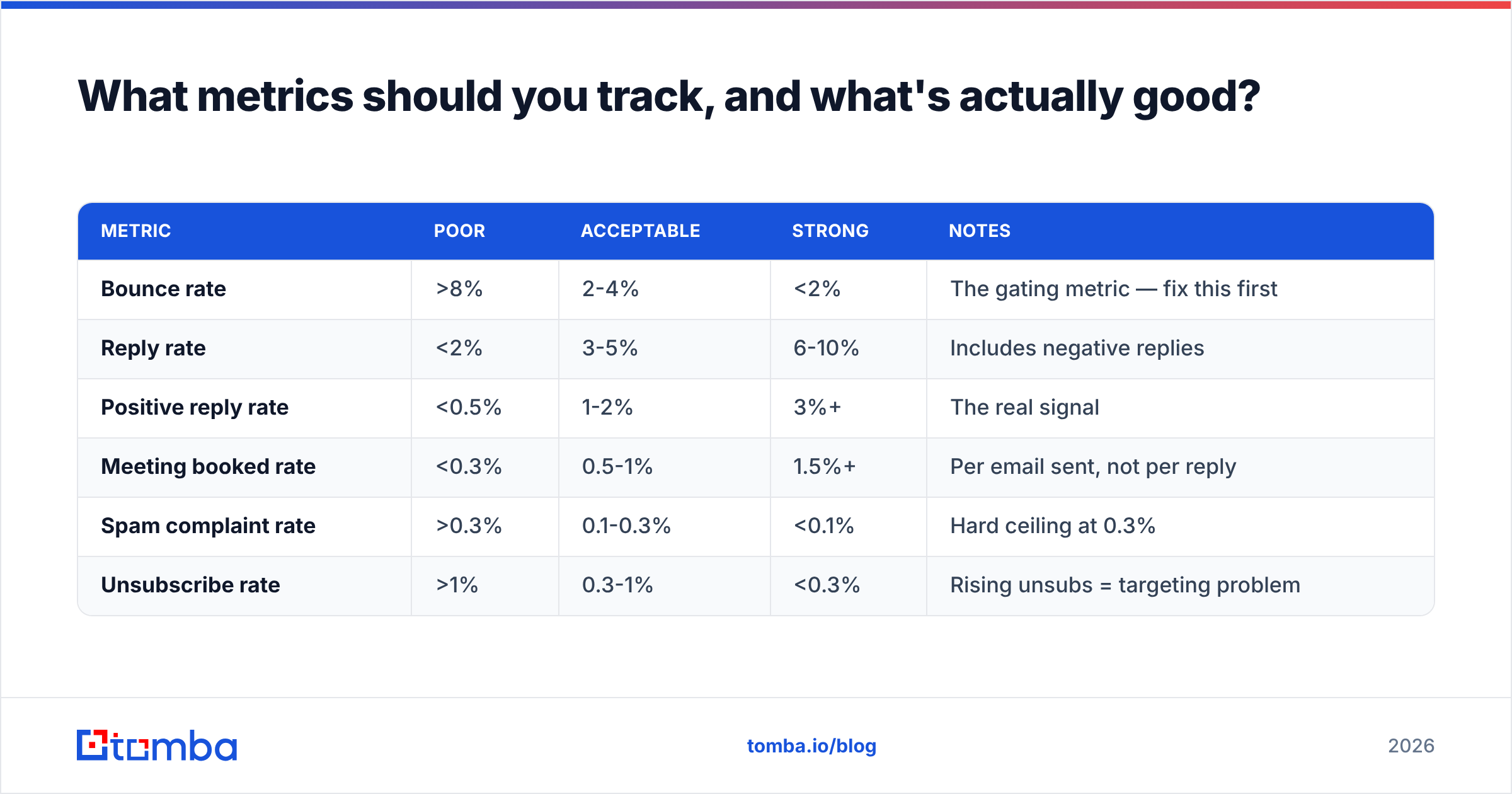
Stop reporting open rate as a primary KPI. Here are the numbers worth a dashboard:
| Metric | Poor | Acceptable | Strong | Notes |
|---|---|---|---|---|
| Bounce rate | >8% | 2-4% | <2% | The gating metric — fix this first |
| Reply rate | <2% | 3-5% | 6-10% | Includes negative replies |
| Positive reply rate | <0.5% | 1-2% | 3%+ | The real signal |
| Meeting booked rate | <0.3% | 0.5-1% | 1.5%+ | Per email sent, not per reply |
| Spam complaint rate | >0.3% | 0.1-0.3% | <0.1% | Hard ceiling at 0.3% |
| Unsubscribe rate | >1% | 0.3-1% | <0.3% | Rising unsubs = targeting problem |
Two diagnostic rules that save weeks:
- High opens, low replies = message problem. Your subject line and list are fine; your body copy isn't earning the response. Rewrite the ask.
- Low opens, low replies = deliverability or targeting problem. Check DNS records, check your domain against a blacklist checker, and check whether you are actually reaching the inbox with seed tests before you touch the copy.
What are the most common email prospecting mistakes?#
- Sending from the primary domain. One bad campaign and your invoices stop reaching customers. Always use a secondary, warmed domain.
- Skipping verification to save $30. A 10% bounce on a 2,000-email campaign costs you weeks of reputation recovery. Verification is the cheapest insurance in the stack.
- Personalizing the wrong variable. Merge-tagging a company name is not personalization; referencing something they published or shipped is.
- Sequencing too aggressively. Seven emails in ten days generates unsubscribes and complaints far faster than it generates meetings.
- Treating no-reply as no-interest. Roughly a third of positive replies arrive on touch three or four. The people who quit at touch two lose most of their pipeline.
- Buying a list instead of building one. Purchased lists carry unknown provenance, unknown consent basis, and typically double-digit bounce. Build from verified sources with documented data sources.
Is email prospecting compliant with GDPR and CAN-SPAM?#
Short answer: cold B2B email is legal in the US and most of the EU, with conditions.
Under CAN-SPAM (US), cold B2B email is permitted provided you use accurate headers and subject lines, disclose that the message is a solicitation where applicable, include a valid physical postal address, and honor opt-outs within 10 business days. The FTC's CAN-SPAM compliance guide is the authoritative source.
Under GDPR (EU/UK), you generally rely on legitimate interest rather than consent for B2B outreach to corporate role addresses. That requires a documented legitimate interest assessment, a clear opt-out, a privacy notice explaining where you sourced the data, and prompt deletion on request. Individual-format addresses at sole traders and partnerships get stricter treatment in some member states — Germany and Italy in particular.
Practical compliance checklist: unsubscribe link in every email, suppression list honored globally across all sequences and domains, physical address in the footer, and a record of where each contact came from. None of that hurts reply rates, and all of it keeps you out of trouble.
Getting started without burning your domain#
If you take one thing from this: fix the list before you write a single line of copy. The teams that plateau at 1% reply rates are almost never writing bad emails — they are sending good emails to addresses that don't exist, to people who left the company, or from domains that were never authenticated.
Start narrow. Pick 100 accounts with a real trigger. Find two contacts each. Verify all 200. Warm a secondary domain for three weeks. Send four touches. Measure reply rate and meetings, ignore opens. Then scale what worked.
For the finding-and-verifying half of that workflow, the Tomba Email Finder covers domain search, name-to-email lookup, catch-all handling, and verification in one place — with a free tier at 25 searches a month so you can benchmark accuracy against your own ICP before paying anyone. Run your next 200 prospects through it, compare the bounce rate to whatever you're using now, and let the numbers decide.
Related guides#
Ready to find emails that actually work?
Join 150,000+ professionals who stopped guessing and started sending. Free credits on signup — no credit card required.
Get the Tomba newsletter
Practical outbound tactics and product updates — once every two weeks.
About the author