Email Prospecting Software in 2026: A Complete Buyer's Guide
Most teams buy email prospecting software on seat price, then lose 30% of their list to bounces. Here's how the stack actually breaks down — data, verification, sending — and what each layer should cost you per booked meeting.
TL;DR
- Email prospecting software is not one product. It is three layers — contact data, verification, and sending/sequencing — and most vendors are strong at one and mediocre at the other two.
- Seat pricing hides the real number. What matters is cost per verified, deliverable contact that actually replies, which is usually 3–10x the sticker credit price once you account for bounces and unused seats.
- Bounce rate is the single metric that decides whether the rest of your stack works. Above 3%, Google and Microsoft start throttling you and your sequencer's win rate collapses.
- All-in-one platforms (Apollo, Outreach, Salesloft) trade data depth for convenience. Specialist stacks (a finder + a verifier + a lightweight sender) usually cost less and hit harder.
- Start by fixing the data layer. A $49/mo finder with 99% deliverable output beats a $1,200/mo platform feeding a sequencer garbage.
What is email prospecting software, exactly?#
Email prospecting software is any tool that helps you go from "I know the kind of company I want to sell to" to "I have a verified email address in a sequence with a reply." That's a wide definition on purpose, because vendors deliberately blur the categories.
Think of it like a water system. Somebody has to find the source (contact data), somebody has to filter out what's undrinkable (verification), and somebody has to run the pipes to the house (sending and sequencing). Buying a beautiful set of pipes does nothing if the source is a puddle.
Here is how the layers break down in practice:
- Data / discovery layer — finds the person and their work email. Email finders, domain search, LinkedIn extractors, B2B databases. Examples: Tomba, Hunter, BookYourData, Apollo's database, RocketReach.
- Verification layer — proves the address will accept mail before you send. SMTP checks, MX validation, catch-all handling, role-account detection. Examples: Tomba's verifier, ZeroBounce, NeverBounce, Bouncer.
- Enrichment layer — attaches firmographics, tech stack, headcount, funding, and phone numbers so your copy has something to say. Examples: Clearbit, Tomba enrichment, ZoomInfo.
- Sending / sequencing layer — mailbox rotation, warmup, multi-step cadences, reply detection, A/B testing. Examples: Instantly, Smartlead, Lemlist, Outreach, Salesloft.
- Routing layer — pushes replies and meetings into your CRM, dedupes against existing accounts, and reports on pipeline. Examples: HubSpot, Salesforce, Pipedrive.
Most "all-in-one" email prospecting software claims all five. In reality, they own two or three and license or fudge the rest.
Why does the data layer decide everything else?#
Because bounces are not a cosmetic problem — they're a reputation problem, and reputation is a spending limit on your entire outbound program.
Google's bulk sender guidelines put the spam-complaint threshold at 0.3% and expect senders to maintain low invalid-recipient rates. Microsoft is stricter in practice. Once you cross the line, the damage isn't "these 40 emails bounced." It's that your good emails start landing in Promotions and Junk for the next six weeks, and no amount of clever subject lines fixes that.
Run the math on a modest campaign:
- 5,000 contacts pulled from a cheap database at 70% accuracy
- 1,500 bounce → 30% bounce rate → mailbox throttled by day three
- Remaining 3,500 land at a degraded inbox-placement rate, maybe 60%
- Effective reach: ~2,100 out of 5,000 you paid for
Now the same campaign with a 97%+ deliverable list:
- 150 bounce → 3% bounce rate → reputation intact
- 4,850 land at ~90% inbox placement
- Effective reach: ~4,365
Same sequencer. Same copy. Double the actual delivered volume. This is why the smart move is to fix the source before you upgrade the pipes — and why an email verifier sitting between your finder and your sender is not optional.
What should email prospecting software cost in 2026?#
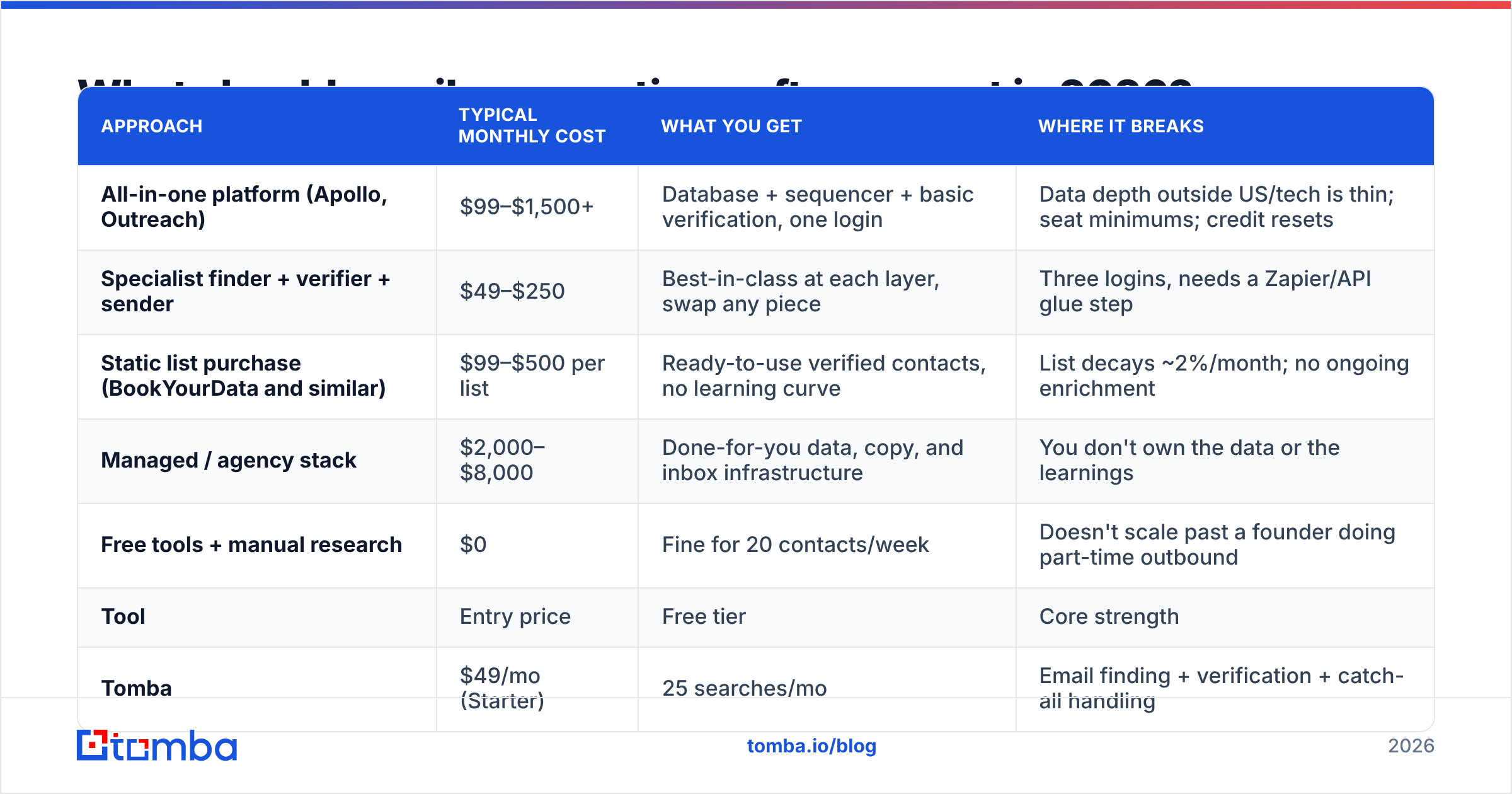
Pricing in this category is deliberately hard to compare because vendors use three different units: seats, credits, and contacts. Here's a normalized view of the common approaches.
| Approach | Typical monthly cost | What you get | Where it breaks |
|---|---|---|---|
| All-in-one platform (Apollo, Outreach) | $99–$1,500+ | Database + sequencer + basic verification, one login | Data depth outside US/tech is thin; seat minimums; credit resets |
| Specialist finder + verifier + sender | $49–$250 | Best-in-class at each layer, swap any piece | Three logins, needs a Zapier/API glue step |
| Static list purchase (BookYourData and similar) | $99–$500 per list | Ready-to-use verified contacts, no learning curve | List decays ~2%/month; no ongoing enrichment |
| Managed / agency stack | $2,000–$8,000 | Done-for-you data, copy, and inbox infrastructure | You don't own the data or the learnings |
| Free tools + manual research | $0 | Fine for 20 contacts/week | Doesn't scale past a founder doing part-time outbound |
And here's how the well-known tools stack up on the attributes that actually drive cost per meeting:
| Tool | Entry price | Free tier | Core strength | Verification included | Best fit |
|---|---|---|---|---|---|
| Tomba | $49/mo (Starter) | 25 searches/mo | Email finding + verification + catch-all handling | Yes, native | Teams that need clean data feeding any sequencer |
| Apollo | $49/user/mo | ||||
| Limited credits | Database breadth + built-in sequencing | Basic | SMB teams wanting one login | ||
| Hunter | $34/mo | 25 searches/mo | Domain search, simple UX | Yes | Solo founders, light volume |
| --- | --- | --- | --- | --- | --- |
| BookYourData | Pay-per-list | Sample available | Prebuilt, human-checked B2B lists | Yes | Teams that want a list today, not a workflow |
| Instantly | $37/mo | Trial | Mailbox rotation + warmup at scale | No (sending only) | High-volume senders who already have data |
| ZoomInfo | Custom (~$15k/yr) | No | Enterprise firmographics + intent | Yes | Enterprise ABM with a real ops team |
Note what's missing from every sticker price: the cost of the bad records. If a $99/mo plan gives you 10,000 credits at 75% accuracy, you paid for 10,000 and can use 7,500 — your real unit cost went up 33% before anyone opened anything.
Is an all-in-one platform better than a specialist stack?#
It depends on how much of your revenue depends on outbound, and it's worth being honest about the tradeoff rather than picking a side.
Choose all-in-one when:
- You have fewer than five reps and no RevOps person
- Your ICP is US-based B2B SaaS, where the big databases are genuinely strong
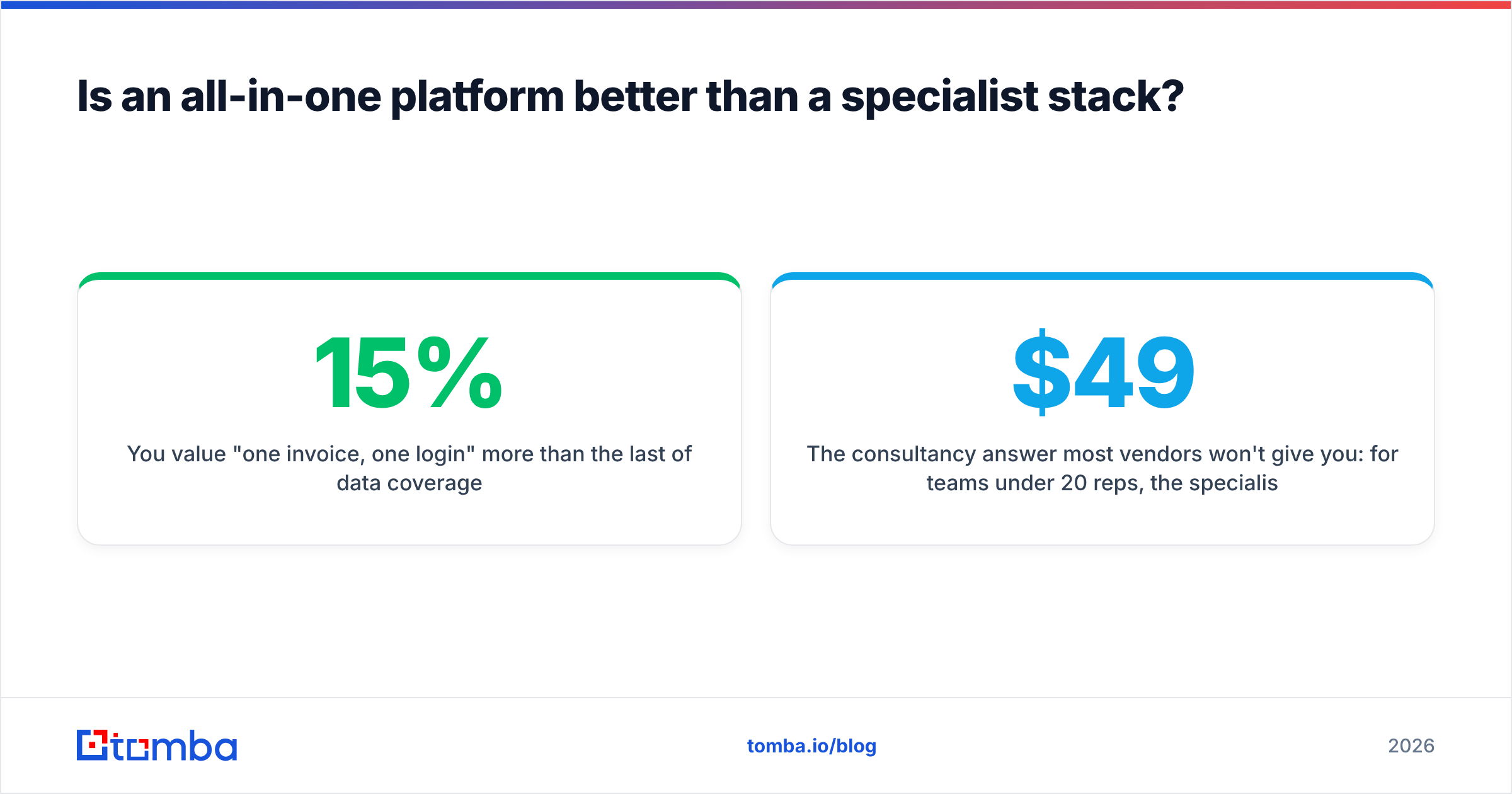
- You value "one invoice, one login" more than the last 15% of data coverage
- You're testing whether outbound works at all and don't want to assemble anything
Choose a specialist stack when:
- Outbound is a core channel and a 10-point accuracy difference is worth real money
- Your ICP is non-US, non-tech, or otherwise outside the big databases' sweet spot
- You already own a sequencer you like and only need better inputs
- You want to run data through your own systems via an email finder API instead of a UI
The consultancy answer most vendors won't give you: for teams under 20 reps, the specialist stack usually wins on cost and results. A finder at $49/mo plus a sender at $37/mo is $86. The equivalent all-in-one seat coverage is often $400+ once you add the seats you need for everyone who touches the sequence. G2's sales intelligence category is a good reality check here — read the 3-star reviews, not the 5-star ones, because that's where credit-burn and data-decay complaints live.

How do you evaluate email prospecting software without wasting a quarter?#
Run a bake-off. Not a demo — a bake-off. Vendors will show you their best accounts; you need to see performance on yours.
The 90-minute evaluation protocol:
- Build a 100-row control list. Real companies in your ICP, pulled from a source none of the vendors control — a conference attendee list, a G2 category page, an industry association directory. Include first name, last name, and company domain only.
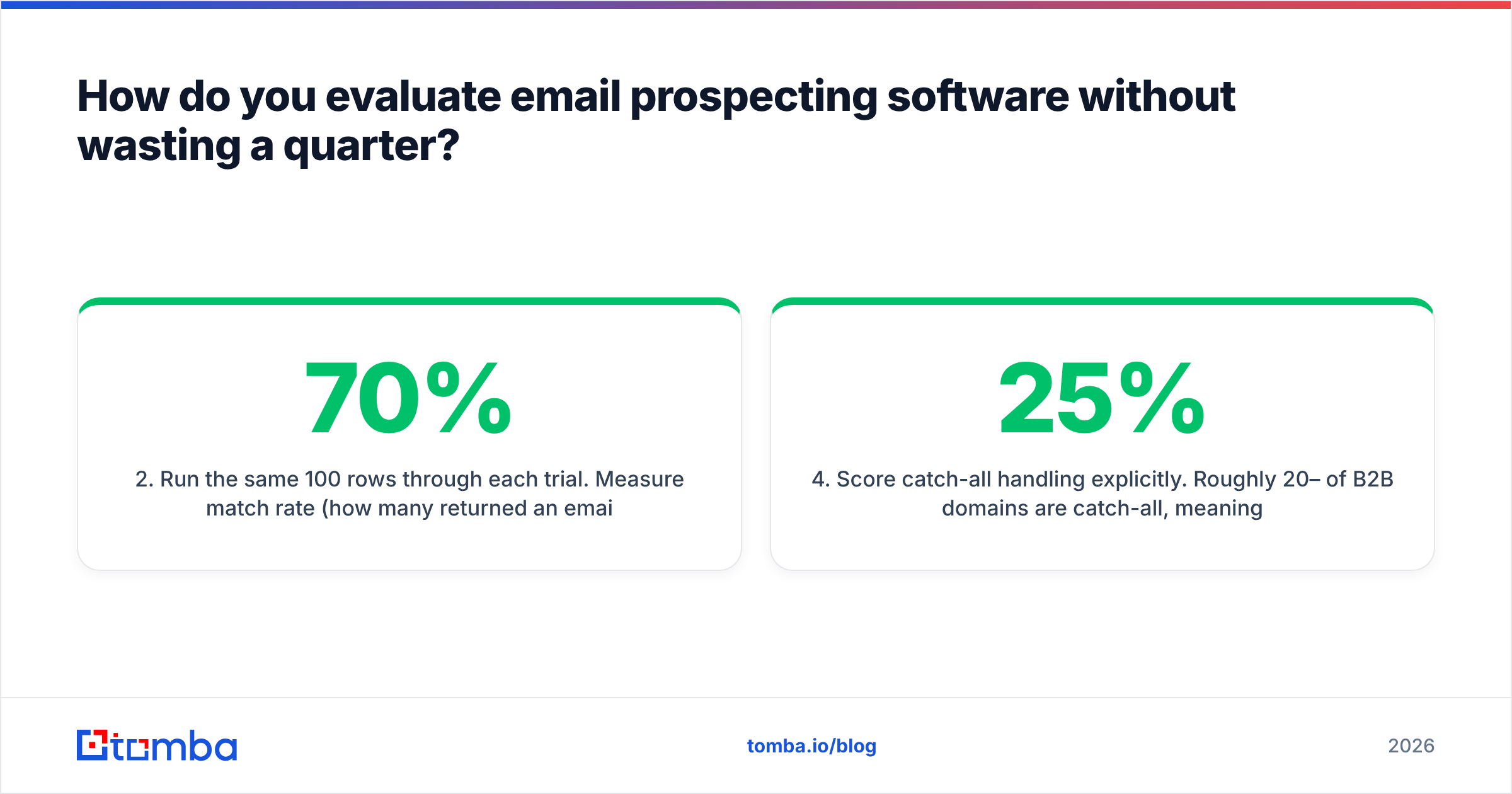
- Run the same 100 rows through each trial. Measure match rate (how many returned an email) separately from accuracy (how many of those are actually valid). A tool that returns 95 emails at 70% accuracy is worse than one returning 78 at 98%.
- Verify the output with a third-party checker. Never grade a vendor's data using that vendor's own verifier. Use a neutral free email checker or a separate verification service.
- Score catch-all handling explicitly. Roughly 20–25% of B2B domains are catch-all, meaning naive verifiers mark everything "valid." Ask each vendor what they do with catch-alls. "We mark them risky and let you decide" is honest. "We verify them all" is a red flag unless they can explain the method.
- Price the winner per usable record. Total monthly cost ÷ (credits × accuracy rate). That single number, not the plan name, is what you're actually buying.
- Test one non-obvious segment. A non-US market, a sub-100-employee vertical, a role that isn't VP of Sales. This is where coverage claims fall apart and where you'll learn the most.
Most teams skip steps 3 and 6, which is exactly why so many end up switching tools nine months later.
What features actually matter — and which are noise?#
Matters:
- Catch-all resolution. Determines whether a quarter of your TAM is usable or a coin flip. A dedicated catch-all verifier is one of the highest-leverage line items in the stack.
- Bulk processing. You will eventually have a 20,000-row CSV. Check throughput limits and whether bulk jobs consume credits for failed lookups.
- API and CRM sync. If enrichment doesn't happen automatically on record creation, it doesn't happen. HubSpot's sales resources are a decent primer on where enrichment belongs in the lifecycle.
- Data source transparency. Vendors that explain where records come from tend to have fewer compliance surprises.
- Credit rollover and refund policy. Do unfound searches burn a credit? Do unused credits roll over? These two clauses can swing effective cost 40%.
Noise:
- "AI-powered" as a standalone claim. Every tool in this category uses pattern matching and ML. The label tells you nothing.
- Total database size. "700 million contacts" is a vanity metric. 700M records at 60% freshness is worse than 40M at 95%.
- Intent data on SMB plans. Real intent signal requires enterprise-grade co-op data. At $99/mo it's usually a repackaged website-visitor feed — useful, but not intent.
- Chrome extension count. Nice convenience, terrible reason to pick a platform.
How should a small team assemble its stack?#
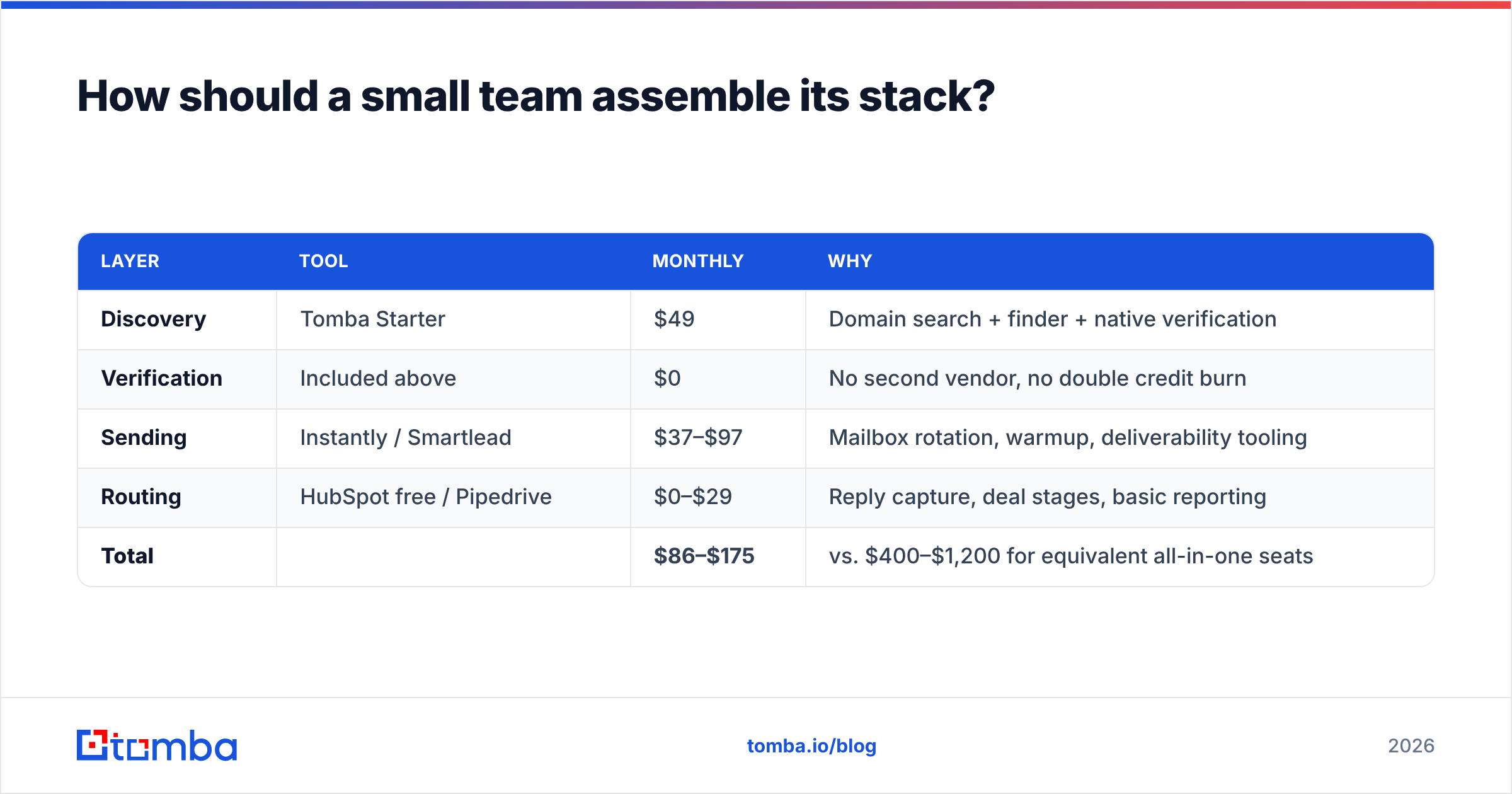
For a team of one to ten reps, this stack covers the whole workflow without enterprise pricing:
| Layer | Tool | Monthly | Why |
|---|---|---|---|
| Discovery | Tomba Starter | $49 | Domain search + finder + native verification |
| Verification | Included above | $0 | No second vendor, no double credit burn |
| Sending | Instantly / Smartlead | $37–$97 | Mailbox rotation, warmup, deliverability tooling |
| Routing | HubSpot free / Pipedrive | $0–$29 | Reply capture, deal stages, basic reporting |
| Total | $86–$175 | vs. $400–$1,200 for equivalent all-in-one seats |
Scale that to 20+ reps and the calculus changes — at that point governance, audit trails, and shared sequence libraries start justifying a platform. But get there on results, not on a demo. Full Tomba pricing runs Free (25 searches/mo), Starter $49/mo, Growth $99/mo, Pro $249/mo, and Enterprise custom, so you can move up a tier when volume actually demands it rather than buying capacity upfront.
What's changing in email prospecting software in 2026?#
Three shifts are worth planning around.
Mailbox providers keep tightening. Authentication (SPF, DKIM, DMARC) is now table stakes, and one-click unsubscribe is enforced for bulk senders. Software that doesn't help you monitor sender reputation is shifting risk onto you.
Volume is no longer a strategy. The teams winning in 2026 send fewer, better-targeted emails to verified contacts. That inverts the old economics: data quality and research depth now matter more than sequencer throughput, which is the opposite of what the 2019–2022 tool boom optimized for.
API-first is becoming the default. More teams pipe finding and verification directly into their own workflows — an agent, a workflow builder, a CRM trigger — rather than logging into a UI. If a vendor's API is an afterthought, that's a signal about where the product is going.
Where should you start?#
Fix the data layer first, then decide whether you need a platform.
Pull 100 contacts in your ICP, verify them independently, and calculate your true cost per usable record. If that number is above $0.50, your bottleneck isn't your copy or your cadence — it's your source. Tomba's email finder gives you 25 searches free to run exactly that test, with verification and catch-all handling built into the same workflow, and starts at $49/mo when you're ready to scale. Test it against whatever you're using now on your own list, and let the bounce rate pick the winner.
Related guides#
Ready to find emails that actually work?
Join 150,000+ professionals who stopped guessing and started sending. Free credits on signup — no credit card required.
Get the Tomba newsletter
Practical outbound tactics and product updates — once every two weeks.
About the author