Email Prospecting Templates: 12 Proven Examples for 2026
Twelve email prospecting templates that still book meetings in 2026 — with the reply-rate math, the personalization layer, and the data hygiene that decides whether any of them land.
TL;DR
- Templates don't fail because the words are bad. They fail because the list is bad, the trigger is missing, or the ask is too big.
- The 12 templates below are grouped by trigger type — job change, hiring signal, tech stack, content, referral, and re-engagement — because the trigger drives the reply rate far more than the copy does.
- Expect 3–8% reply rates on a well-triggered template sent to a verified list. Expect 0.5–1.5% on the same template sent to scraped, unverified addresses.
- Personalization that works is one specific, checkable fact per email. Personalization that doesn't work is "I loved your post!" with no proof you read it.
- Verify before you send. A 12% bounce rate does more damage to your domain than any subject line can undo.
What makes an email prospecting template actually work in 2026?#
A template is a container, not a message. The container holds four variables: who you're writing to, why now, what you're claiming, and how small the ask is. Change the container and reply rates move a little. Change the variables and they move a lot.
Here's the uncomfortable math. Send 1,000 emails with a great template to a list where 30% of addresses are wrong, generic (info@), or belong to people who left the company. You've already thrown away 300 sends, tanked your bounce rate above the 2% threshold most inbox providers tolerate, and dragged your remaining 700 emails toward spam. The template never got a fair test.
That's why every serious prospecting workflow starts with data, not copy. Use an email finder to resolve names to addresses, run the list through an email verifier to strip catch-alls and dead mailboxes, and only then argue about whether your opening line should be a question.

What are the core parts of a prospecting email?#
Every template below is built from the same six components. If you understand these, you can write your own instead of copying mine.
- The trigger — the reason this email exists today rather than six months ago. A funding round, a new VP, a job posting, a tech-stack change, a published article. No trigger means no urgency, and no urgency means the email competes with 120 other unread messages on merit alone.
- The subject line — 3 to 6 words, lowercase, no pitch. "quick question re: hiring" beats "Transform Your Sales Process Today" every single time. Test variants with a subject line generator before you commit a sequence.
- The opener — one sentence proving you did homework. It must contain a fact the recipient can verify about their own company. Generic flattery reads as automation.
- The claim — what changes for them, stated in their units (hours, headcount, pipeline, churn points), not yours (features, integrations, "AI-powered").
- The proof — one number or one named peer company. Two proofs is bragging. Zero proofs is noise.
- The ask — the smallest possible next step. "Worth a look?" outperforms "Do you have 30 minutes Tuesday at 2pm PT?" because it costs the reader nothing to answer.
Under 120 words total. If your template runs longer, you've added a second claim or a second ask. Cut one.
Which email prospecting templates get replies?#
Trigger 1: The new-role email#
Template 1 — Executive job change
Subject: congrats on the {{title}} role
Hi {{first_name}} — saw you moved into the {{title}} seat at {{company}} last month. First 90 days usually means auditing what's already running.
Most {{title}}s we talk to inherit a pipeline reporting setup they didn't choose. We cut that cleanup from ~6 weeks to about 4 days at {{peer_company}}.
Want the 2-page teardown we used?
Why it works: new executives have budget authority and an explicit mandate to change things. This is the single highest-converting trigger in B2B outbound, routinely doubling baseline reply rates.
Template 2 — Peer promoted internally
Subject: quick one before Q{{n}} planning
{{first_name}}, congrats on the promotion. Internal moves usually mean you're keeping the old workload plus the new one.
Two of your peers at {{peer_company_1}} and {{peer_company_2}} handed us the {{workflow}} piece during that exact window. Took the load off without a migration.
Open to a 9-minute walkthrough?
Trigger 2: The hiring-signal email#
Template 3 — Open req as a pain signal
Subject: the {{job_title}} req
Hi {{first_name}} — you've had a {{job_title}} opening live for {{n}} weeks. Usually that means the work is currently landing on someone who already has a job.
We cover {{specific_task}} for teams in exactly that gap. {{peer_company}} used us as a bridge for five months, then hired.
Useful, or bad timing?
Template 4 — Hiring at scale
Subject: 12 new AEs
{{first_name}} — noticed you're adding 12 AEs this quarter. Ramp math gets ugly fast: 12 reps × 4 months × quota is a big number to leave on the table.
We cut ramp by 5 weeks at {{peer_company}} by handing new reps a pre-verified territory list on day one instead of week six.
Worth 10 minutes?
Trigger 3: The tech-stack email#
Template 5 — Complementary tool detected
Subject: {{tool}} + {{your_product}}
Saw {{company}} runs {{tool}}. Teams on {{tool}} usually hit the same wall around {{specific_limitation}}.
We sit next to it and handle {{gap}}. Setup is a single API key — no rip-and-replace.
Want the integration doc?
Template 6 — Competitor tool detected
Subject: honest question about {{competitor}}
{{first_name}} — you're using {{competitor}}. Genuinely not here to trash it; it's good at {{thing_it_does_well}}.
The one complaint we hear from switchers is {{specific_complaint}}. If that's not a problem for you, ignore me entirely.
If it is: 12-minute side-by-side?
Trigger 4: The content email#
Template 7 — They published something
Subject: your point on {{specific_argument}}
{{first_name}}, your piece on {{topic}} — the part about {{specific_argument}} is the part most people skip.
We saw the same pattern across {{n}} accounts last year: {{supporting_data_point}}.
Happy to send the raw numbers if they'd be useful for a follow-up.
This one requires you to actually read the article. An author finder resolves the byline to a real inbox so you're not routing a personal note through a press@ alias.
Template 8 — They spoke somewhere
Subject: {{event}} — your {{topic}} slide
Caught your {{event}} talk. The slide on {{topic}} landed.
One thing you didn't mention: {{adjacent_insight}}. We built for exactly that gap.
Want the 4-slide version?
Trigger 5: The referral email#
Template 9 — Internal referral
Subject: {{referrer_name}} pointed me your way
Hi {{first_name}} — spoke with {{referrer_name}} on your {{team}} team last week about {{problem}}. They said you own the decision.
Short version: {{one_line_claim}}. {{referrer_name}} thought it was worth 10 minutes of yours.
Should I send the details here or loop them in?
Template 10 — Network referral
Subject: via {{mutual_contact}}
{{mutual_contact}} mentioned you're rebuilding {{function}} this year.
We did the same rebuild with {{peer_company}} — {{specific_result}}.
Worth a intro call, or is this already handled?
Trigger 6: The re-engagement email#
Template 11 — Closed-lost revival
Subject: we fixed the thing
{{first_name}} — you passed on us in {{month_year}} because of {{specific_objection}}. Fair call at the time.
That shipped in {{month}}. {{one_sentence_proof}}.
Worth another look, or is the door closed?
Template 12 — The breakup that isn't a breakup
Subject: closing your file
{{first_name}}, I've sent three notes about {{topic}} and haven't heard back — which usually means it's not a priority, and that's a fine answer.
Closing the loop on my end. If {{trigger_event}} ever changes, reply "later" and I'll circle back in Q{{n}}.
The breakup email is the most over-hyped template in outbound. It gets replies, but a large share are polite declines that inflate your reply metric without adding pipeline. Track meetings booked, not replies.
How do these template types compare?#
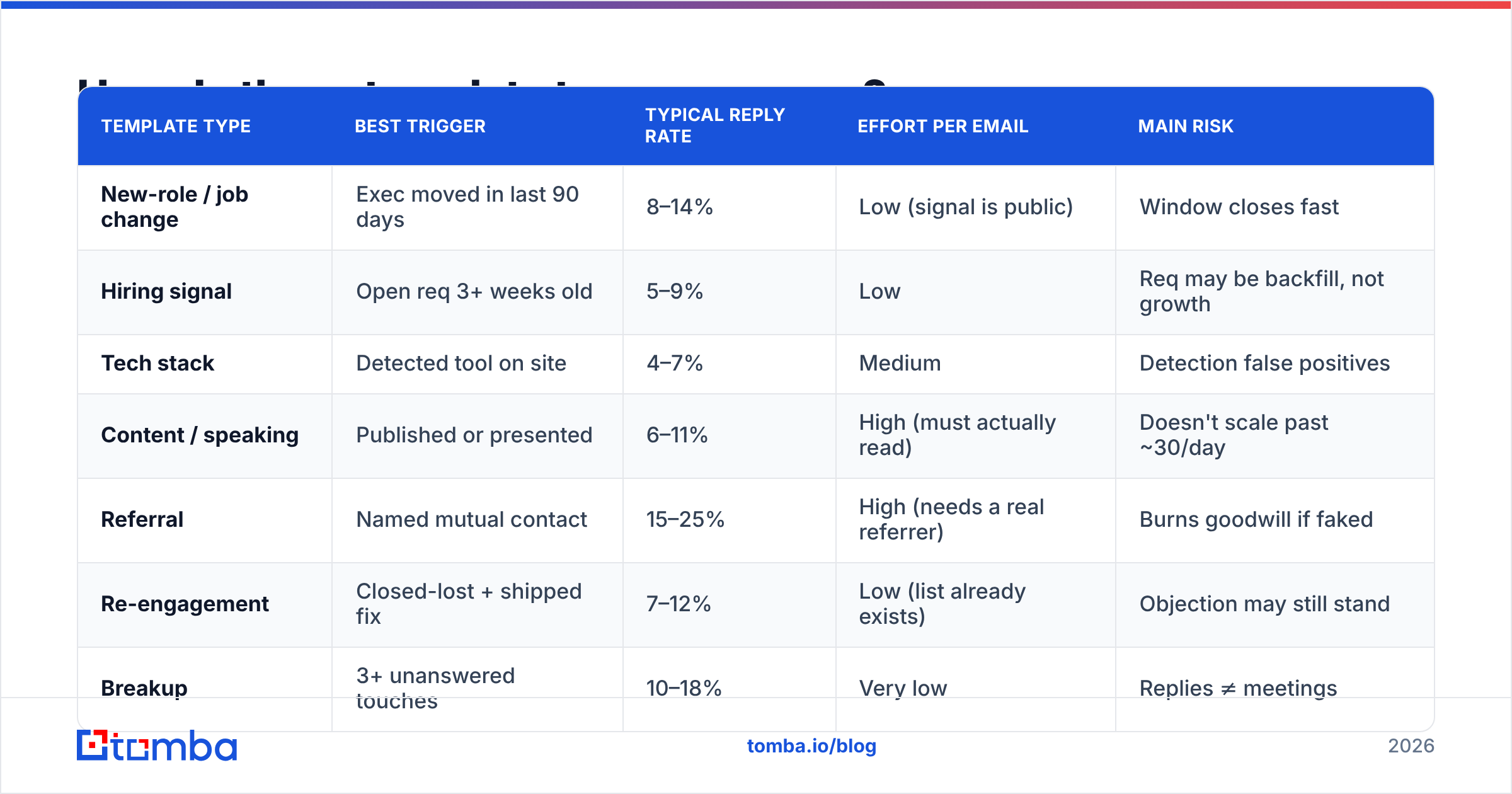
| Template type | Best trigger | Typical reply rate | Effort per email | Main risk |
|---|---|---|---|---|
| New-role / job change | Exec moved in last 90 days | 8–14% | Low (signal is public) | Window closes fast |
| Hiring signal | Open req 3+ weeks old | 5–9% | Low | Req may be backfill, not growth |
| Tech stack | Detected tool on site | 4–7% | Medium | Detection false positives |
| Content / speaking | Published or presented | 6–11% | High (must actually read) | Doesn't scale past ~30/day |
| Referral | Named mutual contact | 15–25% | High (needs a real referrer) | Burns goodwill if faked |
| Re-engagement | Closed-lost + shipped fix | 7–12% | Low (list already exists) | Objection may still stand |
| Breakup | 3+ unanswered touches | 10–18% | Very low | Replies ≠ meetings |
Ranges reflect what teams report at 200–2,000 sends per month on verified lists. Your numbers will sit at the bottom of each range in crowded categories like sales tooling and at the top in niche verticals. Public benchmark data from HubSpot's sales research and conversation analysis from Gong both point the same direction: specificity beats volume, and trigger recency beats both.
Do templates fail because of copy or because of data?#
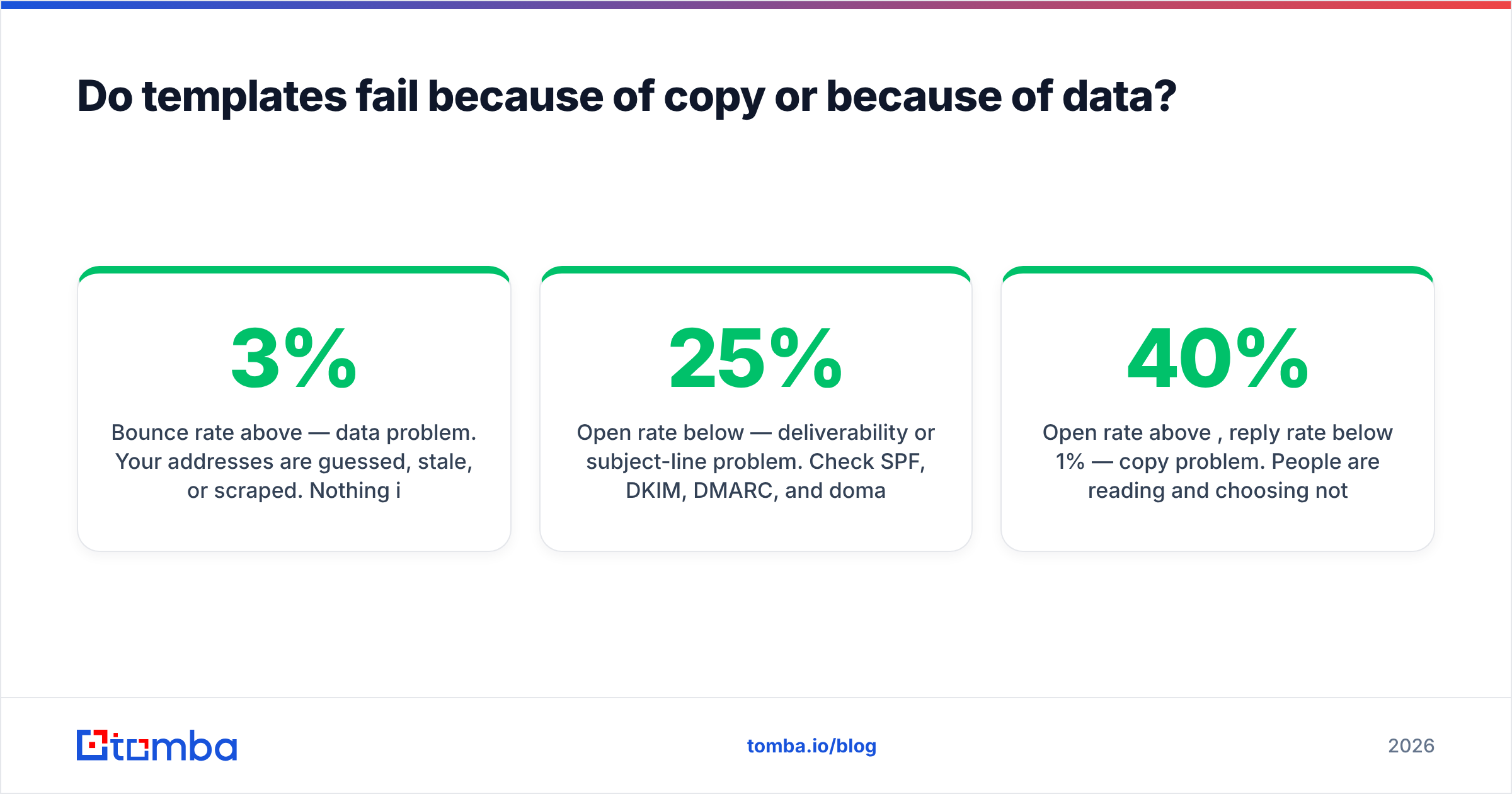
Data, usually. Run this diagnostic before you rewrite a single line:
- Bounce rate above 3% — data problem. Your addresses are guessed, stale, or scraped. Nothing in the copy caused this.
- Open rate below 25% — deliverability or subject-line problem. Check SPF, DKIM, DMARC, and domain age before touching the subject.
- Open rate above 40%, reply rate below 1% — copy problem. People are reading and choosing not to answer. Now the templates matter.
- Replies but no meetings — targeting problem. You're reaching the wrong seniority, or your ask is bigger than the trust you've earned.
Most teams jump straight to rewriting copy because it's the fun part. It's also the least likely culprit. If you're building lists by pattern-guessing addresses, a domain search that returns confirmed addresses and known company email patterns will move your numbers more than a month of A/B testing subject lines.

How do you personalize templates at scale without sounding like a bot?#
Pick one variable and make it expensive to fake.
The bar is simple: could this sentence appear in an email to any other company in your list? If yes, it isn't personalization. "I saw you're scaling your team" fits 40,000 companies. "You've had a Senior RevOps Analyst req open since March and your last two hires came from Stripe" fits one.
A workable split for a 10-person team:
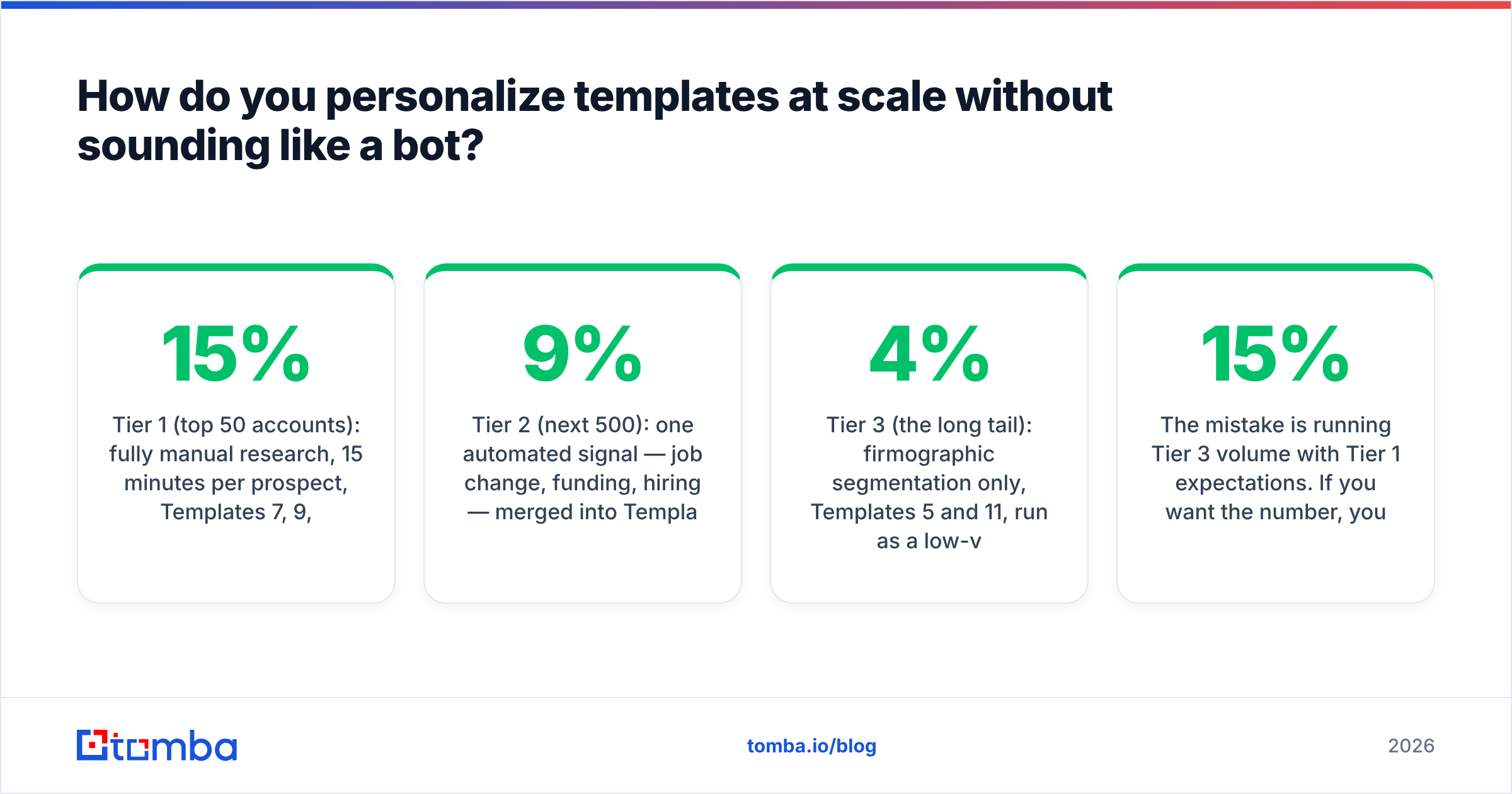
- Tier 1 (top 50 accounts): fully manual research, 15 minutes per prospect, Templates 7, 9, and 10. Expect 15%+ replies.
- Tier 2 (next 500): one automated signal — job change, funding, hiring — merged into Templates 1–4. Expect 5–9%.
- Tier 3 (the long tail): firmographic segmentation only, Templates 5 and 11, run as a low-volume always-on sequence. Expect 2–4%.
The mistake is running Tier 3 volume with Tier 1 expectations. If you want the 15% number, you have to pay the 15-minute price.
Whichever tier you're in, the send list should be enriched first. Pulling job titles, seniority, and company size through data enrichment is what makes the merge fields accurate — and a merge field that renders as {{first_name}} in a live send costs you the account permanently.
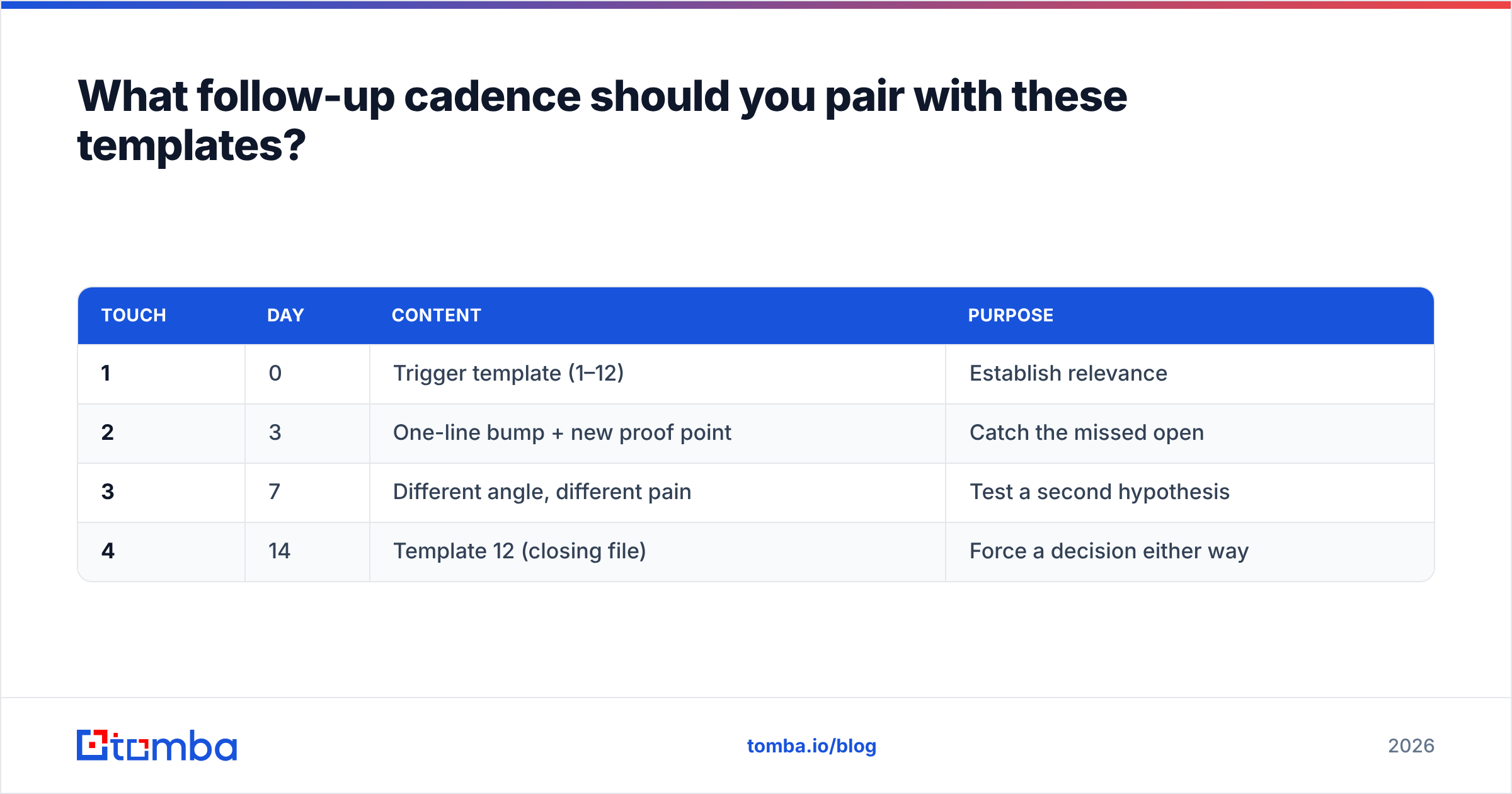
What follow-up cadence should you pair with these templates?#
Four touches over 14 days, then stop. The distribution most teams find:
| Touch | Day | Content | Purpose |
|---|---|---|---|
| 1 | 0 | Trigger template (1–12) | Establish relevance |
| 2 | 3 | One-line bump + new proof point | Catch the missed open |
| 3 | 7 | Different angle, different pain | Test a second hypothesis |
| 4 | 14 | Template 12 (closing file) | Force a decision either way |
Don't send eight follow-ups. Reply rates for touches 5 through 8 collapse to under 1% while your spam-complaint rate climbs. Category reviews on G2 show the same pattern across sales engagement platforms: teams that shorten sequences and tighten targeting outperform teams that lengthen them.
What are the three templates that consistently flop?#
The "just checking in." No trigger, no new information, no reason to reply. It asks the recipient to do the work of remembering why they should care.
The feature dump. Three paragraphs of capabilities with no claim about the reader's world. Feature lists belong on your pricing page, not in a first touch.
The fake-personalization opener. "I've been following {{company}}'s journey for a while now" is transparently automated, and readers pattern-match it in under a second. It poisons everything below it, including a claim that might have been good.
Where should you start?#
Take one segment of 100 accounts. Pick the single strongest trigger you can detect for that segment. Build one template around it. Verify every address before the first send. Measure meetings booked, not replies, over four weeks. Then change exactly one variable.
That loop beats a library of 50 templates you never test.
The part most teams get wrong is the input, not the output. If your prospecting list is built from guessed patterns and stale exports, the best template in this post will still return zero. Start with the Tomba Email Finder — search by domain, name, or company, get confirmed addresses with confidence scores, and push clean lists into your sequencer. The free tier gives you 25 searches a month to test the workflow, and paid plans start at $49/mo on Tomba pricing if the numbers hold up.
Related guides#
Ready to find emails that actually work?
Join 150,000+ professionals who stopped guessing and started sending. Free credits on signup — no credit card required.
Get the Tomba newsletter
Practical outbound tactics and product updates — once every two weeks.
About the author