Email Prospecting Tool: How to Pick the Right One in 2026
Most email prospecting tools sell you a database and hope you never audit it. Here's how accuracy, credit models, and verification actually differ across the major platforms in 2026 — plus a 30-minute test you can run before you pay.
TL;DR
- An email prospecting tool is judged on three numbers only: coverage (what share of your target list it returns anything for), accuracy (what share of those addresses actually accept mail), and cost per verified contact — not per credit.
- Coverage and accuracy trade against each other. Any vendor advertising both "300M+ contacts" and "99% accuracy" is measuring one of them on a friendly sample.
- Credit models hide most of the real price. Charging for failed lookups, monthly credit expiry, and annual-only discounts routinely double the effective rate.
- All-in-one platforms (Apollo, Seamless) bundle sequencing but ship noisier data; focused finders (Tomba, Hunter, Findymail) return less volume with cleaner results.
- Run the 30-minute bake-off at the end of this post on 100 of your own accounts before you sign anything. Vendor benchmarks are marketing; your ICP is the only sample that matters.
What is an email prospecting tool?#
An email prospecting tool takes something you already know about a person — their name and company, their LinkedIn profile, the domain they work at — and returns a business email address you can actually send to. Think of it as a directory-assistance operator for B2B: you give it a name and a place of work, it gives you a way to reach them.
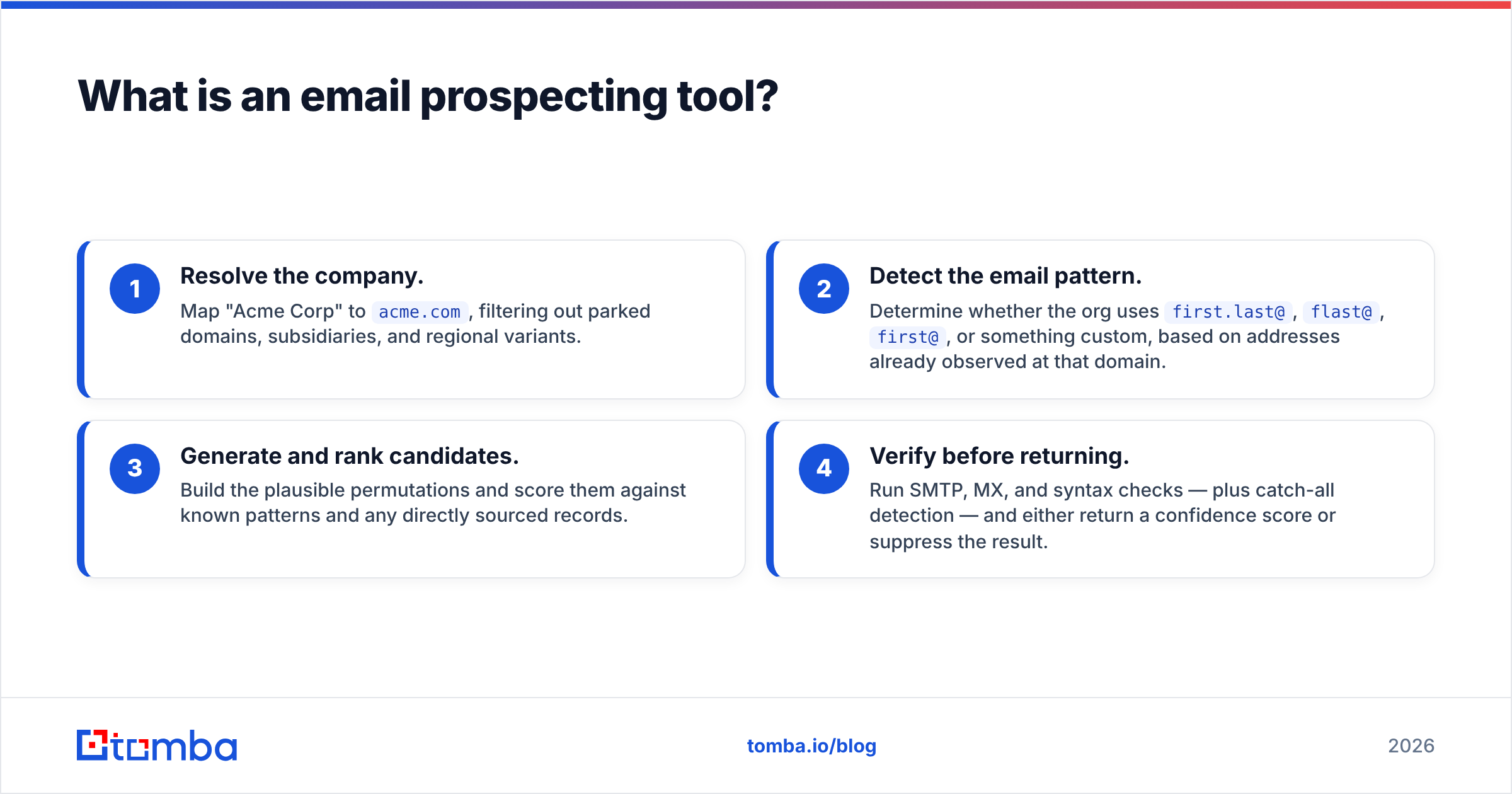
Under the hood, most platforms do the same four things in sequence:
- Resolve the company. Map "Acme Corp" to
acme.com, filtering out parked domains, subsidiaries, and regional variants. - Detect the email pattern. Determine whether the org uses
first.last@,flast@,first@, or something custom, based on addresses already observed at that domain. - Generate and rank candidates. Build the plausible permutations and score them against known patterns and any directly sourced records.
- Verify before returning. Run SMTP, MX, and syntax checks — plus catch-all detection — and either return a confidence score or suppress the result.
Step four is where tools separate. A weak provider skips real-time verification and hands you a permutation with a confidence badge stapled on. A strong one refuses to return an address it can't stand behind, which looks like worse coverage on a spreadsheet and behaves like better deliverability in your inbox.
The distinction matters more in 2026 than it did three years ago. Google and Yahoo's bulk-sender requirements pushed acceptable complaint and bounce thresholds down hard, and Microsoft followed with tighter enforcement on high-volume senders into Outlook. A 6% bounce rate used to be an annoyance. Now it's a domain reputation event.
What does an email prospecting tool actually have to do?#
Feature lists blur together fast. These six capabilities are the ones that change outcomes:
- Single lookup by name + domain — the baseline. Should return an address, a confidence score, and the sources or pattern evidence behind it.
- Domain search — enumerate everyone a provider knows at a company, filtered by department or seniority. This is how you build an account map instead of chasing one contact at a time. Tomba's domain search and Hunter's equivalent both work this way.
- Bulk processing — upload 5,000 rows, get results back with per-row status. If the only bulk path is "call the API 5,000 times yourself," that's an engineering project, not a feature.
- Standalone verification — the ability to re-check a list you already own, including lists from other vendors. Data decays roughly 22–30% per year as people change jobs, so verification is recurring work, not a one-time step.
- Catch-all handling — catch-all domains accept every address at SMTP time, which makes standard verification useless. Tools either flag them honestly, guess, or apply deeper heuristics. Ask which. A catch-all verifier that gives you a real risk tier beats a blanket "unknown."
- Where it lives — CRM sync, a Chrome extension, a Sheets add-on, an API, or an MCP server. A tool your reps have to context-switch into gets used for two weeks and then abandoned.
Notice what isn't on that list: contact counts. "270 million contacts" tells you nothing about whether the 400 people in your ICP are in there and current.
How accurate are email prospecting tools in 2026?#
Accuracy claims are the most abused number in this category, because every vendor gets to pick the denominator.

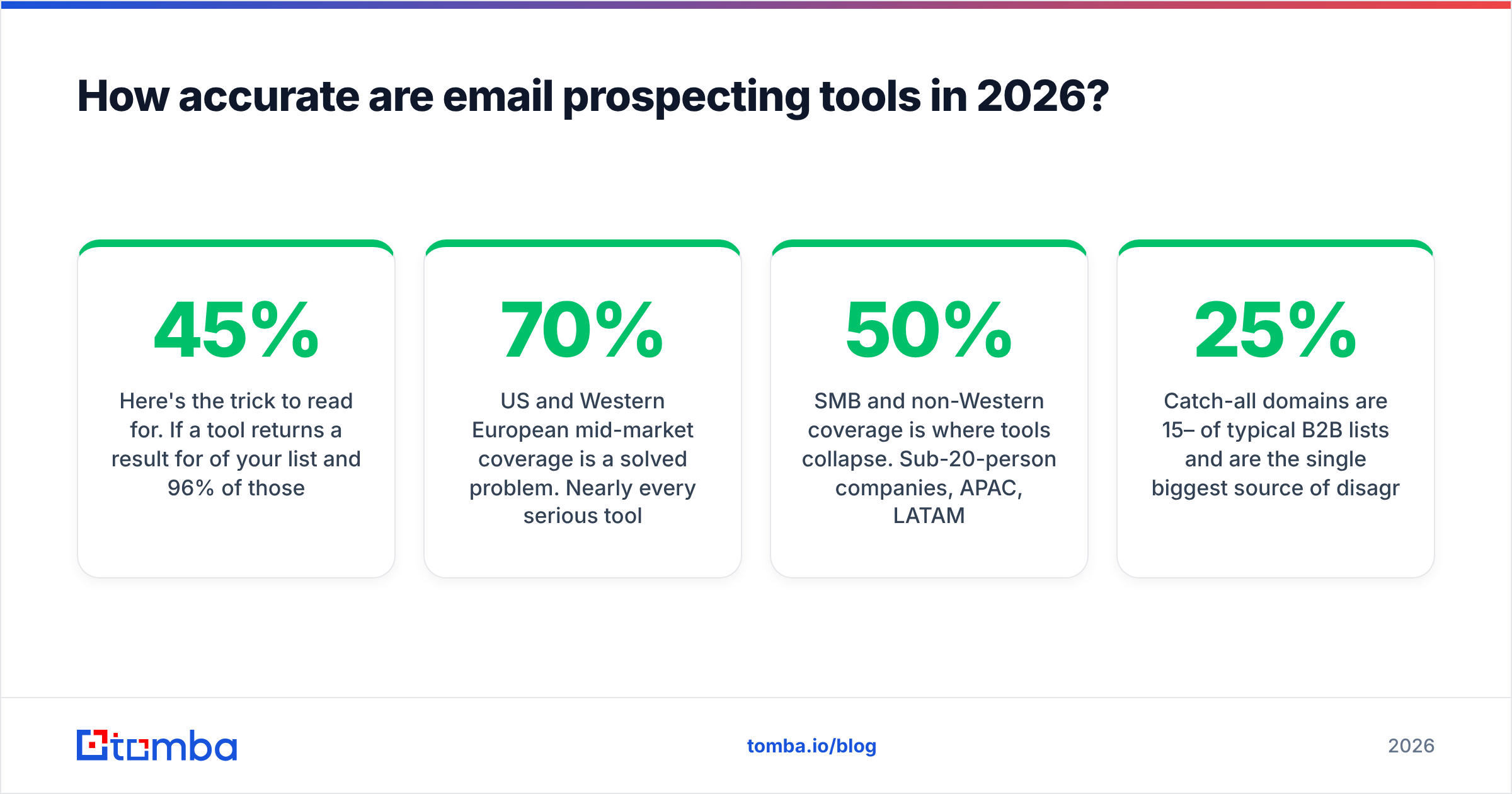
Here's the trick to read for. If a tool returns a result for 45% of your list and 96% of those results are valid, it will advertise "96% accuracy." Another tool returns results for 80% of your list at 88% valid and advertises "88% accuracy." The second tool gave you 70 usable contacts per 100 rows; the first gave you 43. The lower advertised number won.
So compute this instead:
Usable contacts per 100 rows = hit rate × validity rate
Then divide your monthly bill by that number. That's your true cost per verified contact, and it's usually 2–4x the headline per-credit price.
A few patterns hold up consistently across independent testing and G2 reviewer data:
- US and Western European mid-market coverage is a solved problem. Nearly every serious tool clears 70%+ hit rates on companies with 50–5,000 employees in those regions.
- SMB and non-Western coverage is where tools collapse. Sub-20-person companies, APAC, LATAM, and MENA domains see hit rates fall to 30–50% for most providers.
- Seniority skews results. VP-and-above contacts at known companies are well covered. Individual contributors at startups founded in the last 18 months are not.
- Catch-all domains are 15–25% of typical B2B lists and are the single biggest source of disagreement between vendors' "valid" counts.
If your ICP is US SaaS directors, almost anything works and you should optimize on price. If it's operations managers at 30-person manufacturers in Poland, run the bake-off — the spread between tools on that segment is enormous.
Which email prospecting tool fits which team?#
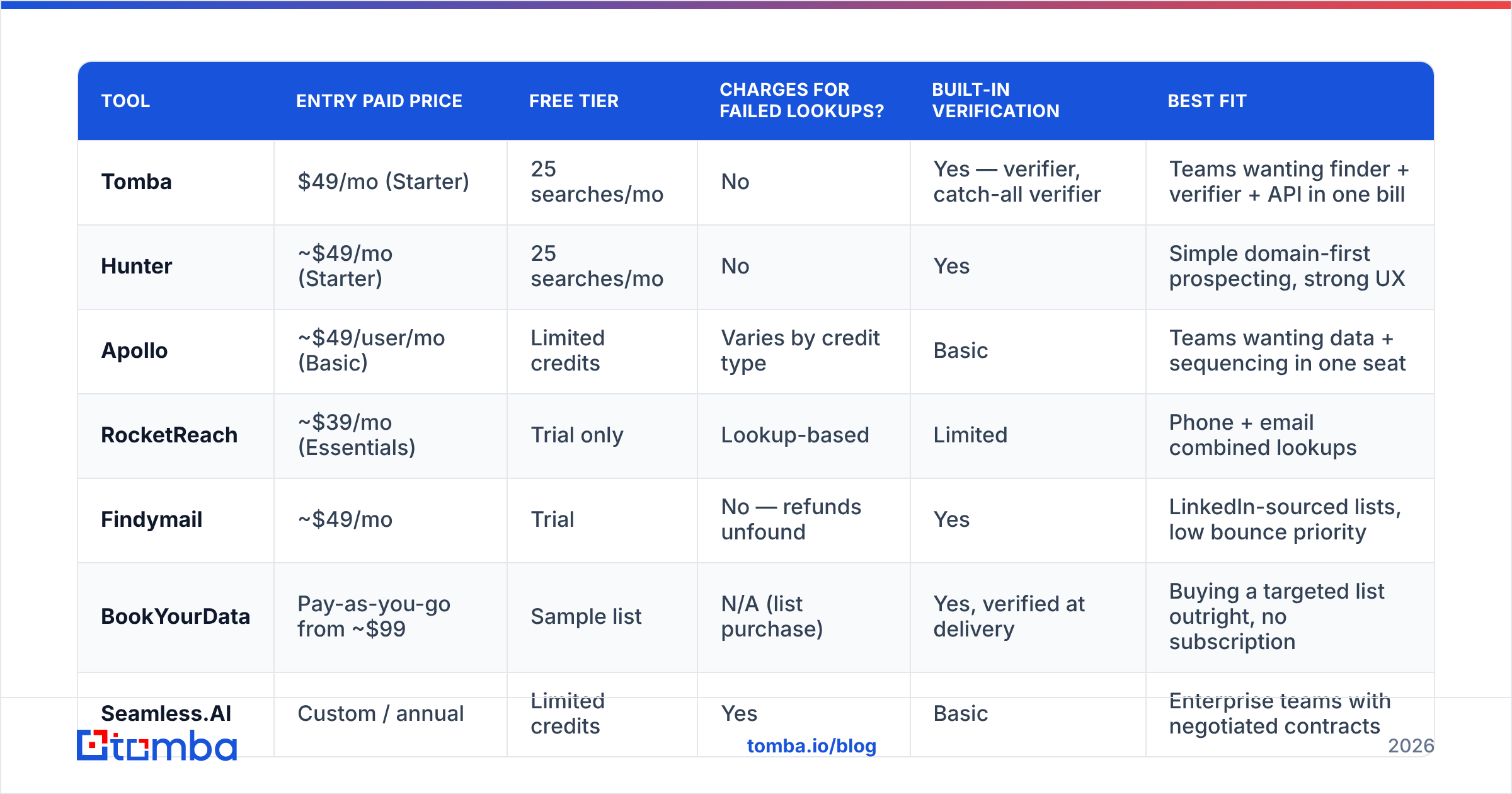
Below is how the main options actually differ. Prices are list prices for the entry paid tier at the time of writing — check each vendor's page before budgeting, since this category re-prices constantly.

| Tool | Entry paid price | Free tier | Charges for failed lookups? | Built-in verification | Best fit |
|---|---|---|---|---|---|
| Tomba | $49/mo (Starter) | 25 searches/mo | No | Yes — verifier, catch-all verifier | Teams wanting finder + verifier + API in one bill |
| Hunter | ~$49/mo (Starter) | 25 searches/mo | No | Yes | Simple domain-first prospecting, strong UX |
| Apollo | ~$49/user/mo (Basic) | Limited credits | Varies by credit type | Basic | Teams wanting data + sequencing in one seat |
| RocketReach | ~$39/mo (Essentials) | Trial only | Lookup-based | Limited | Phone + email combined lookups |
| Findymail | ~$49/mo | Trial | No — refunds unfound | Yes | LinkedIn-sourced lists, low bounce priority |
| BookYourData | Pay-as-you-go from ~$99 | Sample list | N/A (list purchase) | Yes, verified at delivery | Buying a targeted list outright, no subscription |
| Seamless.AI | Custom / annual | Limited credits | Yes | Basic | Enterprise teams with negotiated contracts |
Three honest observations about that table.
All-in-one platforms are not cheaper than they look. Apollo bundles data with sequencing, dialer, and CRM-lite features, which is genuinely good value if you use all of it. If you already run Instantly or Smartlead for sending and Salesforce for CRM, you're paying per seat for a stack you've duplicated. That's usually when teams start looking at an Apollo alternative.
Pay-as-you-go list purchase is a legitimate strategy. BookYourData's model — buy a targeted, pre-verified list once, no subscription — suits teams running a defined campaign against a defined segment rather than continuous prospecting. It's a different shape of purchase, not a worse one. Subscriptions win when your prospecting is always-on; list purchase wins when it's project-based.
Focused finders win on cost per verified contact. Tools that do finding and verification and nothing else tend to have the cleanest credit math, because there's no bundled feature subsidizing the data cost or vice versa. You can check current Tomba pricing tiers directly — Free at 25 searches/month, Starter $49, Growth $99, Pro $249, Enterprise custom — and the verifier is included rather than sold as a separate SKU.
What do credit models actually cost you?#
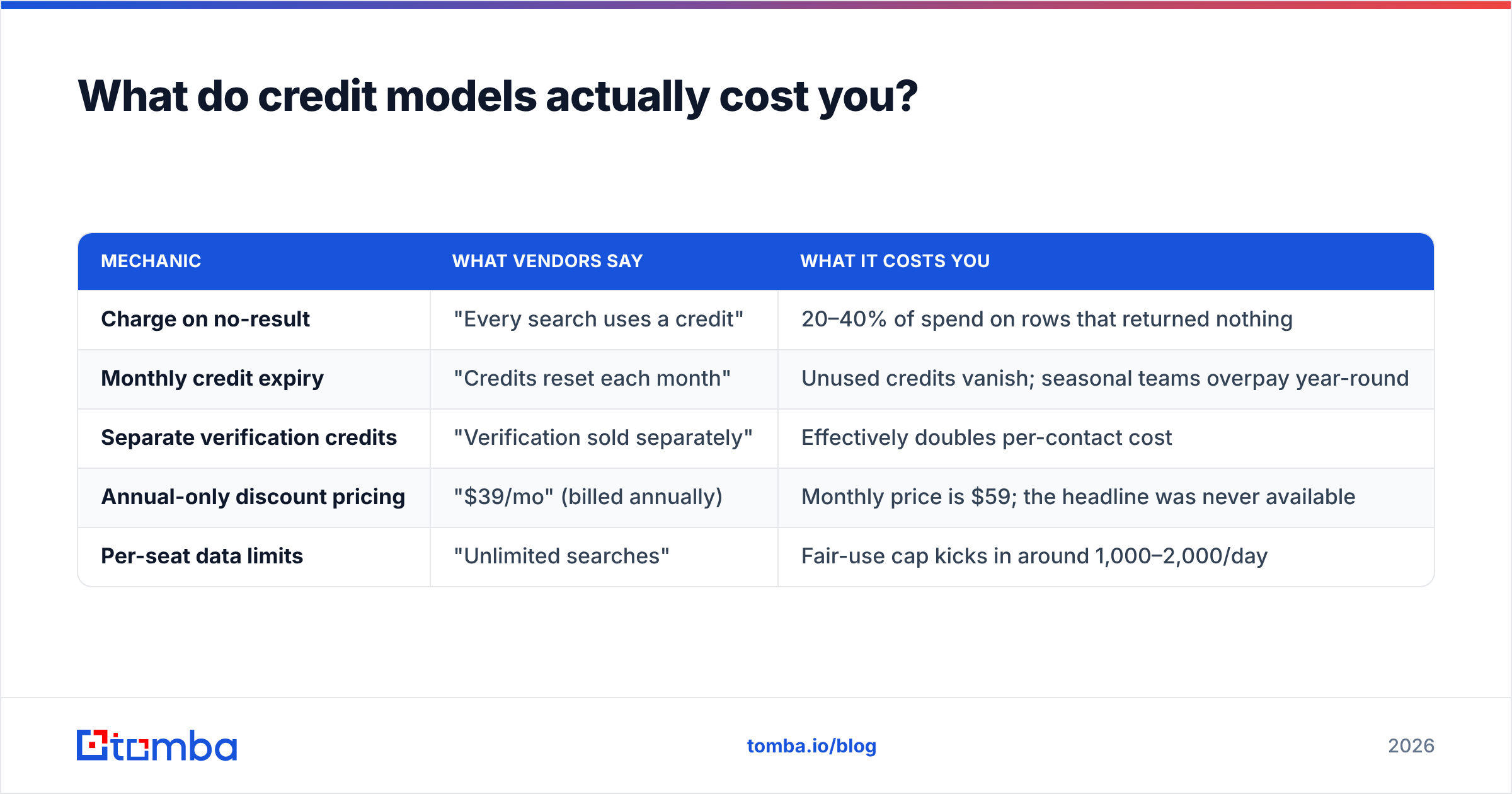
This is where budgets die. Four mechanics to check in the fine print before you commit:
| Mechanic | What vendors say | What it costs you |
|---|---|---|
| Charge on no-result | "Every search uses a credit" | 20–40% of spend on rows that returned nothing |
| Monthly credit expiry | "Credits reset each month" | Unused credits vanish; seasonal teams overpay year-round |
| Separate verification credits | "Verification sold separately" | Effectively doubles per-contact cost |
| Annual-only discount pricing | "$39/mo" (billed annually) | Monthly price is $59; the headline was never available |
| Per-seat data limits | "Unlimited searches" | Fair-use cap kicks in around 1,000–2,000/day |
Run the arithmetic on a real scenario. Say you need 2,000 verified contacts a month, your tool has a 60% hit rate, and it charges for failed lookups plus separate verification credits. You'll burn ~3,300 search credits and ~2,000 verification credits to get there. On a plan advertising "5,000 credits for $99," you've just used every credit and are shopping for an overage package — at an effective rate near double the sticker.
A tool that doesn't charge for failed lookups and includes verification needs ~2,000 credits for the same output. Same headline price, half the real cost.

How do you run a 30-minute evaluation?#
Vendor benchmarks are run on samples that flatter the vendor. Yours won't be. Here's the test:
Build the sample. Pull 100 rows from your CRM of contacts you've already emailed successfully — first name, last name, company domain. You know ground truth for every row. Strip the email column.
Run all shortlisted tools on the same 100 rows. Use each tool's free tier or trial. Most give you 25–50 lookups free, so split into two batches if needed, but keep the sample identical across tools.
Score three columns.
- Hit rate: how many rows returned any address
- Exact match: how many matched your known-good address
- False confidence: how many returned a wrong address with high confidence
That third column is the one nobody measures and the one that hurts. A tool that says "not found" costs you a credit. A tool that confidently returns j.smith@acme.com when the real address is jsmith@acme.com costs you a bounce, and bounces compound into sender reputation damage.
Then run the reverse test. Take 50 addresses you know are dead — people who left, bounced last quarter — and push them through each tool's verifier. A good verifier catches the majority. A weak one marks them all "valid" or "unknown" and you learn nothing.
Thirty minutes of this beats thirty hours of reading comparison posts, including this one. If you want a starting point for the verification half, the email verifier and the free email checker will handle single-address spot checks without a signup.
What mistakes ruin prospecting data quality?#
Five failure modes account for most bad outcomes, and only one of them is the tool's fault.
Sending to everything a tool returns. Confidence scores are probabilities, not permissions. Set a threshold — typically 90%+ for cold outbound — and route everything below it to LinkedIn or a manual check instead of your sending domain.
Ignoring catch-all risk tiers. Catch-all domains accept everything at the SMTP layer, so "valid" means nothing there. Segment them into their own campaign on a separate sending domain, or verify them through a dedicated catch-all finder before they touch your main list.
Never re-verifying. A list built in January is materially wrong by June. Re-verify anything older than 90 days before reuse. This is the single cheapest deliverability intervention available.
Buying volume you can't send. 50,000 contacts is worthless if your infrastructure sends 300 a day. Buy for your sending capacity plus a margin, not for the biggest number on the pricing page.
Treating one tool as sufficient. The realistic best-practice stack in 2026 is a primary finder for volume plus a waterfall fallback for the rows it misses. Even excellent tools miss 20–30% of a hard ICP. Enrichment APIs make chaining cheap — Tomba's email finder API and bulk endpoints exist precisely so you can slot a second provider behind the first without manual CSV shuffling.
One more thing worth knowing: the compliance layer is not optional. Under GDPR, legitimate interest can cover B2B outreach in the EU, but it requires you to document the basis, honor opt-outs immediately, and disclose where the data came from. Ask any vendor for their data sourcing documentation before you buy — if they can't explain provenance, that's your liability, not theirs. The ICO's guidance on direct marketing is the clearest free reference on where the lines sit.
So which one should you actually buy?#
Short version, by situation:
- Solo founder or small team, US/EU ICP, under $100/mo: a focused finder with an included verifier. Test Tomba and Hunter on the same 100 rows and pick whichever wins your sample.
- You already own sequencing and CRM: don't buy an all-in-one. You'll pay per seat for duplicated features.
- You have no sending stack at all: an all-in-one like Apollo is defensible — one bill, one login, faster to launch.
- One-off campaign against a fixed segment: a pay-as-you-go verified list purchase costs less than three months of any subscription.
- Engineering-led, enrichment inside your product: go API-first and evaluate on rate limits, latency, and response schema, not UI.
The pattern across all five: match the purchase shape to how you actually prospect, then let the 100-row test settle the vendor question. Every remaining argument is marketing.
Ready to test it on your own list? Start with the Tomba Email Finder — the free tier gives you 25 searches a month with no card, which is enough to run a meaningful slice of the bake-off above. Verification and catch-all handling are included on every plan, so the number you see on your invoice is the number you actually pay per verified contact. Upload your hardest 25 accounts, score the hit rate yourself, and let the data pick your tool.
Related guides#
Ready to find emails that actually work?
Join 150,000+ professionals who stopped guessing and started sending. Free credits on signup — no credit card required.
Get the Tomba newsletter
Practical outbound tactics and product updates — once every two weeks.
About the author