Email Quality Score: How to Measure and Fix Your List in 2026
A 98% valid rate on a vendor dashboard and a 4% bounce rate in your sending tool are not a contradiction — they measure different things. Here's how an email quality score is actually built, what a good one looks like, and how to raise yours.
TL;DR
- An email quality score is a 0–100 (or A–F) rating that predicts whether a given address will accept mail, bounce, or damage your sender reputation. It is not the same thing as "valid syntax."
- Most scores blend five inputs: syntax, domain/MX health, mailbox existence via SMTP, role/disposable/spam-trap risk, and engagement or recency signals.
- A list-level score above 95% deliverable with under 2% unknown is healthy. Below 90%, pause the campaign and re-verify — Gmail and Microsoft both start throttling well before you notice.
- Catch-all domains are where scores diverge wildly between vendors. One tool calls them "valid," another calls them "unknown," and your bounce rate tells you who was right.
- A perfect list score still won't save bad sending infrastructure. Authentication, warmup, and content carry at least half the deliverability load.
What is an email quality score?#
An email quality score is a single number that answers one question: if I send to this address today, what happens?
Think of it like a credit score for an inbox. A credit score doesn't guarantee someone repays a loan — it estimates risk from a pile of historical and structural signals. An email quality score does the same for an address: it estimates the probability of a successful delivery based on how the domain is configured, whether the mailbox actually exists, and whether the address looks like a human, a shared alias, or a trap.
Two levels matter, and people constantly confuse them:
- Address-level score — one contact.
sarah.chen@acme.comscores 97;info@acme.comscores 40 (real, but a role account);sarah@acme-mail.tkscores 8 (disposable domain). - List-level score — the aggregate. 10,000 addresses where 9,540 are deliverable, 220 are risky, 190 are unknown, and 50 are invalid gives you roughly a 95.4% quality score.
Your email service provider only cares about the second number, because that's what drives your bounce rate. Your SDRs only care about the first, because that's what decides whether a specific prospect gets the email. Both need to be tracked.
How is an email quality score calculated?#
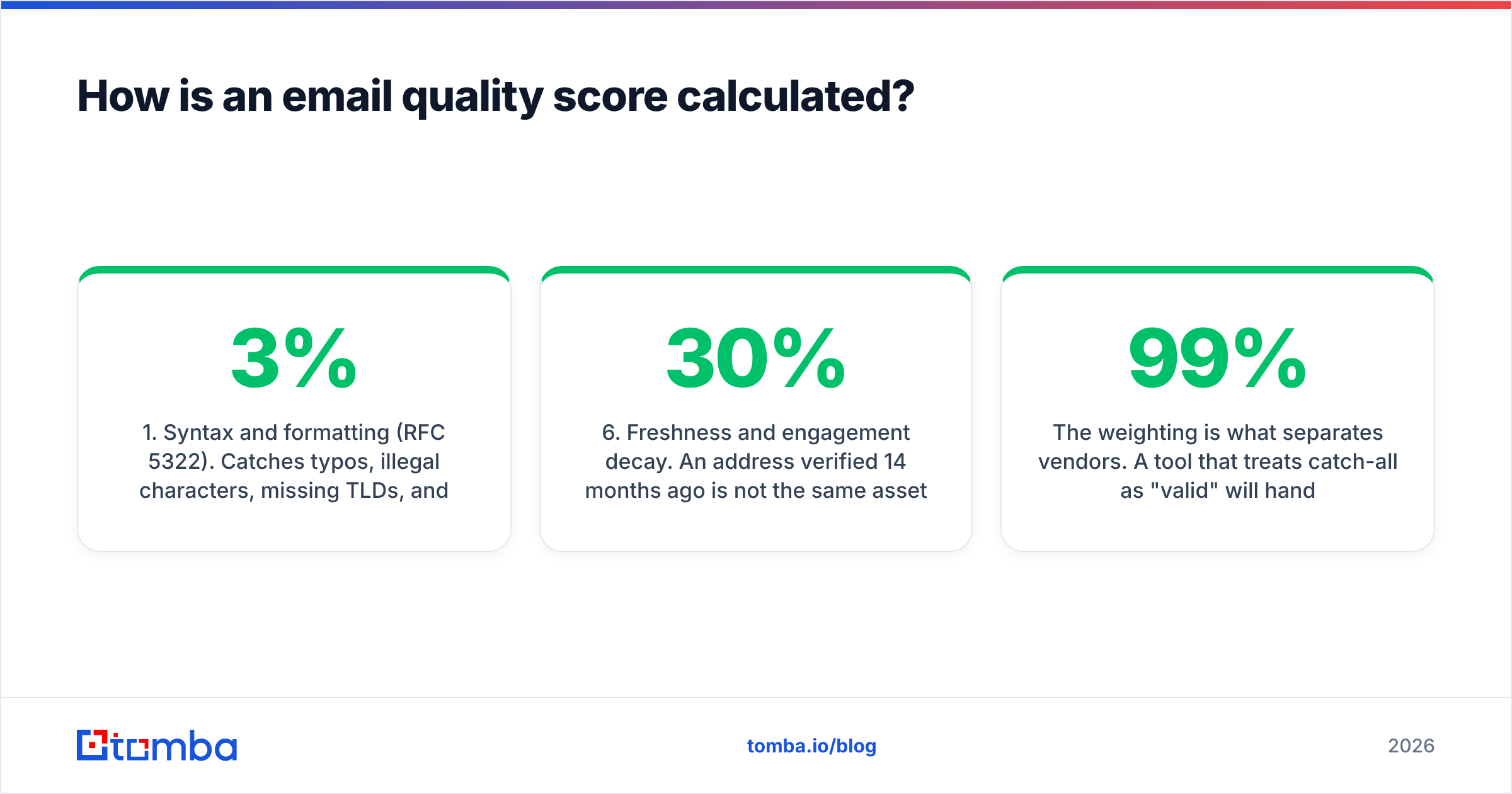
Every serious verification engine runs the same escalating ladder of checks, cheapest first. Each rung can knock points off or reject the address outright:
- Syntax and formatting (RFC 5322). Catches typos, illegal characters, missing TLDs, and the
gmial.com-class errors. Costs nothing, kills 1–3% of a typical scraped list. - Domain and DNS health. Does the domain resolve? Does it have valid MX records? Is it parked, expired, or freshly registered? A domain registered eleven days ago with no web presence is a red flag regardless of the mailbox.
- Mailbox existence (SMTP handshake). The verifier opens a conversation with the receiving mail server and asks whether the recipient exists — without delivering a message. This is the single highest-weighted signal, and it's where accuracy claims are won or lost.
- Risk classification. Is it a role address (
sales@,support@,admin@)? A disposable domain? A known spam trap or complainer? These addresses may be technically deliverable and still torch your reputation. - Catch-all detection. Does the server accept mail for every address at that domain, including obvious nonsense? If yes, SMTP verification is inconclusive, and the score should reflect uncertainty instead of faking confidence.
- Freshness and engagement decay. An address verified 14 months ago is not the same asset as one verified last week. Roughly 22–30% of B2B contact data goes stale each year through job changes alone, so good scoring systems apply a time penalty.
The weighting is what separates vendors. A tool that treats catch-all as "valid" will hand you a beautiful 99% score and a 6% bounce rate. A tool that treats catch-all as "invalid" throws away workable contacts. The honest approach is a separate bucket with its own confidence rating.
What counts as a good email quality score in 2026?#
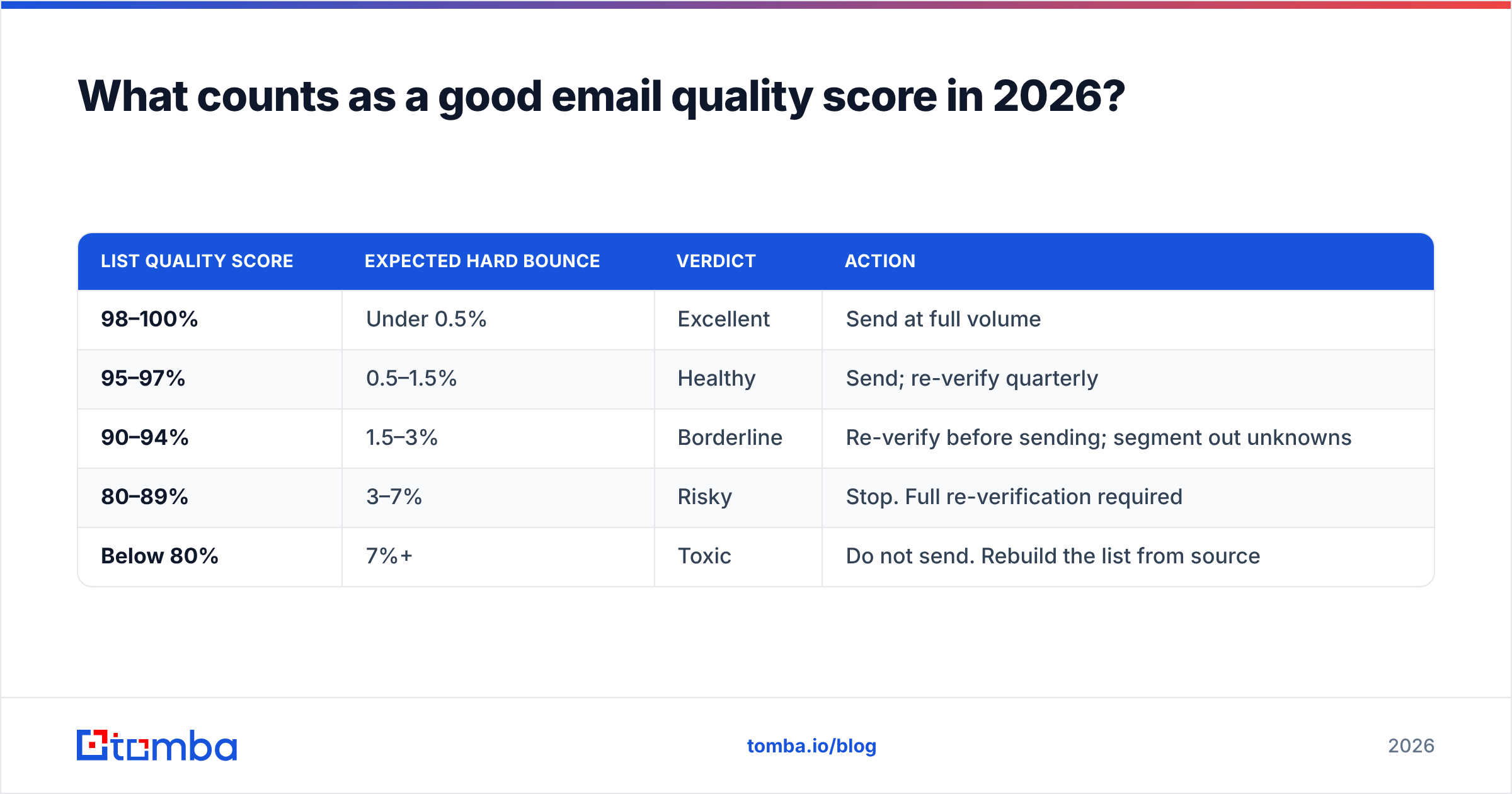
Here's the practical banding most deliverability teams use. Note the thresholds tightened after Google and Yahoo's bulk-sender requirements landed — a 3% bounce rate that was survivable in 2022 is now a throttling trigger.
| List quality score | Expected hard bounce | Verdict | Action |
|---|---|---|---|
| 98–100% | Under 0.5% | Excellent | Send at full volume |
| 95–97% | 0.5–1.5% | Healthy | Send; re-verify quarterly |
| 90–94% | 1.5–3% | Borderline | Re-verify before sending; segment out unknowns |
| 80–89% | 3–7% | Risky | Stop. Full re-verification required |
| Below 80% | 7%+ | Toxic | Do not send. Rebuild the list from source |
The ceiling matters as much as the floor. If a provider tells you 100% of a 50,000-row purchased list is valid, that is not a good sign — it means catch-alls and role accounts were counted as wins. Real-world clean lists land between 95% and 98.5%, with a small unknown bucket that no honest engine can eliminate.
For sender-side context, cross-check your score against actual delivery data in Google Postmaster Tools rather than trusting a dashboard number in isolation.
How do email verification tools score addresses differently?#
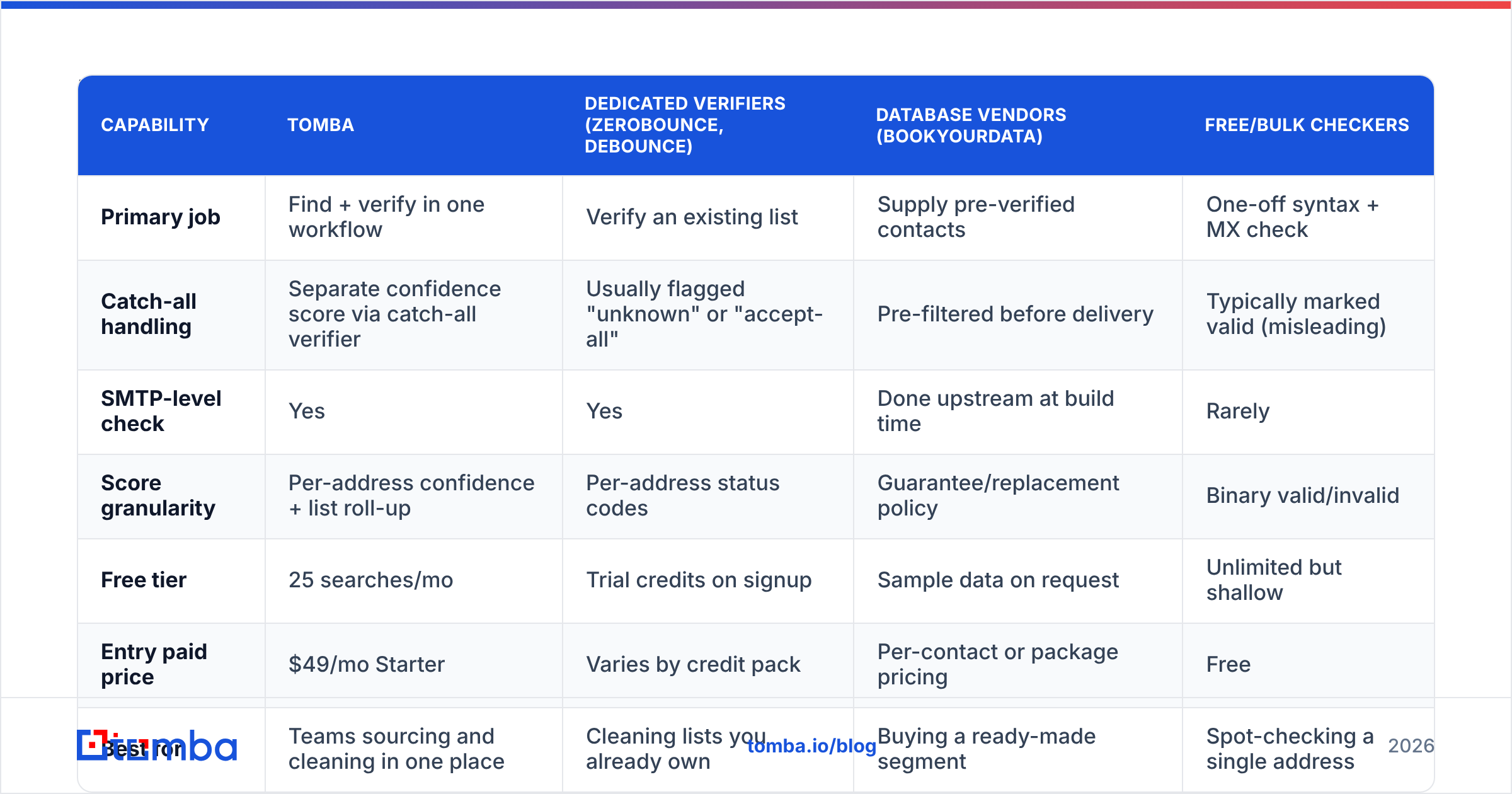
The category is crowded, and the differences that matter are structural, not cosmetic. Here's how the main approaches compare:
| Capability | Tomba | Dedicated verifiers (ZeroBounce, Debounce) | Database vendors (BookYourData) | Free/bulk checkers |
|---|---|---|---|---|
| Primary job | Find + verify in one workflow | Verify an existing list | Supply pre-verified contacts | One-off syntax + MX check |
| Catch-all handling | Separate confidence score via catch-all verifier | Usually flagged "unknown" or "accept-all" | Pre-filtered before delivery | Typically marked valid (misleading) |
| SMTP-level check | Yes | Yes | Done upstream at build time | Rarely |
| Score granularity | Per-address confidence + list roll-up | Per-address status codes | Guarantee/replacement policy | Binary valid/invalid |
| Free tier | 25 searches/mo | Trial credits on signup | Sample data on request | Unlimited but shallow |
| Entry paid price | $49/mo Starter | Varies by credit pack | Per-contact or package pricing | Free |
| Best for | Teams sourcing and cleaning in one place | Cleaning lists you already own | Buying a ready-made segment | Spot-checking a single address |
A note on category boundaries, because buyers mix these up constantly: a verifier tells you whether an address you already have is safe to mail. A finder produces the address in the first place. A database vendor like BookYourData sells you the contacts pre-built with its own quality guarantees attached — a genuinely different purchase, and often the faster path if you need a targeted segment now rather than a sourcing workflow. Tomba sits across the first two: find email addresses and score them in the same pipeline, so you never mail an address that was never verified.
If you want third-party signal rather than vendor claims, the G2 email verification category is the least-bad public source for how these tools behave at scale.
Why do catch-all domains break most quality scores?#
Because the mail server refuses to tell you the truth.
A catch-all (or "accept-all") domain is configured to say yes to every recipient at SMTP time — ceo@company.com and xj9qz@company.com get identical acceptance responses. The server then decides internally whether to deliver or silently discard. Verification simply cannot resolve this at the handshake layer.
Roughly 15–25% of B2B domains run catch-all, and the rate is higher among enterprises using aggressive security gateways. That means on an enterprise-heavy list, a quarter of your addresses land in a bucket where a binary valid/invalid answer is fiction.
Three ways vendors handle it:
- Call it valid. Inflates the score, inflates the bounce rate. Common among cheap bulk checkers.
- Call it invalid. Safe but wasteful — you discard real prospects at real companies.
- Score it separately. Use pattern confidence (does
first.last@match the company's known format?), historical send data, and secondary sources to assign a probability rather than a verdict.
The third approach is the only defensible one. Tomba's catch-all finder assigns a confidence tier so you can decide the risk yourself: mail high-confidence catch-alls on a warm domain, hold the low-confidence ones back, or route them to LinkedIn instead.

How do you raise your email quality score?#
Scores don't improve by staring at them. Here's the sequence that actually moves the number, in order of return on effort:
- De-duplicate before you verify. You pay per verification. A 40,000-row export from three CRMs typically contains 12–18% duplicates across casing and alias variants. Strip them first and the whole job gets cheaper.
- Kill the obvious junk locally. Syntax errors, disposable domains, and
noreply@addresses can be removed with regex and a blocklist before a single API credit is spent. - Run a full verification pass. Push the remainder through an email verifier and keep the raw status codes, not just the pass/fail. You'll want them for segmentation later.
- Segment by score, don't just filter. Deliverable addresses go to the main sequence. Catch-alls with high pattern confidence go to a smaller, slower-throttled sequence on a secondary domain. Unknowns get parked.
- Suppress role accounts from cold outreach.
info@andsales@deliver fine and convert terribly, while generating a disproportionate share of complaints. Keep them for support workflows only. - Re-verify on a schedule. Quarterly for active outbound lists, monthly for anything you mail weekly. Data decays whether or not you look at it.
For lists over a few thousand rows, do this as a batch job rather than one-by-one — bulk verify with a CSV in, CSV out, so the segmentation step becomes a spreadsheet filter instead of a scripting project.
Does a high email quality score guarantee good deliverability?#
No, and this is the most expensive misconception in the category.
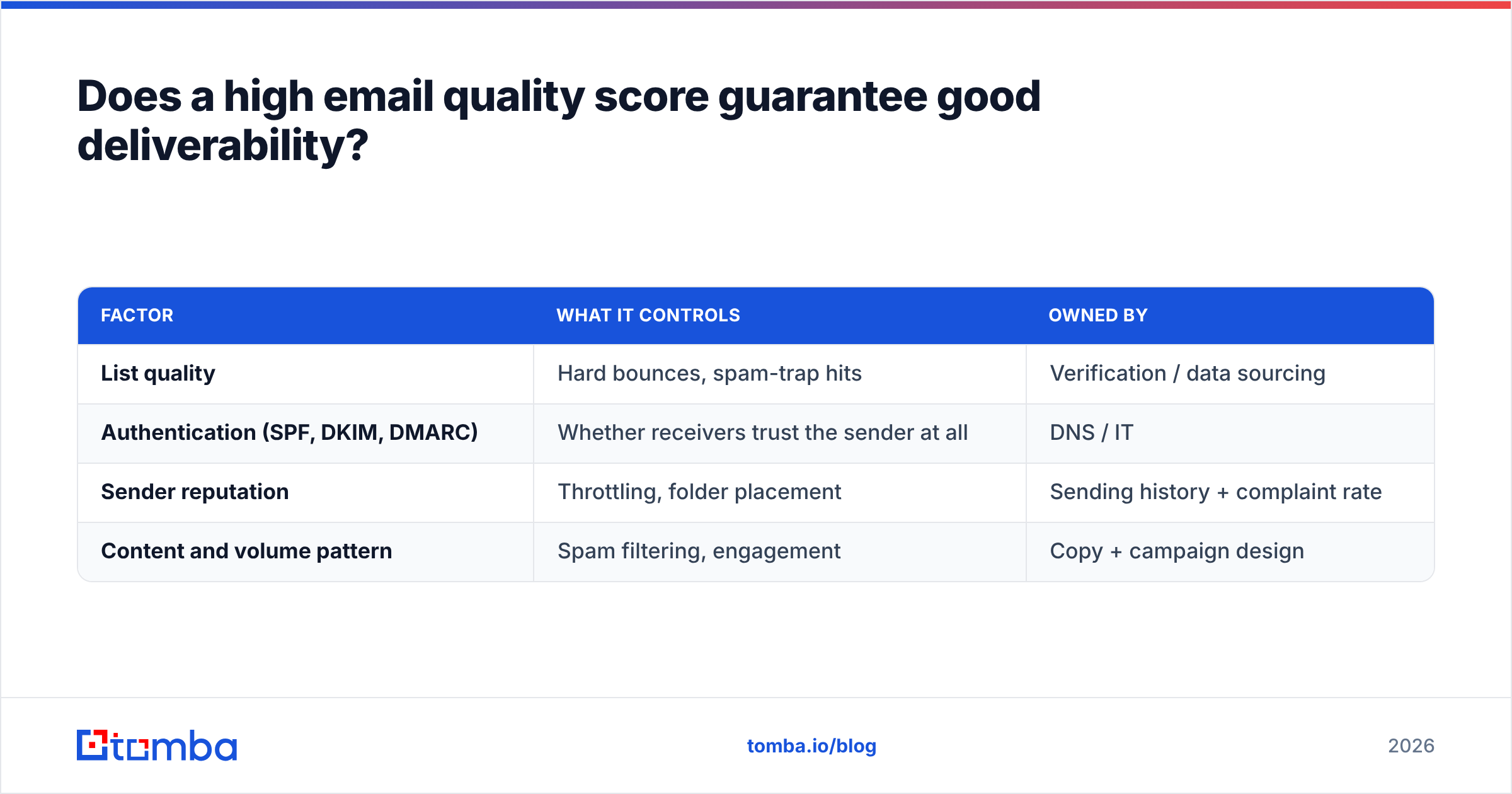
List quality is one of roughly four factors that decide whether your message hits the inbox. Even a flawless 99% list will land in spam if the rest is broken:
| Factor | What it controls | Owned by |
|---|---|---|
| List quality | Hard bounces, spam-trap hits | Verification / data sourcing |
| Authentication (SPF, DKIM, DMARC) | Whether receivers trust the sender at all | DNS / IT |
| Sender reputation | Throttling, folder placement | Sending history + complaint rate |
| Content and volume pattern | Spam filtering, engagement | Copy + campaign design |
Bulk senders to Gmail must now keep spam complaints under 0.3% and pass DMARC alignment — requirements documented in Google's sender guidelines. A clean list helps you clear the bounce threshold; it does nothing for the complaint rate, which is a function of targeting and copy.
The practical framing: list quality is a prerequisite, not a strategy. It removes the failure mode where you never had a chance. It doesn't create the reason someone replies.
How should you monitor email quality score over time?#
Track four numbers weekly and you'll catch every meaningful degradation before it becomes a reputation problem:
- Verified-list score at send time — the aggregate deliverable percentage of the exact segment you mailed, not of your whole database.
- Actual hard bounce rate — the reality check. If the gap between predicted and actual exceeds 1.5 percentage points, your provider's catch-all handling is too optimistic.
- Unknown percentage — should sit under 2%. A rising unknown rate usually means more enterprise domains with security gateways, not a broken verifier.
- Data age distribution — what share of your active contacts were verified more than 90 days ago. This is the leading indicator; the other three are lagging.
The gap between predicted and actual bounces is the single most useful diagnostic you have. It's the only way to audit a vendor's accuracy claim with your own data instead of their marketing page. Run it for one campaign cycle before committing to an annual contract — and check pricing details against the volume you actually verify, not the volume you hope to.
Should you build or buy email quality scoring?#
Building is tempting because the first two rungs — syntax and MX lookup — are trivial. The trap is everything above them.
SMTP verification at scale requires a rotating pool of sending IPs with clean reputations, because mail servers rate-limit and blocklist aggressive verification traffic. Maintaining disposable-domain and spam-trap lists is a continuous data-acquisition problem, not a one-time import. Catch-all confidence scoring needs a corpus of company email patterns you almost certainly don't have.
Build if verification is your product. Buy if it's an input to your product. For most B2B teams, the calculus is simple: a $49/month plan replaces an engineer-week of setup plus indefinite maintenance, and it comes with an API you can wire into your CRM in an afternoon.
Where to start#
If your bounce rate is above 2% or you're about to mail a list you didn't build yourself, the fastest fix is a single verification pass with catch-all confidence scoring turned on — not a new sending tool, not new copy.
Start with the Tomba Email Finder. It sources addresses by domain, name, or company and scores each one at discovery, so the quality check happens before the contact ever reaches your sequence rather than after your bounce rate has already told the story. The free tier covers 25 searches a month — enough to benchmark Tomba's predicted scores against your actual bounce data before you spend anything.
Related guides#
Ready to find emails that actually work?
Join 150,000+ professionals who stopped guessing and started sending. Free credits on signup — no credit card required.
Get the Tomba newsletter
Practical outbound tactics and product updates — once every two weeks.
About the author