Email Read Tracking in 2026: How It Works and What Breaks It
Open pixels still fire, but Apple, Gmail and security scanners have made raw open rates close to meaningless. Here is how email read tracking actually works in 2026, how wrong it is, and what to measure instead.
TL;DR
- Email read tracking works by embedding a 1x1 transparent image (a tracking pixel) that pings a server when the recipient's client loads remote content. It never actually proves a human read anything.
- Apple Mail Privacy Protection pre-fetches images for a large share of Apple Mail users, and Gmail proxies every image through Google's cache. Both inflate opens and destroy timing data.
- Corporate security scanners (Proofpoint, Mimecast, Microsoft Defender) open and click links before the recipient ever sees the message, adding another layer of phantom activity.
- Treat opens as a directional signal at the campaign level, never as a per-person "they read it" trigger. Replies, meeting bookings, and site visits are the metrics that survive.
- The biggest lever on your reply rate is not tracking — it's sending to addresses that exist. Verified contact data beats any pixel.
What is email read tracking?#
Email read tracking is the practice of detecting when a recipient opens your message, usually by embedding a tiny invisible image that calls back to a tracking server. When the image loads, the server logs an "open" with a timestamp, IP address, and user-agent string.
It is the oldest telemetry in email. The technique is a web beacon — the same mechanism that powered banner-ad analytics in the 1990s — repurposed for inboxes. Nothing about it has fundamentally changed in thirty years. What has changed is the environment it runs in.
The important distinction: read tracking measures image loads, not reading. Those two things used to correlate at roughly 85-90%. In 2026, depending on your audience mix, the correlation can be as low as 40%. That gap is where most sales teams quietly lose their forecasting accuracy.
How does an open-tracking pixel actually work?#
Here is the full chain, step by step, so you know exactly what each "open" event does and does not prove.
- Injection. Your sending tool appends
<img src="https://track.example.com/o/abc123.gif" width="1" height="1">to the bottom of the HTML body. The unique IDabc123maps to one recipient in one campaign. - Delivery. The message hits the recipient's mail server. If that server runs a security gateway, the gateway may fetch the image during scanning — before any human touches the message.
- Render. The email client decides whether to load remote images. Outlook desktop blocks by default. Gmail loads them, but through Google's image proxy. Apple Mail with Mail Privacy Protection loads them on Apple's infrastructure, often within minutes of delivery, regardless of whether the user opened anything.
- Callback. The tracking server receives the GET request and records a row: pixel ID, timestamp, IP, user-agent.
- Attribution. Your CRM or sequencer turns that row into "Sarah opened your email 3 times." Each of those three "opens" may be a cache refresh, a scroll back into the preview pane, or a forwarded copy opened by a colleague.
Steps 2 and 3 are where the model breaks. Nothing in the chain requires a human being.

Why are open rates broken in 2026?#
Four forces, stacked. Individually each one is survivable. Together they make raw open rate a vanity metric.
Apple Mail Privacy Protection. Since iOS 15, Apple Mail pre-loads remote content through a proxy for users who opted in — and most did, because the prompt is a single tap. Every message sent to those users registers as opened, usually shortly after delivery, with a spoofed IP that reports a generic location. Apple publishes its position openly on its privacy page: the goal is to hide the IP and prevent senders from building a behavioral profile. It works.
Gmail's image proxy. Google caches every remote image on googleusercontent.com. You get an open event, but the IP belongs to Google, the geolocation is useless, and repeated views may be served from cache without hitting your server at all. So Gmail simultaneously inflates first opens and suppresses repeat opens.
Security gateways. Enterprise filters detonate links and fetch images in sandboxes. A single message to a Fortune 500 prospect can generate an open and a click within seconds of delivery, from a datacenter IP, with no human involvement. This is the most damaging failure mode for sales teams, because it triggers "hot lead" alerts on your coldest accounts.
Plain-text and dark-mode preferences. A growing share of technical buyers read in plain text or with images permanently off. These people may genuinely read every word and never register a single open. Your most engaged segment can look like your deadest one.
How accurate is email read tracking by client?#
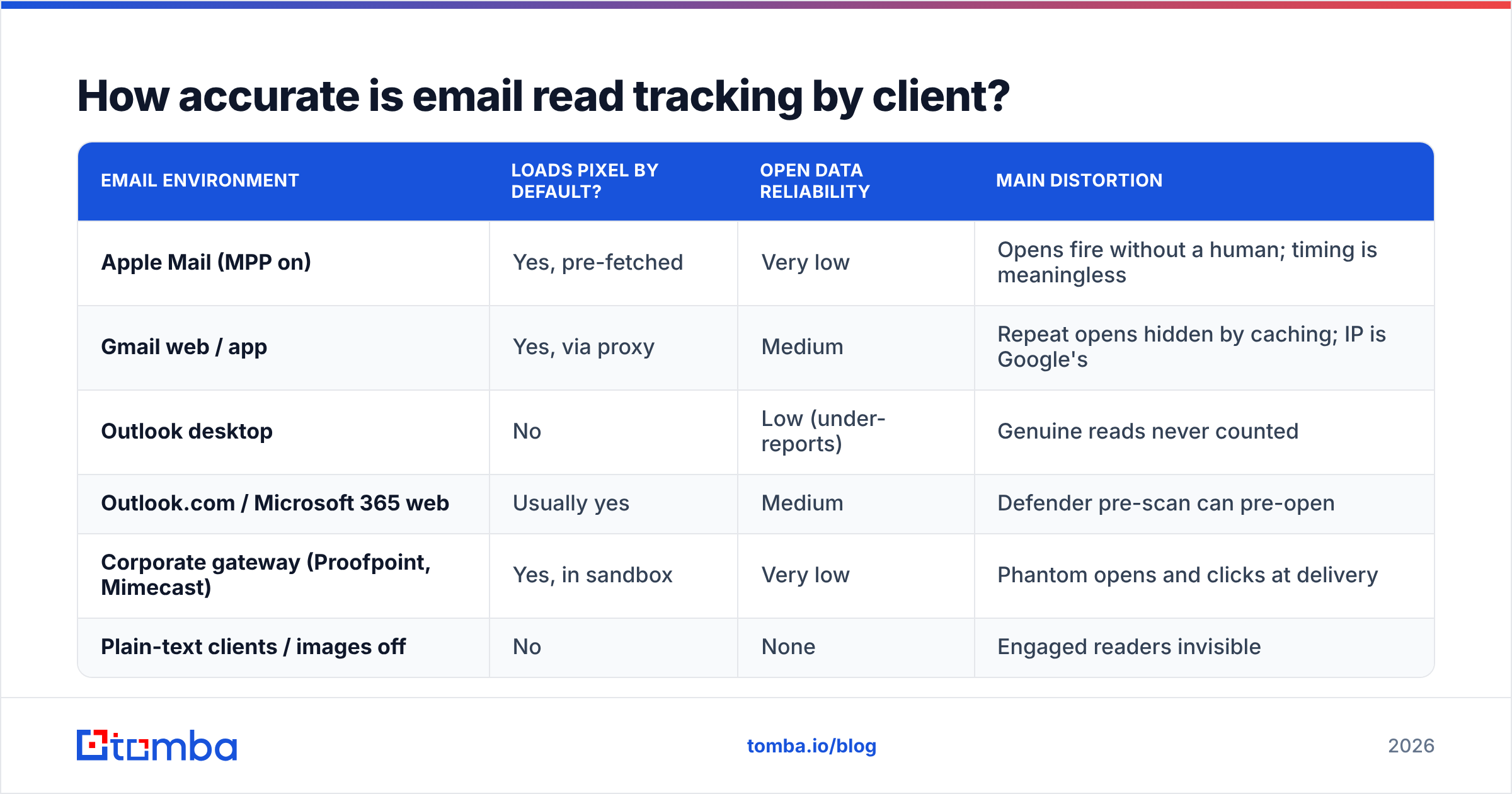
Directional estimates based on how each environment handles remote content. Treat these as planning assumptions, not published figures — your own mix will differ.
| Email environment | Loads pixel by default? | Open data reliability | Main distortion |
|---|---|---|---|
| Apple Mail (MPP on) | Yes, pre-fetched | Very low | Opens fire without a human; timing is meaningless |
| Gmail web / app | Yes, via proxy | Medium | Repeat opens hidden by caching; IP is Google's |
| Outlook desktop | No | Low (under-reports) | Genuine reads never counted |
| Outlook.com / Microsoft 365 web | Usually yes | Medium | Defender pre-scan can pre-open |
| Corporate gateway (Proofpoint, Mimecast) | Yes, in sandbox | Very low | Phantom opens and clicks at delivery |
| Plain-text clients / images off | No | None | Engaged readers invisible |
The practical read: if your ICP is heavy on Apple devices or enterprise IT, your open rate is a number about your recipients' infrastructure, not their interest.
Which email read tracking tools should you compare?#
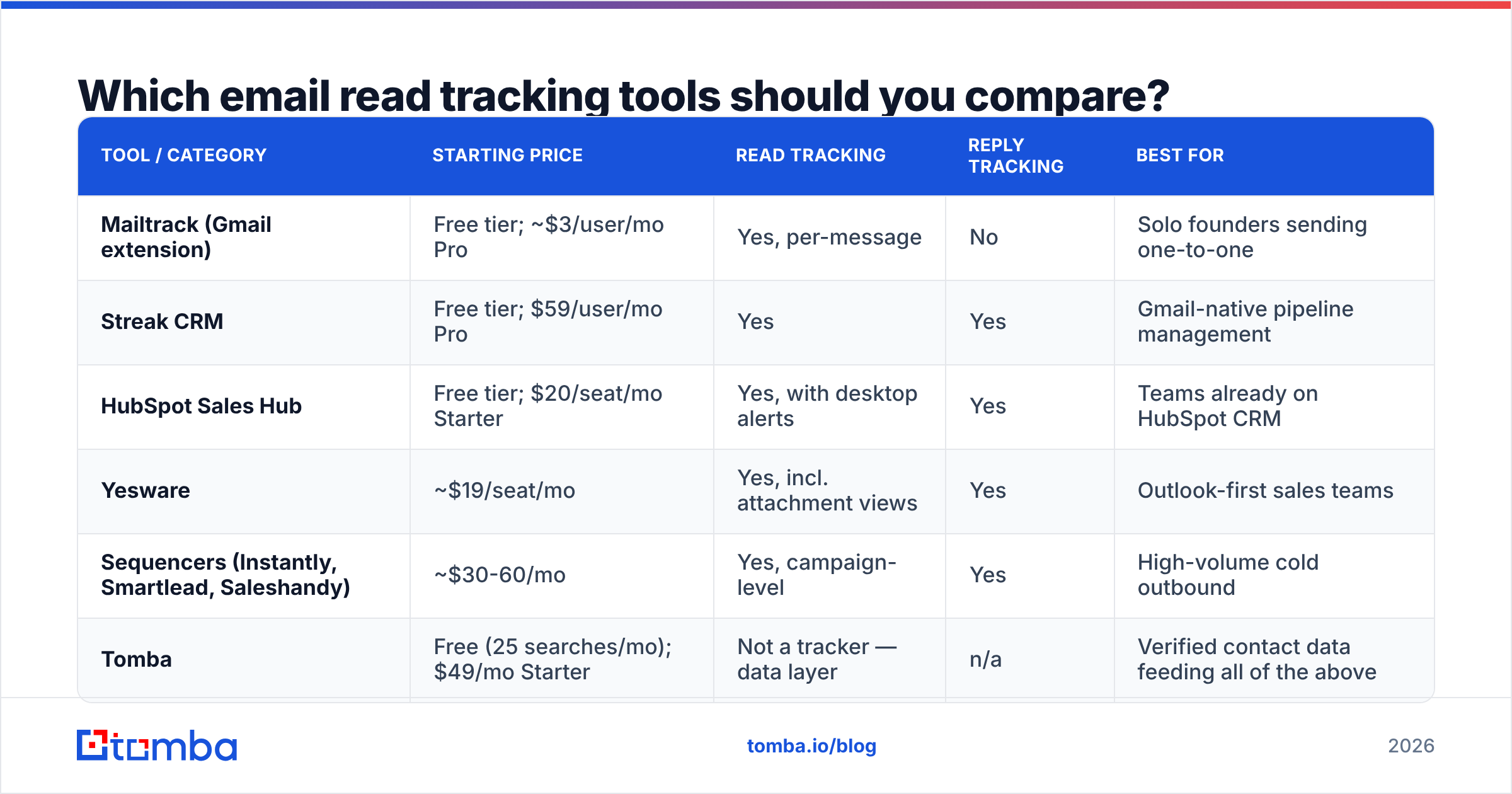
Most sales teams end up with tracking bundled into something they already pay for. Standalone trackers still exist and are cheaper, but they rarely write back cleanly to a CRM. Here is how the main categories stack up.
| Tool / category | Starting price | Read tracking | Reply tracking | Best for |
|---|---|---|---|---|
| Mailtrack (Gmail extension) | Free tier; ~$3/user/mo Pro | Yes, per-message | No | Solo founders sending one-to-one |
| Streak CRM | Free tier; $59/user/mo Pro | Yes | Yes | Gmail-native pipeline management |
| HubSpot Sales Hub | Free tier; $20/seat/mo Starter | Yes, with desktop alerts | Yes | Teams already on HubSpot CRM |
| Yesware | ~$19/seat/mo | Yes, incl. attachment views | Yes | Outlook-first sales teams |
| Sequencers (Instantly, Smartlead, Saleshandy) | ~$30-60/mo | Yes, campaign-level | Yes | High-volume cold outbound |
| Tomba | Free (25 searches/mo); $49/mo Starter | Not a tracker — data layer | n/a | Verified contact data feeding all of the above |
Two notes before you pick. First, buyers on G2's email tracking category consistently rate reply detection and CRM sync higher than open accuracy — the market already knows opens are soft. Second, tracking is a feature, not a product. If you are choosing a sequencer, choose it for deliverability and inbox rotation, and accept whatever tracking ships with it.
Is email read tracking legal under GDPR and CAN-SPAM?#
Short version: read tracking is regulated in the EU/UK and largely unregulated in the US, but "unregulated" does not mean risk-free.
Under GDPR and the ePrivacy Directive, a tracking pixel is a form of terminal-equipment access and personal-data processing. The defensible positions are consent (for marketing email) or legitimate interest with a documented balancing test (sometimes viable for B2B one-to-one sales email). Either way you need the tracking disclosed in your privacy notice and an honest answer if someone asks what you collect. The official GDPR reference site is the cheapest place to start reading before you involve counsel.
CAN-SPAM in the US says nothing about pixels. It regulates deceptive headers, missing unsubscribe mechanisms, and physical addresses. You can track opens legally and still be non-compliant for a missing footer.
The reputational layer matters more than the legal one for outbound teams. Calling a prospect ninety seconds after their "open" and referencing it is the fastest way to sound like surveillance software. If your pitch depends on the recipient not knowing you tracked them, you have a positioning problem, not a tooling problem.
Does read tracking hurt deliverability?#
Sometimes, and in ways people underestimate.
Every tracking pixel and rewritten link adds a third-party domain to your message. Spam filters weigh domain reputation across all links in the body, so a shared tracking domain used by thousands of other senders becomes a liability the moment one of them gets flagged. Three practical mitigations:
- Use a custom tracking domain. A subdomain like
t.yourcompany.comwith its own CNAME isolates your reputation from every other customer of your sequencer. - Skip link rewriting on cold first-touch emails. A plain-text-looking message with one unrewritten URL passes filters more often than an HTML message stuffed with redirects.
- Keep the HTML minimal. Image-to-text ratio still matters. A one-pixel image inside an otherwise text-only email is fine; a tracked HTML template with a signature banner is not.
Before you optimise any of this, check the boring fundamentals: authentication records, list hygiene, and warmup. Run your domain through an SPF checker and confirm your sender reputation is clean. A perfect tracking setup on a domain landing in spam measures nothing.

What should you measure instead of opens?#
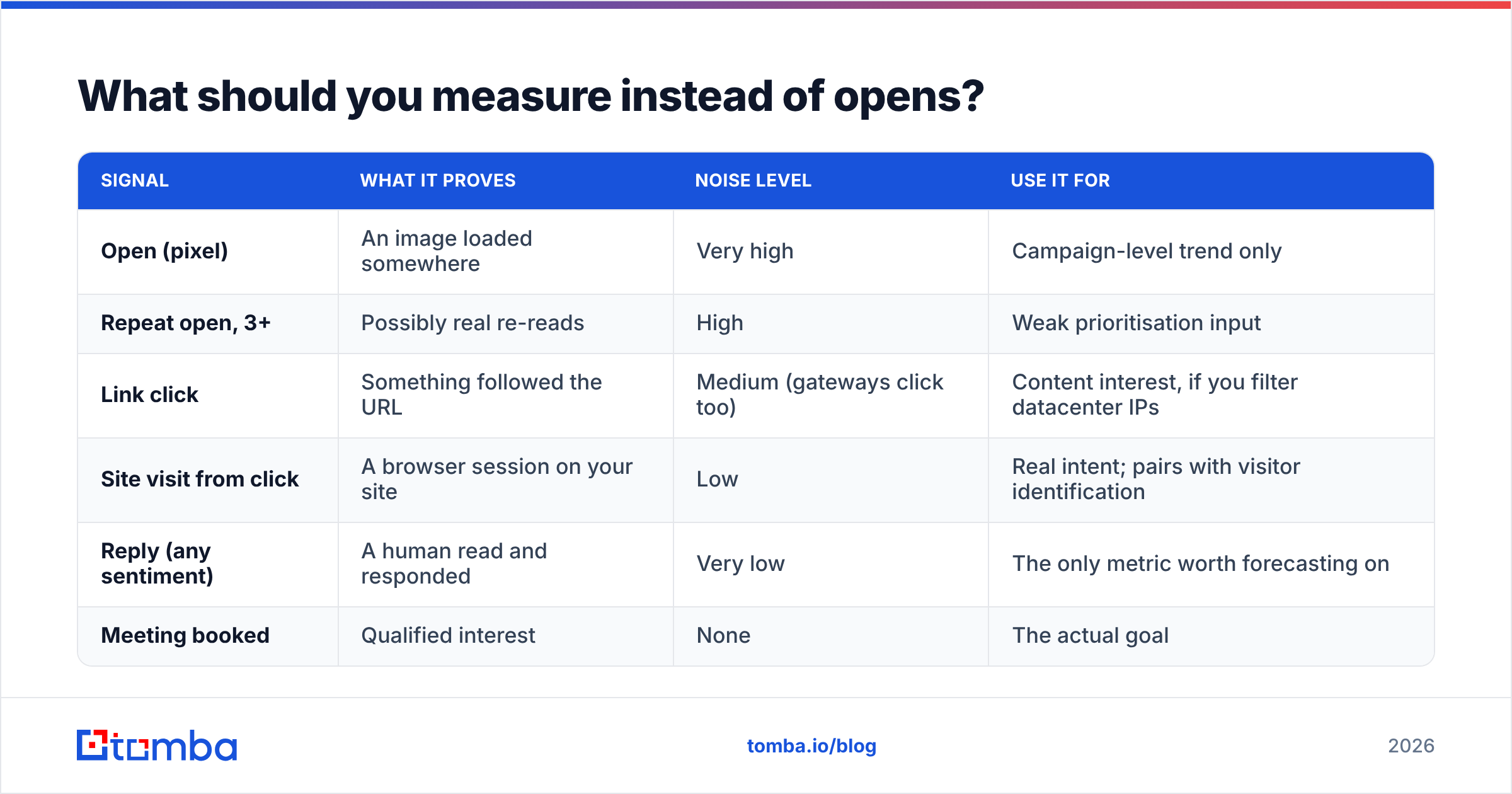
Replace one soft metric with a stack of harder ones. The rule of thumb: the more effort an action takes from the recipient, the more it means.
| Signal | What it proves | Noise level | Use it for |
|---|---|---|---|
| Open (pixel) | An image loaded somewhere | Very high | Campaign-level trend only |
| Repeat open, 3+ | Possibly real re-reads | High | Weak prioritisation input |
| Link click | Something followed the URL | Medium (gateways click too) | Content interest, if you filter datacenter IPs |
| Site visit from click | A browser session on your site | Low | Real intent; pairs with visitor identification |
| Reply (any sentiment) | A human read and responded | Very low | The only metric worth forecasting on |
| Meeting booked | Qualified interest | None | The actual goal |
Practical reporting change: stop putting open rate at the top of your dashboard. Put reply rate there, and track opens only as a diagnostic — a sudden collapse in opens across all clients usually means a deliverability problem, which is the one job the metric still does well. If you need a benchmark to calibrate against, start with what a healthy response rate looks like for your segment and work backwards.
How do you set up read tracking that is actually useful?#
Six steps, in order. Skipping the first two makes the rest pointless.
- Verify the list first. A bounced address produces no open, no click, and no reply — but it does damage your domain. Run every import through an email verifier before it enters a sequence, and handle catch-all domains explicitly rather than guessing.
- Authenticate the sending domain. SPF, DKIM, and DMARC on the sending subdomain. No exceptions.
- Configure a custom tracking domain. Separate subdomain, separate reputation.
- Disable open tracking on first-touch cold email. Enable it from touch two onward, once the recipient has already received a clean plain message. You lose almost no information and gain inbox placement.
- Filter datacenter and proxy traffic. Most good tools now let you exclude Apple MPP opens and known-scanner user-agents. Turn that filter on, and report the filtered number as your real one.
- Score on behaviour bundles, not single events. One open means nothing. An open plus a pricing-page visit plus a second link click within 48 hours is a real signal. Build your alerts on the bundle.
Does better data beat better tracking?#
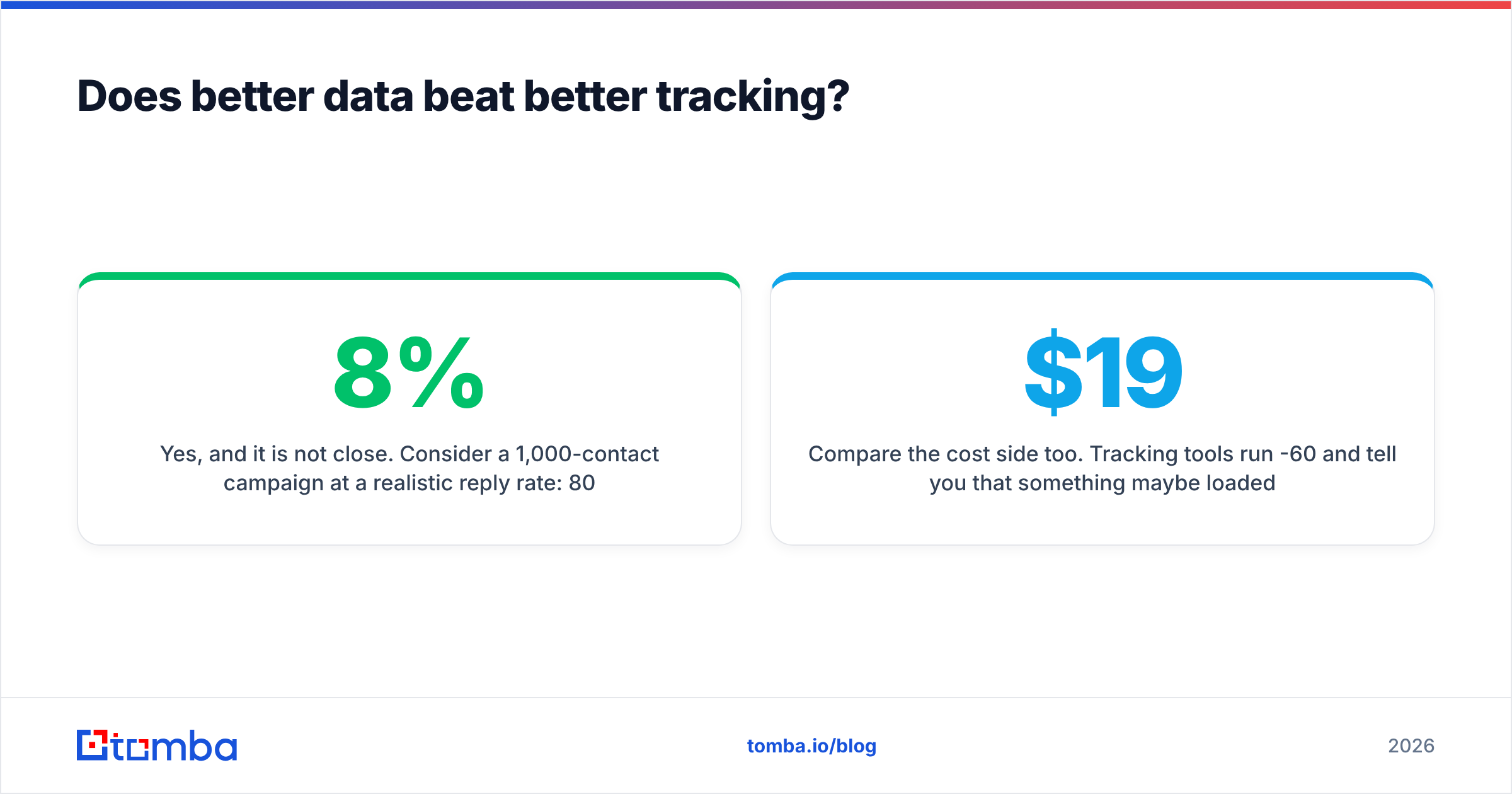
Yes, and it is not close. Consider a 1,000-contact campaign at a realistic 8% reply rate: 80 conversations. Now assume 18% of the list is stale or wrong — bad addresses, people who changed jobs, generic role accounts. You are actually sending 820 usable emails, taking a bounce penalty on the rest, and your reply count drops accordingly. No amount of open-rate analysis recovers those conversations.
The fix is upstream of the sequencer. Build lists from a source that verifies at collection time rather than scraping and hoping: use domain search to map the real contacts at a target company, confirm each address before import, and enrich with role and seniority so your segmentation is honest. Teams that do this see the tracking argument become academic — when your reply rate is healthy, nobody is squinting at open pixels trying to figure out what went wrong.
Compare the cost side too. Tracking tools run $19-60 per seat per month and tell you that something maybe loaded an image. Data tools at comparable pricing tell you whether the person exists, where they work, and how to reach them. One of those changes pipeline.
Ready to fix the input instead of the instrument?#
Open-rate dashboards are a mirror pointed at your recipients' infrastructure. If you want to change outcomes, change what goes into the top of the sequence: correct names, current companies, verified addresses.
Start with the Tomba Email Finder. Search by domain, name, or company, get verified professional addresses with a confidence score, and push them straight into your sequencer or CRM. The free tier gives you 25 searches a month to test the accuracy against a list you already know, and Starter runs $49/mo when you are ready to scale. Get the data right, and the tracking argument stops mattering.
Related guides#
Ready to find emails that actually work?
Join 150,000+ professionals who stopped guessing and started sending. Free credits on signup — no credit card required.
Get the Tomba newsletter
Practical outbound tactics and product updates — once every two weeks.
About the author