Email Reputation Check: How to Audit Your Sender Score in 2026
Your open rate collapsed and nobody told you why. Here's how to run a real email reputation check — the free tools, the signals that predict inboxing, and the fixes that actually move the needle.
TL;DR
- An email reputation check is not one number. It's three separate scores — domain reputation, IP reputation, and list hygiene — and mailbox providers weight them differently.
- Google Postmaster Tools and Microsoft SNDS are the only sources that show you what the two biggest inbox providers actually think. Everything else is an estimate.
- "Sender Score" style ratings measure IP behaviour. If you send from a shared pool (Google Workspace, most ESPs), your IP score tells you almost nothing about your own sending.
- Bounce rate above 2% and spam complaints above 0.3% are the two thresholds that trigger real filtering. Both are list problems, not copy problems.
- Fix order that works: verify the list → authenticate the domain (SPF/DKIM/DMARC) → reduce volume → repair engagement. Doing them out of order wastes weeks.
What Is an Email Reputation Check?#
An email reputation check is an audit of how mailbox providers — Gmail, Outlook, Yahoo, corporate filters — score your right to land in the inbox. Think of it like a credit check before a mortgage: no single bureau decides, each one scores slightly different behaviour, and you only find out you failed when the door closes.
The confusing part is that "reputation" gets used for four different things:
- Domain reputation — the trust score attached to the sending domain in your From address and your DKIM signature. This is the one that follows you everywhere. It survives IP changes and ESP migrations.
- IP reputation — the trust score attached to the server IP that hands the message to the receiving MTA. Shared on most platforms, dedicated on high-volume ones.
- Content reputation — URLs, attachments, tracking domains, and link shorteners inside the message. A clean domain sending a blacklisted bit.ly link still gets filtered.
- List reputation — the quality of the addresses you send to. Hard bounces, spam traps, and unengaged recipients degrade the other three.
When someone says "my email reputation dropped," they almost always mean #4 caused a fall in #1. That's the causal chain worth memorising.
Why Does Email Reputation Matter More in 2026?#
Because the enforcement got automated. Google and Yahoo's bulk-sender requirements — DMARC alignment, one-click unsubscribe, and a spam complaint rate held under 0.3% — moved from "best practice" to programmatic rejection. Microsoft followed with tightened requirements for high-volume senders into Outlook and Hotmail domains. There is no appeals inbox for most of it.
The practical effect: a cold outreach domain that would have limped along at 40% inbox placement in 2021 now gets quietly foldered at 5% with no bounce, no error code, and no warning. Your ESP reports "delivered." Your prospects never see it. This is why an email reputation check that only looks at bounce rate is useless — modern filtering rarely bounces. It hides.
How Do You Run an Email Reputation Check? (Step by Step)#
Run these in order. Each step narrows the problem so the next one is cheaper.
- Pull your Postmaster data first. Google Postmaster Tools shows domain reputation (High/Medium/Low/Bad), spam rate, IP reputation, authentication pass rates, and delivery errors for Gmail recipients. It requires a DNS TXT verification and roughly 100+ daily messages to Gmail before charts populate. This is ground truth, not an estimate.
- Check IP-level scores. Sender Score rates sending IPs 0–100 based on complaint volume, trap hits, and volume consistency. Above 90 is healthy; below 70 means active filtering. Useful only if you have a dedicated IP.
- Sweep the blacklists. Query Spamhaus, SURBL, SpamCop, and Barracuda against both your sending IP and your domain. A blacklist checker does the whole set in one pass. Domain listings hurt far more than IP listings and take longer to clear.
- Verify authentication. Confirm SPF resolves in under 10 DNS lookups, DKIM signs with a 2048-bit key, and DMARC is published at minimum
p=nonewith a reporting address. Run an SPF checker before assuming your record is valid — nested includes silently break the lookup limit more often than anything else. - Score the list itself. Take a 500-address sample and run it through an email verifier. If more than 5% come back invalid, your reputation problem is a data problem and no deliverability tactic will outrun it.
- Test actual placement. Seed-list tools (GlockApps, MailReach, Mailtrap) send to real accounts across providers and report inbox vs. spam vs. missing. Estimates lie; placement tests don't.
Which Email Reputation Tools Should You Use?#
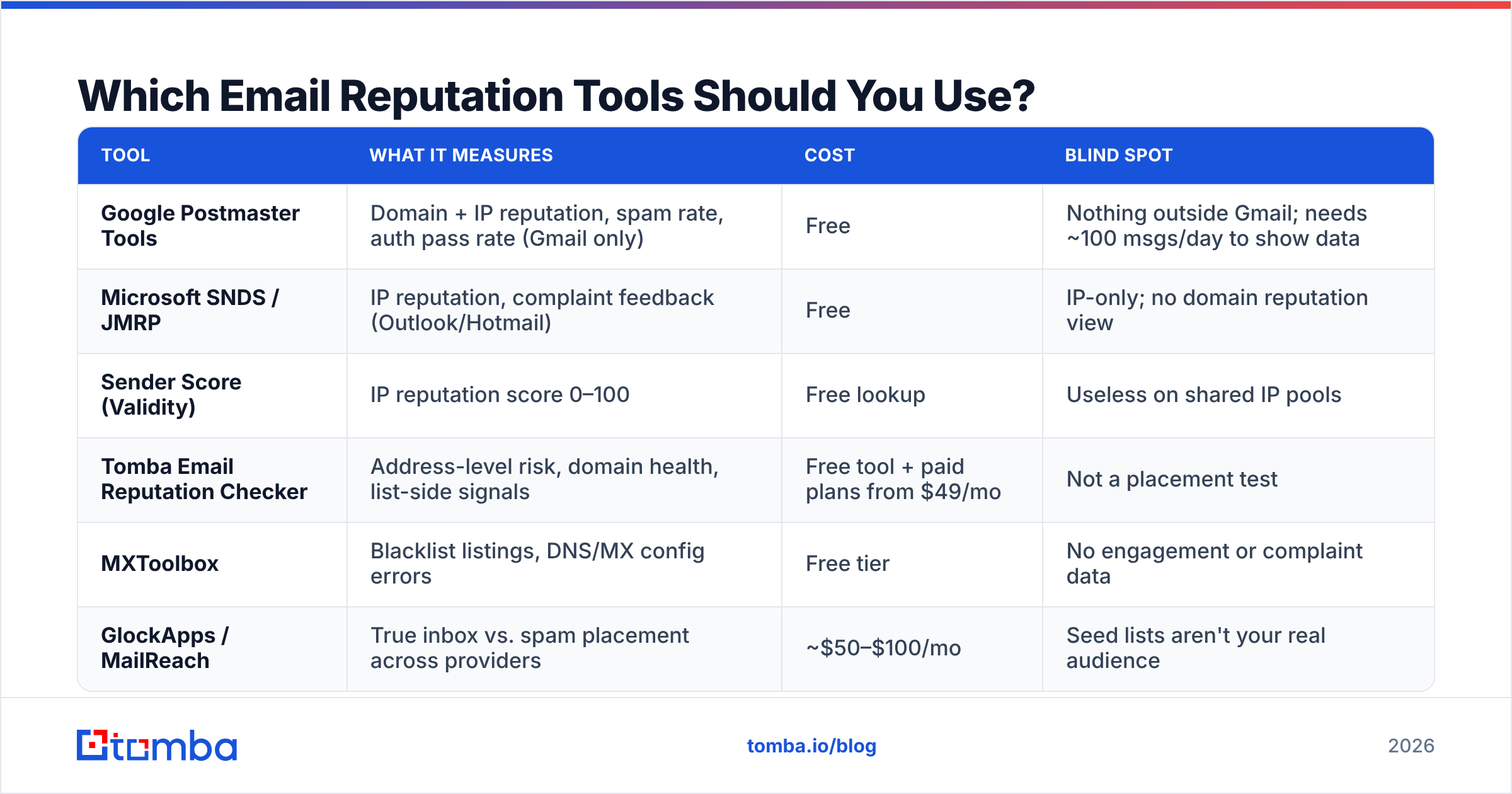
No single tool covers all four reputation layers. Here's what each actually measures and where it stops.
| Tool | What it measures | Cost | Blind spot |
|---|---|---|---|
| Google Postmaster Tools | Domain + IP reputation, spam rate, auth pass rate (Gmail only) | Free | Nothing outside Gmail; needs ~100 msgs/day to show data |
| Microsoft SNDS / JMRP | IP reputation, complaint feedback (Outlook/Hotmail) | Free | IP-only; no domain reputation view |
| Sender Score (Validity) | IP reputation score 0–100 | Free lookup | Useless on shared IP pools |
| Tomba Email Reputation Checker | Address-level risk, domain health, list-side signals | Free tool + paid plans from $49/mo | Not a placement test |
| MXToolbox | Blacklist listings, DNS/MX config errors | Free tier | No engagement or complaint data |
| GlockApps / MailReach | True inbox vs. spam placement across providers | ~$50–$100/mo | Seed lists aren't your real audience |
The honest workflow for most B2B senders: Postmaster Tools for the trend line, a free email reputation checker for per-address and per-domain risk before you send, and one seed test per quarter to confirm what the charts imply.
What Signals Actually Predict Inbox Placement?#
Seven signals do most of the work. Ranked by how strongly they correlate with placement in practice:
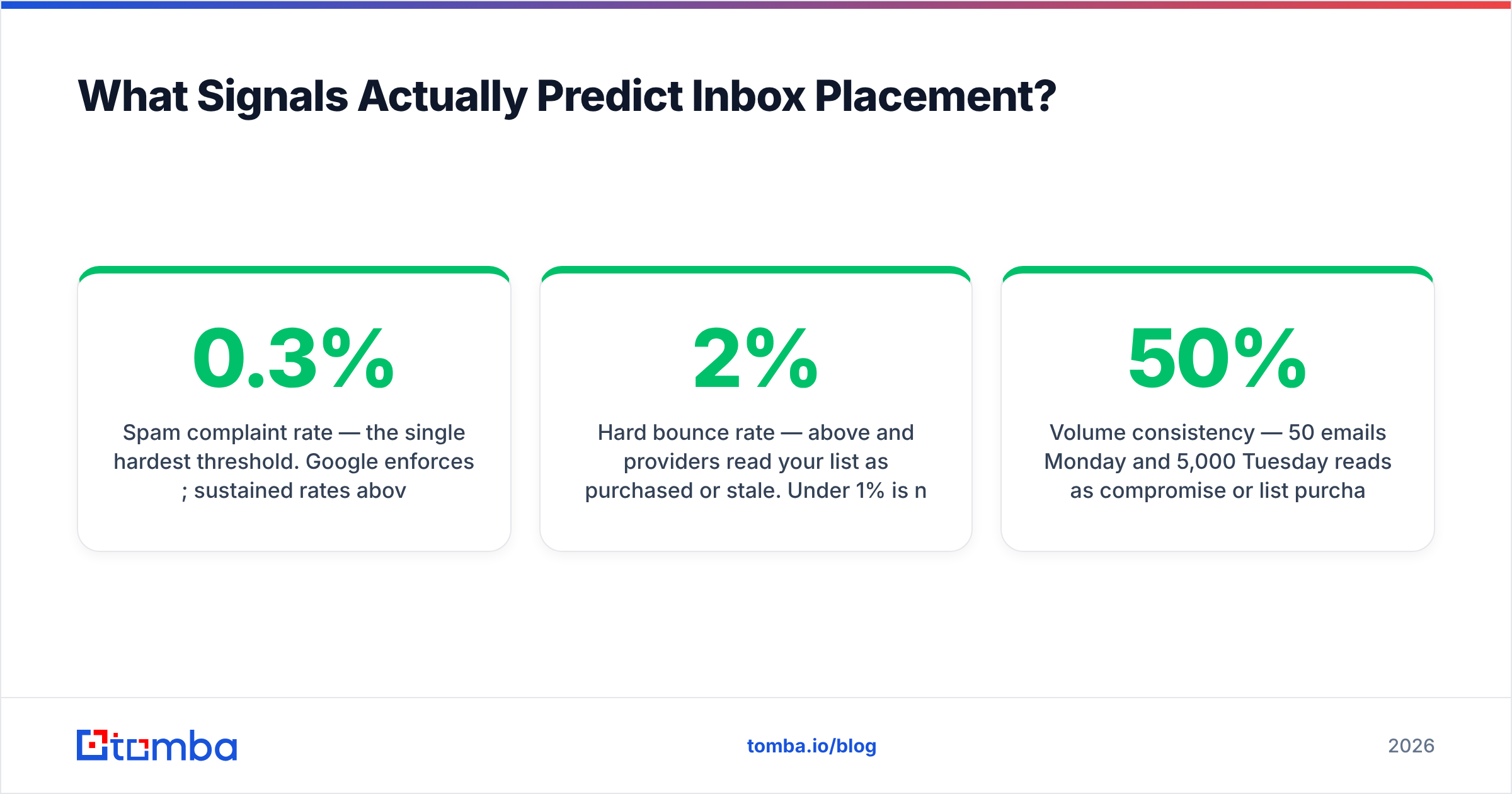
- Spam complaint rate — the single hardest threshold. Google enforces 0.3%; sustained rates above 0.1% already correlate with visible placement decay. One complaint per thousand sends is the real target.
- Hard bounce rate — above 2% and providers read your list as purchased or stale. Under 1% is normal for a verified list; under 0.5% is achievable.
- Authentication alignment — SPF and DKIM passing is table stakes; DMARC alignment (the visible From domain matching the authenticated domain) is what separates senders now. See the DMARC specification for how the alignment check works.
- Engagement ratio — opens are noisy post-MPP, but replies, forwards, and "moved to inbox" actions are strong positive signals. Zero-reply campaigns decay even with perfect technical setup.
- Volume consistency — 50 emails Monday and 5,000 Tuesday reads as compromise or list purchase. Ramp in steps of roughly 30–50% per week.
- Spam trap hits — recycled traps (abandoned real addresses) and pristine traps (never-valid addresses seeded on scraped pages). Pristine hits are the ones that get you Spamhaus-listed.
- Content and link reputation — shortened URLs, unfamiliar tracking domains, and unbranded redirect chains carry their own scores independent of yours.
Notice how many of these are list-quality problems wearing a deliverability costume. That's the pattern.

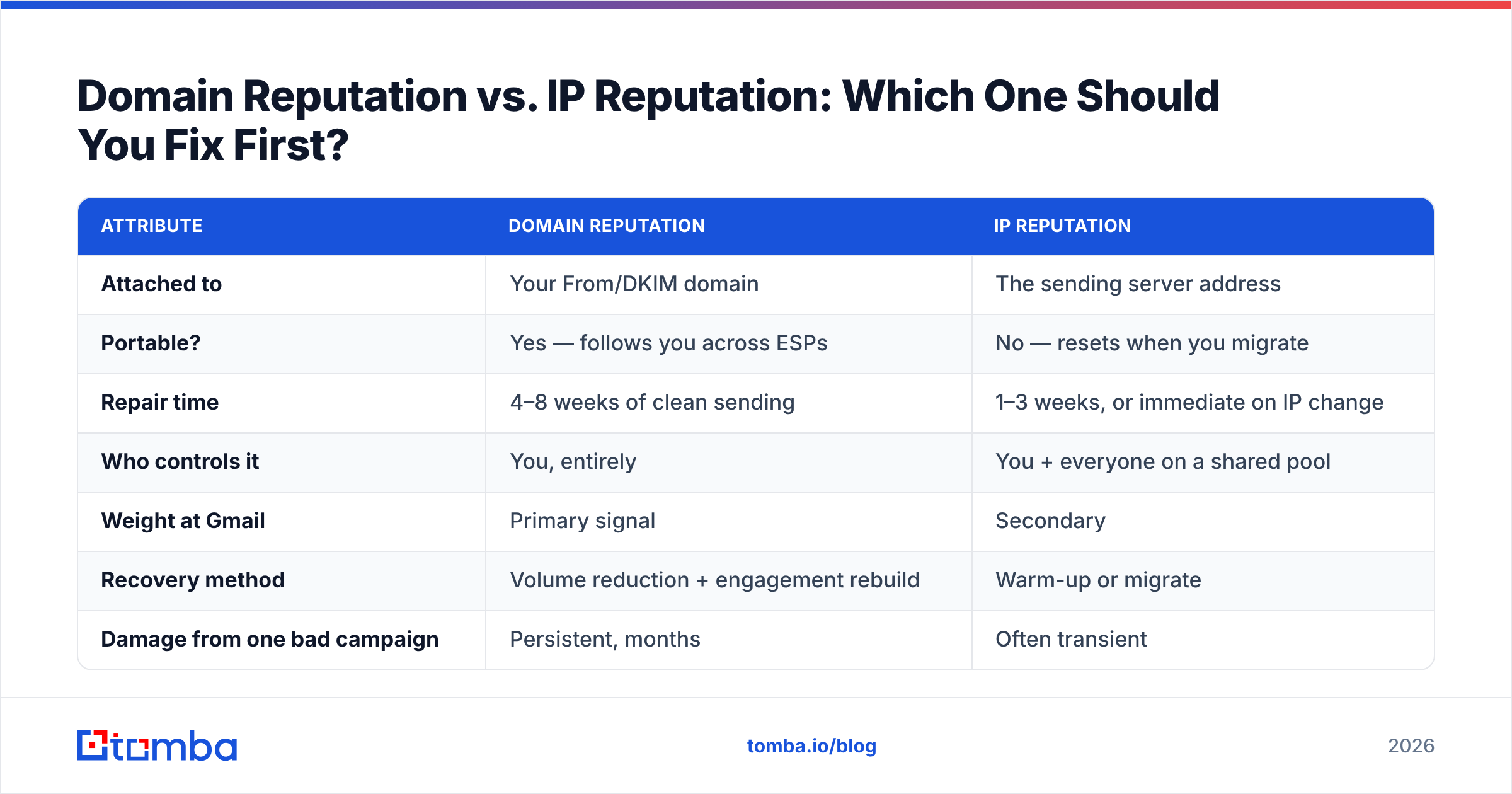
Domain Reputation vs. IP Reputation: Which One Should You Fix First?#
Domain, almost always. Here's the comparison that clarifies the tradeoff:
| Attribute | Domain reputation | IP reputation |
|---|---|---|
| Attached to | Your From/DKIM domain | The sending server address |
| Portable? | Yes — follows you across ESPs | No — resets when you migrate |
| Repair time | 4–8 weeks of clean sending | 1–3 weeks, or immediate on IP change |
| Who controls it | You, entirely | You + everyone on a shared pool |
| Weight at Gmail | Primary signal | Secondary |
| Recovery method | Volume reduction + engagement rebuild | Warm-up or migrate |
| Damage from one bad campaign | Persistent, months | Often transient |
The asymmetry matters: you can escape a bad IP by switching providers, but a burned root domain follows your brand into every future campaign. This is precisely why serious outbound teams send cold email from a separate domain (getcompany.com, not company.com) — the root domain that carries your invoices, support tickets, and password resets should never be the one absorbing cold-outreach complaints.
If you're on Google Workspace, Microsoft 365, or a standard ESP tier, your IP is shared with thousands of senders and your individual influence on it is negligible. Spend your effort on domain and list.
How Do You Fix a Damaged Email Reputation?#
Repair is a sequence, not a checklist you can shuffle. Doing step 4 before step 1 is why most recovery attempts stall.
Step 1 — Stop the bleeding. Pause all cold campaigns from the affected domain. Continuing to send while reputation is Low or Bad deepens the hole. Keep transactional and reply-thread mail flowing; that's the engagement you'll rebuild on.
Step 2 — Clean the list at the source. Remove every hard bounce, every role account (info@, sales@, admin@), every address older than 12 months without engagement, and every unresolvable catch-all you can't confirm. Catch-all domains accept everything and confirm nothing, which is why a dedicated catch-all verifier matters more than generic syntax checking — a syntax-valid address on a catch-all domain can still be a trap.
Step 3 — Fix authentication properly. SPF under the 10-lookup limit. DKIM at 2048-bit. DMARC published and monitored, moving from p=none to p=quarantine once reports are clean. Add a branded tracking domain (links.yourbrand.com) so your click URLs inherit your reputation instead of a shared redirect pool's.
Step 4 — Ramp back slowly. Start at 10–20 messages per day per mailbox to your most engaged segment only. Increase roughly 30% weekly. Reaching 200/day from zero takes about six weeks — accept it. Compressing the ramp restarts the damage.
Step 5 — Rebuild the engagement signal. Target recipients likely to reply, not just open. Ask a question in the first email. Shorter messages get more replies, and replies are the strongest positive signal in the system. HubSpot's ongoing email marketing benchmark research consistently shows engagement-segmented sends outperforming full-list blasts by wide margins on every downstream metric.
Step 6 — Monitor weekly, not quarterly. Postmaster's domain reputation chart moves in days. Catching a drop from High to Medium in week one is a two-week fix; catching it in month three is a two-month fix.
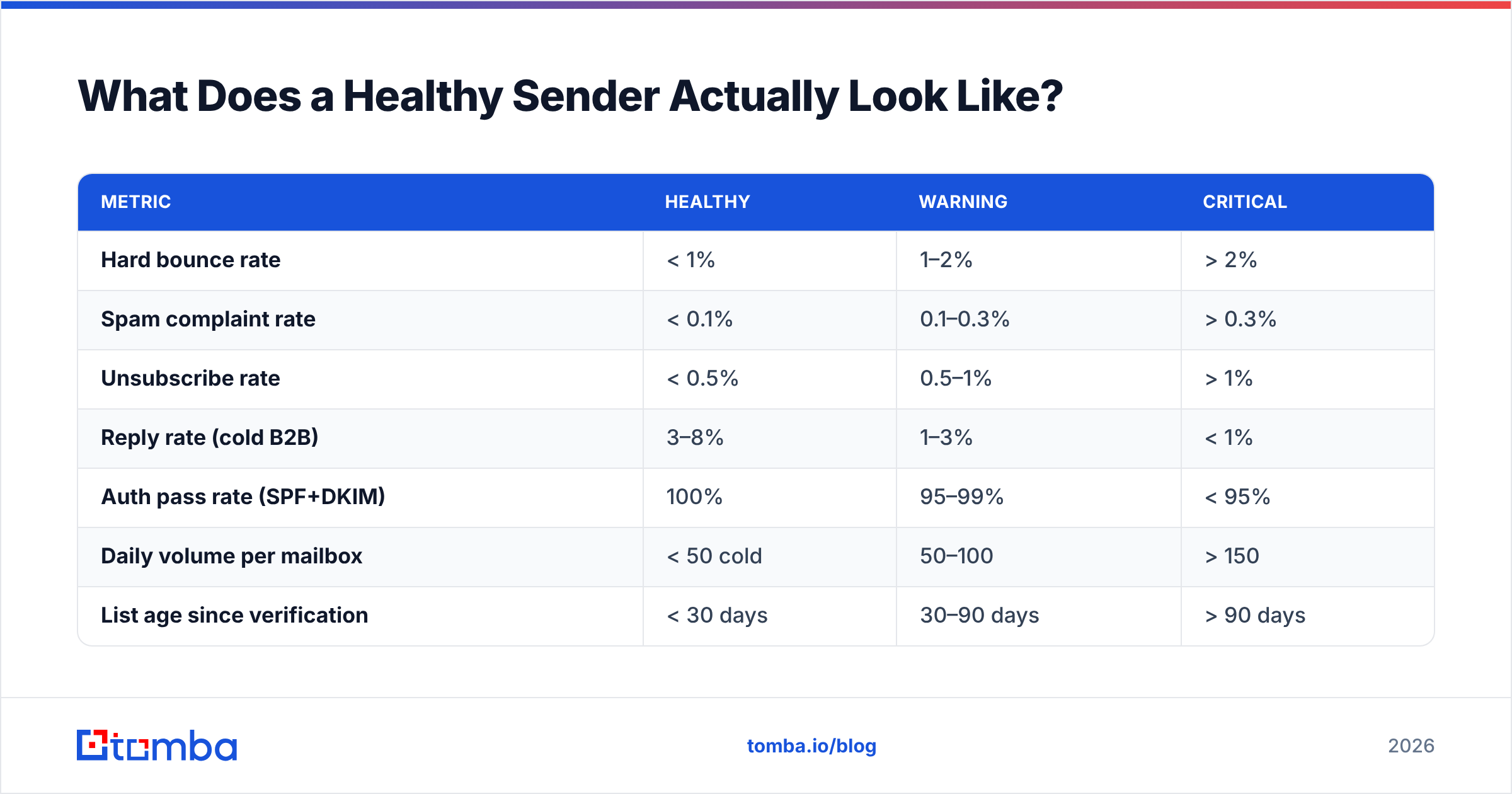
What Does a Healthy Sender Actually Look Like?#
Benchmarks worth measuring yourself against, drawn from what consistently correlates with High domain reputation:
| Metric | Healthy | Warning | Critical |
|---|---|---|---|
| Hard bounce rate | < 1% | 1–2% | > 2% |
| Spam complaint rate | < 0.1% | 0.1–0.3% | > 0.3% |
| Unsubscribe rate | < 0.5% | 0.5–1% | > 1% |
| Reply rate (cold B2B) | 3–8% | 1–3% | < 1% |
| Auth pass rate (SPF+DKIM) | 100% | 95–99% | < 95% |
| Daily volume per mailbox | < 50 cold | 50–100 | > 150 |
| List age since verification | < 30 days | 30–90 days | > 90 days |
That last row is the one teams skip. B2B contact data decays at roughly 25–30% per year — people change jobs, companies restructure, domains consolidate. A list verified nine months ago is not a verified list. Re-verification before every major send is cheaper than reputation repair by an order of magnitude, and bulk verification makes it a batch job rather than a project.
Is a Free Email Reputation Check Enough?#
For diagnosis, yes. Postmaster Tools, SNDS, a blacklist sweep, and a free reputation checker will tell you what is wrong at zero cost. Free tiers are genuinely sufficient to identify whether you have an authentication problem, a list problem, or a volume problem.
For prevention, no. The failure mode of free tools is that they're reactive — they describe damage after it has already registered with mailbox providers, and by then you're on a multi-week repair timeline. Prevention means the addresses never enter your sequencer unverified in the first place, which requires verification wired into your acquisition flow via API or CRM integration rather than run as an occasional cleanup.
The cost math is straightforward. Verifying 10,000 addresses on a mid-tier plan runs well under a hundred dollars. A burned domain costs you six weeks of pipeline plus the price of buying, warming, and authenticating a replacement — and every sequence in flight dies in the meantime.
Where Should You Start?#
Run the five-minute version today: check Postmaster Tools for your domain reputation trend, sweep your sending domain and IP against the major blacklists, and verify a 500-address sample of whatever list you're about to mail. If the sample comes back above 95% valid and Postmaster shows High or Medium with a spam rate under 0.1%, your problem is copy or targeting — not reputation. If it doesn't, you now know exactly which of the four layers to fix, and in what order.
The durable fix is upstream. Reputation problems are overwhelmingly data problems that surfaced late, which means the highest-leverage change is sourcing verified contacts instead of cleaning unverified ones after the fact. Tomba Email Finder returns addresses with a confidence score and SMTP-level validation at the moment you find them, so the list that enters your sequencer is already clean — no separate scrub step, no bounce spike, no reputation recovery sprint. The free tier covers 25 searches a month to test it against your own domains; paid plans start at $49/mo when you're ready to run it at list scale. Check your reputation this week, then build the workflow that means you rarely have to check it again.
Related guides#
// get started
Find, verify and enrich your first contacts today
Start on the free plan with 25 searches a month, then scale when your team is ready.
Free plan · No credit card required · GDPR & CCPA
// about the author