Email Sales Automation in 2026: A Practical Playbook
Most automated email programs fail at the data layer, not the copy layer. Here's what to automate, what to keep manual, and what the whole stack actually costs in 2026.
TL;DR
- Email sales automation is not "send more email." It's removing the manual steps between a trigger and a relevant message — list building, enrichment, verification, sequencing, routing, and logging.
- The failure point in most stacks is data, not copy. A sequence built on a 25% invalid list burns your domain before anyone reads the second touch.
- Automate research, verification, sending logic, and CRM sync. Keep first-line personalization, objection handling, and pricing conversations human.
- A working 2026 stack costs roughly $150–$400/month for a small team: a data source, a verifier, a sending tool, and a CRM. You do not need a $2,000/month platform to start.
- Volume caps matter more than they did in 2023. Google and Yahoo's bulk-sender rules mean sending 3,000 unverified emails a day is now an account-ending move, not a growth tactic.
What is email sales automation, really?#
Email sales automation is the practice of letting software handle the repeatable parts of an outbound or lifecycle email motion, so a rep only spends time on the parts that need judgment.
Think of it like a restaurant kitchen. Prep — chopping, stock, mise en place — happens before service and gets systematized. The dish itself still gets plated by a person who tastes it. Automation is your prep station: finding the contact, checking the address is real, deciding which sequence they belong in, stopping the sequence when they reply, and writing it all to the CRM. The judgment calls — what to say to a VP of Engineering at a Series B company who just posted about migration pain — stay with the human.
Most teams get this backwards. They automate the message (AI writes 500 variants) and manually handle the data (someone copy-pastes from LinkedIn into a spreadsheet). That's the expensive half automated wrong.
A modern stack has five layers:
- Trigger layer — what makes a contact enter a sequence. A job change, a funding round, a demo no-show, a website visit, a list import.
- Data layer — turning a name and company into a deliverable address, plus firmographic and role context. This is where data enrichment and email verification live.
- Sending layer — the sequencer: inboxes, throttling, A/B splits, reply detection, unsubscribe handling.
- Routing layer — what happens on reply. Round-robin to reps, alert in Slack, create a deal, or push to a nurture track.
- Measurement layer — reply rate, positive reply rate, meetings booked, and the deliverability signals that predict when the whole thing is about to break.
Skip layer two and layers three through five produce confident-looking dashboards full of noise.
Which parts of the process should you automate — and which shouldn't you?#
Here's the honest split, based on where automation reliably improves output versus where it quietly destroys it.
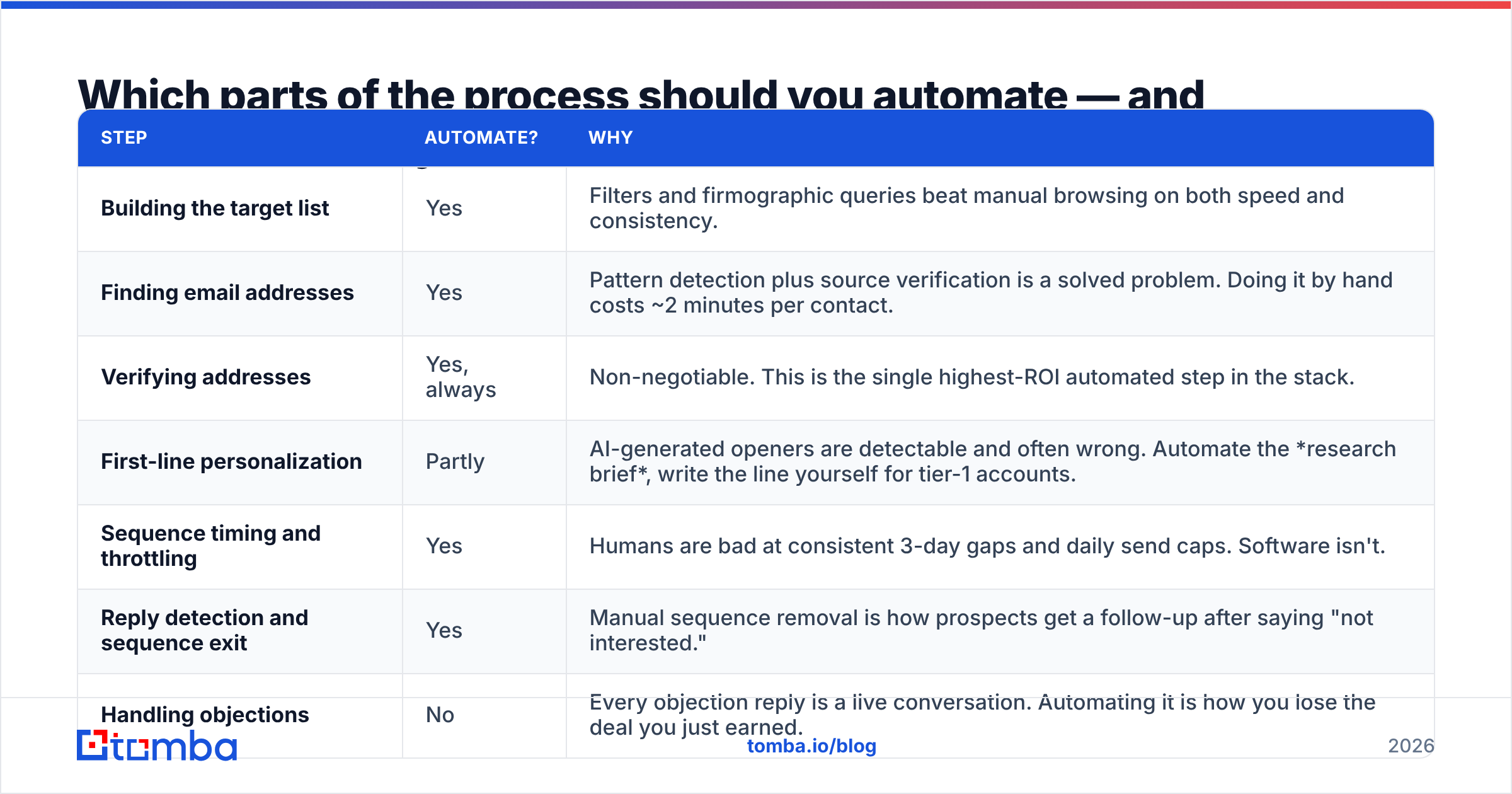
| Step | Automate? | Why |
|---|---|---|
| Building the target list | Yes | Filters and firmographic queries beat manual browsing on both speed and consistency. |
| Finding email addresses | Yes | Pattern detection plus source verification is a solved problem. Doing it by hand costs ~2 minutes per contact. |
| Verifying addresses | Yes, always | Non-negotiable. This is the single highest-ROI automated step in the stack. |
| First-line personalization | Partly | AI-generated openers are detectable and often wrong. Automate the research brief, write the line yourself for tier-1 accounts. |
| Sequence timing and throttling | Yes | Humans are bad at consistent 3-day gaps and daily send caps. Software isn't. |
| Reply detection and sequence exit | Yes | Manual sequence removal is how prospects get a follow-up after saying "not interested." |
| Handling objections | No | Every objection reply is a live conversation. Automating it is how you lose the deal you just earned. |
| Pricing and negotiation email | No | Same reason. |
| CRM logging | Yes | Reps under-log by roughly half. Sync it or accept a fictional pipeline. |
| Deciding who to target next quarter | No | This is strategy, not a workflow. |
The pattern: automate anything that is deterministic and repetitive; keep anything where being wrong costs you the relationship.
Why does the data layer break most automated email programs?#
Because bounce rate is a compounding tax, and automation multiplies the mistake.
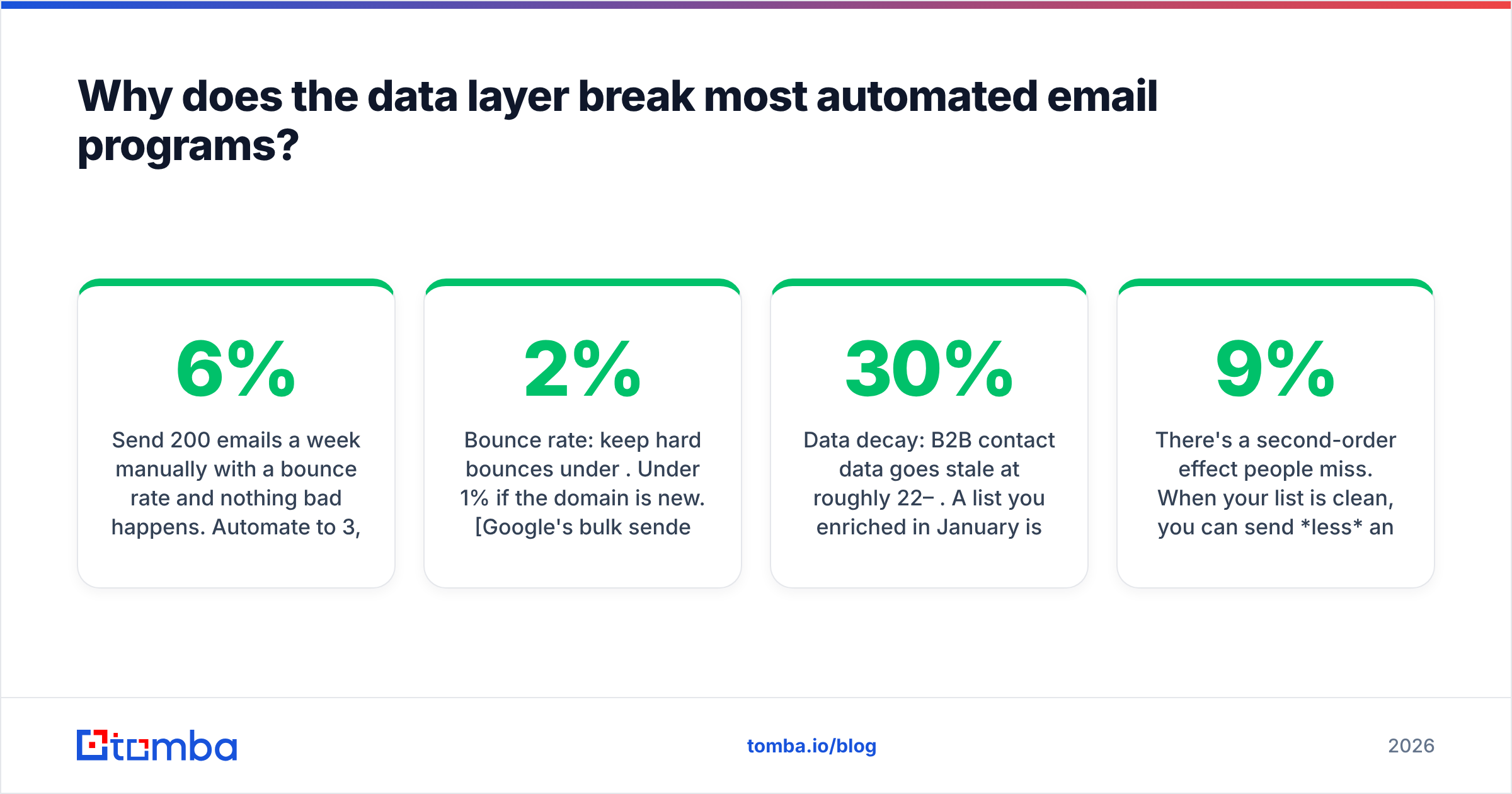
Send 200 emails a week manually with a 6% bounce rate and nothing bad happens. Automate to 3,000 a week at the same 6% and you're generating 180 hard bounces weekly against a domain that has no sending history. Mailbox providers read that as list-buying behavior. Your inbox placement drops, your open rate looks like it halves overnight, and the team blames the subject line.
The thresholds that matter in 2026:
- Bounce rate: keep hard bounces under 2%. Under 1% if the domain is new. Google's bulk sender requirements set the spam-complaint ceiling at 0.3%, and bounces correlate directly with complaints.
- Catch-all domains: roughly a quarter of B2B domains accept everything at the SMTP layer, which means a standard verifier returns "unknown." A catch-all verifier resolves a large share of those instead of forcing you to guess.
- Role addresses:
info@,sales@,support@. High complaint rate, near-zero reply rate. Filter them before they enter a sequence, not after. - Data decay: B2B contact data goes stale at roughly 22–30% per year. A list you enriched in January is measurably worse by June. Re-verify before every major campaign, not once at import.
The practical rule: verification is not a one-time import step. It's a scheduled job. Run a bulk verify against any segment older than 90 days before it re-enters a sequence.
There's a second-order effect people miss. When your list is clean, you can send less and get more. A verified 800-contact list with a 9% reply rate produces more meetings than a 4,000-contact list with a 1.2% reply rate — and it doesn't put your domain at risk. Volume was a viable strategy when inbox filters were dumber. It isn't now.
What does a functional automated sequence look like?#
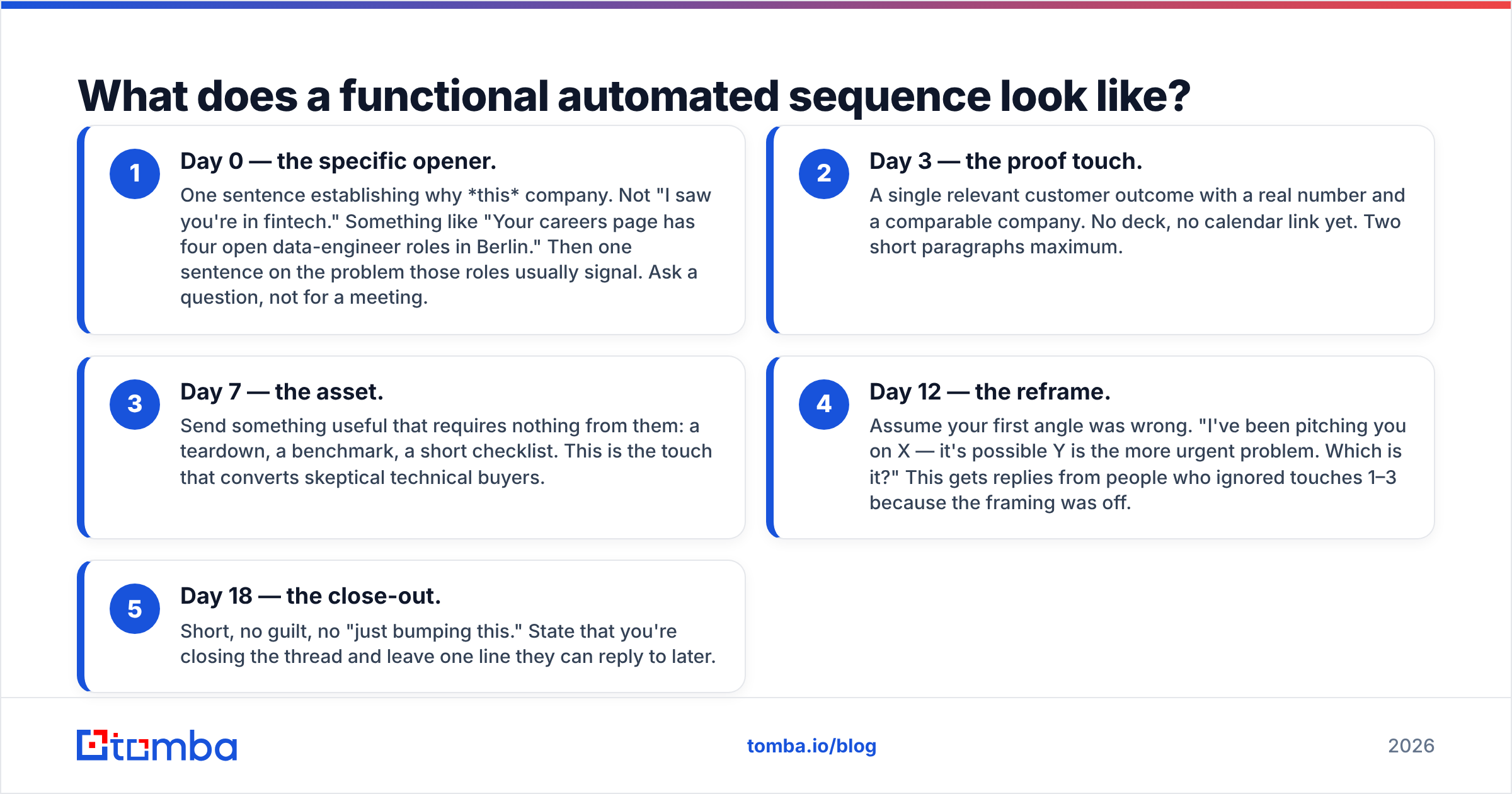
Concrete structure, not theory. This is a five-touch B2B sequence over 18 days that assumes a verified list and a warmed domain.
- Day 0 — the specific opener. One sentence establishing why this company. Not "I saw you're in fintech." Something like "Your careers page has four open data-engineer roles in Berlin." Then one sentence on the problem those roles usually signal. Ask a question, not for a meeting.
- Day 3 — the proof touch. A single relevant customer outcome with a real number and a comparable company. No deck, no calendar link yet. Two short paragraphs maximum.
- Day 7 — the asset. Send something useful that requires nothing from them: a teardown, a benchmark, a short checklist. This is the touch that converts skeptical technical buyers.
- Day 12 — the reframe. Assume your first angle was wrong. "I've been pitching you on X — it's possible Y is the more urgent problem. Which is it?" This gets replies from people who ignored touches 1–3 because the framing was off.
- Day 18 — the close-out. Short, no guilt, no "just bumping this." State that you're closing the thread and leave one line they can reply to later.
Automation handles the timing, the sending, the reply-detection exit, and the CRM write. You handle sentence one of touch one and every reply after that.
Three configuration details that matter more than the copy:
- Send from a secondary domain. Never run cold outbound from your primary corporate domain. Buy a lookalike, warm it for three to four weeks, and cap it at 30–50 sends per inbox per day.
- Plain text, no tracking pixels on cold. Open tracking inflates your spam score and, since Apple Mail Privacy Protection, produces open-rate data that's largely fiction anyway. Track replies and meetings.
- One unsubscribe mechanism, honored instantly. List-Unsubscribe header plus a plain-text line. Automate the suppression list across every sending tool you use.
What should an email sales automation stack cost in 2026?#
The market has split into two tiers: all-in-one platforms that bundle mediocre data with good sequencing, and specialist tools you assemble. Assembled stacks usually win on data quality and cost; bundles win on procurement simplicity.
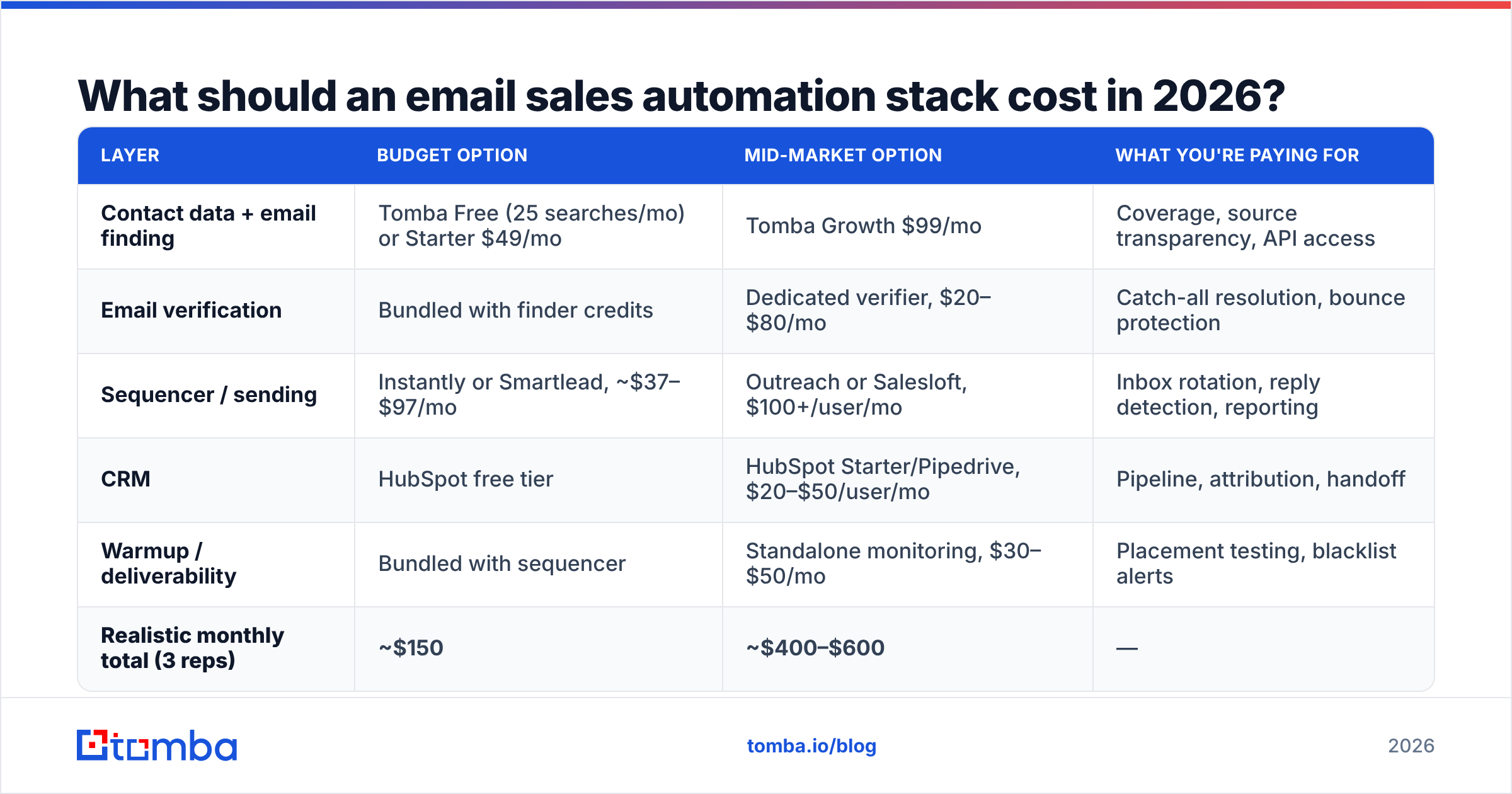
| Layer | Budget option | Mid-market option | What you're paying for |
|---|---|---|---|
| Contact data + email finding | Tomba Free (25 searches/mo) or Starter $49/mo | Tomba Growth $99/mo | Coverage, source transparency, API access |
| Email verification | Bundled with finder credits | Dedicated verifier, $20–$80/mo | Catch-all resolution, bounce protection |
| Sequencer / sending | Instantly or Smartlead, ~$37–$97/mo | Outreach or Salesloft, $100+/user/mo | Inbox rotation, reply detection, reporting |
| CRM | HubSpot free tier | HubSpot Starter/Pipedrive, $20–$50/user/mo | Pipeline, attribution, handoff |
| Warmup / deliverability | Bundled with sequencer | Standalone monitoring, $30–$50/mo | Placement testing, blacklist alerts |
| Realistic monthly total (3 reps) | ~$150 | ~$400–$600 | — |
A few notes on this table. Tomba's pricing runs Free (25 searches/month), Starter $49/mo, Growth $99/mo, and Pro $249/mo, which covers the data layer for most teams under 20 reps. Enterprise sequencing platforms like Outreach and Salesloft justify their per-seat cost through forecasting and manager tooling, not through better sending — if you're a five-person team, you're buying features you won't configure. And a free HubSpot CRM tier handles pipeline for a small team indefinitely; upgrade when reporting becomes the bottleneck, not before.
The mistake worth naming: paying $1,200/month for a platform whose bundled contact database has 60% coverage in your segment, then paying again for a data vendor to fill the gaps. Check coverage against your actual ICP with a 100-row test before signing anything annual. Vendors will run that test for you if you ask.
How do you measure whether it's working?#
Four metrics, in priority order:
- Positive reply rate. Not reply rate — positive reply rate. A 12% reply rate where 10 points are "unsubscribe me" is a failing campaign that looks successful.
- Meetings booked per 100 verified contacts. This normalizes for list size and is the only number that maps cleanly to pipeline. Healthy B2B outbound lands between 1 and 4.
- Bounce rate per segment. Track it by data source and by list age. When one source degrades, you'll see it here first.
- Inbox placement, tested weekly. Not open rate. Run a seed-list placement test against Gmail, Outlook, and one corporate Microsoft 365 tenant. If placement drops below 80%, pause sending and fix deliverability before touching copy.
Everything else — opens, clicks, "engagement score" — is either unreliable post-MPP or downstream of these four.
Where should you start if you're building this from scratch?#
Start at the data layer, because every other layer's output is capped by it.
Pick 100 accounts in your best-performing segment. Run domain search to map the org and pull the verified contacts at the roles you sell to. Verify everything. Write one sequence, send it manually for two weeks so you can feel where the replies come from, then automate the timing and CRM sync once the copy has proven itself. Add volume last, and only after your bounce rate has held under 2% for a month.
Teams that build in the opposite order — buy the platform, import a purchased list, blast it — usually spend their first quarter recovering a burned domain instead of booking meetings.
Ready to fix the layer that actually breaks? Start with the Tomba Email Finder. The free tier gives you 25 searches a month to test coverage against your own ICP before you commit to anything — and every result runs through verification, so what enters your sequencer is what your prospects actually read. Build the data layer first; the rest of the stack gets easier from there.
Related guides#
Ready to find emails that actually work?
Join 150,000+ professionals who stopped guessing and started sending. Free credits on signup — no credit card required.
Get the Tomba newsletter
Practical outbound tactics and product updates — once every two weeks.
About the author