Email Scoring in 2026: How to Rank Leads Before You Send
Most teams verify emails and stop there. Email scoring goes further: it grades every address on deliverability risk and buyer fit, so you know what to send, what to hold, and what to delete.
TL;DR
- Email scoring is two jobs wearing one name: address risk scoring (will this email bounce, trap, or burn my domain?) and lead fit scoring (is this person worth a send at all?). Run both or you optimize the wrong number.
- A usable risk score combines syntax, MX/SMTP response, catch-all status, role-account detection, disposable-domain lists, and data freshness. No single signal is enough.
- Send at 90+, hold 70-89 for a warm secondary domain, and drop anything under 70. That one rule alone typically pulls bounce rates under 2%.
- Fit scoring belongs in your CRM, not your verifier. Score on firmographics, trigger events, and intent — then multiply by the risk score to get a send priority.
- Tools split into verifiers (scoring accuracy), finders (scoring confidence at discovery), and CRMs (scoring fit). The cheapest stack scores at discovery so you never pay to verify garbage.
What is email scoring?#
Email scoring is the practice of assigning a numeric grade — usually 0-100 — to an email address or a contact record, so you can decide programmatically whether to send, hold, or discard.
Think of it like a credit score for your send list. A bank doesn't decide "loan / no loan" from a single fact; it blends payment history, utilization, and account age into one number, then sets policy thresholds against that number. Email scoring works the same way: no single check tells you whether an address is safe and worth contacting, but a weighted blend of a dozen checks does.
Technically, most scoring engines produce a composite of independent validators. Syntax parsing, DNS/MX lookup, SMTP handshake result, catch-all detection, role-account pattern matching, disposable-domain lookup, and record age each contribute a weighted sub-score. The output is a number plus a status label (valid, accept-all, risky, invalid).
The confusion in the market is that "email scoring" gets used for three different things:
- Address quality scoring — probability the address exists and will accept mail.
- Lead fit scoring — probability this person matches your ICP and can buy.
- Engagement scoring — probability this person replies, based on past opens, clicks, and replies.
They are not interchangeable. A CFO at a perfect-fit company with a dead email scores 100 on fit and 0 on quality. Send to that record and you eat a hard bounce that costs you sender reputation across every campaign running from that domain.

Why does email scoring matter more in 2026 than it did in 2022?#
Because inbox providers moved from measuring volume to measuring intent quality, and they did it with enforcement teeth.
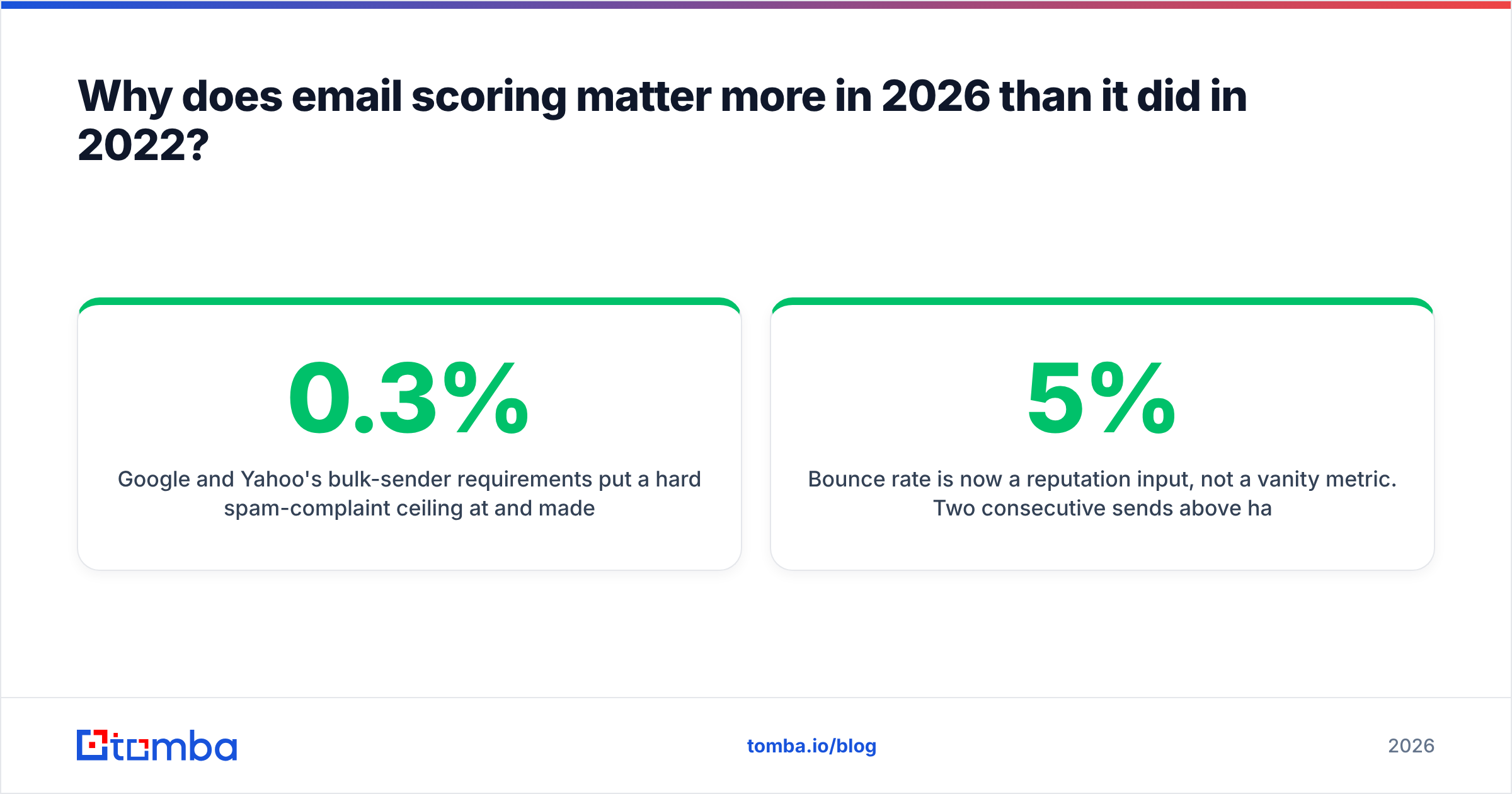
Google and Yahoo's bulk-sender requirements put a hard spam-complaint ceiling at 0.3% and made authentication non-negotiable. Microsoft followed with tighter throttling on unauthenticated and low-reputation senders. The practical effect: a list with 8% invalid addresses no longer just wastes credits — it actively suppresses delivery of the 92% that were good.
Three shifts made scoring mandatory rather than nice-to-have:
- Bounce rate is now a reputation input, not a vanity metric. Two consecutive sends above 5% hard bounce and mailbox providers start foldering you.
- Catch-all domains grew. A large share of mid-market B2B domains now accept all mail at the gateway, which means binary
valid/invalidverification returns "unknown" far more often than it used to. You need a probability, not a boolean. - AI-generated volume raised the noise floor. Providers compensate by weighting engagement harder. Sending to low-fit contacts who never reply drags your domain down even when every address is technically valid.
Read the current email deliverability baseline if you want the full provider-by-provider breakdown. The short version: scoring is now the cheapest insurance you can buy on an outbound program.
How is an email quality score actually calculated?#
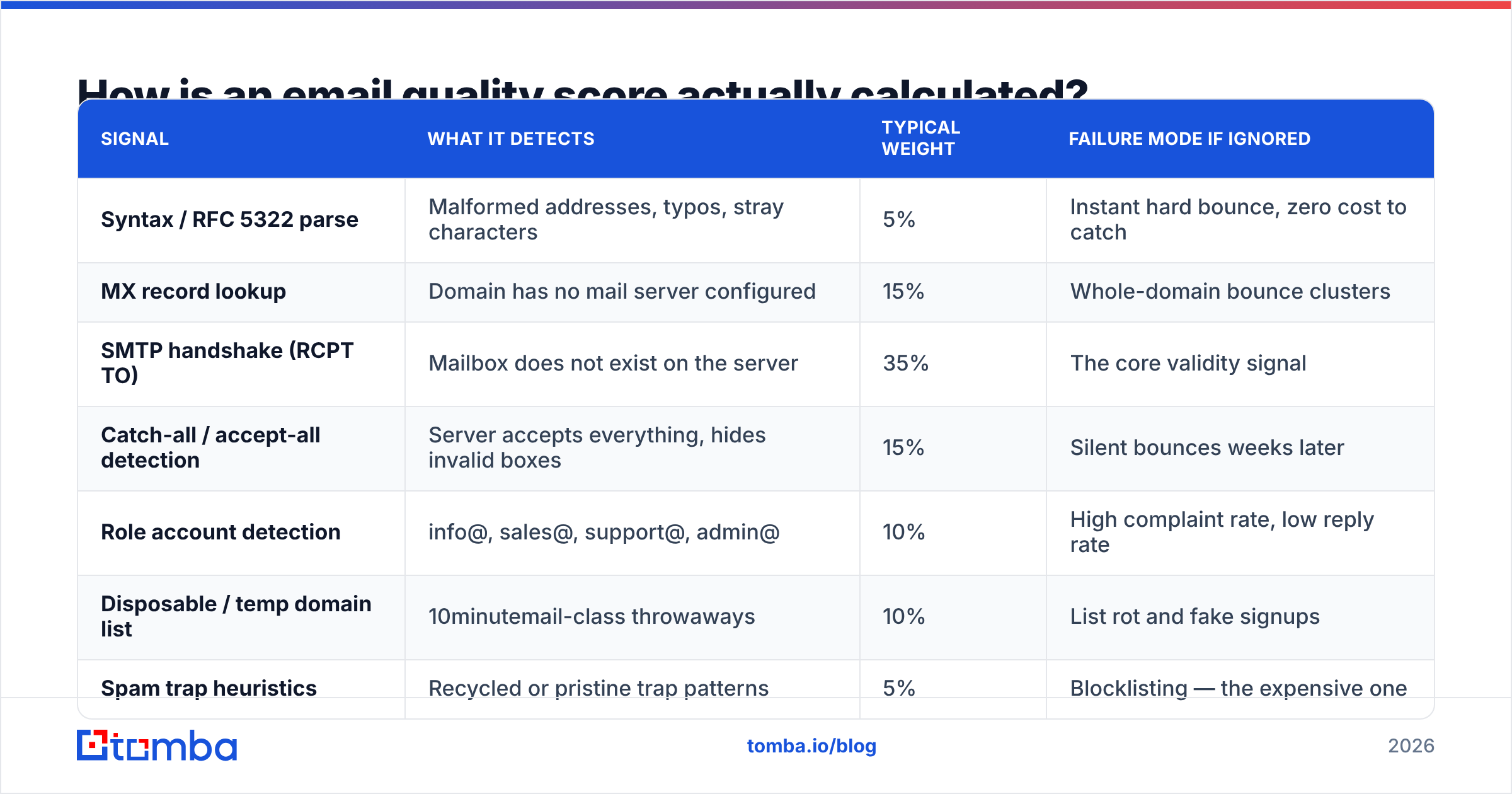
Every serious verifier runs the same family of checks. The differences are in weighting, in how they handle ambiguity, and in whether they penalize or reward unknowns.
| Signal | What it detects | Typical weight | Failure mode if ignored |
|---|---|---|---|
| Syntax / RFC 5322 parse | Malformed addresses, typos, stray characters | 5% | Instant hard bounce, zero cost to catch |
| MX record lookup | Domain has no mail server configured | 15% | Whole-domain bounce clusters |
| SMTP handshake (RCPT TO) | Mailbox does not exist on the server | 35% | The core validity signal |
| Catch-all / accept-all detection | Server accepts everything, hides invalid boxes | 15% | Silent bounces weeks later |
| Role account detection | info@, sales@, support@, admin@ | 10% | High complaint rate, low reply rate |
| Disposable / temp domain list | 10minutemail-class throwaways | 10% | List rot and fake signups |
| Spam trap heuristics | Recycled or pristine trap patterns | 5% | Blocklisting — the expensive one |
| Record freshness | Age since last confirmed activity | 5% | 22-30% annual B2B contact decay |
Two of those rows deserve extra attention.
Catch-all handling is where vendors diverge most. Some score every catch-all address a flat 50 and call it "risky." Others run pattern inference — comparing the address against the confirmed format for that domain, checking whether the person exists on LinkedIn or the company site, and checking whether that mailbox has appeared in verified data before. That second approach is what a dedicated catch-all verifier does, and it's the difference between throwing away 30% of a mid-market list and sending to it with a 90%+ hit rate.
Freshness is the most under-weighted signal in the industry. B2B contact data decays roughly 2.5% per month through job changes alone. An address verified valid 14 months ago is not a valid address today; it's a coin flip. Any scoring model that doesn't decay confidence over time is quietly lying to you.
What score threshold should you actually send at?#
Set policy against bands, not a single cutoff. Here's the framework that holds up across most B2B programs:
- 90-100 — Send from your primary domain. SMTP-confirmed, non-role, non-catch-all, verified within 90 days. Expected bounce under 1%.
- 80-89 — Send, but from a secondary sending domain. Usually catch-all addresses with strong pattern confirmation, or valid addresses verified 3-9 months ago. Expected bounce 1-3%.
- 70-79 — Hold for a low-volume warm sequence. Catch-all with weak inference, or role accounts at small companies where info@ genuinely reaches a human. Cap these at 10-15% of any daily send.
- 50-69 — Re-enrich before sending. Run these back through discovery to find a better address for the same person rather than gambling on this one.
- Below 50 — Suppress permanently. Add to a global do-not-send list so no future import resurrects them.
The mistake most teams make is treating the threshold as a global constant. It isn't. If your domain is three weeks old and still warming, run 95+ only. If you've got a five-year-old domain with a strong reply history, you can absorb the 80-89 band on the primary. Match the threshold to the reputation you can afford to spend.
How do address scoring and lead scoring fit together?#
Multiply them. Then sort descending. That's the entire model.
Send Priority = Address Score (0-100) × Fit Score (0-100) / 100
A perfect-fit CMO with a 55-point address scores 55. A mediocre-fit manager with a 98-point address scores 49 at an 50 fit. The perfect-fit contact still ranks higher — but the math tells you the real move: go re-find that CMO's address instead of sending to the weak one.
Fit scoring itself is a separate discipline, and HubSpot's lead scoring documentation is a solid starting point for the mechanics. The inputs that carry most of the weight in B2B:
- Firmographic match — employee count, revenue band, industry, geography, tech stack. Static, easy, and the biggest single filter.
- Role seniority and function — does this person own the budget line your product touches, or do they merely influence it?
- Trigger events — funding round, new hire in the target role, office expansion, competitor churn signal. These decay fast; weight them heavily for 30 days, then drop them.
- Behavioral intent — site visits, pricing-page views, content downloads, review-site activity on G2. Highest predictive value, lowest coverage.
- Negative signals — existing customer, active opportunity, competitor employee, previously unsubscribed. These should zero the score, not reduce it.
Keep fit scoring in the CRM and address scoring in the data layer. Teams that try to jam both into one tool end up with a score nobody trusts because nobody can explain what moved it.

Which tools do email scoring best?#
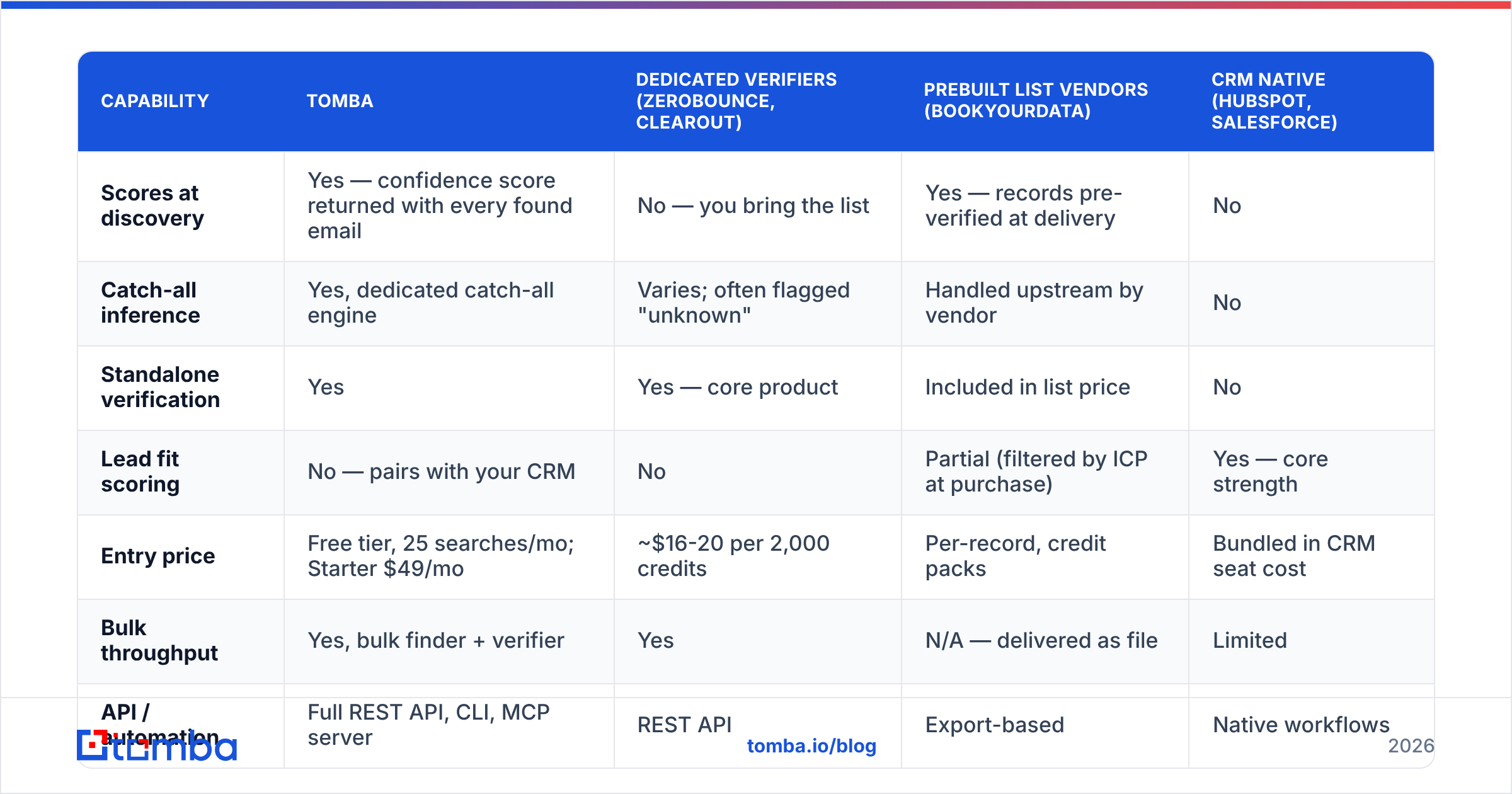
The category splits three ways, and the right answer depends on where in the funnel you want scoring to happen.
| Capability | Tomba | Dedicated verifiers (ZeroBounce, Clearout) | Prebuilt list vendors (BookYourData) | CRM native (HubSpot, Salesforce) |
|---|---|---|---|---|
| Scores at discovery | Yes — confidence score returned with every found email | No — you bring the list | Yes — records pre-verified at delivery | No |
| Catch-all inference | Yes, dedicated catch-all engine | Varies; often flagged "unknown" | Handled upstream by vendor | No |
| Standalone verification | Yes | Yes — core product | Included in list price | No |
| Lead fit scoring | No — pairs with your CRM | No | Partial (filtered by ICP at purchase) | Yes — core strength |
| Entry price | Free tier, 25 searches/mo; Starter $49/mo | ~$16-20 per 2,000 credits | Per-record, credit packs | Bundled in CRM seat cost |
| Bulk throughput | Yes, bulk finder + verifier | Yes | N/A — delivered as file | Limited |
| API / automation | Full REST API, CLI, MCP server | REST API | Export-based | Native workflows |
| Best for | Teams building lists from scratch | Cleaning an inherited list | Fast, ICP-filtered list acquisition | Scoring inbound behavior |
A few honest notes on this table.
Dedicated verifiers are excellent at the one job they do. If you've inherited a 400,000-record list of unknown provenance, a bulk verifier is the correct first purchase. What they can't do is prevent the problem — they clean up after bad discovery.
BookYourData and similar list vendors solve a different problem well. When you need 5,000 ICP-filtered contacts by Friday and you don't have a research team, buying a pre-verified, ICP-filtered list is faster and often cheaper than building it. Their records arrive scored and cleaned, which removes an entire step. The trade-off is that you're buying a snapshot — freshness starts decaying the day it lands, so re-score before any second send 90+ days later.
Scoring at discovery is the structural advantage. If your finder returns a confidence score with every result, you never pay verification credits on addresses that were never going to survive. Tomba's email finder returns a confidence figure alongside each address, and the email verifier handles the standalone-list case. Full plan breakdown is on the Tomba pricing page — the free tier covers 25 searches a month, which is enough to sanity-check the scoring model against a list you already know the answers to.
What are the most common email scoring mistakes?#
Treating "catch-all" as "invalid." This is the single most expensive default in the industry. Catch-all domains are disproportionately mid-market and enterprise — exactly the accounts you want. Blanket-suppressing them can delete a third of your addressable list. Score them with pattern inference instead.
Never re-scoring. A score is a timestamped claim, not a permanent property. Re-verify anything older than 90 days before it enters a sequence. Use a bulk verify run as a scheduled job, not a one-time cleanup project.
Scoring after import instead of before. If bad records reach the CRM, they get reported on, forecasted against, and re-exported into new campaigns forever. Score at the boundary.
Optimizing bounce rate to zero. A 0% bounce rate means you're over-suppressing and leaving real prospects unsent. Target under 2%, not zero. The last 2% costs more in lost coverage than it saves in reputation.
Using one threshold across every sending domain. New domains, warmed domains, and transactional domains have completely different risk tolerances. One global cutoff is either too loose for the new domain or too tight for the old one.
Ignoring role accounts entirely. At companies under 20 people, info@ and hello@ frequently reach the founder. Score them low, but don't zero them — segment them into a separate, lower-volume track.
How do you implement email scoring without rebuilding your stack?#
Start with four steps, in this order:
- Score at discovery. Whatever tool finds your emails should return a confidence value. Store it as a field on the record from day one.
- Set band policy in writing. Document the send/hold/drop thresholds and which domain each band sends from. Put it in the same doc as your sequence rules so nobody has to guess.
- Add a decay job. A weekly script that drops stored confidence by ~0.6% per week since last verification, and flags anything crossing below 70 for re-verification. Ten lines of code, enormous payoff.
- Multiply by fit at send time. Pull the CRM fit score, multiply, sort, and send top-down. This puts your best sending capacity against your best combined records automatically.
If you're automating this, the Tomba API returns both the address and its confidence score in a single call, so steps 1 and 4 can live in the same webhook. For teams that want the scoring layer inside an existing workflow rather than a new dashboard, the integrations cover the usual CRM and automation suspects.
Ready to score before you send?#
Stop paying for verification credits on addresses that were never going to work. Tomba Email Finder returns a confidence score with every address it finds, so scoring happens at discovery instead of cleanup — and the free tier gives you 25 searches a month to test the model against a list where you already know the ground truth. Start there, set your bands, and let the math decide what ships.
Related guides#
Ready to find emails that actually work?
Join 150,000+ professionals who stopped guessing and started sending. Free credits on signup — no credit card required.
Get the Tomba newsletter
Practical outbound tactics and product updates — once every two weeks.
About the author