Email Scraper Guide 2026: Tools, Legality, and Accuracy
Email scrapers still pull thousands of addresses in minutes — and most of them bounce. Here's what scraping actually delivers in 2026, where it's legal, and when a verified email finder beats it outright.
TL;DR
- An email scraper extracts addresses that already exist in public HTML — websites, directories, PDFs, social bios. It does not predict or verify anything.
- Scraped lists typically land somewhere between 40% and 70% deliverable before cleaning. The gap between "collected" and "usable" is where most cold email programs quietly die.
- Scraping public pages is generally lawful in the US and EU; emailing what you scraped is governed by GDPR, CAN-SPAM, CASL and PECR, and those rules are stricter than the scraping itself.
- Generic scrapers (Octoparse, PhantomBuster, browser extensions) win on breadth. Email finders and B2B databases win on hit rate, role targeting, and verification.
- The realistic 2026 stack is hybrid: scrape for discovery, then run everything through a real email verifier before a single send.
What is an email scraper?#
An email scraper is a program that fetches web pages and pulls out anything matching an email pattern. That's the whole idea. Think of it as a metal detector on a beach: it beeps at anything metallic, and you're the one who has to decide whether it's a coin or a bottle cap.
Concretely, a scraper does four things:
- Crawls a list of URLs — a domain, a directory category, a set of LinkedIn profiles, a Google Maps result page.
- Renders the page (headless browsers are now standard, because half the web ships contact details via JavaScript).
- Extracts strings matching an email regex, plus nearby context — names, job titles, phone numbers.
- Exports to CSV, Sheets, or an API endpoint.
What it does not do: confirm the mailbox exists, tell you whether info@ is a human, detect a catch-all domain, or check whether the person left the company eighteen months ago. Those are separate problems, and they're the expensive ones.
That distinction matters more than any tool comparison. Web scraping is a collection technique. Email deliverability is a data-quality discipline. Confusing the two is why so many teams burn a sending domain in week three.
How does an email scraper actually work?#
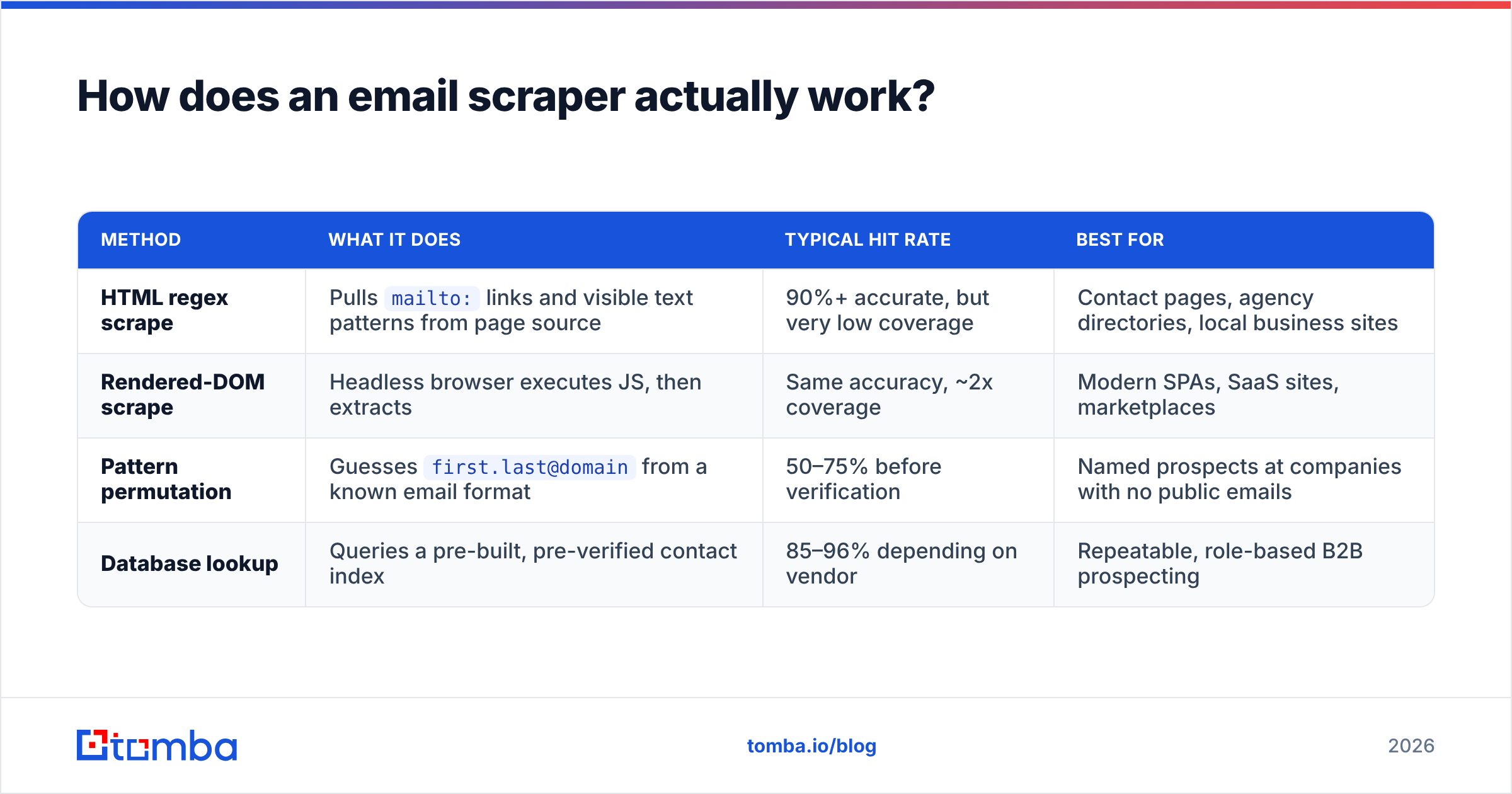
Under the hood, most tools sit on one of four extraction strategies, and each one has a very different accuracy profile.
| Method | What it does | Typical hit rate | Best for |
|---|---|---|---|
| HTML regex scrape | Pulls mailto: links and visible text patterns from page source |
90%+ accurate, but very low coverage | Contact pages, agency directories, local business sites |
| Rendered-DOM scrape | Headless browser executes JS, then extracts | Same accuracy, ~2x coverage | Modern SPAs, SaaS sites, marketplaces |
| Pattern permutation | Guesses first.last@domain from a known email format |
50–75% before verification | Named prospects at companies with no public emails |
| Database lookup | Queries a pre-built, pre-verified contact index | 85–96% depending on vendor | Repeatable, role-based B2B prospecting |
The first two are what people mean by "email scraper." The last two are what actually powers a modern email finder. Most commercial tools now blend all four and call the result "scraping," which muddies the comparison badly.
Here's the practical consequence: a pure HTML scraper pointed at 1,000 SaaS company websites might return 180 emails, and 160 of them will be hello@, support@, or press@. Those are inboxes, not people. Your reply rate on generic aliases sits well under 1% in most B2B categories, and they're disproportionately likely to be spam traps.
Is an email scraper legal in 2026?#
Short answer: collecting public data is usually fine, sending to it is where you get in trouble. Long answer has three layers.
Layer 1 — the scraping itself. Courts in the US have repeatedly declined to treat scraping publicly accessible pages as unauthorized access under the CFAA. In the EU there is no blanket prohibition on collecting public information either. But terms of service still bind you contractually, and platforms like LinkedIn actively enforce theirs with account bans and litigation. Scraping a site that explicitly forbids it isn't a criminal matter in most jurisdictions; it can still cost you your account and your reputation.
Layer 2 — storing the data. Under GDPR, a work email tied to a named person is personal data. You need a lawful basis, and for B2B outbound that's normally legitimate interest. That basis is not automatic. It requires a documented balancing test, a clearly stated source of data, and a working opt-out. Scraping 200,000 addresses and storing them with no provenance record fails this test immediately.
Layer 3 — sending. This is where the rules genuinely bite:
- CAN-SPAM (US) — no consent required, but you need accurate headers, a physical address, and a functioning unsubscribe.
- GDPR + PECR (EU/UK) — legitimate interest works for corporate role-holders; sending to
firstname.lastname@sole-trader.co.ukis treated much more like B2C. - CASL (Canada) — the strictest of the three. Implied consent has narrow, time-limited conditions.
The compliance takeaway is boring but real: keep a per-record note of where each address came from and when. Most scrapers don't store that. Enterprise data vendors do, and it's a large part of what you're paying for. If you want the definitions in plain language, Tomba's B2B glossary covers the terms most teams get wrong.
Email scraper vs email finder: which one should you use?#
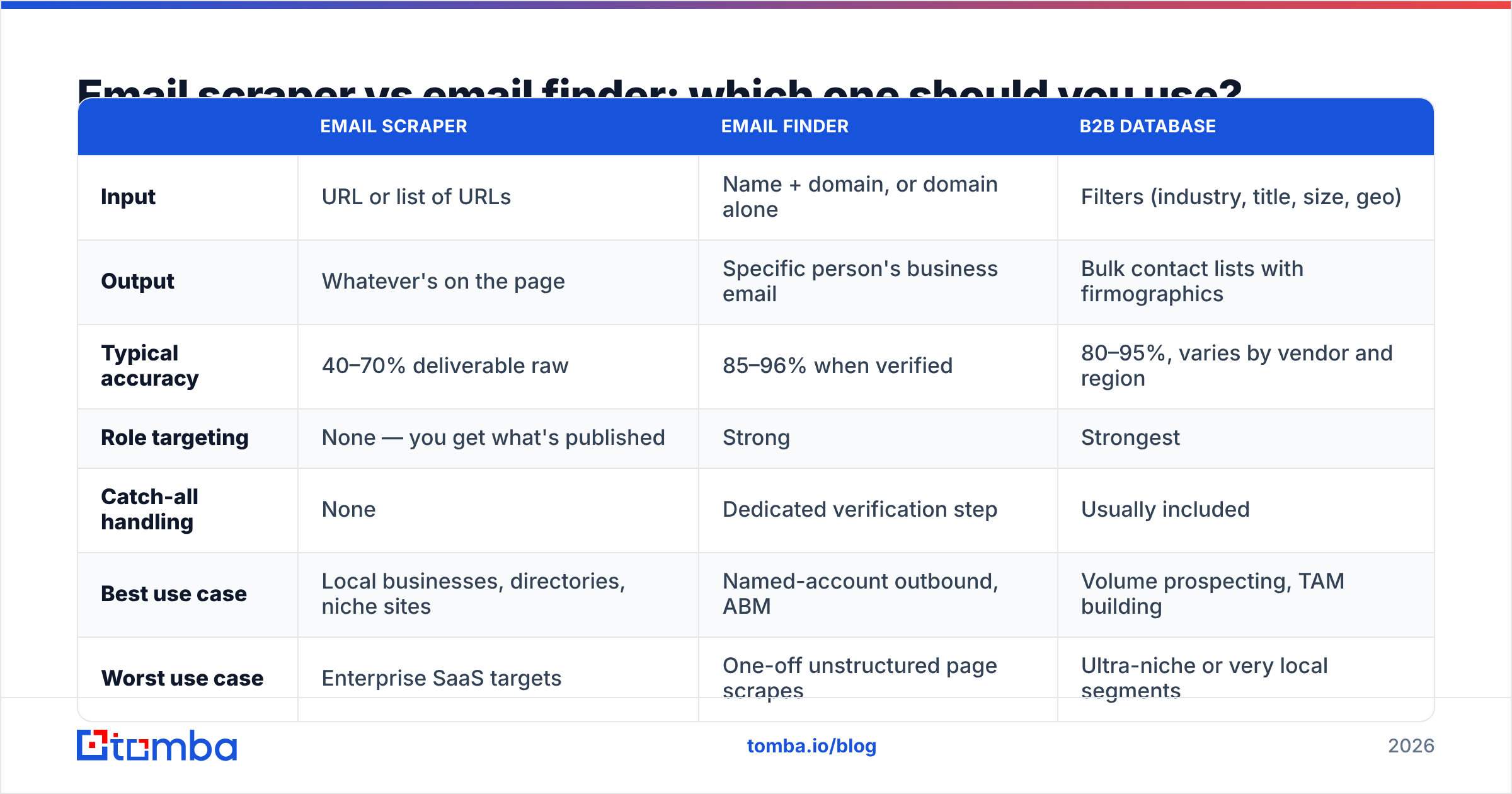
They solve adjacent problems. Choosing wrong wastes months.
| Email scraper | Email finder | B2B database | |
|---|---|---|---|
| Input | URL or list of URLs | Name + domain, or domain alone | Filters (industry, title, size, geo) |
| Output | Whatever's on the page | Specific person's business email | Bulk contact lists with firmographics |
| Typical accuracy | 40–70% deliverable raw | 85–96% when verified | 80–95%, varies by vendor and region |
| Role targeting | None — you get what's published | Strong | Strongest |
| Catch-all handling | None | Dedicated verification step | Usually included |
| Best use case | Local businesses, directories, niche sites | Named-account outbound, ABM | Volume prospecting, TAM building |
| Worst use case | Enterprise SaaS targets | One-off unstructured page scrapes | Ultra-niche or very local segments |
Use a scraper when the emails are genuinely published and you're targeting long-tail businesses — restaurants, clinics, contractors, regional agencies. Those sites list real addresses because they want to be contacted.
Use a finder when you know who you want to reach and their company doesn't publish anything. A domain search returns the company's verified email pattern plus known contacts, which beats guessing from a homepage that lists nothing but a contact form.
Use a database when you need repeatable volume with firmographic filters and you'd rather buy provenance than build it.
Why do scraped email lists bounce so hard?#
Because scraping captures a moment in time, and B2B contact data decays at roughly 22–30% per year. Job changes, domain migrations, alias retirements, mergers. A page you scraped in January is measurably wrong by June.

Four failure modes account for most of the damage:
- Role aliases counted as leads.
info@,admin@,sales@. They technically deliver, so they never show as bounces — they just never reply, and they inflate your "valid" percentage. - Catch-all domains. The server accepts everything, so naive verification marks every guessed address as valid. Send to 500 of them and you'll find out the hard way. A dedicated catch-all verifier is the only reliable check here.
- Spam traps in old directories. Abandoned addresses get recycled as traps by blocklist operators. Scraped directory data is one of the highest-risk sources.
- Encoded and obfuscated addresses. Cloudflare email obfuscation, image-based addresses,
name [at] domain [dot] com. Bad scrapers either miss them or mangle them into garbage.
The practical rule: never treat a scrape as a send list. Treat it as a candidate list. Between those two steps sits verification, deduplication, and alias filtering — and that step routinely removes 30–50% of what you collected. That's not the tool failing. That's the tool doing its job and reality doing hers.
Which email scraper tools are worth using in 2026?#
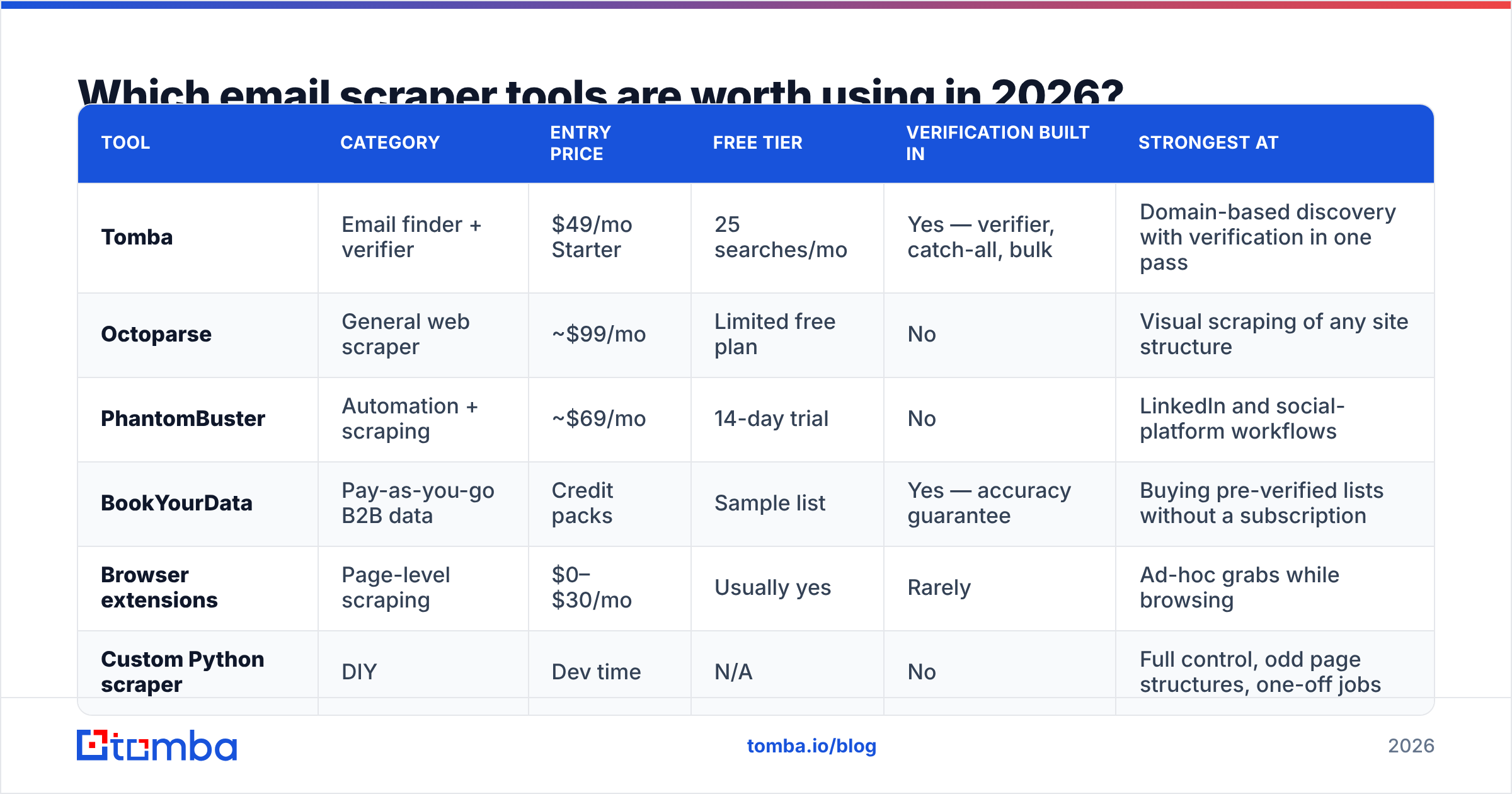
Here's an honest side-by-side. Prices are list prices at time of writing and vendors change them often — check each site before you commit.

| Tool | Category | Entry price | Free tier | Verification built in | Strongest at |
|---|---|---|---|---|---|
| Tomba | Email finder + verifier | $49/mo Starter | 25 searches/mo | Yes — verifier, catch-all, bulk | Domain-based discovery with verification in one pass |
| Octoparse | General web scraper | ~$99/mo | Limited free plan | No | Visual scraping of any site structure |
| PhantomBuster | Automation + scraping | ~$69/mo | 14-day trial | No | LinkedIn and social-platform workflows |
| BookYourData | Pay-as-you-go B2B data | Credit packs | Sample list | Yes — accuracy guarantee | Buying pre-verified lists without a subscription |
| Browser extensions | Page-level scraping | $0–$30/mo | Usually yes | Rarely | Ad-hoc grabs while browsing |
| Custom Python scraper | DIY | Dev time | N/A | No | Full control, odd page structures, one-off jobs |
A few notes on how to read that table.
General scrapers are not lead tools. Octoparse and similar platforms are excellent at what they do — pulling structured data off arbitrary pages. They will happily extract product prices, reviews, or emails. They will not tell you whether the email works. Budget for a separate verification layer, always.
PhantomBuster's value is workflow, not extraction. Chaining a LinkedIn search to an enrichment step to a CSV export is genuinely useful. Just know that platform automation carries account risk that a server-side API call doesn't. Their own documentation is candid about rate limits for a reason.
BookYourData occupies a different lane. If you don't want to run infrastructure and would rather buy a clean list per campaign, credit-based data vendors with an accuracy guarantee are a reasonable purchase — particularly for teams running a handful of campaigns a quarter rather than continuous outbound.
DIY still makes sense for narrow jobs. A 60-line Python script with requests and BeautifulSoup will out-perform a commercial tool on a single well-understood site. It will not scale to 10,000 heterogeneous domains without turning into a maintenance project. Check current user reviews on G2 before assuming a tool's marketing page reflects its 2026 reality.
How do you build a scraping workflow that doesn't burn your domain?#
Six steps, in order. Skipping any of them is where teams get hurt.
- Define the segment before you scrape. "All companies in the directory" is not a segment. "Dental practices in three metro areas with 5–20 staff" is. Narrow segments produce higher-quality scrapes because the pages are more consistent.
- Scrape for discovery, not for sending. Your scraper's job is to produce a candidate list of domains and names — not a send-ready CSV. Reframing this one thing fixes most downstream problems.
- Resolve people, not pages. Take the domains you found and run them through a proper finder to get named contacts with roles. A bulk email finder handles thousands of domains in one job and returns confidence scores rather than raw strings.
- Verify everything, including the addresses you scraped directly. SMTP check, MX check, disposable-domain check, catch-all detection. Anything under an 85% confidence score gets held back or routed to a separate low-volume sequence.
- Strip role aliases and duplicates. Remove
info@,noreply@,webmaster@and anything that appears on more than three unrelated domains — that's a scraper artifact, not a lead. - Warm and throttle. New domain, new mailbox, low volume for the first three weeks. No amount of data quality survives sending 800 cold emails on day one from a fresh domain.
Teams that run all six steps typically see bounce rates under 2%. Teams that scrape-and-send see 8–15% and wonder why their sender reputation collapsed. It's not mysterious. Mailbox providers read bounce rate as a direct signal of list hygiene, and list hygiene is a direct signal of intent.
What does an email scraper actually cost per usable contact?#
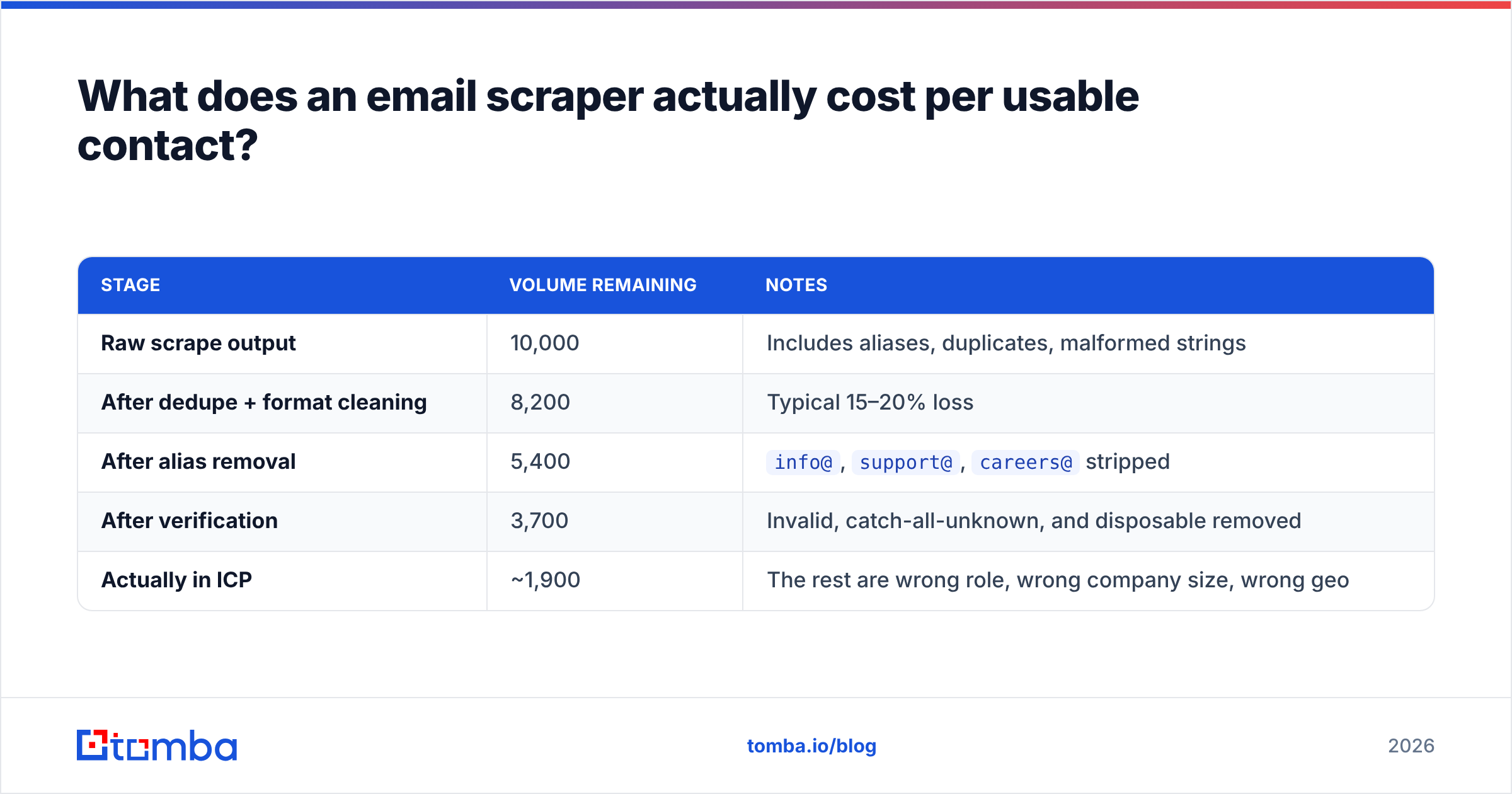
This is the number nobody publishes, so let's model it plainly. Assume 10,000 scraped addresses.
| Stage | Volume remaining | Notes |
|---|---|---|
| Raw scrape output | 10,000 | Includes aliases, duplicates, malformed strings |
| After dedupe + format cleaning | 8,200 | Typical 15–20% loss |
| After alias removal | 5,400 | info@, support@, careers@ stripped |
| After verification | 3,700 | Invalid, catch-all-unknown, and disposable removed |
| Actually in ICP | ~1,900 | The rest are wrong role, wrong company size, wrong geo |
So 10,000 scraped rows produce roughly 1,900 contacts you'd genuinely want to email. If your scraper subscription is $99/month and your verification credits cost another $60, you're at about $0.08 per usable contact — which is genuinely cheap, provided you actually ran the pipeline.
Run the same 10,000 straight into a sequencer and you get a burned domain, a 12% bounce rate, and a two-month recovery. That's the real comparison. Scraping isn't expensive; skipping the cleanup is.
For teams doing this continuously, a finder-plus-verifier subscription usually beats scraper-plus-standalone-verifier on total cost, because you're not paying twice for the same record. Compare Tomba pricing against your current stack on a per-verified-contact basis rather than per-search, and the picture changes quickly.
When should you skip scraping entirely?#
Skip it when any of these is true:
- Your targets are enterprise. Large companies publish nothing. Scraping returns a media-relations alias and nothing else.
- You need job titles. Scrapers rarely capture role reliably. Databases and finders do.
- You're in a regulated market. Financial services, healthcare, and legal buyers respond badly to obviously-scraped outreach, and your compliance team will ask for provenance you can't produce.
- Your volume is under 500 contacts a month. At that scale, manual research plus a finder is faster and materially more accurate than building a scraping pipeline.
Scraping earns its keep at the long tail: local businesses, niche directories, event exhibitor lists, regional trade bodies. That's where addresses are genuinely published and genuinely current.
Start with verified contacts instead of a cleanup project#
If your goal is replies rather than row counts, work backwards from deliverability. Find the named people at the accounts you actually want, confirm the mailboxes exist, and send at a volume your domain can support.
That's what Tomba Email Finder is built for — search by domain, name, or company, get confidence-scored results with verification baked into the same request, and export straight to your CRM or sequencer. The free tier gives you 25 searches a month to test hit rate against your own target list, and Starter runs $49/month when you're ready to scale. Point it at ten accounts you already know well, compare the output to whatever your scraper returned for the same ten, and let the numbers decide.
Related guides#
Ready to find emails that actually work?
Join 150,000+ professionals who stopped guessing and started sending. Free credits on signup — no credit card required.
Get the Tomba newsletter
Practical outbound tactics and product updates — once every two weeks.
About the author