What Is an Email Search Service? A 2026 Buyer's Guide
An email search service turns a name and a domain into a deliverable inbox. Here is how the tech actually works, what separates 95% accuracy from 70%, and how the main vendors compare on price, coverage, and verification depth in 2026.
TL;DR
- An email search service takes an identity signal (name + company domain, a LinkedIn URL, an article byline) and returns the professional email address attached to it, ideally with a verification status and a confidence score.
- The two things that separate a good service from a bad one are coverage (does it have data on your segment at all?) and verification depth (does it prove the mailbox exists before it charges you a credit?).
- Pattern guessing alone gets you roughly 60–75% accuracy. Pattern guessing plus SMTP validation plus multi-source cross-checking is what gets you into the 90s.
- Pricing is credit-based almost everywhere. The real cost per usable email is what matters — a $29 plan with 40% bounce is more expensive than a $49 plan with 3%.
- Match the tool to the motion: bulk list building, one-off enrichment, and API-driven automation are three different buying decisions.
What is an email search service?#
An email search service is a lookup layer between "I know who this person is" and "I can email them." You supply an identifier — usually a first name, last name, and company domain — and the service returns a professional address like firstname.lastname@company.com, plus metadata: whether the mailbox accepted a test connection, what sources back the record, and how confident the vendor is.
The everyday analogy: it's a phone directory that rebuilds itself every night. A printed directory goes stale the moment someone moves. An email search service re-crawls, re-verifies, and re-scores continuously, so the entry you pull today reflects the mailbox as it exists today — not as it existed when the dataset was assembled.
Technically, most services combine four things:
- A crawled corpus. Public web pages, press releases, GitHub commits, conference speaker lists, company team pages, and news bylines where email addresses appear in the open.
- A pattern engine. Once the service has seen enough
j.smith@acme.comandk.patel@acme.com, it infers that Acme usesfirst-initial.last. That pattern generalizes to employees it has never seen. - A verification stack. Syntax check, DNS/MX lookup, then an SMTP handshake that asks the receiving server whether the mailbox exists — without sending an actual message.
- An enrichment layer. Job title, seniority, department, LinkedIn URL, sometimes a direct dial. This is what makes the record usable for segmentation, not just sending.
Skip any one of those and quality drops in a predictable way. No corpus means everything is a guess. No pattern engine means you only find people who already leaked their address publicly. No verification means you find out about bounces from your ESP instead of from your vendor.
How does an email search service actually find an address?#
Here is the sequence a well-built service runs when you submit "Maya Chen, stripe.com":
- Resolve the domain. Confirm
stripe.comis a live domain with valid MX records, and that it isn't a parked page, a redirect, or a free-mail provider masquerading as a company. - Query the known-records index. If Maya's address has already been observed and re-verified within the freshness window, return it immediately with the source attached. This is the cheapest and most reliable path.
- Infer the company pattern. No direct hit? Pull every known address on that domain, extract the dominant format, and score how consistent it is. A domain with 200 known addresses all using
first.lastis a far safer inference than one with 4 addresses in 3 different formats. - Generate and rank candidates. Build
maya.chen@,mchen@,m.chen@,maya@,chenm@, and rank them by the pattern score plus name-frequency heuristics. - Validate at the mail server. Run the SMTP conversation against each candidate in rank order. The first mailbox that returns an accept response wins. If the domain is catch-all, every candidate "accepts" — which is why catch-all handling is a separate discipline (more below).
- Score and return. Emit the winner with a confidence value, the verification status, and the sources. A good service will return nothing rather than a plausible guess when confidence falls below threshold.
Step 6 is where vendors quietly differ the most. Some return a low-confidence guess and charge you for it. Others return null and charge nothing. Over 10,000 lookups, that policy difference changes your effective cost per usable contact by more than any headline price does.
What makes one email search service more accurate than another?#
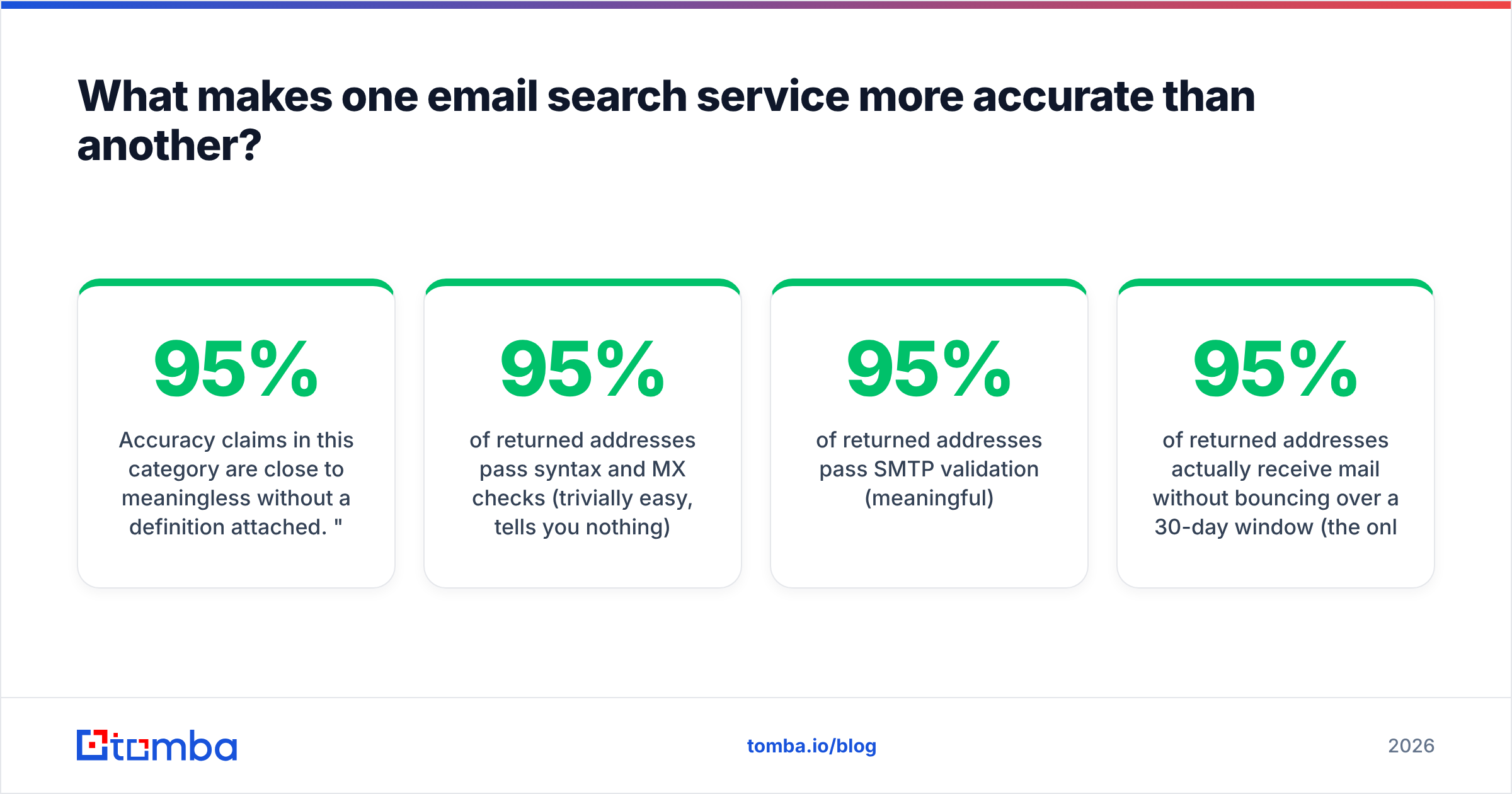
Accuracy claims in this category are close to meaningless without a definition attached. "95% accurate" can mean:
- 95% of returned addresses pass syntax and MX checks (trivially easy, tells you nothing)
- 95% of returned addresses pass SMTP validation (meaningful)
- 95% of returned addresses actually receive mail without bouncing over a 30-day window (the only definition that matters commercially)
When you evaluate, insist on the third. Build a 200-row test list drawn from your real ICP — not a vendor-supplied sample — run it through two or three services, send a small volume, and measure the hard-bounce rate from your ESP's logs. That is the only benchmark that reflects your segment.

Three structural factors drive the real numbers:
- Segment coverage. Every provider is stronger in some regions and industries than others. A service built on North American SaaS crawling will underperform on German Mittelstand manufacturers or Japanese enterprises. Coverage gaps show up as null returns, not as bounces — which is why hit rate and accuracy must be read together.
- Freshness cadence. B2B email data decays roughly 2–3% per month as people change jobs. A record verified 14 months ago is a coin flip. Ask each vendor when the specific record you're looking at was last re-verified, not when the database was "last updated."
- Verification honesty. Some services mark catch-all domains as "valid" because the server accepted the handshake. That's a category error, and it's the single largest source of surprise bounces. A dedicated catch-all verifier exists precisely because that case needs different logic.
Which email search service should you choose in 2026?#
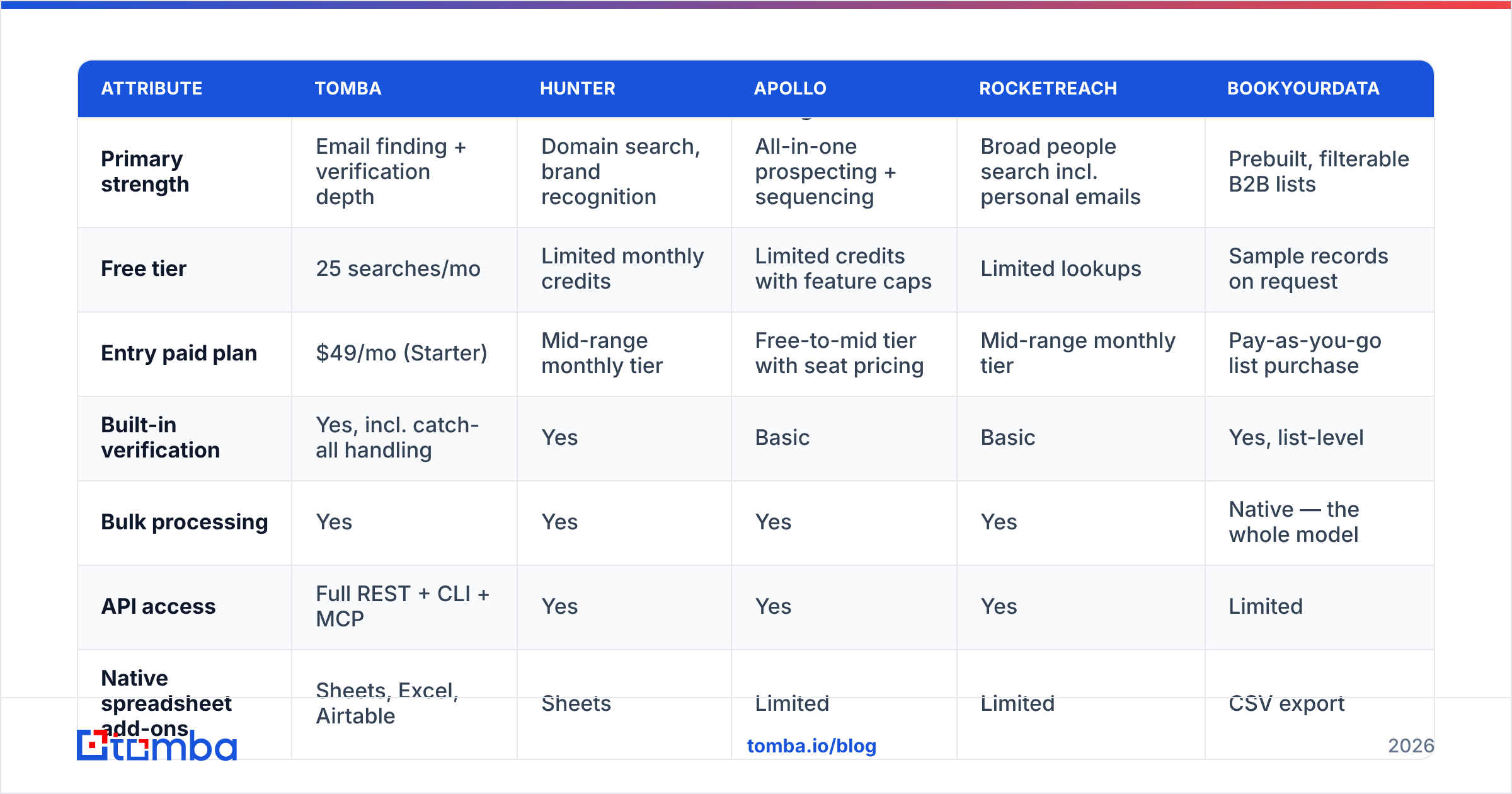
There is no universal winner — there's a best fit per motion. Here's how the main options line up on the attributes that actually change your workflow.

| Attribute | Tomba | Hunter | Apollo | RocketReach | BookYourData |
|---|---|---|---|---|---|
| Primary strength | Email finding + verification depth | Domain search, brand recognition | All-in-one prospecting + sequencing | Broad people search incl. personal emails | Prebuilt, filterable B2B lists |
| Free tier | 25 searches/mo | Limited monthly credits | Limited credits with feature caps | Limited lookups | Sample records on request |
| Entry paid plan | $49/mo (Starter) | Mid-range monthly tier | Free-to-mid tier with seat pricing | Mid-range monthly tier | Pay-as-you-go list purchase |
| Built-in verification | Yes, incl. catch-all handling | Yes | Basic | Basic | Yes, list-level |
| Bulk processing | Yes | Yes | Yes | Yes | Native — the whole model |
| API access | Full REST + CLI + MCP | Yes | Yes | Yes | Limited |
| Native spreadsheet add-ons | Sheets, Excel, Airtable | Sheets | Limited | Limited | CSV export |
| Best for | Verified 1:1 and bulk lookup, dev workflows | Simple domain-level discovery | Teams wanting data + sending in one seat | Recruiting and hard-to-find contacts | Buying a defined list fast |
Read this as a fit map, not a leaderboard. If you already run a sequencer you like and just need clean addresses, an all-in-one platform is redundant spend. If you want to hand a rep a finished list of 3,000 dentists in Ohio tomorrow morning, a list vendor like BookYourData is a genuinely cleaner path than running 3,000 individual lookups. If you're wiring enrichment into a product or a nightly job, API quality and rate limits outrank everything on the feature grid.
Independent review aggregation on G2 is useful for spotting support and billing complaints that never appear on vendor pages — filter reviews to your company size before you read them, because the complaints from 500-seat orgs rarely apply to a 5-person team.
How much should an email search service cost?#
Ignore the sticker price. Compute cost per usable email:
(monthly price ÷ credits) ÷ (hit rate × deliverability rate)
A $29 plan with 5,000 credits looks like $0.0058 per lookup. If it hits on 55% of your list and 12% of those bounce, your real cost per inboxed contact is about $0.012 — more than double. Run this math on your own test list before committing to an annual plan.
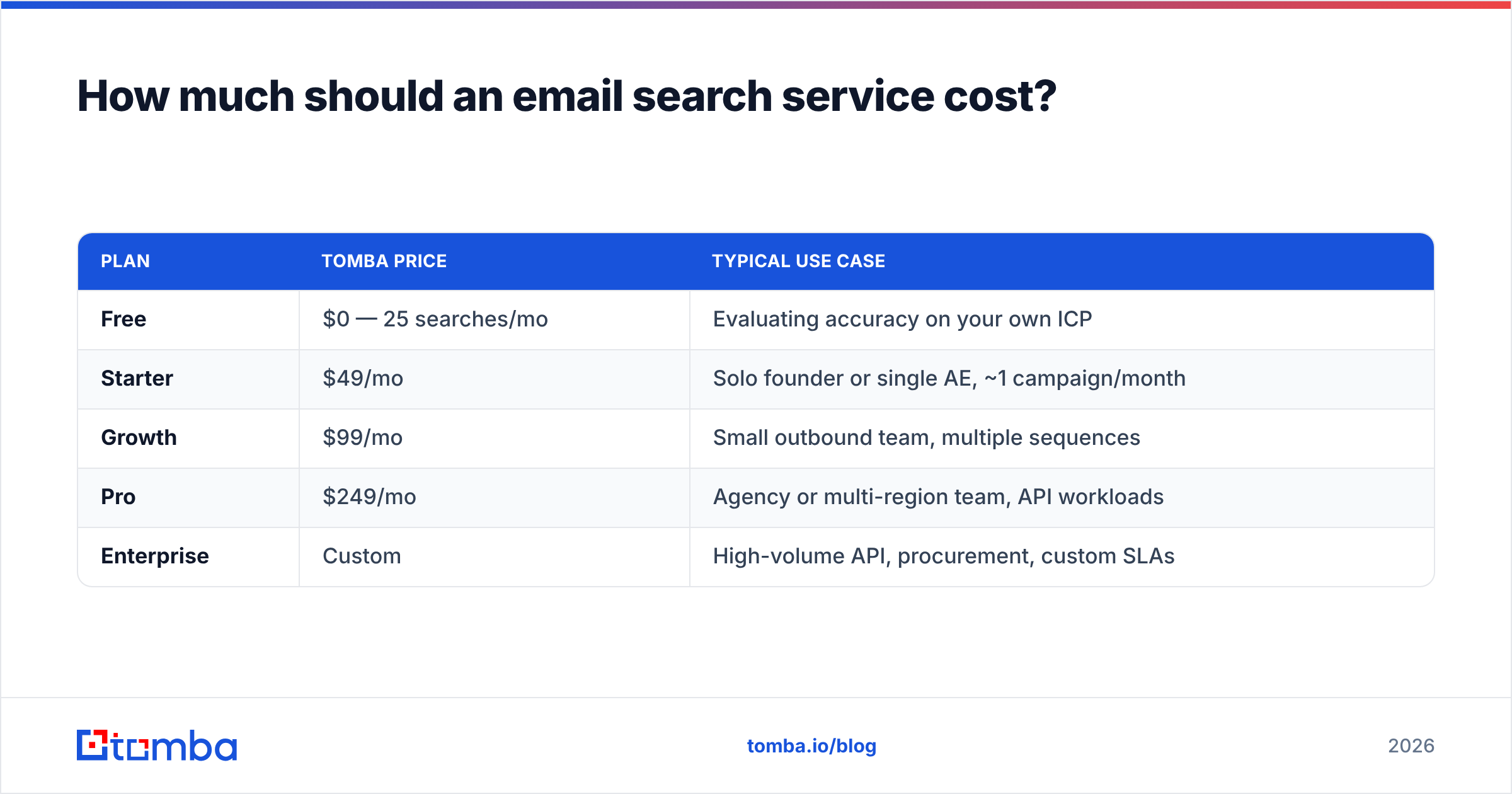
| Plan | Tomba price | Typical use case |
|---|---|---|
| Free | $0 — 25 searches/mo | Evaluating accuracy on your own ICP |
| Starter | $49/mo | Solo founder or single AE, ~1 campaign/month |
| Growth | $99/mo | Small outbound team, multiple sequences |
| Pro | $249/mo | Agency or multi-region team, API workloads |
| Enterprise | Custom | High-volume API, procurement, custom SLAs |
Full details are on the Tomba pricing page. Whatever vendor you pick, check three fine-print items: do failed lookups consume credits, do credits roll over, and does verification cost a separate credit from the search? Those three answers move your effective price more than the tier you choose.

What about catch-all domains and role accounts?#
Two edge cases account for most of the disappointment people feel with email search services.
Catch-all domains accept mail to any address at the domain, valid or not. Roughly 15–25% of B2B domains are configured this way, and it's more common at enterprises. SMTP validation can't distinguish a real mailbox from a fake one on these domains — the server says yes to everything. Serious services handle catch-alls with a separate confidence model built on pattern strength and corroborating sources, and they label the record as catch-all rather than pretending it's confirmed. Tools like the catch-all finder exist specifically to surface and score this class instead of hiding it.
Role accounts — info@, sales@, support@, hello@ — are technically valid and almost always commercially useless for 1:1 outbound. They route to shared inboxes, generate high complaint rates, and drag your sender reputation down. A good service flags them; a great one lets you exclude them at the query level so they never enter your sequence in the first place.
The practical rule: treat "valid," "catch-all," and "role" as three different buckets with three different sending policies. Send confidently to bucket one. Send to bucket two only from a warmed domain, in small volumes, and watch the bounce rate. Route bucket three to a different play entirely — or drop it.
Is a free email search service good enough?#
For evaluation, yes. For production, almost never — and the reason is structural rather than stingy.
Free tiers exist to let you test accuracy on your own data. Twenty-five searches is plenty to check whether a vendor covers your segment. What free tiers cannot give you is the SMTP infrastructure required for high-volume verification: that means distributed IP pools, careful rate limiting per receiving domain, and reputation management on the verification IPs themselves. Providers that skip that get their probes blocked by major mail hosts, which quietly degrades accuracy for everyone on the platform.
The honest sequencing is: use free tiers to shortlist two vendors, run a paid month on the one that wins your bounce test, and re-test every six months. Data quality is not a permanent property of a vendor — it moves as crawling and verification infrastructure change.
Free single-purpose utilities are still worth keeping bookmarked for one-off checks — a free email checker or an email permutator covers the "I just need to sanity-check one address" case without burning a credit.
How do you plug an email search service into your workflow?#
Pick the integration surface that matches how your team actually works:
- Browser extension — best for reps doing manual, high-intent research on LinkedIn or company sites. Low volume, high context, zero setup.
- Spreadsheet add-on — best for ops people who live in Sheets or Excel. Paste a column of names and domains, fill a column of verified emails.
- CRM-native enrichment — best when the record already exists in HubSpot or Salesforce and you just need the missing field filled on create. Both platforms document their enrichment patterns well; HubSpot's own guidance on data hygiene is a reasonable starting framework.
- API / CLI — best for anything scheduled or product-embedded. Nightly enrichment jobs, signup-form domain lookups, in-app enrichment. Check rate limits and batch endpoints before you build; the Tomba API documents both.
- Bulk upload — best for one-time list builds. Upload CSV, download verified CSV, done.
Whichever surface you pick, put verification after enrichment and before sending — as a distinct step you can measure. Teams that fold verification into the send step never learn what their real data quality is, because bounces get attributed to copy, timing, or deliverability instead of to the list.
What mistakes kill results with an email search service?#
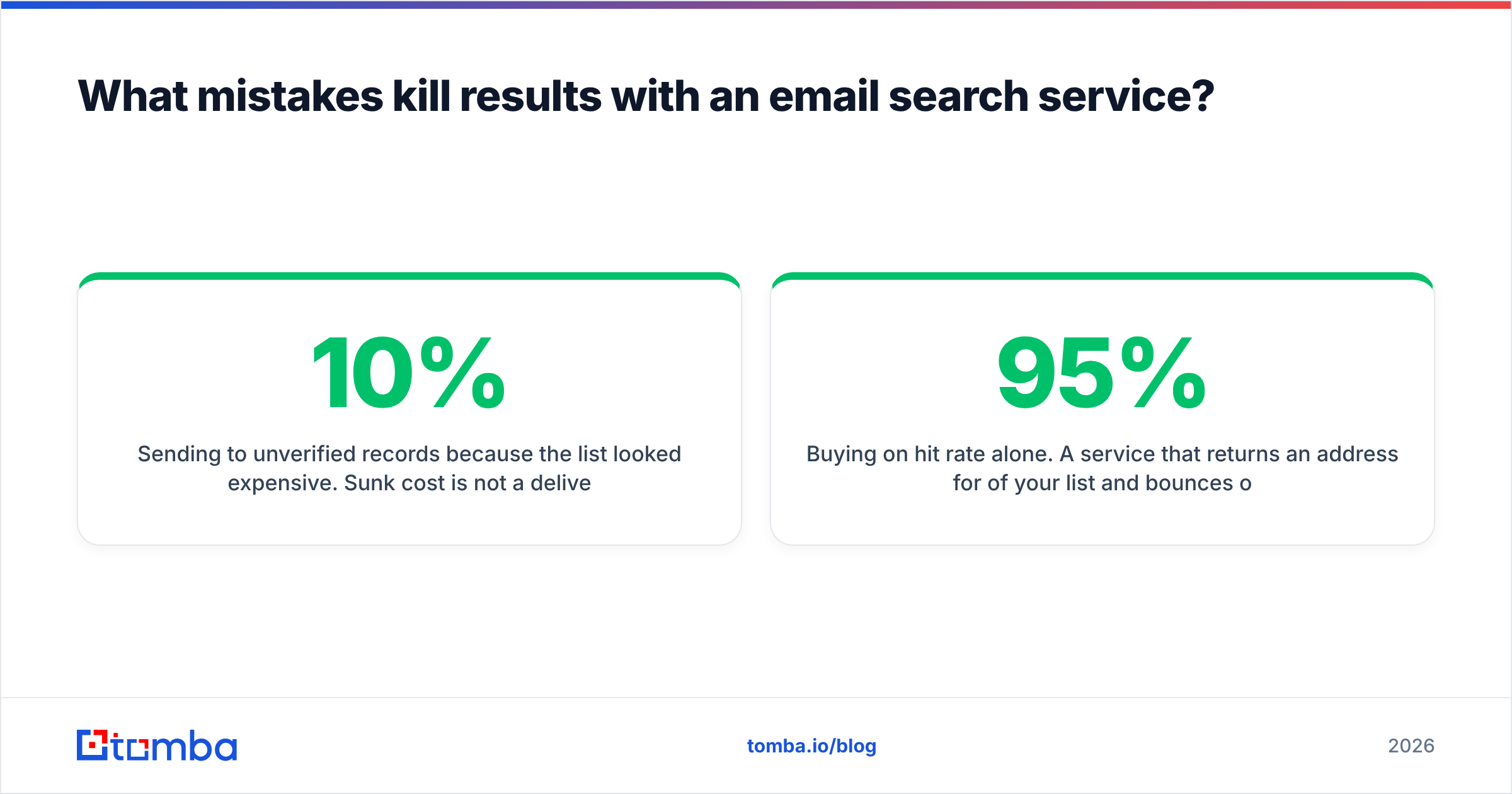
- Sending to unverified records because the list looked expensive. Sunk cost is not a deliverability strategy. A 10% bounce rate on a cold domain can cost you weeks of recovery.
- Buying on hit rate alone. A service that returns an address for 95% of your list and bounces on a quarter of them is worse than one that returns 70% and bounces on 2%.
- Ignoring the freshness date on individual records. Database size is a vanity metric; per-record recency is the useful one.
- Never re-verifying. Lists decay. Re-run verification on anything older than 90 days before it enters a sequence.
- Treating catch-alls as confirmed. See above — this is the most common single cause of "the tool lied to me" complaints across every vendor in the category.
Where should you start?#
If you're evaluating: pull 200 rows of your real ICP, run them through two services on free tiers, send a controlled batch, and read your bounce logs. That single test settles the question better than any comparison article, including this one.
If you already know you need verified addresses and want to stop paying for guesses, start with the Tomba Email Finder. The free tier gives you 25 searches to run your own accuracy test on your own segment — no credit card, no sales call. Then check the result against whatever you're using today, and let the bounce rate pick the winner.
Related guides#
Ready to find emails that actually work?
Join 150,000+ professionals who stopped guessing and started sending. Free credits on signup — no credit card required.
Get the Tomba newsletter
Practical outbound tactics and product updates — once every two weeks.
About the author