Email Segmentation Strategy: The Complete 2026 B2B Playbook
Most B2B email lists are one giant segment called "everyone." Here is how to split by firmographics, role, and intent, and what each layer is actually worth in replies.
TL;DR
- An email segmentation strategy is a set of rules that splits your list into groups that deserve different messages. If every contact gets the same email, you have exactly one segment, and it is the worst-performing one you will ever run.
- Five models matter in B2B: firmographic, technographic, role/persona, behavioral/intent, and lifecycle. Most teams get 80% of the lift from the first three and never need a data science team.
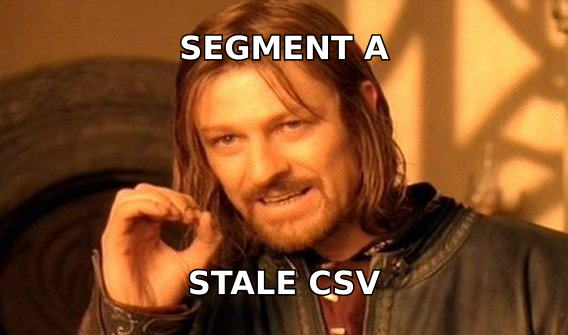
- Segmentation fails on data quality, not strategy. A perfectly designed persona segment built on a stale CSV bounces at 12% and burns your domain.
- Practical floor: 50–300 contacts per segment. Below 50 you cannot read the results; above 500 the message drifts back toward generic.
- Budget reality: the enrichment and verification layer that makes segmentation possible costs $49–$249/mo for most teams, not the five figures vendors imply.
What is an email segmentation strategy?#
An email segmentation strategy is the documented logic you use to divide a contact list into groups, plus the message variant each group gets. That second half is the part teams skip. Splitting a list into twelve tidy buckets and sending all twelve the same template is filing, not segmentation.
Think of it like a restaurant menu. A diner that serves one dish to everyone will satisfy some customers by accident. A kitchen that runs five dishes off shared prep serves far more people at nearly the same cost. Segmentation is shared prep: the research, the proof points, and the offer stay largely the same, while the opening line, the pain framing, and the social proof swap per group.
Technically, a segment is a filter over contact attributes plus a required message change. If you cannot name what changes in the email, the segment does not exist. "US-based" is a filter. "US-based Series B fintech ops leads who just posted a compliance hire" is a segment, because it tells you what the first sentence says.
The wider discipline borrows directly from market segmentation in consumer marketing, but B2B has a harder constraint: your total addressable list is often 2,000 accounts, not 2 million. You cannot afford to waste a segment on a hypothesis you never test.
Why does segmentation beat raw volume in 2026?#
Because the cost of being generic went up. Three things changed:
Inbox providers now weight engagement heavily. Google and Microsoft both push low-engagement mail to spam faster than they did three years ago, and a broad blast produces exactly the signal they punish: high send volume, low opens, low replies, occasional complaints. A segmented campaign that gets 8% replies protects the domain that an unsegmented one destroys.
Buyers pattern-match faster. Anyone in a revenue role reads 40+ cold emails a week. The tell for a blast is not bad grammar, it is irrelevance in sentence one. Industry benchmarks published by Mailchimp consistently show segmented and targeted sends outperforming broadcast sends on open and click rates across every vertical they track, and B2B outbound behaves the same way.
Volume tooling got commoditized. Everyone can send 3,000 emails a day now. That is not an advantage. The advantage moved upstream to who you send to and what you know about them, which is precisely what segmentation encodes.

What data do you actually need to segment on?#
You need less than the vendors want to sell you. These six fields carry most of the weight, in rough order of ROI:
- Company size (headcount band) — The single highest-signal field. A 25-person company and a 2,500-person company do not share a problem, a budget, or a buying process. Bands of 1–10, 11–50, 51–200, 201–1000, 1000+ are enough.
- Industry or vertical — Drives the proof point you cite. One customer logo from the prospect's own vertical outperforms three from adjacent ones.
- Job function and seniority — Not job title. Titles are chaos ("Growth Ninja"), functions are stable (marketing, ops, engineering, finance). Seniority splits into IC, manager, director, VP+, C-level.
- Technographics — What they run. If your product replaces or plugs into a specific stack, knowing they use HubSpot vs Salesforce vs nothing changes the entire pitch.
- Trigger events — Funding, new hires in a relevant function, a product launch, a job posting that names your category. This is the field that makes an email feel timed rather than random.
- Email deliverability status — Valid, risky, catch-all, or invalid. Not a targeting field, but it decides whether a segment ships at all. Treat it as a gate before every send.
Everything beyond these — revenue estimates, tech spend modeling, intent scores from third-party networks — is optional refinement. Buy it after the first six are clean, not before.
Which segmentation model should you use?#
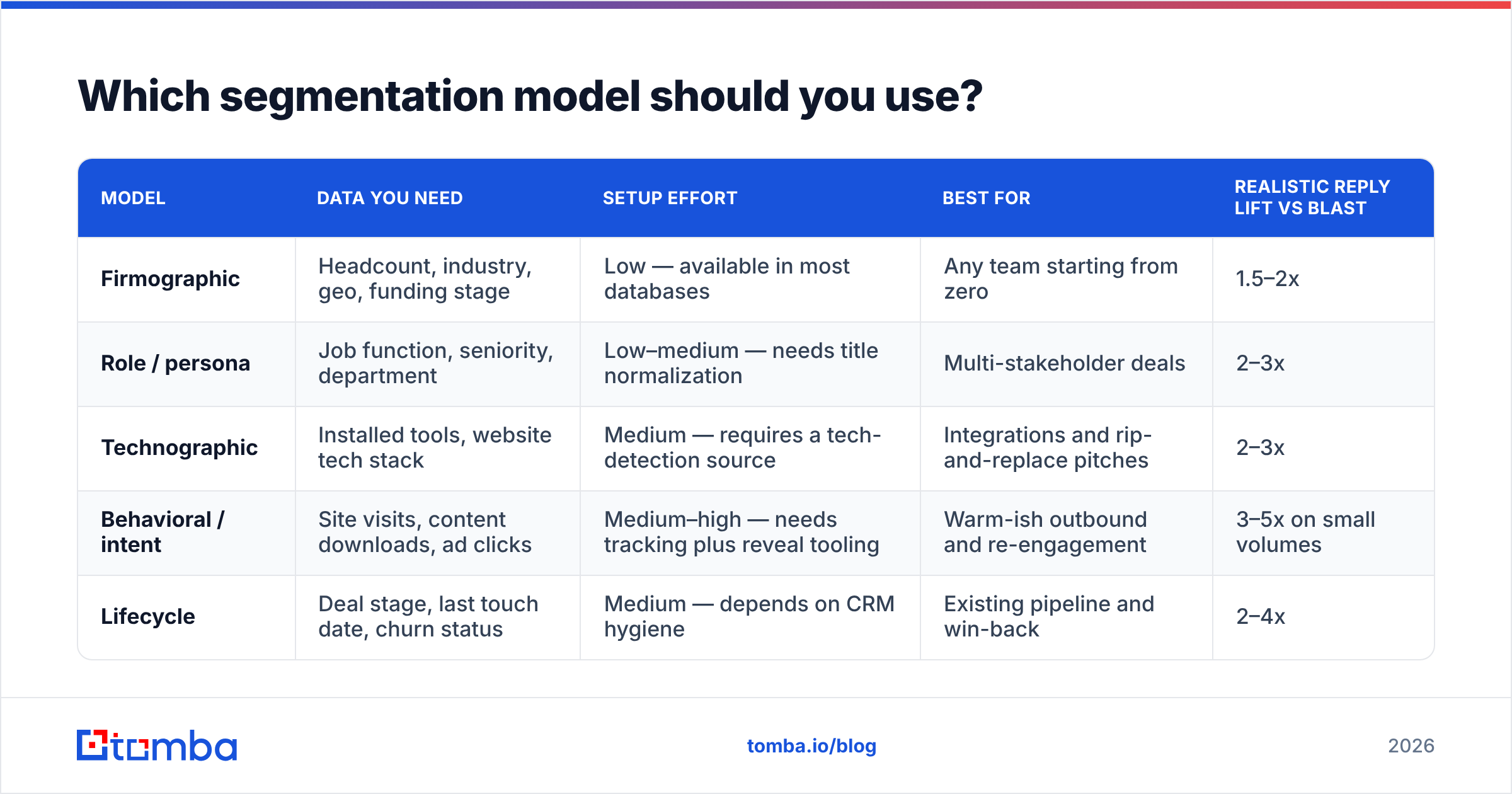
Pick based on what you can actually source, not what sounds sophisticated. Here is how the five common models compare:
| Model | Data you need | Setup effort | Best for | Realistic reply lift vs blast |
|---|---|---|---|---|
| Firmographic | Headcount, industry, geo, funding stage | Low — available in most databases | Any team starting from zero | 1.5–2x |
| Role / persona | Job function, seniority, department | Low–medium — needs title normalization | Multi-stakeholder deals | 2–3x |
| Technographic | Installed tools, website tech stack | Medium — requires a tech-detection source | Integrations and rip-and-replace pitches | 2–3x |
| Behavioral / intent | Site visits, content downloads, ad clicks | Medium–high — needs tracking plus reveal tooling | Warm-ish outbound and re-engagement | 3–5x on small volumes |
| Lifecycle | Deal stage, last touch date, churn status | Medium — depends on CRM hygiene | Existing pipeline and win-back | 2–4x |
A sane sequencing for a team of one to five reps: start firmographic plus role in week one, layer technographic in month two, add behavioral once you have website visitor identification wired up. Skip nothing, but do not start at the bottom of the table.
The pattern worth internalizing: firmographic segmentation tells you who to include, role segmentation tells you what to say, and behavioral segmentation tells you when to send. They are not competitors. They stack.
How do you build these segments without a data team?#
The mechanical version, start to finish:
Step 1 — Define the segment on paper first. Write the filter and the message change in one sentence. "51–200 headcount B2B SaaS, RevOps function, director+, message leads with data-hygiene cost, not lead volume." If you cannot write it, do not build it.
Step 2 — Source the accounts. Pull a target account list from your ICP filters. This is where a B2B database with firmographic filters earns its keep. Providers like BookYourData are a solid option when you want pre-filtered, verified lists by industry and role without building the pull yourself; database-plus-API tools suit teams who want to re-run the query monthly.
Step 3 — Find contacts at those accounts. Use domain search to return every discoverable address at a company along with the detected email pattern, then filter down to the functions in your segment definition. This is faster than name-by-name lookups when you are building segments of 100+.
Step 4 — Enrich the fields you segment on. Push the list through data enrichment to fill in headcount, industry, seniority, and social profiles. Enrichment before segmentation, always. Segmenting on missing fields silently dumps half your list into an "unknown" bucket you then ignore.
Step 5 — Verify before you split. Run the full list through an email verifier and drop invalids. Handle catch-all domains separately rather than deleting them; a catch-all verifier can tell you which are likely deliverable so you do not throw away entire enterprise accounts.
Step 6 — Cap segment size at 300. If a segment has 1,400 contacts, it is not a segment, it is your whole list with a label. Split it again by seniority or sub-vertical.
Step 7 — Write one message per segment, then diff them. Open two variants side by side. If more than 30% of the words are identical outside your signature, you have not really segmented.
What does a properly segmented sequence look like?#
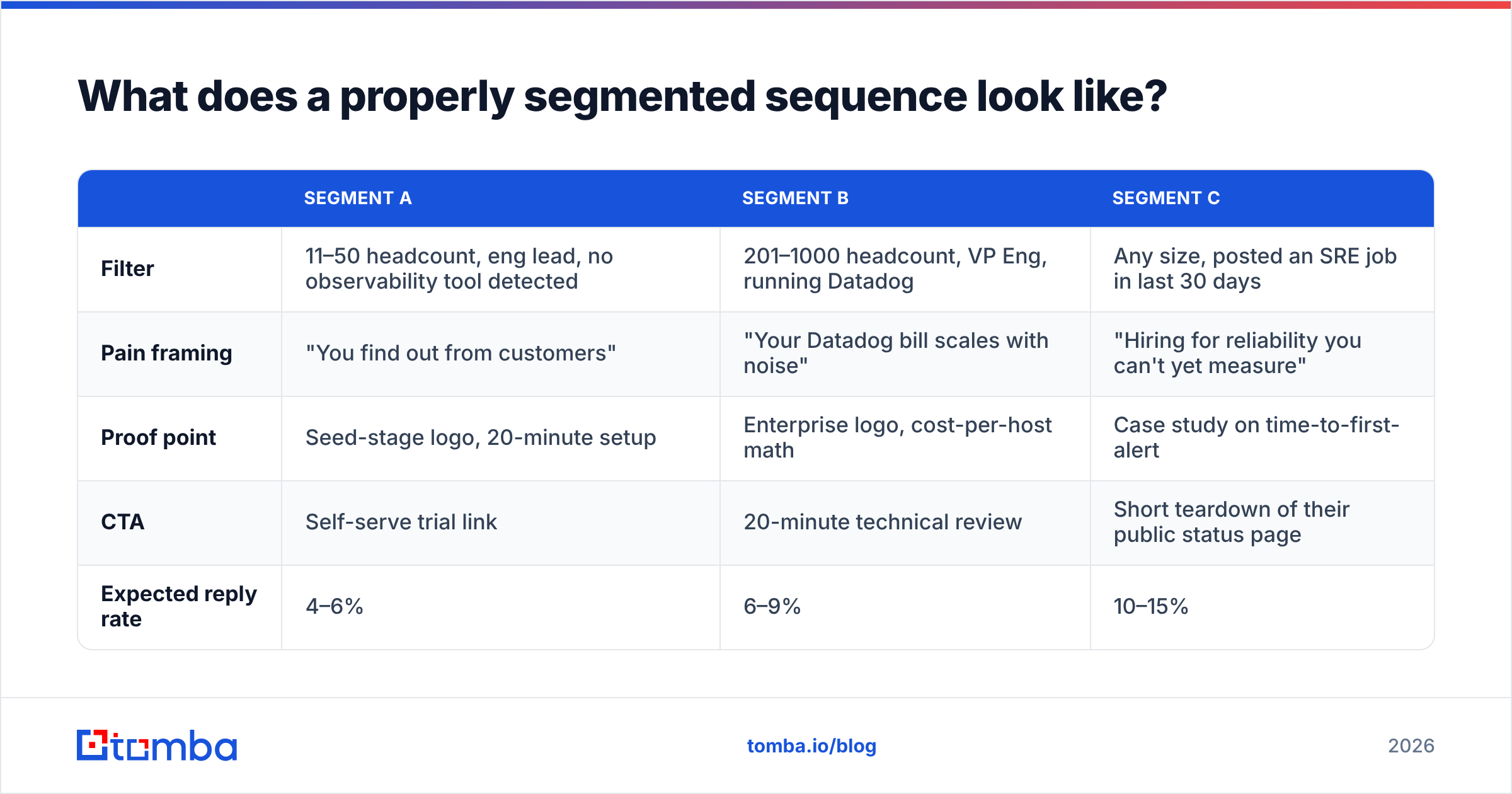
Take a hypothetical API monitoring product. Same core offer, three segments:
| Segment A | Segment B | Segment C | |
|---|---|---|---|
| Filter | 11–50 headcount, eng lead, no observability tool detected | 201–1000 headcount, VP Eng, running Datadog | Any size, posted an SRE job in last 30 days |
| Pain framing | "You find out from customers" | "Your Datadog bill scales with noise" | "Hiring for reliability you can't yet measure" |
| Proof point | Seed-stage logo, 20-minute setup | Enterprise logo, cost-per-host math | Case study on time-to-first-alert |
| CTA | Self-serve trial link | 20-minute technical review | Short teardown of their public status page |
| Expected reply rate | 4–6% | 6–9% | 10–15% |
Segment C is the smallest and the best performing, which is the general rule: trigger-based segments outperform static ones by a wide margin but expire fast. Build the static segments for consistent volume and the trigger segments for the wins.
How do you keep segments from rotting?#
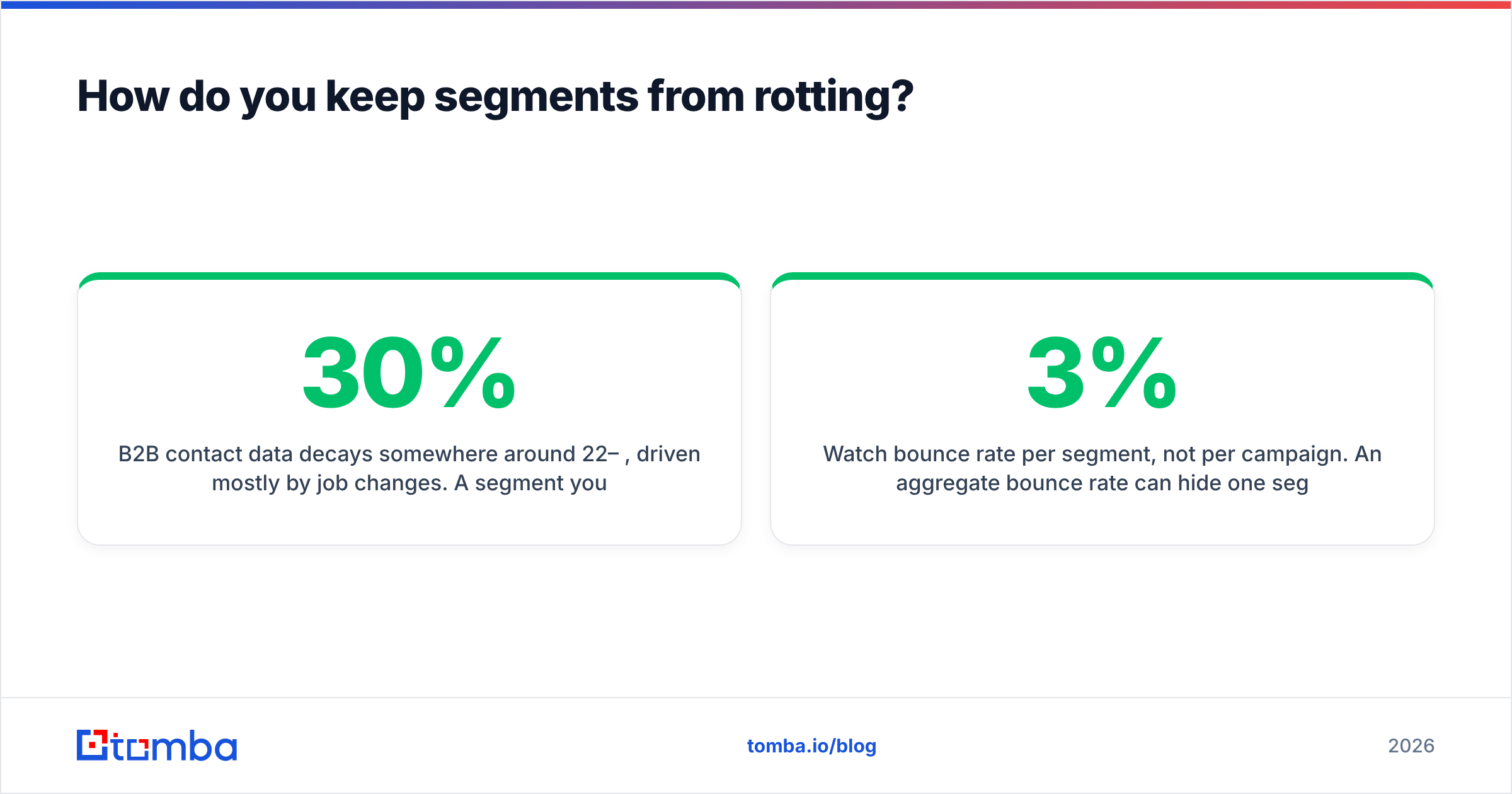
B2B contact data decays somewhere around 22–30% per year, driven mostly by job changes. A segment you built in January is meaningfully wrong by September, and the failure mode is invisible: the email does not bounce loudly, it lands with a person who no longer owns the problem.
Three habits fix most of it:
- Re-verify before every campaign, not every quarter. Verification is cheap relative to a burned domain. A bulk verify pass on the specific segment you are about to mail takes minutes.
- Watch bounce rate per segment, not per campaign. An aggregate 3% bounce rate can hide one segment sitting at 14%. Segment-level bounce reporting tells you which data source is decaying.
- Set a rebuild cadence by volatility. Trigger segments: rebuild weekly. Role segments: quarterly. Firmographic segments: twice a year. Technographic: quarterly, since stacks change faster than org charts.
Deliverability and segmentation are the same project viewed from two angles. Tight segments produce engagement, engagement produces sender reputation, and reputation is what lets the next campaign reach the inbox at all. Teams that treat these as separate workstreams end up with beautiful segments landing in spam.
What mistakes kill segmentation ROI?#
Segmenting on data you did not verify. The most common one. Enrichment providers return a confidence score for a reason. Treat low-confidence industry tags as unknown rather than truth.
Too many segments, too few contacts. Twelve segments of 30 contacts each produce zero statistically readable results and twelve times the writing work. Three segments of 200 beat that every time.
Segmenting the list but not the offer. Changing the first line while the CTA stays "hop on a 30-minute call" wastes the setup. Different segments have different willingness to spend time. Juniors will take a resource, VPs will take a 15-minute teardown, C-level will take a peer intro.
Ignoring the negative segment. Define who you exclude with as much care as who you include. Competitors, current customers, churned accounts, anyone who replied "not interested" in the last 90 days. Suppression lists are segments too.
Treating role titles as literal strings. "Head of Growth," "Growth Lead," and "VP Growth" are the same persona. Normalize function and seniority into fields before you filter, or your segments will be built on string matching that misses a third of the list.
Optimizing segmentation before fixing the offer. If your baseline reply rate is 0.3% because the product pitch is unclear, segmentation takes you to 0.9%. Still bad. Research from HubSpot's marketing statistics round-up and most vendor benchmark reports consistently show message-market fit dominating targeting refinements. Fix the sentence that explains why anyone should care first.
How much should the data layer cost?#
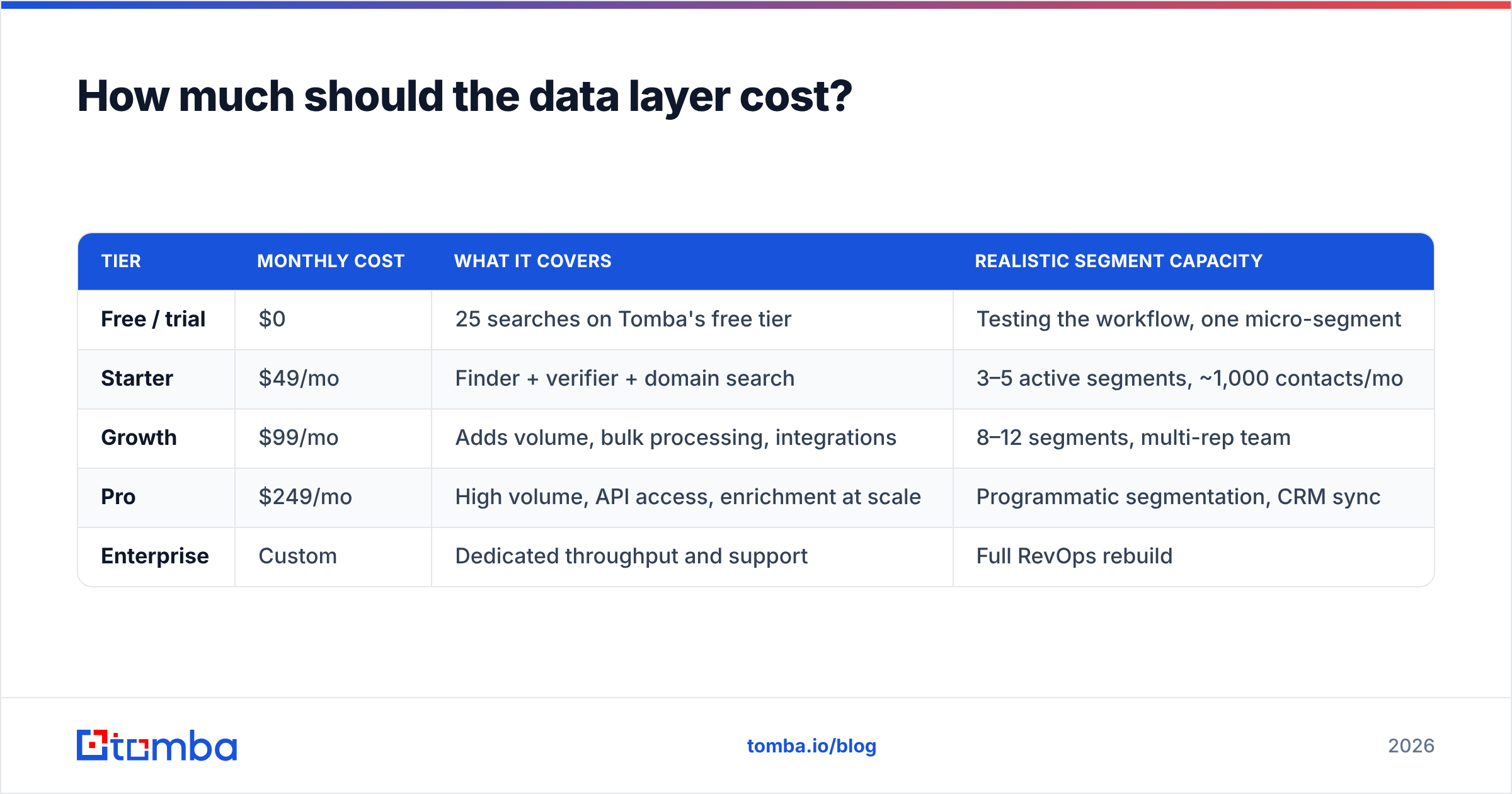
Less than teams assume. Segmentation is mostly an enrichment and verification bill, and those have gotten cheap:
| Tier | Monthly cost | What it covers | Realistic segment capacity |
|---|---|---|---|
| Free / trial | $0 | 25 searches on Tomba's free tier | Testing the workflow, one micro-segment |
| Starter | $49/mo | Finder + verifier + domain search | 3–5 active segments, ~1,000 contacts/mo |
| Growth | $99/mo | Adds volume, bulk processing, integrations | 8–12 segments, multi-rep team |
| Pro | $249/mo | High volume, API access, enrichment at scale | Programmatic segmentation, CRM sync |
| Enterprise | Custom | Dedicated throughput and support | Full RevOps rebuild |
Compare against the alternative cost: a rep spending six hours a week manually researching and copy-pasting contacts is roughly $1,500/mo in loaded salary doing work an API call handles. Full Tomba pricing is public, which is worth checking against seat-based competitors where the real cost only appears on a sales call.
Where should you start this week?#
Pick one ICP. Build three segments off firmographics and role. Enrich and verify both, write three genuinely different emails, and send 100 per segment. Read the reply rates in ten days. That experiment costs you a Starter plan and about four hours, and it will tell you more about your market than a quarter of blast sending.
When you are ready to build the contact layer underneath those segments, start with the Tomba Email Finder. It returns verified professional addresses by domain, name, or company with a confidence score attached, so the fields you segment on are ones you can actually trust. Free tier gives you 25 searches to test the workflow before you commit to anything.
Related guides#
Ready to find emails that actually work?
Join 150,000+ professionals who stopped guessing and started sending. Free credits on signup — no credit card required.
Get the Tomba newsletter
Practical outbound tactics and product updates — once every two weeks.
About the author