Email Sender Reputation: How to Measure and Fix It in 2026
Your sender reputation decides whether cold email lands in the inbox or the spam folder. Here's what mailbox providers actually score, how to check yours for free, and a 30-day repair plan that works.
TL;DR
- Email sender reputation is a per-provider score built mostly from three things: complaint rate, bounce rate, and engagement. Authentication and volume consistency are gatekeepers, not scores.
- Gmail publicly enforces a spam complaint rate under 0.30% and recommends staying under 0.10%. Cross that line and throttling starts within days, not weeks.
- Reputation attaches to your domain, your subdomain, and your sending IP — separately. A clean IP will not rescue a burned domain.
- List quality moves the needle faster than warmup. A 6% bounce rate destroys reputation faster than any warmup tool can rebuild it.
- Recovery takes 3–6 weeks of low-volume, high-engagement sending. There is no reset button, and buying a new domain only resets the clock, not the habit that caused the problem.
What is email sender reputation?#
Email sender reputation is a trust score that each mailbox provider — Gmail, Microsoft, Yahoo, Proofpoint, Mimecast — calculates for your sending identity, then uses to decide whether your message reaches the inbox, the spam folder, or nowhere at all.
Think of it like a credit score at a bank that never tells you the number. You can see the consequences (your loan gets denied, your open rate collapses), you can see partial indicators (Google Postmaster Tools shows a coarse High/Medium/Low/Bad band), but the underlying model is private and changes constantly.
The important nuance most guides skip: there is no single reputation. There are at least four, and they are scored independently.
- Domain reputation — tied to the root domain in your
From:address and your DKIM signing domain. This is the most durable and the hardest to repair. - Subdomain reputation —
mail.yourcompany.cominherits some trust from the root but accumulates its own history. This is why serious senders isolate cold outbound on a separate subdomain or a separate domain entirely. - IP reputation — tied to the sending IP. On a shared pool (most ESPs), you inherit your neighbors' behavior. On a dedicated IP, you own all of it, good and bad.
- Content and link reputation — the URLs, redirect services, and tracking domains inside your message carry their own scores. A shortener that spammers abuse will drag down a perfectly clean sender.
If your sender reputation drops, the first symptom is almost never a bounce. It's a quiet slide in reply rate while your "delivered" number stays at 98%. Delivered means accepted by the receiving server. It says nothing about which folder it landed in.
Which signals actually move your sender reputation?#
Providers weight these signals very unevenly. Here is the ranked list, heaviest first, based on what Gmail and Microsoft document publicly plus what shows up consistently in postmaster data.
- Spam complaint rate — the single most punishing signal. Google's Email sender guidelines set a hard ceiling of 0.30% and a target below 0.10%. That's 1 complaint per 1,000 messages. Three complaints per 1,000 and you are in enforcement territory.
- Hard bounce rate — invalid recipients tell providers you are mailing a list you did not verify. Under 2% is healthy. Over 5% and filtering tightens immediately. Over 10% and you are being treated as a list buyer.
- Engagement, positive and negative — replies, stars, moves-to-folder, and "not spam" clicks push you up. Deletes-without-open and archive-without-read push you down. Opens are the weakest signal in the set now that privacy proxies inflate them.
- Spam trap hits — recycled traps (abandoned real addresses) and pristine traps (never-used addresses seeded on the web). One pristine trap hit can blacklist a domain outright.
- Authentication alignment — SPF, DKIM, and DMARC. These do not earn you reputation; missing them caps how much you can earn. Since 2024, bulk senders to Gmail and Yahoo need all three plus one-click unsubscribe.
- Volume and cadence consistency — 40 emails Monday, 4,000 emails Tuesday reads as a compromised account. Smooth ramps read as a business.

Notice what is not on that list: subject-line spam words, the number of images, "free" in the copy. Content heuristics still exist, but on modern filters they are a tiebreaker applied to senders who are already borderline. If your complaint and bounce rates are clean, you can write the word "free" without consequence.
How do Gmail, Outlook, and Yahoo score you differently?#
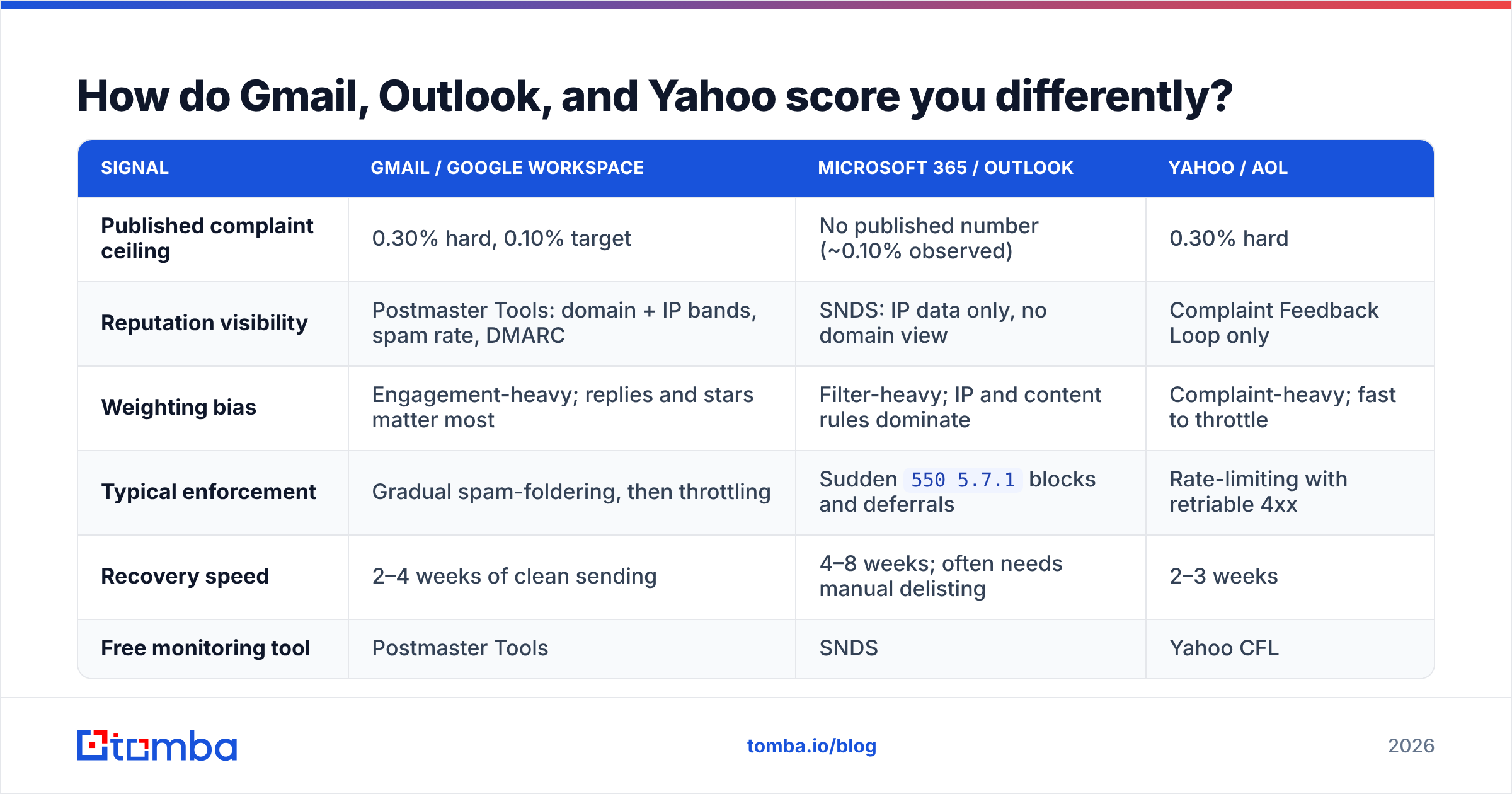
They agree on the fundamentals and diverge sharply on tolerance and transparency. If most of your prospects sit in one ecosystem, optimise for that one.
| Signal | Gmail / Google Workspace | Microsoft 365 / Outlook | Yahoo / AOL |
|---|---|---|---|
| Published complaint ceiling | 0.30% hard, 0.10% target | No published number (~0.10% observed) | 0.30% hard |
| Reputation visibility | Postmaster Tools: domain + IP bands, spam rate, DMARC | SNDS: IP data only, no domain view | Complaint Feedback Loop only |
| Weighting bias | Engagement-heavy; replies and stars matter most | Filter-heavy; IP and content rules dominate | Complaint-heavy; fast to throttle |
| Typical enforcement | Gradual spam-foldering, then throttling | Sudden 550 5.7.1 blocks and deferrals |
Rate-limiting with retriable 4xx |
| Recovery speed | 2–4 weeks of clean sending | 4–8 weeks; often needs manual delisting | 2–3 weeks |
| Free monitoring tool | Postmaster Tools | SNDS | Yahoo CFL |
The practical takeaway: Google will tell you what's wrong but punish you slowly. Microsoft will not tell you much but punish you abruptly. If you sell into enterprise IT, finance, or manufacturing — heavy Microsoft territory — build your monitoring around SMTP response codes and reply rate, because SNDS will not show you domain-level data at all.
How do you check your email sender reputation for free?#
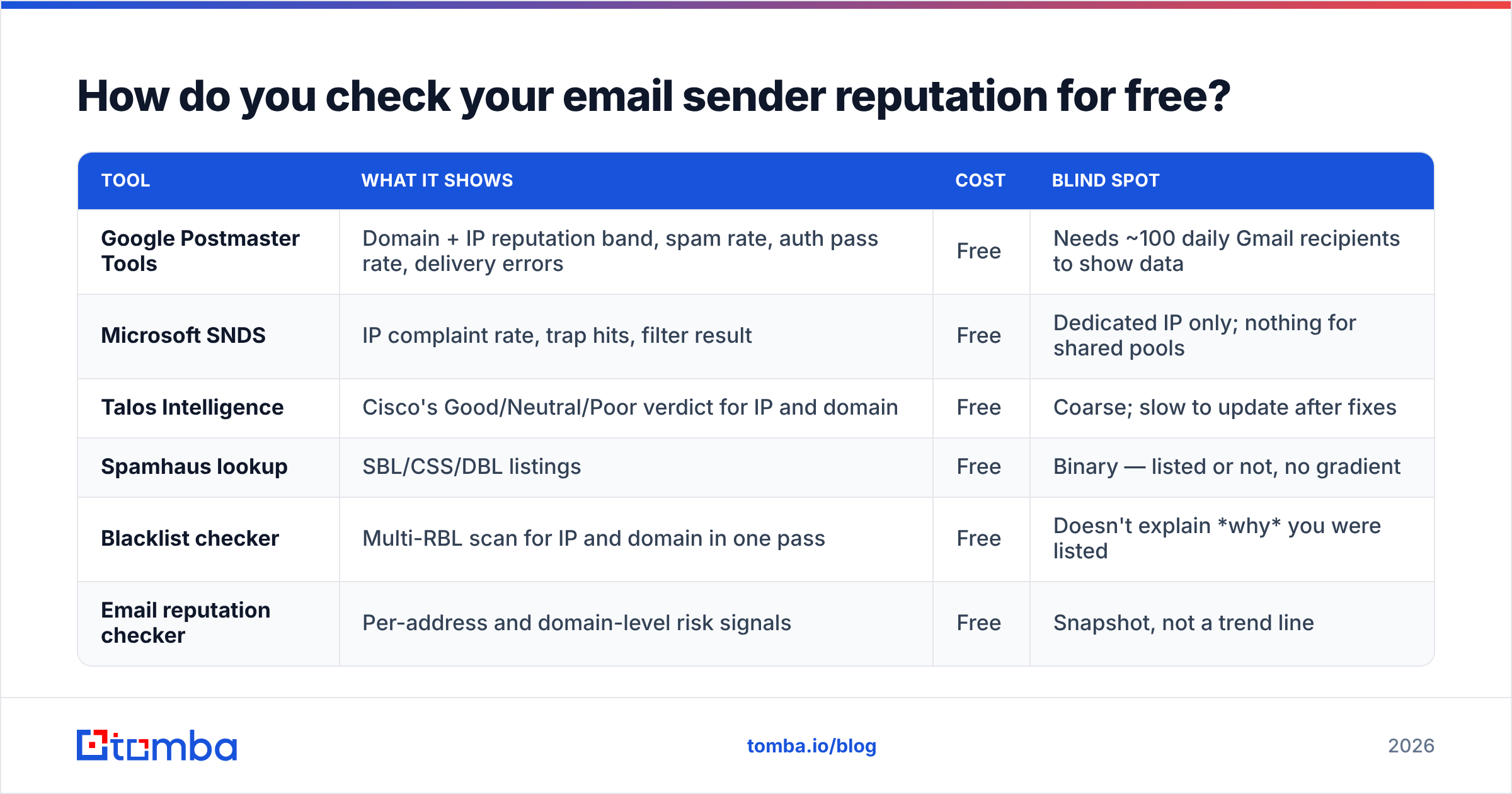
You need at least three views: a provider view, a blacklist view, and your own outcome data. No single tool covers all three.
| Tool | What it shows | Cost | Blind spot |
|---|---|---|---|
| Google Postmaster Tools | Domain + IP reputation band, spam rate, auth pass rate, delivery errors | Free | Needs ~100 daily Gmail recipients to show data |
| Microsoft SNDS | IP complaint rate, trap hits, filter result | Free | Dedicated IP only; nothing for shared pools |
| Talos Intelligence | Cisco's Good/Neutral/Poor verdict for IP and domain | Free | Coarse; slow to update after fixes |
| Spamhaus lookup | SBL/CSS/DBL listings | Free | Binary — listed or not, no gradient |
| Blacklist checker | Multi-RBL scan for IP and domain in one pass | Free | Doesn't explain why you were listed |
| Email reputation checker | Per-address and domain-level risk signals | Free | Snapshot, not a trend line |
Set up Postmaster Tools before you need it. It shows a rolling window, so registering the day after a disaster gives you no baseline to compare against. Same for SNDS — the data starts when you request it.
Then add the view no tool gives you: reply rate per sending domain, tracked weekly. If reply rate halves while sends stay flat, you are being spam-foldered even if every dashboard still says "Medium."
What does a damaged sender reputation actually look like in the data?#
Reputation damage has a recognisable signature. Here's the sequence, roughly in the order you'll see it.
- Week 1 — reply rate drops 30–50% with no change to copy, list, or volume. Open rate stays flat because Apple and Google proxies keep firing pixels.
- Week 2 — Postmaster domain reputation slips from High to Medium. Spam rate crosses 0.10%.
- Week 3 — Microsoft deferrals appear:
451 4.7.500 Server busyon retry, then550 5.7.1 Unfortunately, messages from [IP] weren't sent. Gmail begins bulk-foldering entire campaigns. - Week 4 — domain appears on a low-tier RBL. Some mid-market filters (Barracuda, Proofpoint) start rejecting outright.
The trap is that steps 1 and 2 look like "the market is slow this quarter." Teams respond by increasing volume, which is exactly the wrong move and accelerates every step below it.

Does list quality matter more than warmup?#
Yes — and it isn't close.
Warmup tools work by generating artificial positive engagement: seed accounts open your mail, reply, and mark it important. That helps a new, clean domain establish a baseline. It does almost nothing to offset ongoing negative signals from a bad list, because the negative signals come from real recipients and real complaint feedback loops that providers weight far more heavily than synthetic engagement.
Run the arithmetic. You send 5,000 emails to a list with a 7% invalid rate. That's 350 hard bounces in one day. To offset that, warmup would need to manufacture thousands of positive interactions from accounts the provider already recognises as low-value networks. It cannot win that trade.
The fix order that actually works:
- Verify before you send, every time. Run every list through an email verifier and drop anything that isn't
valid. Target under 2% bounce, not "close enough." - Handle catch-all domains deliberately. Catch-all servers accept everything, so they return "valid" without meaning it. A catch-all verifier separates the ones you can safely mail from the ones that are pure guesswork. If you can't resolve them, cap catch-alls at 10–15% of any send.
- Source addresses that exist rather than guessing patterns. Permutator-generated addresses (
first.last@,flast@,f.last@) are the fastest way to bloat a bounce rate. Pattern-guessed lists routinely bounce at 15–25%. - Then warm up. A warmup calculator will tell you the ramp schedule for your target volume — typically 20 → 50 → 100 → 200 per inbox per day over four weeks.
- Then optimise copy. Relevance drives replies, replies drive reputation. But copy only matters once you're actually landing in the inbox.
Vendors like BookYourData and other verified-database providers exist precisely because sourcing pre-validated contacts removes step 1 from your workload — a reasonable trade if your team doesn't want to run verification in-house. The point isn't which route you pick; it's that list hygiene is the input variable, not a nice-to-have.
How do you repair a damaged sender reputation in 30 days?#
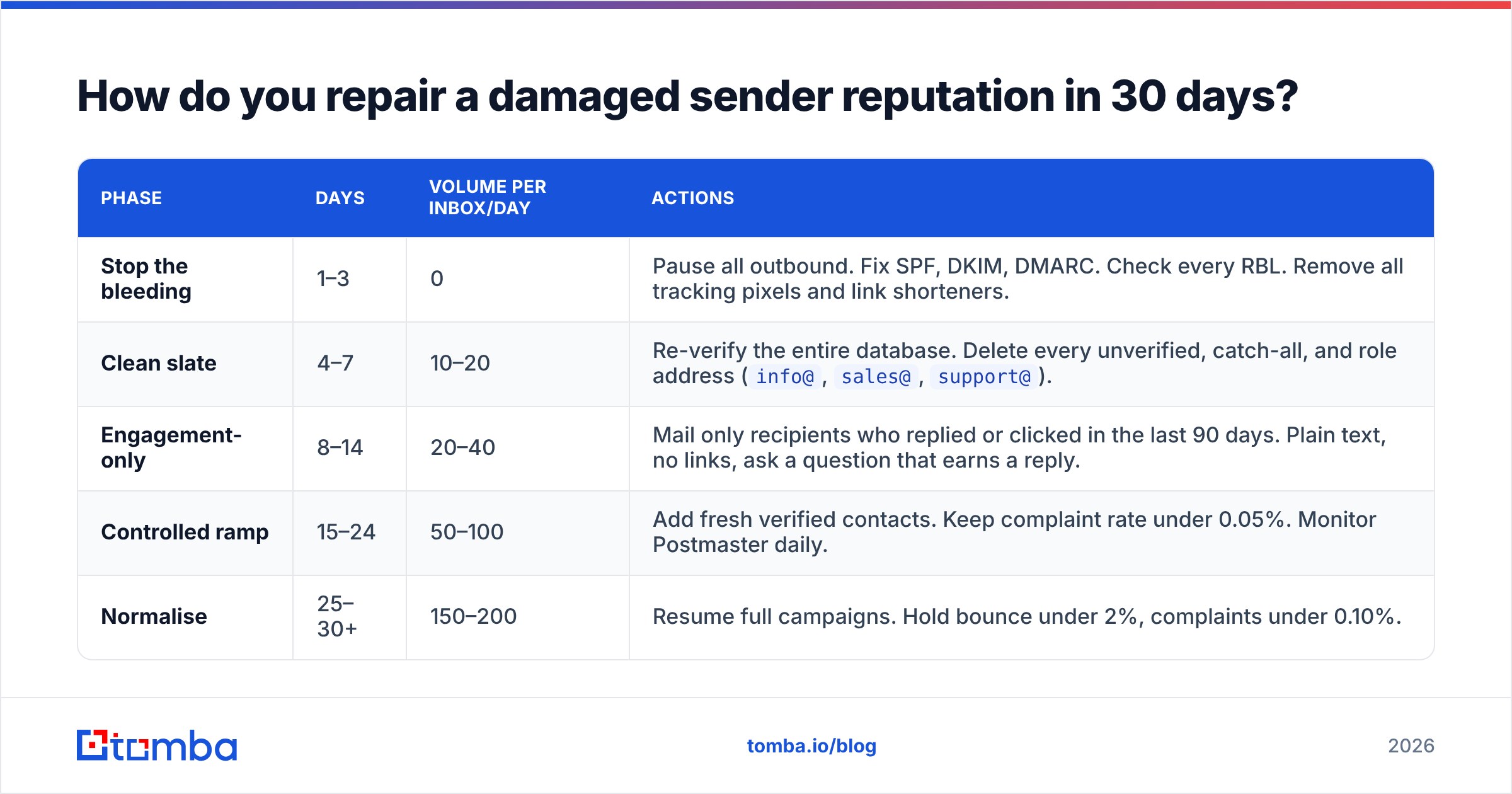
There is no reset. There is only a slow, boring, deliberate rebuild. This schedule works because it re-teaches the provider what your normal looks like.
| Phase | Days | Volume per inbox/day | Actions |
|---|---|---|---|
| Stop the bleeding | 1–3 | 0 | Pause all outbound. Fix SPF, DKIM, DMARC. Check every RBL. Remove all tracking pixels and link shorteners. |
| Clean slate | 4–7 | 10–20 | Re-verify the entire database. Delete every unverified, catch-all, and role address (info@, sales@, support@). |
| Engagement-only | 8–14 | 20–40 | Mail only recipients who replied or clicked in the last 90 days. Plain text, no links, ask a question that earns a reply. |
| Controlled ramp | 15–24 | 50–100 | Add fresh verified contacts. Keep complaint rate under 0.05%. Monitor Postmaster daily. |
| Normalise | 25–30+ | 150–200 | Resume full campaigns. Hold bounce under 2%, complaints under 0.10%. |
Two rules that decide whether this works:
- Do not resume old volume early. If Postmaster still shows Medium on day 20, extend the ramp. Providers reward patience and punish spikes.
- Do not buy a new domain and repeat the behaviour. Burning through domains works until reputation systems correlate registrar, DNS, and content fingerprints — which they increasingly do. You'll get two or three cycles, then the pattern itself becomes the signal.
What quietly kills reputation that nobody warns you about?#
- Role addresses.
info@,admin@,contact@route to shared inboxes where "mark as spam" is the default triage. They complain at multiple times the rate of individual addresses. Strip them. - Unbranded tracking domains. If your sequencer uses a shared click-tracking domain, you inherit every other user's link reputation. Set up a custom tracking CNAME on day one.
- Recycled contact data. B2B data decays roughly 25–30% per year through job changes. A list you verified 14 months ago is not a verified list. Re-verify quarterly.
- Missing one-click unsubscribe. Since Gmail and Yahoo's 2024 requirements, an unsubscribe link buried in the footer pushes people toward the spam button instead — which is the one action you most need to avoid.
- Auto-reply and OOO loops. Sending to an address that bounces an auto-response to a non-existent reply-to can generate backscatter and trap hits.
- Perfect-looking HTML. A heavily designed template sent from a personal-looking sales address is incongruent. Cold outbound should look like the plain-text mail a human writes.
What should you actually monitor every week?#
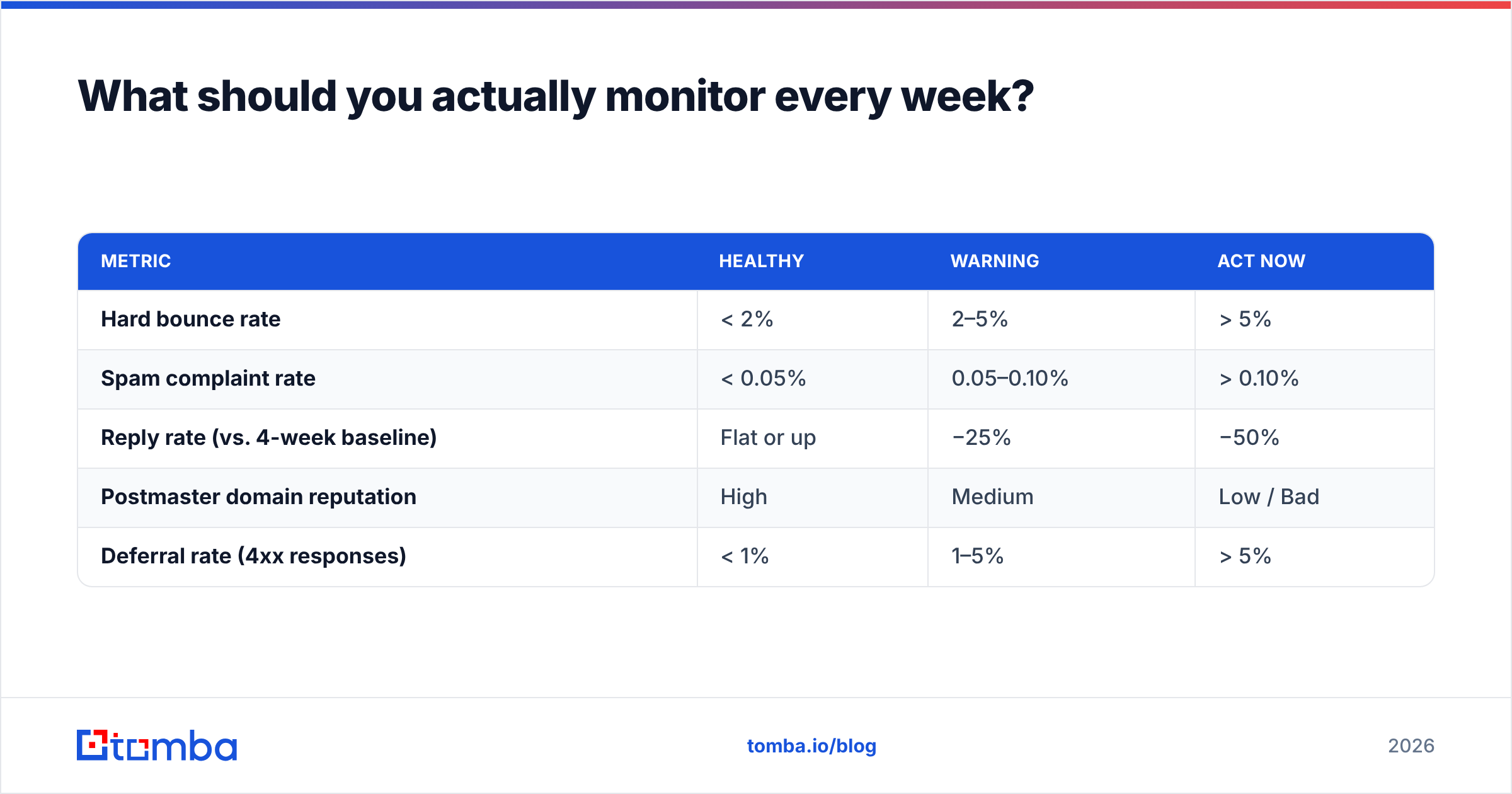
Keep it to five numbers. More than that and nobody looks at the dashboard.
| Metric | Healthy | Warning | Act now |
|---|---|---|---|
| Hard bounce rate | < 2% | 2–5% | > 5% |
| Spam complaint rate | < 0.05% | 0.05–0.10% | > 0.10% |
| Reply rate (vs. 4-week baseline) | Flat or up | −25% | −50% |
| Postmaster domain reputation | High | Medium | Low / Bad |
| Deferral rate (4xx responses) | < 1% | 1–5% | > 5% |
Review them the same day each week. Reputation problems are cheap to fix at the warning threshold and expensive to fix after enforcement.
Where do you start?#
Start upstream. Nearly every reputation failure traces back to a list that was assembled by guessing rather than by verification — permutated addresses, a scraped export from two years ago, a bulk purchase nobody checked.
Fix the input and most of the downstream work disappears. Tomba's Email Finder returns verified professional addresses with a confidence score and the source of the data, so the contacts entering your sequencer are ones that actually accept mail. The free tier gives you 25 searches a month to test against a domain you already know; paid plans start at $49/mo on Starter, with Growth at $99/mo and Pro at $249/mo — full Tomba pricing is public.
Verify first, send second. Your sender reputation is downstream of that one decision.
Related guides#
// get started
Find, verify and enrich your first contacts today
Start on the free plan with 25 searches a month, then scale when your team is ready.
Free plan · No credit card required · GDPR & CCPA
// about the author