Email Sequence Examples: 7 Proven B2B Templates for 2026
Seven real B2B email sequences — cold outbound, demo no-show, trial onboarding, re-engagement and more — with exact timing, subject lines, and the numbers that decide whether a sequence works.
TL;DR
- A sequence is not "one email plus nagging." The best-performing B2B sequences run 4-6 touches over 12-18 days, each with a different angle — not the same ask reworded.
- Cold outbound sequences peak around touch 3. Onboarding and re-engagement sequences behave completely differently and need different spacing.
- Subject lines under 40 characters and bodies under 120 words consistently outperform long, "value-packed" emails in reply rate.
- Every sequence below includes exact timing, copy, and the one metric that tells you whether to keep it or kill it.
- Sequence quality collapses if your list is dirty. A 30% bounce rate makes even perfect copy look like a copy problem.
What is an email sequence, and how is it different from a drip campaign?#
An email sequence is a pre-planned series of emails sent to one contact over a set schedule, where each message has a distinct job and later messages stop firing once the contact replies or converts.
Think of it like a conversation at a conference. You don't repeat your opening line five times to someone who walked away. You try a different angle, then a shorter one, then you say "I'll let you go" and move on. That's a sequence.
A drip campaign, by contrast, is usually time-based and broadcast-flavored: everyone on the list gets the same five emails whether or not they engage. Sequences are behavior-aware. If someone books a meeting after email two, emails three through five never send.
The parts that matter:
- Trigger — what puts someone into the sequence (list import, form fill, demo no-show, trial signup, closed-lost date).
- Cadence — the day gaps between touches. This is where most teams guess and lose.
- Angle per touch — each email argues something new: a problem, proof, a peer example, a lightweight ask, a breakup.
- Exit condition — reply, meeting booked, unsubscribe, or sequence end. Missing exit conditions is how you email someone who already said yes.
- Channel mix — the strongest sequences interleave LinkedIn views, a call attempt, or a comment on a post between emails.
- Measurement window — you judge a sequence on reply rate and meetings, not opens. Open tracking has been unreliable since Apple Mail Privacy Protection started pre-fetching images.
What does a cold outbound email sequence example look like?#
Here's a four-touch cold sequence for a mid-market SaaS selling to RevOps leaders. Total span: 12 days.
Touch 1 — Day 0. Subject: "your Salesforce routing"
Hi Dana,
Saw Northwind added 14 AEs since January. Usually that's when lead routing rules start dropping inbound demos into the wrong territory.
We fixed that for Brightline — 2,400 leads/month, routing errors went from 9% to under 1%.
Worth 15 minutes to see if you have the same leak?
— Sam
Word count: 58. One observation, one proof point, one ask. No attachments, no calendar link in email one.
Touch 2 — Day 3. Subject: reply to same thread
Quick follow-up — the routing audit we ran for Brightline is a 20-minute thing, no commitment. I can send the checklist instead if that's easier.
Offer a lower-friction alternative. Some prospects will take the checklist and convert three weeks later.
Touch 3 — Day 7. New thread. Subject: "wrong person?"
Dana — if territory routing isn't yours, who owns it now? Happy to stop emailing you either way.
This is historically the highest-reply email in a cold sequence. It's short, it gives an easy out, and referrals from it convert well because they arrive with an internal endorsement.
Touch 4 — Day 12. Subject: "closing the loop"
I'll assume the timing's off and stop here. If routing becomes a fire in Q3, the audit checklist is yours — just reply "send it."
Good luck with the ramp.
No guilt, no "I've reached out five times." The breakup email works because it removes pressure, not because it manufactures scarcity.
How should the cadence change by sequence type?#
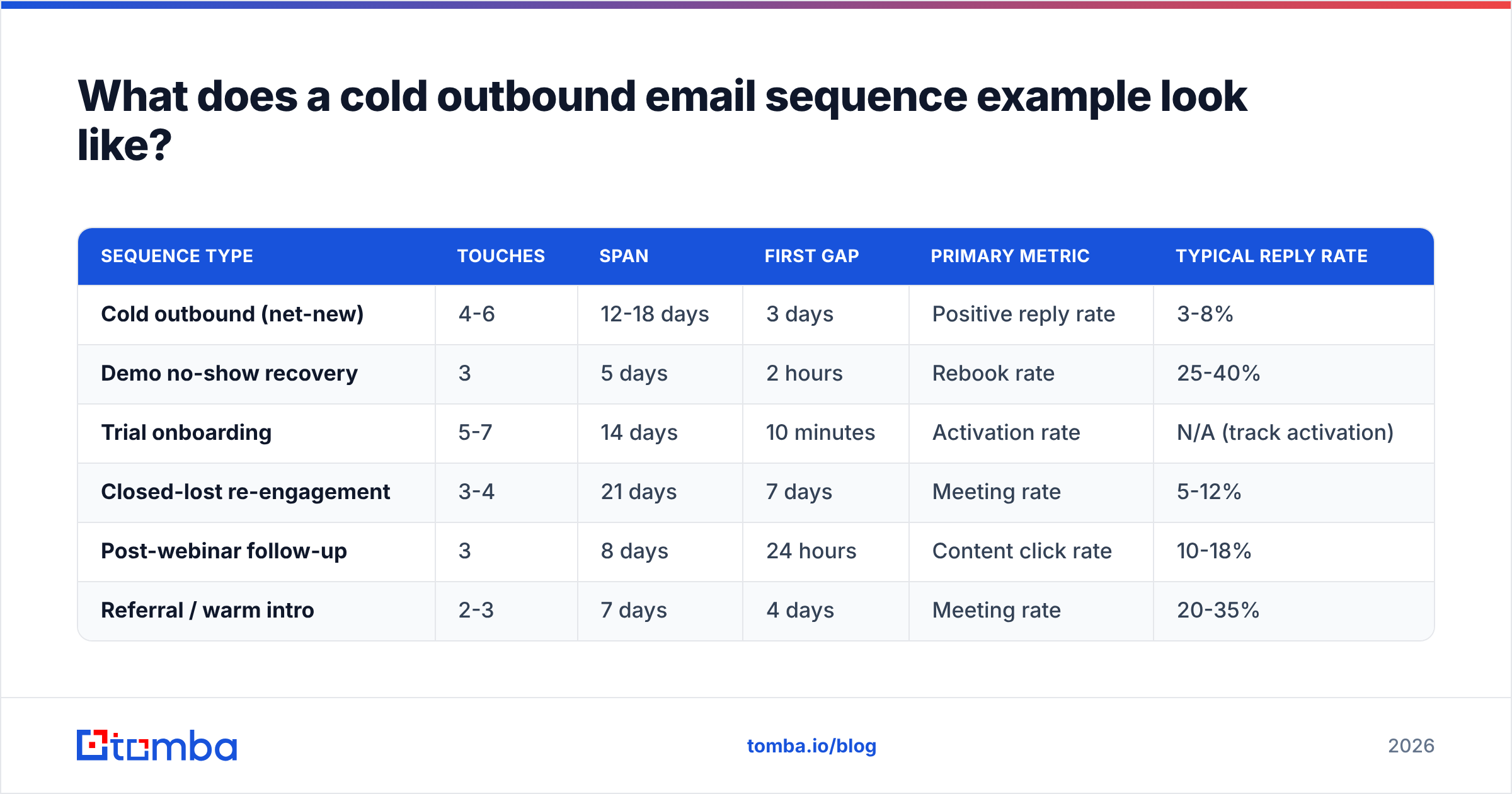
| Sequence type | Touches | Span | First gap | Primary metric | Typical reply rate |
|---|---|---|---|---|---|
| Cold outbound (net-new) | 4-6 | 12-18 days | 3 days | Positive reply rate | 3-8% |
| Demo no-show recovery | 3 | 5 days | 2 hours | Rebook rate | 25-40% |
| Trial onboarding | 5-7 | 14 days | 10 minutes | Activation rate | N/A (track activation) |
| Closed-lost re-engagement | 3-4 | 21 days | 7 days | Meeting rate | 5-12% |
| Post-webinar follow-up | 3 | 8 days | 24 hours | Content click rate | 10-18% |
| Referral / warm intro | 2-3 | 7 days | 4 days | Meeting rate | 20-35% |
Reply-rate ranges above are directional bands drawn from published vendor benchmarks and vary hugely by industry, seniority, and list quality. Treat them as a sanity check, not a target — your own 30-day baseline is the number that matters.
What are the other five sequence examples worth copying?#
2. The demo no-show recovery sequence#
Fires two hours after a missed call. Three touches, five days, done.
- T+2 hours: "Looks like we missed each other — here's my calendar, grab any slot." One line, one link.
- T+2 days: "Sending the 90-second walkthrough instead, in case the live call is hard to schedule." Attach or link a Loom.
- T+5 days: "Should I close this out on my end?" — a yes/no question that's easy to answer.
Rebook rates on this pattern routinely beat cold outbound by 5-10x because intent already existed. The mistake is waiting 24 hours to send touch one. Send it while the calendar reminder is still on their screen.
3. The trial onboarding sequence#
Behavior-triggered, not time-triggered. Each email fires on a milestone, or on the absence of one.
- Minute 10: Confirm signup + the single first action that predicts retention.
- Day 1 (if action not taken): "Stuck on X? Here's the 2-minute version."
- Day 3 (if action taken): Introduce the second-order feature.
- Day 7: Customer example matching their company size.
- Day 11: Trial expiry math — what they'd lose, what upgrading costs.
- Day 14: Human check-in from a real AE, plain text, no images.
The failure mode: sending all six on a fixed timer regardless of what the user did. A user who already activated and got value receives "stuck on X?" and concludes your product isn't paying attention.
4. The closed-lost re-engagement sequence#
Run it 6-9 months after the loss, and only when something changed — new funding, new exec, a competitor's price hike, your own feature release.
- Day 0: "You passed on us in March because of the API limits. We shipped batch endpoints in June." Name the exact objection.
- Day 7: Share a customer who had the same objection and moved.
- Day 21: "Not chasing — want me to check back next fiscal?" Ask for permission to schedule the next attempt.
5. The post-webinar follow-up sequence#
Split attendees from registrants-who-didn't-show. Same content, opposite framing: "here's what you saw" vs "here's what you missed."
- T+24 hours: Recording plus the three timestamps that matter.
- T+4 days: The one slide people asked about, as a standalone asset.
- T+8 days: A soft meeting ask tied to the specific question they submitted in chat, if they submitted one.
6. The referral / warm-intro sequence#
Two emails. The first goes to the connector, the second to the target after the intro lands. Keep the forwardable blurb under 60 words so your connector can paste it without editing. Warm-intro sequences that take more than two touches usually mean the intro wasn't real.
7. The account-based multithread sequence#
Same account, three personas, staggered by four days: practitioner first, then their manager, then the VP. Each email references a slightly different pain. When the VP hears the same vendor name from two directions in a week, it reads as market presence, not spam — as long as the copy is genuinely different per persona. Copy-pasting identical emails across an org is the fastest way to get blocklisted internally.
Why do good sequences still fail?#
Usually not the copy. Four things kill sequences before the words ever get read.
Bad data. If 22% of your addresses bounce, your sending domain's reputation drops, and the 78% of valid addresses start landing in spam. You then rewrite your subject lines, which fixes nothing. Run every list through an email verifier before it enters a sequence, and use a catch-all verifier for the domains that accept everything at the SMTP layer — those are the ones that quietly poison a list.
Volume outrunning infrastructure. A new domain sending 300 emails a day in week one will get throttled. Google and Microsoft both weight sending consistency heavily; Google's own bulk sender guidelines spell out the authentication and complaint-rate thresholds. Keep spam complaints under 0.3% and authenticate with SPF, DKIM, and DMARC before the first send.
No exit conditions. Someone replies "let's talk next week," and touch four fires anyway asking if they got your last note. This single bug does more damage to sequence performance than any subject line.
Personalization theater. "I loved your recent post!" with no evidence you read it is worse than no personalization, because it signals automation. One specific, checkable detail — a headcount change, a job posting, a product launch — beats three vague compliments.
How do you know which sequence to fix first?#
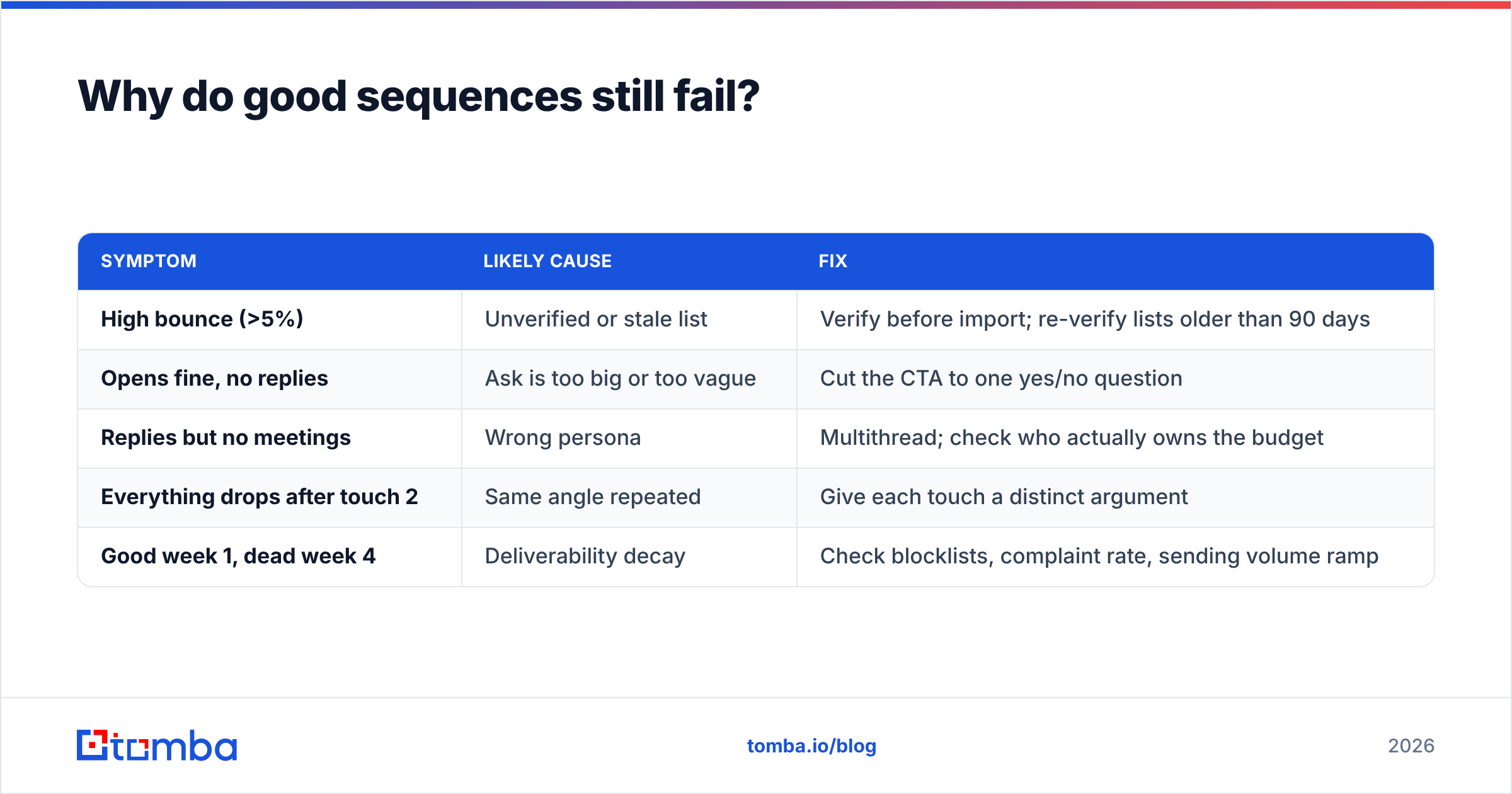
| Symptom | Likely cause | Fix |
|---|---|---|
| High bounce (>5%) | Unverified or stale list | Verify before import; re-verify lists older than 90 days |
| Opens fine, no replies | Ask is too big or too vague | Cut the CTA to one yes/no question |
| Replies but no meetings | Wrong persona | Multithread; check who actually owns the budget |
| Everything drops after touch 2 | Same angle repeated | Give each touch a distinct argument |
| Good week 1, dead week 4 | Deliverability decay | Check blocklists, complaint rate, sending volume ramp |
What tools do you need to run these sequences?#
Three layers, and most teams over-buy the middle one.
Data layer — finding and verifying the contacts. This is where sequence quality is actually decided. You need accurate work emails, a way to catch role accounts and catch-alls, and enrichment so your personalization tokens aren't blank.
Sending layer — the sequencer itself. Instantly, Smartlead, Apollo, Salesloft, and Outreach all do the mechanical job of scheduling and threading. Pick on inbox rotation, reply detection quality, and CRM sync, not on template libraries.
Measurement layer — usually your CRM. If meetings booked aren't attributed back to the sequence and touch number, you're optimizing blind.
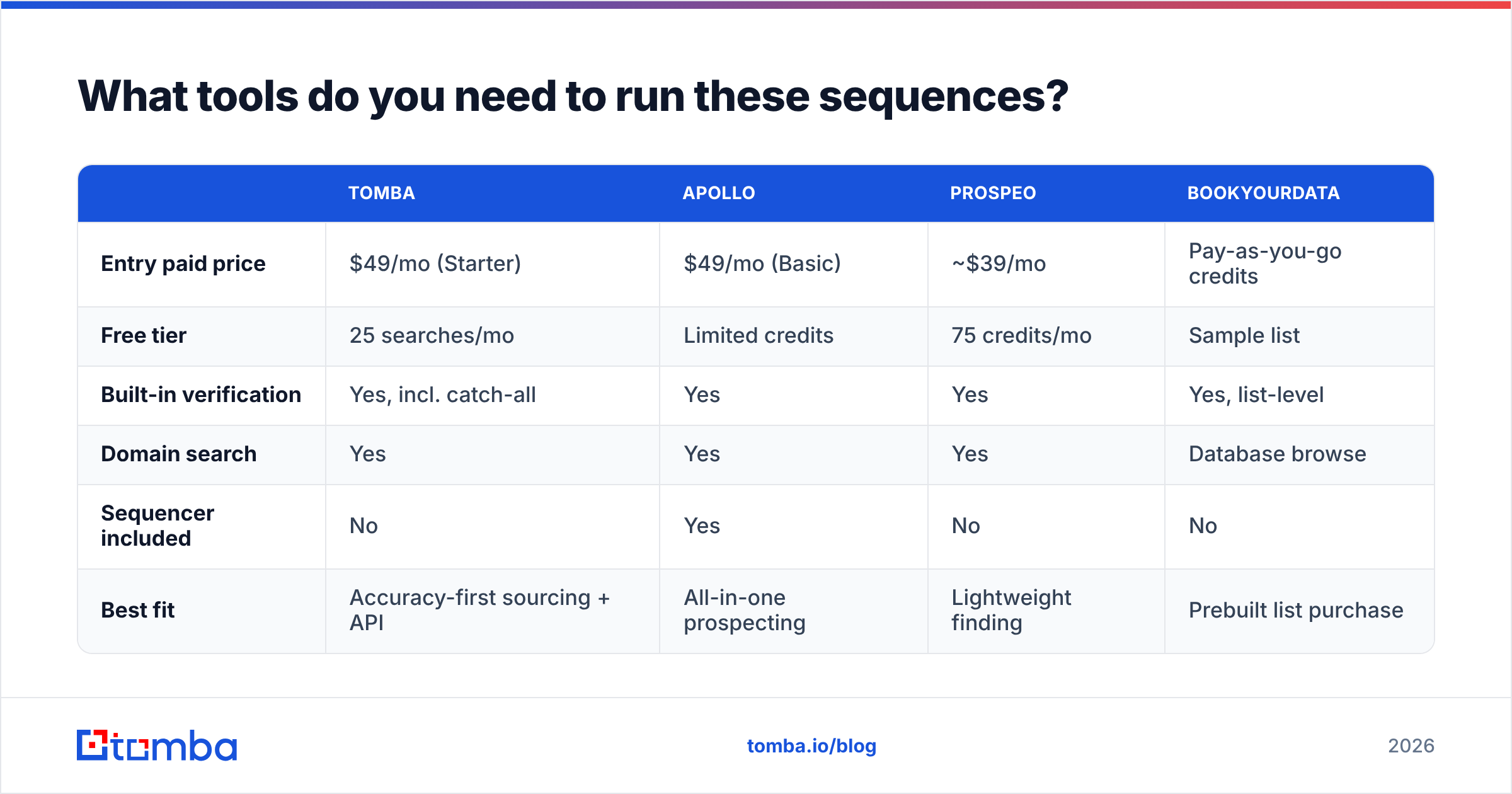
For the data layer, here's how a few common options compare:
| Tomba | Apollo | Prospeo | BookYourData | |
|---|---|---|---|---|
| Entry paid price | $49/mo (Starter) | $49/mo (Basic) | ~$39/mo | Pay-as-you-go credits |
| Free tier | 25 searches/mo | Limited credits | 75 credits/mo | Sample list |
| Built-in verification | Yes, incl. catch-all | Yes | Yes | Yes, list-level |
| Domain search | Yes | Yes | Yes | Database browse |
| Sequencer included | No | Yes | No | No |
| Best fit | Accuracy-first sourcing + API | All-in-one prospecting | Lightweight finding | Prebuilt list purchase |
Pricing and features change; check each vendor's page before you commit. Tomba's full Tomba pricing runs Free (25 searches/mo), Starter $49/mo, Growth $99/mo, Pro $249/mo, and custom Enterprise.
The honest split: if you want one tool that also sends, Apollo is the simpler purchase. If you need a prebuilt, human-verified list to load in tomorrow, BookYourData is a legitimately strong option and skips the sourcing work entirely. If your bottleneck is contact accuracy feeding an existing sequencer — and you want it wired in through an email finder API or a bulk email finder — that's the case for Tomba.
Third-party review sites like G2's sales intelligence category are useful for checking whether a vendor's claims survive contact with actual users, especially on data freshness.
How do you measure whether a sequence is working?#
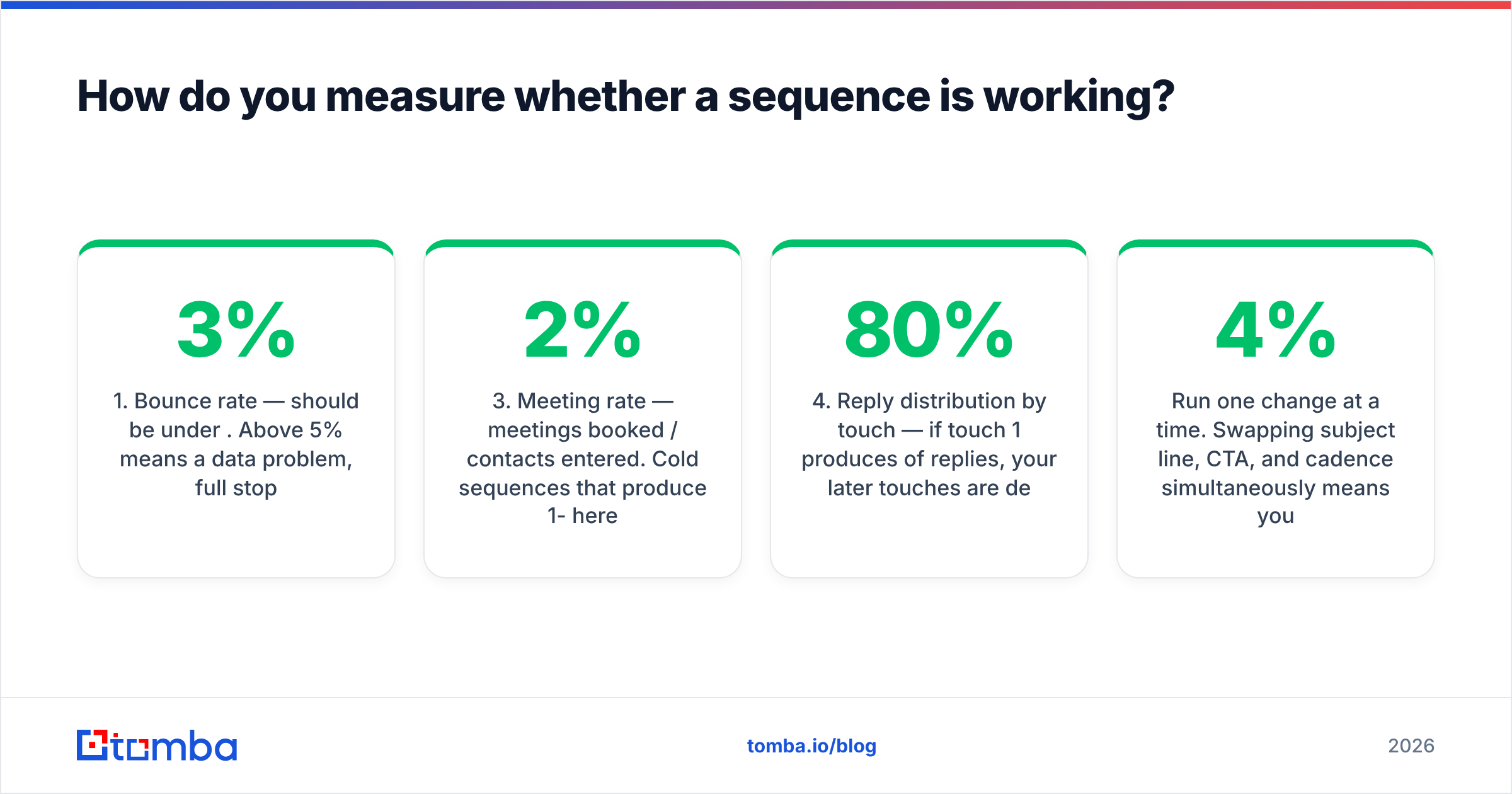
Set a 30-day baseline before you change anything. Then track four numbers per sequence, per touch:
- Bounce rate — should be under 3%. Above 5% means a data problem, full stop.
- Positive reply rate — replies that aren't "unsubscribe" or "wrong person," divided by contacts entered. This is the real scoreboard.
- Meeting rate — meetings booked / contacts entered. Cold sequences that produce 1-2% here are performing.
- Reply distribution by touch — if touch 1 produces 80% of replies, your later touches are dead weight. If touch 3 produces the most, your opener is weak.
Ignore open rate as a primary metric. Since Apple's Mail Privacy Protection began pre-loading tracking pixels, opens are inflated and inconsistent across mail clients. Use them only as a rough relative signal between two subject lines in the same week, on the same list.
Run one change at a time. Swapping subject line, CTA, and cadence simultaneously means you learn nothing from the result. Give each variant at least 200 contacts before you call it — smaller samples on a 4% reply rate are noise.
Also check your response rate against your own history rather than public benchmarks. Industry averages compress wildly different realities: a sequence to 50 CTOs at $200k ACV and a sequence to 5,000 SMB owners are not the same job.
Where should you start?#
Pick one sequence — the demo no-show recovery, if you have demos, because it has the highest ceiling for the least work. Write four emails, none longer than 90 words. Set the exit condition. Verify the list. Run it for 30 days without touching it. Then change one thing.
The sequences in this post are patterns, not scripts. The parts you should copy exactly are the structural ones: distinct angle per touch, short bodies, one ask, a real exit, and a clean list underneath.
That last piece is the one most teams skip. Before your next sequence goes out, run the list through Tomba's Email Finder to source and confirm work addresses at the domain level — start on the free tier at 25 searches a month, and move up only when the sequences are earning it.
Related guides#
Ready to find emails that actually work?
Join 150,000+ professionals who stopped guessing and started sending. Free credits on signup — no credit card required.
Get the Tomba newsletter
Practical outbound tactics and product updates — once every two weeks.
About the author