Email Sequence for Sales: The 2026 Playbook That Converts
Most sales sequences fail before the first send because the list is wrong, not the copy. Here is the timing, structure, and message-by-message breakdown of an email sequence for sales that still books meetings in 2026.
TL;DR
- A working email sequence for sales in 2026 is 4–6 messages over 14–21 business days, not 12 messages over 8 weeks. Reply rates collapse after touch six on almost every dataset that has been published.
- Sequence structure matters less than list quality. A perfect five-email cadence sent to a 22% bounce list will underperform a mediocre cadence sent to verified contacts.
- Every email in the sequence needs its own job: relevance, evidence, objection, alternative path, close. Repeating "just following up" five times is why most sequences die.
- Plain-text, single-CTA, sub-100-word emails outperform designed templates for cold outbound. Save the HTML for nurture.
- Measure reply rate and meeting rate per step, not aggregate open rate. Open tracking is unreliable post-MPP and will lie to you about which step is working.
What is an email sequence for sales?#
An email sequence for sales is a pre-planned series of messages sent to one prospect over a fixed window, where each message has a distinct angle and the whole series stops on reply, meeting booked, or hard no.
Think of it like knocking on a door. One knock and walking away is not persistence — it's noise. Standing there knocking for ten minutes is not persistence either — it's a nuisance call. The sequence is the agreed number of knocks, spaced far enough apart that the person has a real chance to answer, and structured so each knock sounds different.
Technically, a sequence has four moving parts:
- The audience segment — a list narrow enough that one message can be genuinely relevant to every contact in it. If you cannot write a first line that is true for all of them, your segment is too wide.
- The cadence — the day-by-day send schedule, including business-day-only logic and time-zone handling.
- The message set — the individual emails, each with a single job and a single call to action.
- The exit rules — what stops the sequence (reply, out-of-office, unsubscribe, meeting booked, CRM stage change).
Miss any one of these and the sequence becomes a blast with delays. That is the most common failure mode: teams build five emails, load 4,000 contacts with nothing in common, and call it outbound.
Why do most sales email sequences fail?#
They fail on data before they fail on copy. Here is the honest ranking of causes, based on what actually breaks in production outbound programs:
- Bad or unverified addresses. Bounces above 3–4% get your domain throttled by Google and Microsoft. Once throttled, even your good emails land in spam, and the sequence is dead regardless of how well written it is. Run every list through an email verifier before the first send, and re-verify anything older than 90 days.
- Segments that are too broad. "SaaS companies, 50–500 employees, US" is not a segment. "Series B SaaS companies that posted a Head of RevOps role in the last 30 days" is.
- No differentiation between steps. If emails 2 through 5 are variations of "checking in," you have a one-email sequence with four spam complaints attached.
- Too many CTAs. Asking for a 30-minute call, a resource download, and a LinkedIn connection in one email produces zero of the three.
- Sending forever. Sequences that run 10+ touches over two months generate the bulk of spam complaints while contributing a rounding error of meetings.
- Copying a template verbatim. Reply rates on widely circulated templates decay fast — prospects have literally seen the exact wording before.
The fix order matters. Cleaning your data is a one-week project with a measurable outcome. Rewriting copy is an endless project with an ambiguous one. Do the first one first.
How many emails should a sales sequence have?#
Four to six, spread over roughly three weeks, with break-ups handled explicitly rather than implicitly.
The argument for longer sequences comes from a real observation — meetings do get booked on touch seven and eight. The argument against is that the marginal meeting on touch eight costs you disproportionate deliverability damage across the whole list. You are borrowing against your domain reputation to buy a small number of late-stage replies.
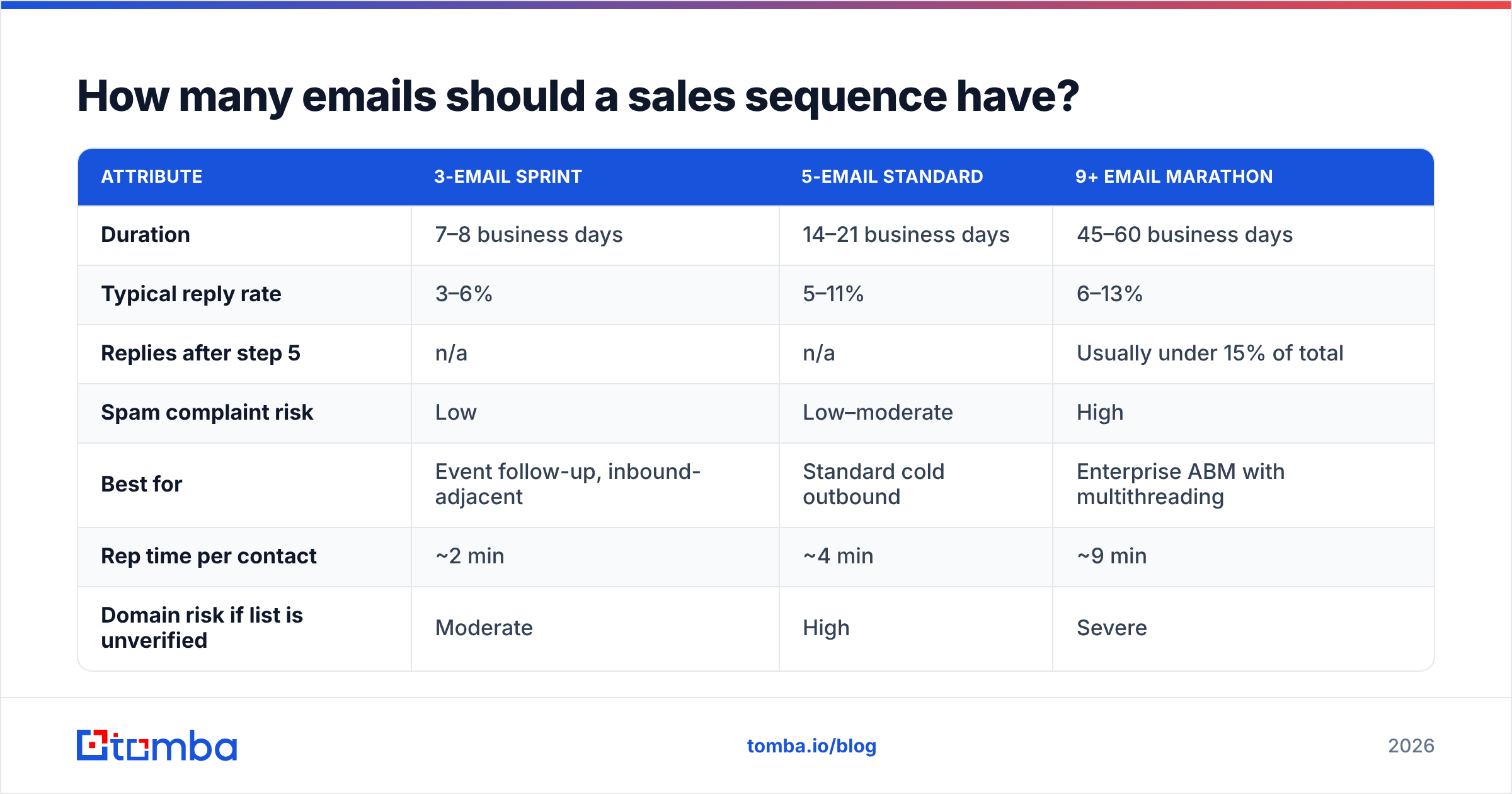
Here is how the common cadence lengths compare in practice:
| Attribute | 3-email sprint | 5-email standard | 9+ email marathon |
|---|---|---|---|
| Duration | 7–8 business days | 14–21 business days | 45–60 business days |
| Typical reply rate | 3–6% | 5–11% | 6–13% |
| Replies after step 5 | n/a | n/a | Usually under 15% of total |
| Spam complaint risk | Low | Low–moderate | High |
| Best for | Event follow-up, inbound-adjacent | Standard cold outbound | Enterprise ABM with multithreading |
| Rep time per contact | ~2 min | ~4 min | ~9 min |
| Domain risk if list is unverified | Moderate | High | Severe |
Reply-rate ranges vary enormously by industry and offer — treat them as relative comparisons, not benchmarks to grade yourself against. The point is the shape: the marathon buys you a couple of extra points of reply rate at several times the risk and effort.
If you sell six-figure enterprise deals to a named account list of 200 companies, the marathon can be justified — but only with multithreading across three or four contacts per account, and only with hand-written messages. For everything else, five emails is the sane default.
What should each email in the sequence say?#
Give every step one job. This is the structure that survives contact with real inboxes:
- Email 1 — Relevance. Why this person, why now. One observed trigger (hiring, funding, product launch, tech-stack change, published content), one sentence on the problem it implies, one soft ask. Under 90 words. No attachments, no images, no tracked links if you can avoid them.
- Email 2 — Evidence. Sent 2–3 days later. A concrete result from a comparable company, with a number. Not a case-study PDF — one sentence of proof. "Two Series B RevOps teams cut list-build time from 6 hours to 40 minutes" beats a link to a landing page.
- Email 3 — Objection. Sent 4–5 days later. Name the reason they haven't replied and defuse it. "If the blocker is that you already pay for a data vendor, the question isn't replacing it — it's what your bounce rate looks like on the contacts it can't find."
- Email 4 — Alternative path. Sent 5–7 days later. Lower the ask. Instead of a call, offer an async option: a two-minute Loom, a one-page teardown, or a referral question ("is this even your area, or should I be talking to someone else?"). The referral question is consistently the highest-yielding step in most sequences.
- Email 5 — Close the loop. Sent 5–7 days later. Short, no guilt, no "I'll assume you're not interested." Just: "I'll stop here. If timing changes in Q3, reply to this and I'll pick it back up."
Two structural rules that apply to all five:
Reply on the same thread for steps 2–5. Threading keeps context, keeps the subject line consistent, and looks like a human following up rather than a system firing.
One CTA per email, and vary the size of the ask. Step 1 might ask for a yes/no. Step 4 asks for a redirect. Never stack them.
If subject lines are the sticking point, run drafts through a subject line tester before committing the sequence — you're checking for spam triggers and length, not for cleverness. The best cold subject lines in 2026 look like internal email: two to four lowercase words, no punctuation gymnastics.
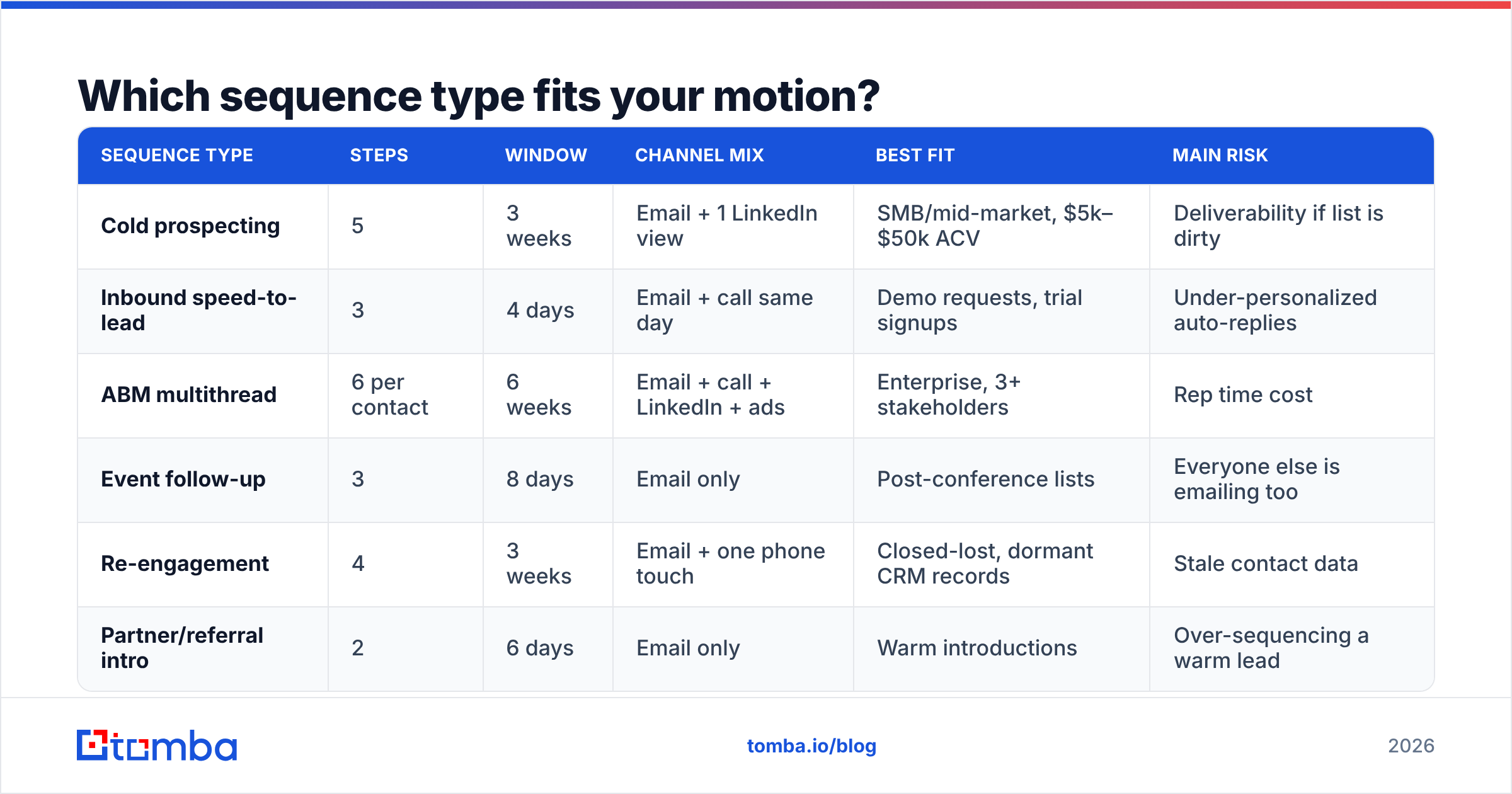
Which sequence type fits your motion?#
Not every outbound motion needs the same shape. Match the sequence to the deal, not to a template library.
| Sequence type | Steps | Window | Channel mix | Best fit | Main risk |
|---|---|---|---|---|---|
| Cold prospecting | 5 | 3 weeks | Email + 1 LinkedIn view | SMB/mid-market, $5k–$50k ACV | Deliverability if list is dirty |
| Inbound speed-to-lead | 3 | 4 days | Email + call same day | Demo requests, trial signups | Under-personalized auto-replies |
| ABM multithread | 6 per contact | 6 weeks | Email + call + LinkedIn + ads | Enterprise, 3+ stakeholders | Rep time cost |
| Event follow-up | 3 | 8 days | Email only | Post-conference lists | Everyone else is emailing too |
| Re-engagement | 4 | 3 weeks | Email + one phone touch | Closed-lost, dormant CRM records | Stale contact data |
| Partner/referral intro | 2 | 6 days | Email only | Warm introductions | Over-sequencing a warm lead |
Two notes on this table. First, re-engagement sequences fail more often than any other type for a boring reason: 25–30% of B2B contact records decay per year, so half your closed-lost list has moved companies. Re-verify before you re-engage. Second, warm intros should almost never run more than two touches — automating a referral is the fastest way to burn the referrer's credibility.
How do you build the list the sequence runs on?#
Work backwards from the segment definition, not forwards from whatever list you can export fastest.
A practical build looks like this:
- Define the trigger. Something observable and recent. Job postings, funding announcements, new leadership hires, technology adoption, published content. Without a trigger, email 1 has no reason to exist.
- Build the company list. 100–400 accounts per sequence is the workable range for one rep. Larger than that and personalization becomes theater.
- Identify the right person per account. Title alone is unreliable across company sizes — a "Head of Growth" at a 30-person company owns what three people own at a 3,000-person company.
- Find and verify the address. Use a domain search to pull the company's email pattern and known contacts, then confirm each address individually. Pattern-guessing without verification is how bounce rates hit double digits.
- Enrich for personalization inputs. Company size, funding stage, tech stack, recent news — the fields your first line actually depends on.
- Suppress aggressively. Existing customers, open opportunities, contacts sequenced in the last 90 days, competitors, and anyone who unsubscribed anywhere in your stack.
That last step is skipped constantly and it is the one that produces angry replies. Suppression lists are cheap insurance.
For teams running this at volume, the bottleneck is usually step 4. Manual finding and verification runs 3–5 minutes per contact; at 300 contacts that's a full working day per sequence. A bulk email finder collapses that to minutes and keeps the verification status attached to each record so you know what you're sending to. Compare Tomba pricing against your current per-contact cost — the Free tier gives 25 searches a month to test the match rate on your own list before committing, and Starter runs $49/mo.
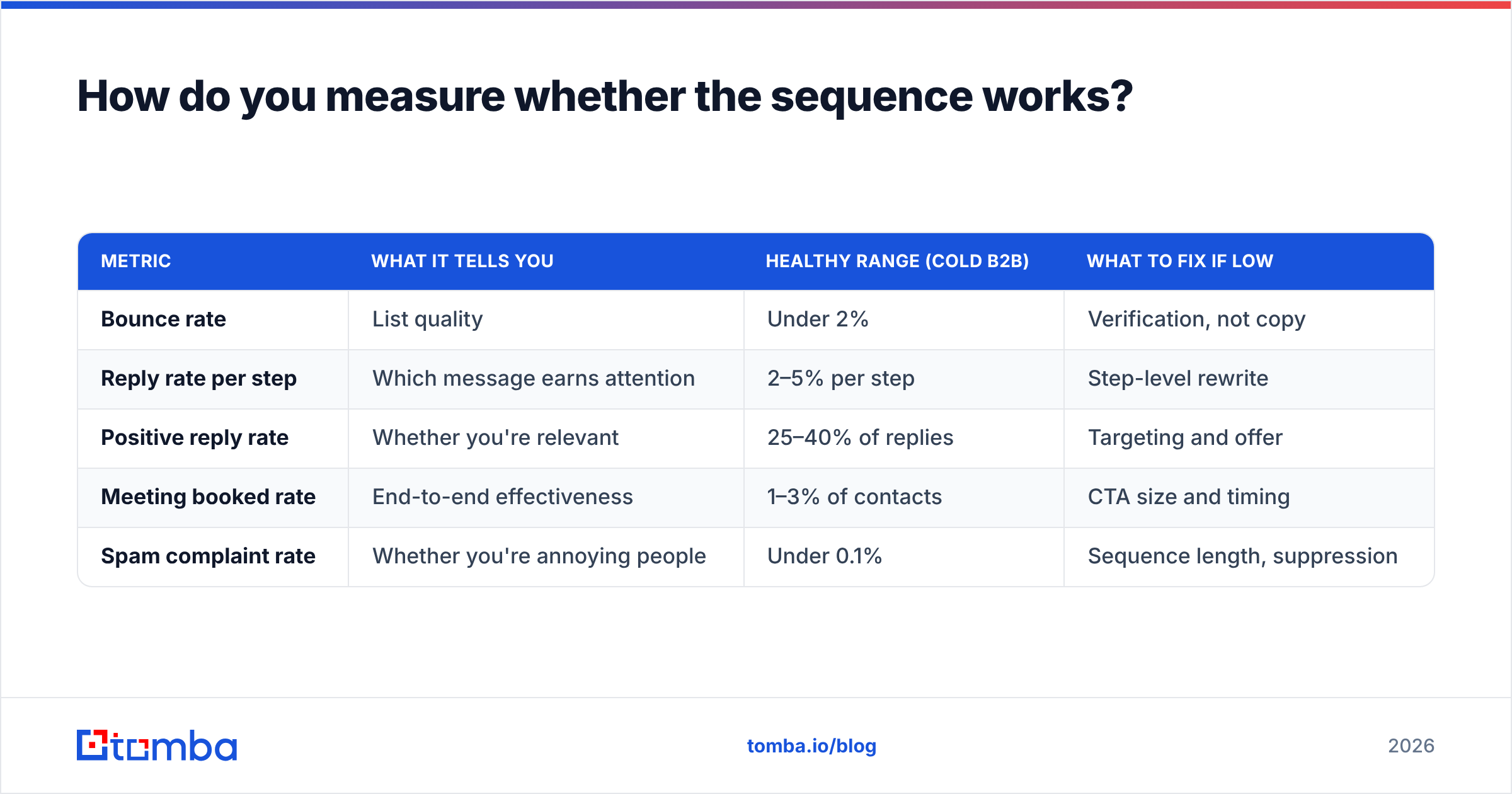
How do you measure whether the sequence works?#
Track these five numbers per step, not just for the sequence overall:
| Metric | What it tells you | Healthy range (cold B2B) | What to fix if low |
|---|---|---|---|
| Bounce rate | List quality | Under 2% | Verification, not copy |
| Reply rate per step | Which message earns attention | 2–5% per step | Step-level rewrite |
| Positive reply rate | Whether you're relevant | 25–40% of replies | Targeting and offer |
| Meeting booked rate | End-to-end effectiveness | 1–3% of contacts | CTA size and timing |
| Spam complaint rate | Whether you're annoying people | Under 0.1% | Sequence length, suppression |
Deliberately absent: open rate. Apple Mail Privacy Protection and similar proxy-fetch behavior inflate opens for a large share of your list, and you cannot tell which. Using open rate to choose between subject lines in 2026 means optimizing against noise. If you need a directional signal, use reply rate on identical copy with different subject lines and accept that it takes more volume to reach significance.
For deeper reading on how sequence performance holds up across large datasets, Gong's research library publishes analyses on outbound patterns worth checking against your own numbers, and HubSpot's sales blog maintains a solid catalog of sequence structures and benchmark surveys. If you're evaluating sequencing platforms themselves, the G2 sales engagement category is the least biased public place to compare feature sets and pricing complaints.
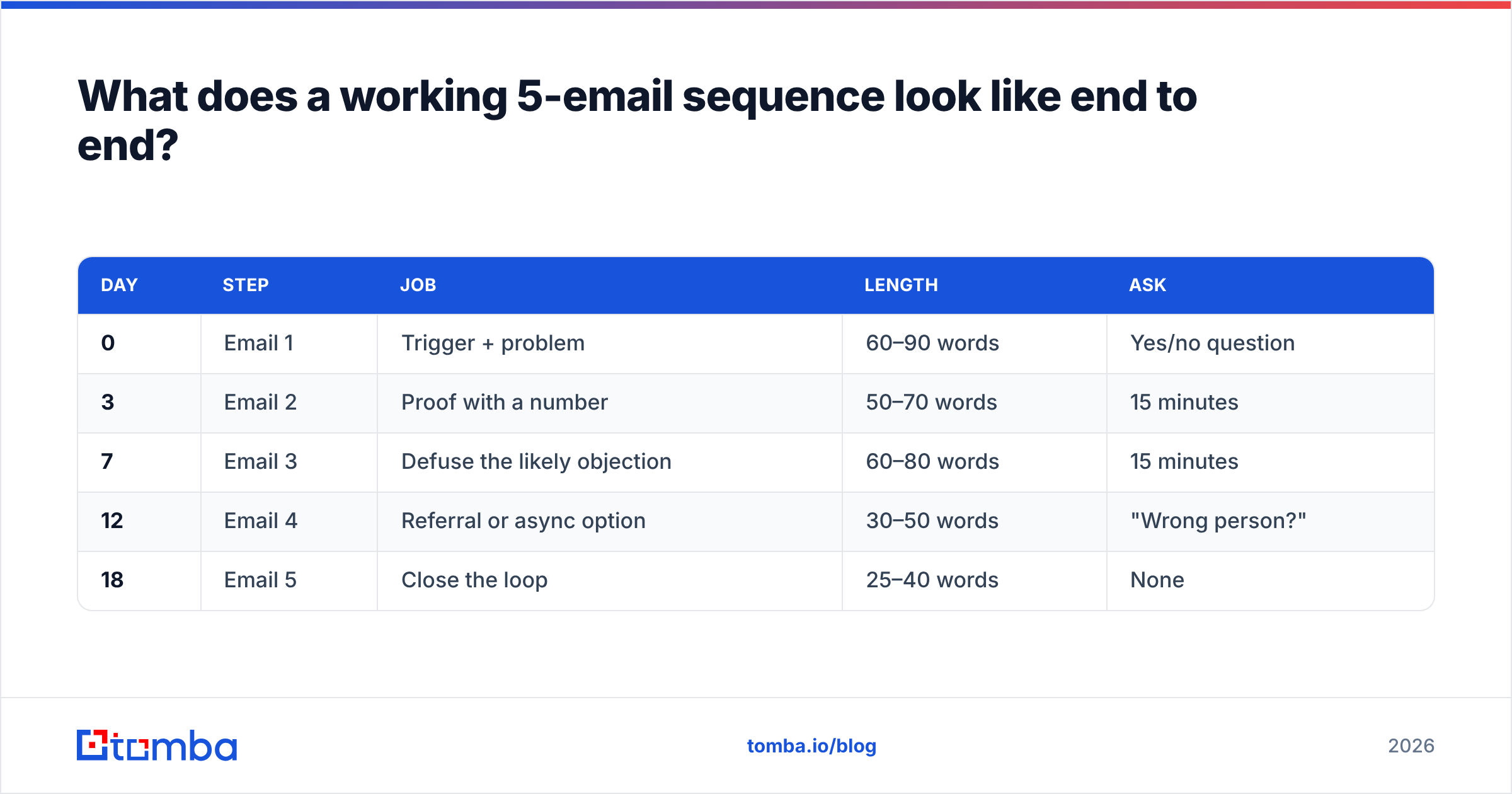
What does a working 5-email sequence look like end to end?#
Here is the skeleton, with day offsets in business days:
| Day | Step | Job | Length | Ask |
|---|---|---|---|---|
| 0 | Email 1 | Trigger + problem | 60–90 words | Yes/no question |
| 3 | Email 2 | Proof with a number | 50–70 words | 15 minutes |
| 7 | Email 3 | Defuse the likely objection | 60–80 words | 15 minutes |
| 12 | Email 4 | Referral or async option | 30–50 words | "Wrong person?" |
| 18 | Email 5 | Close the loop | 25–40 words | None |
Send windows: Tuesday through Thursday, 7–9am in the prospect's time zone, business days only. Skip the prospect's national holidays — a sequence that fires on a public holiday reads as automated no matter how good the copy is.
Warm the sending domain before you start if it's new, keep per-mailbox volume under about 50 cold sends a day, and use a separate domain from your primary corporate one. If your main domain gets flagged, you lose invoicing and support email too, and that's a bad day.
Where should you start this week?#
Pick one segment of 150 accounts with a real trigger. Find and verify the contacts. Write five emails where each one does a different job. Run it for three weeks. Read the per-step reply rates. Then change exactly one thing and run it again.
That loop beats any template pack, because the variable that moves outbound results most is not the wording — it's whether the message reaches a real person who has the problem you described.
If your bottleneck is getting from a company list to verified, deliverable addresses without burning a day per sequence, start with the Tomba Email Finder. Find contacts by domain, name, or company, verify them before they enter your sequence, and keep bounce rate low enough that your carefully structured cadence actually lands in the inbox it was written for. The free tier is enough to test match and accuracy rates on your own segment before you commit a cent.
Related guides#
Ready to find emails that actually work?
Join 150,000+ professionals who stopped guessing and started sending. Free credits on signup — no credit card required.
Get the Tomba newsletter
Practical outbound tactics and product updates — once every two weeks.
About the author