Email Sequence Templates: 7 Frameworks That Get Replies
Most cold sequences fail on structure, not wording. Here are 7 email sequence templates with real timing, step counts, and the data checks that keep them landing in the inbox.
TL;DR
- A sequence is a timing structure, not a stack of emails. Get the cadence and the exit rules right before you obsess over copy.
- Four to six steps over 14–21 days is the working range for most B2B cold sequences. Nine-step marathons mostly buy you spam complaints.
- The seven templates below cover cold outbound, inbound follow-up, demo no-show, trial onboarding, churn-risk, event, and re-engagement — each with step counts and send-day spacing.
- Reply rate is bounded by data quality first. A perfect sequence sent to a 22% bounce list gets you a domain reputation problem, not a pipeline.
- Personalize the first line and the ask. Everything else can be templated without penalty.
What is an email sequence, exactly?#
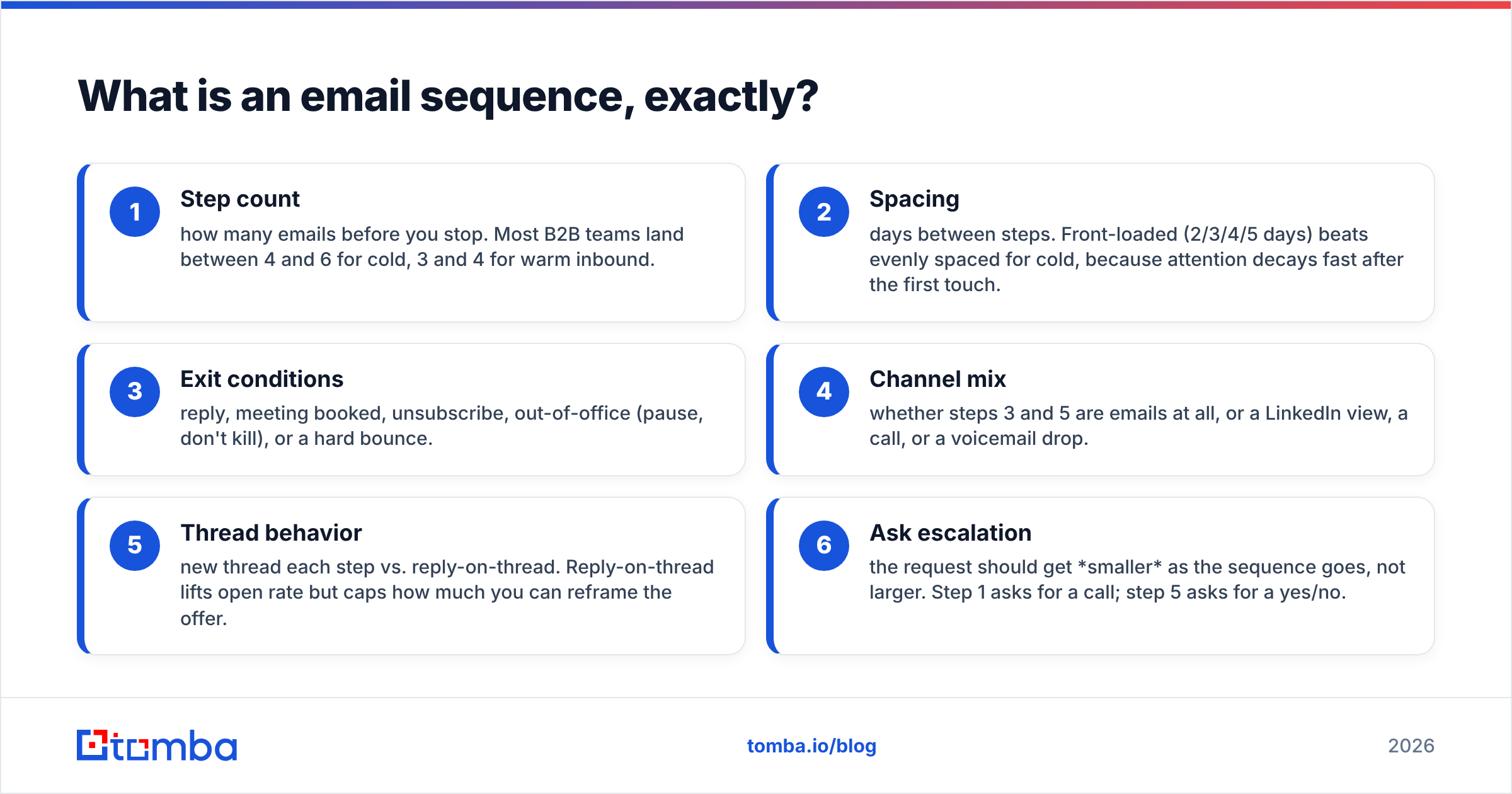
An email sequence is a pre-planned series of messages sent to one contact on fixed intervals, with rules for when to stop. That last part is what separates a sequence from a drip campaign. A drip runs until the calendar ends. A sequence exits the moment the contact replies, books, unsubscribes, or hits a negative trigger.
Three structural decisions define every sequence you will ever build:
- Step count — how many emails before you stop. Most B2B teams land between 4 and 6 for cold, 3 and 4 for warm inbound.
- Spacing — days between steps. Front-loaded (2/3/4/5 days) beats evenly spaced for cold, because attention decays fast after the first touch.
- Exit conditions — reply, meeting booked, unsubscribe, out-of-office (pause, don't kill), or a hard bounce.
- Channel mix — whether steps 3 and 5 are emails at all, or a LinkedIn view, a call, or a voicemail drop.
- Thread behavior — new thread each step vs. reply-on-thread. Reply-on-thread lifts open rate but caps how much you can reframe the offer.
- Ask escalation — the request should get smaller as the sequence goes, not larger. Step 1 asks for a call; step 5 asks for a yes/no.
Teams that write "the perfect cold email" and then bolt three bumps onto it are solving step one of six. The structure is where the reply rate actually lives.
How many steps should an email sequence have?#
Between four and six for cold outbound, spread over 14 to 21 days.
The honest reasoning: each additional step has a lower marginal reply rate and a constant marginal complaint rate. Steps 1 through 3 typically produce 75–85% of a cold sequence's total replies. Step 7 produces almost nothing but keeps generating spam reports, and spam reports are what drive Google and Microsoft to start filtering your domain. Google's bulk sender requirements put the complaint threshold at 0.3%, which sounds generous until you realize a 9-step sequence gives one annoyed prospect nine chances to click the button.
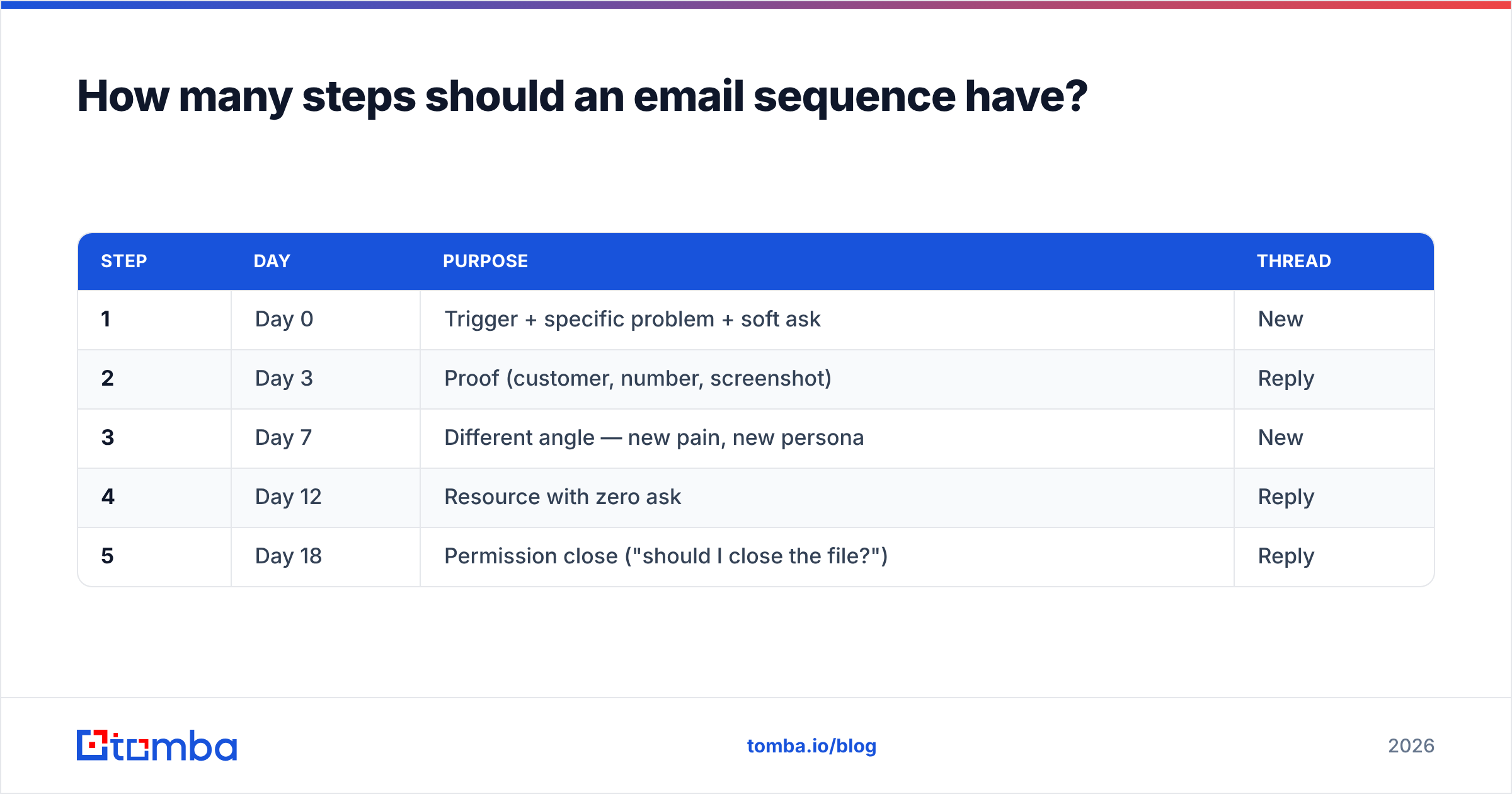
A workable default cadence:
| Step | Day | Purpose | Thread |
|---|---|---|---|
| 1 | Day 0 | Trigger + specific problem + soft ask | New |
| 2 | Day 3 | Proof (customer, number, screenshot) | Reply |
| 3 | Day 7 | Different angle — new pain, new persona | New |
| 4 | Day 12 | Resource with zero ask | Reply |
| 5 | Day 18 | Permission close ("should I close the file?") | Reply |
Extend to six steps only when your sales cycle is long and the buying committee is large. Enterprise ABM sequences justify it. SMB self-serve does not.
What do the 7 email sequence templates look like?#
Each template below is structure-first. Copy the shape, then write your own first lines — the specific trigger is the only part that cannot be templated.
1. Cold outbound (5 steps / 18 days)#
Step 1 (Day 0): One-sentence trigger ("Saw you posted three SDR roles in Q3"), one-sentence hypothesis about the problem that creates, one-question ask. Under 90 words. Step 2 (Day 3): Reply on thread. A named customer with a number. "Ramped 4 SDRs at Vanta in six weeks — here's how the onboarding doc looked." Step 3 (Day 7): New thread, new angle. If step 1 targeted hiring cost, step 3 targets ramp time. Step 4 (Day 12): Give something away. A teardown, a benchmark, a template. No CTA. Step 5 (Day 18): Permission close. "Sounds like this isn't a priority — want me to close the file or check back in Q1?"
2. Inbound lead follow-up (4 steps / 8 days)#
Speed matters more than craft. Research on lead response time consistently shows contact rates collapse after the first hour, so step 1 goes out within 5 minutes, automated. Step 2 (Day 1) is a human message referencing what they downloaded. Step 3 (Day 4) offers two specific times. Step 4 (Day 8) breaks up politely.
3. Demo no-show recovery (3 steps / 5 days)#
Step 1 (2 hours after): No guilt. "Something must have come up — here's my calendar." Step 2 (Day 2): Send the deck or a 3-minute Loom so the meeting has value even if it never happens. Step 3 (Day 5): Ask if the timing or the person is wrong. Offer to route to a colleague.
4. Free trial onboarding (5 steps / 14 days)#
Tie each step to an activation milestone, not a calendar day. Trigger step 2 when the user hasn't completed setup by day 2, step 3 when they've hit the first "aha" action, step 4 at 70% of trial elapsed, step 5 at expiry with a specific extension offer.
5. Churn-risk / usage decline (4 steps / 21 days)#
Fires on a product signal — logins down 50% month over month, seats unassigned, API calls flat. Step 1 asks a question rather than pitching. Step 3 brings in the exec sponsor. Step 4 offers a re-onboarding session.
6. Event / conference (5 steps / 30 days)#
Two pre-event steps (Day -14, Day -3), one during (Day 0, short and logistical), two post (Day +2 with a specific memory of the conversation, Day +9 with the next step). The post-event steps carry the pipeline; the pre-event steps just earn recognition.
7. Re-engagement of dead pipeline (3 steps / 12 days)#
Only send to opportunities closed-lost 6+ months ago, and only when something changed: new champion, funding round, competitor's price increase, your own new feature. Step 1 names the change. Step 2 offers proof from a similar account. Step 3 closes the loop.
Which template fits which motion?#
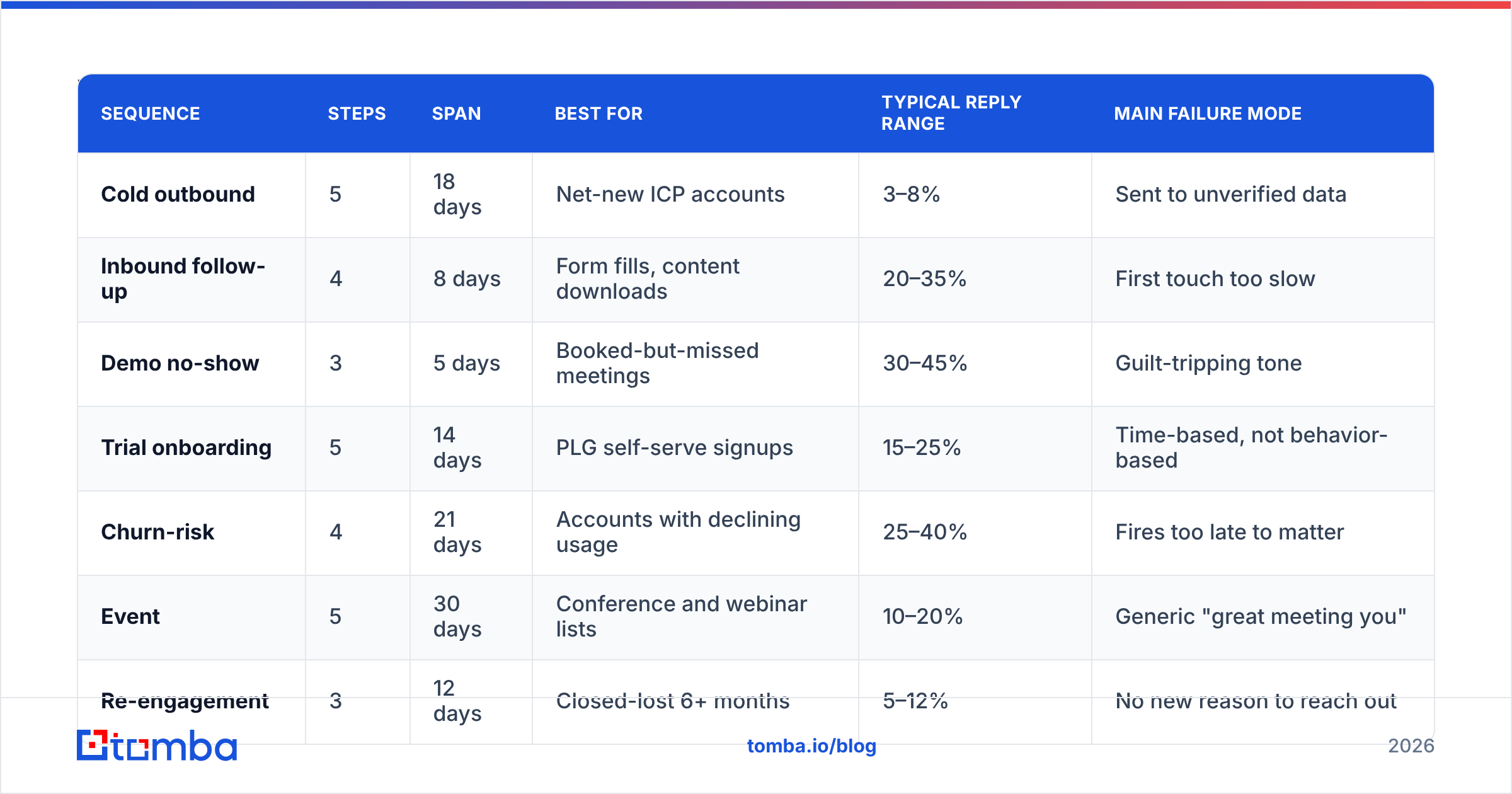
| Sequence | Steps | Span | Best for | Typical reply range | Main failure mode |
|---|---|---|---|---|---|
| Cold outbound | 5 | 18 days | Net-new ICP accounts | 3–8% | Sent to unverified data |
| Inbound follow-up | 4 | 8 days | Form fills, content downloads | 20–35% | First touch too slow |
| Demo no-show | 3 | 5 days | Booked-but-missed meetings | 30–45% | Guilt-tripping tone |
| Trial onboarding | 5 | 14 days | PLG self-serve signups | 15–25% | Time-based, not behavior-based |
| Churn-risk | 4 | 21 days | Accounts with declining usage | 25–40% | Fires too late to matter |
| Event | 5 | 30 days | Conference and webinar lists | 10–20% | Generic "great meeting you" |
| Re-engagement | 3 | 12 days | Closed-lost 6+ months | 5–12% | No new reason to reach out |
Treat those reply ranges as directional. They move with list quality, seniority, and category maturity — a cold sequence into VP Engineering at Series B companies behaves nothing like the same sequence into office managers. Public benchmark sets on G2 and vendor reports vary widely for exactly this reason.
Why do good templates still get bad results?#
Because the list, not the copy, sets the ceiling.
Run the math. A 5-step sequence to 1,000 contacts is 5,000 sends. If 18% of those addresses are invalid — a normal figure for a scraped or 12-month-old list — you generate roughly 900 bounces. That pushes your bounce rate past every mailbox provider's tolerance, and by step 3 your valid recipients stop seeing the emails at all. The template didn't fail. The sequence never reached anyone.
Three checks before any sequence goes live:
- Verify every address. Run the list through an email verifier and drop anything not marked deliverable. Keep list-level bounce under 2%.
- Handle catch-all domains separately. Catch-all servers accept everything, so standard verification returns "unknown." A catch-all verifier gives you a confidence score instead of a coin flip. Segment these into their own sending pool.
- Warm the sending domain. If the domain is under 90 days old, ramp volume gradually and check your SPF record, DKIM, and DMARC alignment before the first campaign. Broken auth is the most common cause of "my great sequence got 0 replies."
Sourcing matters as much as verification. Pulling contacts by company with a domain search — where you get the pattern, the department, and the confidence score together — produces a cleaner starting list than exporting whatever a scraper found on a directory page.
How much of a sequence should be personalized?#
Two elements: the opening line and the ask. That's it.
Everything else — the proof point, the resource, the breakup — can be fully templated without measurable damage. Teams that try to hand-write all five steps send 40 sequences a week instead of 400 and produce fewer meetings in absolute terms.
The opening line needs a specific, checkable fact: a job posting, a funding round, a product launch, a podcast appearance, a stack change, a new hire on their team. "I saw your company is growing fast" is not personalization; it's noise with a first name attached.
The ask needs to match the buying stage. Cold contacts get an interest-check ask ("worth a look?"), not a 30-minute calendar link. Contacts who replied once get the calendar link. Contacts who ghosted after a demo get a binary question.
A useful sanity test from Gartner's B2B buying research: buyers spend a small fraction of their evaluation time with any single vendor rep. Your sequence is competing for that sliver. If a step doesn't give the buyer something they can use without talking to you, it's probably filler.
What should you measure per step?#
Not opens. Apple Mail Privacy Protection and its equivalents inflate open rates to the point of uselessness for most B2B lists. Measure these instead:
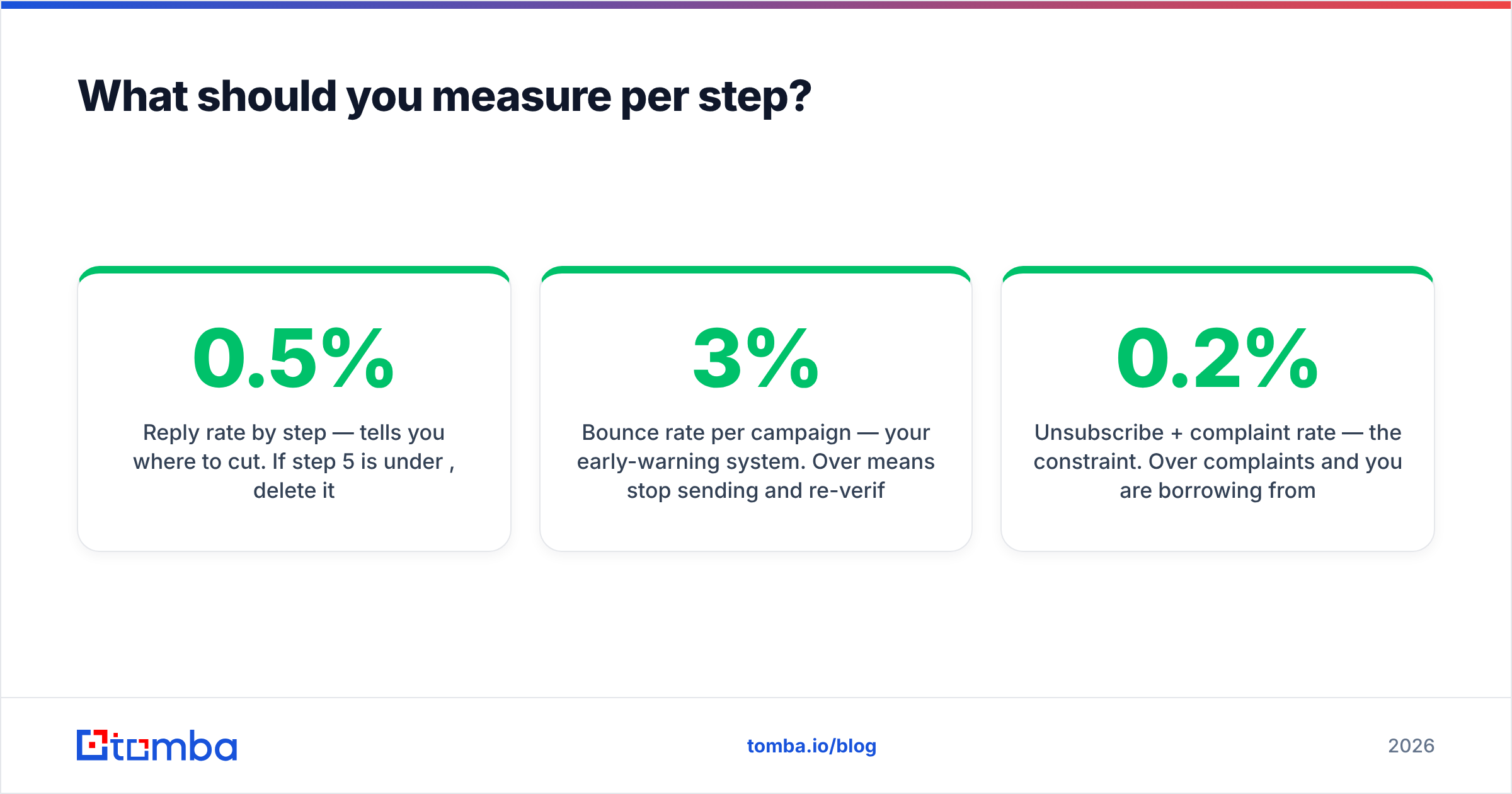
- Reply rate by step — tells you where to cut. If step 5 is under 0.5%, delete it.
- Positive reply rate — separate "not interested" from "tell me more." Total replies can rise while pipeline falls.
- Bounce rate per campaign — your early-warning system. Over 3% means stop sending and re-verify.
- Meetings per 100 contacts — the only number that reconciles with pipeline. Compare across sequences, not across steps.
- Unsubscribe + complaint rate — the constraint. Over 0.2% complaints and you are borrowing from next quarter's deliverability.
Track response rate at the sequence level and step level simultaneously. Sequences usually degrade at one specific step, and averaging hides it.
What's the fastest way to build one this week?#
Pick one motion. Copy the matching template above. Build the list, verify it, and send to 100 contacts — not 2,000. Read every reply, including the rude ones, and rewrite step 1 based on what people actually pushed back on. Then scale.
Two things will slow you down more than writing: finding the right contacts, and finding out too late that half of them bounced. Solve those first and the templates do their job.
That's where Tomba fits. Use the Tomba Email Finder to source verified, pattern-matched business addresses by name and domain before a single step goes out — each result comes with a confidence score and sources, so you know what you're sending to. The free tier gives you 25 searches a month to test the workflow; paid plans start at $49/mo on Starter and $99/mo on Growth if you need volume, with full Tomba pricing laid out per plan. Build the list right, and the seven templates above stop being theory.
Related guides#
Ready to find emails that actually work?
Join 150,000+ professionals who stopped guessing and started sending. Free credits on signup — no credit card required.
Get the Tomba newsletter
Practical outbound tactics and product updates — once every two weeks.
About the author