Email Sequencing CRM: How to Build One That Actually Works
Native CRM sequencing, a dedicated sales engagement tool, or a hybrid stack? Here is an honest 2026 breakdown of costs, deliverability tradeoffs, and the data layer that decides whether any of it works.
TL;DR
- An email sequencing CRM is a CRM that runs multi-step outbound cadences natively, so activity, replies, and pipeline attribution live in one record instead of three tools.
- CRM-native sequencing wins on attribution, reporting, and admin overhead. Dedicated sales engagement tools still win on sending volume, inbox rotation, and deliverability controls.
- The deciding factor is rarely the sequencer. It is the contact data feeding it: a 12% bounce list will sink a perfectly built cadence in any platform.
- Budget realistically. HubSpot Sales Pro and Salesforce Sales Engagement both land in the $100-165/user/month range once you need real sequencing, before data costs.
- Hybrid stacks (CRM as system of record + lightweight sender + verified data source) are the most common setup among teams sending 200+ emails/day.
What is an email sequencing CRM?#
An email sequencing CRM is a customer relationship management system that can execute automated, multi-step email cadences directly against its own contact records — without exporting to a separate outreach tool.
Think of it like a restaurant that owns its kitchen instead of ordering from a caterer. The caterer might cook better food, but the restaurant knows exactly what went out, to which table, at what time, and whether the guest came back. That visibility is the entire argument for sequencing inside the CRM.
Practically, "sequencing" means a defined series of touches: email on day 0, follow-up on day 3, a task to call on day 5, a LinkedIn touch on day 8, a breakup email on day 14. The CRM enrolls a contact, sends from the rep's connected mailbox, pauses the sequence when someone replies, logs everything to the timeline, and updates deal stages when the outcome changes.
The distinction that matters:
- Marketing automation sends bulk campaigns from a shared domain to an opted-in list. One-to-many, brand-branded, tracked as a campaign.
- Email sequencing sends one-to-one messages from an individual rep's mailbox to a small set of targeted prospects. Personalized, conversational, tracked as sales activity.
- Workflow automation fires internal actions — assign a task, update a field, notify a channel — and often triggers the sequence rather than being the sequence.
- Cold email infrastructure is the sending layer underneath: domains, mailboxes, warmup, throttling, rotation. Most CRMs do very little here.
- The data layer supplies verified addresses and enrichment. No CRM generates this on its own.
Conflating those five is the single most common reason a sequencing project stalls at month two.
Should sequencing live in your CRM or a separate tool?#
Short answer: put it in the CRM if you send fewer than roughly 100 emails per rep per day and care more about attribution than throughput. Use a dedicated sender above that, or if you run multiple domains.
Here is the honest comparison across the three common architectures.
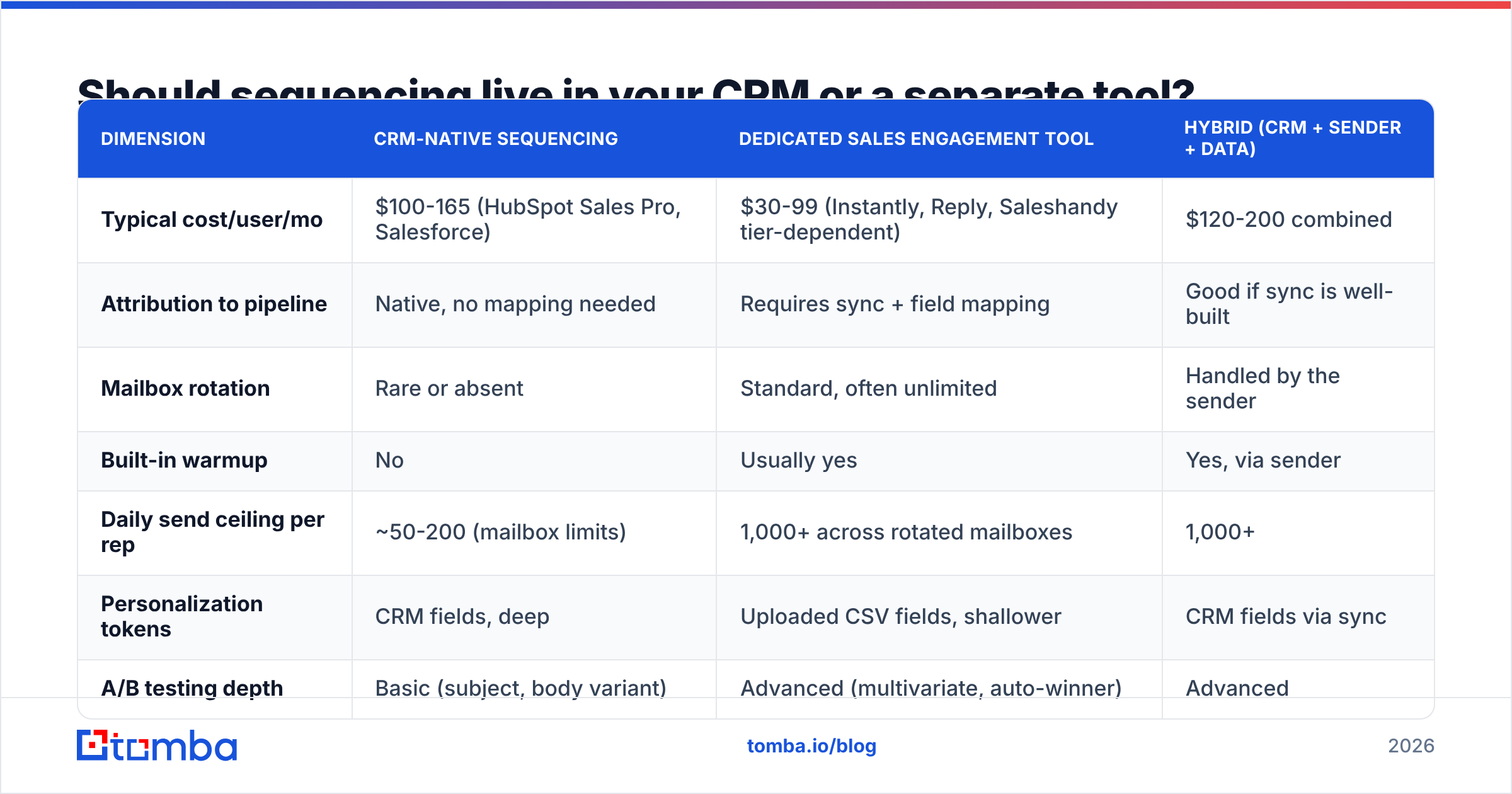
| Dimension | CRM-native sequencing | Dedicated sales engagement tool | Hybrid (CRM + sender + data) |
|---|---|---|---|
| Typical cost/user/mo | $100-165 (HubSpot Sales Pro, Salesforce) | $30-99 (Instantly, Reply, Saleshandy tier-dependent) | $120-200 combined |
| Attribution to pipeline | Native, no mapping needed | Requires sync + field mapping | Good if sync is well-built |
| Mailbox rotation | Rare or absent | Standard, often unlimited | Handled by the sender |
| Built-in warmup | No | Usually yes | Yes, via sender |
| Daily send ceiling per rep | ~50-200 (mailbox limits) | 1,000+ across rotated mailboxes | 1,000+ |
| Personalization tokens | CRM fields, deep | Uploaded CSV fields, shallower | CRM fields via sync |
| A/B testing depth | Basic (subject, body variant) | Advanced (multivariate, auto-winner) | Advanced |
| Reply detection accuracy | High (native inbox) | High | High |
| Admin overhead | Low, one system | Medium, two systems to reconcile | Medium-high |
| Best for | AEs, account-based, 20-80 touches/day | SDR pods, high-volume outbound | Teams scaling past one pod |
Notice the pattern. CRM-native sequencing is not worse; it is optimized for a different job. Salesforce's sales engagement layer and HubSpot's sales tooling both assume a rep working 30-60 named accounts with real research behind each touch. Dedicated senders assume a list of 5,000 and a numbers game. If you buy one expecting the other's behavior, you will be disappointed on schedule.
What does an email sequencing CRM actually cost in 2026?#
More than the sticker price, because sequencing is almost never in the entry tier.
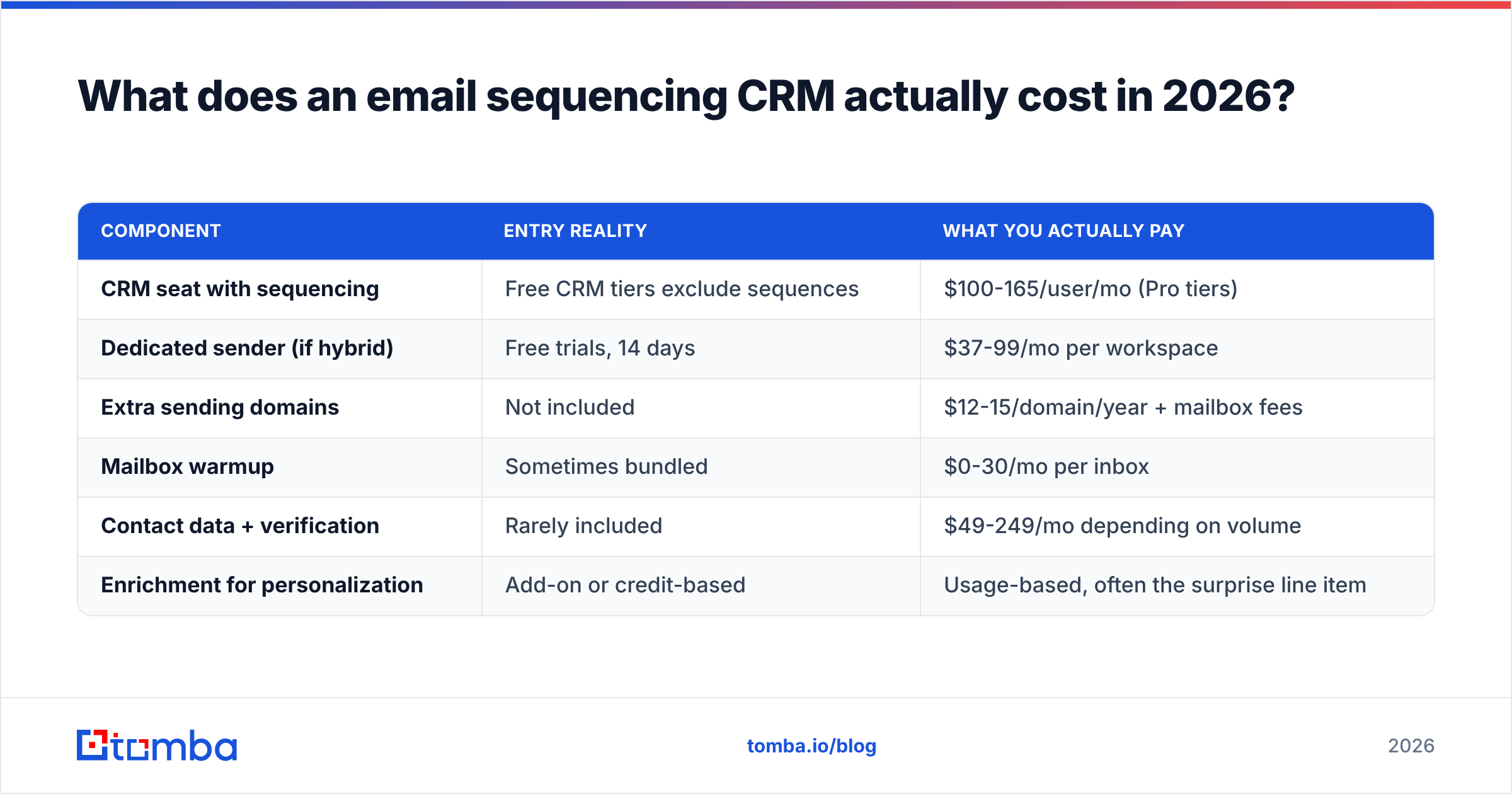
| Component | Entry reality | What you actually pay |
|---|---|---|
| CRM seat with sequencing | Free CRM tiers exclude sequences | $100-165/user/mo (Pro tiers) |
| Dedicated sender (if hybrid) | Free trials, 14 days | $37-99/mo per workspace |
| Extra sending domains | Not included | $12-15/domain/year + mailbox fees |
| Mailbox warmup | Sometimes bundled | $0-30/mo per inbox |
| Contact data + verification | Rarely included | $49-249/mo depending on volume |
| Enrichment for personalization | Add-on or credit-based | Usage-based, often the surprise line item |
For a five-person SDR team, a realistic all-in number lands between $900 and $1,600 per month. The line item teams underestimate is always data. You can run a sequence engine on a $49/mo plan; you cannot run it on a list you scraped in 2023.
For reference on category pricing spread, G2's sales engagement category is a decent sanity check on where vendors sit relative to each other before you take a demo.
How do you feed a sequencing CRM with data that doesn't bounce?#
This is where most sequencing programs quietly fail, and it has nothing to do with the sequencer.
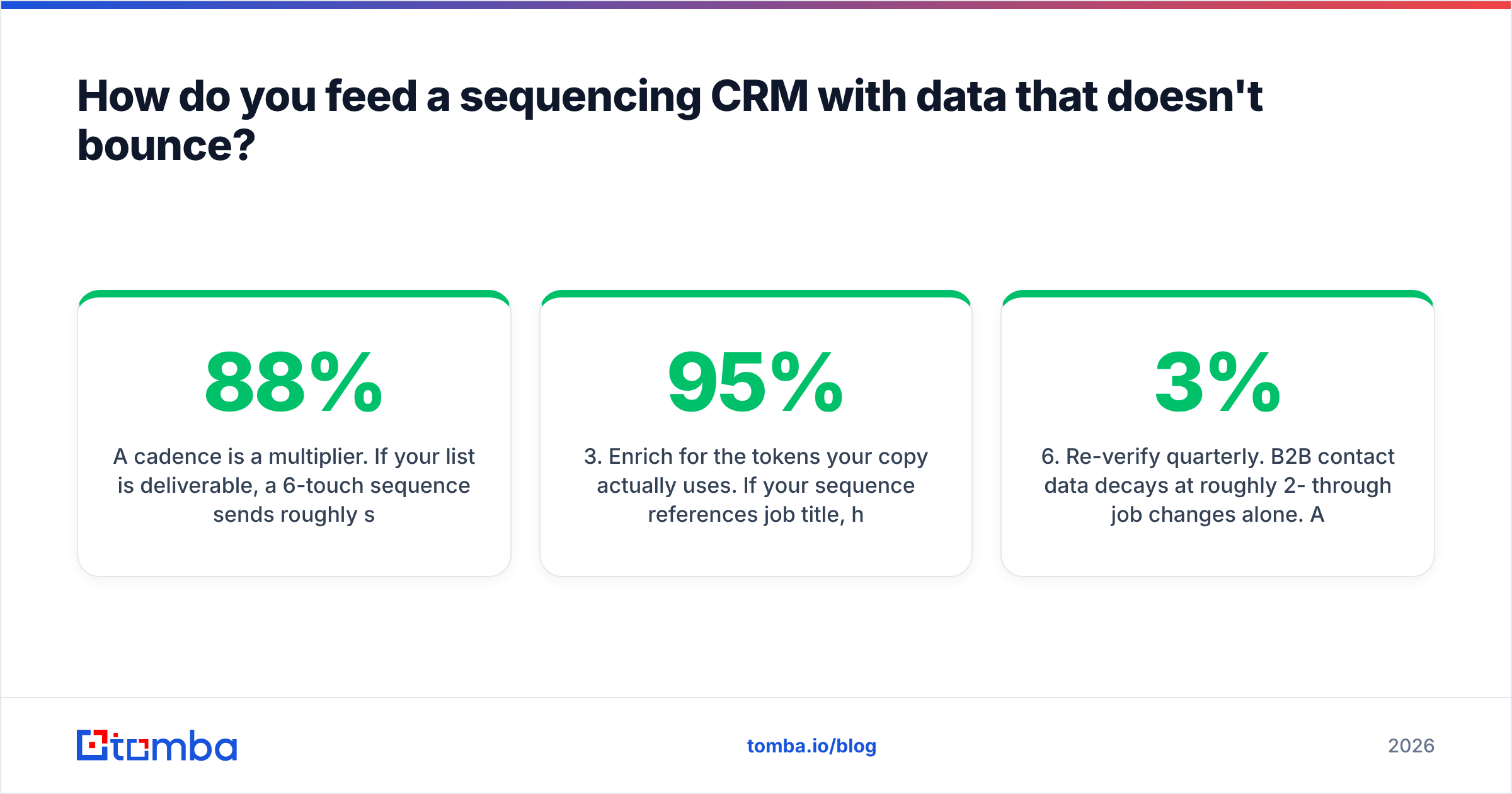
A cadence is a multiplier. If your list is 88% deliverable, a 6-touch sequence sends roughly six times as many messages to bad addresses as a single blast — compounding the bounce signal against your domain across weeks rather than one afternoon. Mailbox providers read that as a sender who does not manage their list.
The working order of operations:
- Source the contact, don't guess it. Pattern-guessing (
first.last@domain.com) produces plausible addresses that fail silently at catch-all domains. Use an email finder that returns a confidence score and a source, not a formula. - Verify before enrollment, not after. Run every address through an email verifier at the moment of import. Catch-all domains need their own treatment — a straight SMTP check returns "accept all" and tells you nothing.
- Enrich for the tokens your copy actually uses. If your sequence references job title, headcount, and tech stack, those three fields must be populated for 95%+ of the list or your merge tags will produce awkward blanks. Contact enrichment at import time is cheaper than a rep manually patching records mid-sequence.
- Sync bidirectionally. Bounces, replies, and opt-outs discovered by the sender must flow back to the CRM record, or the same bad contact gets re-enrolled next quarter. If you are on HubSpot, wire this through the HubSpot integration rather than a nightly CSV.
- Suppress aggressively. Current customers, open opportunities, competitors, and anyone who replied "not now" in the last 90 days should be excluded by a saved list, not by rep memory.
- Re-verify quarterly. B2B contact data decays at roughly 2-3% per month through job changes alone. A list verified in January is measurably worse by April.
Teams that automate steps 1-3 through an email finder API at the point of record creation stop having this conversation entirely. The alternative is a recurring quarterly cleanup project that nobody wants to own.
How should you structure a sequence inside a CRM?#
The structure that consistently outperforms is shorter than most teams expect and more channel-mixed than most templates suggest.
A working 5-touch, 12-day frame:
- Day 0 — Email 1. One observation about their business, one question. Under 90 words. No attachment, no calendar link, no image. The only goal is a reply, not a meeting.
- Day 2 — Manual touch. LinkedIn profile view or a comment on recent company news. Costs 20 seconds, meaningfully lifts email 2's open rate because the name is now familiar.
- Day 4 — Email 2. New angle, not a bump. "Following up" is not an angle. Reference a peer company outcome with a specific number.
- Day 7 — Call task. The CRM should surface this as a task with the prior email thread visible. This is the touch native CRM sequencing handles better than any standalone sender.
- Day 12 — Email 3, the close-the-loop. Two sentences. Explicit permission to say no. Reply rates on this touch are frequently the highest in the sequence.
Rules that hold across industries:
- Cap at 5-6 touches. Touch 7+ produces spam complaints at a rate that outweighs its marginal replies.
- Never send all touches from the same template family. If touches 1, 2, and 3 share sentence structure, filters cluster them.
- Pause on any reply, including out-of-office. An OOO reply that triggers touch 3 the next day makes you look automated, because you are.
- One CTA per email. Two CTAs is a decision, and decisions get deferred.
- Personalize the first line, template the rest. Full personalization does not scale and, past a threshold, does not measurably outperform a strong templated body with a real opening line.
If you want a starting point rather than a blank page, the cold email templates library is a reasonable place to pull structure from before you rewrite it in your own voice.
What metrics tell you the sequence is working?#
Open rate is now the least reliable metric in the stack. Privacy proxies inflate it, and a sequence with 68% opens and 0.4% replies is a failed sequence with good-looking dashboards.
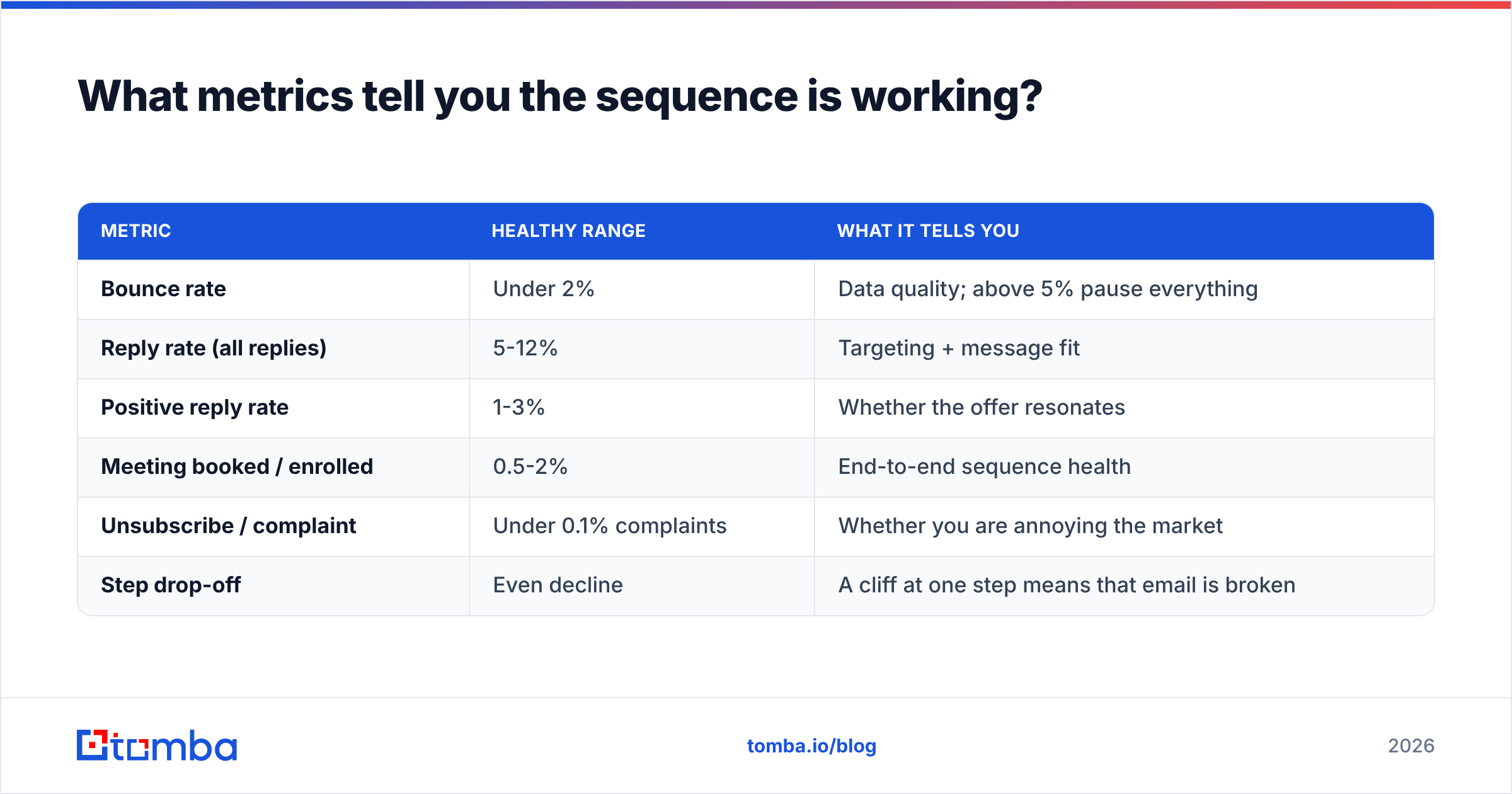
Track these instead, per sequence and per step:
| Metric | Healthy range | What it tells you |
|---|---|---|
| Bounce rate | Under 2% | Data quality; above 5% pause everything |
| Reply rate (all replies) | 5-12% | Targeting + message fit |
| Positive reply rate | 1-3% | Whether the offer resonates |
| Meeting booked / enrolled | 0.5-2% | End-to-end sequence health |
| Unsubscribe / complaint | Under 0.1% complaints | Whether you are annoying the market |
| Step drop-off | Even decline | A cliff at one step means that email is broken |
Run the analysis at the step level. A sequence with a 7% overall reply rate might be one excellent first email carrying four dead follow-ups — and you will never see it in the aggregate. Fixing the weakest step is almost always cheaper than writing a new sequence.
Watch sender reputation alongside these. A sequence that performs beautifully for six weeks and then collapses is usually a deliverability event, not a copy event, and the fix is in domain health rather than in the words.
Is a CRM-native sequencer enough for a scaling team?#
It depends on which constraint binds first.
Stay CRM-native if: your reps work named accounts, your sequences carry real research, your daily volume per rep is under 100, you value one system of record over throughput, and your sales leader reads pipeline reports more often than send reports.
Move to hybrid if: you have added a second SDR pod, you need more than two sending domains, you are hitting mailbox throttles by 2pm, or you need multivariate testing your CRM does not offer. In this setup the CRM stays the source of truth, the sender handles infrastructure, and a verified data layer feeds both.
Consider a standalone sender only if: your CRM is genuinely just a database, your team lives entirely in outbound, and attribution is handled downstream. This is rarer than vendors imply and usually a temporary state.
The migration cost between these is mostly in field mapping and suppression logic, not in the tools. Plan two weeks, not two days, and keep a single owner for the sync.
Where does this leave you?#
Pick the sequencer that matches your motion, then spend the saved energy on the layer that actually moves the numbers: accurate, verified, enriched contact data flowing into the CRM automatically.
A well-built cadence against a stale list will underperform a mediocre cadence against a clean one, every time. That is the least glamorous finding in outbound and the most consistently true.
Start by fixing the input. Tomba's Email Finder returns verified professional addresses with confidence scores and sources, connects directly to HubSpot, Salesforce, Pipedrive, and Sheets, and runs through an API when you want records enriched the moment they enter the CRM. The free tier gives you 25 searches a month to test against a list you already know the answers to; paid plans start at $49/mo. Verify your next sequence's list before you enroll it, and compare the bounce rate to your last one — that single comparison usually settles the argument.
Related guides#
Ready to find emails that actually work?
Join 150,000+ professionals who stopped guessing and started sending. Free credits on signup — no credit card required.
Get the Tomba newsletter
Practical outbound tactics and product updates — once every two weeks.
About the author