Email Sequencing Tool: The 2026 Guide to Higher Replies
An email sequencing tool automates multi-step outreach, but most teams buy the wrong one. Here's how sequencing actually works, what the major platforms cost in 2026, and why data quality decides your reply rate before copy ever does.
TL;DR
- An email sequencing tool sends a pre-built series of emails on a schedule, pauses on reply, and reports on each step — it is a scheduler with guardrails, not a magic reply machine.
- The platform you pick matters less than three inputs: verified addresses, sending volume per inbox, and step-level relevance. Change those and any tool performs better.
- Expect $30–$80 per seat per month for a modern sending tool. Sequencer plus data plus warmup usually lands between $150 and $400/month for a two-person outbound team.
- Sequences that stop at three steps leave replies on the table. Most positive replies in B2B land on steps two through five, spread over 14–21 days.
- Bad addresses are the single largest cause of low reply rates. Verify before you load a list — a 12% bounce rate can suppress an entire domain within one campaign.
What is an email sequencing tool?#
An email sequencing tool is software that sends a predefined series of emails to a contact over time, automatically stopping when that contact replies, books a meeting, or unsubscribes.
Think of it like a dishwasher cycle. You load the dishes once (your contact list), select a program (the sequence: five steps, three days apart, weekdays only), and the machine runs the stages in order without you standing over it. If someone opens the door mid-cycle — replies — the machine stops.
Technically, a sequencer does four things:
- Schedules steps — step 1 on day 0, step 2 on day 3, step 4 on day 10, respecting the recipient's timezone and your sending window.
- Enforces exit conditions — reply detected, meeting booked, unsubscribe clicked, or manual removal. Without reliable exit logic you will email someone who already said yes.
- Distributes sending load — rotates across multiple mailboxes and domains so no single inbox exceeds a safe daily volume.
- Attributes outcomes — which step, which variant, which segment produced the reply.
That last point is where most teams under-use the tool. A sequencer is your only honest source of step-level data. If you cannot say "step 3 produces 41% of our positive replies," you are guessing at your own playbook.
How is sequencing different from email marketing automation?#
They look similar and behave nothing alike.
Marketing automation (Mailchimp, HubSpot Marketing Hub, Klaviyo) sends bulk broadcast mail from shared or dedicated IPs, usually in HTML, to opted-in lists, and optimizes for opens and clicks. Sequencing sends one-to-one plain-text mail from a real person's mailbox to a cold or warm B2B contact, and optimizes for replies.
The practical differences:
- Sending infrastructure — sequencers connect via SMTP/OAuth to your actual Google Workspace or Microsoft 365 mailbox. Broadcast tools use their own ESP infrastructure.
- Volume ceiling — a broadcast tool sends 50,000 emails in an hour. A sequencer should send 20–40 per mailbox per day, which is why inbox rotation exists.
- Formatting — tracking pixels, images and heavy HTML hurt cold reply rates. Good sequencers default to plain text.
- Exit logic — broadcast tools rarely stop a campaign because someone replied. Sequencers must.
- Compliance posture — cold B2B outreach lives under a different legal regime than opt-in marketing, and the two should not share a sending domain.
Mixing the two on the same domain is the fastest way to damage email deliverability for both. Use a separate sending domain for outbound. Always.
Which email sequencing tool should you pick in 2026?#
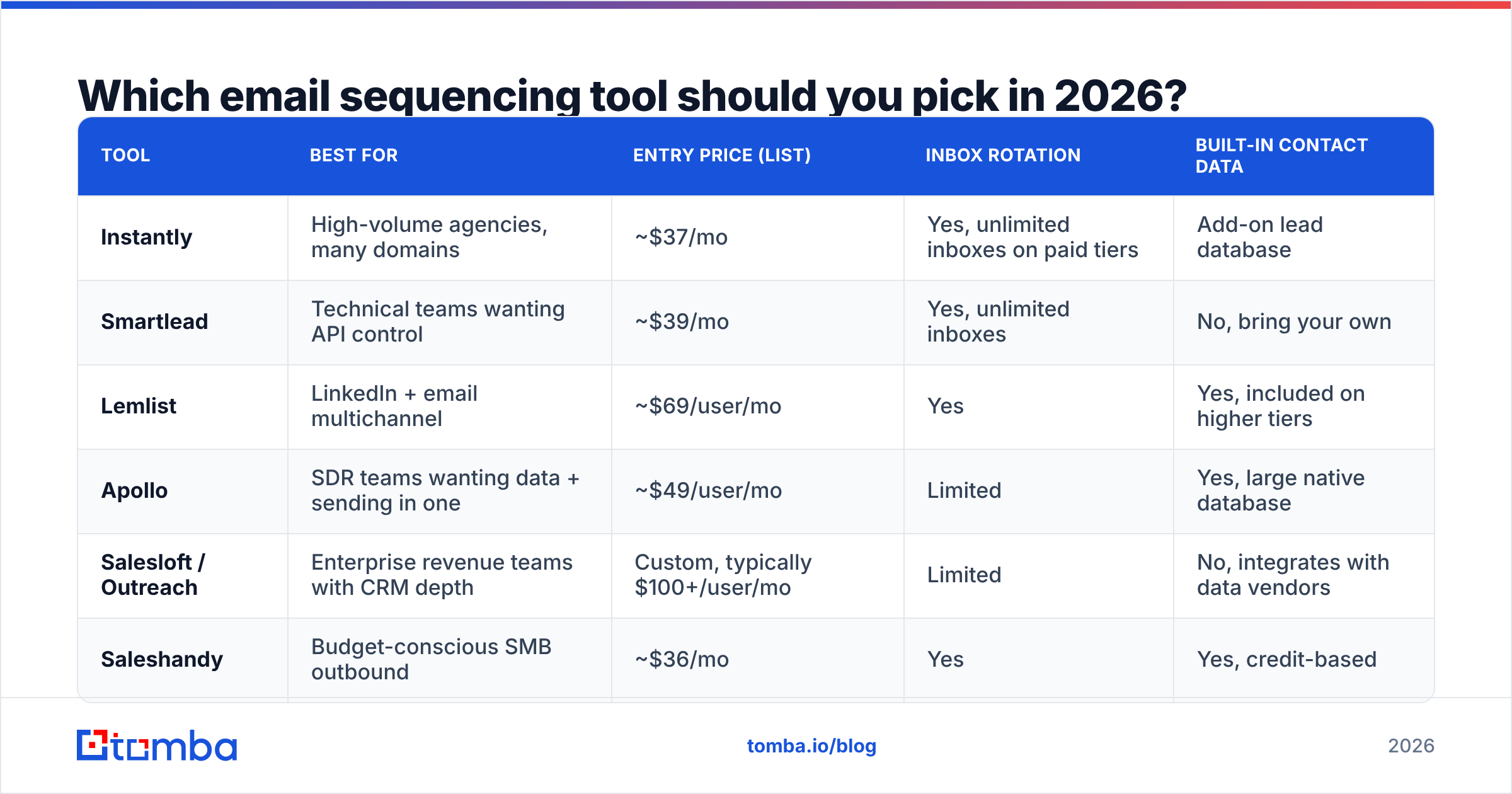
There is no universal winner. There is a right answer per team shape. The table below reflects publicly listed entry pricing at the time of writing — always confirm on the vendor's own page, since outbound tooling reprices often.
| Tool | Best for | Entry price (list) | Inbox rotation | Built-in contact data |
|---|---|---|---|---|
| Instantly | High-volume agencies, many domains | ~$37/mo | Yes, unlimited inboxes on paid tiers | Add-on lead database |
| Smartlead | Technical teams wanting API control | ~$39/mo | Yes, unlimited inboxes | No, bring your own |
| Lemlist | LinkedIn + email multichannel | ~$69/user/mo | Yes | Yes, included on higher tiers |
| Apollo | SDR teams wanting data + sending in one | ~$49/user/mo | Limited | Yes, large native database |
| Salesloft / Outreach | Enterprise revenue teams with CRM depth | Custom, typically $100+/user/mo | Limited | No, integrates with data vendors |
| Saleshandy | Budget-conscious SMB outbound | ~$36/mo | Yes | Yes, credit-based |
Read that table as a fork, not a leaderboard:
- You run agency-scale volume across dozens of domains → Instantly or Smartlead. Their entire architecture is built around mailbox rotation and warmup.
- You have one team, one CRM, and forecasting pressure → Salesloft or Outreach. You pay for governance, call recording, and pipeline reporting, not for sending.
- You want one bill and one login → Apollo. Data and sending in the same product is genuinely convenient, and the trade-off is data you can't easily swap out.
- You sell into markets where LinkedIn carries the relationship → Lemlist, or a dedicated multichannel tool.
If you're evaluating against a current contract, G2's sales engagement category is the least biased public source for feature-level comparison, because reviews are tied to verified seats.
Correction — that image renders as:
Why do good sequences still get zero replies?#
Because the list was wrong, not the copy.
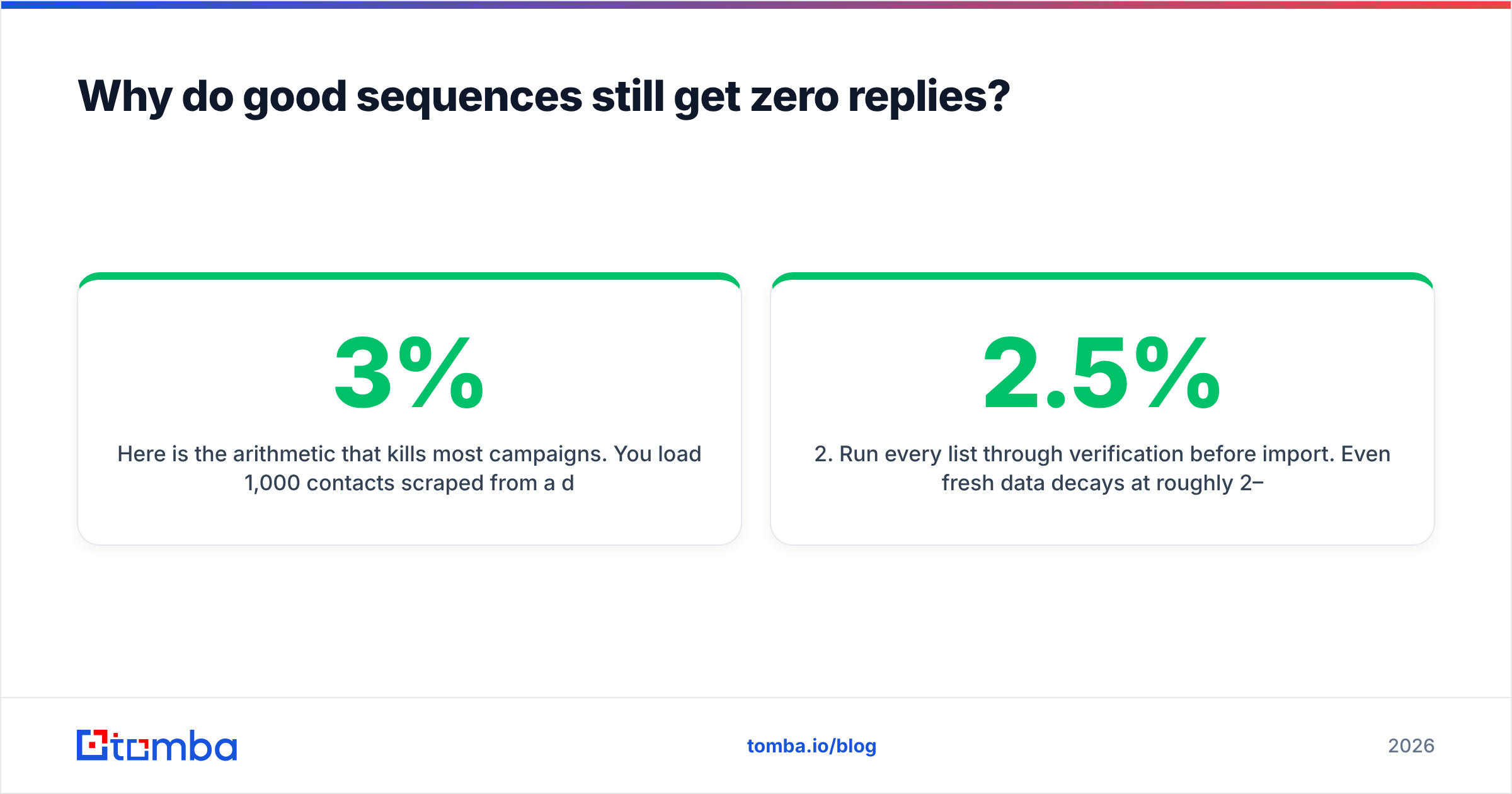
Here is the arithmetic that kills most campaigns. You load 1,000 contacts scraped from a directory. Twelve percent are dead, role-based, or catch-all guesses. That's 120 hard bounces in week one. Google and Microsoft read a bounce rate above roughly 2–3% as a spam signal. Your domain reputation drops. The 880 valid contacts now receive your mail in Promotions or Spam. Reply rate collapses to under 1%, and you conclude your subject lines need work.
They don't. Your data does.
Order of operations that actually works:
- Source addresses from a provider that shows confidence scores, not a static CSV of unknown age. An email finder that returns a verification status per address is the baseline requirement in 2026.
- Run every list through verification before import. Even fresh data decays at roughly 2–2.5% per month as people change jobs. A dedicated email verifier pass costs a fraction of a cent per record and protects an asset — your domain — that you cannot re-buy.
- Handle catch-all domains explicitly. Catch-all servers accept everything, which means standard verification returns "unknown." Either exclude them, or route them through a catch-all verifier that tests deliverability by other means. Do not blindly send to unknowns.
- Segment before you write. Twelve tight segments of 80 contacts outperform one blast of 1,000, because the first line can be true for everyone in the segment.
This is also why the data layer and the sending layer are usually separate purchases. Providers like Tomba and BookYourData compete on coverage and verification depth; sequencers compete on sending infrastructure and reporting. Buying a single tool that does both adequately is convenient, but it caps your ceiling on whichever half is weaker.
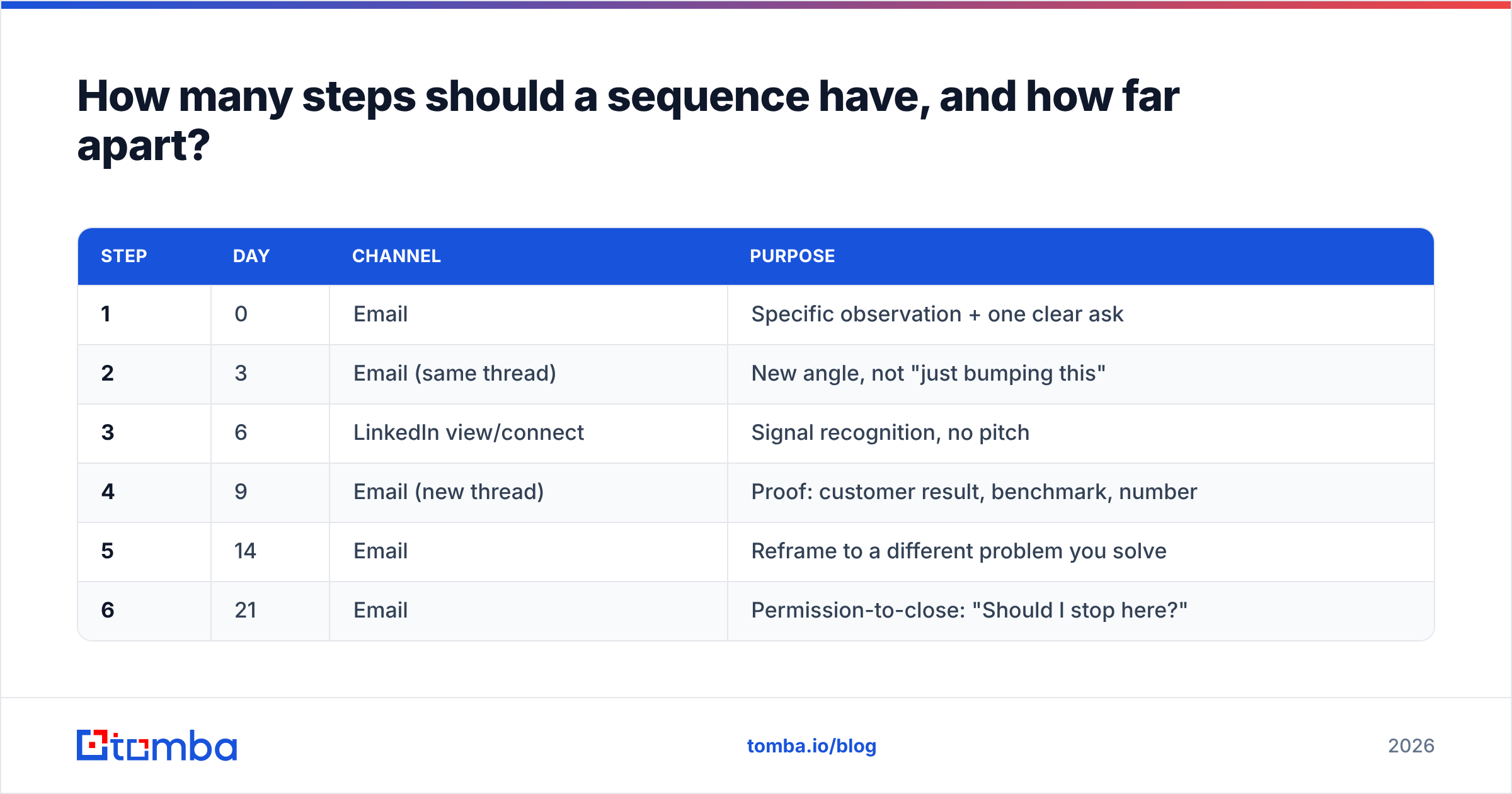
How many steps should a sequence have, and how far apart?#
Five to seven steps over 18–24 business days is the range that holds up across most B2B motions.
A defensible default:
| Step | Day | Channel | Purpose |
|---|---|---|---|
| 1 | 0 | Specific observation + one clear ask | |
| 2 | 3 | Email (same thread) | New angle, not "just bumping this" |
| 3 | 6 | LinkedIn view/connect | Signal recognition, no pitch |
| 4 | 9 | Email (new thread) | Proof: customer result, benchmark, number |
| 5 | 14 | Reframe to a different problem you solve | |
| 6 | 21 | Permission-to-close: "Should I stop here?" |
Three rules to protect that structure:
- Every step must be able to stand alone. If step 4 makes no sense to someone who never read step 1, rewrite it.
- Never send two steps in the same 48 hours. Reply lift is negligible and unsubscribe risk is not.
- Weekdays only, local business hours. A sequencer that ignores recipient timezone is costing you opens.
The final "should I stop here?" step reliably outperforms every other closing pattern in cold outbound, because it costs the recipient one word to answer. Track it — many teams find it produces their second-highest reply rate of the whole sequence.
What does a full outbound stack cost per month?#
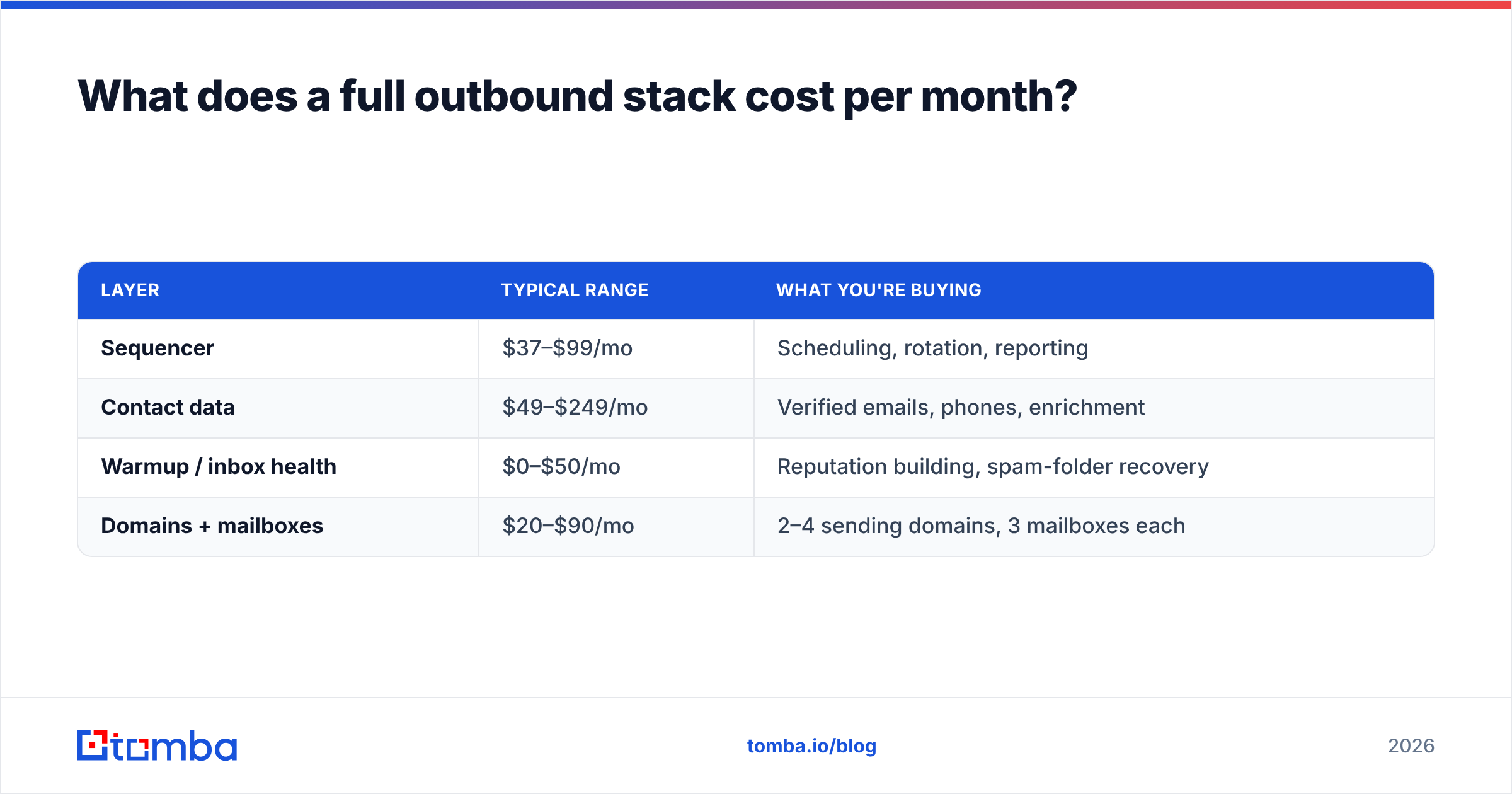
Budget for four line items, not one. The sequencer is rarely the biggest.
| Layer | Typical range | What you're buying |
|---|---|---|
| Sequencer | $37–$99/mo | Scheduling, rotation, reporting |
| Contact data | $49–$249/mo | Verified emails, phones, enrichment |
| Warmup / inbox health | $0–$50/mo | Reputation building, spam-folder recovery |
| Domains + mailboxes | $20–$90/mo | 2–4 sending domains, 3 mailboxes each |
On the data line, Tomba pricing runs a free tier at 25 searches/month, Starter at $49/mo, Growth at $99/mo, and Pro at $249/mo, with an Enterprise tier for custom volume. For a two-SDR team sending 60 emails per day, the Growth tier plus a $39 sequencer plus warmup lands around $160–$190/month all in — well under one seat of an enterprise engagement platform.
Cost per positive reply is the only metric worth comparing across vendors. Take total monthly spend, divide by positive replies. If it's above $150, the problem is almost always list quality or targeting, not the tool.
How do you launch your first sequence in a week?#
- Day 1 — Buy and warm the domain. Register a sending variant of your main domain (
getcompany.com, notcompany.com). Configure SPF, DKIM, and DMARC. Start warmup immediately; you cannot compress this step. - Day 2 — Build the list. Pull 200–400 contacts in one tight segment. Use domain search to map every relevant contact at target accounts, then verify. Discard anything below your confidence threshold rather than "trying it."
- Day 3 — Write six steps for that one segment. Write step 1 last. It is the hardest and benefits from knowing where the sequence goes.
- Day 4 — Configure the sequencer. Set 20 emails per mailbox per day, weekday-only sending, reply detection on, open tracking off. Open tracking pixels add a deliverability tax and inflate metrics you shouldn't optimize for anyway.
- Day 5 — Send 30 test contacts. Check placement with a seed-list test before you scale. If step 1 lands in Promotions, fix infrastructure before adding volume.
- Days 6–7 — Scale to full segment, then leave it alone for 14 days. Judging a sequence before step 4 has landed is the most common self-inflicted wound in outbound.
If you send at any real volume, do the sourcing side through an API rather than by hand — the Tomba API returns finder and verifier results in the same call, so enrichment happens at list-build time instead of as a separate weekly chore. For teams already living in a CRM, both HubSpot and Salesforce ship native sequencing that's worth evaluating before you add a fourth tool.
Does an email sequencing tool replace an SDR?#
No, and the 2026 version of that question is more interesting: does an AI-assisted sequencer replace the research an SDR does?
Partially. AI drafting handles first-pass personalization at a quality that beats a rushed human working a 200-contact daily quota. What it does not do is decide which 200 contacts are worth writing to, read a funding announcement and infer the buying trigger, or handle the "we're evaluating three vendors, can you send a comparison" reply that arrives on step 4.
The realistic split: the tool owns scheduling, rotation, exit logic, and step-level attribution. The human owns segment selection, the specific claim in step 1, and every conversation after the first reply. Teams that automate the second half see reply rates that look fine and pipeline that never converts.
Ready to fix the input, not just the sender?#
The fastest reply-rate improvement available to most teams is not a new sequencer. It's replacing guessed addresses with verified ones before the first send.
Tomba's Email Finder returns verified professional addresses by name, domain, or company, with a confidence score on every result and catch-all handling built in — so your sequencer spends its daily volume on people who actually exist. Start on the free tier at 25 searches a month, or move to Starter at $49/mo when you're ready to load a real campaign. Plug it into your sequencer via API, Chrome extension, or a plain CSV export, and let the sending tool do the one job it's good at.
Related guides#
Ready to find emails that actually work?
Join 150,000+ professionals who stopped guessing and started sending. Free credits on signup — no credit card required.
Get the Tomba newsletter
Practical outbound tactics and product updates — once every two weeks.
About the author