Email Snippets: How to Write, Store, and Use Them in 2026
Email snippets save reps 30-60 minutes a day — or turn every message into obvious boilerplate. Here's the line between the two, plus how snippets differ from templates and sequences.
TL;DR
- An email snippet is a short, reusable block of text — a paragraph, a pricing answer, a calendar link — that you insert mid-message with a keyboard shortcut. It is not a full template and not a sequence.
- Snippets win on speed for reactive work (replies, objections, scheduling). Templates win on structure for proactive work (first touches). Sequences win on cadence.
- The reps who get value from snippets keep them short, atomic, and voice-neutral. The reps who get ignored paste 200-word blocks with a broken merge tag at the top.
- Tooling matters less than hygiene: a snippet library with no owner rots in about a quarter. Audit quarterly, kill anything under 5 uses.
- Personalization tokens are only as good as your data. A snippet that inserts a wrong job title is worse than no snippet at all.
What is an email snippet?#
An email snippet is a saved fragment of text you drop into an email on demand, usually triggered by a short abbreviation or a keyboard shortcut. Type ;pricing and three sentences about your pricing model appear. Type ;cal and your booking link appears with the right anchor text.
Think of snippets like the mise en place in a kitchen. The chef still cooks each dish to order, but the onions are already diced, the stock is already made, and the sauce base is already reduced. Nobody accuses the chef of serving a frozen dinner — the prep work just removes the parts that were never the creative bit.
That's the useful mental model. A snippet is prep, not the meal. The moment a snippet becomes the entire email, you've quietly switched from snippets to templates, and the reader can tell.
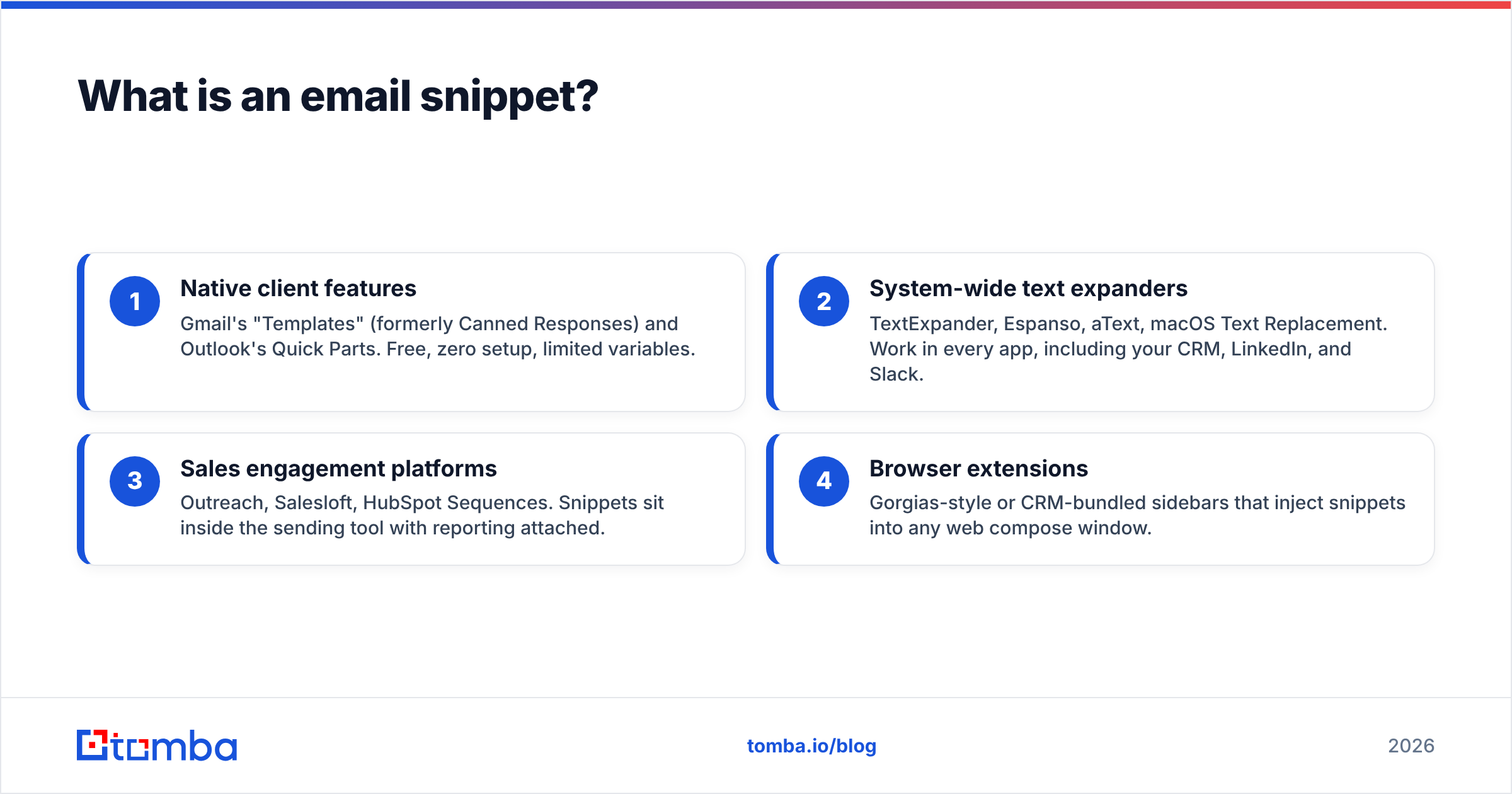
Technically, snippets live in one of four places:
- Native client features — Gmail's "Templates" (formerly Canned Responses) and Outlook's Quick Parts. Free, zero setup, limited variables.
- System-wide text expanders — TextExpander, Espanso, aText, macOS Text Replacement. Work in every app, including your CRM, LinkedIn, and Slack.
- Sales engagement platforms — Outreach, Salesloft, HubSpot Sequences. Snippets sit inside the sending tool with reporting attached.
- Browser extensions — Gorgias-style or CRM-bundled sidebars that inject snippets into any web compose window.
Each layer has a different failure mode, which is the actual thing worth understanding before you pick one.
Snippets vs templates vs sequences: what's the difference?#
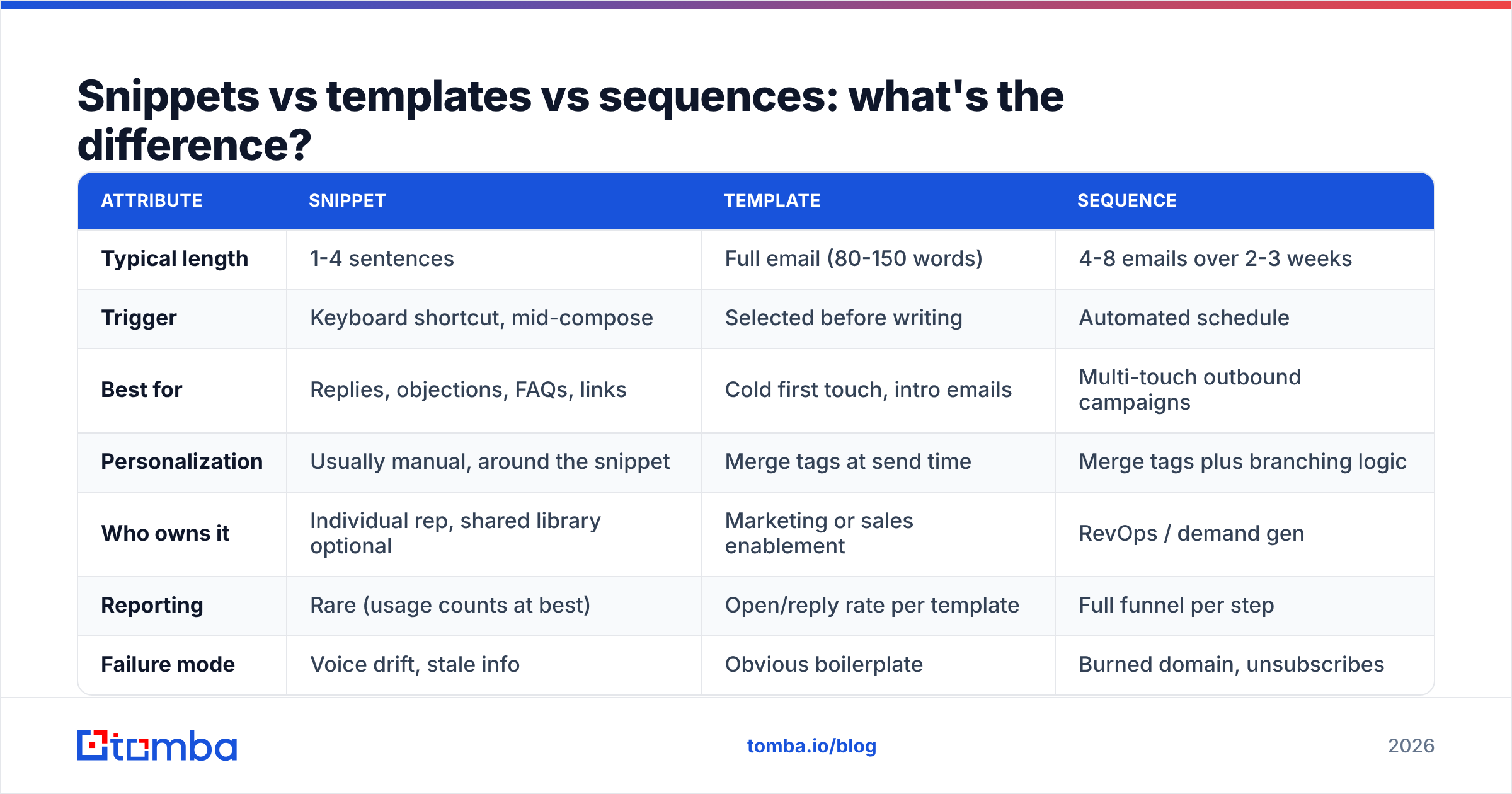
People use these three words interchangeably and then wonder why their outbound reads like a form letter. They solve different problems.
| Attribute | Snippet | Template | Sequence |
|---|---|---|---|
| Typical length | 1-4 sentences | Full email (80-150 words) | 4-8 emails over 2-3 weeks |
| Trigger | Keyboard shortcut, mid-compose | Selected before writing | Automated schedule |
| Best for | Replies, objections, FAQs, links | Cold first touch, intro emails | Multi-touch outbound campaigns |
| Personalization | Usually manual, around the snippet | Merge tags at send time | Merge tags plus branching logic |
| Who owns it | Individual rep, shared library optional | Marketing or sales enablement | RevOps / demand gen |
| Reporting | Rare (usage counts at best) | Open/reply rate per template | Full funnel per step |
| Failure mode | Voice drift, stale info | Obvious boilerplate | Burned domain, unsubscribes |
| Setup time | Minutes | Hours | Days |
The practical rule: use snippets for anything you've typed more than three times but that never constitutes a whole email. Your security questionnaire answer. Your "here's how our free tier works" paragraph. Your reschedule apology. Your data-sources explainer.
Use a full template when the entire message is predictable — a first touch to a defined persona, for instance. If you need starting points there, a library of cold email templates is a better tool than stitching six snippets together.
Why do email snippets actually save time?#
The time math is more boring and more convincing than the productivity-blog version.
A mid-market AE sends 40-60 emails a day. Roughly 60% are reactive: replies to inbound, follow-ups after calls, scheduling, and answering the same eight questions. If each of those contains 30-90 seconds of retyping known information, that's 20-45 minutes a day of pure re-derivation. Across a 10-person team, you're looking at four to seven hours of daily headcount spent typing sentences that already exist somewhere.
But the speed gain isn't the strongest argument. Two others matter more:
Consistency of facts. When five reps each freestyle the answer to "do you store our data in the EU?", you get five slightly different answers, and one of them is wrong. A snippet is a single source of truth that legal can approve once.
Lower activation energy. The reason follow-ups don't get sent isn't laziness — it's that a blank compose window at 5:40pm costs more willpower than it's worth. A snippet that gives you the first 40% of the message makes the difference between sending and not sending. Response rate improves less because your copy got better and more because the email actually went out.
What makes a good email snippet?#
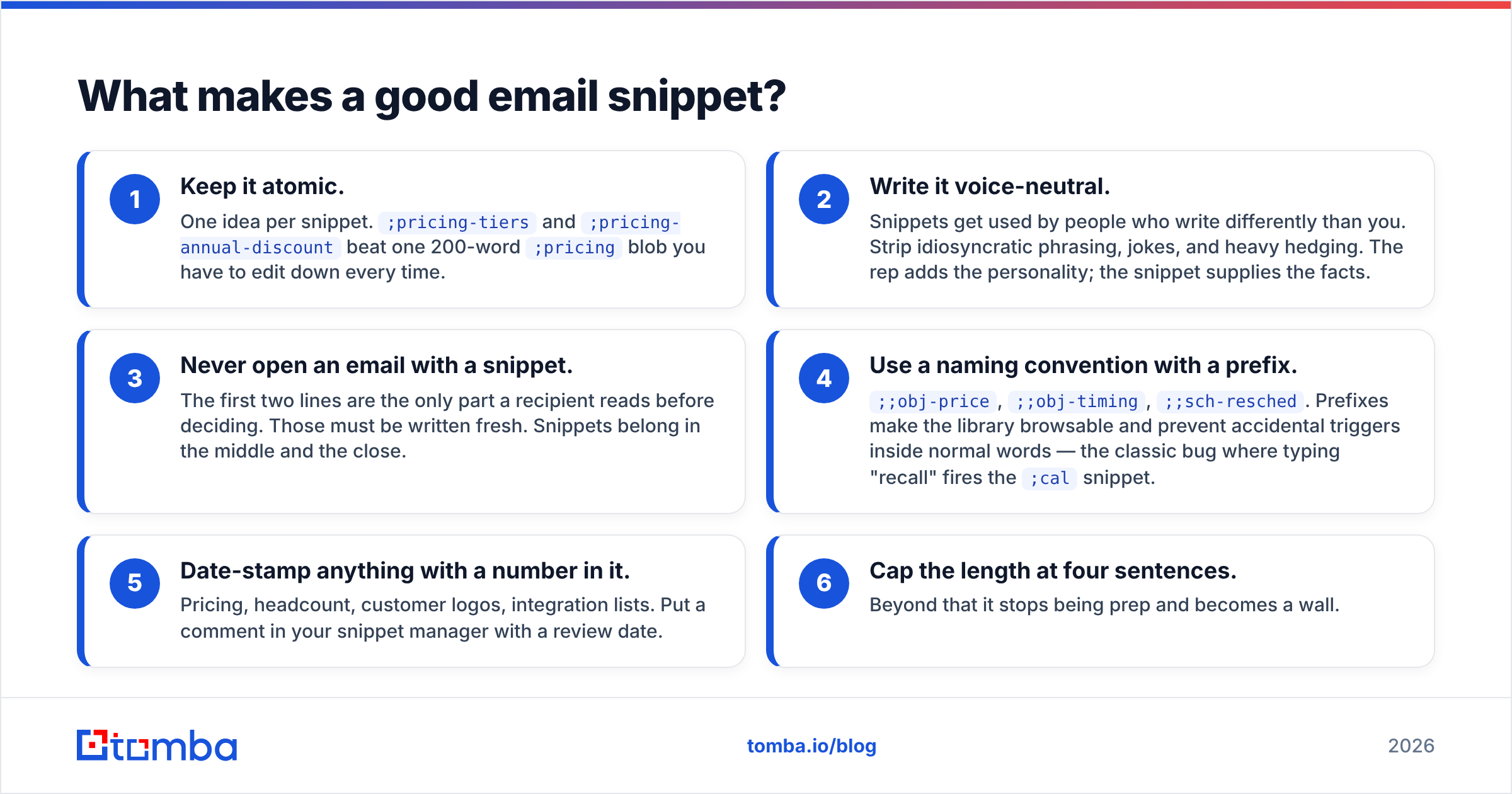
Six rules, in rough order of how often they get broken.
- Keep it atomic. One idea per snippet.
;pricing-tiersand;pricing-annual-discountbeat one 200-word;pricingblob you have to edit down every time. - Write it voice-neutral. Snippets get used by people who write differently than you. Strip idiosyncratic phrasing, jokes, and heavy hedging. The rep adds the personality; the snippet supplies the facts.
- Never open an email with a snippet. The first two lines are the only part a recipient reads before deciding. Those must be written fresh. Snippets belong in the middle and the close.
- Use a naming convention with a prefix.
;;obj-price,;;obj-timing,;;sch-resched. Prefixes make the library browsable and prevent accidental triggers inside normal words — the classic bug where typing "recall" fires the;calsnippet. - Date-stamp anything with a number in it. Pricing, headcount, customer logos, integration lists. Put a comment in your snippet manager with a review date.
- Cap the length at four sentences. Beyond that it stops being prep and becomes a wall.
The fourth rule deserves emphasis because it's the one that produces public embarrassment. Every text-expander user has, at some point, sent a message where a snippet fired mid-word. Use a non-alphabetic prefix character and test it in a scratch document before shipping the snippet to a shared library.
Which snippet tools are worth using in 2026?#
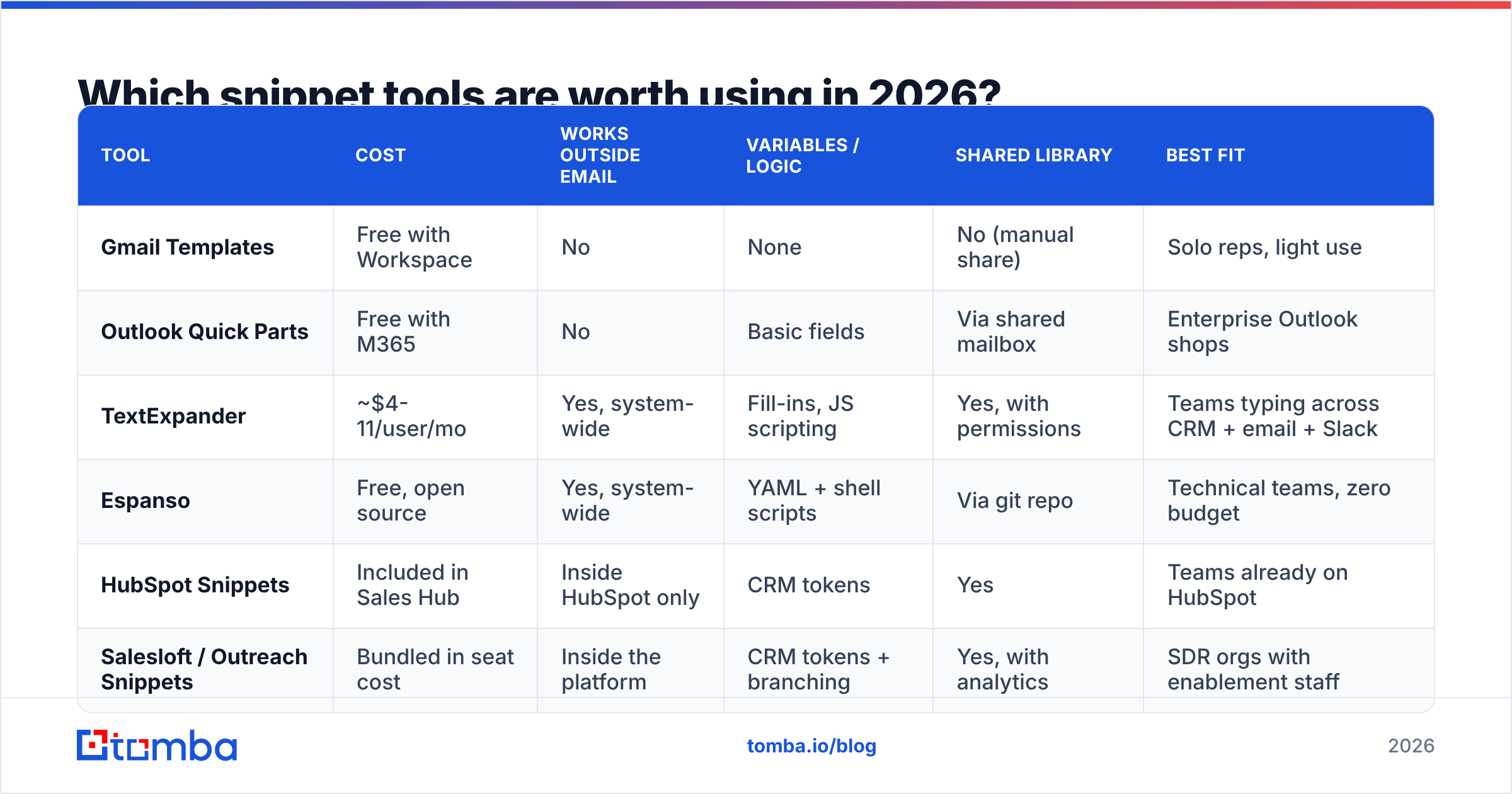
There is no single winner — the right layer depends on where you type.
| Tool | Cost | Works outside email | Variables / logic | Shared library | Best fit |
|---|---|---|---|---|---|
| Gmail Templates | Free with Workspace | No | None | No (manual share) | Solo reps, light use |
| Outlook Quick Parts | Free with M365 | No | Basic fields | Via shared mailbox | Enterprise Outlook shops |
| TextExpander | ~$4-11/user/mo | Yes, system-wide | Fill-ins, JS scripting | Yes, with permissions | Teams typing across CRM + email + Slack |
| Espanso | Free, open source | Yes, system-wide | YAML + shell scripts | Via git repo | Technical teams, zero budget |
| HubSpot Snippets | Included in Sales Hub | Inside HubSpot only | CRM tokens | Yes | Teams already on HubSpot |
| Salesloft / Outreach Snippets | Bundled in seat cost | Inside the platform | CRM tokens + branching | Yes, with analytics | SDR orgs with enablement staff |
Two things this table hides. First, system-wide expanders are the only category that works in LinkedIn messages, support tickets, and CRM notes — which is where a surprising share of repeated typing actually happens. Second, platform-bundled snippets are the only category that reports on usage, which is what lets you kill dead entries. If you want to compare user reviews before committing, G2's sales engagement category is a reasonable neutral starting point.
If you're on Gmail and want the native option first, Google's own templates documentation walks through enabling them from Settings → Advanced. It's a genuinely fine place to start, and you'll know within a month whether you need more.
How do you personalize snippets without sounding automated?#
This is where most snippet libraries fall over, and the cause is almost always data, not copy.
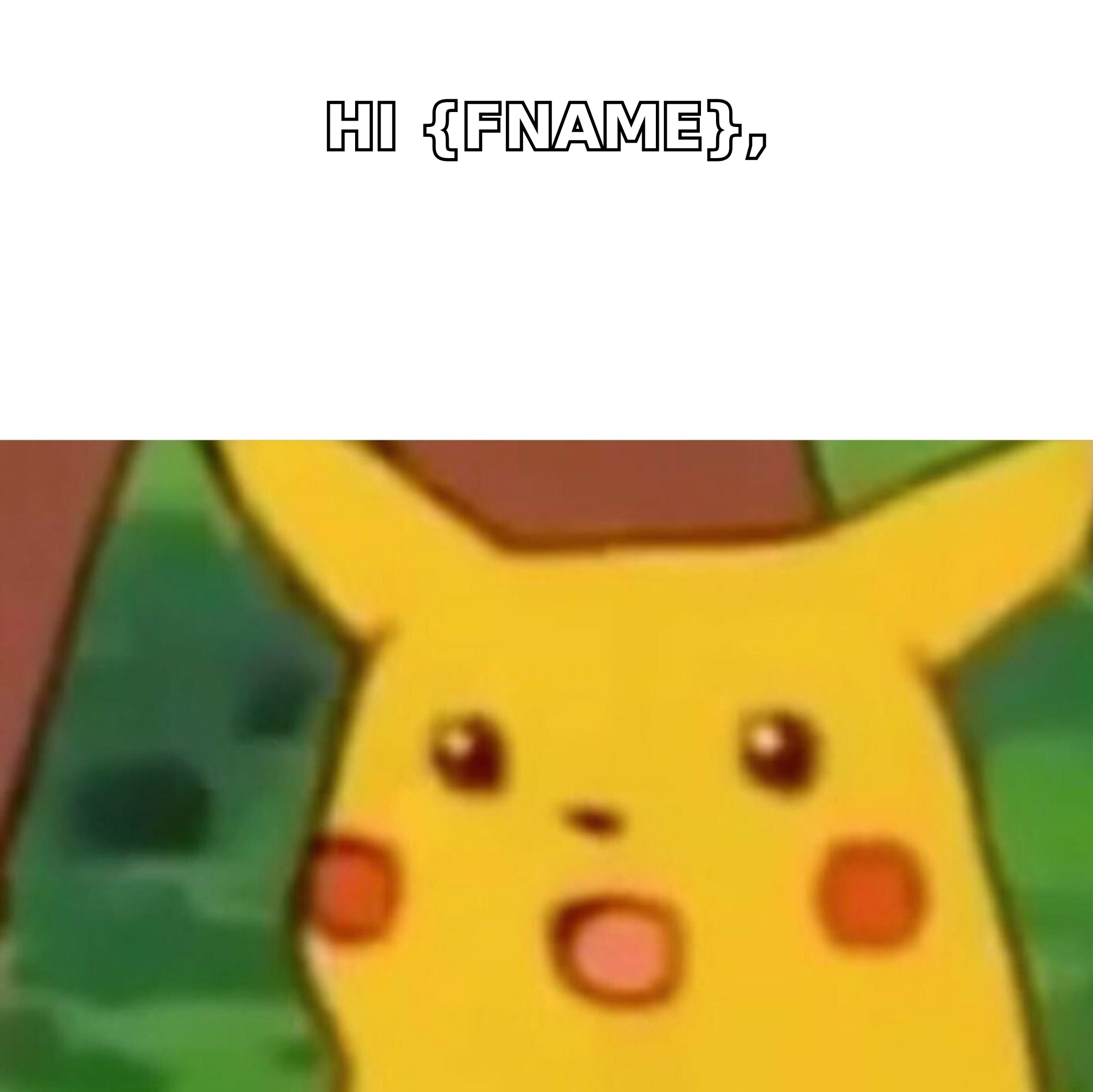
A snippet with {{first_name}}, {{company}}, and {{title}} reads perfectly in your test account and terribly in production, because roughly 15-30% of typical B2B contact records have at least one of those fields wrong, stale, or empty. The result is the email everyone has received: "Hi {FIRSTNAME}," or "As a VP of Sales at Acme Corp Inc. LLC..."
Three defenses, in order of effectiveness:
- Fewer tokens, better tokens. First name and company name are safe. Job title, company size, and funding stage are not — they change and they're frequently miscoded. Personalize on the two you trust and write the rest by hand.
- Fallback values on every token. If your tool supports defaults (
{{first_name | there}}), set them. This converts a catastrophic failure into a mildly generic greeting. - Verify before you send, not after. Bad merge output is a symptom of a bad record. Running your list through an email verifier and enriching missing fields with proper data enrichment fixes the root cause instead of patching the copy.
The last one is the unglamorous fix that actually moves reply rates. Snippet quality has a ceiling set by record quality — you cannot personalize your way out of a contact table where a third of the titles are from 2023.
There's also a subtler personalization failure: snippet-shaped rhythm. When every rep uses the same five snippets, prospects who talk to each other start noticing identical paragraphs. Rotate two or three variants of your highest-use snippets, and rewrite the most-used one every quarter. Same treatment applies to subject lines — if you're recycling the same six, run new options through a subject line generator and test rather than defaulting.
What should be in your first snippet library?#
Start with twelve. Not fifty. A library you can hold in your head gets used; a library you have to search doesn't.
- Scheduling — booking link with context, reschedule apology, timezone confirmation, "does next Tuesday work" with two concrete slots.
- Objection handling — price/budget, timing ("call me in Q3"), incumbent vendor, "send me information", security review.
- Facts and proof — one-paragraph product explainer, security/compliance summary, two customer proof points with numbers, integration list.
- Process — trial setup instructions, what happens on the demo call, procurement/contract next steps.
Build each one from an email you actually sent that worked. Never write snippets from scratch in a workshop — the library that comes out of a two-hour enablement session reads like it came out of a two-hour enablement session.
Then instrument it. If your tool reports usage, review quarterly and delete anything under five uses. If it doesn't, spot-check by asking three reps which snippets they used last week. The answer is usually four or five, and everything else is dead weight that makes the library harder to navigate.
When are email snippets the wrong tool?#
Three situations where snippets actively hurt.
Enterprise deals with named stakeholders. When you're emailing six people at one account, snippet reuse across that thread group is highly visible. Write those by hand.
First touches in a competitive category. If your prospect gets 30 cold emails a week in your category, the fastest way to get deleted is a paragraph they've seen before from a competitor using the same public playbook.
Anything after bad news. Missed SLA, pricing change, outage, a deal falling through. Snippet-assisted apologies read as exactly what they are.
The common thread: snippets are for information transfer, not for relationship work. When the email's job is to convey a known fact quickly, snippets are close to free money. When the email's job is to change how someone feels, type it yourself.
Get the data right before you scale the copy#
Snippets multiply whatever you already have. Good positioning and clean contact data plus snippets equals a faster, more consistent team. Sloppy positioning and stale records plus snippets equals sending the same mediocre email 400 times a week instead of 40.
Fix the input first. Tomba Email Finder gets you verified, correctly-attributed contacts — real names, real domains, real roles — so the merge tags inside your snippets resolve to something true. The free tier covers 25 searches a month if you just want to test the accuracy on accounts you already know, and paid plans start at $49/mo. Check the pricing details before you commit, and start with a list you can verify by hand.
Then build your twelve snippets, keep them short, and rewrite the top three every quarter.
Related guides#
Ready to find emails that actually work?
Join 150,000+ professionals who stopped guessing and started sending. Free credits on signup — no credit card required.
Get the Tomba newsletter
Practical outbound tactics and product updates — once every two weeks.
About the author