Email Spoofing Protection: How to Lock Down Your Domain
SPF, DKIM, DMARC, BIMI, MTA-STS — most teams configure two of them and assume they're covered. Here's what each layer actually blocks, what it doesn't, and how to reach p=reject without breaking your own mail.
TL;DR
- Email spoofing protection is not one setting. It's a stack: SPF authorizes sending IPs, DKIM signs the message, DMARC ties them to the visible From domain and tells receivers what to do when they don't match.
- SPF alone stops almost nothing an attacker cares about. It validates the invisible envelope sender, not the
From:address your recipient reads. - DMARC at
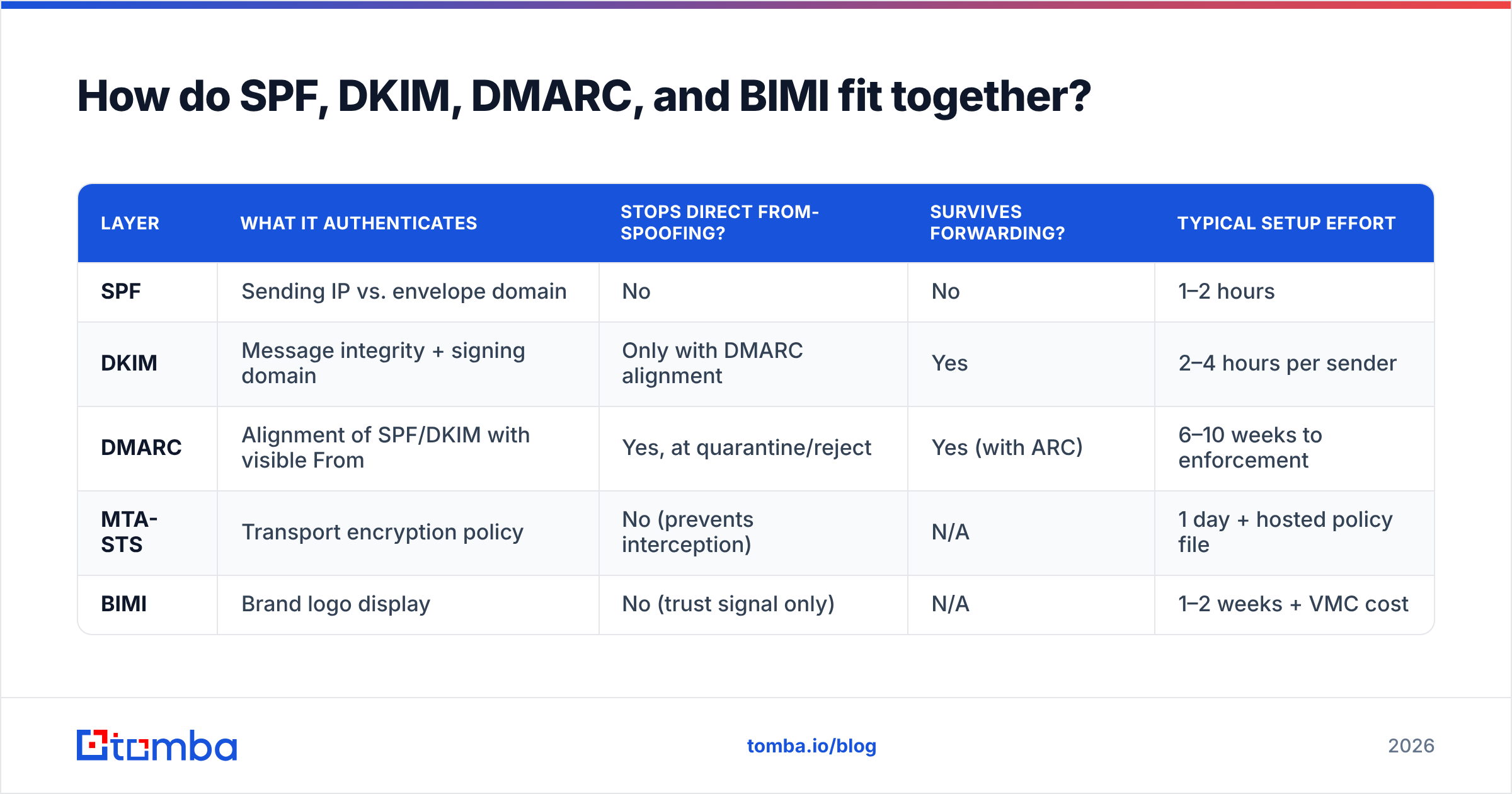
p=noneis telemetry, not protection. Until you reachp=quarantineorp=reject, anyone can send mail as your domain and it will land. - The two attacks DMARC does not stop: lookalike domains (
tomba-io.com) and display-name spoofing ("Mohamed Ben Rebia" <random@gmail.com>). Those need separate controls. - A safe rollout takes 6–10 weeks: inventory senders → align SPF/DKIM →
p=nonewithruareporting →p=quarantine pct=10→ ramp →p=reject.
What is email spoofing, exactly?#
Email spoofing is forging the sender identity on a message so it appears to come from a domain or person the recipient trusts. Think of an envelope in the physical mail: the sender writes whatever return address they want on the outside, and the post office does not check it. SMTP was designed in 1982 with the same trust model — the protocol simply takes the sender's word for who they are.
There are three distinct identities in every email, and conflating them is why most teams misconfigure their defenses:
- The envelope sender (
MAIL FROM, aka Return-Path) — used for bounce routing. Invisible to the recipient. This is what SPF checks. - The header From (
From:) — the name and address your recipient actually sees in their inbox. This is what attackers forge and what DMARC protects. - The display name — the free-text label before the angle brackets. Completely unauthenticated, by design, forever.
An attacker who sends from their own domain with valid SPF and DKIM, but puts your CFO's name in the display field, passes every authentication check ever written. That's not a bug in the standards — it's a category of attack the standards were never built to solve.
Why does email spoofing still work in 2026?#
Because adoption is uneven and configuration is hard. Google and Yahoo's 2024 bulk-sender rules pushed a large wave of domains into DMARC compliance, and Microsoft followed in 2025 for high-volume senders. But the mandates apply to senders shipping thousands of messages a day to consumer mailboxes. The long tail — B2B domains, subsidiaries, acquired brands, parked marketing domains, and the transactional subdomain nobody remembers owning — is still wide open.
The four failure patterns we see most often:
- Published DMARC, stuck at
p=none. The record exists, the compliance checkbox is ticked, and the enforcement that would actually block forged mail was never turned on because someone feared breaking payroll notifications. - SPF only. Very common on smaller domains. It creates a false sense of coverage while leaving the visible From address unprotected.
- Unprotected subdomains and parked domains.
mail.example.comwith no policy, orexample-careers.comregistered for a campaign three years ago and never given a null MX plusp=reject. - The 10-lookup SPF limit. Every
include:in your SPF record costs DNS lookups. Chain five SaaS vendors together and you silently blow past the RFC 7208 limit, which returnspermerror— and many receivers treat that as a pass-equivalent soft failure.
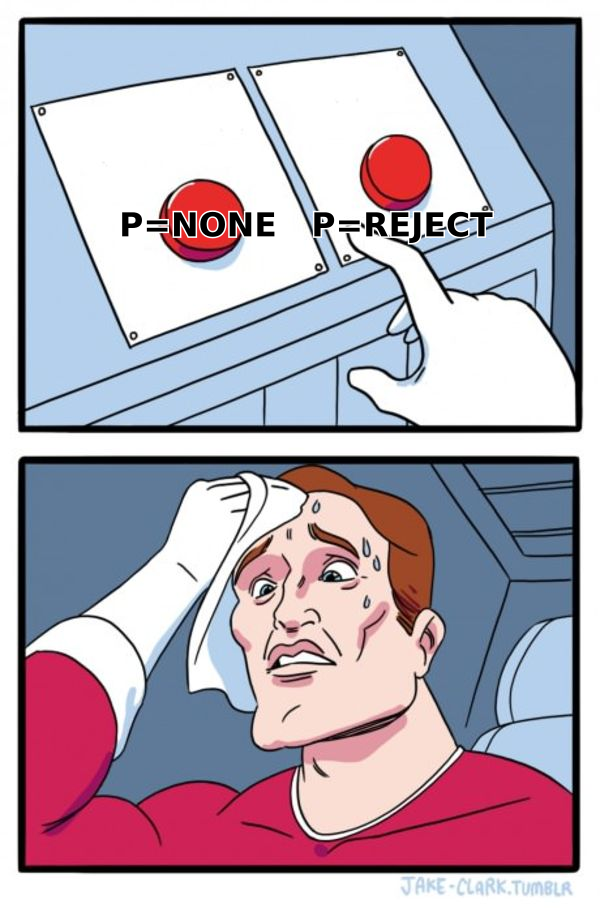
How do SPF, DKIM, DMARC, and BIMI fit together?#
Each layer answers a different question. Skipping one leaves a specific, nameable hole.
- SPF (Sender Policy Framework) — answers "is this IP allowed to send for this envelope domain?" A TXT record listing authorized senders. Breaks on forwarding, because the forwarding server's IP isn't on your list. Costs you a hard cap of 10 DNS lookups.
- DKIM (DomainKeys Identified Mail) — answers "was this message modified in transit, and does the signing domain vouch for it?" A cryptographic signature over selected headers and the body, verified against a public key in DNS. Survives forwarding. Does not survive mailing lists that rewrite the subject or append footers.
- DMARC — answers "does an authenticated identifier align with the From domain the human sees, and what should I do if not?" This is the layer that closes the direct-spoofing hole, because alignment is what links SPF/DKIM back to the visible sender. It also gives you aggregate (
rua) and forensic (ruf) reports. - MTA-STS + TLS-RPT — answers "must mail to this domain be delivered over verified TLS?" Defends against downgrade and man-in-the-middle interception, not spoofing. Increasingly expected by security reviewers.
- BIMI — answers "can I show a verified logo in the inbox?" Requires DMARC at enforcement plus, for most mailbox providers, a Verified Mark Certificate. Pure trust signal — zero additional protection, meaningful brand lift.
- ARC (Authenticated Received Chain) — preserves authentication results across intermediaries so legitimate forwarded mail doesn't get killed by your own enforcement.
| Layer | What it authenticates | Stops direct From-spoofing? | Survives forwarding? | Typical setup effort |
|---|---|---|---|---|
| SPF | Sending IP vs. envelope domain | No | No | 1–2 hours |
| DKIM | Message integrity + signing domain | Only with DMARC alignment | Yes | 2–4 hours per sender |
| DMARC | Alignment of SPF/DKIM with visible From | Yes, at quarantine/reject | Yes (with ARC) | 6–10 weeks to enforcement |
| MTA-STS | Transport encryption policy | No (prevents interception) | N/A | 1 day + hosted policy file |
| BIMI | Brand logo display | No (trust signal only) | N/A | 1–2 weeks + VMC cost |
Note the pattern: only DMARC has a "yes" in the column that matters for spoofing. Everything else is either an input to DMARC or a different threat model entirely. The official DMARC specification and deployment guidance is the reference to hand your infrastructure team, and Google publishes sender requirements that spell out what Gmail expects at volume.
Is DMARC enough on its own?#
No — and this is the most expensive misconception in the category.
DMARC protects the exact string of your domain in the From: header. It does nothing about:
Lookalike and cousin domains. tomba.io is protected. tomba-io.com, tomba.co, t0mba.io, and tomba.io.secure-login.net are not your domains, so your DMARC policy has no jurisdiction over them. An attacker registers one for $12 and configures perfect SPF/DKIM/DMARC on their domain. Every check passes. The mail lands. Defense here is domain monitoring, defensive registration of high-risk permutations, and inbound rules that flag newly-registered lookalikes.
Display-name spoofing. From: "Finance Team" <accounts@totally-legit-domain.com> passes authentication because the attacker owns the sending domain. On mobile clients that render only the display name, this is devastatingly effective. Defense is at the receiving gateway: rules that flag external mail whose display name matches an internal executive.
Compromised legitimate accounts. If an attacker has valid credentials, mail from your infrastructure is genuinely authenticated. DMARC is irrelevant. Defense is MFA, anomaly detection, and session monitoring.
Reply-to swaps. Authentication passes on the sending domain while Reply-To: points somewhere entirely different. Many clients don't surface this until you hit send.
The honest framing: DMARC at enforcement eliminates one attack class completely — exact-domain impersonation — and forces attackers into noisier, more detectable alternatives. That's a real win. It is not a finished security program.
How do you roll out DMARC without breaking your own mail?#
The reason so many domains sit at p=none for years is that the first team to enforce prematurely and black-hole the invoicing system never gets a second attempt. Do it in stages.
Week 1–2: Inventory every sender. Marketing automation, CRM, transactional provider, helpdesk, HR platform, billing, calendar invites, the marketing agency's tool, the one-off Python script on a VPS. Publish v=DMARC1; p=none; rua=mailto:reports@yourdomain.com and read the aggregate XML. You will find senders nobody in the room remembers approving.
Week 3–4: Fix alignment. For each legitimate sender, get DKIM signing with your domain (not the vendor's shared signing domain) and confirm SPF alignment. Where a vendor only supports relaxed DKIM alignment, that's fine — relaxed matches on the organizational domain. Verify your record syntax and lookup count with a free SPF checker before you trust it. Consolidate SPF includes to stay under 10 lookups.
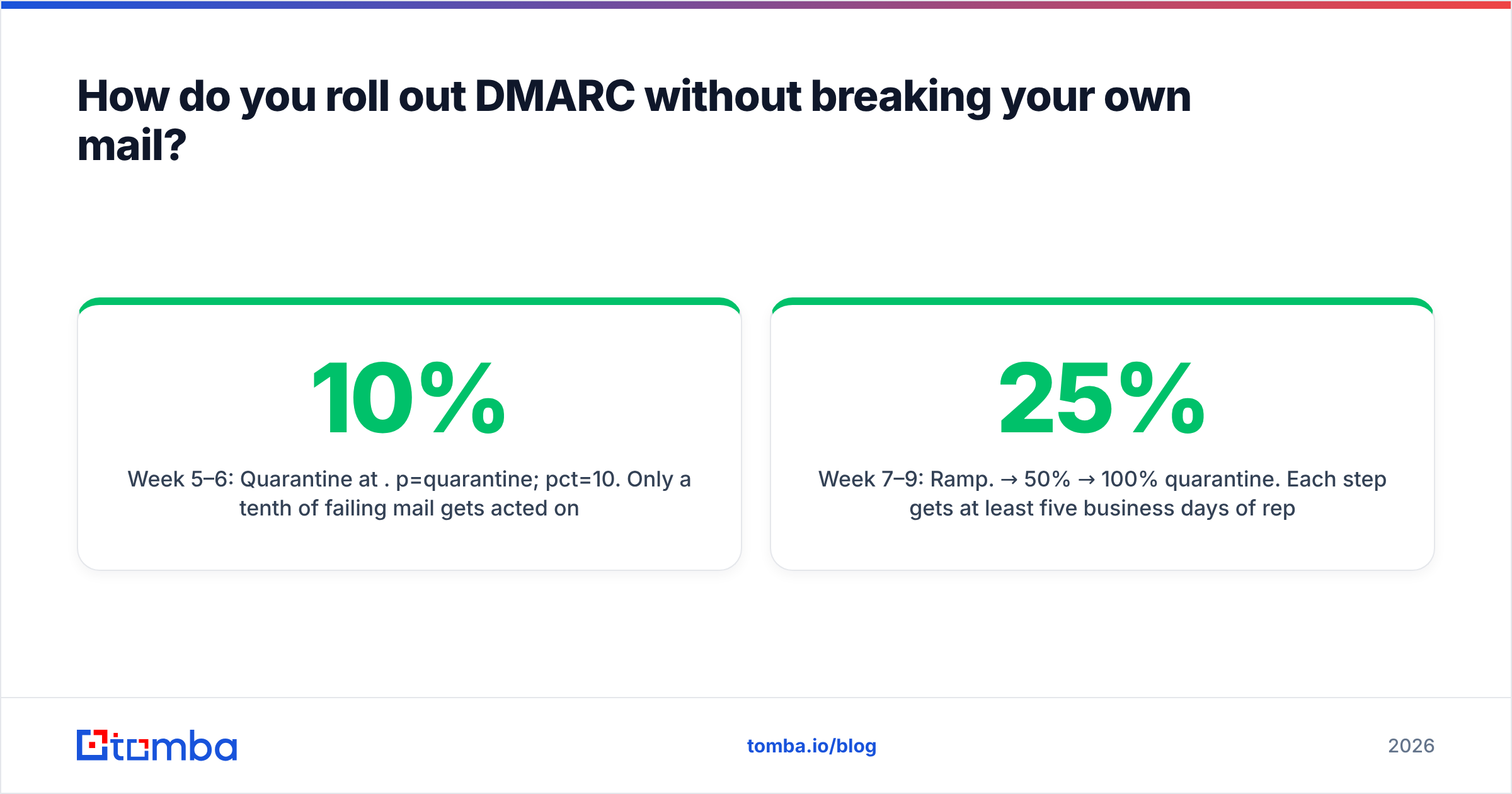
Week 5–6: Quarantine at 10%. p=quarantine; pct=10. Only a tenth of failing mail gets acted on, so a missed sender surfaces as a handful of complaints rather than an outage. Watch reports for two full weeks — monthly billing runs and quarterly HR mailings hide outside a 7-day window.
Week 7–9: Ramp. 25% → 50% → 100% quarantine. Each step gets at least five business days of report review.
Week 10: Reject. v=DMARC1; p=reject; sp=reject; adkim=s; aspf=s; rua=mailto:.... Set sp=reject explicitly so subdomains inherit enforcement, and publish p=reject plus a null MX on every parked domain you own.
Which email spoofing protection tools are worth paying for?#
The DNS records are free. What you're buying is report parsing — DMARC aggregate reports arrive as gzipped XML from hundreds of receivers, and reading them manually is not a job a human should have.
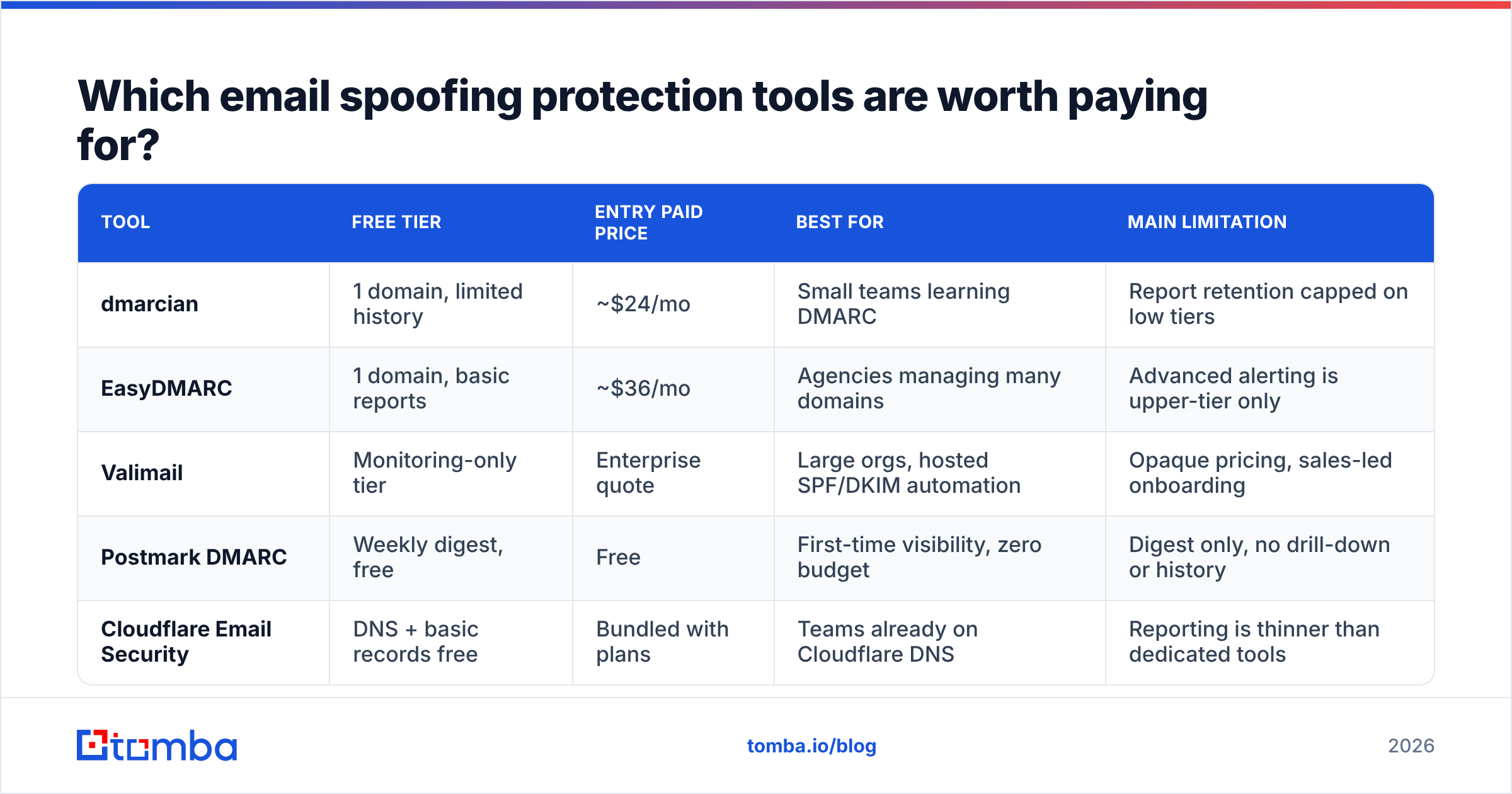
| Tool | Free tier | Entry paid price | Best for | Main limitation |
|---|---|---|---|---|
| dmarcian | 1 domain, limited history | ~$24/mo | Small teams learning DMARC | Report retention capped on low tiers |
| EasyDMARC | 1 domain, basic reports | ~$36/mo | Agencies managing many domains | Advanced alerting is upper-tier only |
| Valimail | Monitoring-only tier | Enterprise quote | Large orgs, hosted SPF/DKIM automation | Opaque pricing, sales-led onboarding |
| Postmark DMARC | Weekly digest, free | Free | First-time visibility, zero budget | Digest only, no drill-down or history |
| Cloudflare Email Security | DNS + basic records free | Bundled with plans | Teams already on Cloudflare DNS | Reporting is thinner than dedicated tools |
Start with a free monitoring digest. If your aggregate reports show more than four or five distinct sending sources, or you manage multiple brands, move to a paid parser — the time saved on XML wrangling pays for a $30/month plan in the first week. Independent review volume on G2 is a reasonable sanity check before committing to an annual contract.
How does spoofing protection change your outbound program?#
Enforcement improves deliverability, and this surprises people who expect security controls to cost them reach.
Mailbox providers weight authenticated, aligned mail more favorably. A domain at p=reject with consistent DKIM signing accumulates a cleaner sender reputation because forged mail carrying your domain stops reaching spam folders and generating complaints against you. Teams that enforce typically see inbox placement improve, not degrade — provided they did the alignment work first.
Three operational consequences to plan for:
- Cold outreach on a separate domain still needs full authentication. A throwaway sending domain with no DKIM and
p=nonelooks exactly like an attacker to a receiving filter. If you run outbound fromgetyourbrand.com, it needs the same stack as your primary. - Authentication doesn't fix a bad list. Perfect SPF/DKIM/DMARC with a 25% bounce rate still tanks your reputation. Run every list through an email verifier before it touches your sending infrastructure — hard bounces damage the sender score that authentication is trying to protect. Check your domain and IP against major blocklists with a blacklist checker at the same time.
- Every new SaaS vendor is an SPF change. Build vendor onboarding into your DNS change process, or you'll discover the gap when a campaign fails silently. Broader email deliverability hygiene and anti-spoofing hygiene are the same project with two names.
What should you check on your own domain right now?#
A 20-minute audit, in order:
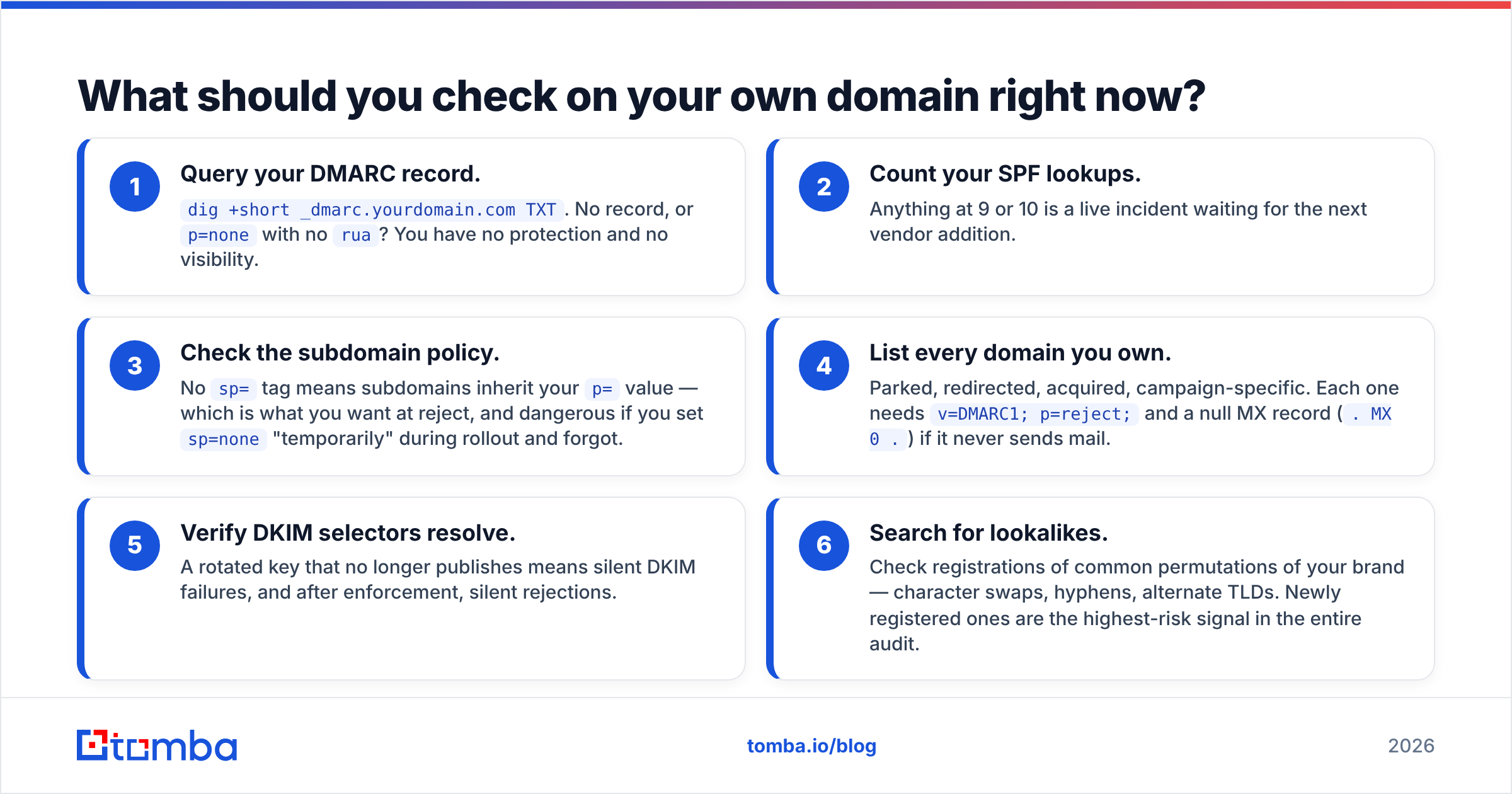
- Query your DMARC record.
dig +short _dmarc.yourdomain.com TXT. No record, orp=nonewith norua? You have no protection and no visibility. - Count your SPF lookups. Anything at 9 or 10 is a live incident waiting for the next vendor addition.
- Check the subdomain policy. No
sp=tag means subdomains inherit yourp=value — which is what you want at reject, and dangerous if you setsp=none"temporarily" during rollout and forgot. - List every domain you own. Parked, redirected, acquired, campaign-specific. Each one needs
v=DMARC1; p=reject;and a null MX record (. MX 0 .) if it never sends mail. - Verify DKIM selectors resolve. A rotated key that no longer publishes means silent DKIM failures, and after enforcement, silent rejections.
- Search for lookalikes. Check registrations of common permutations of your brand — character swaps, hyphens, alternate TLDs. Newly registered ones are the highest-risk signal in the entire audit.
If steps 1 and 4 come back clean, you're ahead of the large majority of B2B domains. If they don't, you now have a two-month project with a clear finish line.
Where does contact data fit into all of this?#
Spoofing protection and prospecting data are usually managed by different teams, which is exactly why the seam leaks. Your authentication stack determines whether your mail is trusted. Your data quality determines whether that trust survives contact with a real send.
Sending to stale, guessed, or scraped addresses generates bounces and spam complaints that erode the reputation your DMARC deployment was built to protect. The two controls only work together. If you're building outbound lists, use the Tomba Email Finder to source verified, deliverable business addresses at the point of discovery rather than cleaning a broken list after the damage is done. The free tier covers 25 searches a month, and paid Tomba plans start at $49/month with bulk verification, catch-all detection, and an API for wiring verification directly into your CRM before a single message leaves your authenticated domain.
Related guides#
Ready to find emails that actually work?
Join 150,000+ professionals who stopped guessing and started sending. Free credits on signup — no credit card required.
Get the Tomba newsletter
Practical outbound tactics and product updates — once every two weeks.
About the author