Email Subject Introducing Someone: 14 Lines That Get Replies
An intro email lives or dies in the subject line. Here are 14 tested formats for introducing someone over email, when to use each, and the double opt-in step most people skip.
TL;DR
- The best email subject introducing someone names both people and the reason:
Mia Chen <> Jon Ruiz — API partnership. Vague lines like "Intro" or "Quick connection" get buried. - Always run a double opt-in first: ask both sides privately before you send the joint email. Skipping this is the single fastest way to burn a relationship.
- Use the
<>(orx) convention for peer-to-peer intros, and a plain "Introducing X to Y" for hierarchical or formal ones. - Keep it under 50 characters so it survives mobile truncation, and never put the reason in the body only — the subject has to carry it.
- If you're introducing someone you found through research rather than a mutual contact, verify the address before you send. A bounced intro embarrasses three people at once.
What is an intro email, and why does the subject line carry so much weight?#
An intro email is a three-party message: you, the person you're introducing, and the person you're introducing them to. Think of it like a dinner party seating card — the card doesn't make the conversation happen, but if it's blank, both guests sit down confused about why they're there.
That's the job of the subject line in an intro. Unlike a cold email where the subject sells the open, an intro subject line does something narrower and harder: it has to be instantly parseable by two different people with two different contexts, and it has to survive being forwarded, replied-to, and archived. Six months later, someone will search their inbox for "Mia" and needs to find this thread.
Most intro emails fail on one of three things:
- No names in the subject. The recipient sees "Intro" from a contact and assumes it's low priority.
- No reason. Both parties open, read, and think "and… what am I supposed to do?"
- No permission. One or both sides didn't agree to the intro, so the thread dies in polite silence.
The subject line fixes the first two. Your process fixes the third.

Should you always ask permission before making an introduction?#
Yes — and this is the part people skip. The convention is called a double opt-in intro, popularized in venture and startup circles and now standard practice in B2B. HubSpot's sales blog and most modern sales playbooks treat it as table stakes.
The sequence:
- Ask the busier/more senior person first. Send a short forwardable blurb: who the other person is, what they want, why it's worth 20 minutes.
- Wait for a yes. Not "sure, maybe sometime" — an actual yes.
- Then send the joint email, cc'ing or to-lining both, with a subject line that names both people and the reason.
- Step back. Move yourself to bcc in your first message so the thread doesn't clutter your inbox.
The reason this matters more than the copy: an unrequested intro costs the recipient time and costs you credibility. A double opt-in intro arrives pre-approved, so the subject line only has to identify the thread, not persuade anyone.
What makes a good email subject introducing someone?#
Here's the anatomy, in priority order. Each element earns its place:
- Both first and last names — "Mia Chen <> Jon Ruiz" is searchable. "Mia <> Jon" is not, six months later.
- A connector symbol —
<>signals a peer-to-peer intro.xreads slightly more casual. "and" reads formal. - The reason, in three words or fewer — "API partnership," "hiring advice," "Series A intro." This is the part most people leave out.
- Length under 50 characters — mobile clients truncate around 35–45 characters, and roughly two-thirds of business email is first opened on a phone.
- No "quick" or "just" — hedging words make the intro feel apologetic, which lowers the odds either side prioritizes it.
- Sentence case, not Title Case — Title Case reads like marketing; sentence case reads like a colleague.
If you want to pressure-test a line before sending, run it through a subject line tester — it'll flag length, spam triggers, and truncation points.
Which subject line format should you use for each scenario?#
Fourteen formats, mapped to the situation they actually fit. Copy them directly and swap the names.
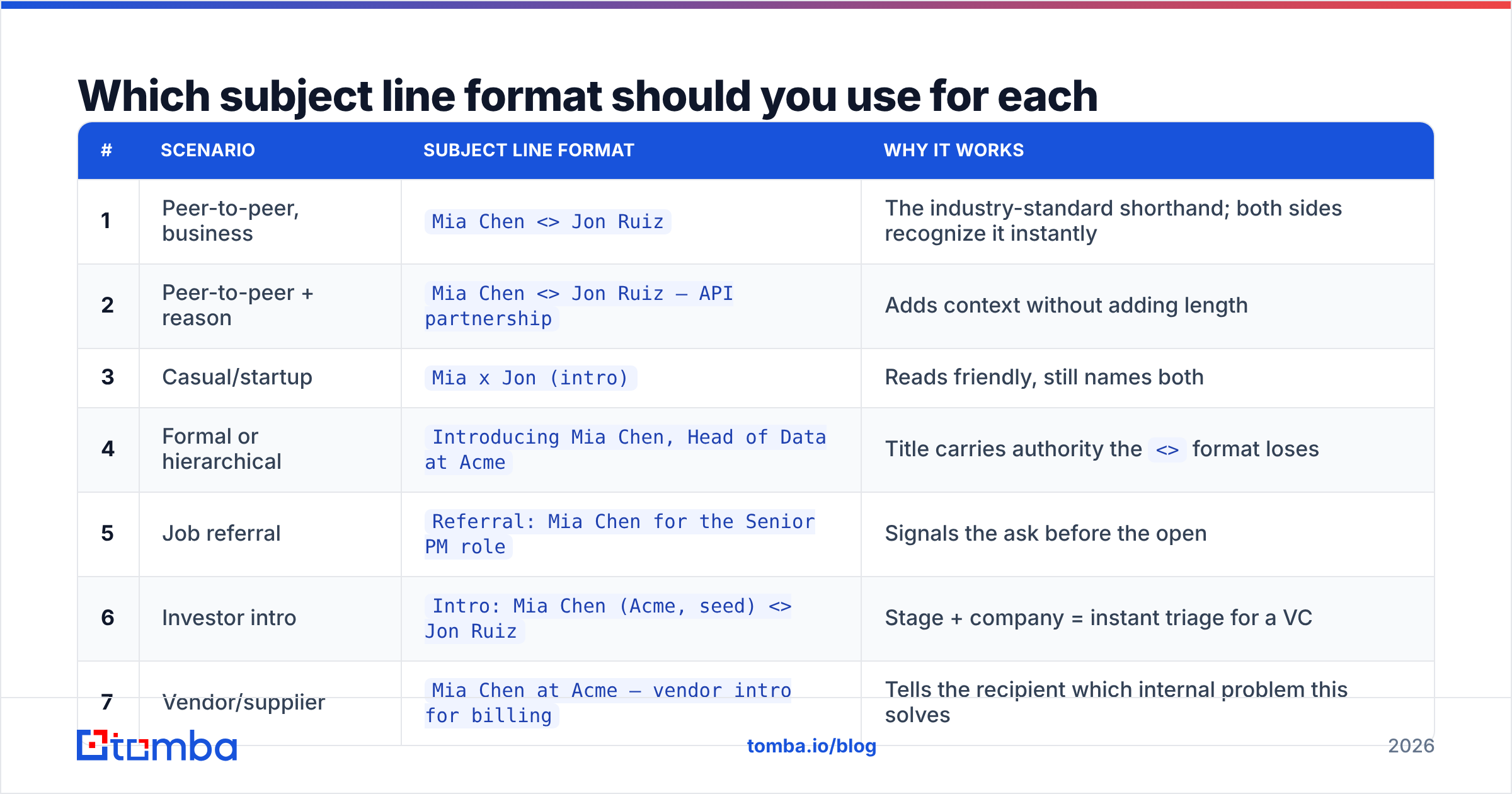
| # | Scenario | Subject line format | Why it works |
|---|---|---|---|
| 1 | Peer-to-peer, business | Mia Chen <> Jon Ruiz |
The industry-standard shorthand; both sides recognize it instantly |
| 2 | Peer-to-peer + reason | Mia Chen <> Jon Ruiz — API partnership |
Adds context without adding length |
| 3 | Casual/startup | Mia x Jon (intro) |
Reads friendly, still names both |
| 4 | Formal or hierarchical | Introducing Mia Chen, Head of Data at Acme |
Title carries authority the <> format loses |
| 5 | Job referral | Referral: Mia Chen for the Senior PM role |
Signals the ask before the open |
| 6 | Investor intro | Intro: Mia Chen (Acme, seed) <> Jon Ruiz |
Stage + company = instant triage for a VC |
| 7 | Vendor/supplier | Mia Chen at Acme — vendor intro for billing |
Tells the recipient which internal problem this solves |
| 8 | Requested intro | As promised: Mia Chen <> Jon Ruiz |
"As promised" confirms this was opted into |
| 9 | Reconnecting two people | Re-intro: Mia Chen <> Jon Ruiz (met at SaaStr) |
The event anchor jogs memory |
| 10 | Internal team intro | New teammate: Mia Chen joins Data on Monday |
Date creates a small, useful deadline |
| 11 | Client handoff | Handoff: Mia Chen is your new account lead |
No ambiguity about who owns what |
| 12 | Advice/mentorship | Mia Chen <> Jon Ruiz — hiring advice |
Names the favor so the senior party can size it |
| 13 | Conference follow-up | SaaStr follow-up: Mia Chen <> Jon Ruiz |
Context beats cleverness in a post-event inbox |
| 14 | Warm-lead intro | Mia Chen asked to be connected re: pricing |
Attribution makes the recipient reply faster |
Two things to notice. First, none of these are clever. Intro subject lines are the one place in email where wit costs you — clarity is the entire product. Second, every single one names at least one person. If your draft doesn't, rewrite it.
Is <> better than "Introducing X to Y"?#
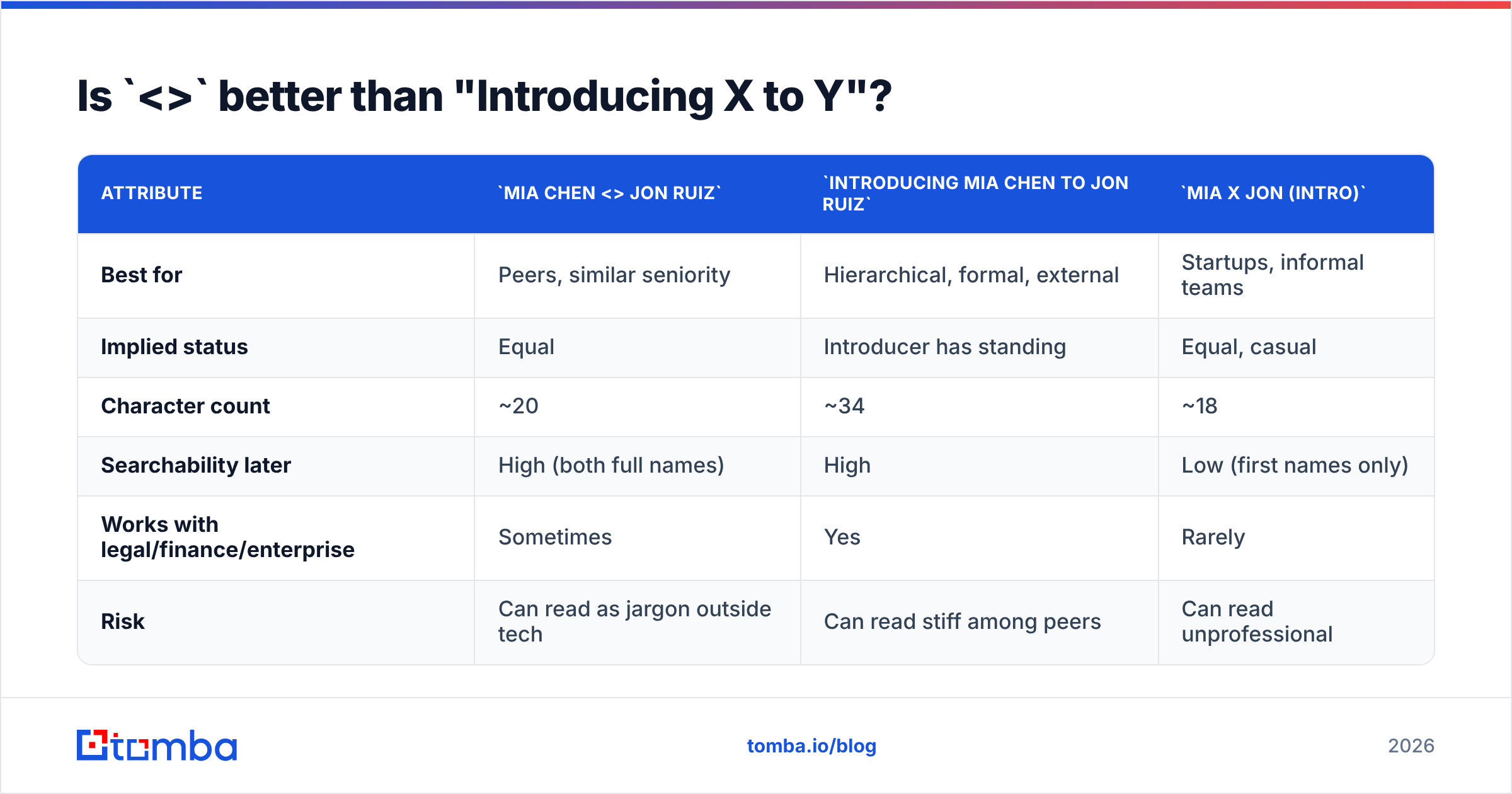
It depends on the power dynamic, and this is where most guides give a single blanket answer.
| Attribute | Mia Chen <> Jon Ruiz |
Introducing Mia Chen to Jon Ruiz |
Mia x Jon (intro) |
|---|---|---|---|
| Best for | Peers, similar seniority | Hierarchical, formal, external | Startups, informal teams |
| Implied status | Equal | Introducer has standing | Equal, casual |
| Character count | ~20 | ~34 | ~18 |
| Searchability later | High (both full names) | High | Low (first names only) |
| Works with legal/finance/enterprise | Sometimes | Yes | Rarely |
| Risk | Can read as jargon outside tech | Can read stiff among peers | Can read unprofessional |
The <> convention comes out of tech and venture, where it's fully naturalized. Outside that world — enterprise procurement, legal, healthcare, public sector — it can read as insider jargon. When in doubt about the recipient's world, use the explicit "Introducing X to Y" form. You lose eight characters and gain zero ambiguity.
How do you write the body once the subject line is right?#
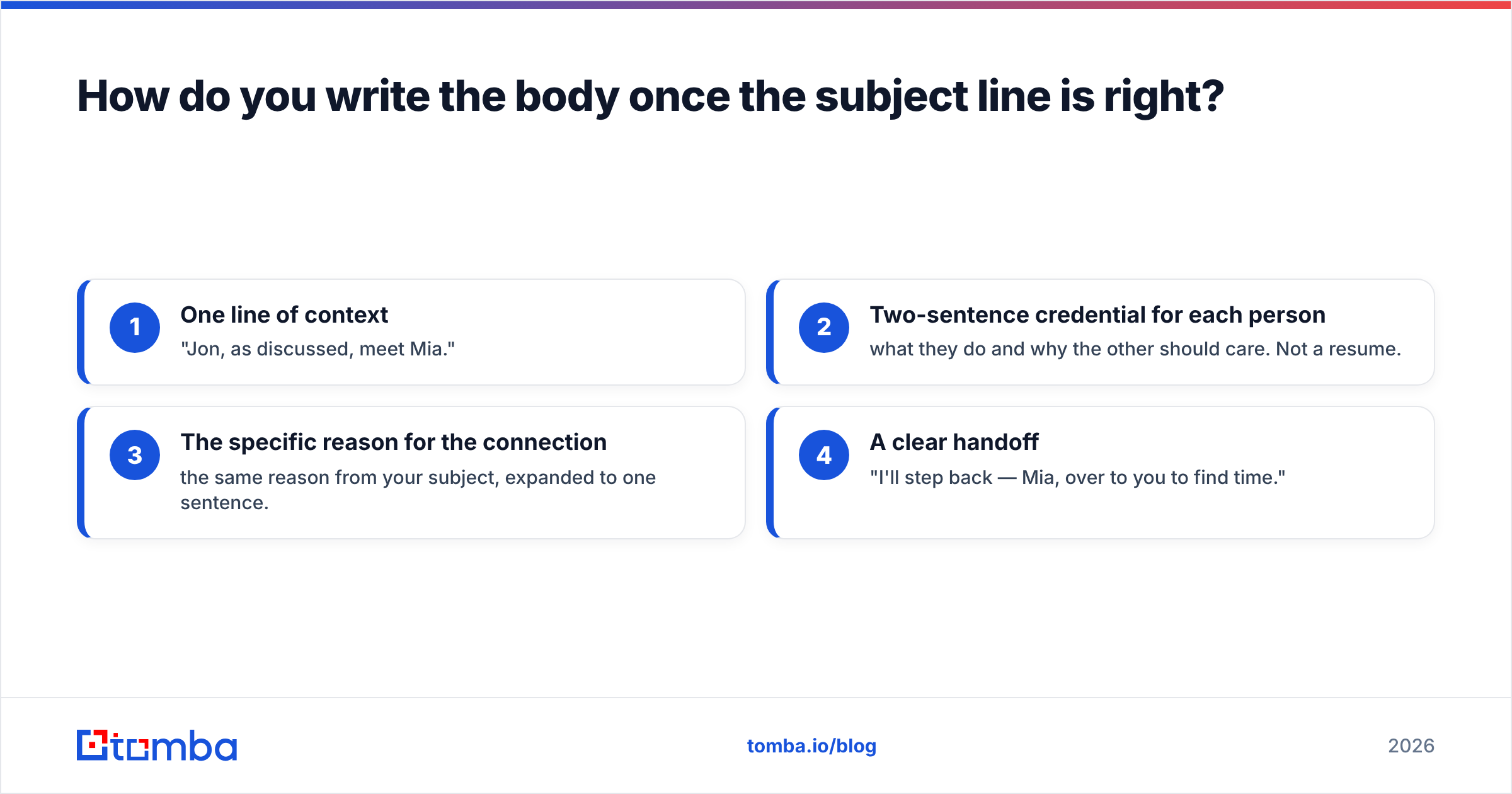
The subject earns the open; the body earns the reply. Keep it to four moves and under 120 words:
- One line of context — "Jon, as discussed, meet Mia."
- Two-sentence credential for each person — what they do and why the other should care. Not a resume.
- The specific reason for the connection — the same reason from your subject, expanded to one sentence.
- A clear handoff — "I'll step back — Mia, over to you to find time."
That last move matters more than people expect. An intro without an explicit owner is an intro where both parties wait for the other. Name who sends the next message.
For internal announcements — new hire, role change, account handoff — the structure loosens, but the subject rule holds: name the person and the change. Salesforce's own sales resources make the same point about handoff emails: ambiguity in the subject line correlates with slower first-response times.

What if you don't have a mutual contact — can you still send an intro?#
You can, but it's a different email with different rules. When you're introducing yourself, or introducing a colleague to someone with no prior relationship, you've left intro territory and entered cold outreach. The double opt-in doesn't apply because there's no third party to opt in.
Two things change:
- The subject has to earn attention, not just identify a thread. "Mia Chen <> Jon Ruiz" means nothing to a stranger. "Question about your API rate limits" does.
- The address has to be right. A warm intro forgives a typo — someone will forward it. A cold intro that bounces is simply gone, and repeated bounces damage your sender reputation.
That's the practical reason deliverability and prospecting overlap here. If you're building the list yourself, use an email finder to get the address from a name and domain, then run it through an email verifier before it goes anywhere near your sequence. For a whole company at once — say you're mapping a buying committee before an intro request — domain search returns every public address on a domain with the pattern and confidence score attached.
There's also a middle path worth knowing: instead of cold emailing the target, cold email a plausible connector. Find the mutual second-degree contact, ask for the intro, and let the warm path do the work. It's slower and converts far better. Your response rate on a referred intro typically runs several multiples above a pure cold send.
What mistakes kill intro emails?#
- The surprise intro. Connecting two people who never agreed to it. It's the cardinal sin, and no subject line saves it.
- Burying the reason. If the "why" is in paragraph three, both parties skim past it.
- Introducing up without a blurb. If you're asking a senior person for their time, hand them a forwardable paragraph so they don't have to write one.
- Too many people. An intro is two people plus you. Three-way group intros dilute ownership and nobody replies.
- Forgetting to move to bcc. You'll get twelve reply-alls you don't need.
- Vague ownership. "Let me know if you two want to connect" guarantees neither will.
- Sending to a stale address. Job changes run high in B2B every year. An address that worked eighteen months ago is a coin flip today.
- Overlong subject lines. Anything past ~50 characters truncates on mobile, and the reason — usually at the end — is exactly what gets cut.
How do you track whether your intros actually work?#
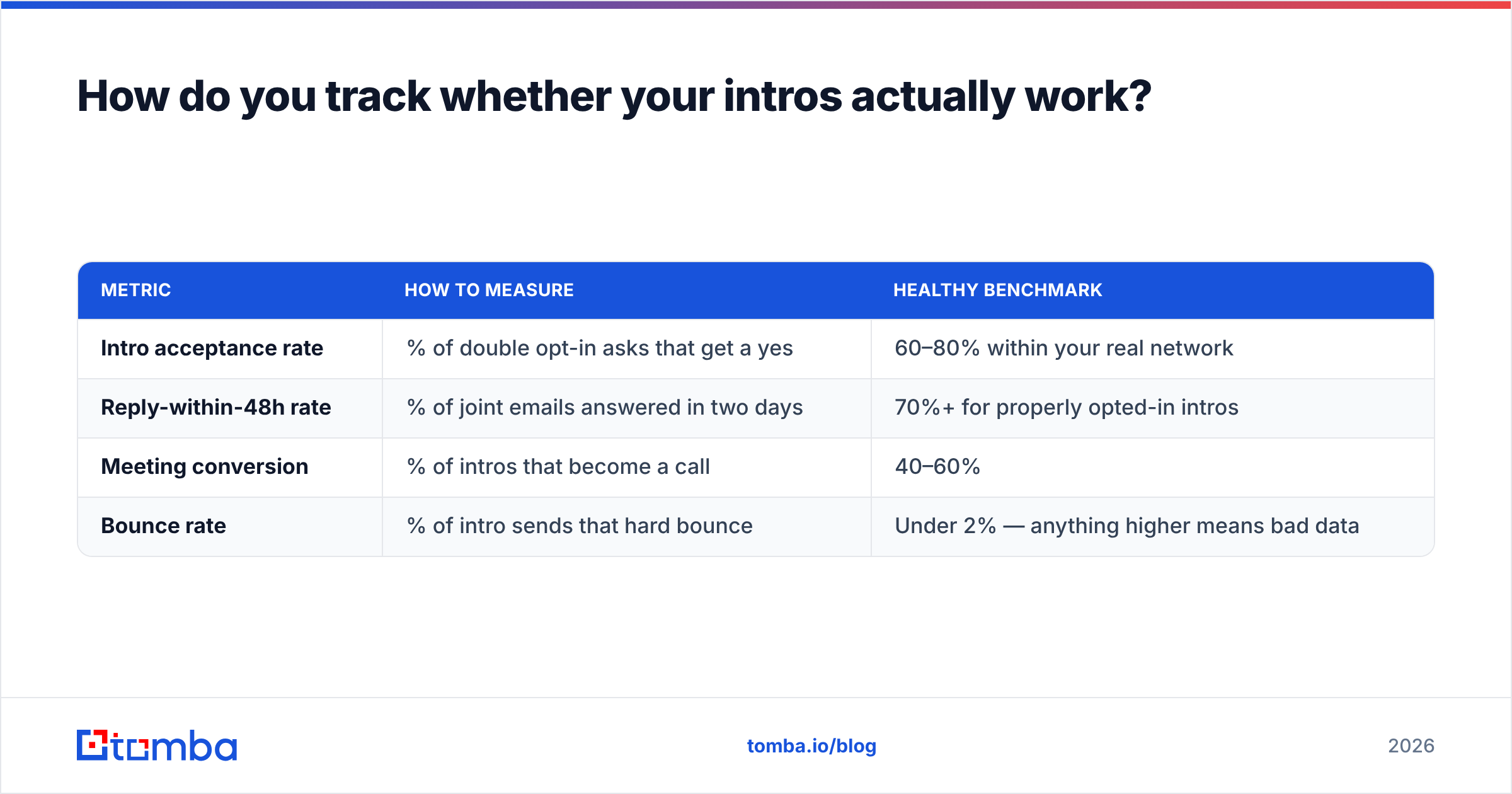
Intros are hard to measure because success is a meeting, not a click. Three metrics that do work:
| Metric | How to measure | Healthy benchmark |
|---|---|---|
| Intro acceptance rate | % of double opt-in asks that get a yes | 60–80% within your real network |
| Reply-within-48h rate | % of joint emails answered in two days | 70%+ for properly opted-in intros |
| Meeting conversion | % of intros that become a call | 40–60% |
| Bounce rate | % of intro sends that hard bounce | Under 2% — anything higher means bad data |
If your acceptance rate is under 50%, the problem is upstream: you're proposing intros with weak reasons. If your reply rate is low but acceptance is high, the problem is your subject line and body — start with the formats in the table above. If bounces are above 2%, your contact data is the problem, not your writing.
For teams sending intros at volume — partner managers, recruiters, community leads — templating helps. Keep a small library of the five formats you actually use and stop rewriting from scratch. A cold email template library plus a subject line generator removes most of the blank-page tax, and you spend your thinking time on the reason for the intro rather than the wrapper.
Getting the right address before you hit send#
Every intro assumes one thing that nobody talks about: you have a working email for both people. That assumption breaks constantly — people change companies, domains consolidate after acquisitions, and personal Gmail addresses in your phone contacts route to inboxes nobody reads anymore.
If you're reconnecting two people who last met at a conference in 2023, check both addresses before you send. If you're introducing someone into a company where you only know a name and a domain, Tomba Email Finder returns the address with a confidence score and the source it came from, so you know whether you're sending to a verified individual address or a pattern guess. Start on the free tier at 25 searches a month, or move to Starter at $49/mo when intros become a weekly habit rather than an occasional favor. The writing is the easy part — landing in the right inbox is what makes the introduction real.
Related guides#
Ready to find emails that actually work?
Join 150,000+ professionals who stopped guessing and started sending. Free credits on signup — no credit card required.
Get the Tomba newsletter
Practical outbound tactics and product updates — once every two weeks.
About the author