Email Subject Line Introduction: The 2026 Playbook for Opens
Your subject line sells the open and your first line sells the read. Here is how to build the two-line pairing that actually earns replies in 2026, with character limits, tested formulas, and a testing framework.
TL;DR
- The subject line and the first line of your email are one unit, not two. Inbox previews render them together, so writing them separately is why most cold emails die unopened.
- Keep subject lines at 3-7 words (about 30-45 characters) so they survive mobile truncation, and make the first 40-60 characters of your intro carry real information instead of "Hope this email finds you well."
- Specificity beats cleverness. A subject line naming a company, number, or event out-performs a curiosity tease in almost every B2B test we have seen reported.
- Never test subject lines on a list you have not verified. Bounce noise corrupts open-rate data and damages sender reputation at the same time.
- Test one variable at a time across at least 200 sends per variant, or you are reading randomness.
What is an email subject line introduction?#
An email subject line introduction is the pairing of your subject line with the opening line of the email body — the two pieces of text a recipient sees before deciding whether to open. On most inbox clients, they render on the same row or in stacked rows: subject in bold, then a grey preview snippet pulled from your first line of body copy (or your preheader, if you set one).
That means you have roughly 100 characters of combined real estate to earn a click. Treat them as a single ad unit and your open rates move. Treat the intro as throat-clearing and you waste half your inventory.
Here is what each part is actually doing:
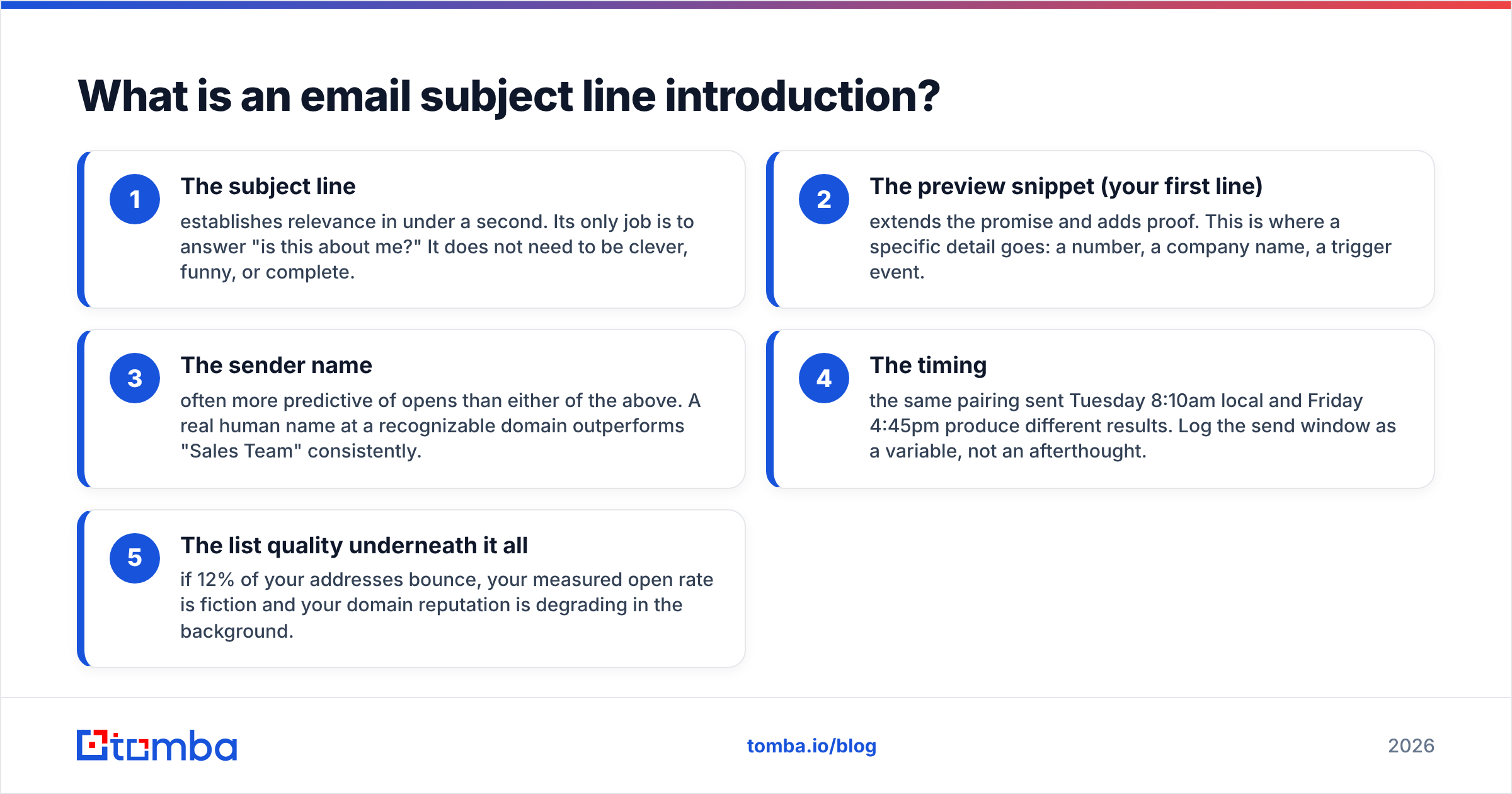
- The subject line — establishes relevance in under a second. Its only job is to answer "is this about me?" It does not need to be clever, funny, or complete.
- The preview snippet (your first line) — extends the promise and adds proof. This is where a specific detail goes: a number, a company name, a trigger event.
- The sender name — often more predictive of opens than either of the above. A real human name at a recognizable domain outperforms "Sales Team" consistently.
- The timing — the same pairing sent Tuesday 8:10am local and Friday 4:45pm produce different results. Log the send window as a variable, not an afterthought.
- The list quality underneath it all — if 12% of your addresses bounce, your measured open rate is fiction and your domain reputation is degrading in the background.
Most teams optimize item 1 obsessively and ignore 2 through 5. That is backwards. Item 5 is the foundation; run your list through an email verifier before you argue about word choice.
Why does the first line matter as much as the subject?#
Because inbox clients are showing it whether you planned for it or not.
If you do not set a preheader, Gmail, Outlook, and Apple Mail scrape the first readable text in your body and display it as the preview. That is how "Hi {{first_name}}, I hope you're doing well —" ends up as the most-viewed sentence in your entire sequence. It is 40 characters of pure filler shown to every prospect before they decide.
Rewrite that space and your open rate moves without touching the subject line at all. Compare:
Wasted preview: "Subject: Quick question — Hi Sarah, I hope this email finds you well and that your week is..."
Working preview: "Subject: Your Careers page, 14 open roles — Saw you added 14 engineering roles since March. One question about..."
The second version does three things in the same pixel space: it proves research, it gives a reason for the timing, and it sets up the ask. Litmus has documented preview-text support across major clients for years and the practical takeaway has not changed — preview text is a second subject line, and it is the one almost nobody writes on purpose.
How long should your subject line and intro be?#
Length depends on where the email is read, and in B2B that is increasingly a phone at 7am. Design for the narrowest viewport, not for your desktop draft window.
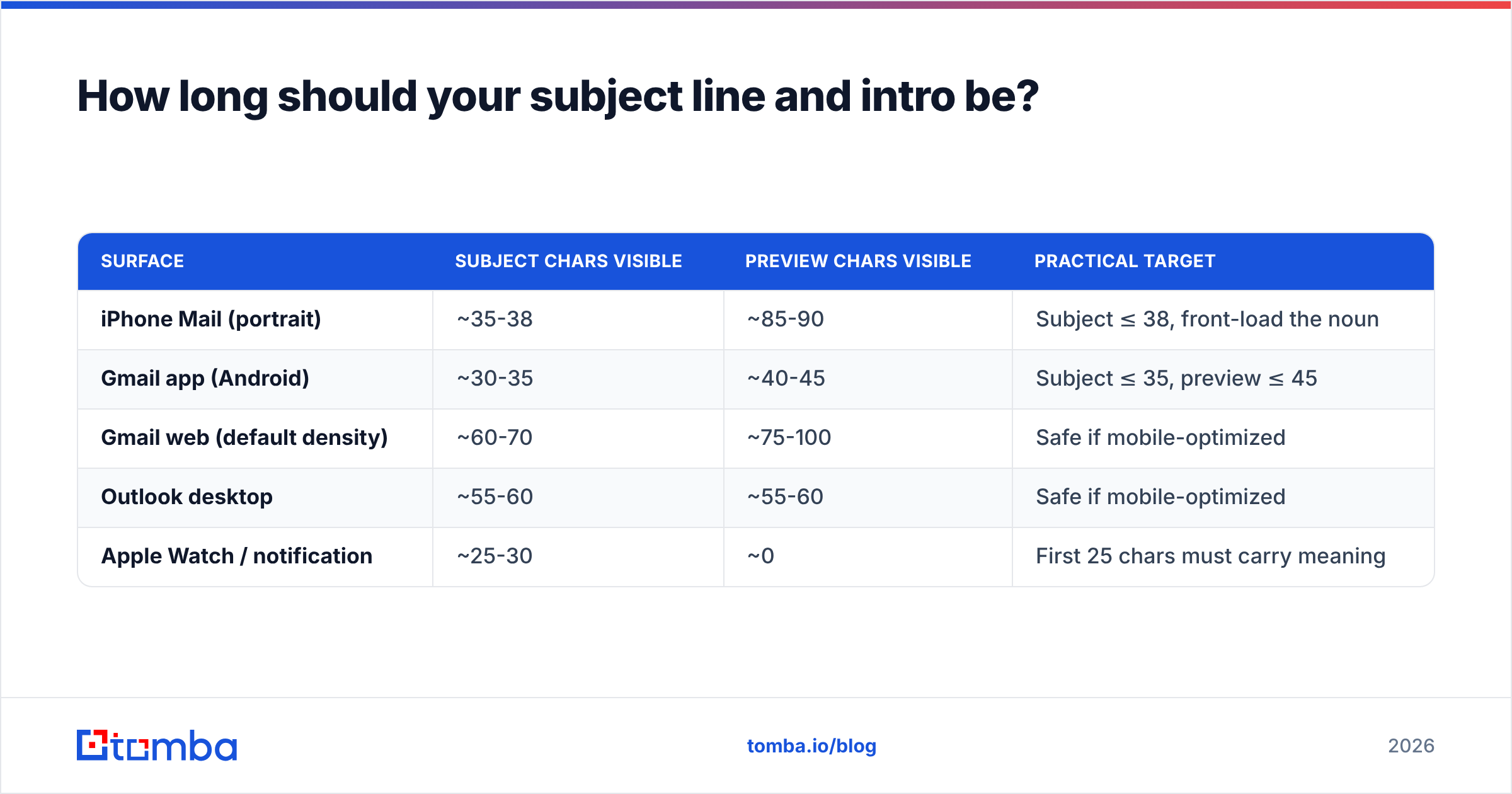
| Surface | Subject chars visible | Preview chars visible | Practical target |
|---|---|---|---|
| iPhone Mail (portrait) | ~35-38 | ~85-90 | Subject ≤ 38, front-load the noun |
| Gmail app (Android) | ~30-35 | ~40-45 | Subject ≤ 35, preview ≤ 45 |
| Gmail web (default density) | ~60-70 | ~75-100 | Safe if mobile-optimized |
| Outlook desktop | ~55-60 | ~55-60 | Safe if mobile-optimized |
| Apple Watch / notification | ~25-30 | ~0 | First 25 chars must carry meaning |
The rule that falls out of this table: the first 30 characters of your subject line must be able to stand alone. Anything after character 38 is a bonus that some readers will never see.
That kills a whole category of subject lines — the ones that back-load the payload. "Following up on our conversation about your Q3 hiring plans" reads as "Following up on our conv..." on a phone, which is indistinguishable from spam. "Q3 hiring plans — follow-up" reads completely at 27 characters.
What subject line and intro pairings actually work?#
These are the archetypes that survive contact with a real B2B inbox. Each one pairs a subject pattern with the intro that should follow it.
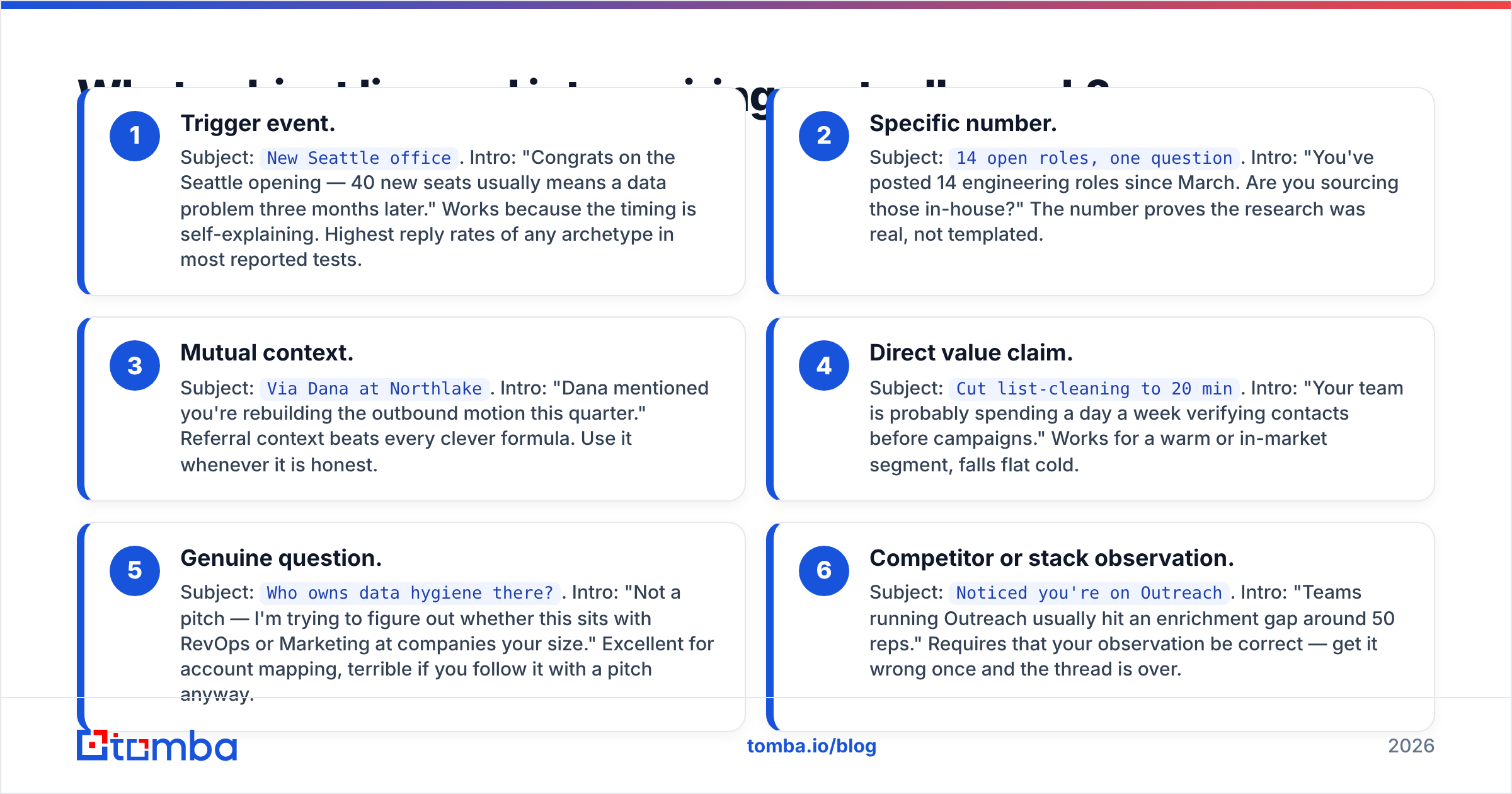
- Trigger event. Subject:
New Seattle office. Intro: "Congrats on the Seattle opening — 40 new seats usually means a data problem three months later." Works because the timing is self-explaining. Highest reply rates of any archetype in most reported tests. - Specific number. Subject:
14 open roles, one question. Intro: "You've posted 14 engineering roles since March. Are you sourcing those in-house?" The number proves the research was real, not templated. - Mutual context. Subject:
Via Dana at Northlake. Intro: "Dana mentioned you're rebuilding the outbound motion this quarter." Referral context beats every clever formula. Use it whenever it is honest. - Direct value claim. Subject:
Cut list-cleaning to 20 min. Intro: "Your team is probably spending a day a week verifying contacts before campaigns." Works for a warm or in-market segment, falls flat cold. - Genuine question. Subject:
Who owns data hygiene there?. Intro: "Not a pitch — I'm trying to figure out whether this sits with RevOps or Marketing at companies your size." Excellent for account mapping, terrible if you follow it with a pitch anyway. - Competitor or stack observation. Subject:
Noticed you're on Outreach. Intro: "Teams running Outreach usually hit an enrichment gap around 50 reps." Requires that your observation be correct — get it wrong once and the thread is over.
Notice what is missing: no "Quick question," no "Touching base," no "Circling back," no emoji, no ALL CAPS urgency. Those patterns are so heavily used that filters and humans both discount them. HubSpot's sales blog has been tracking the decay of these openers for years and the pattern is consistent — generic openers underperform specific ones at every stage of the funnel.
Which subject line styles perform best by segment?#
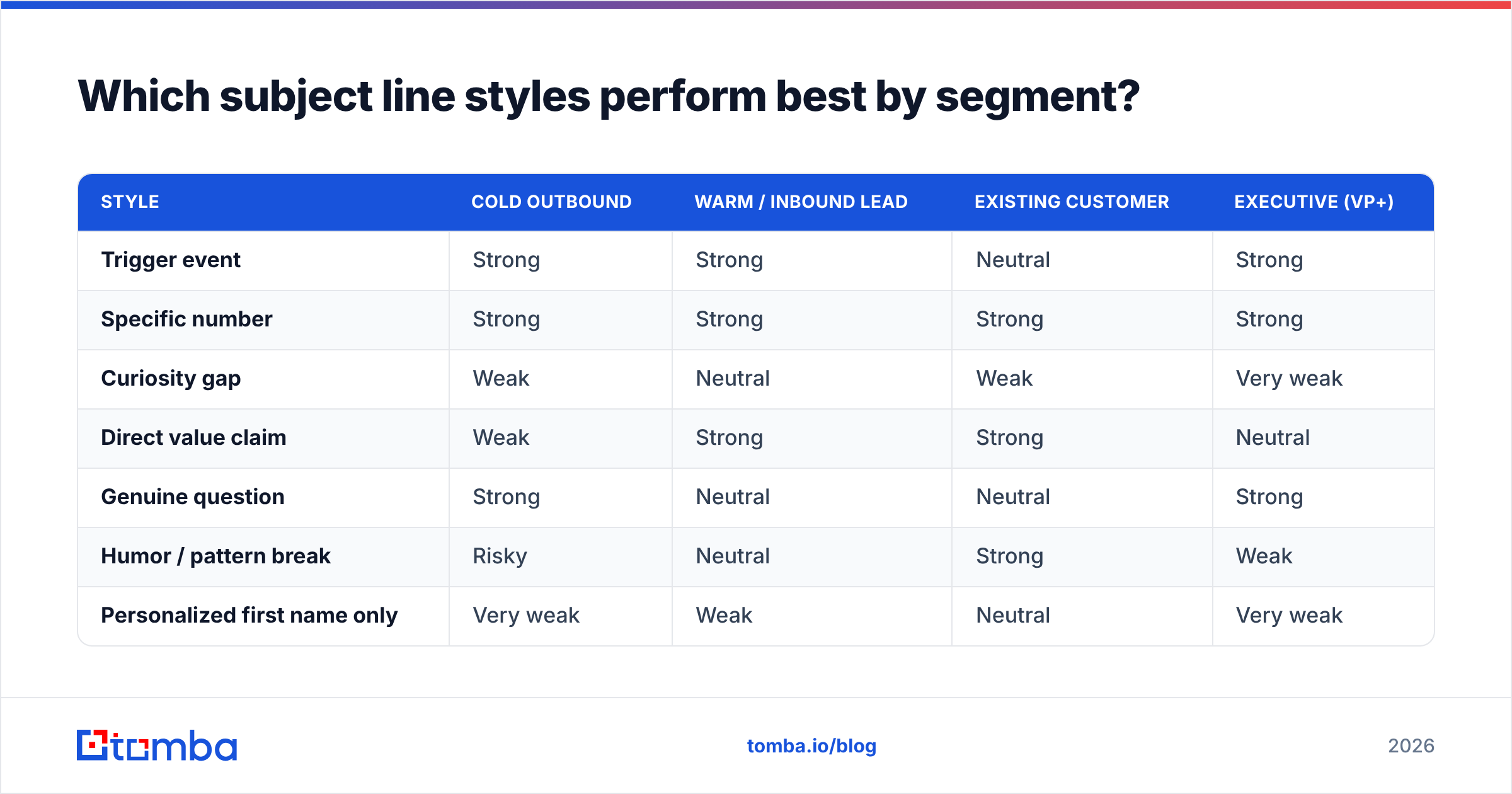
No single style wins across all audiences. Match the archetype to how cold the relationship is and how senior the recipient is.
| Style | Cold outbound | Warm / inbound lead | Existing customer | Executive (VP+) |
|---|---|---|---|---|
| Trigger event | Strong | Strong | Neutral | Strong |
| Specific number | Strong | Strong | Strong | Strong |
| Curiosity gap | Weak | Neutral | Weak | Very weak |
| Direct value claim | Weak | Strong | Strong | Neutral |
| Genuine question | Strong | Neutral | Neutral | Strong |
| Humor / pattern break | Risky | Neutral | Strong | Weak |
| Personalized first name only | Very weak | Weak | Neutral | Very weak |
The executive column is the one that surprises people. Senior buyers respond to brevity and specificity, not to cleverness — they read subject lines the way they read a calendar invite. "Q3 hiring plans — 2 min" outperforms "You won't believe what we found" by a wide margin at that level.
Also note the last row. Dropping a first name into a subject line stopped being a differentiator around 2018. Every sequencing tool does it, every recipient knows it, and it now reads as automation. Personalization has to be about a fact, not a merge field.
How do you keep subject lines out of the spam folder?#
Subject lines rarely trigger spam filters on their own anymore — modern filters weight sender reputation, engagement history, and authentication far more heavily than keywords. But the subject still contributes, and a few habits reliably hurt:
- Excessive punctuation. Multiple exclamation marks, or a mix of
!!!and???, still score badly. - ALL CAPS words. One capitalized acronym is fine. A capitalized sentence is not.
- Money and urgency stacking. "FREE," "guaranteed," "act now," and "$" in the same line is the classic pattern.
- Mismatched subject and body. Filters increasingly compare the two. A subject promising a report and a body pitching a demo is a mismatch signal.
- RE: and FWD: fakery. Faking a reply thread on a first-touch email is the fastest way to burn trust and get marked as spam manually — which hurts far more than an algorithmic flag.
The larger lever is technical. Google's bulk sender requirements make SPF, DKIM, DMARC, one-click unsubscribe, and a spam-complaint rate under 0.3% effectively mandatory — read the current sender guidelines directly rather than a secondhand summary, because they have changed twice since 2024.
Before a send, run the draft through a spam checker and confirm your authentication with an SPF checker. Those two checks take four minutes and prevent the failure mode where a great subject line never reaches a single inbox.
How should you test subject lines properly?#
Most subject line "testing" in B2B is not testing. It is two variants sent to 60 people each, a 4-point difference in open rate, and a conclusion drawn from noise.
Here is a defensible process:
- Fix your denominator first. Verify the list. A 10% invalid rate means your open rate is understated by roughly 10% and unevenly across segments — which is worse than being wrong in one direction.
- Change one variable. Subject line OR first line OR send time. If you change two, you learn nothing about either.
- Set a minimum sample. 200 sends per variant is a reasonable floor for spotting differences of 5 points or more. Below 100 per variant, do not draw conclusions.
- Measure replies, not opens. Open tracking is increasingly unreliable — Apple Mail Privacy Protection pre-fetches images and inflates opens for a large share of your list. Reply rate is the metric that survives.
- Run the same test twice. A result that does not replicate was a Tuesday, not an insight.
- Keep a library. Log every variant, the segment, and the reply rate in a sheet. Within a quarter you will have a house style backed by your own data instead of blog posts.
If you want a starting point rather than a blank page, the subject line generator produces archetype-based variants you can edit, and the subject line tester scores length, spam risk, and mobile truncation before you commit a variant to a 5,000-contact send.
What is the biggest mistake teams make here?#
Optimizing copy on a broken list.
You can spend a week A/B testing six subject lines and gain three points of open rate. Or you can clean a list where 15% of the addresses are stale, role-based, or catch-all, and gain considerably more — while also protecting the domain reputation that determines whether any future subject line gets rendered at all.
The order of operations that works:
- Source accurate contacts (verified, role-matched, not scraped guesses).
- Verify deliverability, including catch-all domains, which need a separate check.
- Authenticate your sending domain and warm it properly.
- Then optimize the subject line and intro pairing.
- Then test send times.
Steps 1 through 3 are infrastructure. Step 4 is where this article lives, and it only pays off once the infrastructure holds. If you are working through catch-all domains — common at enterprise accounts — a dedicated catch-all verifier is the difference between a usable segment and a silently discarded one.
Where should you start this week?#
Pick your worst-performing sequence. Do not rewrite it. Instead:
- Rewrite only the first line of the first email so the preview snippet carries a fact instead of a pleasantry.
- Cut the subject line to 38 characters with the noun in the first three words.
- Verify the segment before you resend.
- Send to 400 contacts split evenly against the old version.
- Read reply rate at day seven, not open rate at day one.
That single change — treating the subject line and intro as one unit and putting a real fact in the preview slot — is the highest-leverage edit available in cold email, and it costs an afternoon.
None of it works on contacts that do not exist. Before you spend another cycle on copy, build the list correctly: the Tomba Email Finder returns verified professional addresses by domain, name, or company, with a confidence score and the sources behind each result, so your open-rate tests measure your writing instead of your bounce rate. The free tier covers 25 searches a month, and paid plans start at $49/mo — enough to validate a segment before you commit budget to a campaign. Check current Tomba pricing and run your next test on data you can trust.
Related guides#
Ready to find emails that actually work?
Join 150,000+ professionals who stopped guessing and started sending. Free credits on signup — no credit card required.
Get the Tomba newsletter
Practical outbound tactics and product updates — once every two weeks.
About the author