Email Subject Line Spam: Words, Triggers, and Fixes for 2026
Spam-word lists are mostly folklore. Filters in 2026 score your sender reputation, list quality, and engagement first, and only then read the subject line. Here is what actually moves the needle.
TL;DR
- Word-level spam filters died around 2010. Modern filters score sender reputation, authentication, engagement, and list quality first, then use subject line signals as a weak tiebreaker.
- A subject line can still hurt you, but almost never on its own. "FREE" in a subject from a warm, authenticated domain with 40% open rates is fine. The same word from a cold IP sending to scraped addresses is the last straw, not the cause.
- The patterns that genuinely correlate with spam placement are ALL-CAPS blocks, more than one exclamation mark, fake
RE:/FWD:prefixes, currency and percentage symbols stacked together, and unicode look-alike characters. - Bounce rate is the single biggest deliverability lever most senders control. Getting under 2% hard bounces does more for inbox placement than any subject rewrite.
- Test order that works: verify the list, fix authentication, warm the domain, then A/B the subject line. Reverse that order and you are optimizing a rounding error.
What actually counts as email subject line spam?#
Two very different things get called "email subject line spam," and conflating them is why so much advice is useless.
The first is subject lines that look like spam to a human. Overpromising, shouting, obviously templated. These lower your open rate and raise your complaint rate. That is a copywriting problem.
The second is subject lines that contribute to a spam-folder placement decision. These get scored by a filter alongside a few hundred other signals. That is a deliverability problem.
The copywriting problem is real and fixable. The deliverability problem is mostly not about the subject line at all, which is the part nobody selling you a "500 spam trigger words" PDF wants to say out loud.
Think of it like airport security. The subject line is your carry-on bag. It gets scanned, and if you pack a bottle of liquid you will get pulled aside. But if you are on a watchlist, the neatest carry-on in the world does not get you through. Your sending domain reputation is the watchlist.
Do spam trigger word lists still work in 2026?#
Mostly no, and here is the mechanical reason.
Filters like Apache SpamAssassin do still ship rules that fire on specific strings, and those rules do still assign points. But a typical SpamAssassin spam threshold is 5.0 points, and a subject line rule fires for 0.1 to 1.5 points. You would need to stack six or seven of them to cross the line on content alone. Meanwhile a single DMARC failure or a blocklist hit contributes several points by itself.
More importantly, Gmail, Outlook, and Yahoo do not run SpamAssassin. They run per-recipient machine-learned classifiers trained on how real people treat your mail. Google's sender guidelines spell out what they care about: authentication, a complaint rate under 0.3%, one-click unsubscribe, and consistent volume. Subject line wording is not on the list.
So when someone tells you the word "free" sends you to spam, the honest answer is: it does not, but the kind of sender who writes "FREE!!!" is usually also the kind of sender with a purchased list, and the filter has already noticed the list.
Which subject line patterns actually hurt?#
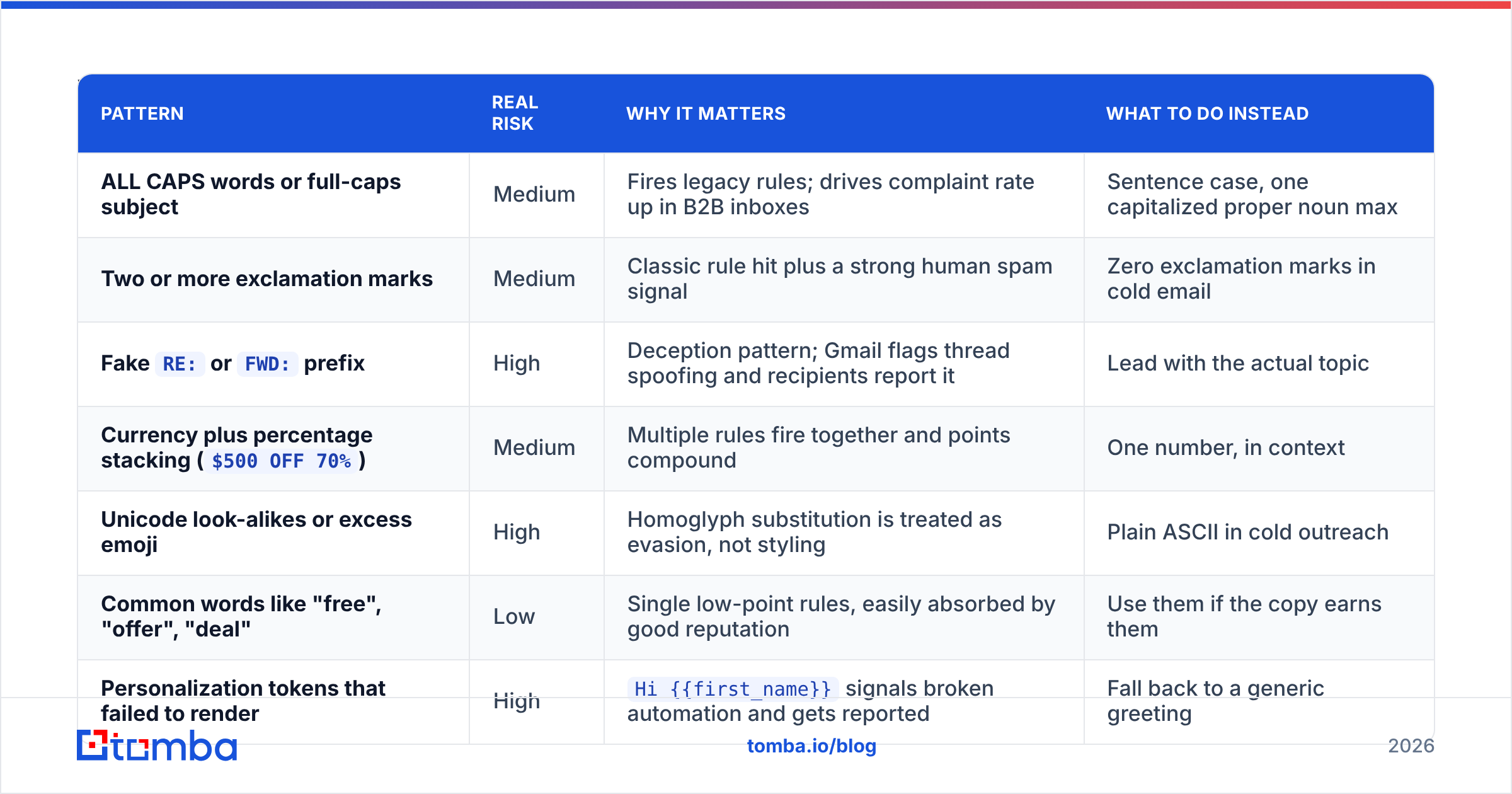
Some patterns do carry measurable weight, either through classic rule engines or because they correlate strongly with complaint behavior. Here is what is worth avoiding and what is overblown.
| Pattern | Real risk | Why it matters | What to do instead |
|---|---|---|---|
| ALL CAPS words or full-caps subject | Medium | Fires legacy rules; drives complaint rate up in B2B inboxes | Sentence case, one capitalized proper noun max |
| Two or more exclamation marks | Medium | Classic rule hit plus a strong human spam signal | Zero exclamation marks in cold email |
Fake RE: or FWD: prefix |
High | Deception pattern; Gmail flags thread spoofing and recipients report it | Lead with the actual topic |
Currency plus percentage stacking ($500 OFF 70%) |
Medium | Multiple rules fire together and points compound | One number, in context |
| Unicode look-alikes or excess emoji | High | Homoglyph substitution is treated as evasion, not styling | Plain ASCII in cold outreach |
| Common words like "free", "offer", "deal" | Low | Single low-point rules, easily absorbed by good reputation | Use them if the copy earns them |
| Personalization tokens that failed to render | High | Hi {{first_name}} signals broken automation and gets reported |
Fall back to a generic greeting |
| Subject over 70 characters | Low | No filter penalty; truncation hurts opens on mobile | Aim for 30 to 50 characters |
Notice the split. The high-risk items are all forms of deception or breakage. The low-risk items are the ones featured on every spam-word list. That inversion is the whole lesson.
How much does the subject line actually weigh?#
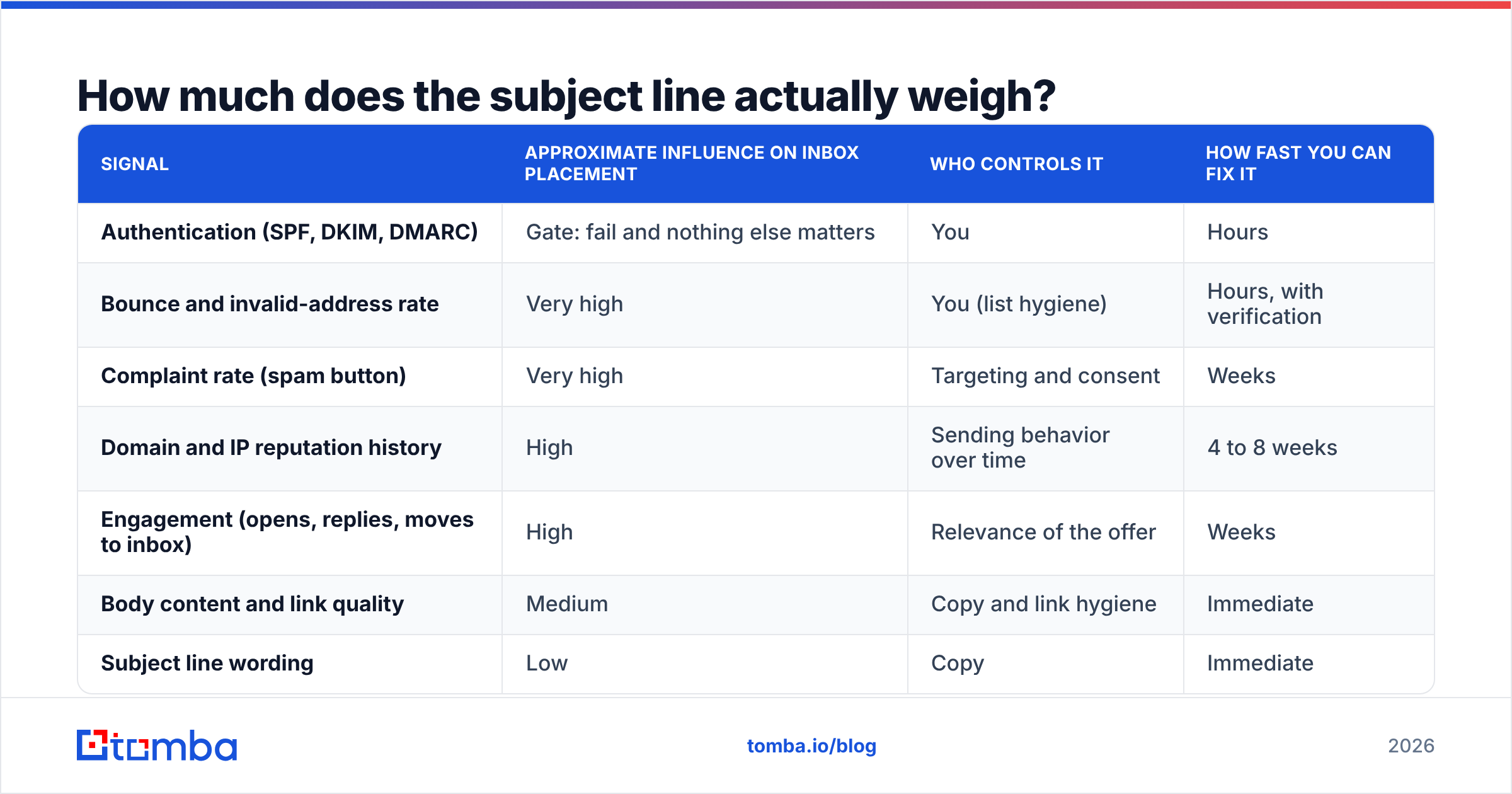
Rough weighting, based on what the major providers publish and what shows up consistently in placement testing. Treat these as directional, not precise.
| Signal | Approximate influence on inbox placement | Who controls it | How fast you can fix it |
|---|---|---|---|
| Authentication (SPF, DKIM, DMARC) | Gate: fail and nothing else matters | You | Hours |
| Bounce and invalid-address rate | Very high | You (list hygiene) | Hours, with verification |
| Complaint rate (spam button) | Very high | Targeting and consent | Weeks |
| Domain and IP reputation history | High | Sending behavior over time | 4 to 8 weeks |
| Engagement (opens, replies, moves to inbox) | High | Relevance of the offer | Weeks |
| Body content and link quality | Medium | Copy and link hygiene | Immediate |
| Subject line wording | Low | Copy | Immediate |
The subject line sits at the bottom. That is not permission to write garbage, it is permission to stop rewriting the subject line for the fourth time when your real problem is a 9% bounce rate.
Why do clean subject lines still land in spam?#
Four causes account for nearly every case where the copy looks fine and the mail still disappears.
- Invalid addresses in the send. Every hard bounce is a vote against your domain. Mailbox providers treat a high invalid rate as evidence you did not collect the list yourself. Running the list through an email verifier before send is the cheapest deliverability fix that exists, and it is the one most teams skip because the list "looked fine."
- Broken or partial authentication. SPF passes but DKIM is unsigned. DMARC is at
p=noneand nobody reads the reports. A subdomain sends without its own alignment. Any of these will outweigh every wording decision you make. - Spam traps and recycled addresses. Old lists accumulate abandoned mailboxes that providers reactivate as traps. Hitting one is worse than a hundred bounces. Spamhaus runs the best-known trap networks, and once you are listed, your subject line is irrelevant until you get delisted.
- Volume that does not match your history. Going from 50 sends a day to 2,000 on a domain registered last month reads as a compromised account. Ramp in steps, not jumps.
If you have not cleared all four, subject line testing is theater. Fix them in order, then optimize copy.
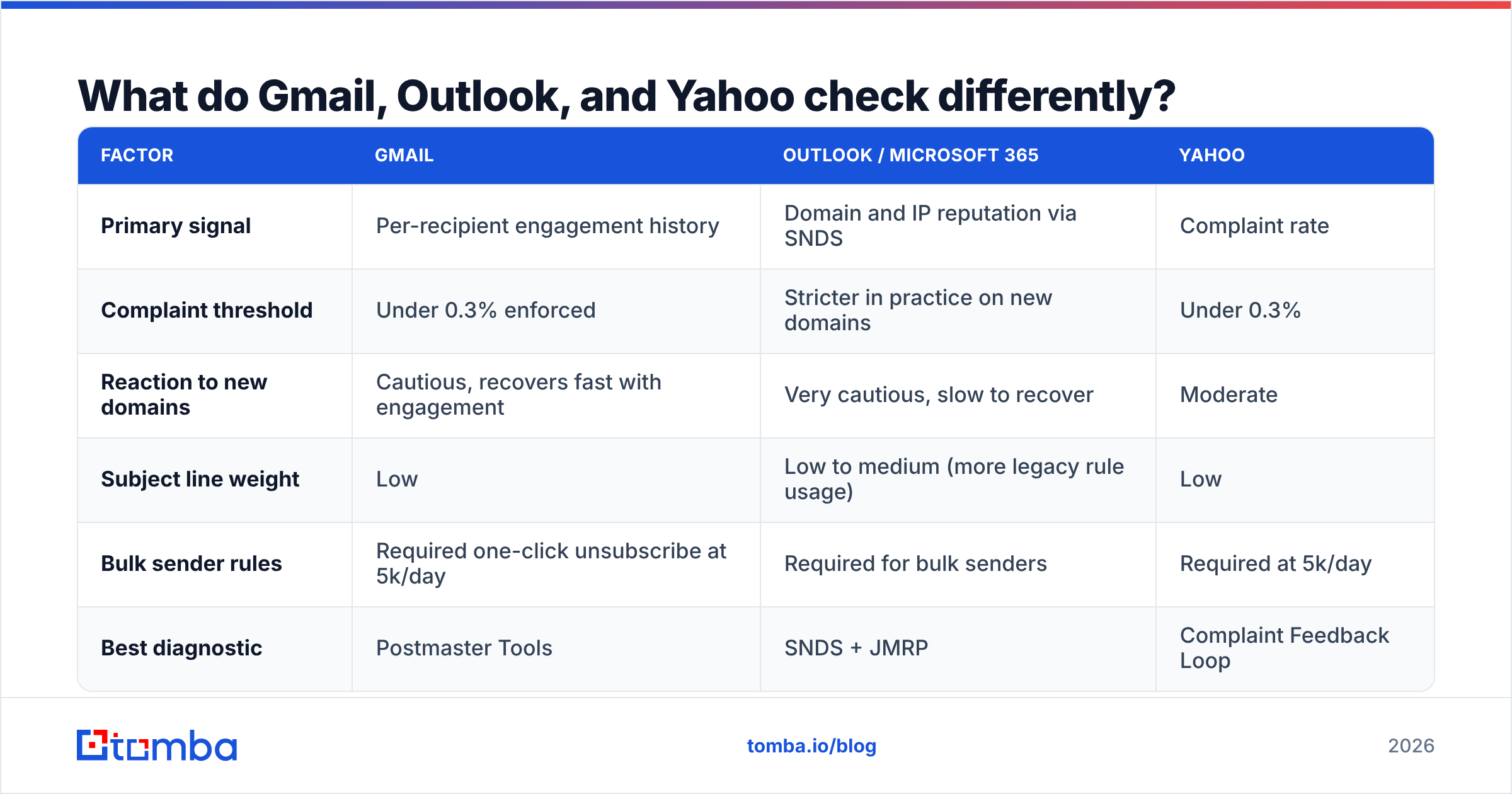
What do Gmail, Outlook, and Yahoo check differently?#
The three big providers weight things differently enough that "it landed in my Gmail test inbox" tells you very little about Outlook.
| Factor | Gmail | Outlook / Microsoft 365 | Yahoo |
|---|---|---|---|
| Primary signal | Per-recipient engagement history | Domain and IP reputation via SNDS | Complaint rate |
| Complaint threshold | Under 0.3% enforced | Stricter in practice on new domains | Under 0.3% |
| Reaction to new domains | Cautious, recovers fast with engagement | Very cautious, slow to recover | Moderate |
| Subject line weight | Low | Low to medium (more legacy rule usage) | Low |
| Bulk sender rules | Required one-click unsubscribe at 5k/day | Required for bulk senders | Required at 5k/day |
| Best diagnostic | Postmaster Tools | SNDS + JMRP | Complaint Feedback Loop |
Practical consequence: if you sell into enterprises running Microsoft 365, your subject line hygiene matters slightly more, because Microsoft still leans on content rules more than Google does. It still is not your main problem, but it is not zero either.
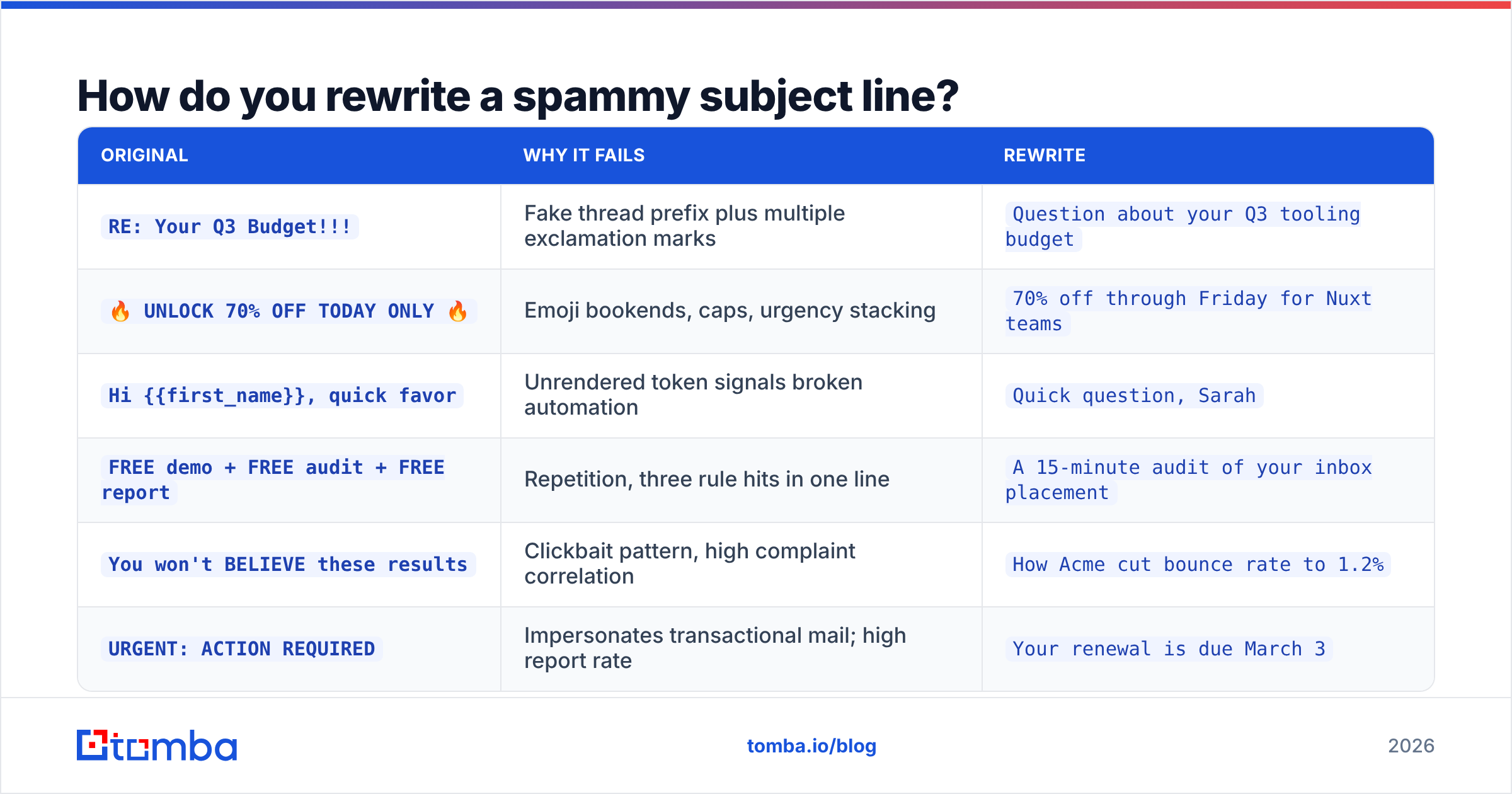
How do you rewrite a spammy subject line?#
The rewrite pattern is boring and it works: strip the shouting, cut the claim to something you can prove, and make it look like a message one person sent another.
| Original | Why it fails | Rewrite |
|---|---|---|
RE: Your Q3 Budget!!! |
Fake thread prefix plus multiple exclamation marks | Question about your Q3 tooling budget |
🔥 UNLOCK 70% OFF TODAY ONLY 🔥 |
Emoji bookends, caps, urgency stacking | 70% off through Friday for Nuxt teams |
Hi {{first_name}}, quick favor |
Unrendered token signals broken automation | Quick question, Sarah |
FREE demo + FREE audit + FREE report |
Repetition, three rule hits in one line | A 15-minute audit of your inbox placement |
You won't BELIEVE these results |
Clickbait pattern, high complaint correlation | How Acme cut bounce rate to 1.2% |
URGENT: ACTION REQUIRED |
Impersonates transactional mail; high report rate | Your renewal is due March 3 |
The rewrites are shorter, more specific, and contain a fact. That combination is what raises reply rate, and reply rate is what actually pulls you toward the inbox over time. You can pressure-test variants with a subject line tester before committing a send.
How should you test before you press send?#
Run these in order. Stopping early is fine. Skipping ahead is not.
- Verify the recipient list. Target under 2% hard bounces, ideally under 1%. Anything above 5% will damage sender reputation faster than any content change can repair it.
- Confirm SPF, DKIM, and DMARC alignment for the exact sending domain and subdomain, not just the root domain. Send a test to a mailbox you control and read the raw headers for three
passresults. - Score the full message, not the subject. A spam checker evaluates headers, links, HTML-to-text ratio, and content rules together. A subject scored in isolation gives you a false clean bill.
- Seed-test across providers. Send to real Gmail, Outlook, Yahoo, and one corporate Microsoft 365 mailbox. Placement varies more between providers than between your subject line variants.
- A/B on reply rate, not open rate. Apple Mail Privacy Protection and its equivalents have made open rate roughly decorative. Reply rate is the metric filters are approximating anyway.
- Watch the first 200 sends. If placement degrades, pause and diagnose before scaling. Volume amplifies whatever reputation you already have, good or bad.
Does personalization protect you from spam filters?#
Partly, and not the way most people assume.
Personalization does not make a filter friendlier because the words are personal. It helps because personalized mail gets replied to, and replies are the strongest positive engagement signal a mailbox provider can observe. A reply tells Gmail that this sender is wanted by this recipient, and that judgment carries forward.
The catch is that personalization only works if the underlying data is correct. Sending "Hi Sarah, saw you're now VP Marketing at Acme" to someone who left Acme fourteen months ago produces a complaint, not a reply. Stale contact data is a deliverability problem disguised as a copywriting problem.
That is where accurate sourcing matters more than clever wording. Pulling verified contacts through a domain search at the moment you build the list, rather than reusing a spreadsheet from last year, keeps the personalization true. True personalization earns replies. False personalization earns spam reports, and spam reports are weighted an order of magnitude more heavily than any subject line rule.
What does a safe subject line framework look like?#
Four shapes cover almost every legitimate B2B cold email, and none of them trip filters:
- The specific question.
Question about your onboarding flow— no claim, no urgency, obviously human. - The named observation.
Noticed Acme is hiring 3 SDRs— proves you did work, invites a reply. - The plain value statement.
Cut invalid emails from 9% to 1%— one number, verifiable, no symbols. - The direct ask.
15 minutes next Tuesday?— short, unambiguous, zero decoration.
Constraints that keep all four safe: under 55 characters, sentence case, zero exclamation marks, at most one number, no emoji, no RE: prefix unless it is a genuine reply, and no personalization token that could fail to render.
If a subject line would look odd coming from a colleague, it will look odd to a recipient. That heuristic gets you 90% of the way and costs nothing.
What should you actually fix first?#
Ranked by return on effort:
- Clean the list. Remove invalid addresses, catch-all domains you cannot verify, and role accounts.
- Fix authentication end to end, including subdomains.
- Warm the domain over four to six weeks before scaling volume.
- Tighten targeting so complaint rate stays under 0.1%.
- Then, and only then, run subject line experiments.
Most teams do this list backwards. They spend a week workshopping subject lines while a 12% bounce rate quietly burns the domain. The subject line is the cheapest thing to change and the least important, which is exactly why it absorbs so much attention.
If your subject lines are already clean and placement is still bad, the answer is in your list, not your copy. Start there. Build the list from verified sources with the Tomba Email Finder, verify before every send, and keep hard bounces under 2%. The free tier gives you 25 searches a month to test the workflow, and paid plans start at $49/mo on the Starter tier if you need volume. Clean data first, clever subject lines second.
Related guides#
Ready to find emails that actually work?
Join 150,000+ professionals who stopped guessing and started sending. Free credits on signup — no credit card required.
Get the Tomba newsletter
Practical outbound tactics and product updates — once every two weeks.
About the author