Email Subjects for Checking In: 47 Lines That Get Replies
"Just checking in" is the most ignored subject line in B2B sales. Here are 47 tested alternatives, the data behind why they work, and a framework for writing your own follow-up subjects.
TL;DR
- "Just checking in" is a subject line about your needs, not the prospect's. It signals zero new information, which is exactly why it gets archived.
- The highest-performing check-in subjects do one of four things: reference a specific event, offer something new, ask a closed question, or create a clean exit.
- Short beats clever. Subjects of 3–7 words consistently outperform longer, punchier attempts in B2B follow-up sequences.
- Subject line quality collapses if the email lands in spam or bounces. Fix your list before you optimize your words.
- Below: 47 subject lines sorted by scenario, a comparison table of check-in styles, and a repeatable framework for writing your own.
Why does "just checking in" fail so consistently?#
Because it contains no information.
Open your own inbox and scan the subject lines. You decide what to open in under a second, and that decision is driven by one question: does this contain something I need? "Just checking in" answers that question with a clear no. It tells the recipient you have nothing new to say, you want something from them, and you're hoping guilt does the work your pitch didn't.
There's a second problem. Check-in emails are usually follow-ups, which means the prospect already ignored you once. Repeating the same ask in weaker packaging doesn't improve your odds — it confirms their original instinct. HubSpot's sales research has consistently found that follow-ups which add new context outperform pure bumps, and the mechanism is obvious once you name it: a bump asks the prospect to do work, while a value-add gives them a reason to.
Think of it like knocking on a neighbor's door. "Hey, just seeing if you're home" gets a polite nod. "Hey, your package got delivered to my porch" gets the door opened. Same knock, completely different reception, because one of them carries something.
What makes a check-in subject line actually work?#
Four mechanisms. Every subject line in this post uses at least one.
- Event anchoring — you reference something that happened since your last email. A funding round, a product launch, a new hire, a LinkedIn post, a conference. The subject proves the email is new, not recycled.
- New value — you're delivering something: a benchmark, a case study, an intro, a teardown. The subject names the thing so the prospect knows what they're getting.
- Closed questions — you ask something answerable in one word. "Still a priority?" costs the prospect three seconds. "Would love to reconnect and explore synergies" costs them a calendar invite.
- Clean exit — you give permission to say no. Counter-intuitively, these get the highest reply rates in most sequences, because "no" is easier to send than silence is to maintain.
What doesn't work: fake urgency ("Last chance!"), fake threads ("Re: our call" when there was no call), clickbait ("You won't believe this"), and anything with more than one punctuation mark. These get opens and destroy trust in the same motion, and they train spam filters to distrust your domain.
Check-in subject line styles compared#
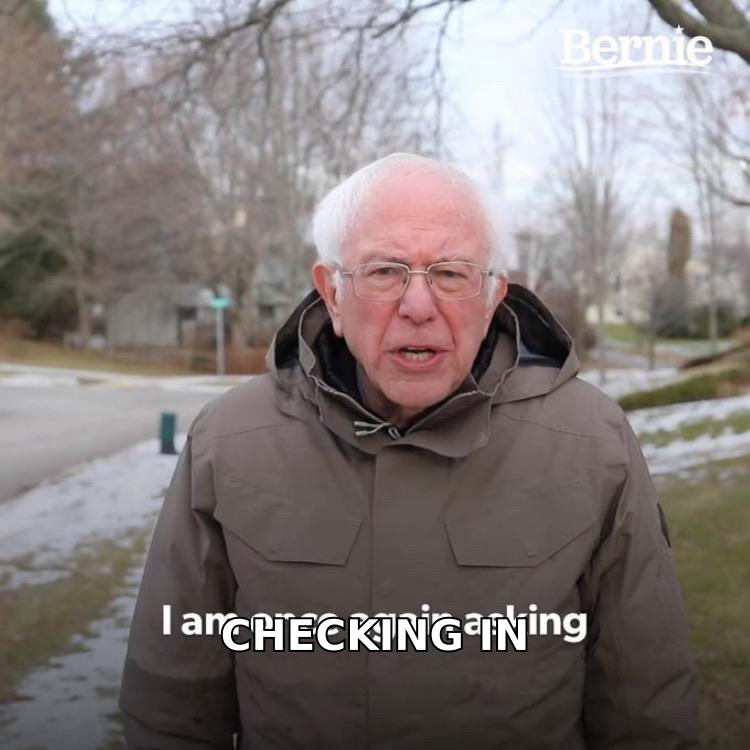
| Style | Example | Best used at | Typical reply rate | Risk |
|---|---|---|---|---|
| Event anchor | Saw the Series B — congrats |
Follow-up 2–3 | High | Needs real research time |
| Value drop | Benchmark: 2026 SDR ramp times |
Follow-up 2–4 | High | Asset must be genuinely useful |
| Closed question | Still on your roadmap? |
Follow-up 3–5 | Medium-high | Easy to get a fast "no" |
| Clean exit / breakup | Closing your file? |
Final follow-up | Highest single-send | Ends the thread if ignored |
| Generic bump | Just checking in |
Never | Lowest | Trains prospects to ignore you |
| Fake thread | Re: last week |
Never | Opens high, replies low | Damages trust and domain reputation |
What are the best email subjects for checking in?#
Sorted by scenario. Steal them directly or use them as templates — the bracketed parts are where your research goes.
After a demo or meeting (no response since)
Next step from Tuesday?Your notes from the demo[Company] rollout — still Q3?Two things I forgot to sendDid the pricing land okay?Who else needs to see this?Quick question on the [integration] piece
After a proposal went quiet
Proposal — anything unclear?Should I revise the scope?Budget timing changed?Is [competitor] still in the mix?Killing this or pausing it?One-line answer is fine
Triggered by a real event
Saw the [Series B] — congratsYour post on [topic]New [VP Sales] — worth a re-look?[Company] just launched [product]Noticed you're hiring [4 SDRs][Conference] next month?Congrats on the [award]
Delivering new value
Teardown of your [signup flow]Benchmark: [industry] reply ratesThree [SaaS] companies solving thisBuilt you a quick [audit]Case study: [similar company]Thought of you — [article title]Free [tool] that fixes [problem]
Closed questions
Still a priority?Wrong person?Bad timing?Worth 15 minutes?Yes, no, or later?Should I stop emailing?Is this on your radar at all?
Breakup / clean exit
Closing your fileLast one from mePermission to close out?I'll assume it's a noMoving you to my archiveShould I circle back in Q1?
Re-engaging an old lead
[6 months] later — still stuck?We fixed the thing you flaggedYou mentioned [objection] — updateRevisiting our [March] convoNew pricing since we last spokeYou were right about [thing]Different angle on [problem]
Notice the pattern: almost every line is under seven words, most are under five, and none of them contain the word "synergy," "touch base," or "circle back." Short subjects also survive mobile truncation, where roughly half of B2B email now gets its first read.
How long should a check-in subject line be?#
Three to seven words. Thirty to fifty characters.
The constraint isn't aesthetic — it's the iPhone Mail preview pane, which cuts subjects at roughly 35–40 characters in portrait. Gmail's mobile app is slightly more generous. If your differentiating word lands past character 40, it may as well not exist.
There's a second reason short wins for check-ins specifically: length signals effort, and effort signals a pitch. Following up on our conversation about improving your outbound conversion rates reads as a sales email before the prospect processes a single word. Still stuck on outbound? reads as a colleague. The shorter line gets the benefit of the doubt.
Test both if you want, but the direction of the result is predictable. Every large-scale subject line study — including the ones G2 reviewers cite when scoring outreach tools — points the same way for follow-up email specifically.
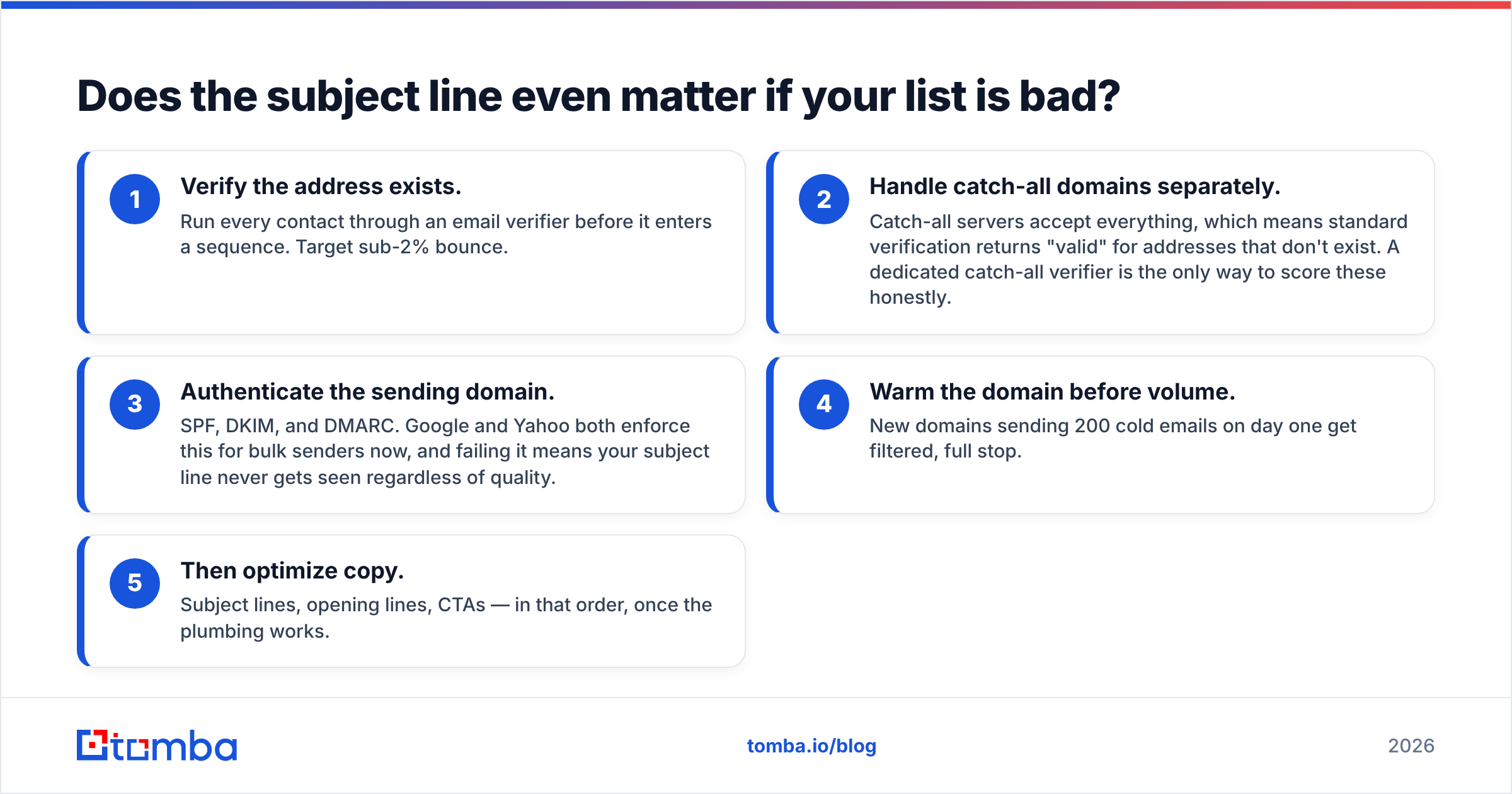
Does the subject line even matter if your list is bad?#
Not much, and this is the part most "best subject lines" posts skip.
A subject line can only be judged by someone who receives the email. If your list has a 12% bounce rate, three things happen in order: your bounces spike, your sender reputation drops, and the emails that do land start routing to spam. At that point your A/B test between "Still a priority?" and "Bad timing?" is measuring noise.
The sequence that actually works:
- Verify the address exists. Run every contact through an email verifier before it enters a sequence. Target sub-2% bounce.
- Handle catch-all domains separately. Catch-all servers accept everything, which means standard verification returns "valid" for addresses that don't exist. A dedicated catch-all verifier is the only way to score these honestly.
- Authenticate the sending domain. SPF, DKIM, and DMARC. Google and Yahoo both enforce this for bulk senders now, and failing it means your subject line never gets seen regardless of quality.
- Warm the domain before volume. New domains sending 200 cold emails on day one get filtered, full stop.
- Then optimize copy. Subject lines, opening lines, CTAs — in that order, once the plumbing works.
I've watched teams spend three weeks A/B testing check-in subjects while sitting on a list where a quarter of the contacts had left the company. The copy was never the problem. Getting accurate contact data through a proper email finder fixed the reply rate before a single word changed.
How do you build a check-in sequence that doesn't annoy people?#
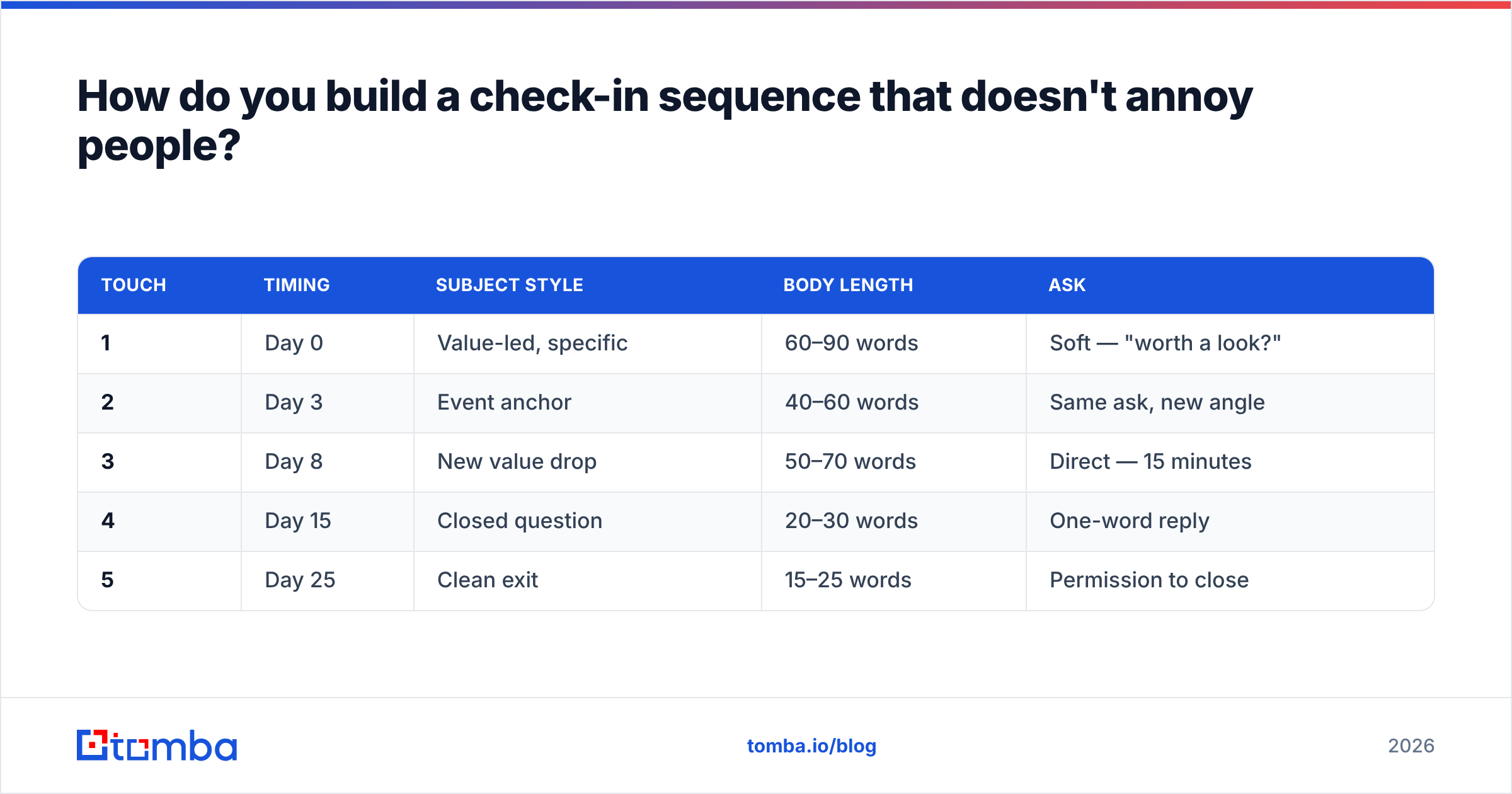
Structure the sequence so each email earns its place. A five-touch follow-up sequence that works:
| Touch | Timing | Subject style | Body length | Ask |
|---|---|---|---|---|
| 1 | Day 0 | Value-led, specific | 60–90 words | Soft — "worth a look?" |
| 2 | Day 3 | Event anchor | 40–60 words | Same ask, new angle |
| 3 | Day 8 | New value drop | 50–70 words | Direct — 15 minutes |
| 4 | Day 15 | Closed question | 20–30 words | One-word reply |
| 5 | Day 25 | Clean exit | 15–25 words | Permission to close |
Two rules govern this table. First, emails get shorter as the sequence progresses — by touch five you're at two sentences, because a long breakup email is a contradiction. Second, no two touches use the same mechanism. If touch two anchored on their funding round, touch three cannot also be a congratulations email.
Space touches by days, not hours. Three to four days early in the sequence, widening to seven-plus by the end. Daily follow-ups are the fastest way to get marked as spam, and spam complaints damage your domain far more than a lost deal does.
If you're managing this at volume, pull contact data programmatically rather than by hand. The Tomba API handles finding and verifying in a single flow, so sequence enrollment doesn't wait on a manual CSV cleanup.
What should you never put in a check-in subject line?#
A short blocklist, in order of damage caused:
- "Just" anything. "Just checking in," "just following up," "just wanted to." The word apologizes for the email's existence.
- "Re:" or "Fwd:" on a new thread. It's a lie the recipient discovers in two seconds, and it's the single fastest way to convert a neutral prospect into a spam complaint.
- All caps or multiple exclamation marks. Spam filters weight these heavily. Run anything questionable through a spam checker before it goes into a sequence.
- The recipient's first name alone. "John?" reads as manipulation, not familiarity.
- Vague value words. "Opportunity," "solution," "partnership," "synergies." Every one of them is a category, not a thing.
- Emoji in B2B follow-up. Fine in B2C ecommerce. In enterprise sales it reads as a mass send, because it usually is.
- Fake deadlines. "Offer expires Friday" on an offer that doesn't expire. You get one use of this per prospect, ever.
The consistent thread: every item on this list optimizes for opens at the expense of replies. Opens are a vanity metric that Apple Mail Privacy Protection has already made unreliable. Replies are the only number that matters in a check-in sequence.
How do you personalize check-in subjects at scale?#
The tension is real — event-anchored subjects are the strongest performers and the hardest to scale. Three approaches, in order of effort:
Tier 1: Manual research (10–30 accounts). Read their last two LinkedIn posts, check their careers page, scan recent news. Write a genuinely custom subject for each. Reply rates here can run 3–5x your sequence average, which is why it's worth doing for named accounts.
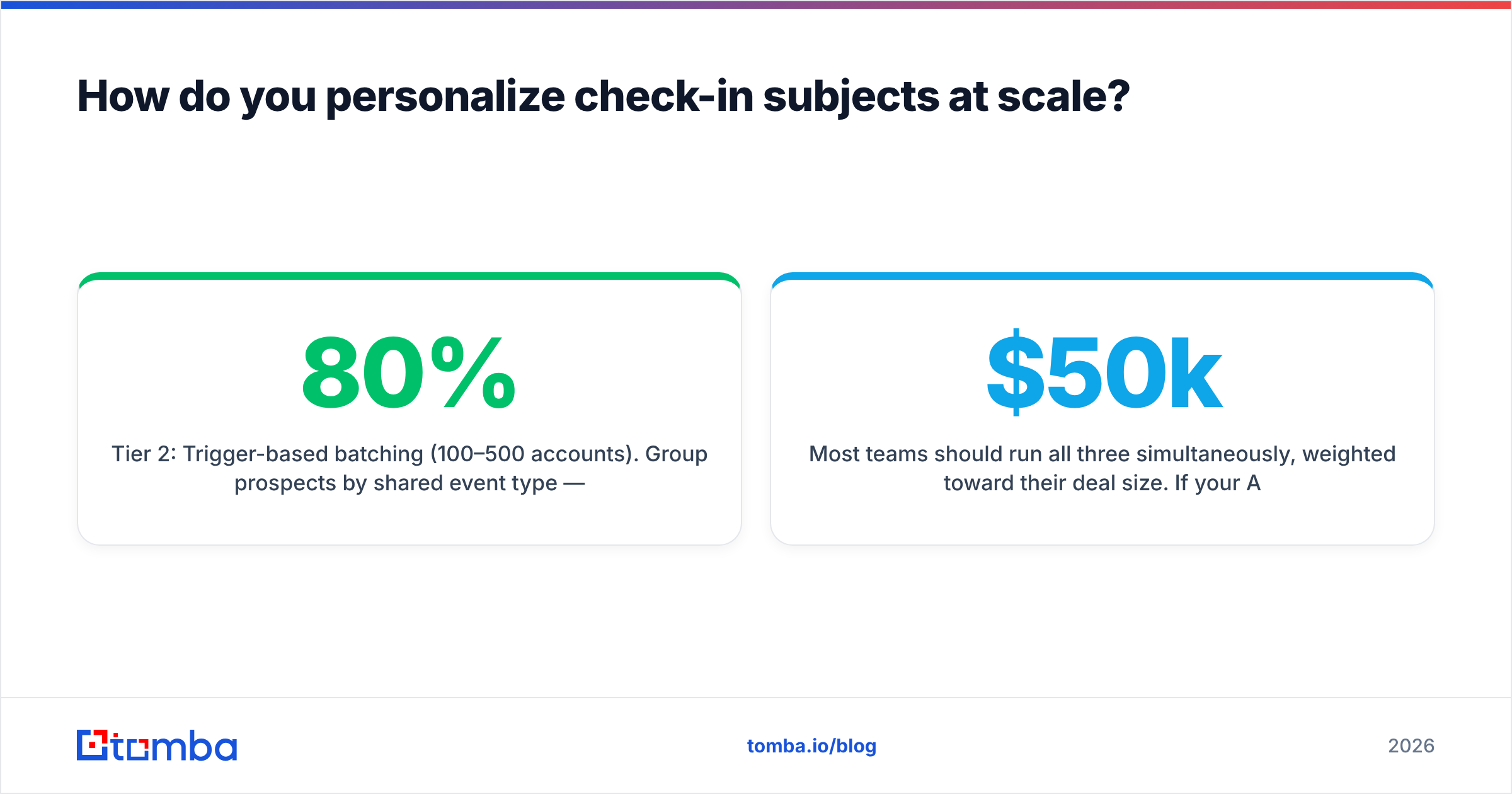
Tier 2: Trigger-based batching (100–500 accounts). Group prospects by shared event type — everyone who raised funding this quarter, everyone hiring for a specific role, everyone who launched a product. One subject template per group, one variable slot. You get 80% of the personalization value at 10% of the effort.
Tier 3: Segment-level relevance (500+). Drop event anchoring and lean on closed questions and clean exits, which don't require research to work. Still a priority? is honest at any scale. Pair it with accurate firmographic data from a solid B2B database so at least your targeting is right even when your subject line is generic.
Most teams should run all three simultaneously, weighted toward their deal size. If your ACV is $50k, tier one is the whole strategy. If it's $500/month, tier three plus clean data will beat any amount of manual research per hour spent.
Frequently asked questions#
Should I change the subject line on a follow-up, or keep the thread?
Keep the thread for touches one through three — threading preserves context and the prospect can see the history. Break to a new subject for touches four and five, because a fresh subject line gives a dormant thread one last chance at a first impression.
How many check-in emails is too many?
Five total touches over roughly a month, then stop. Move the contact to a quarterly nurture list rather than continuing. Teams that push past eight touches see reply rates flatten while spam complaints climb — the math stops working well before touch eight.
Do question-mark subject lines really perform better?
For check-ins specifically, yes. A question implies a low-cost answer exists, and it puts the prospect in responder mode rather than evaluator mode. It's less reliable for cold first-touch emails, where a question from a stranger reads as presumptuous.
What about check-in emails to existing customers?
Different game. With customers you have an account history to reference, so lead with it: Your usage dropped in July or Renewal is 60 days out. Generic check-ins are worse with customers than with prospects, because they highlight that you haven't been paying attention.
Where should you start?#
Pick five subject lines from the list above that match where your deals actually stall, and swap them into your next sequence. Keep everything else identical so you can read the result. Then fix the layer underneath: verify the list, authenticate the domain, and make sure the addresses you're writing these clever subjects for are real people who still work there.
That last part is where most follow-up sequences quietly leak. If a meaningful share of your contacts are stale, no subject line rescues the campaign. Start with Tomba's Email Finder to source and verify contacts in one pass — the free tier covers 25 searches a month so you can check your existing list quality before committing, and paid Tomba pricing starts at $49/mo for teams running real volume. Get the data right, then let the subject lines do the job they're actually good at.
Related guides#
Ready to find emails that actually work?
Join 150,000+ professionals who stopped guessing and started sending. Free credits on signup — no credit card required.
Get the Tomba newsletter
Practical outbound tactics and product updates — once every two weeks.
About the author