Email Suppression List: The Complete 2026 Guide for Senders
A suppression list is the cheapest deliverability insurance you can buy. Here's how to build one, what belongs on it, and the mistakes that get sending domains blocked.
TL;DR
- An email suppression list is the record of every address you must never email again — unsubscribes, hard bounces, spam complainers, role accounts, and competitor or customer domains.
- Suppression is legally required in most jurisdictions (CAN-SPAM gives you 10 business days to honor an opt-out; GDPR is effectively immediate) and technically required if you want to keep your bounce rate under 2%.
- The failure mode is almost never "we forgot to suppress." It's fragmentation: five tools, five lists, no sync — so a suppressed contact gets emailed from your second sending domain.
- Global suppression (account-wide) and campaign suppression (list-specific) solve different problems. Most teams only build the second one and then wonder why complaints climb.
- Clean at the source: verified, deduped data going in means a much smaller suppression list to manage later.
What is an email suppression list?#
An email suppression list is a blocklist you maintain against yourself. It's the set of addresses your sending system checks before every send and silently skips — no matter which campaign, sequence, or list they appear on.
Think of it like the "do not seat" list at a restaurant. The host doesn't argue with the reservation system or hope the server notices; the name is flagged at the door and never reaches a table. Your ESP or sequencer should do the same thing at the send layer, not at the list-building layer, because list-building is where humans make mistakes.
The distinction that matters most: a suppression list is not a bounce log. A bounce log is a record of what happened. A suppression list is an enforcement mechanism that changes what happens next. Plenty of teams have the first and assume it does the job of the second.
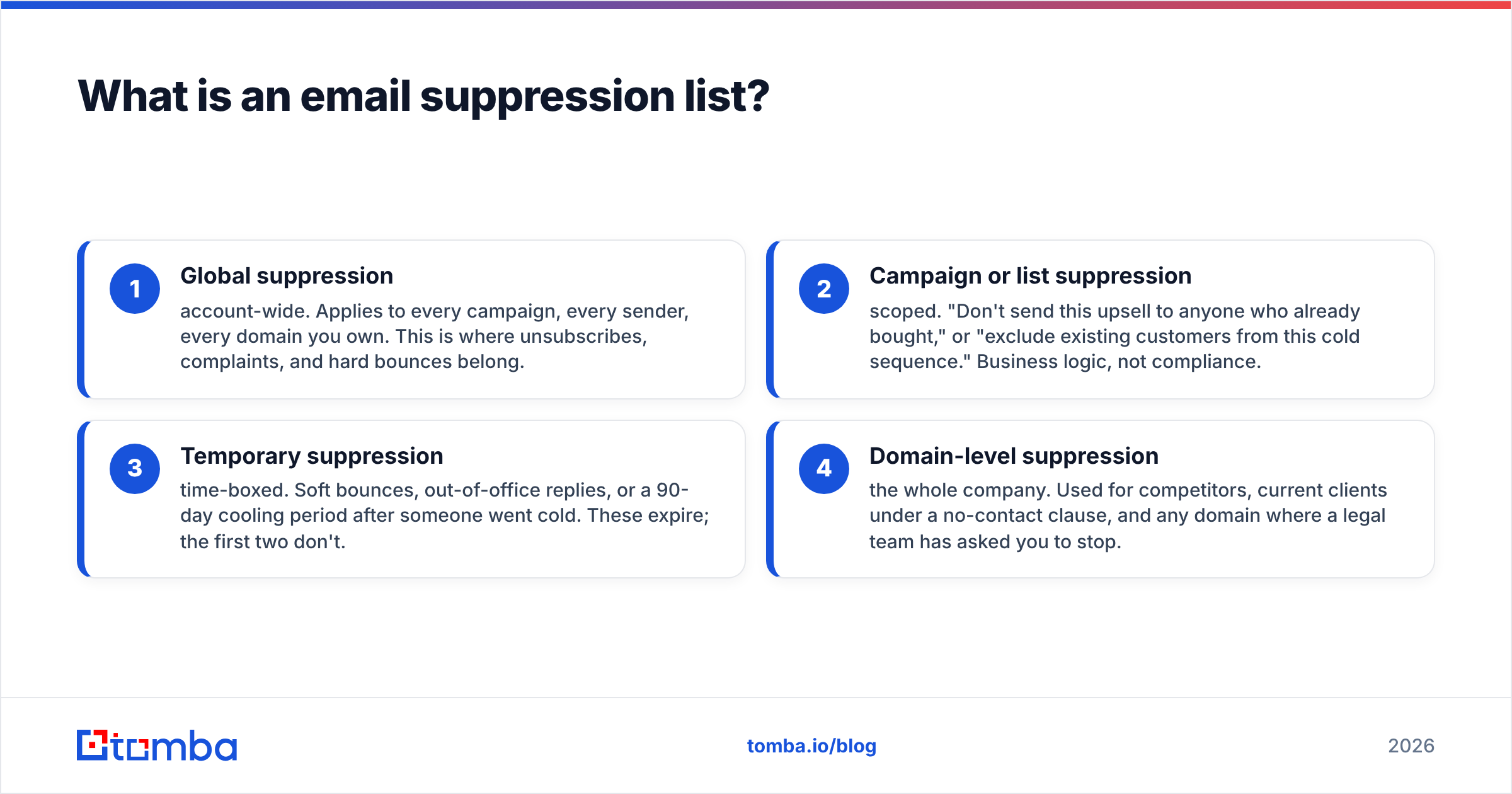
Two scopes exist, and you need both:
- Global suppression — account-wide. Applies to every campaign, every sender, every domain you own. This is where unsubscribes, complaints, and hard bounces belong.
- Campaign or list suppression — scoped. "Don't send this upsell to anyone who already bought," or "exclude existing customers from this cold sequence." Business logic, not compliance.
- Temporary suppression — time-boxed. Soft bounces, out-of-office replies, or a 90-day cooling period after someone went cold. These expire; the first two don't.
- Domain-level suppression — the whole company. Used for competitors, current clients under a no-contact clause, and any domain where a legal team has asked you to stop.
Mixing scopes is the classic mistake. Someone dumps a customer-exclusion list into global suppression, and six months later marketing can't email its own customers.
What belongs on your suppression list?#
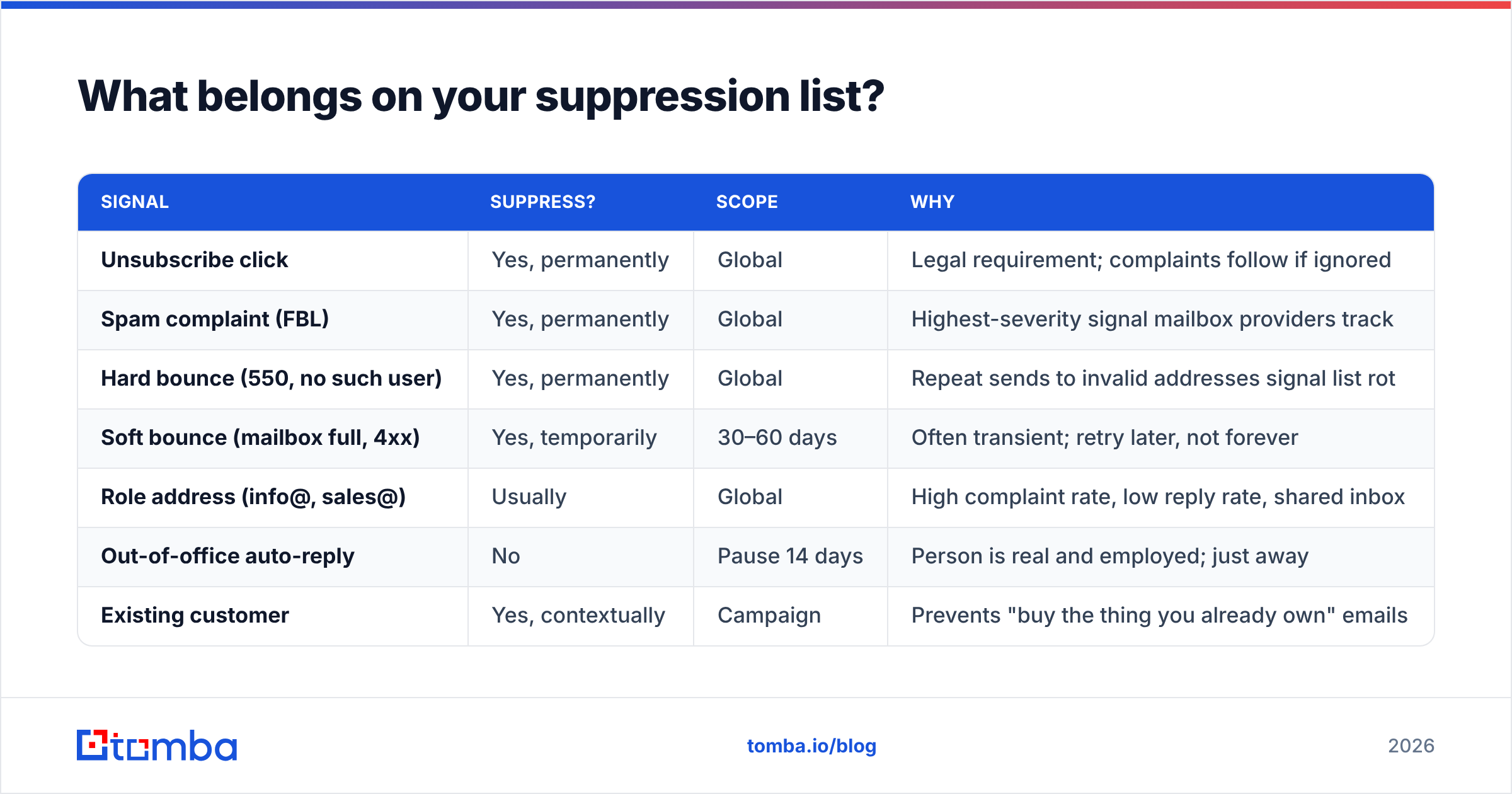
Not everything that looks like a bad address deserves permanent suppression. Over-suppressing shrinks your addressable market for no deliverability gain; under-suppressing burns your domain. Here's the working split.
| Signal | Suppress? | Scope | Why |
|---|---|---|---|
| Unsubscribe click | Yes, permanently | Global | Legal requirement; complaints follow if ignored |
| Spam complaint (FBL) | Yes, permanently | Global | Highest-severity signal mailbox providers track |
| Hard bounce (550, no such user) | Yes, permanently | Global | Repeat sends to invalid addresses signal list rot |
| Soft bounce (mailbox full, 4xx) | Yes, temporarily | 30–60 days | Often transient; retry later, not forever |
| Role address (info@, sales@) | Usually | Global | High complaint rate, low reply rate, shared inbox |
| Out-of-office auto-reply | No | Pause 14 days | Person is real and employed; just away |
| Existing customer | Yes, contextually | Campaign | Prevents "buy the thing you already own" emails |
| Competitor domain | Yes | Domain-level | Leaks roadmap and pricing to the wrong audience |
| Manual "not interested" reply | Yes | Global | Emailing again converts a soft no into a complaint |
The row people argue about is role addresses. Google's own sender guidelines push hard on complaint rates, and shared inboxes generate complaints at a much higher rate than named mailboxes because whoever opens it has no relationship with you. If your ICP genuinely runs through shared inboxes — small agencies, local services, some healthcare — carve out an exception rather than suppressing the category globally.
The row people ignore is out-of-office. Auto-replies are not bounces. Treating them as bounces is how teams quietly delete their most qualified contacts, because senior people take the most vacation.
Why does a suppression list matter for deliverability?#
Because mailbox providers score your behavior over time, not your individual messages. Repeatedly emailing addresses that bounce, complain, or opted out is the clearest available signal that you don't manage your list — and reputation systems weight that heavily.
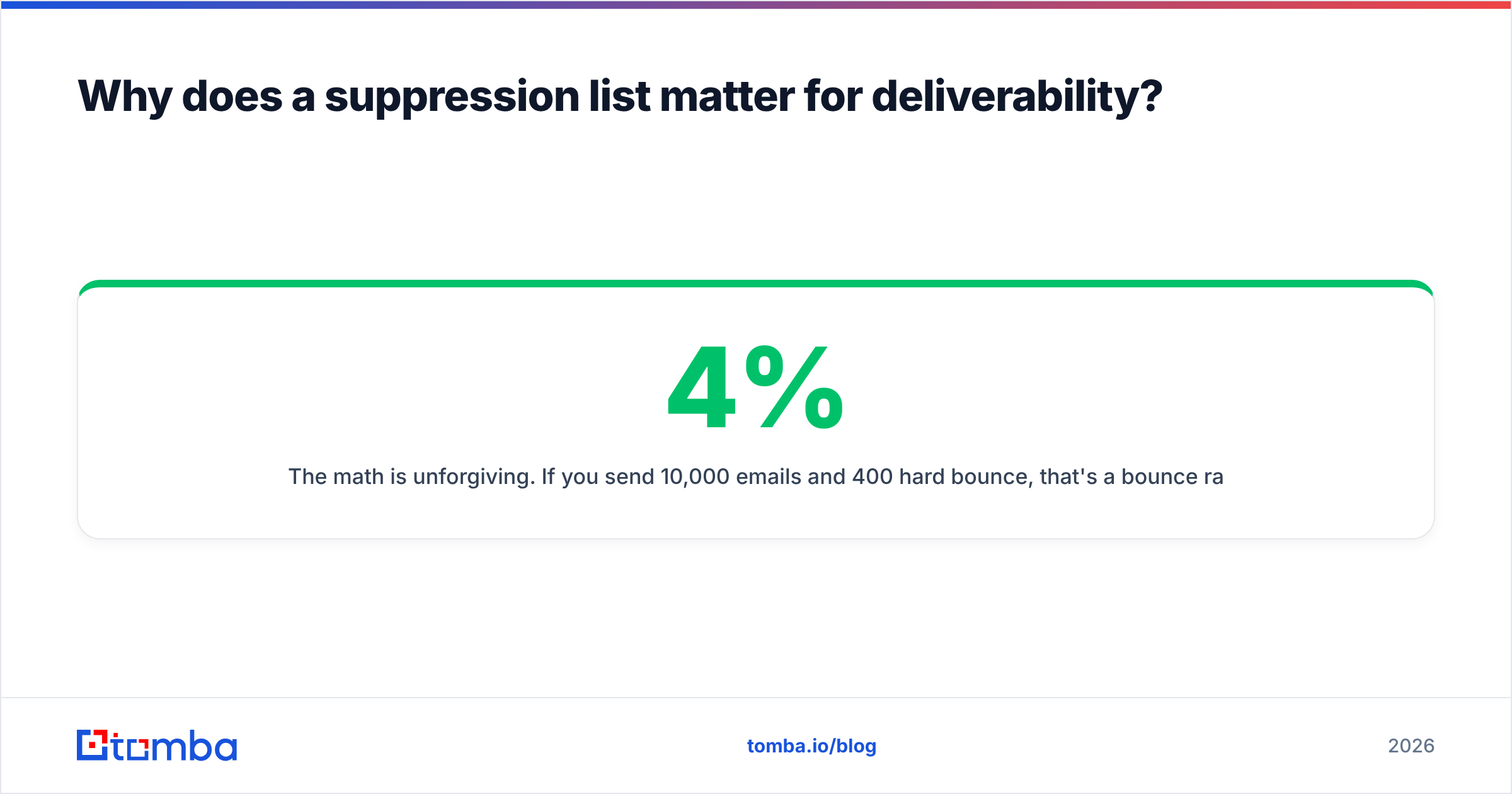
The math is unforgiving. If you send 10,000 emails and 400 hard bounce, that's a 4% bounce rate. Most ESPs start throttling around 2%, and some suspend accounts above 5%. Google's bulk-sender rules ask senders to stay under a 0.3% spam-complaint rate, with 0.1% as the real target. You do not get there with a leaky suppression list.
There's a compounding effect that makes this worse than it looks. Poor sender reputation doesn't just hurt the campaign that caused it — it degrades inbox placement for every email from that domain, including transactional receipts and password resets. One badly-suppressed cold campaign can cost you signup confirmations.

Suppression also protects against a subtler problem: repeat exposure. A prospect who ignored you three times and then got a fourth email is meaningfully more likely to hit "report spam" than to reply. Suppression rules that include "no contact for 180 days after 4 touches with zero engagement" are a reputation investment, not lost pipeline.
How do you build and maintain one?#
Six steps, in order. Skipping step 5 is the most common reason suppression lists fail in practice.
- Choose one system of record. Your CRM, your ESP, or a dedicated table. Not "all three." Every other tool reads from it; nothing writes to it independently.
- Backfill history. Pull unsubscribes, bounces, and complaints from every tool you've used in the last three years. Export to CSV, normalize casing, strip plus-addressing where your ESP treats it as distinct, and remove duplicates before import.
- Normalize the format. Lowercase everything. Decide your policy on Gmail dots and plus-aliases and apply it consistently —
j.smith@gmail.comandjsmith@gmail.comare the same mailbox, and a suppression list that doesn't know that will re-email someone who opted out. - Add domain-level entries. Competitors, current clients, partners under NDA, and any domain your legal team flags. Store these as domains, not as individual addresses, so new hires at those companies are covered automatically.
- Sync everywhere, on a schedule. This is the step that breaks. If you run Instantly for cold, HubSpot for nurture, and a homegrown script for product emails, all three need the same suppression data daily — via API, not a quarterly CSV someone remembers to export.
- Verify before you send, not after. Run new imports through an email verifier so invalid addresses never enter the sending pool. Prevention costs a fraction of a cent; a hard bounce costs reputation.
On step 6: the cheapest suppression list is a small one. If your acquisition pipeline pulls verified addresses with confirmed patterns, your hard-bounce suppression barely grows. If you scrape and hope, it balloons. That's why the sourcing tool matters more than the cleanup tool.
How do suppression features compare across tools?#
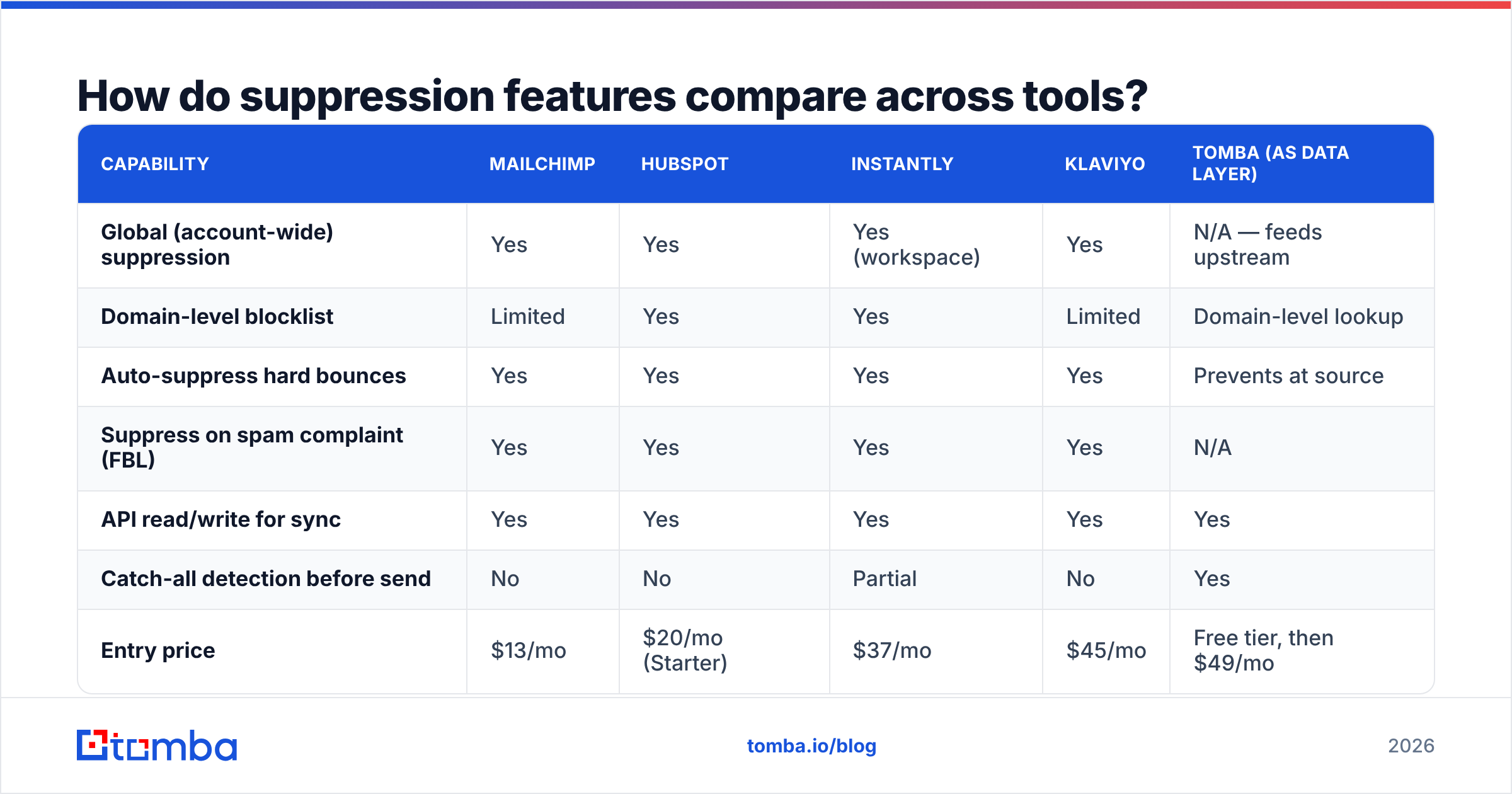
Suppression is a checkbox on most vendor pages and a wildly different feature in practice. The questions that separate them: is suppression global by default, can you suppress whole domains, and does it enforce at the send layer or just filter at import?
| Capability | Mailchimp | HubSpot | Instantly | Klaviyo | Tomba (as data layer) |
|---|---|---|---|---|---|
| Global (account-wide) suppression | Yes | Yes | Yes (workspace) | Yes | N/A — feeds upstream |
| Domain-level blocklist | Limited | Yes | Yes | Limited | Domain-level lookup |
| Auto-suppress hard bounces | Yes | Yes | Yes | Yes | Prevents at source |
| Suppress on spam complaint (FBL) | Yes | Yes | Yes | Yes | N/A |
| API read/write for sync | Yes | Yes | Yes | Yes | Yes |
| Catch-all detection before send | No | No | Partial | No | Yes |
| Entry price | $13/mo | $20/mo (Starter) | $37/mo | $45/mo | Free tier, then $49/mo |
Read that last column carefully — it's a different job, not a better version of the same job. Sending platforms suppress after something goes wrong. A data layer stops the bad address from entering the pipeline at all. Teams that run both keep suppression lists an order of magnitude smaller.
The catch-all row deserves a note. Catch-all domains accept every address at the SMTP layer and then silently discard the invalid ones, which means standard verification returns "valid" and your bounce data lies to you. A dedicated catch-all verifier gives you a confidence score instead of a false green light, so you can route risky catch-alls to a separate warm-up segment rather than your main domain.
If you're comparing platforms broadly, G2's email deliverability category has current user reviews that call out suppression-sync bugs specifically — worth ten minutes before you commit.
What are the legal requirements around suppression?#
Suppression is where deliverability and law overlap, and the rules differ by jurisdiction more than most senders realize.
- CAN-SPAM (US) — you must honor an opt-out within 10 business days, cannot charge a fee or require anything beyond an email address to unsubscribe, and cannot sell or transfer a suppressed address. The FTC's compliance guide is short and worth reading in full.
- GDPR (EU/UK) — consent must be as easy to withdraw as to give, and "as easy" is generally read as immediate. You also need a lawful basis for the suppression record itself; keeping the address to avoid contacting someone is legitimate interest, and you should document that.
- CASL (Canada) — unsubscribe requests must be honored within 10 business days, with meaningfully stiffer penalties than CAN-SPAM and a broader definition of commercial electronic message.
One nuance that trips people up: a GDPR erasure request and an unsubscribe are not the same thing. If you fully delete someone's record on an erasure request, you lose the ability to suppress them — and you may email them again next quarter. The standard practice is to retain a hashed version of the address for suppression purposes only, documented in your privacy policy. Confirm the specifics with counsel; this is a summary, not legal advice.
How do you keep suppression from eating your pipeline?#
The honest tension: every address you suppress is one you can't sell to. A team that suppresses aggressively and sources lazily runs out of TAM in a quarter.
The fix is upstream. If your prospecting motion pulls fresh, verified contacts with a known email deliverability profile, suppression stays a small tax rather than a shrinking cage. Concretely:
- Source by pattern, not by guess. Domain search returns a company's actual email format plus known addresses, which produces far fewer hard bounces than permutation guessing.
- Verify at import. Every new contact runs through verification before it touches a sequence. Invalid addresses get discarded, not suppressed — there's a difference, and it keeps your suppression list meaningful.
- Segment catch-alls. Don't suppress them and don't blast them. Route them to a lower-volume, higher-personalization track on a separate domain.
- Re-verify quarterly. B2B contact data decays roughly 25–30% a year as people change jobs. A contact that was valid in January may be a hard bounce by August, and re-verification catches that before your bounce rate does.
- Track suppression reasons. "Unsubscribed" and "bounced" are different problems. If unsubscribes spike, your targeting or copy is wrong. If bounces spike, your data source is. You can't diagnose either without the reason code.
That last point is underrated. A suppression list without reason codes is a graveyard. With them, it's the cleanest feedback loop you have on message-market fit.
What does a good suppression workflow look like end to end?#
Here's the shape most well-run outbound teams converge on:
Daily: ESP webhooks push bounces, complaints, and unsubscribes into the system of record within minutes. Reply-classification flags "not interested" and routes those to global suppression automatically.
Weekly: Sync job pushes the full global suppression list to every sending tool via API. A diff report shows what was added and why, and anything unexpected gets reviewed by a human.
Monthly: Audit for over-suppression. Are out-of-office replies leaking into permanent suppression? Are soft bounces expiring on schedule? Pull a sample of 50 suppressed records and check the reason codes are accurate.
Quarterly: Re-verify the active list, refresh domain-level entries against the current customer and competitor set, and check that legal has nothing new to add.
The whole thing is maybe two hours of engineering to set up with an email finder API and your ESP's webhook endpoints, and it removes the single most common cause of unexplained deliverability decline: a suppressed contact getting emailed from a tool nobody remembered was still running.
The bottom line#
A suppression list is not glamorous work, but it's the difference between a sending domain that lasts three years and one that lasts three months. Build one global list, sync it everywhere on a schedule, and — most importantly — stop feeding your pipeline addresses that were never going to work.
That last part is where the leverage is. Start with clean, verified contact data and your suppression list stays small enough to actually manage. Tomba Email Finder returns verified professional addresses with confidence scores and catch-all detection built in, so bad addresses never enter your sequences in the first place. The free tier covers 25 searches a month if you want to test it against a list you already suspect is dirty; paid Tomba plans start at $49/mo when you're ready to run it at volume.
Related guides#
// get started
Find, verify and enrich your first contacts today
Start on the free plan with 25 searches a month, then scale when your team is ready.
Free plan · No credit card required · GDPR & CCPA
// about the author