Email Syntax Check: How to Validate Address Format in 2026
A syntax check catches typos before they hit your sending reputation — but it can't tell you if a mailbox exists. Here's exactly what RFC-compliant validation does, what it misses, and how to layer it correctly.
TL;DR
- An email syntax check only confirms an address is shaped correctly (
local@domain.tld). It says nothing about whether the mailbox exists or accepts mail. - Full RFC 5322 compliance is famously ugly — the canonical regex runs over 6,000 characters. You almost never want it. A pragmatic pattern plus a domain check catches 99% of real-world typos.
- Syntax validation is layer one of four: syntax → domain/MX → SMTP mailbox probe → risk scoring (role, disposable, catch-all).
- Running syntax checks client-side costs nothing and blocks the most common signup errors:
gmial.com, trailing spaces, double dots, missing TLD. - If your goal is a clean sending list rather than a clean form field, syntax checking alone will still leave you with a 15–25% bounce rate. You need mailbox-level verification.
You typed an email into a form, hit submit, and got "please enter a valid email address." That is a syntax check. It took under a millisecond, cost nothing, and involved zero network traffic. It also had no idea whether the address you entered belongs to a real human.
That gap — between "looks like an email" and "is an email" — is where most bounce problems live. This guide covers what a syntax check actually validates, where the RFC rules get weird, how to implement one without shipping a 6,000-character regex, and what has to happen after the syntax check passes.
What is an email syntax check?#
An email syntax check is a pattern-matching test that confirms a string conforms to the structural rules for an email address: a local part, an @ separator, and a domain with at least one dot and a valid top-level domain.
Think of it like checking a phone number has the right number of digits. 555-0199 has the shape of a phone number. Whether anyone picks up when you dial it is a completely different question.
The structural rules come from RFC 5322 (message format) and RFC 5321 (SMTP transport). Together they define:
- Local part — everything before the
@. Max 64 octets. Can contain letters, digits, and these specials:! # $ % & ' * + - / = ? ^ _ \{ | } ~ .` — but a dot cannot lead, trail, or repeat. - The
@separator — exactly one, unquoted. Quoted local parts ("john doe"@example.com) may contain a literal@, which is why naive splitting on@breaks on edge cases. - Domain part — max 255 octets, labels separated by dots, each label 1–63 characters, letters/digits/hyphens only, no leading or trailing hyphen.
- Total length — 320 octets theoretical maximum, though 254 is the practical SMTP limit for a forward path.
- Case sensitivity — the domain is case-insensitive; the local part is technically case-sensitive, though virtually every provider treats it as insensitive.
Almost every "invalid email" your form rejects fails on one of five things: missing @, missing TLD, a space, a double dot, or a typo'd domain like gmial.com or yahooo.com.
What does a syntax check actually catch?#
Here is the honest breakdown of what each validation layer catches, and what slips through.
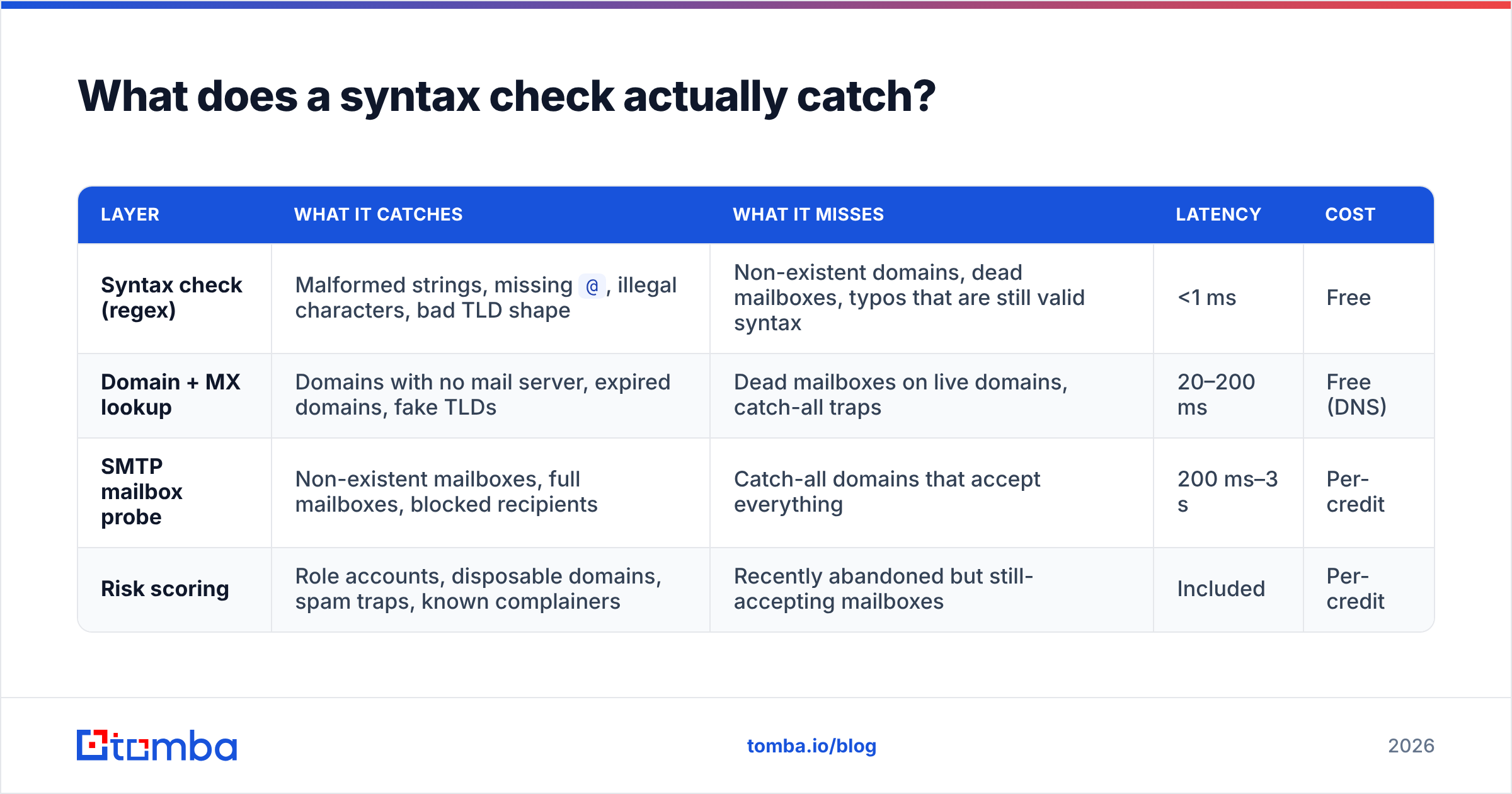
| Layer | What it catches | What it misses | Latency | Cost |
|---|---|---|---|---|
| Syntax check (regex) | Malformed strings, missing @, illegal characters, bad TLD shape |
Non-existent domains, dead mailboxes, typos that are still valid syntax | <1 ms | Free |
| Domain + MX lookup | Domains with no mail server, expired domains, fake TLDs | Dead mailboxes on live domains, catch-all traps | 20–200 ms | Free (DNS) |
| SMTP mailbox probe | Non-existent mailboxes, full mailboxes, blocked recipients | Catch-all domains that accept everything | 200 ms–3 s | Per-credit |
| Risk scoring | Role accounts, disposable domains, spam traps, known complainers | Recently abandoned but still-accepting mailboxes | Included | Per-credit |
Notice the asymmetry. A syntax check is free and instant but weak. A mailbox probe is slow and metered but decisive. The right architecture uses both — syntax at the edge, mailbox verification in batch.
The single biggest failure mode: john.smith@gmial.com passes every syntax check ever written. The string is perfectly well-formed. The domain is a typosquat. Only a DNS or MX check catches it, and only a mailbox probe tells you whether john.smith exists at the correct domain.

How do you write an email syntax regex that doesn't suck?#
Short answer: don't use the RFC-complete one. The fully compliant RFC 5322 regex is a 6,343-character monster that supports comments, folding whitespace, quoted strings, and domain literals like user@[192.168.1.1]. You will never receive a signup from someone using a domain literal. Supporting it costs you readability and CPU for zero business value.
Use a pragmatic pattern instead:
^[a-zA-Z0-9.!#$%&'*+/=?^_`{|}~-]+@[a-zA-Z0-9](?:[a-zA-Z0-9-]{0,61}[a-zA-Z0-9])?(?:\.[a-zA-Z0-9](?:[a-zA-Z0-9-]{0,61}[a-zA-Z0-9])?)+$This is essentially the HTML5 <input type="email"> specification pattern, extended to require at least one dot in the domain. It accepts every address a real user will type and rejects the obvious garbage.
Then layer these checks on top, because regex alone won't cover them:
- Length guards — reject if local part > 64 chars or total > 254 chars. Cheaper and clearer than encoding limits into the pattern.
- Consecutive-dot check — reject
..anywhere. Encoding this in regex makes the pattern unreadable; a simpleincludes('..')is better. - Leading/trailing dot in local part —
.john@x.comandjohn.@x.comare both invalid. - TLD sanity — reject numeric-only TLDs and single-character TLDs. Optionally validate against the IANA TLD list if you want to catch
.conand.comm. - Trim and normalize — strip whitespace, lowercase the domain, and strip zero-width characters before validating. Copy-paste from a PDF injects invisible characters constantly.
- Typo suggestion — run a Levenshtein comparison against the top 30 mail domains and suggest a correction rather than a hard reject. "Did you mean gmail.com?" recovers signups that a red error message loses.
That last one matters more than people expect. A hard rejection on a typo'd domain loses the lead entirely. A suggestion converts it.
If you want to test individual addresses without writing any code, the free email checker runs syntax, domain, and mailbox checks in one pass, and the email permutator generates the standard format variations when you're guessing at a pattern.
Is a syntax check enough to prevent bounces?#
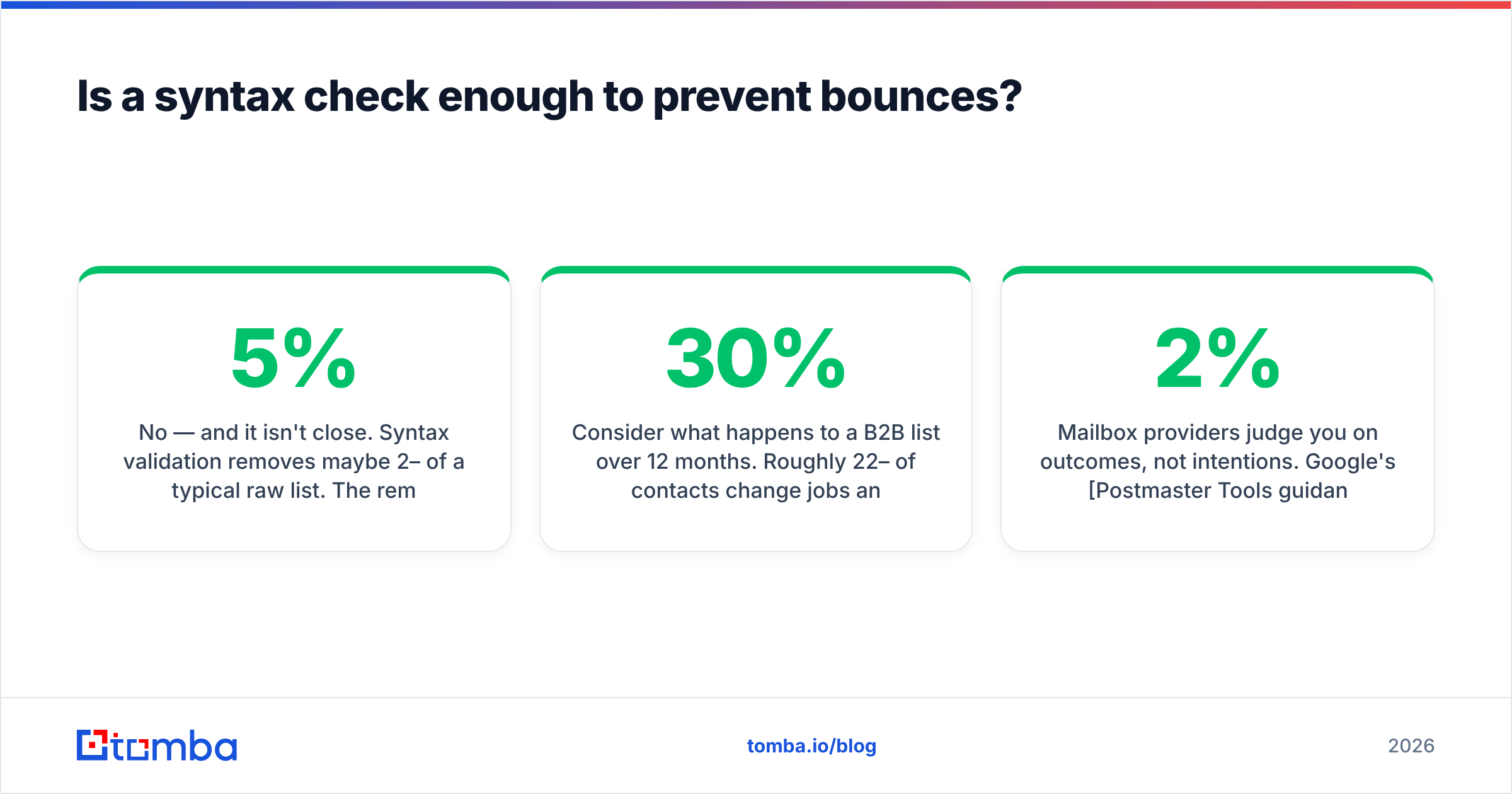
No — and it isn't close. Syntax validation removes maybe 2–5% of a typical raw list. The remaining bounce risk sits almost entirely in addresses that are syntactically perfect but functionally dead.
Consider what happens to a B2B list over 12 months. Roughly 22–30% of contacts change jobs annually, according to HubSpot's research on database decay. Every one of those departures leaves an address that still parses perfectly but now bounces — or worse, gets recycled into a spam trap.
Mailbox providers judge you on outcomes, not intentions. Google's Postmaster Tools guidance is blunt about it: sustained hard bounces damage domain reputation, and reputation damage lands your mail in spam for the recipients who do exist. A 2% hard-bounce rate is the widely cited danger line. A syntax-only list routinely lands between 15% and 25%.
The fix is layering. Syntax check at the point of entry, then a real email verifier pass before any send. The verifier does the DNS lookup, opens an SMTP conversation with the receiving server, and reports whether the mailbox actually accepts mail — plus flags for role addresses (info@, sales@), disposable domains, and catch-all configurations.
Catch-all domains deserve their own note. Some servers accept mail for every possible address at the domain, which makes standard SMTP probing useless — everything returns "valid." A dedicated catch-all verifier uses pattern intelligence and historical delivery signals to estimate whether a specific address at a catch-all domain is genuinely in use.
How do the validation approaches compare in practice?#
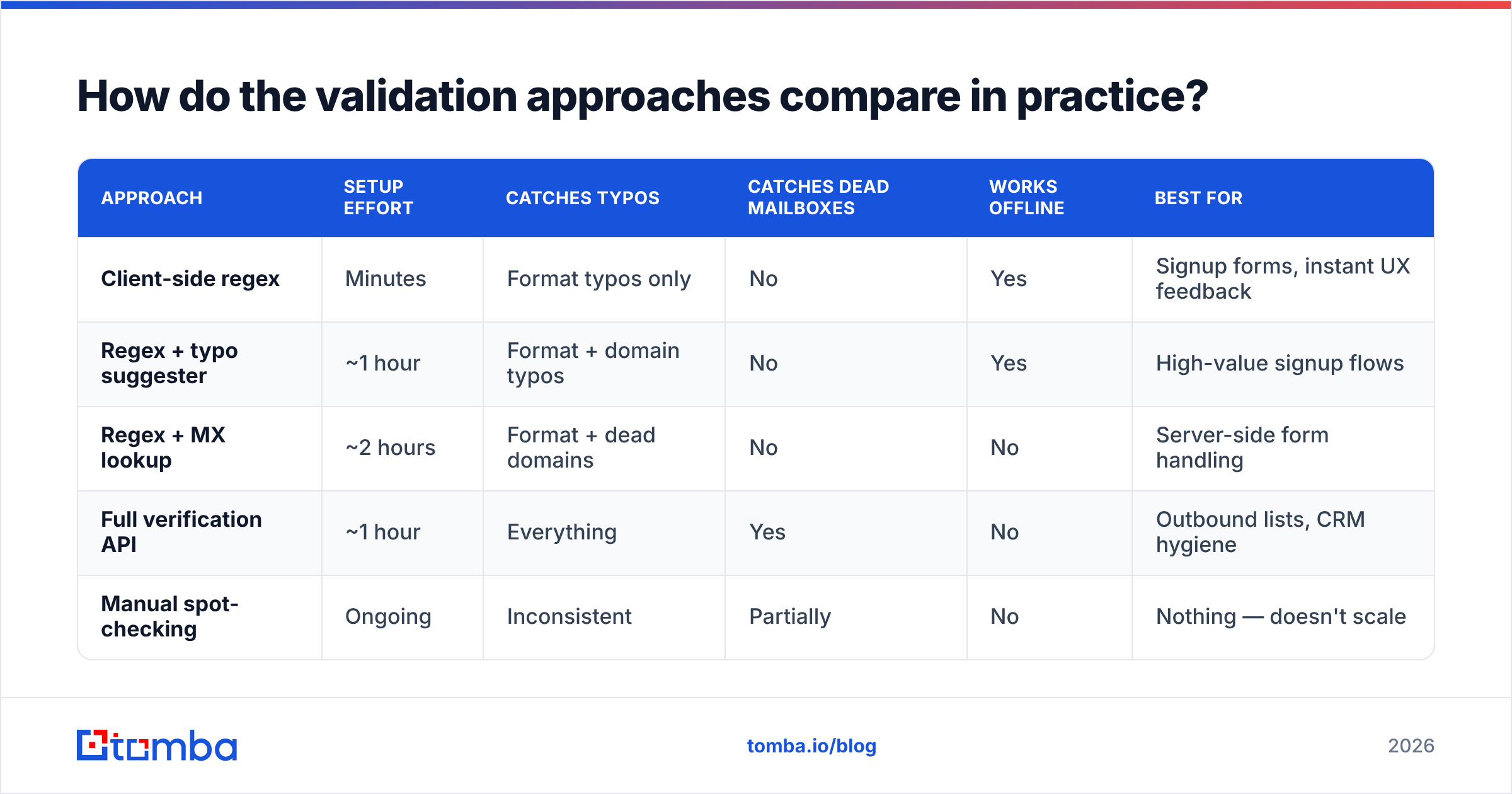
Here's how the common options stack up for a team that needs both form-level validation and list-level cleaning.
| Approach | Setup effort | Catches typos | Catches dead mailboxes | Works offline | Best for |
|---|---|---|---|---|---|
| Client-side regex | Minutes | Format typos only | No | Yes | Signup forms, instant UX feedback |
| Regex + typo suggester | ~1 hour | Format + domain typos | No | Yes | High-value signup flows |
| Regex + MX lookup | ~2 hours | Format + dead domains | No | No | Server-side form handling |
| Full verification API | ~1 hour | Everything | Yes | No | Outbound lists, CRM hygiene |
| Manual spot-checking | Ongoing | Inconsistent | Partially | No | Nothing — doesn't scale |
The pattern most teams land on: cheap regex in the browser for immediate feedback, MX validation server-side on submit, and a verification API pass in batch before any campaign. Each layer is progressively more expensive and progressively more decisive.
For lists you've already collected, running everything through a bulk verify job is faster than piecemeal checking — upload the CSV, get back status codes and confidence scores per row.

What are the edge cases that break naive validators?#
These are the addresses that trip up hand-rolled validators. Worth adding to your test suite.
- Plus addressing —
john+newsletter@gmail.comis valid and extremely common. Validators that reject+break Gmail power users and anyone tracking signup sources. - New gTLDs —
.software,.engineering,.technology,.marketing. Any validator hardcoded to 2–4 character TLDs rejects legitimate business domains. There are over 1,400 TLDs in the IANA root zone. - Internationalized addresses (EAI) —
josé@münchen.de. Unicode in both local and domain parts is legal under RFC 6531, though provider support is uneven. If you serve non-English markets, decide explicitly whether to support or reject these. - Single-label domains —
admin@localhostis technically valid in RFC 5322 but useless for public mail. Always require at least one dot. - Subdomains —
user@mail.corp.example.comis fine. Validators that count dots and reject more than one break enterprise addresses. - Hyphenated domains —
user@my-company.comis fine;user@-company.comanduser@company-.comare not. Leading and trailing hyphens in a label are illegal. - Trailing dot in domain —
user@example.com.is a fully-qualified DNS name and technically valid, but almost every mail system chokes on it. Strip it.
A quick sanity test: run these seven cases through whatever validator you're about to ship. If plus addressing or a .technology domain fails, you're rejecting real customers.
How does syntax checking fit into a prospecting workflow?#
If you're building outbound lists rather than validating a signup form, syntax checking is the last thing you should worry about — because good sourcing never produces malformed addresses in the first place.
The workflow that actually matters:
- Source the pattern, not the guess. Instead of permuting
firstname.lastname@and hoping, use a domain search to pull the addresses a company actually publishes, plus the dominant format for that domain. - Find specific people by name. An email finder resolves a name plus company domain to the specific address, using the confirmed pattern rather than a blind permutation.
- Verify before send. Every returned address gets a confidence score. Anything below your threshold goes to a secondary check or gets dropped.
- Re-verify on a schedule. Quarterly for active lists, monthly for high-volume senders. Data decay is continuous, not a one-time cleanup.
- Monitor outcomes. Track hard-bounce rate per segment. A spike usually means a source went stale, not that your validator broke.
Sourcing from published, verified data flips the problem. You're not validating guesses — you're confirming known addresses. That difference alone is worth more than any regex refinement.
For teams working at scale, the Tomba API exposes finder and verifier endpoints so validation runs inside your own pipeline — CRM enrichment on record creation, list cleaning before a campaign export, whatever fits. Pricing starts free with 25 searches per month, then $49/mo on Starter, $99/mo on Growth, and $249/mo on Pro; full Tomba pricing breaks down credit allocations per tier.
What should you implement this week?#
Concrete, in priority order:
- If you own a signup form: ship the pragmatic regex plus a typo suggester for the top 30 domains. Two hours of work, measurable reduction in bad signups, zero ongoing cost.
- If you own a sending list: stop tuning your regex. Run the list through mailbox-level verification and remove everything that fails. Your bounce rate is the metric, not your pattern's RFC compliance.
- If you own a CRM: add verification at the point of record creation via API or HubSpot integration. Catching a bad address on entry costs one credit. Catching it after a campaign costs reputation.
- If you're building lists from scratch: source from verified data rather than permutation. The validation problem mostly disappears.
Syntax checking is table stakes — necessary, free, and insufficient. Treat it as the door lock, not the security system.
Ready to stop guessing at addresses?#
A syntax check tells you an address is well-formed. The Tomba Email Finder tells you it's real. Enter a name and a company domain and get back the verified professional address with a confidence score, sourced from published data rather than pattern guessing — so the addresses you send to are the ones that actually accept mail. Start on the free tier with 25 searches per month, no card required, and see what your current list has been hiding.
Related guides#
Ready to find emails that actually work?
Join 150,000+ professionals who stopped guessing and started sending. Free credits on signup — no credit card required.
Get the Tomba newsletter
Practical outbound tactics and product updates — once every two weeks.
About the author