Email Template for Client Meeting: 9 Proven Examples (2026)
Nine copy-paste client meeting emails — cold requests, confirmations, reschedules, and follow-ups — plus the six-part structure, send-timing rules, and the mistakes that quietly kill your reply rate.
TL;DR
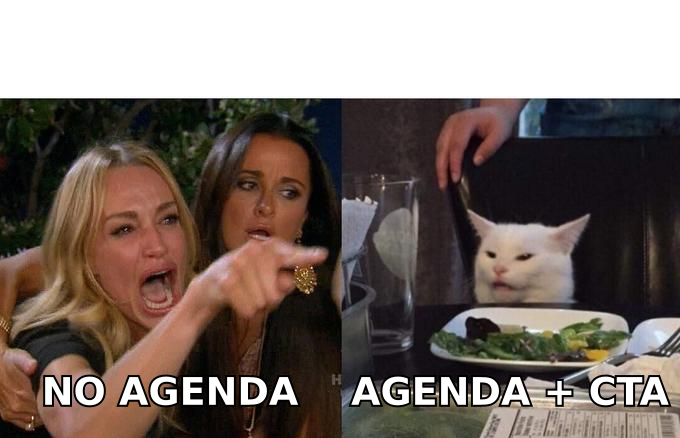
- An email template for client meeting requests has one job: make saying "yes" cheaper than saying "no." Every extra decision you push onto the reader costs you a reply.
- Six parts do the work: a specific subject, a reason you're writing now, proof you did homework, a stated agenda, a duration, and one concrete time slot.
- Use different templates for cold requests, warm requests, confirmations, reschedules, and post-meeting recaps. A single "generic" template underperforms all five.
- Send times matter less than send reasons. A trigger event beats a Tuesday-9am rule every time.
- None of it works if the address bounces. Verify before you send. A 4% bounce rate can strip your domain reputation faster than any subject line can rebuild it.
What is an email template for client meeting outreach?#
An email template for client meeting outreach is a reusable skeleton — subject line, opening, agenda, time proposal, sign-off — that you adapt per prospect instead of rewriting from scratch. Think of it like a restaurant's mise en place: the prep is done in advance, so when the order comes in you're assembling, not inventing.
The distinction that matters: a template is a structure, not a script. The parts that stay fixed are the ones the reader doesn't notice (length, sequence, ask). The parts that change are the ones that earn the reply: why them, why now, and what you already know.
Most client meeting emails fail for a boring reason. They ask for time without saying what the time is for. The reader has to work out what a 30-minute block is worth from a two-sentence pitch. That is work, so they archive it.
What are the six parts every client meeting email needs?#
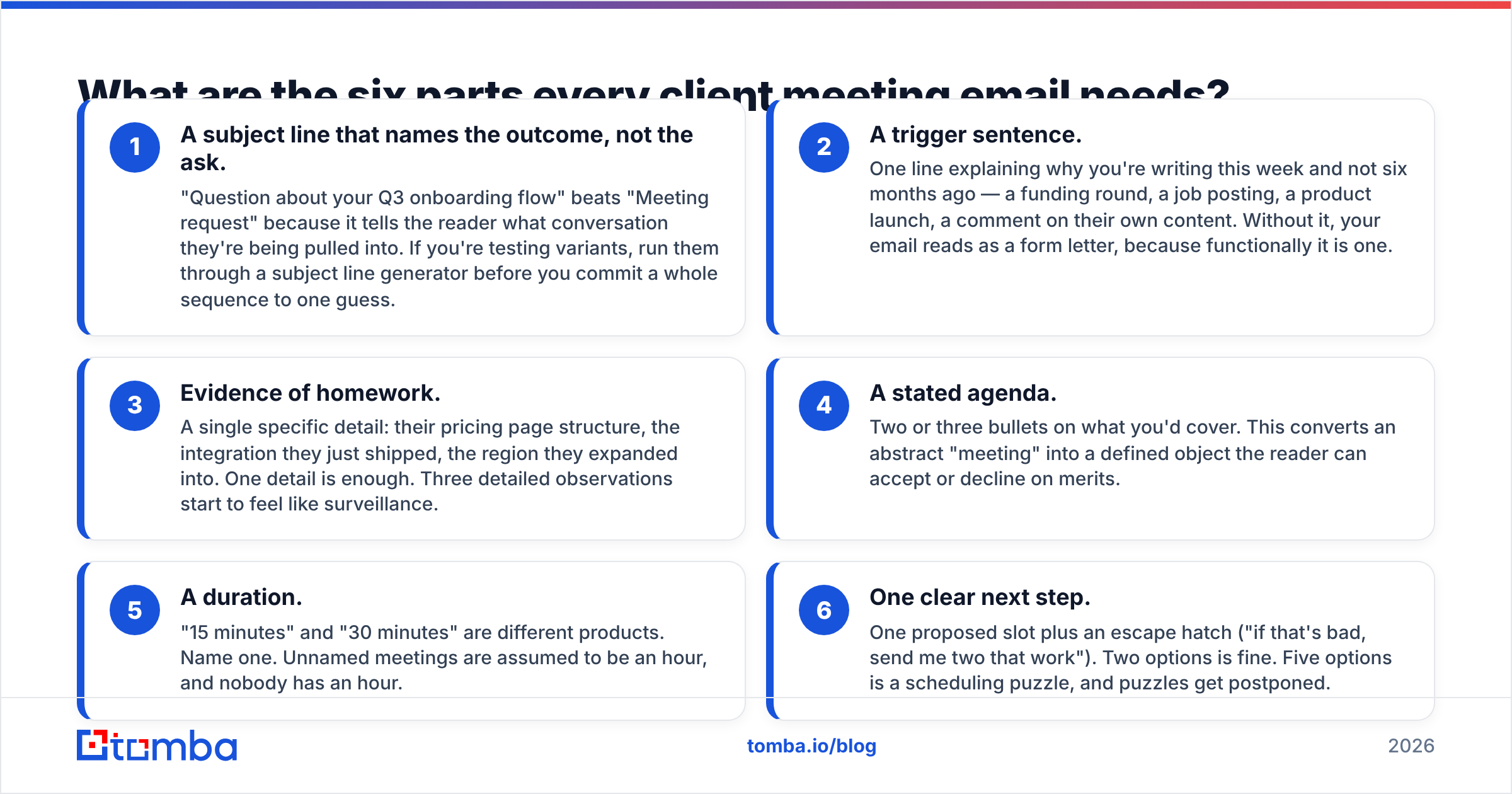
Every template below is built from the same six components. Drop one and reply rates drop with it.
- A subject line that names the outcome, not the ask. "Question about your Q3 onboarding flow" beats "Meeting request." It tells the reader what conversation they are being pulled into. Testing variants? Run them through a subject line generator before you commit a whole sequence to one guess.
- A trigger sentence. One line on why you're writing this week and not six months ago — a funding round, a job posting, a product launch, a comment on their own content. Without it, your email reads as a form letter, because it is one.
- Evidence of homework. One specific detail: their pricing page, the integration they just shipped, the region they expanded into. One detail is enough. Three start to feel like surveillance.
Those three earn attention. The next three make saying yes easy.
- A stated agenda. Two or three bullets on what you'd cover. This turns an abstract "meeting" into a defined object the reader can accept or decline on merits.
- A duration. "15 minutes" and "30 minutes" are different products. Name one. Unnamed meetings are assumed to be an hour, and nobody has an hour.
- One clear next step. One proposed slot plus an escape hatch ("if that's bad, send me two that work"). Two options is fine. Five options is a scheduling puzzle, and puzzles get postponed.
Which client meeting email template should you use?#
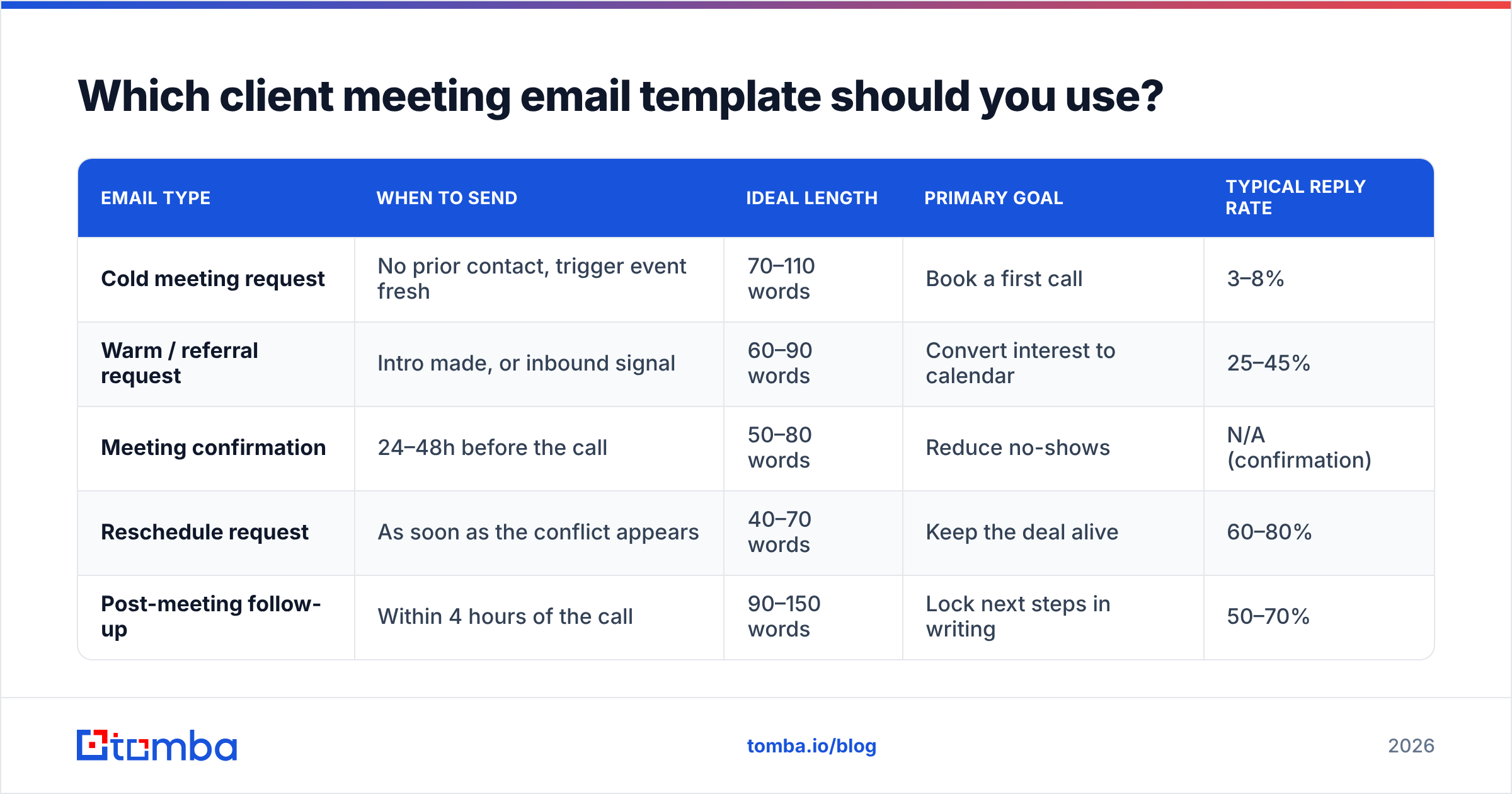
Different situations need genuinely different emails. Here's how the five main types compare:
| Email type | When to send | Ideal length | Primary goal | Typical reply rate |
|---|---|---|---|---|
| Cold meeting request | No prior contact, trigger event fresh | 70–110 words | Book a first call | 3–8% |
| Warm / referral request | Intro made, or inbound signal | 60–90 words | Convert interest to calendar | 25–45% |
| Meeting confirmation | 24–48h before the call | 50–80 words | Reduce no-shows | N/A (confirmation) |
| Reschedule request | As soon as the conflict appears | 40–70 words | Keep the deal alive | 60–80% |
| Post-meeting follow-up | Within 4 hours of the call | 90–150 words | Lock next steps in writing | 50–70% |
These are directional industry ranges, not promises. Your list quality, industry, and offer move them more than the copy does. HubSpot's sales blog publishes ongoing benchmark data if you want a broader baseline.
What does a cold client meeting request email look like?#
Cold is the hardest case. You have no permission and no context. Keep it short enough that skimming it costs less than deleting it.
Template 1 — trigger-based cold request
Subject: Your new Frankfurt office + EU data residency
Hi {{first_name}},
Saw the announcement about the Frankfurt office last week. Congrats.
Teams that open an EU entity usually hit the same snag about 60 days in: their contact data pipeline still routes through US processors, and procurement flags it during the first enterprise deal.
Worth 15 minutes to compare notes? I'd cover:
- How three similar teams handled the residency question
- What it changed about their outbound stack
Thursday 10:00 or 14:00 CET? If neither works, send two times and I'll take them.
{{signature}}
Template 2 — the "one question" cold request
Subject: Quick question on {{company}}'s SDR ramp
Hi {{first_name}},
You're hiring four SDRs this quarter based on your careers page. Are they going to be sourcing their own lists, or are you feeding them?
Reason I ask: that one decision drives most of the ramp-time gap I see between teams your size. Happy to walk you through what the fast ones do differently — 15 minutes, no deck.
Free Tuesday afternoon?
{{signature}}
Template 3 — the low-commitment alternative
Subject: Not a meeting request
Hi {{first_name}},
I'll skip the calendar link. Two things I think apply to {{company}}:
- {{specific observation}}
- {{specific observation}}
If either lands, reply "send it" and I'll write it up properly. If a call is easier, I'm around Wednesday.
{{signature}}
Template 3 works because it removes the meeting ask. You trade value for a one-word reply. That is a far lower bar than a calendar commitment.
How do you write a warm or referral meeting email?#
Warm emails fail when they waste the warmth. Lead with the connection in the first six words — before the reader's skim reflex kicks in.
Template 4 — referral introduction
Subject: {{referrer_name}} suggested I reach out
Hi {{first_name}},
{{referrer_name}} mentioned you're rebuilding the outbound motion at {{company}} and thought the conversation we had about list hygiene would be relevant.
Short version: their bounce rate went from 9% to under 2% by changing one step in the workflow, not the tooling.
20 minutes next week to walk through it? Tuesday or Thursday morning both work here.
{{signature}}
Template 5 — inbound / content-triggered
Subject: You downloaded the deliverability checklist
Hi {{first_name}},
You grabbed our deliverability checklist on Tuesday — thanks for reading it.
Most people who download it are dealing with one of two things: inbox placement dropping after a domain change, or a list they inherited and don't trust. Which one is it for you?
If it's useful, I'll block 20 minutes and go through your specific setup. Otherwise, reply with the number (1 or 2) and I'll send the relevant deep-dive.
{{signature}}
How do you confirm a client meeting without sounding robotic?#
Confirmations are the highest-ROI email nobody optimizes. A no-show costs you the entire sequence that produced the booking.
Template 6 — confirmation with pre-work
Subject: Thursday 14:00 — agenda + one ask
Hi {{first_name}},
Confirming Thursday at 14:00 CET, 30 minutes, {{link}}.
What I'll cover:
- Where your current data pipeline is leaking (based on what you sent)
- Two ways teams your size fixed it
- What it would take on your side
One ask: if you can tell me your current bounce rate before the call, I'll bring comparison numbers instead of generalities.
{{signature}}
The "one ask" is doing quiet work. A reader who replies with a number has invested in the meeting. Invested people show up. Give them a reason to touch the thread between booking and call.
What should a post-meeting follow-up email contain?#
Send it the same day, ideally within four hours, while the reader can still check your recap against their memory.
Template 7 — recap and next steps
Subject: Recap + the two things we owe each other
Hi {{first_name}},
Good call. Capturing it so nothing gets lost:
What you said matters most: cutting the SDR research time from 40 minutes per account to under 10, without adding another seat.
What I'm sending: the API docs and the two-week pilot scope, by Friday.
What you're checking: whether procurement needs a security review before a pilot.
If that's wrong anywhere, correct me. Otherwise let's reconnect on the 14th — I'll send an invite.
{{signature}}
Template 8 — the "no next step agreed" follow-up
Subject: Where this stands
Hi {{first_name}},
We didn't land on a next step yesterday, which is usually my fault for not asking directly. So, directly:
Is this a "not now, revisit in Q4" or a "not a fit"? Either answer is genuinely fine — I'd just rather know than guess.
{{signature}}
That second one recovers more stalled deals than three polite check-ins. Naming the awkwardness works. It beats the passive "just circling back" that everyone has learned to ignore. Want to know how these numbers get measured? The response rate definition is worth a skim before you set targets.
How do you reschedule without losing momentum?#
Template 9 — reschedule
Subject: Need to move Thursday — my fault
Hi {{first_name}},
I have to move our Thursday 14:00. Apologies — that's on me.
Same agenda, same 30 minutes. Tuesday 10:00 or Wednesday 15:00 CET? If it's easier, here's my calendar: {{link}}
{{signature}}
Three rules for reschedules. Own the cause without a paragraph of explanation. Re-anchor the agenda so the value doesn't reset to zero. Propose new times in the same email — never send a reschedule that ends with "let me know."
Tools like Calendly remove the back-and-forth. But only send a booking link after the reader has said yes to the idea of a meeting. Leading with a link asks someone to do admin work for a call they never agreed to.
Why do good templates still get zero replies?#
Because the email never arrived. This is the failure mode people misdiagnose as "bad copy."
Say you're sending to guessed addresses — first.last@, f.last@, firstinitial+last@. A meaningful share of them don't exist. Every bounce tells mailbox providers you don't know who you're emailing. Enough of those signals push your next meeting request to spam, even for the people whose addresses were correct.
The order of operations that actually works:
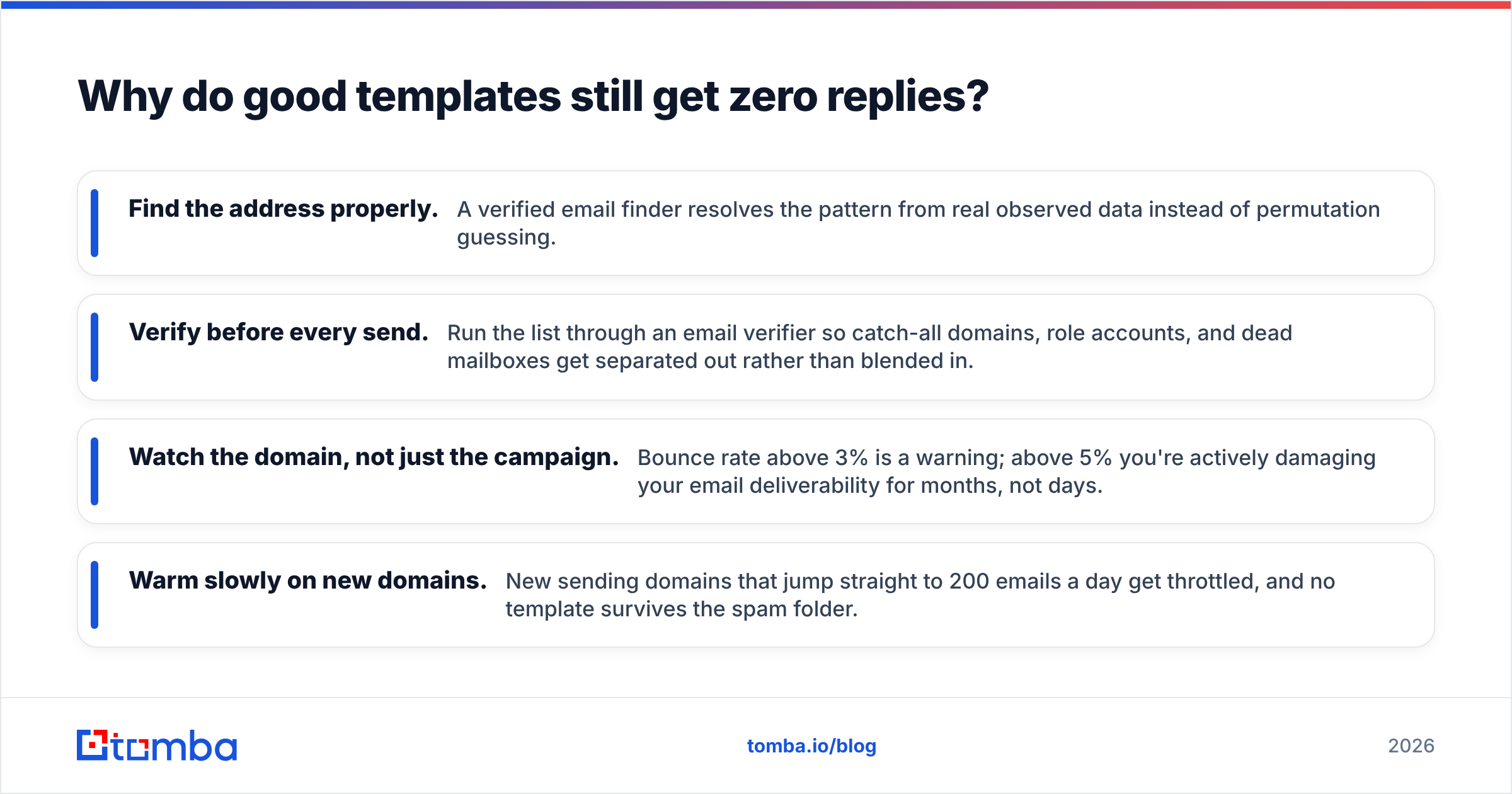
- Find the address properly. A verified email finder resolves the pattern from real observed data instead of permutation guessing.
- Verify before every send. Run the list through an email verifier so catch-all domains, role accounts, and dead mailboxes get pulled out first.
- Watch the domain, not just the campaign. Bounce rate above 3% is a warning. Above 5% you're actively damaging your email deliverability for months, not days.
- Warm slowly on new domains. New sending domains that jump straight to 200 emails a day get throttled, and no template survives the spam folder.
What separates a template that works from one that doesn't?#
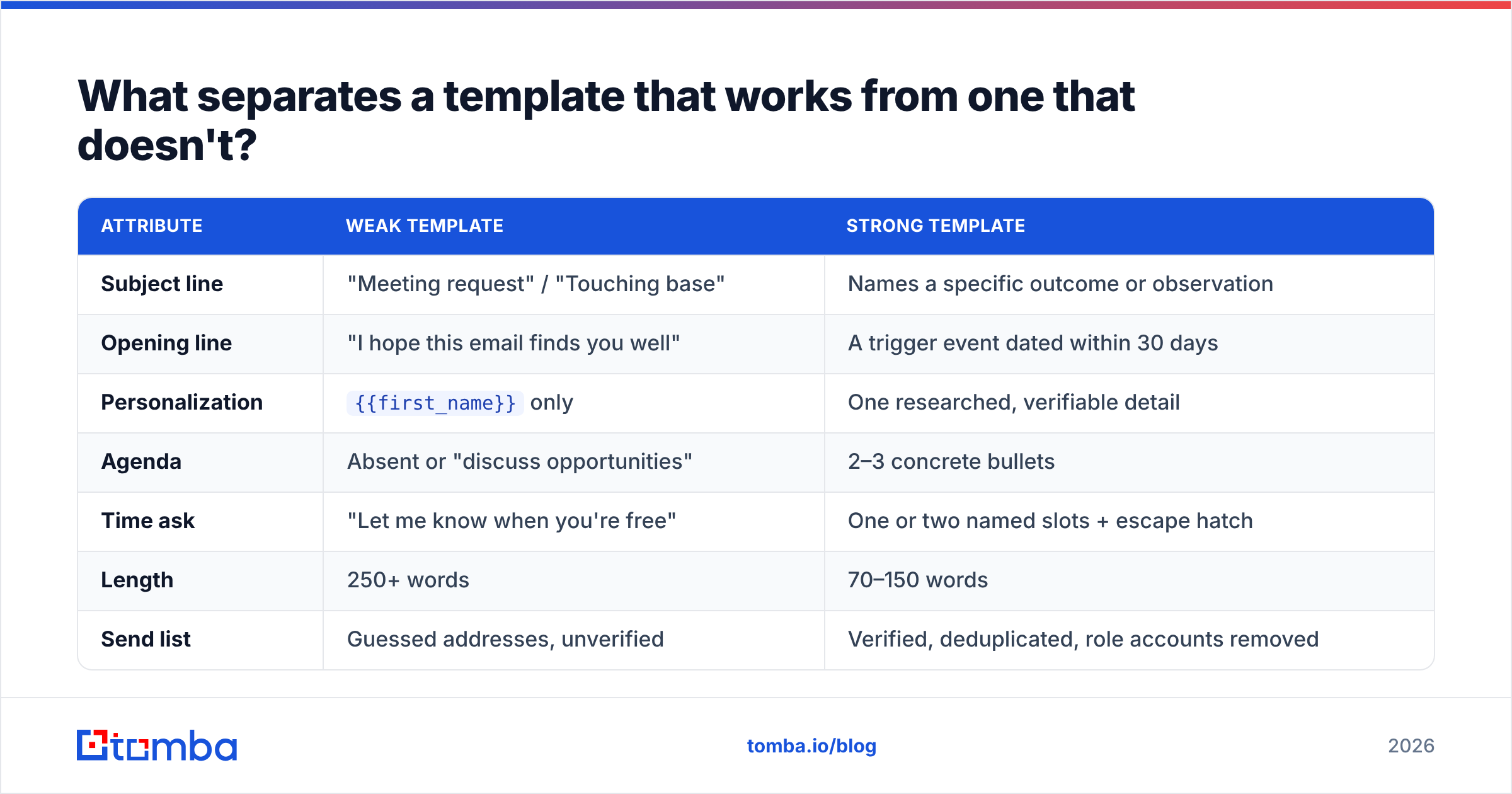
| Attribute | Weak template | Strong template |
|---|---|---|
| Subject line | "Meeting request" / "Touching base" | Names a specific outcome or observation |
| Opening line | "I hope this email finds you well" | A trigger event dated within 30 days |
| Personalization | {{first_name}} only |
One researched, verifiable detail |
| Agenda | Absent or "discuss opportunities" | 2–3 concrete bullets |
| Time ask | "Let me know when you're free" | One or two named slots + escape hatch |
| Length | 250+ words | 70–150 words |
| Send list | Guessed addresses, unverified | Verified, deduplicated, role accounts removed |
Read the right-hand column as a checklist. Does the template you're about to send match four or more items in the left column? Don't send it. Rewriting takes less time than recovering a burnt domain.
One more thing. Buyers now do most of their evaluation before they'll talk to anyone. Gartner's sales research has said so for years. The meeting request that wins is the one offering information the buyer can't easily self-serve. "Let me show you our platform" is self-serve. "Here's how three companies in your segment handled the exact problem you posted about" is not.
How should you adapt these templates at scale?#
Templates degrade when the same variant hits the same market repeatedly. Practical guardrails:
- Rotate structure, not just words. Swapping synonyms doesn't help. Swapping the shape of the email — question-led vs. observation-led vs. no-ask — does.
- Segment before you personalize. Ten well-segmented templates outperform one template with fifty merge fields.
- Keep a kill list. Any variant under a 2% reply rate after 150 sends gets retired, not tweaked.
- Re-verify quarterly. B2B contact data decays roughly 2–3% per month through job changes alone. A list you verified in January is measurably worse by April.
- Test the send, not just the copy. Pull a handful of addresses and check them with a free email checker before committing a whole segment.
Want a starting library rather than a blank page? The cold email templates collection covers meeting requests, follow-ups, and re-engagement sequences you can fork and rewrite in your own voice.
Where should you start?#
Pick two templates, not nine. A cold request and a post-meeting follow-up cover the two moments where deals are most often won or quietly lost. Run each for 150 sends, measure replies rather than opens, and only then expand the library.
Before any of that, fix the input. The best email template for client meeting requests still fails on a dead address. Build your list with the Tomba Email Finder. It resolves verified professional addresses by name and domain, and it flags catch-all servers instead of pretending they're deliverable. It starts free with 25 searches a month, so you can test the accuracy against a list you already know. Paid plans begin at $49/mo on Starter and scale to $99/mo on Growth; full Tomba pricing is public. Good templates reaching real inboxes beat great templates reaching nobody.
Related guides#
Ready to find emails that actually work?
Join 150,000+ professionals who stopped guessing and started sending. Free credits on signup — no credit card required.
Get the Tomba newsletter
Practical outbound tactics and product updates — once every two weeks.
About the author