Email Template for Sending Quotation to Client: 7 Examples
Most quotes lose the deal in the email that carries them, not in the pricing. Here are seven quotation email templates, a format comparison table, follow-up timing that works, and the mistakes that stall signed contracts.
TL;DR
- A quotation email has one job: make the price easy to say yes to. The PDF is evidence; the email is the argument.
- Put the total, the scope, the validity date, and the next step in the body — not only in the attachment. Roughly half of B2B buyers read the first pass on a phone.
- Use a different structure for inbound requests, post-demo quotes, renewals, and re-quotes. One template for all four is why your reply rate is flat.
- Follow up three times over 12 days with a new piece of information each time, then close the loop politely instead of vanishing.
- Deliverability beats copy: a perfect quote sent to
info@or a guessed address never gets scored at all.
What is a quotation email, and why does it decide the deal?#
A quotation email is the message that carries your price to the buyer. Think of it like the handoff in a relay race — the runner may be fast, but if the baton drops, the split time is irrelevant. Your pricing can be competitive and your proposal well-built, but if the email around it is vague, the buyer forwards a confusing thread to a colleague who was not on the call, and the deal dies in a Slack channel you never see.
Two things happen the moment your quote lands:
- The recipient decides in about eight seconds whether this needs a real reading session or a quick skim.
- They decide whether they can forward it internally without writing a summary themselves.
Every good email template for sending quotation to client is engineered around those two decisions. You are not writing to persuade the person who opened it. You are writing to arm them to persuade someone else — typically a finance approver who never spoke to you.
What should an email template for sending quotation to client include?#
Six components, in this order. Everything else is decoration.
- A subject line that names the deal, not the document. "Quotation attached" is invisible in a busy inbox. "Quote — 40 seats, Q3 rollout (valid to 12 Sept)" survives a search three weeks later. If you are unsure whether a line reads as spam or as business, run it through a subject line tester before sending.
- The headline number in the first two lines. Buyers hunt for the total. Hiding it on page four of a PDF reads as evasion, and evasion invites a comparison bid.
- A one-sentence scope restatement. "This covers onboarding for 40 users across two sites, with data migration from your current CRM." This is the sentence your champion copies into their internal request.
- Assumptions and exclusions, listed plainly. Three to five bullets. Every unlisted assumption becomes a renegotiation later.
- A validity date. Not aggressive scarcity — a real commercial boundary. "Pricing holds until 12 September" gives the buyer a legitimate reason to push their own approvals.
- One next step with a named owner and a time. "If the scope reads right, I'll send the order form Thursday — say the word." Ending with "let me know your thoughts" hands the buyer homework with no deadline.
Notice what is not on the list: your company history, a paragraph about your values, and the phrase "please do not hesitate to contact us." None of them move a signature closer.
Which quotation email format fits your deal type?#
Not every quote is sent in the same situation. A cold inbound request needs qualification; a post-demo quote needs momentum; a renewal needs friction removal. Here is how the four common formats differ.
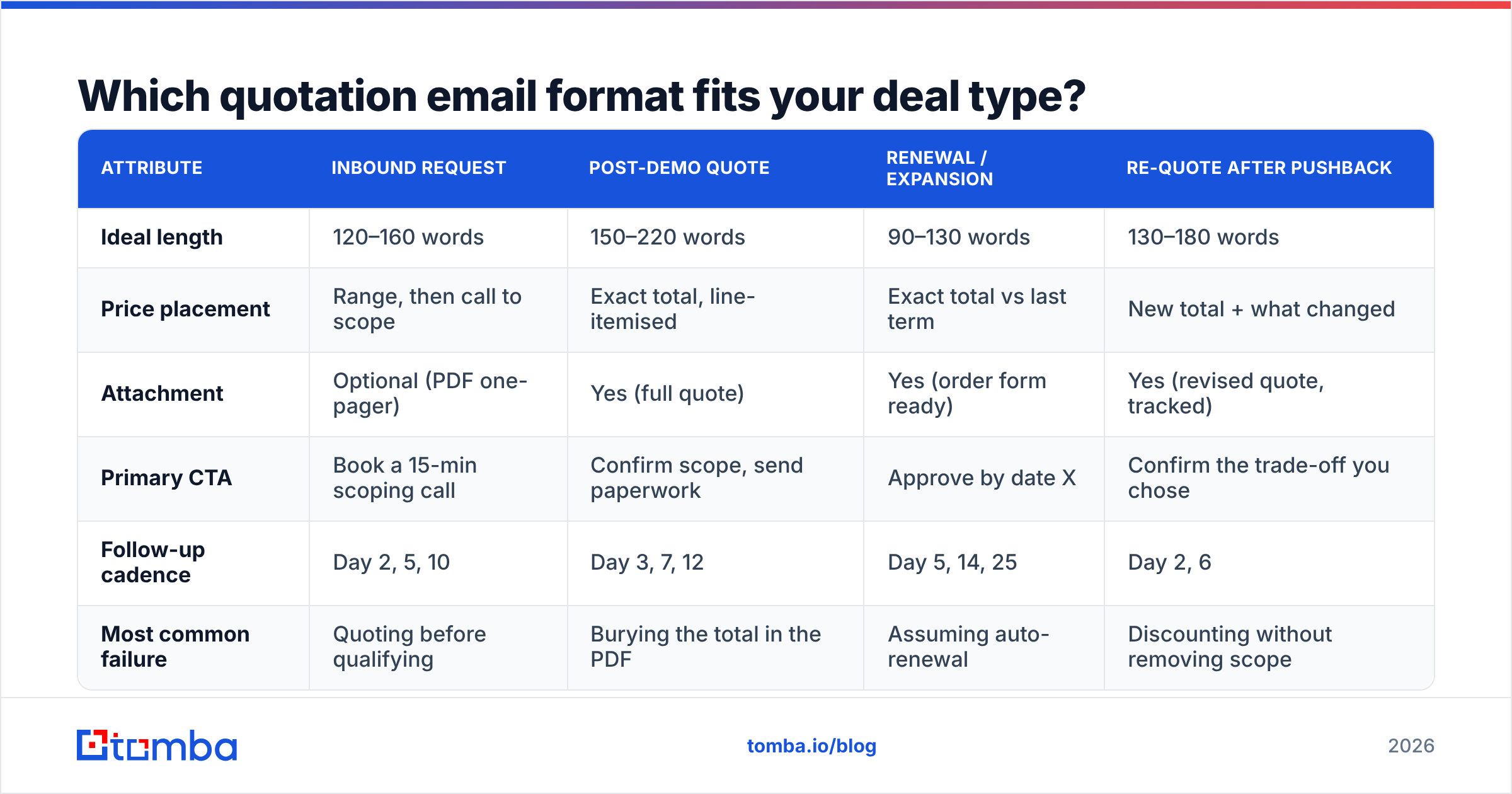
| Attribute | Inbound request | Post-demo quote | Renewal / expansion | Re-quote after pushback |
|---|---|---|---|---|
| Ideal length | 120–160 words | 150–220 words | 90–130 words | 130–180 words |
| Price placement | Range, then call to scope | Exact total, line-itemised | Exact total vs last term | New total + what changed |
| Attachment | Optional (PDF one-pager) | Yes (full quote) | Yes (order form ready) | Yes (revised quote, tracked) |
| Primary CTA | Book a 15-min scoping call | Confirm scope, send paperwork | Approve by date X | Confirm the trade-off you chose |
| Follow-up cadence | Day 2, 5, 10 | Day 3, 7, 12 | Day 5, 14, 25 | Day 2, 6 |
| Most common failure | Quoting before qualifying | Burying the total in the PDF | Assuming auto-renewal | Discounting without removing scope |
The pattern across all four: the closer you are to a signature, the shorter the email gets. Long quotation emails signal that you are still selling. Short ones signal that you are executing.
What does a standard quotation email template look like?#
Template 1 — post-demo, the workhorse.
Subject: Quote — 40 seats, Q3 rollout (valid to 12 Sept)

Hi Amara,

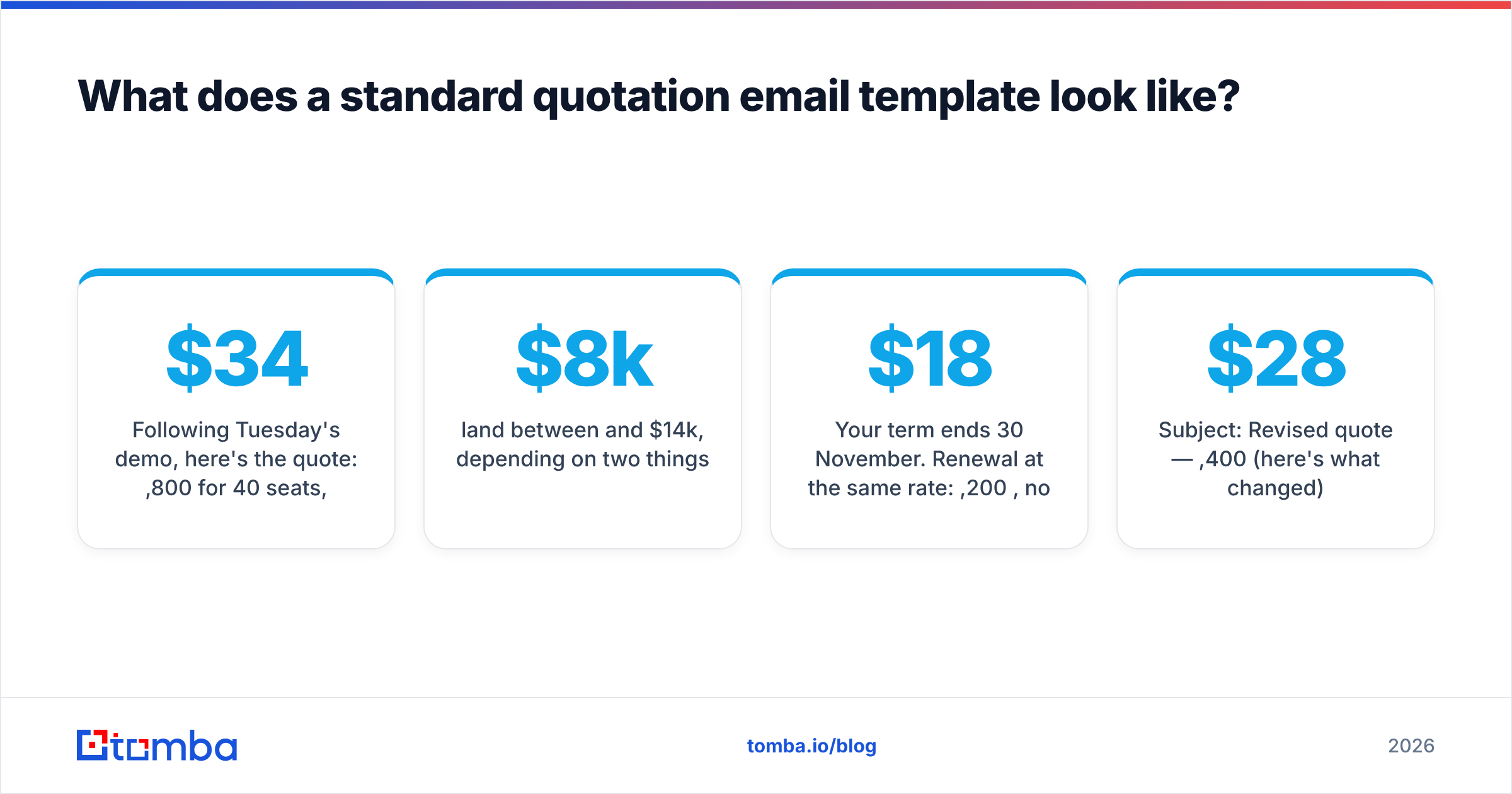
Following Tuesday's demo, here's the quote: $34,800/year for 40 seats,
billed annually, including onboarding and data migration from Pipedrive.
Full breakdown attached.

Scope: 40 user licences, 2 admin seats, migration of ~18k contact records,
and two live training sessions in the first 30 days.

Assumptions:
- Migration runs from a single Pipedrive workspace
- Training happens remotely
- Start date on or before 1 October

Pricing holds until 12 September. If the scope reads right, I'll send the
order form Thursday and we can keep the October start.

Anything you'd want changed before Finance sees this?

— Daniel
That last question matters. It invites a small, low-cost objection now instead of a silent one later.
Template 2 — inbound request, scope unknown.
Subject: Your quote request — two questions first

Hi Marcus,

Thanks for the request. Based on what you described, projects like this
land between $8k and $14k, depending on two things:

1. How many locations need the integration
2. Whether you want us to handle the historical data or just go forward

Answer those two and I'll send an exact number the same day — or grab 15
minutes here and we'll scope it live: [link]

— Priya
Sending an exact figure before you understand scope is how you end up quoting twice and looking disorganised on the second attempt.
Template 3 — renewal, friction removal.
Subject: Renewal — same terms, ready to sign

Hi Kenji,

Your term ends 30 November. Renewal at the same rate: $18,200/year, no
uplift. Order form is attached and pre-filled.

You added 6 seats in April, which are already reflected. Nothing else
changes.

If you're good, sign and it's done. If you want to talk about the
multi-year rate instead, I have Thursday afternoon open.

— Lena
Template 4 — the re-quote after price pushback.
Subject: Revised quote — $28,400 (here's what changed)

Hi Amara,

Revised as discussed: $28,400 instead of $34,800.

What changed: onboarding moves from our team to a self-serve track with
two office-hours sessions, and migration covers contacts only, not
historical activity.

What didn't: all 40 seats, admin access, and the October start.

If that trade works for you, I'll send paperwork today. If activity
history matters more than the $6,400, we can go back to the original.

— Daniel
The rule visible in Template 4: never drop price without removing something. A discount with no scope change teaches the buyer that your first number was fiction, and it invites a second round of pressure on every future deal. HubSpot's sales research library has covered this pattern for years, and it holds in nearly every B2B segment.
How should you present pricing inside the email body?#
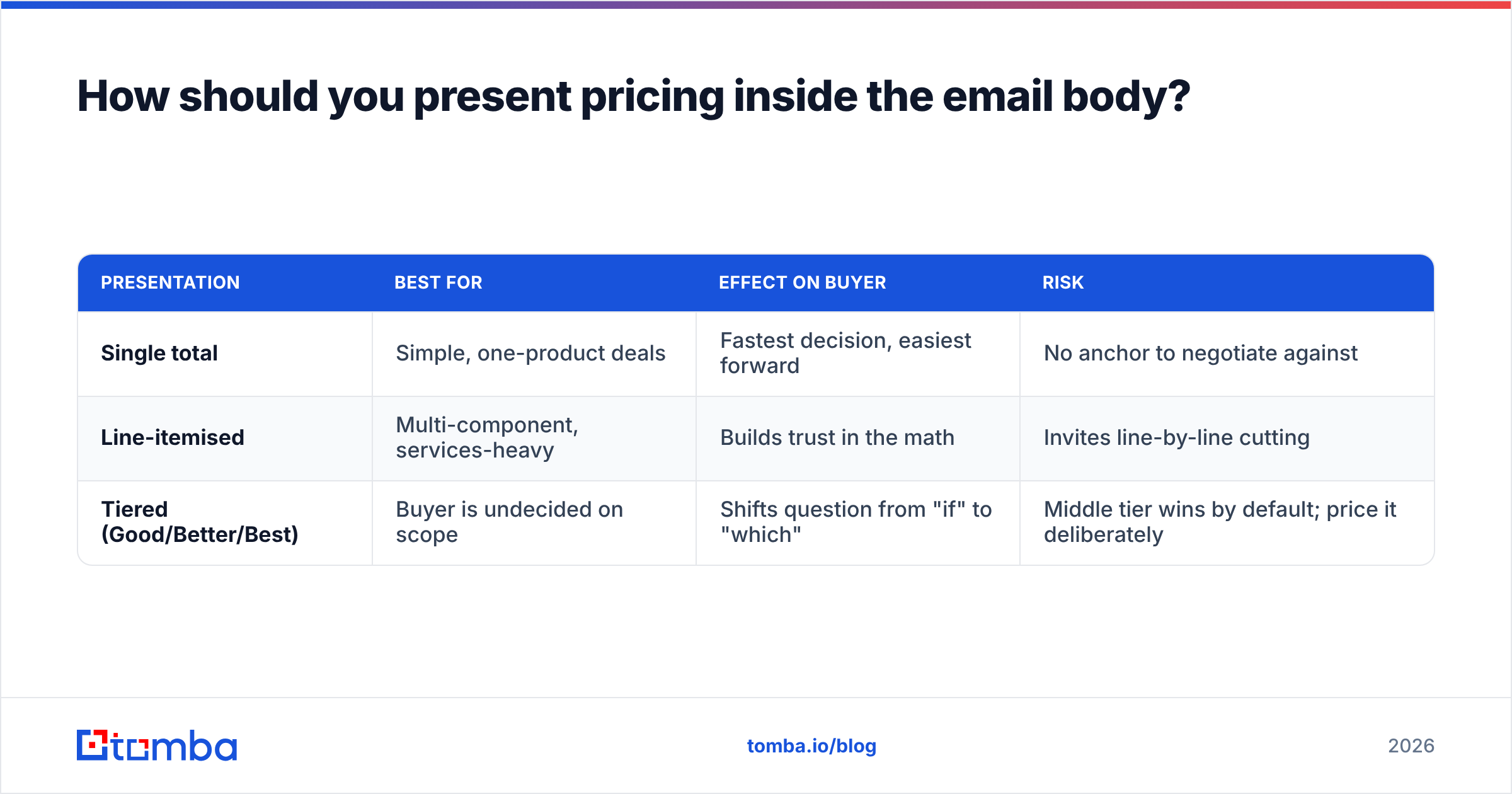
Three presentations, three different effects on buyer behaviour.
| Presentation | Best for | Effect on buyer | Risk |
|---|---|---|---|
| Single total | Simple, one-product deals | Fastest decision, easiest forward | No anchor to negotiate against |
| Line-itemised | Multi-component, services-heavy | Builds trust in the math | Invites line-by-line cutting |
| Tiered (Good/Better/Best) | Buyer is undecided on scope | Shifts question from "if" to "which" | Middle tier wins by default; price it deliberately |
For anything over roughly $20k, line items win because a finance approver will ask for them anyway — and making them ask costs you three days. For smaller, faster deals, a single total closes quicker. Tiered quotes work well when the buyer's real objection is uncertainty about scope, not budget. Configure-price-quote platforms like Salesforce exist because this problem gets genuinely hard at enterprise scale; if you're comparing tooling for it, the CPQ category on G2 is a reasonable starting point.
One formatting note that matters more than it should: put the number in plain text in the email body, not only in the attachment. Mobile clients frequently render PDFs badly or not at all, and a buyer who has to download something to learn the price will often postpone the whole thing.
How many times should you follow up after sending a quote?#
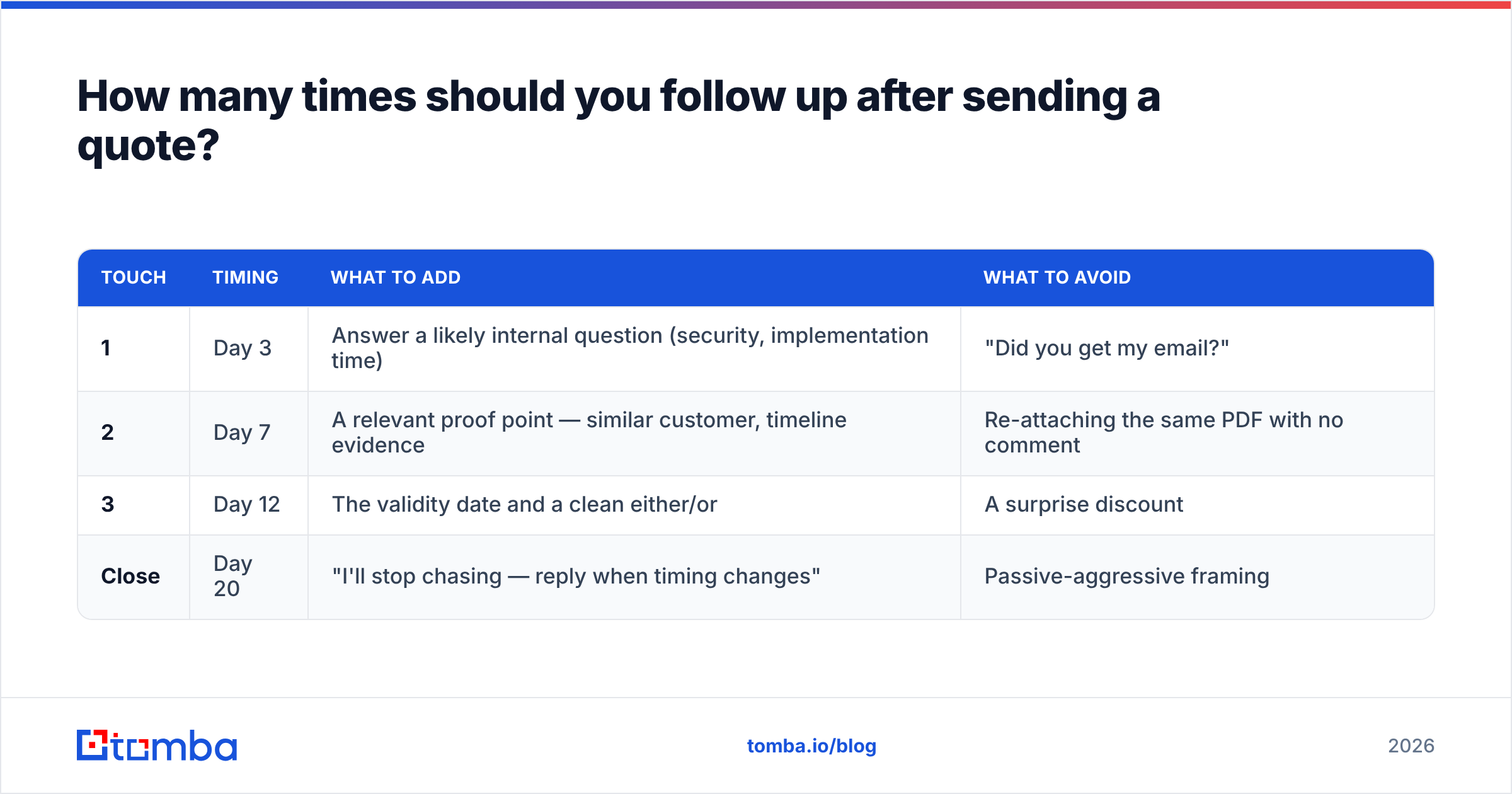
Three times, over roughly 12 days, each with a new input. Repeating "just checking in" trains people to ignore you.
| Touch | Timing | What to add | What to avoid |
|---|---|---|---|
| 1 | Day 3 | Answer a likely internal question (security, implementation time) | "Did you get my email?" |
| 2 | Day 7 | A relevant proof point — similar customer, timeline evidence | Re-attaching the same PDF with no comment |
| 3 | Day 12 | The validity date and a clean either/or | A surprise discount |
| Close | Day 20 | "I'll stop chasing — reply when timing changes" | Passive-aggressive framing |
That final message performs surprisingly well because it removes obligation. Plenty of reps report that the polite close-out generates more replies than touches two and three combined. If you want reusable starting points across the whole sequence, the cold email templates library is a decent place to pull structure from.
What mistakes kill quotation emails?#
- Attaching without summarising. "Please find attached" is not a message. If your email is deleted and only the subject line survives, would the buyer still know the number?
- Quoting the wrong person. Sending a $40k quote to a coordinator who cannot approve $500 wastes a week. Ask on the call who signs.
- No validity date. Without one, the quote lives forever, which means it can be revisited during your worst quarter.
- Discounting proactively. Adding "we have some flexibility" before anyone objects converts your list price into an opening bid.
- Vague next steps. "Let me know" transfers the work to the buyer. "I'll send paperwork Thursday unless you tell me otherwise" keeps it with you.
- Sending to a dead address. The quietest failure of all — no bounce visible to you, no reply, no signal. It looks identical to being ignored.
That last one deserves its own section.
How do you make sure the quote reaches the right inbox?#
You can write a flawless email template for sending quotation to client and still lose the deal to a mistyped address, an employee who left in March, or a catch-all domain that swallows everything without bouncing.
Three checks before you hit send on anything commercially significant:
- Confirm the address exists. Run it through an email verifier rather than trusting a CRM record that may be two years stale.
- Find the approver, not just your champion. If Finance signs off, get that person on CC deliberately. A domain search surfaces the pattern and the people at the company so you are not guessing formats like
first.last@versusflast@. - Handle catch-all domains carefully. Many mid-market companies accept everything at the MX layer, which means an invalid address never bounces. A catch-all verifier tells you whether "delivered" actually means anything at that domain.
For teams sending quotes at volume — agencies, distributors, anyone running a request-for-quote inbox — pushing this into the workflow beats doing it by hand. The Tomba API handles verification at the point where the quote is generated, so bad addresses get flagged before a rep spends 20 minutes drafting.
Frequently asked questions#
How long should a quotation email be? 90 to 220 words depending on deal type. If it is longer than 250 words, you are re-selling instead of quoting, and the buyer will skim past the total anyway.
Should the price go in the email or only the PDF? Both. Plain text in the body, detail in the attachment. Buyers read the first pass on their phone and forward from there.
Is it acceptable to include a deadline? Yes, if it is real. A validity date tied to your pricing calendar or a capacity window is normal commercial practice. A fabricated 24-hour discount is not, and experienced procurement teams read it as a pressure tactic.
What if the client never replies? Follow up three times over 12 days, then send a close-out message. Reopen when something changes — a funding round, a new hire in the buying role, a product release that fits them.
Should I send the quote as a PDF or a link? PDF for straightforward deals, a link when you need to track engagement or update figures without resending. Some buyers' security policies block unfamiliar links, so a PDF fallback is worth keeping.
Where to go from here#
Pick the template that matches your deal stage, strip out anything that does not help the buyer answer "should I approve this?", and lock in a follow-up cadence you actually run rather than one you intend to.
Then close the gap the templates cannot close on their own. Before your next quote goes out, confirm you are sending it to a real, current, decision-capable inbox — use the Tomba Email Finder to locate the approver by name and domain, verify the address, and stop losing deals to silence that was never actually rejection. The free tier covers 25 searches a month, and paid plans start at $49/mo; see Tomba pricing for the full breakdown.
Related guides#
Ready to find emails that actually work?
Join 150,000+ professionals who stopped guessing and started sending. Free credits on signup — no credit card required.
Get the Tomba newsletter
Practical outbound tactics and product updates — once every two weeks.
About the author