Email Template to Introduce Someone: 9 Proven Formats
Nine copy-paste introduction email templates for job seekers, investors, vendors and cold connections — plus the double opt-in rule that stops intros from burning your reputation.
TL;DR
- The best email template to introduce someone is short, forwardable, and asks permission first — never blind-CC two busy people and hope.
- Use the double opt-in intro: ask both sides privately, then send a 120-word connector email that moves you to BCC.
- Structure every intro the same way: subject line with both names, one line of context per person, one explicit reason they should talk, one clear next step.
- Self-introductions and third-party introductions are different genres — swapping them is the most common reason intro emails die in the inbox.
- Nine copy-paste templates below cover job referrals, investor intros, vendor handoffs, new-hire announcements, and cold self-intros.
Introduction emails are the highest-leverage message in B2B. A warm intro converts at roughly ten times the rate of a cold email to the same person, because you are borrowing trust that already exists. But the same message can also cost you a relationship: forwarding a stranger into a busy inbox without asking is the fastest way to get quietly downgraded by someone whose goodwill you rely on.
This guide gives you nine templates, the etiquette rules that make them work, and a comparison of when each format applies.
What Is an Introduction Email, Exactly?#
An introduction email is a message whose only job is to establish a relationship between two parties who are not yet connected. It falls into three distinct types, and mixing them up is where most people go wrong.
- Third-party introduction (connector intro) — You know A and B, and you connect them. You are the sender but not the subject. Your credibility is the asset being spent.
- Self-introduction (cold or warm) — You are introducing yourself. There is no third party to vouch for you, so you must manufacture relevance from research.
- Internal / organizational introduction — Announcing a new hire, a new account manager, or a handoff. The goal is continuity, not persuasion.
Each type has a different center of gravity. A connector intro is about the reason the two people should talk. A self-intro is about why you specifically are worth two minutes. An internal intro is about what changes for the recipient.
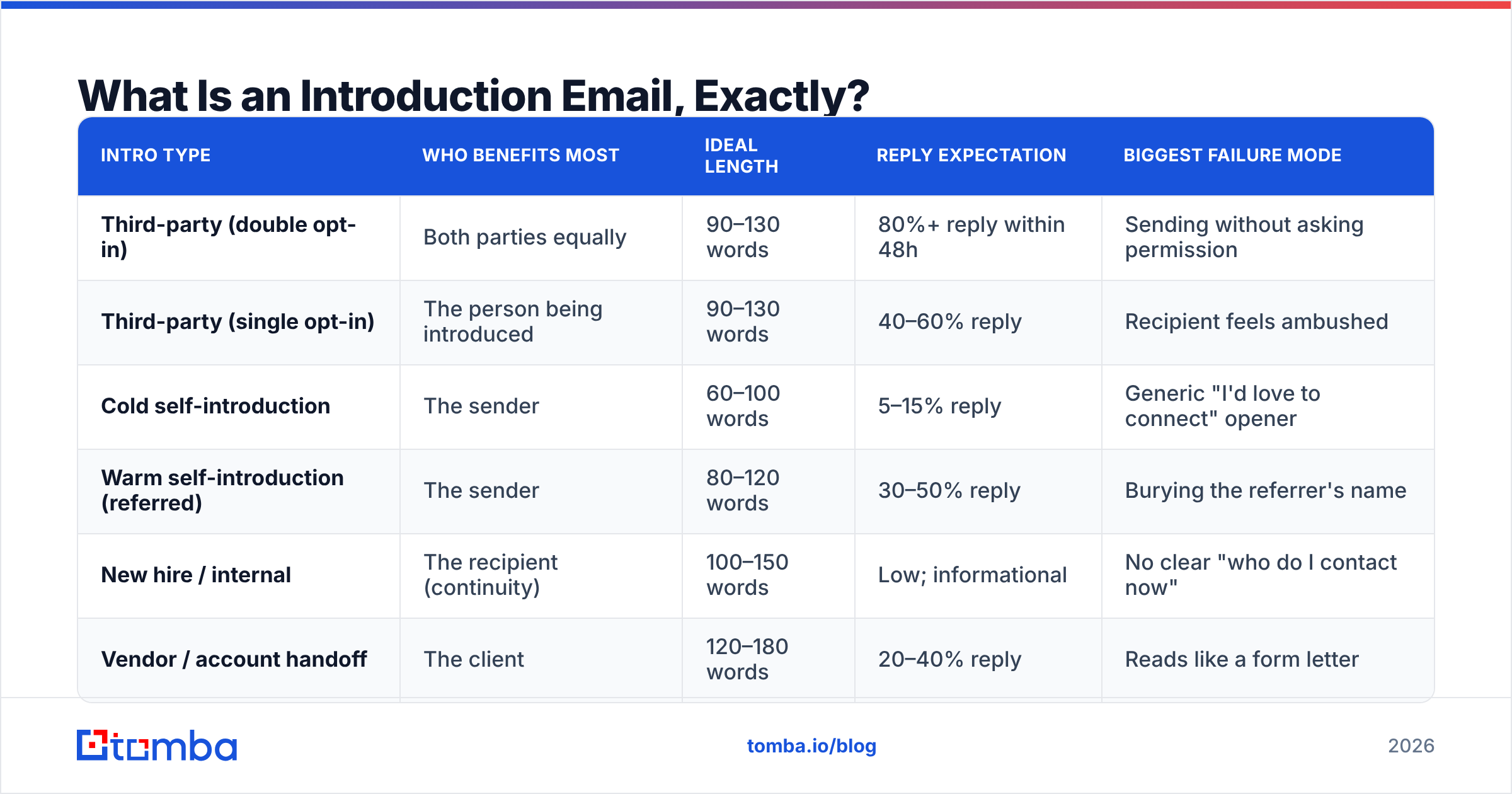
| Intro type | Who benefits most | Ideal length | Reply expectation | Biggest failure mode |
|---|---|---|---|---|
| Third-party (double opt-in) | Both parties equally | 90–130 words | 80%+ reply within 48h | Sending without asking permission |
| Third-party (single opt-in) | The person being introduced | 90–130 words | 40–60% reply | Recipient feels ambushed |
| Cold self-introduction | The sender | 60–100 words | 5–15% reply | Generic "I'd love to connect" opener |
| Warm self-introduction (referred) | The sender | 80–120 words | 30–50% reply | Burying the referrer's name |
| New hire / internal | The recipient (continuity) | 100–150 words | Low; informational | No clear "who do I contact now" |
| Vendor / account handoff | The client | 120–180 words | 20–40% reply | Reads like a form letter |
Why Does the Double Opt-In Rule Matter So Much?#
Because an unwanted introduction transfers work from you to someone who did not agree to it.
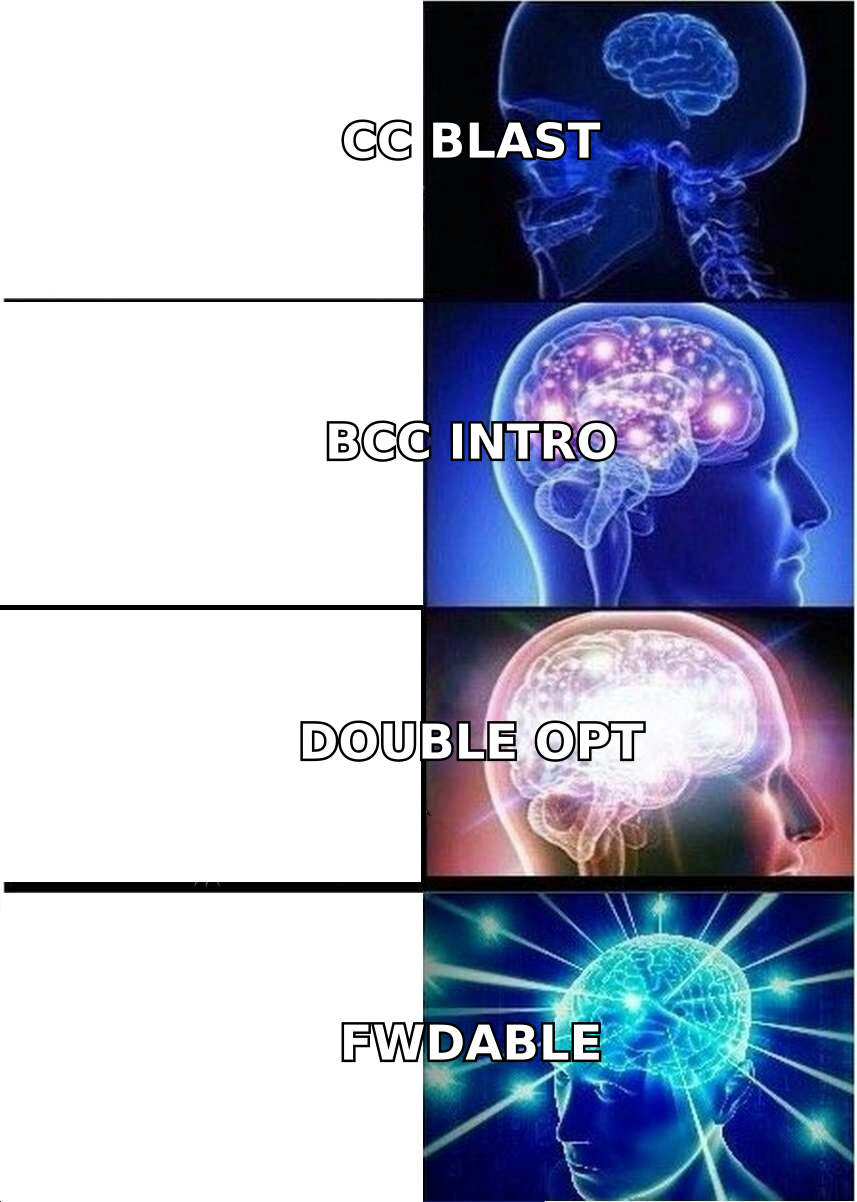
The double opt-in, popularized in venture capital circles and now standard practice across B2B, works in two steps:
- Ask the busy side first. Send a short, forwardable blurb to the person whose time is scarcer, and make declining frictionless. "No worries at all if this isn't a fit" removes the social cost of saying no.
- Only connect after a yes. Then send the actual intro email with both parties on the To: line and yourself moving to BCC on the first reply.
The forwardable blurb is the mechanic that makes this work. When you ask permission, include a paragraph the connector can literally forward without editing. Most people will not write your pitch for you — but almost everyone will hit forward.
Skip the double opt-in only when: both parties have already asked to meet, the introduction is internal and non-optional, or one side is a direct report of yours. Otherwise, ask.
What Should Every Introduction Email Contain?#
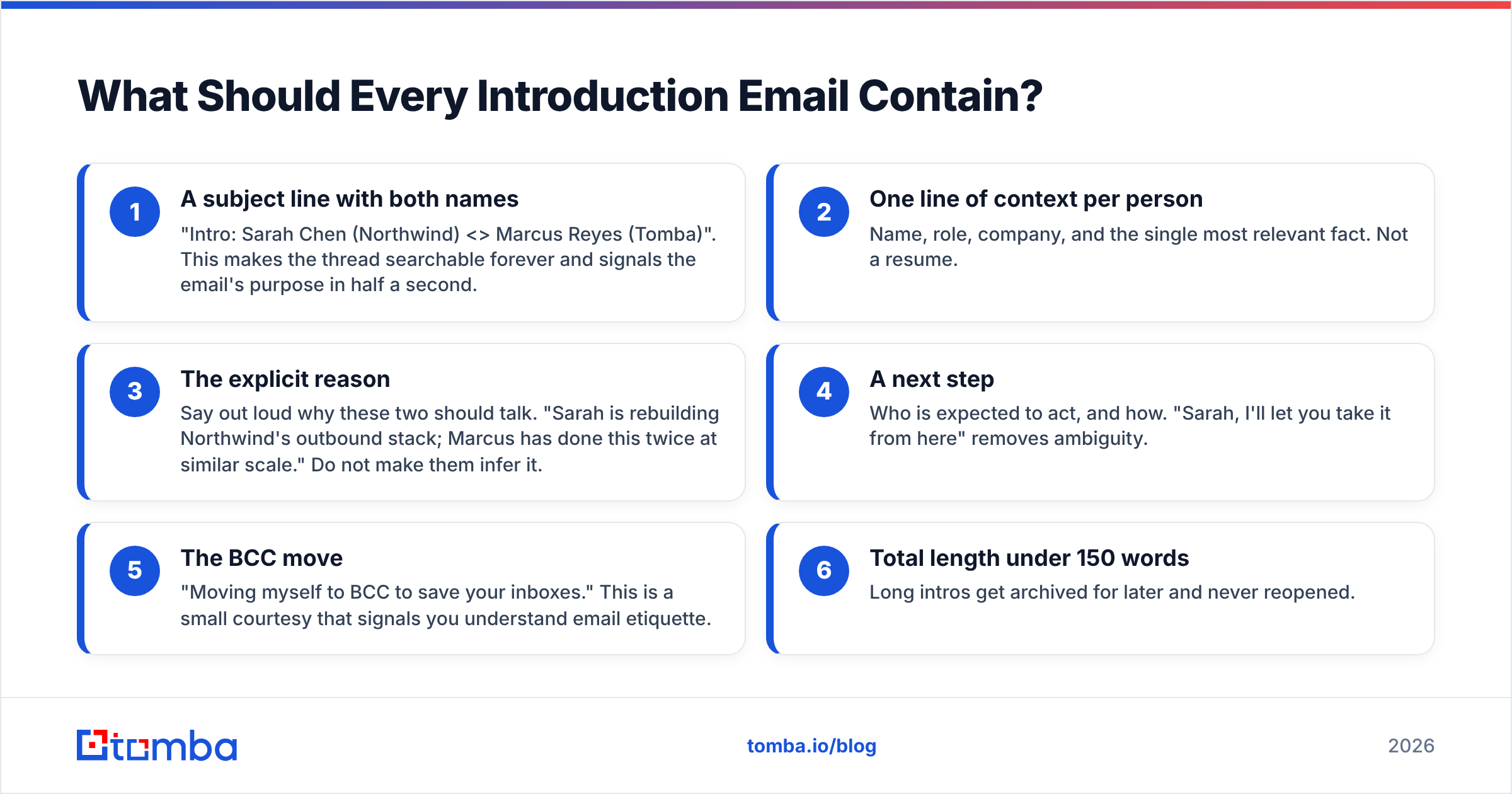
Six components. Miss one and the recipient has to do work you should have done.
- A subject line with both names — "Intro: Sarah Chen (Northwind) <> Marcus Reyes (Tomba)". This makes the thread searchable forever and signals the email's purpose in half a second.
- One line of context per person — Name, role, company, and the single most relevant fact. Not a resume.
- The explicit reason — Say out loud why these two should talk. "Sarah is rebuilding Northwind's outbound stack; Marcus has done this twice at similar scale." Do not make them infer it.
- A next step — Who is expected to act, and how. "Sarah, I'll let you take it from here" removes ambiguity.
- The BCC move — "Moving myself to BCC to save your inboxes." This is a small courtesy that signals you understand email etiquette.
- Total length under 150 words — Long intros get archived for later and never reopened.
Which Email Template Should You Use to Introduce Someone?#
Below are nine templates. Copy them, replace the bracketed fields, and cut anything that does not survive a read-aloud test.
Template 1 — The Standard Double Opt-In Ask#
Subject: Quick ask — worth an intro to [Name]?
Hi [Connector],
[Name] is [role] at [company]; they're working on [specific problem]. Given your work on [relevant thing], I thought there might be a genuine reason for you two to talk.
Want me to make the intro? Totally fine to pass — I won't mention it either way.
Forwardable blurb below if it's easier.
[Name] — [one-sentence bio]. Currently [what they need]. [Link].
Template 2 — The Connector Intro (After Both Say Yes)#
Subject: Intro: [Person A] <> [Person B]
[A], meet [B] — [role] at [company]. [B] spent the last three years [relevant accomplishment], which is exactly the problem you described last month.
[B], [A] runs [function] at [company] and is [specific current situation].
I'll let you two take it from here. Moving to BCC.
[Your name]
Template 3 — The Job Referral Intro#
Subject: Intro: [Candidate] <> [Hiring Manager] — [Role]
[Hiring manager], this is [candidate]. We worked together at [company] where they [specific, measurable accomplishment]. When I saw the [role] opening, they were the first person I thought of.
[Candidate], [hiring manager] leads [team] and is hiring for exactly what you've been doing.
Resume attached. Over to you both.
Template 4 — The Investor Intro#
Subject: Intro: [Founder], [Company] <> [Investor]
[Investor], [founder] is building [one-line description]. They're at [traction metric] and raising [round]. It's in your [thesis area] wheelhouse.
[Founder], [investor] led [relevant investment] and is one of the few people who has actually operated in this space.
Deck is with [founder]. Moving to BCC.
Template 5 — The Vendor / Account Handoff#
Subject: Your new point of contact at [Company]
Hi [Client],
Starting [date], [New rep] takes over as your account lead. They've handled [similar accounts] for two years and already has full context on [specific project].
Nothing changes on your side — same contract, same SLA, same Slack channel. [New rep] will reach out this week to schedule a 20-minute handover call.
I'm still reachable at this address if anything feels off.
Template 6 — The New Hire Announcement#
Subject: Welcome [Name], joining as [Role]
Team — [Name] starts Monday as [role], reporting to [manager]. They come from [company] where they [accomplishment].
What they'll own: [two or three specific areas].
Who should loop them in: [specific triggers].
[Name], the fastest way to get context is [specific doc or person].
Template 7 — The Cold Self-Introduction#
Subject: [Specific observation about their company]
Hi [Name],
I noticed [company] just [specific trigger event — funding, hire, product launch, job posting]. Teams at that stage usually hit [specific problem] within a quarter.
I'm [name] at [company]; we solved this for [comparable company] and cut [metric] by [number].
Worth 15 minutes, or should I send a two-paragraph summary instead?
Template 8 — The Warm Self-Introduction (Referred)#
Subject: [Referrer] suggested I reach out
Hi [Name],
[Referrer] mentioned you're the person thinking about [topic] at [company] — they suggested we talk after I described [what you do].
Short version: [one sentence]. [Referrer] thought it was relevant because [specific reason].
Free for 20 minutes next week?
Template 9 — The Conference / Event Follow-Up Intro#
Subject: Following up from [Event] — intro to [Name]
[A], great talking at [event]. You mentioned [problem]. [B] — copied here — is the person I said I'd connect you with; they run [function] at [company] and have solved this exact thing.
[B], [A] is [context]. Worth 20 minutes.
Enjoy — moving to BCC.
How Do You Find the Right Email Address to Send the Intro To?#
The template is useless if it lands in an abandoned inbox or bounces.
Two failure modes kill introduction emails before anyone reads them:
- Wrong address — You guess
firstname@company.comwhen the org usesf.lastname@company.com. The message bounces, and if you're introducing someone, they see the bounce too. - Stale address — The contact left the company six months ago. Your intro now looks careless to the person you were trying to impress.
Verify before you send. A quick pass through an email verifier catches dead addresses; a domain search surfaces the actual pattern a company uses, so you're not permutating blindly. For introductions specifically, the stakes are higher than in cold outreach — a bounced connector intro costs you social capital, not just a lead.
If you're introducing someone to a person you only know from their writing, an author finder pulls the contact behind a byline. And if the intro is going out to a list — say, announcing a new account manager to 200 clients — run the addresses through a bulk verify pass first. A 4% bounce rate on an internal announcement is embarrassing; on a cold sequence, it damages your sender reputation enough to affect every other campaign you run.

What Are the Most Common Introduction Email Mistakes?#
Introducing without permission. The single biggest one. It converts a favor into an imposition.
Making it about you. "I'd love to pick your brain" is a request disguised as an introduction. If you want something, ask for it directly.
Burying the reason. If the recipient has to read three paragraphs to figure out why they were emailed, they won't. Put the reason in the second sentence.
No subject-line names. "Quick intro" is unsearchable. Six months later, nobody can find the thread.
Over-selling the person you're introducing. "Absolute rockstar" and "genuinely one of the best people I know" are noise. One specific, verifiable accomplishment beats three superlatives — HubSpot's research on referral messaging consistently finds specificity outperforms enthusiasm.
Forgetting the BCC move. Staying on the thread means you get every reply. Move yourself off after the handoff.
Sending from a domain with no authentication. If your SPF record is broken, even a legitimate intro can land in spam. Check it before it matters.
How Do You Follow Up on an Introduction Email?#
If you are the person being introduced, reply within 24 hours. Full stop. The connector spent credibility on you and a slow reply spends it back.
Your reply should do three things: thank the connector by name, move them to BCC yourself, and propose a specific time. "Thanks [connector] — moving you to BCC. [Name], are you free Thursday at 10 or Friday at 2?" That's the whole message.
If the other side goes quiet, one follow-up after five business days is appropriate. Two is the ceiling. Beyond that you're now costing the connector goodwill twice.
For the connector: do not chase. If the intro doesn't take, that's information, not a failure. What you should do is close the loop with whoever asked — a one-line "looks like it didn't connect, happy to try someone else" keeps the relationship clean.
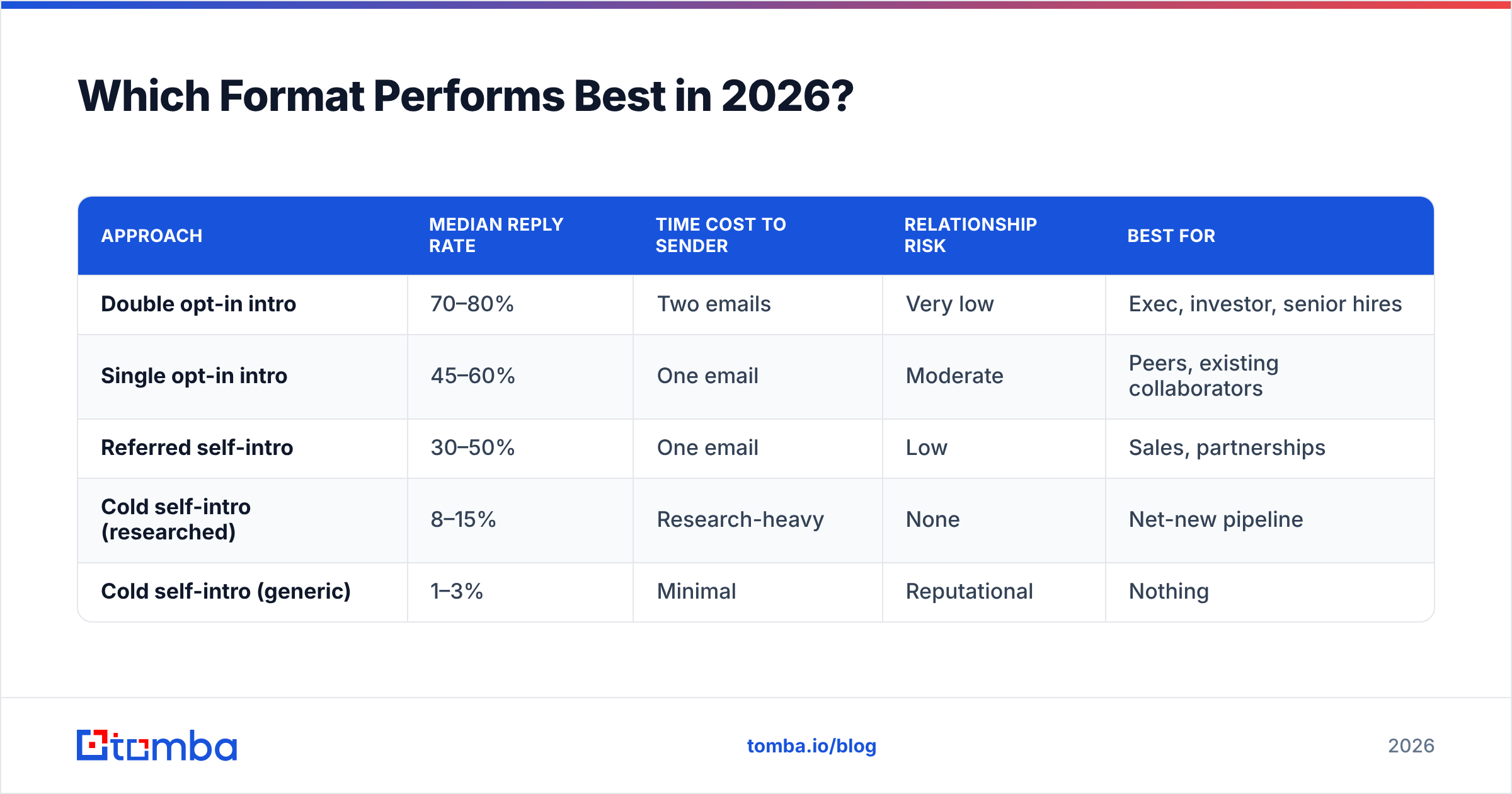
Which Format Performs Best in 2026?#
Short answer: the double opt-in connector intro, by a wide margin — but only because it filters out the intros that were never going to work.
Industry benchmarks compiled across sales-engagement platforms and reviewed on G2 put warm-intro reply rates in the 60–80% range against 3–8% for unqualified cold outreach to the same seniority. The gap isn't the copy. It's the permission.
| Approach | Median reply rate | Time cost to sender | Relationship risk | Best for |
|---|---|---|---|---|
| Double opt-in intro | 70–80% | Two emails | Very low | Exec, investor, senior hires |
| Single opt-in intro | 45–60% | One email | Moderate | Peers, existing collaborators |
| Referred self-intro | 30–50% | One email | Low | Sales, partnerships |
| Cold self-intro (researched) | 8–15% | Research-heavy | None | Net-new pipeline |
| Cold self-intro (generic) | 1–3% | Minimal | Reputational | Nothing |
The pattern is consistent: every unit of permission you gather up front multiplies the reply rate more than any subject-line trick. If you have to choose between spending 20 minutes polishing copy and spending 20 minutes securing a warm path to the same person, take the warm path every time.
One caveat on the numbers above: they're directional medians across mixed industries. Your list quality, seniority mix, and email deliverability will move them 20 points in either direction. Measure your own baseline before optimizing against anyone else's.
Ready to Send Intros That Actually Land?#
An introduction email only works if it reaches a real, current inbox. Guessing addresses — or pulling them from a contact list you exported eighteen months ago — is how good templates die.
Tomba Email Finder resolves professional email addresses from a name and domain, flags catch-all domains, and verifies deliverability before you hit send. The free tier gives you 25 searches a month to test it; paid plans start at $49/mo on Starter, with Growth at $99/mo and Pro at $249/mo — full details on Tomba pricing. If you're wiring intros into an existing workflow, the Tomba API handles it in a single call.
Write the intro well. Then make sure it arrives.
Related guides#
Ready to find emails that actually work?
Join 150,000+ professionals who stopped guessing and started sending. Free credits on signup — no credit card required.
Get the Tomba newsletter
Practical outbound tactics and product updates — once every two weeks.
About the author