Email Thread Best Practices: A 2026 Guide for B2B Sales
Most B2B deals die inside a messy email thread, not in the pitch. Here's how to structure subject lines, replies, CC lists, and follow-ups so threads stay readable, searchable, and deliverable.
TL;DR
- A thread is a shared workspace, not a chat log. Every reply either makes the next decision easier or adds noise.
- Keep one thread per topic. When the subject stops describing the content, start a new thread and say why.
- Bump-only follow-ups ("just checking in") inside an existing thread are the single biggest cause of ignored conversations. Add a reason to reply, every time.
- Long threads hurt deliverability: quoted history bloats message size, image-heavy signatures stack, and reply-all chains trip spam filters.
- Thread hygiene starts before send — a verified address and the right contact beats any formatting trick.
What is an email thread, and why does it decide your deal?#
An email thread is every message that shares a conversation ID and, usually, a subject line. Gmail, Outlook, and Superhuman all collapse those messages into one stack so a reader can scroll the history instead of hunting through an inbox.
Think of a thread like a shared whiteboard in a meeting room. If everyone writes clearly in one place, the next person walks in and knows where things stand in ten seconds. If people scribble over each other, erase half of it, and start a second whiteboard in the hallway, the meeting stalls — not because anyone disagreed, but because nobody can find the state of play.
That is what happens in B2B sales. Deals rarely die on a bad pitch. They die when a prospect forwards a thread to their VP, the VP opens 14 stacked replies with no summary at the top, and quietly closes it. Your thread structure is the interface your buyer uses to sell you internally.
Three things a well-run thread does that a messy one cannot:
- Preserves context for people who join late. Procurement, legal, and the economic buyer all get looped in mid-conversation. They read the top message and nothing else.
- Stays findable. Buyers search their inbox by keyword and by sender. A subject line reading "Re: Re: Fwd: quick question" is invisible to search.
- Protects deliverability. Threads with clean quoting, small footers, and no bloated attachment chains land in the primary tab. Threads that balloon to 400 KB with duplicated inline images do not.
What are the core email thread best practices?#
These are the rules that matter, ranked by how much damage they prevent.
- One topic per thread. A pricing negotiation and a security review are two threads. Merging them means one blocked item freezes both.
- Write the subject line for the person who has not read it yet. "Tomba — SOC 2 docs + DPA for Acme" beats "Following up." Subject lines are your search index.
- Put the ask in the first two lines. Assume mobile. Assume the reader stops at the preview pane. State the decision you need before any context.
- Trim quoted history when it exceeds one screen. Keep the last relevant exchange, delete the rest, and add "(earlier history trimmed)" so nobody thinks you edited them.
- Change the subject line when the topic genuinely changes — and note it: "New subject since we're now scoping onboarding." Silent subject edits break threading in some clients and confuse search.
- Never bump without new information. A follow-up should carry a case study, a deadline, a new stakeholder, or a genuinely simpler ask.
The fourth rule is the one most teams skip. HubSpot's own sales email guidance has repeated the same finding for years: message length correlates inversely with reply rate past roughly 150 words, and quoted history counts toward the visual weight even when it does not count toward your word budget.
When should you start a new thread instead of replying?#
Reply when the new message depends on the previous one. Start fresh when it does not.
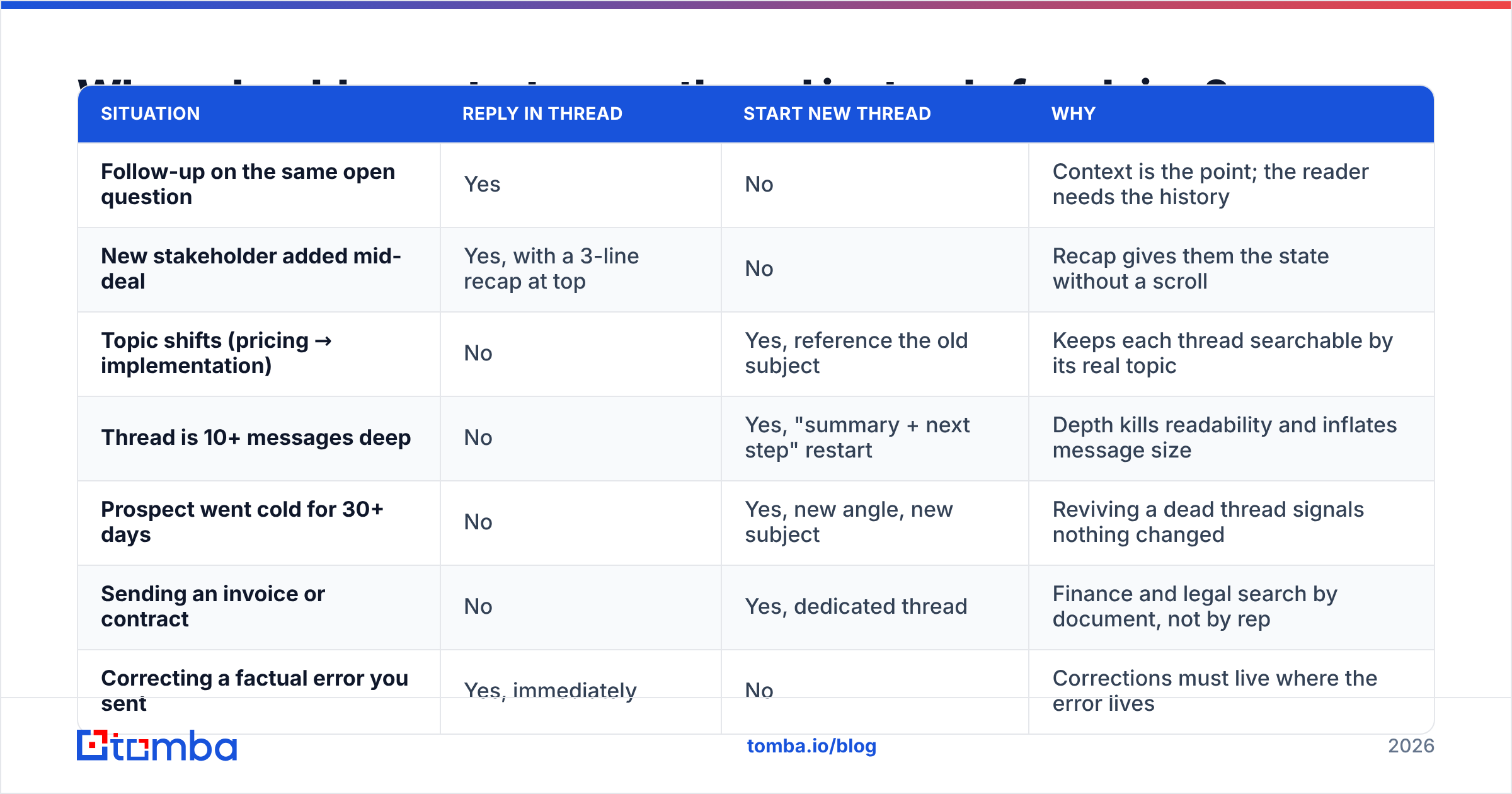
Here is the decision framework, in table form, because the edge cases are where teams get this wrong.
| Situation | Reply in thread | Start new thread | Why |
|---|---|---|---|
| Follow-up on the same open question | Yes | No | Context is the point; the reader needs the history |
| New stakeholder added mid-deal | Yes, with a 3-line recap at top | No | Recap gives them the state without a scroll |
| Topic shifts (pricing → implementation) | No | Yes, reference the old subject | Keeps each thread searchable by its real topic |
| Thread is 10+ messages deep | No | Yes, "summary + next step" restart | Depth kills readability and inflates message size |
| Prospect went cold for 30+ days | No | Yes, new angle, new subject | Reviving a dead thread signals nothing changed |
| Sending an invoice or contract | No | Yes, dedicated thread | Finance and legal search by document, not by rep |
| Correcting a factual error you sent | Yes, immediately | No | Corrections must live where the error lives |
The "10+ messages" rule deserves a note. There is no magic number in any RFC — RFC 5322 defines In-Reply-To and References headers but says nothing about depth. The practical limit is human: past about ten messages, most readers stop scrolling and start guessing. When you hit that point, send a fresh message titled "Acme × Tomba — where we landed + next step," paste a five-bullet summary, and let the old thread rest.
How do email threads affect deliverability?#
More than most reps realize. Threading is a client-side convenience, but the underlying messages are still individual emails passing individual filters.
Four mechanisms that hurt you:
- Message size creep. Each reply re-embeds quoted text and, in HTML mail, often re-embeds signature images. A twelve-deep thread with a 40 KB logo in each signature is over half a megabyte. Gmail clips messages past 102 KB, which means your CTA can end up behind a "View entire message" link.
- Reply-all amplification. A thread with nine recipients where four reply-all generates 36 deliveries of near-identical content. That pattern reads as bulk mail to filters, and one recipient hitting "report spam" damages your sender reputation for the whole domain.
- Bounces inside live threads. When a stakeholder leaves and their address hard-bounces, the bounce is attributed to your sending domain. Repeatedly emailing a dead address in a long-running thread is a slow bleed on email deliverability.
- Authentication drift on forwarded threads. When a prospect forwards your thread internally, SPF often breaks at the forwarding hop. DKIM survives; SPF frequently does not. Google's Postmaster Tools documentation is explicit that alignment failures accumulate against the sending domain.
The fix for the bounce problem is upstream, not in the thread. Re-verify the addresses on any deal thread older than 90 days — an email verifier pass takes seconds and stops you from mailing a departed champion for six weeks. If you sell into companies with catch-all domains, a dedicated catch-all verifier is the only reliable way to tell an accepted-but-dead address from a real mailbox.
How should you handle CC, BCC, and reply-all?#
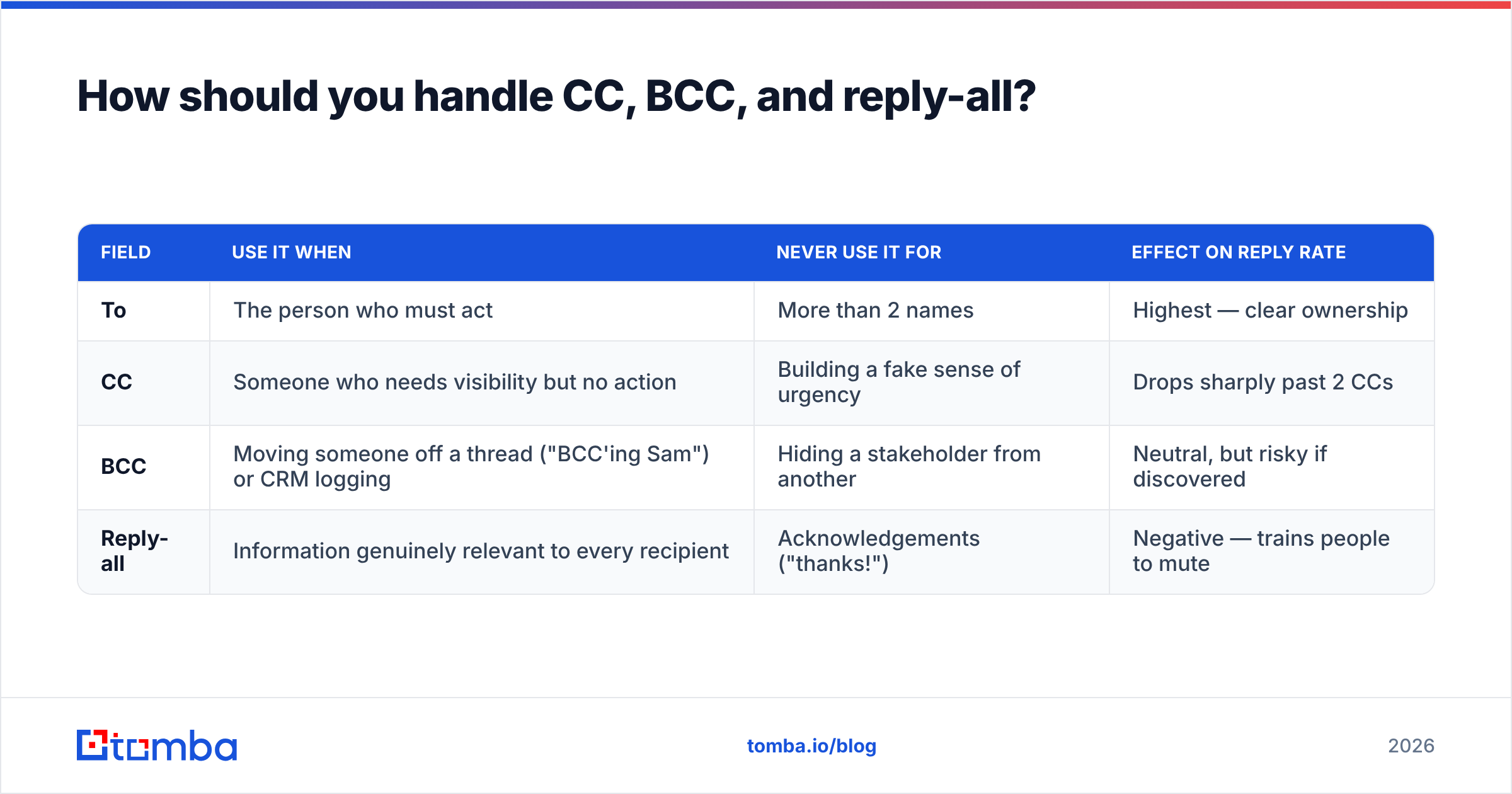
CC is a permission structure, not a courtesy. Every name you add changes who feels responsible for replying.
| Field | Use it when | Never use it for | Effect on reply rate |
|---|---|---|---|
| To | The person who must act | More than 2 names | Highest — clear ownership |
| CC | Someone who needs visibility but no action | Building a fake sense of urgency | Drops sharply past 2 CCs |
| BCC | Moving someone off a thread ("BCC'ing Sam") or CRM logging | Hiding a stakeholder from another | Neutral, but risky if discovered |
| Reply-all | Information genuinely relevant to every recipient | Acknowledgements ("thanks!") | Negative — trains people to mute |
Two conventions worth adopting as a team:
- Name the move. "Moving Priya to BCC to spare her inbox" takes four words and prevents confusion when she stops appearing.
- Split before you escalate. If you need to talk price with the champion without the CFO watching, start a separate thread. Do not reply-all and hope nobody reads carefully.
The Salesforce sales best practices library frames this well: multithreading a deal means building relationships with multiple stakeholders, not stuffing them all into one CC line. Real multithreading is parallel threads with tailored context — which requires knowing each person's actual address. Pulling a full org map with domain search before the deal heats up is faster than asking your champion for introductions one at a time.
What does a good follow-up inside a thread look like?#
Follow-ups fail for one reason: they add a message without adding a reason to reply.
Compare the two shapes.
Weak (bump only):
Hi Dana — just following up on my note below. Any thoughts?
Strong (new information + narrowed ask):
Hi Dana — one update since Tuesday: we shipped SSO on the Growth plan, which was the blocker your security team flagged. Docs here.
Simplest next step: 15 minutes Thursday to confirm it covers your requirement, or reply "not yet" and I'll check back after your Q3 planning.
The second version works because it does three things at once: it justifies its own existence, it removes a known objection, and it offers a low-effort exit. Giving people a graceful "no" reliably improves reply rate — a non-reply teaches you nothing, while a "not yet" gives you a re-engagement date.
Cadence guidance that holds up in practice:
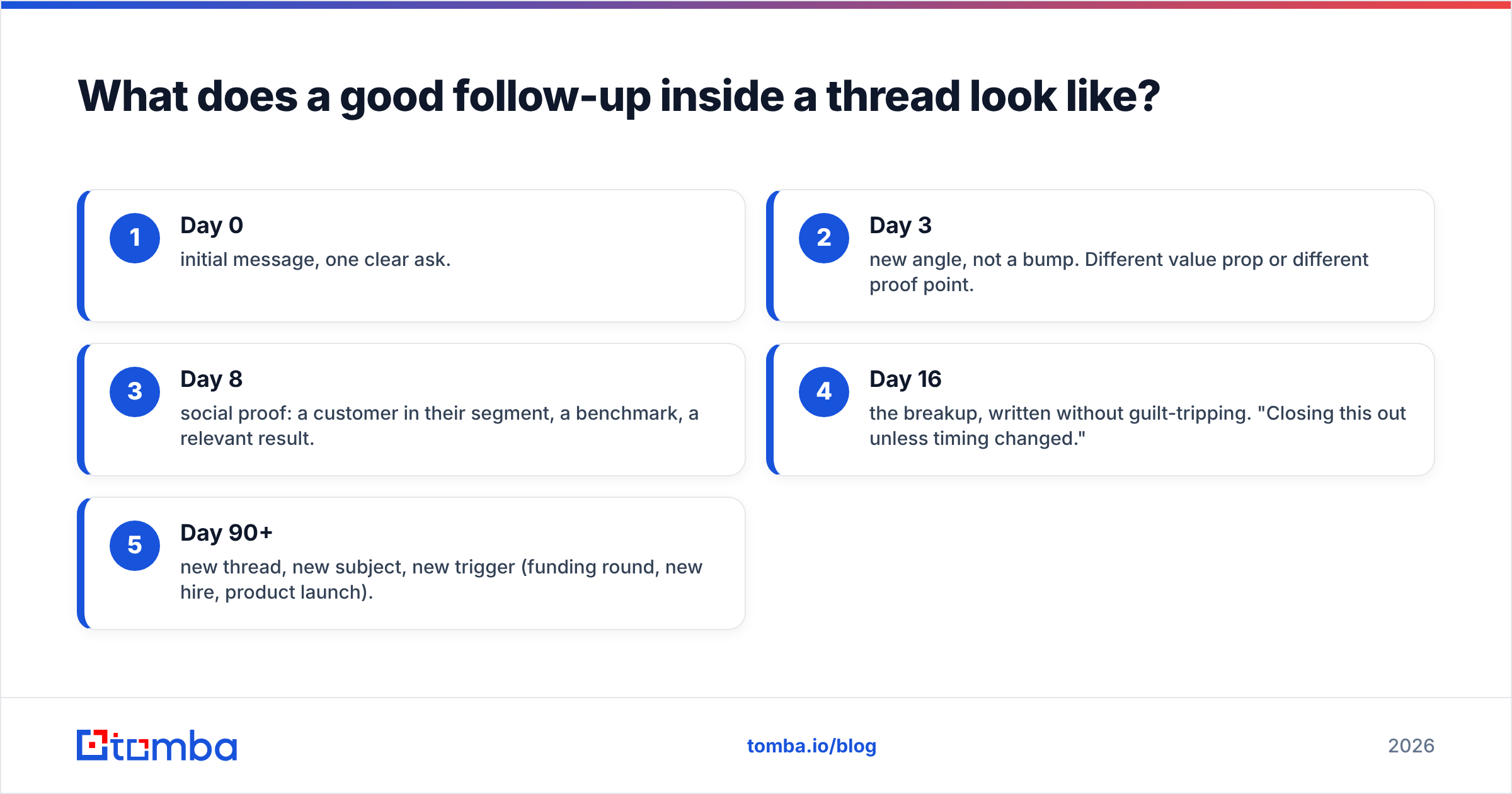
- Day 0 — initial message, one clear ask.
- Day 3 — new angle, not a bump. Different value prop or different proof point.
- Day 8 — social proof: a customer in their segment, a benchmark, a relevant result.
- Day 16 — the breakup, written without guilt-tripping. "Closing this out unless timing changed."
- Day 90+ — new thread, new subject, new trigger (funding round, new hire, product launch).
Notice steps 1–4 live in one thread and step 5 does not. Reviving a four-month-old thread with "bumping this to the top of your inbox" tells the reader you had nothing new for four months.
How do you keep threads clean across a whole team?#
Individual discipline does not survive a growing team. You need conventions written down.
A workable standard, ready to paste into your team wiki:
- Subject format:
[Company] — [Topic]. Example:Acme — Security review + DPA. Prefix tags render badly on mobile if longer than about 30 characters. - Recap rule: any thread past five messages gets a
**Where we are:**block at the top of the next reply. Three bullets maximum. - Trim rule: delete quoted history below the last two exchanges.
- Handoff rule: when a thread transfers between AE and CSM, the outgoing rep sends a new message summarizing the account, and the incoming rep replies to that — not to the sales thread.
- CRM rule: BCC your CRM dropbox address on the first message of each thread, not every reply. Every reply logs duplicates that clutter the timeline.
- Signature rule: text-only signature after the first message in a thread. Images repeat and inflate size.
The signature rule is quietly one of the highest-value items on this list. A 60 KB signature logo, repeated across a fifteen-message thread with three recipients, moves several megabytes for zero information. If you need a consistent format across the team, an email signature generator that outputs lightweight HTML solves it once.
For teams that run outbound at volume, the thread rules interact with sequencing tools. Most sequencers thread follow-ups automatically by replying to the previous send. That is fine for steps 2–4, but check that your tool does not thread the day-90 re-engagement onto a dead conversation — most let you configure this and most teams never look.
What tools support good thread hygiene?#
No tool fixes a badly written email. What tools fix is the data underneath the thread: whether the address is live, whether you have the right person, and whether the thread should exist at all.
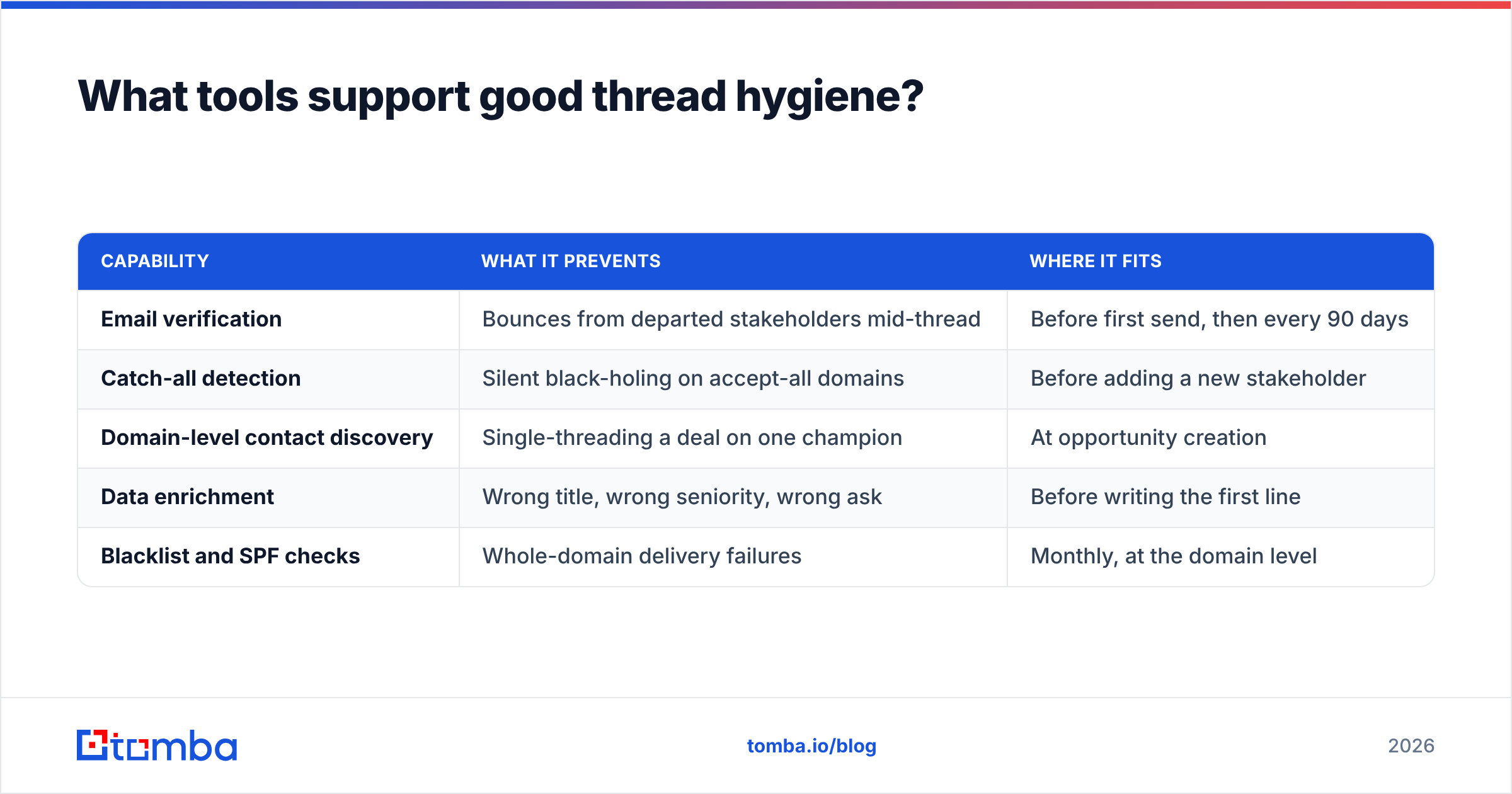
| Capability | What it prevents | Where it fits |
|---|---|---|
| Email verification | Bounces from departed stakeholders mid-thread | Before first send, then every 90 days |
| Catch-all detection | Silent black-holing on accept-all domains | Before adding a new stakeholder |
| Domain-level contact discovery | Single-threading a deal on one champion | At opportunity creation |
| Data enrichment | Wrong title, wrong seniority, wrong ask | Before writing the first line |
| Blacklist and SPF checks | Whole-domain delivery failures | Monthly, at the domain level |
On pricing, the market splits cleanly. Volume verification vendors charge per credit; discovery-plus-verification platforms bundle. Tomba pricing starts with a free tier at 25 searches per month, then Starter at $49/mo, Growth at $99/mo, and Pro at $249/mo, with the finder, verifier, domain search, and enrichment on the same credit pool. BookYourData takes a different and equally valid route — pay-as-you-go prebuilt B2B lists with a verification guarantee, which suits teams that want a list handed to them rather than a discovery workflow. Which fits depends on whether you build target accounts yourself or buy them.
For anything that touches SPF alignment on forwarded threads, run a free SPF checker against your sending domain before blaming your copy. Broken alignment looks exactly like a content problem from the rep's seat.
What are the most common thread mistakes?#
Ranked by frequency in real B2B pipelines:
- Subject lines that describe the sender's intent, not the reader's topic. "Quick question" is about you. "Renewal timing for the Acme workspace" is about them.
- Burying the ask under three paragraphs of context. Ask first, context second. Every time.
- Reply-all acknowledgements. "Thanks!" to nine people is nine interruptions.
- Emailing a dead address for weeks. Nobody notices the bounce because the thread looks alive in the sent folder.
- Nested forwards with no summary.
Fwd: Fwd: Re:with 900 lines of history and one line of new text is the most common way a deal stalls internally. - Attachment re-sends. Attaching the same 4 MB deck three times in one thread instead of linking it.
Fix one through three with writing discipline. Fix four with verification. Fix five and six with the trim-and-restart rule.
Where should you start?#
Pick the two changes with the highest ratio of impact to effort: rewrite your subject-line convention today, and re-verify every address on any open thread older than three months. The first takes an afternoon of team agreement. The second takes minutes and usually surfaces at least one champion who left the company while your sequence kept firing into a void.
If you want the data side handled properly, start with the Tomba Email Finder. It gives you the verified address, the confidence score, and the sources behind it, so the thread you start is a thread that lands — and you never write six thoughtful follow-ups to a mailbox that stopped existing in March. The free tier covers 25 searches a month, which is enough to audit your current open deals before you decide anything.
Related guides#
Ready to find emails that actually work?
Join 150,000+ professionals who stopped guessing and started sending. Free credits on signup — no credit card required.
Get the Tomba newsletter
Practical outbound tactics and product updates — once every two weeks.
About the author